
abs_effects_router (60 effects in one abstraction router) (from DIY2, Stamp Album, my abs)
abs_effects_router
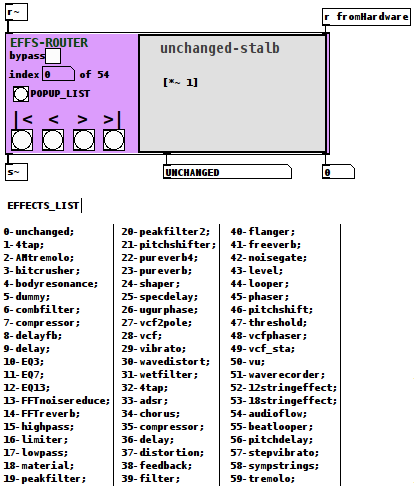
PURPOSE:
to as simply and cleanly as possble allow for the selection of an effect from a large-ish set of effects (currently it contains 60 effects (from the DIY2, Stamp Album, and my own collections (in that order on the lists))).
ARGUMENTS:
There are four creation arguments which identically align with the four messages you can send to the right inlet.
Left inlet is audio signal
Left outlet is audio signal
Middle outlet is effect-name
Right outlet is effect-index (0-indexed).
The four messages/arguments are
$1: index (0-59);
$2: bypass (0-no bypass, 1-bypassed);
$3: param (as a 2 float list, (0-7(int), 0-1 (float)) to set the value for the chosen parameter for the chosen effect;
$4: command either first, previous, next, or last (0, 1, 2, 3) which actually only trigger those identical buttons on the interface.
Optionally effects may be chosen from the POPUP_LIST button(as a pmenu) if you have the "tof" external library loaded which can be found in Deken.
TECHNIQUE:
All of the effects abs are actually loaded when it starts. However each has a [switch~] which is only activated if that index is selected.
They are all housed in "res/abs_PATCHES~_sv.pd" and what is visible is achieved by moving the namedwindow over (a Very carefully) aligned and standardized subwindow for each effect.
The main issue was really standardizing everything, aka. grunt work. Which at the time I desparately needed as my main patch had become sooo abstract it was starting to effect my contentment level  ).
).
FOOTNOTE:
I am currently (and have been) buiding a more complex example of this abs in practice as a 4 stack with RaspPi+Arduino controller (along with HID-keyboard, MIDI, and OSC) to be used as a "Meta" guitar pedal.
However I currently am not yet ready to release that work.
Wanna give a special thanks, to @whale-av for putting me onto the idea about namedwindows which is actually the backbone of this work.
Peace. Let me know if you need anything or have questions and I will do the best I can to answer them.
PD Forever,
svanya
p.s. as I foresee it, what this abs should mean is users can readily drop in not only a single effect abs, but 60 abs all at once, which they can then choose and cross-relate/stack to their hearts content.
p.s.s. I am aware of yet could not resolve the r~/vector size errors which are carry overs from the sympathetic string patch. I have read they do not impact anything, but would like to resolve them if someone can see how. Thanks, in advance.
Thanks, again, everyone who added ideas and moral support.
As I just told my brother the other day: One of the reasons pure data users are so kind is they GET that all mathematics can be mapped on to audio.
-Joy
 posted in abstract~
Simple noise gate
there's one in the DIY2 library
check out mono-gate or st-gate
http://puredata.hurleur.com/sujet-1982-diy2-effects-sample-players-synths-sound-synthesis
 posted in technical issues
Patching a good reverb
i looked at the freeverb~ source code, and even though at that time i didn't understand anything about text based code, i was able to figure out pretty much how it worked.
the reverb i put in my diy-2 library was originally based off that freeverb code, but is somehow a lot thinner and breathier, where the freeverb sound is more thick and metallic. Andy Farnell suggested that freeverb~ may use some overlap on the process. I did try that it mine, and got closer to the freeverb sound, but it also ate up so much CPU, so i dropped the overlap bit.
anyway, that reverb is here:
http://puredata.hurleur.com/sujet-1982-diy2-effects-sample-players-synths-sound-synthesis
there's also an FFT based one that i just took from the pd documentation.
all my stuff is licensed under the same BSD license as PD, so if you're using pd, you're welcome to use or modify anything of mine too. there may be some expr objects or something in there that you'll need to change though? not sure about the deal on android, but i know on iphone you can't use expr cos it's under the GPL license.
posted in technical issues
BECAUSE you guys are MIDI experts, you could well help on this...
Dear Anyone who understands virtual MIDI circuitry
I'm a disabled wannabe composer who has to use a notation package and mouse, because I can't physically play a keyboard. I use Quick Score Elite Level 2 - it doesn't have its own forum - and I'm having one HUGE problem with it that's stopping me from mixing - literally! I can see it IS possible to do what I want with it, I just can't get my outputs and virtual circuitry right.
I've got 2 main multi-sound plug-ins I use with QSE. Sampletank 2.5 with Miroslav Orchestra and Proteus VX. Now if I choose a bunch of sounds from one of them, each sound comes up on its own little stave and slider, complete with places to insert plug-in effects (like EQ and stuff.) So far, so pretty.
So you've got - say - 5 sounds. Each one is on its own stave, so any notes you put on that stave get played by that sound. The staves have controllers so you can control the individual sound's velocity/volume/pan/aftertouch etc. They all work fine. There are also a bunch of spare controller numbers. The documentation with QSE doesn't really go into how you use those. It's a great program but its customer relations need sorting - no forum, Canadian guys who wrote it very rarely answer E-mails in a meaningful way, hence me having to ask this here.
Except the sliders don't DO anything! The only one that does anything is the one the main synth. is on. That's the only one that takes any notice of the effects you use. Which means you're putting the SAME effect on the WHOLE SYNTH, not just on one instrument sound you've chosen from it. Yet the slider the main synth is on looks exactly the same as all the other sliders. The other sliders just slide up and down without changing the output sounds in any way. Neither do any effects plugins you put on the individual sliders change any of the sounds in any way. The only time they work is if you put them on the main slider that the whole synth. is sitting on - and then, of course, the effect's applied to ALL the sounds coming out of that synth, not just the single sound you want to alter.
I DO understand that MIDI isn't sounds, it's instructions to make sounds, but if the slider the whole synth is on works, how do you route the instructions to the other sliders so they accept them, too?
Anyone got any idea WHY the sounds aren't obeying the sliders they're sitting on? Oddly enough, single-shot plug-ins DO obey the sliders perfectly. It's just the multi-sound VSTs who's sounds don't individually want to play ball.
Now when you select a VSTi, you get 2 choices - assign to a track or use All Channels. If you assign it to a track, of course only instructions routed to that track will be picked up by the VSTi. BUT - they only go to the one instrument on that VST channel. So you can then apply effects happily to the sound on Channel One. I can't work out how to route the effects for the instrument on Channel 2 to Channel 2 in the VSTi, and so on. Someone told me on another forum that because I've got everything on All Channels, the effects signals are cancelling eachother out, I can't find out anything about this at the moment.
I know, theoretically, if I had one instance of the whole synth and just used one instrument from each instance, that would work. It does. Thing is, with Sampletank I got Miroslav Orchestra and you can't load PART of Miroslav. It's all or nothing. So if I wanted 12 instruments that way, I'd have to have 12 copies of Miroslav in memory and you just don't get enough memory in a 32 bit PC for that.
To round up. What I'm trying to do is set things up so I can send separate effects - EQ etc - to separate virtual instruments from ONE instance of a multi-sound sampler (Proteus VX or Sampletank.) I know it must be possible because the main synth takes the effects OK, it's just routing them to the individual sounds that's thrown me. I know you get one-shot sound VSTi's, but - no offence to any creators here - the sounds usually aint that good from them. Besides, all my best sounds are in Miroslav/Proteus VX and I just wanted to be able to create/mix pieces using those.
I'm a REAL NOOOB with all this so if anyone answers - keep it simple. Please! If anyone needs more info to answer this, just ask me what info you need and I'll look it up on the program.
Yours respectfully
ulrichburke
 posted in Off topic
A collection of GLSL effects?
Hello everybody,
it's been a long time since i started wondering about getting some advanced visual effects out of pd. I know "advanced visuals" could mean a lot of different things, but let's say I am thinking of pixel stuff like depth of field, bloom, glow, blurring. I kind of tried everything, from basic pix effects to freeframe fx and gridflow convolutions but no matter what I do, since these effects are cpu based the resulting patch is always dead slow.
My first question is: as far as i know pd is born as an audio software, does it make sense to keep pushing it into the domains of visuals?
Don't get me wrong, I love pd and I know the amazing stuff you could get out gem and gridflow. Let's think of all these kind of 3d manipulations, sound visualization, video mixing, opencv stuff, pmpd physics simulation, just to name a few. You could just get some wonderful visuals by only using geos and simple texturing. But, sometimes, I find myself in front of limitations, like the ones about pixel effects I said before, and I wonder if I should just leave pd to what it's good for and move to video driven software like vvvv or "classic" programming environment like Processing.
I know a lot of stuff I've been talking about could be achieved with an irrelevant cpu cost by leaving calculations to the gpu. I think GLSL potential is extremely huge and I got to work some basic blurring, glowing and blooming effects I found on the web, but still seems a little workaroundy for me (especially multipass rendering).
Here is the second question: could opengl and glsl scripting be the solution to my first question? and what do you guys think about having a place where we can host a (hopefully growing) collection of ready to use GLSL effects along with example patches? maybe with a standard framework of objects for multi texture effects and general GLSL handling?
Ok, that's all. Any feedback will be extremely appreciated.
Here follows a simple GLSL blooming effect applied to gem particles (works on macosx 10.5, pd extended, gem 0.92.3)
 posted in pixel#
'harmonicity' test to recognise 'noise' from 'sound'
Oh and PS there's a noise reducer in hardoff's DIY2 pack http://puredata.hurleur.com/sujet-1982-diy2-effects-sample-players-synths-sound-synthesis
 posted in technical issues
Effect Send and Return
I'm trying to make a bank of sends and returns for effects. The sends and returns are all in one patch, and I'm using the send~ and receive~ objects to send the original signal from a drum machine to another patch containing the effects, and back again.
I want to be able to switch the relative positions of each effect module in the signal path so have tried to use the [makefilename] object to alter the ID of the send and return coming into and going out of the effect module. However, this doesn't seem to work ~ i get all sorts of unwanted feedback delay effects and whining when changing the position of the effect.
If i set the send~ name manually it's ok, it's just when I try to change the position automatically. Possibly something to do with not being allowed multiple send~s to a single receive~?
Pls refer attached patches
 posted in technical issues
Interaction Design Student Patches Available
Greetings all,
I have just posted a collection of student patches for an interaction design course I was teaching at Emily Carr University of Art and Design. I hope that the patches will be useful to people playing around with Pure Data in a learning environment, installation artwork and other uses.
The link is: http://bit.ly/8OtDAq
or: http://www.sfu.ca/~leonardp/VideoGameAudio/main.htm#patches
The patches include multi-area motion detection, colour tracking, live audio looping, live video looping, collision detection, real-time video effects, real-time audio effects, 3D object manipulation and more...
Cheers,
Leonard
Pure Data Interaction Design Patches
These are projects from the Emily Carr University of Art and Design DIVA 202 Interaction Design course for Spring 2010 term. All projects use Pure Data Extended and run on Mac OS X. They could likely be modified with small changes to run on other platforms as well. The focus was on education so the patches are sometimes "works in progress" technically but should be quite useful for others learning about PD and interaction design.
NOTE: This page may move, please link from: http://www.VideoGameAudio.com for correct location.
Instructor: Leonard J. Paul
Students: Ben, Christine, Collin, Euginia, Gabriel K, Gabriel P, Gokce, Huan, Jing, Katy, Nasrin, Quinton, Tony and Sandy
GabrielK-AsteroidTracker - An entire game based on motion tracking. This is a simple arcade-style game in which the user must navigate the spaceship through a field of oncoming asteroids. The user controls the spaceship by moving a specifically coloured object in front of the camera.
Features: Motion tracking, collision detection, texture mapping, real-time music synthesis, game logic
GabrielP-DogHead - Maps your face from the webcam onto different dog's bodies in real-time with an interactive audio loop jammer. Fun!
Features: Colour tracking, audio loop jammer, real-time webcam texture mapping
Euginia-DanceMix - Live audio loop playback of four separate channels. Loop selection is random for first two channels and sequenced for last two channels. Slow volume muting of channels allows for crossfading. Tempo-based video crossfading.
Features: Four channel live loop jammer (extended from Hardoff's ma4u patch), beat-based video cross-cutting
Huan-CarDance - Rotates 3D object based on the audio output level so that it looks like it's dancing to the music.
Features: 3D object display, 3d line synthesis, live audio looper
Ben-VideoGameWiiMix - Randomly remixes classic video game footage and music together. Uses the wiimote to trigger new video by DarwiinRemote and OSC messages.
Features: Wiimote control, OSC, tempo-based video crossmixing, music loop remixing and effects
Christine-eMotionAudio - Mixes together video with recorded sounds and music depending on the amount of motion in the webcam. Intensity level of music increases and speed of video playback increases with more motion.
Features: Adaptive music branching, motion blur, blob size motion detection, video mixing
Collin-LouderCars - Videos of cars respond to audio input level.
Features: Video switching, audio input level detection.
Gokce-AVmixer - Live remixing of video and audio loops.
Features: video remixing, live audio looper
Jing-LadyGaga-ing - Remixes video from Lady Gaga's videos with video effects and music effects.
Features: Video warping, video stuttering, live audio looper, audio effects
KatyC_Bunnies - Triggers video and audio using multi-area motion detection. There are three areas on each side to control the video and audio loop selections. Video and audio loops are loaded from directories.
Features: Multi-area motion detection, audio loop directory loader, video loop directory loader
Nasrin-AnimationMixer - Hand animation videos are superimposed over the webcam image and chosen by multi-area motion sensing. Audio loop playback is randomly chosen with each new video.
Features: Multi-area motion sensing, audio loop directory loader
Quintons-AmericaRedux - Videos are remixed in response to live audio loop playback. Some audio effects are mirrored with corresponding video effects.
Features: Real-time video effects, live audio looper
Tony-MusicGame - A music game where the player needs to find how to piece together the music segments triggered by multi-area motion detection on a webcam.
Features: Multi-area motion detection, audio loop directory loader
Sandy-Exerciser - An exercise game where you move to the motions of the video above the webcam video. Stutter effects on video and live audio looper.
Features: Video stutter effect, real-time webcam video effects
 posted in news
Building a modular synth
I'm not sure I entirely understand your first question. Why exactly would plugin support help your modular design in Pd?
As for routing audio, I use jackOSX with Pd all the time. Here's how it works for me:
- Open JackPilot.
- In the preferences, set your buffer size and such to your liking. The virtual ins and outs are important. These are the number of connections that will be allocated to each app.
- Start the server.
- Open Pd and, under the media menu, select jack mode. This will open the audio setting dialog with jack set as the input and output device. Adjust the channels to whatever you need.
- Open whatever other app you're using and set the input and output devices to jack server or whatever it says.
- Now, go back to JackPilot and click the Routing button. In the send ports (which are your apps' outputs) unfold Pd's and select and output. Under receive ports, unfold the other app and double click the input you want to connect to. Or vice versa if you're feeding into Pd. Also, make sure that you're routing the app with the mixed signal (probably the DAW, if you're using that) to the sound card's inputs. This is always labeled "system."
Yes, there will always be latency, but on OSX it seems to be minimized with jack. Even if you're using Pd on its own, you can get lower latency if you route through jack and then into the sound card. You will get added latency every time you go in and out, so try to minimize that. And multiple cores won't make a difference if you're only using Pd, as it will only run on a single core. If you're using other apps, then it might help as they may run on a different core than Pd.
As for the standardization, I know there are some who would like to see everything scaled in a 0-1 range. But I don't think it's that big of a deal in Pd when it comes to sharing patches, as Pd gives you what you need to convert ranges if you need to. I would just go with what works best for your particular needs. Sometimes standards set by others can get in the way.
If you haven't yet, check out hardoff's DIY2 library. It might give you some ideas.
http://puredata.hurleur.com/sujet-1982-diy2-effects-sample-players-synths-sound-synthesis
Hope that answers some of your questions.
 posted in technical issues