
ELSE 1.0-0 RC13 with Live Electronics Tutorial Released
Ok, the cat is out of the bag --> https://github.com/porres/pd-else/releases/tag/1.0-rc13 I'm officialy announcing the update and uploaded binaries to deken for mac (intel/arm), Win and Linux. It all looks ok but tell me if you see something funny please. There's also a raspberry pi binary but not working 100%yet and we'll still look into that. Hopefully someone could help me/us with it. I might make another upload just for the pi later on if/when we figure it out. Find release notes and changelog below.
RELEASE NOTES:
Please support me on Patreon https://www.patreon.com/porres I'll now try to add special content for subscribers. You can follow me on instagram as well if you like... I'm always posting Pd development stuff over there https://www.instagram.com/alexandre.torres.porres/
It's been a little bit over 7 months since the last update and I almost broke the record for taking too long to release an update (which had happened in my previous update). So yeah, there's just too much to talk about! I guess the delays in releasing updates is because it's been a little tricky and hard to sync the release cycles of ELSE with PlugData, which includes ELSE in its download.
Plugdata 0.9.2 should come out soon with ELSE RC13 and it's supposedly the last update before 1.0.0, so I've heard. And the plans was to get to that still in 2025! This means ELSE could be at its last "Release Candidate" phase as I'm aiming to sync the final release with PlugData. Until then, I'll still make breaking changes and I can't wait until I can't do that anymore as I really feel bad. On the other hand, it's kind of inevitable when I'm always adding new stuff and redesigning and reconfiguring objects to include more functionalities. And I always got a lot of new stuff! So I'm thinking that I will eventually try some mechanism like Pd's compatibility flag or something. I'll try to come up with something like that in the next update.
This update has 22 new objects for a total of 573 and 26 new examples in my tutorial for a total of 554 examples. Let's dive into the highlights (see full changelog below after the release notes).
-
Multichannel Support: Last release had 92 MC aware objects, now it's 139! Over a 50% increase that include old and new objects (all the new ones have been coming with MC support). Virtually all oscillators and envelope generators now have MC support, plus some other random ones. Let me highlight the new [lace~]/[delace~] objects that are 'MC' tools that perform interleave/deinterleave in Multichannel connections. My bare minimum number of objects "to start with" would be at least a bit over half the number of signal objects. That was my target for 1.0! ELSE right now has 319 signal objects, so that'd be at least 160. I will definitely pass this milestone in the next update. I guess a good number of MC objects would be around 75% of the signal objects. I will aim for that as soon as I can. Some objects simply can't be MC at all, so 100% will never be the case, but maybe an ideal 90% eventually? We'll see... I am just proud and happy that ELSE is taking such a big jump on MC awareness in less than a couple years.
-
Envelope generators ([adsr~]/[asr~]/[envgen~]/[function~]) now have more curve options. For [adsr~]/[asr~] the default is now a new log curve that you can set the curve parameter (and was 'stolen' from SuperCollider). A new [smooth~] family of objects perform the same kind of curved smoothening for alternating inputs - [envgen~] and [function~] also have that but also '1-pole' filtering, 'sine' and 'hann' curves. You can now trigger [adsr~] and [asr~] with impulses.
-
The [play.file~] object now supports even more file formats besides MP3 and stuff. Hey, you can even stream the supported formats from weblinks! The [sfload] object (which loads files into arrays) also gained support for more formats and can download from weblinks as well! It also has a new threaded mode, so loading big files won't choke Pd. It now also outputs the file information, which is a way to tell you when loading finished in threaded mode. The [sample~], [player~], [gran.player~] and [pvoc.player~] objects are now also based on [sfload], so they support all these file formats!!! Now [sample~] and [tabplayer~] are integrated in a way that [tabplayer~] is always aware of the sample rate of the file loaded in [sample~] (so it reads in the "correct speed"). A new [sfinfo] object is able to extract looping regions and instrument metadata information from AIFF files (which is something I wanted for ages) - it should do more stuff in the future.
-
[knob] has become the ultimate featured bloated creep GUI I always feared and avoided. MAX is envy! but I'm happy with this structure and I want to replicate in other GUIs in the future (yeah, I got plans to offer alternatives to all iemguis). I wanna highlight a new 'param' symbol I added that allows you to remotely set a particular method in an object, so you don't to connect to a "method $1" message and you can even do this wirelessly with a send symbol. [knob] now also acts like a number box, where you can type in the value, which may also be displayed in different ways or the value can be sent elsewhere via another send symbol so you can temper with it using [makefilename] or [else/format]. I've been using this for the MERDA modules and it's really cool.
-
We finally have a [popmenu] GUI object! This was in my to do list forever and was crucial to improve the MERDA modules to set waveforms, instruments and whatnot.
-
Let's about MERDA, the "Modular Euroracks Dancing Along" subset of abstractions in ELSE. It was first released in the last update and it's been driving lots of the development in ELSE as you can see. I now added a MIDI Learn feature for all knobs that feels great and quite handy! There are many fixes and improvements in general and some new modules. I wanna highlight the new [sfont.m~] module, which loads "sound font" banks and you can just click on a [popmenu] to choose the instrument you want. The default bank has numerous (hundreds) options and also comes with PlugData. The sequencer module [seq8.m~] was rather worthless but it's now a whole new cool thingie. It allows you to set pitches with symbols and even has quarter tone resolution. I added a right outlet to send impulses to trigger envelopes and stuff (there's still more stuff of course, see full changelog below).
-
There are newly designed/renamed/recreated [resonbank~]/[resonbank2~] objects that are well suited for Modal Synthesis.
-
What actually drives my development is my Live Electronics tutorial, which got a fair upgrade with a new chapter on Modal Synthesis amongst other things, such as new subtractive synthesis examples and a revision of envelope generators with examples on AHDSR and DAHDSR - by the way, there are new gaterelease~/gatedelay~ objects for handling envelopes (and other processes).
-
I have to thank some people. Tim added 'zoom' to the [pic] object, as well as an image offset. Tim also implemented a new and better technique for bandlimited oscillators. Ben Wesh gave me a new [scope3d~] GUI object, pretty cool, that plots an oscilloscope in 3 dimensions, which is coded in LUA - and ELSE has been carrying a modified version of [pdlua] because it now depends on it for a couple of GUIs. Tim and Ben made many improvements to [pdlua] (as well as Albert Graef, of course).
-
For more new objects, let me also tell you about the simple and cool [float2imp~], that is based on [vline~] and can convert floats to impulses with sample accuracy (don't know why I didn't think of that earlier). A new [tanh~] object has Multichannel support. A bit earlier I made an update to Cyclone that actually "borrows" and includes this one from ELSE instead of its original one (which does not have Multichannel support). PlugData users will load the one from ELSE. This is another tiny step that sort of integrates ELSE and Cyclone, specially for PlugData users.
happy patching.
CHANGELOG:
LIBRARY:
Breaking changes:
- [adsr~]/[asr~]: now a gate off before reaching the sustain point does not start the release right away (this allows you to trigger it with impulses). There's a new mode just for immediate release. There's a new exponential setting for curve factors, the old 'log' mode is renamed to 'lag' as it's the same as used in the [lag~] object. For [adsr~], a bang now is not "retrigger", but an impulse at control rate, there's a new 'retrigger' message for control rate retriggering (and now it only retriggers if the gate is on). For [asr~] a bang now also works like an impulse.
- [sample~]: no more 'load' message, args to 'open' message changed, size is now only in 'ms'.
- [format]: outputs are now always symbols, before you could get float outputs. Also, we just have a simplified symbol output, no more lists or anythings. Hopefully I'll be able to get the 'list' output back, but it involved some bugs that I couldn't fix so I just removed it. You cannot use bangs and lists in secondary inlets no more (this is cylone/max crappy paradigm we don't want here). Bang method was actually removed as well.
- [pack2]: no more support for anythings, also no more support for lists in secondary inlets and output has a list selector (I wanna make this more Pd like and not a silly clone from MAX's [pak], cause fuck MAX).
- [merge]/[unmerge]/[group]: no more '-trim' flag (again, respecting pd's usual list paradigm), in [merge] now there's no more 'hot' argument and a bang now represents an empty list and inlets initialized with empty lists
- [mono]: 1st argument is now 'glide' in ms.
- [sfont~] now uses 'mma' for bank selection (this alters how CC messages set the bank number).
- [player~]/[play.file~]: 'open' message does not play files right away anymore.
- [tabplayer~]/[player~]: play message without args now play at the default settings (whole file at regular speed).
- [envgen~]: removed the 'maxsustain' parameter, use the new [gaterelease~] or [gaterelease] objects instead. Removed the rightmost inlet just to set envelopes, now a list input only sets the envelope and doesn't trigger it. The 'set' message is then removed.
- [envgen~]/[function~]: simplified and got rid of '-exp' flag and message, also deleted 'expl' and 'expi' messages. A new 'curve' and cimpler message sets exponential factors for all or individual segments, and includes more curve formats.
- [knob]: 'esc' key now deactivates the object. The 'ticks' message is renamed to 'steps' and there is a new 'ticks' message that toggles showing ticks on and off. The 'start' message has been renamed to 'arcstart'. The 'outline' message has been renamed to 'square' for better clarity. Design changed a bit to make it like it is in PlugData (they won), so we now fill the whole background color when in 'square mode' and the knob circle has an 85% proportion in this case inside the full 100% square size (so it grows bigger when not in 'square' mode). Now, by default, the GUI is in a new 'loadbang' mode (I don't think this will influence old patches). I'm afraid some old patches might behave really weird since I added a lot of new stuff. I changed the 'load' message behaviour to not update the object (this can arguably be considered a bug fix).
- [wavetable~], [bl.wavetable~] and [wt2d~]: 'set' message now sets frequencies because of the MC support in [wt~] and [wt2d~], while there's a new 'table' method to set the table name.
- [gbman~]/[cusp~] list method is now for MC, old list method is now renamed back to an old 'coeffs' method.
- [f2s~]/[float2sig~] default value is now 10 ms.
- [op] now behaves like [*~] where the smaller list wraps til reaching the size of the longer one.
- [list.seq] does not loop anymore by default.
- [impseq~] list input removed, use the new [float2imp~] object to convert floats to impulses.
- [resonant~] now has 'q' as the default.
- [resonant2~] has been removed.
- [decay2~] has also been removed ([asr~] much better).
- [vcf2~] has been renamed to [resonator2~].
- [resonbank~]/[resonbank2~] have basically been deleted and replaced by new objects with the same name... [resonator~] is based on a new [resonator~] object which is similar to [resonant~] and [resonbank2~] is now based on [resonator2~] (old [vcf2~] instead of [resonant2~] that got deleted). These are well suited objects for Modal Synthesis.
- [oscbank~] now uses a 'partial' list and not a frequency list. The freq input now defaults to '1' and this makes [oscbank2~] completely obsolete.
- [oscbank2~] has been deleted since it became completely obsolete.
- [sfload] load message changed the behaviour a bit.
Enhancements/fixes/other changes:
- [adsr~]: We have now a new mode for immediate release (see breaking changes above, I'm not repeating it). Fixed ADSR signal inputs (it was simply not really working, specially for linear). Fixed status output for MC signals. There's a new curve parameter that allows you to set the curvature.
- [asr~] I actually just made the new [adsr~] code into a new [asr~] code as a simplified version (as it was before)... so it's got the same impromevents/fixes.
- [play.file~]: added support for more file formats and even weblinks for online streaming!
- [sfload]: added an outlet to output information, added threaded mode, added support for more file formats and even weblinks for downloading.
- [sample~], [player~], [gran.player~] and [pvoc.player~] are now also based on [sfload], so they support more file formats!
- [sample~]: improved extension management with [file splitext].
- [sample~] and [tabplayer~] now are automatically integrated in a way that [tabplayer~] is always aware of the sample rate of the file loaded in [sample~], so it automatically adjusts the reading speed if it is different than the one Pd is running with.
- [numbox~]'s number display is not preceded by "~" anymore (that was just kinda stupid to have).
- [format]: fixed issues where empty symbols and symbols with escaped spaces didn't work. Added support '%a' and '%A' type. Added support for an escaped 'space' flag. Improved and added support for length modifiers. Improved syntax check which prevents a crash. Improved documentation.
- [knob]: added new 'param', 'var', 'savestate', 'read only', 'loadbang', "active", "reset" and 'ticks' methods. Added the possibility to type in number values and also modes on how to display these number values, plus new send symbols for 'activity', 'typing', 'tab' and 'enter'. New design more like plugdata. Changed some shortcuts to make it simpler. If you have the yet unreleased Pd 0.56-0 you can also use 'double clicking' in the same way that works in PlugData. Properties were also significantly improved (I'm finally starting to learn how to deal with this tcl/tk thingie). Yup, a lot of shit here...
- [autofade2~]/[autofade2.mc~]: fixed immediate jump up for 0 ramp up.
- [synth~]: fixed polyphony bug.
- [metronome~]: fixed bug with 'set' message.
- [midi2note]: fixed range (octaves 0-8).
- [pulsecount~]: fixed reset count to not output immediately, added bang to reset counter at control rate
- [click]: fixed regression bug where it stopped working.
- [else]: new 'dir' method to output ELSE's binary directory in a new rightmost outlet. The print information also includes the directory.
- [pic]: added zoom capability finally (thanks to tim schoen) and added offset message (also thanks to tim).
- [store]: added 'sort' functionality.
- [scales]: fixed octave number argument. Added functionality to allow octave number as part of the note symbol.
- [mono]: added 'glide' parameter, as in [mono~].
- [pluck~]: fixed list input.
- [rescale]/[rescale~]: added a "reverse log" mode.
- [limit]: added a new second ignore mode.
- [graph~]: added an external source input for plotting the graph and a 'clear' message.
- [canvas.setname]: added a new argument for "abstraction mode" and methods to set name, depth (and mode).
- [midi.learn]: added a new argument for "abstraction mode", fixed 'dirty' message sent to parent.
- [brickwall~]: fixed initialization.
- [list.seq]: added a loop mode and a 2nd outlet to send a bang when the sequence is done.
- [delete]: fixed index for positive numbers.
- [dust~]: added 'list', 'set' and '-mc' flag for managing the already existing Multichannel capabilities.
- Thanks to Tim we have many fixes and a whole new technique for band limited oscillators. Now [bl.saw~], [bl.saw2~], [bl.vsaw~], [bl.square~], [bl.tri~], [bl.imp~] and [bl.imp2~] have been redesigned to implement elliptic blep, which should provide better anti-aliasing.
- [parabolic~] now uses and internal wavetable for more efficiency.
- [resonant~]: added 'bw' resonance mode.
- [lowpass~]/[highpass~]: added 't60' resonance mode.
- [quantizer~]/[quantizer]: added a new mode, which combines floor (for negative) and ceil (for positive) values.
- [crusher~]: now uses the new [quantizer~] mode from above (arguably a breaking change).
- [envgen~]: fixed a bug (actually a misconception) where ramps started one sample earlier. Fixed 0-length lines. Added a possibility to set time in samples instead of ms. Maximum number of lines is now 1024. Added loop mode. Added many curve options (sin/hann/log curve/lag).
- [function~]: Added many curve options (sin/hann/log curve/lag).
- [The out~] family of abstractions now use [bitnormal~] so you won't blow your speakers beyond repair in edge cases.
- [trig.delay~]/[trig.delay2~]: fixed bug where impulse values different than '1' didn't work.
- Added MC support to: [trig.delay~], [trig.delay2~], [gatehold~], [vca.m~], [gain2~], [decay~], [asr~], [envgen~], [function~], [bl.osc~], [bl.saw~], [bl.saw2~], [bl.vsaw~], [bl.square~], [bl.tri~], [bl.imp~], [bl.imp2~], [imp2~], [tri~], [saw~], [saw2~], [vsaw~], [square~], [pulse~], [parabolic~], [gaussian~], [wavetable~], [wt2d~], [randpulse~], [randpulse2~], [stepnoise~], [rampnoise~] [pink~], [gbamn~], [cusp~], [gray~] and [white~].
- Also added MIDI input and soft sync to [imp2~], [tri~], [saw~], [saw2~], [vsaw~], [square~], [pulse~], [gaussian~] and [parabolic~].
- [wavetable~] and [wt2d~] gained args to set xfading.
- Updated pdlua to 0.12.23.
- M.E.R.D.A: Added MIDI-LEARN for all modules (this is only for the knobs). Replaced some number boxes that were attached to knobs by an internal number display mechanism (new feature from knob). Improved interface of [gendyn.m~]. Preset/symbol name fixes to [flanger.m~]. Now we have automatic MIDI mode detection for [plaits.m~] and [pluck.m~] when no signals are connected (still trying to get plaits right, huh? Yup! And bow MIDI input with monophony and trigger mode has been fixed in [plaits.m~]). Added MC support to [vca.m~]. Increased range of [drive.m~] down to 0.1. Changed some objects to include the new [popmenu] GUI. [vco.m~] now uses the new MC functionalities of oscillators and doesn't need to load abstractions into [clone], I hope it makes this more efficient and clean. The [seq8.m~] module was worthless and got a decent upgrade, it's practically a new module. Added new modules (see below). Note that MERDA is still at alpha development phase, much experimental. Expect changes as it evolves.
- 22 new objects: [float2imp~], [lace], [delace], [lace~], [delace~], [gatehold], [gatedelay],[gatedelay~], [gaterelease~], [gaterelease], [popmenu], [scope3d~], [tanh~], [resonator~], [sfinfo], [smooth], [smooth2], [smooth~], [smooth2~], [dbgain~], [level~] plus [crusher.m~], [sfont.m~] and [level.m~] MERDA Modules.
Objects count: total of 573 (319 signal objects [139 of which are MC aware] and 254 control objects)!
- 323 coded objects (210 signal objects / 113 control objects)
- 227 abstractions objects (87 signal objects / 140 control objects)
- 23 MERDA modular abstractions (22 audio / 1 control)
TUTORIAL:
- New examples and revisions to add the new objects, features and breaking changes in ELSE.
- Added the MERDA modules into the examples for reference.
- Revised section on envelopes.
- New subtractive synthesis examples.
- New chapter on Modal Synthesis.
- Total number of examples is now 554! (26 new ones)
 posted in news
looking for velvet noise generator
@seb-harmonik.ar said:
I do think @manuels original idea of having a sample-increment offset still works without missing periods?
Why don't you think it works with non-integer period lengths?a phasor~ is always guaranteed to have its last sample be within the last sample increment regardless of whether an integer-period or not, and
[wrap~]will pretty much perfectly wrap the phasor~'s phase..
With non-integer period lengths you have effectively a changing number of samples per period. That in itself I don't think would be a problem, but adding a random value and wrapping the result can give you sample-increments that are either smaller or bigger than the calculated value.
Maybe an extreme example can help to clarify: Consider a period length of 2.5 samples. The sample increment is in this case 0.4. If you have a period with the sample values 0.3 and 0.7, add 0.8 as a random value and wrap, what you get is 0.1 and 0.5, so the last sample doesn't get above 1 when you add the calculated sample-increment of 0.4. Am I missing something?
@ben.wes Did you do the testing with non-integer fractions of your sampling frequency? You mentioned 3kHz at 48kHz SR as an example, which shouldn't make problems ....
 posted in technical issues
Audio click occur when change start point and end point using |phasor~| and |tabread4~|
@Junzhe-hou said:
@ddw_music Hi professor!?!? good to see you here!
Yes, it's me -- I almost didn't notice your username 
I read your email last week but im so confused with your
patch--varispeed-segment:|noise~|
|
|lop~ 3|
|
|*~ 30|
|
|+~ 1|
This is just a way to generate a modulator for the playback rate. It could be any other modulator (LFO, envelope, anything).
After that, this is multiplied by a sample rate scaling factor.
As you asked jameslo: "if sample rate (in audio setting) changed the result sound different":
-
If the file sample rate is 96 kHz and the soundcard sample rate is 96 kHz, then normal-speed playback is to move forward exactly 1 sample in the file for every output sample.
-
If the file sample rate is 96 kHz and the soundcard sample rate is 48 KHz, then normal-speed playback is to move forward exactly 2 samples in the file for every output sample. (If you playback at 1:1, then the file will sound slower at the lower soundcard sample rate.)
This was one of the big reasons for me to make [soundfiler2] in my abstraction set. It calculates file_sr / system_sr and saves this in a value object named after the ID+"scale". If you multiply the playback rate by this scaling factor, then the file should sound correct at any system sample rate.
(BTW you would have the same issue in SuperCollider: PlayBuf.ar(1, bufnum, rate: 1) will sound different depending on the hardware sample rate, but PlayBuf.ar(1, bufnum, rate: BufRateScale.kr(bufnum)) would sound the same, except maybe for aliasing when downsampling.)
You method "L inlet = rate * scale for sample increment",so is the rate always changing?
Yes -- variable-speed playback.
@jameslo "I'm sorry if I just did your student's homework" -- actually this isn't for my class -- independent project. There are still some students who do hard things just because it's fun to overcome challenges 
hjh
 posted in technical issues
Ganymede: an 8-track, semi-automatic samples-looper and percussion instrument based on modulus instead of metro
Ganymede.7z (includes its own limited set of samples)
Background:
Ganymede was created to test a bet I made with myself:
that I could boil down drum sequencing to a single knob (i.e. instead of writing a pattern).
As far as I am concerned, I won the bet.
The trick is...
Instead of using a knob to turn, for example, up or down a metro, you use it to turn up or down the modulus of a counter, ie. counter[1..16]>[mod X]>[sel 0]>play the sample. If you do this then add an offset control, then where the beat occurs changes in Real-Time.
But you'll have to decide for yourself whether I won the bet.  .
.
(note: I have posted a few demos using it in various stages of its' carnation recently in the Output section of the Forum and intend to share a few more, now that I have posted this.)
Remember, Ganymede is an instrument, i.e. Not an editor.
It is intended to be "played" or...allowed to play by itself.
(aside: specifically designed to be played with an 8-channel, usb, midi, mixer controller and mouse, for instance an Akai Midimix or Novation LaunchPad XL.)
So it does Not save patterns nor do you "write" patterns.
Instead, you can play it and save the audio~ output to a wave file (for use later as a loop, song, etc.)
Jumping straight to The Chase...
How to use it:
REQUIRES:
moonlib, zexy, list-abs, hcs, cyclone, tof, freeverb~ and iemlib
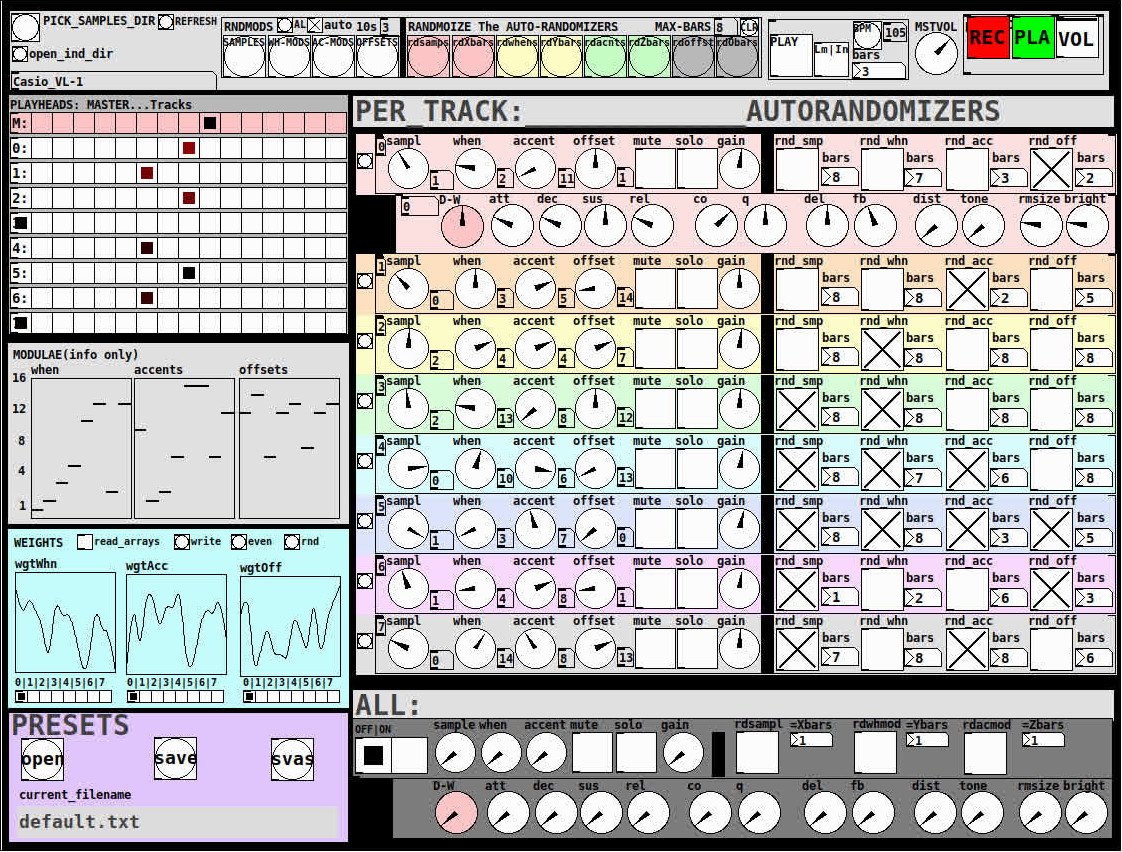
THE 7 SECTIONS:
- GLOBAL:
- to set parameters for all 8 tracks, exs. pick the samples directory from a tof/pmenu or OPEN_IND_DIR (open an independent directory) (see below "Samples"for more detail)
- randomizing parameters, random all. randomize all every 10*seconds, maximum number of bars when randomizing bars, CLR the randomizer check boxes
- PLAY, L(imited) or I(nfinite) counter, if L then number of bars to play before resetting counter, bpm(menu)
- MSTVOL
- transport/recording (on REC files are automatically saved to ./ganymede/recordings with datestamp filename, the output is zexy limited to 98 and the volume controls the boost into the limiter)
- PLAYHEADS:
- indicating where the track is "beating"
- blank=no beat and black-to-red where redder implies greater env~ rms
- MODULAE:
- for information only to show the relative values of the selected modulators
- WEIGHTS:
- sent to [list-wrandom] when randomizing the When, Accent, and Offset modulators
- to use click READ_ARRAYS, adjust as desired, click WRITE, uncheck READ ARRAYS
- EVEN=unweighted, RND for random, and 0-7 for preset shapes
- PRESETS:
- ...self explanatory
-
PER TRACK ACCORDION:
- 8 sections, 1 per track
- each open-closable with the left most bang/track
- opening one track closes the previously opened track
- includes main (always shown)
- with knobs for the sample (with 300ms debounce)
- knobs for the modulators (When, Accent, and Offset) [1..16]
- toggles if you want that parameter to be randomized after X bars
- and when opened, 5 optional effects
- adsr, vcf, delayfb, distortion, and reverb
- D-W=dry-wet
- 2 parameters per effect
-
ALL:
when ON. sets the values for all of the tracks to the same value; reverts to the original values when turned OFF
MIDI:
CC 7=MASTER VOLUME
The other controls exposed to midi are the first four knobs of the accordion/main-gui. In other words, the Sample, When, Accent, and Offset knobs of each track. And the MUTE and SOLO of each track.
Control is based on a midimap file (./midimaps/midimap-default.txt).
So if it is easier to just edit that file to your controller, then just make a backup of it and edit as you need. In other words, midi-learn and changing midimap files is not supported.
The default midimap is:
By track
CCs
| ---TRACK--- | ---SAMPLE--- | ---WHEN--- | ---ACCENT--- | --- OFFSET--- |
|---|---|---|---|---|
| 0 | 16 | 17 | 18 | 19 |
| 1 | 20 | 21 | 22 | 23 |
| 2 | 24 | 25 | 26 | 27 |
| 3 | 28 | 29 | 30 | 31 |
| 4 | 46 | 47 | 48 | 49 |
| 5 | 50 | 51 | 52 | 53 |
| 6 | 54 | 55 | 56 | 57 |
| 7 | 58 | 59 | 60 | 61 |
NOTEs
| ---TRACK--- | ---MUTE--- | ---SOLO--- |
|---|---|---|
| 0 | 1 | 3 |
| 1 | 4 | 6 |
| 2 | 7 | 9 |
| 3 | 10 | 12 |
| 4 | 13 | 15 |
| 5 | 16 | 18 |
| 6 | 19 | 21 |
| 7 | 22 | 24 |
SAMPLES:
Ganymede looks for samples in its ./samples directory by subdirectory.
It generates a tof/pmenu from the directories in ./samples.
Once a directory is selected, it then searches for ./**/.wav (wavs within 1-deep subdirectories) and then ./*.wav (wavs within that main "kit" directory).
I have uploaded my collection of samples (that I gathered from https://archive.org/details/old-school-sample-cds-collection-01, Attribution-Non Commercial-Share Alike 4.0 International Creative Commons License, 90's Old School Sample CDs Collection by CyberYoukai) to the following link on my Google Drive:
https://drive.google.com/file/d/1SQmrLqhACOXXSmaEf0Iz-PiO7kTkYzO0/view?usp=sharing
It is a large 617 Mb .7z file, including two directories: by-instrument with 141 instruments and by-kit with 135 kits. The file names and directory structure have all been laid out according to Ganymede's needs, ex. no spaces, etc.
My suggestion to you is unpack the file into your Path so they are also available for all of your other patches.
MAKING KITS:
I found Kits are best made by adding directories in a "custom-kits" folder to your sampls directory and just adding files, but most especially shortcuts/symlinks to all the files or directories you want to include in the kit into that folder, ex. in a "bongs&congs" folder add shortcuts to those instument folders. Then, create a symnlink to "bongs&congs" in your ganymede/samples directory.
Note: if you want to experiment with kits on-the-fly (while the patch is on) just remember to click the REFRESH bang to get a new tof/pmenu of available kits from your latest ./samples directory.
If you want more freedom than a dynamic menu, you can use the OPEN_IND(depedent)_DIR bang to open any folder. But do bear in mind, Ganymede may not see all the wavs in that folder.
AFTERWARD/NOTES
-
the [hcs/folder_list] [tof/pmenu] can only hold (the first) 64 directories in the ./samples directory
-
the use of 1/16th notes (counter-interval) is completely arbitrary. However, that value (in the [pd global_metro] subpatch...at the noted hradio) is exposed and I will probably incorporate being able to change it in a future version)
-
rem: one of the beauties of this technique is: If you don't like the beat,rhythm, etc., you need only click ALL to get an entirely new beat or any of the other randomizers to re-randomize it OR let if do that by itself on AUTO until you like it, then just take it off AUTO.
-
One fun thing to do, is let it morph, with some set of toggles and bars selected, and just keep an ear out for the Really choice ones and record those or step in to "play" it, i.e. tweak the effects and parameters. It throws...rolls...a lot of them.
-
Another thing to play around with is the notion of Limited (bumpy) or Infinite(flat) sequences in conjunction with the number of bars. Since when and where the modulator triggers is contegent on when it resets.
-
Designed, as I said before, to be played, esp. once it gets rolling, it allows you to focus on the production (instead of writing beats) by controlling the ALL and Individual effects and parameters.
-
Note: if you really like the beat Don't forget to turn off the randomizers. CLEAR for instance works well. However you can't get the back the toggle values after they're cleared. (possible feature in next version)
-
The default.txt preset loads on loadbang. So if you want to save your state, then just click PRESETS>SAVE.
-
[folder_list] throws error messages if it can't find things, ex. when you're not using subdirectories in your kit. No need to worry about it. It just does that.
POSTSCRIPT
If you need any help, more explanation, advise, or have opinions or insight as to how I can make it better, I would love to hear from you.
I think that's >=95% of what I need to tell you.
If I think of anything else, I'll add it below.
Peace thru Music.
Love thru Pure Data.
-s
,
 posted in patch~
Just Another (Drum) Sequencer...SortOf, codename: Virgo
Just Another (Drum) Sequencer...SortOf, codename: Virgo
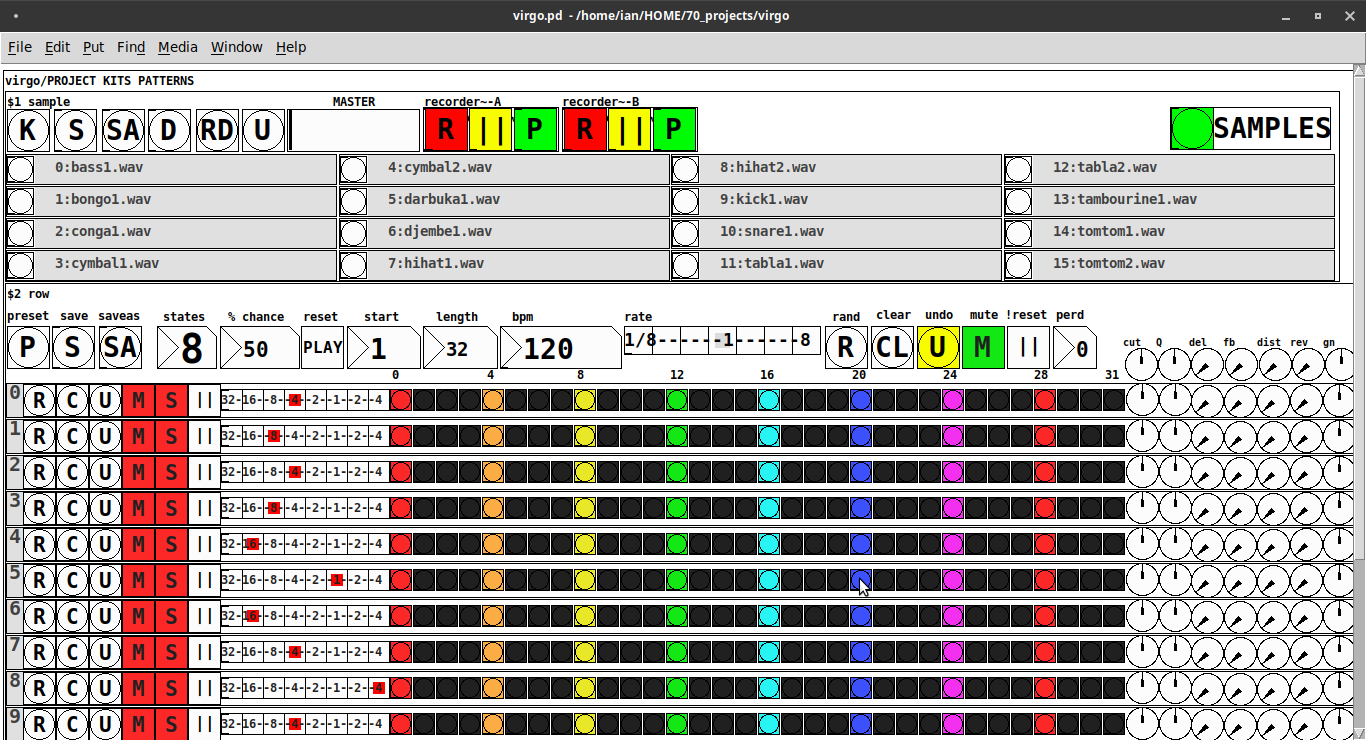
REQUIRES: zexy, moonlib, tof (as of Pd 0.50.2, all of which are in deken) and hcs (which comes by default with Pd 0.50.2 and is in deken (for extended))
Special Features
- Unique playhead per row; each with their own metro (beat)
- Up to 8 Volume states-per-beat (by clicking multiple times on the bang; where an rms=1 is divide among the states (2 states:0=rms=0(black), 1=rms=1(red); 3 states:rms=[0|0.5|1])
- Design approach: using creation arguments to alias abstractions, so subsequently they are referred to by their creation arguments, ex. in [KITS sample] sample is referred to as [$1]; which is how they are listed below)
(notes: what I learned experimenting with this design approach, I will share as a separate post. Currently, it does not include cut-copy-paste (of regions of the pattern)). I good way to start trying it out is clicking the "R" to get a random kit and a random pattern).
virgo:[virgo/PROJECT KITS PATTERNS]
- PROJECT[KITS PATTERNS]
- $1:[KITS sample]
- GUI
- K: openpanel to load a previously saved *.txt (text object) kit of samples; on loadbang the default.txt kit is loaded
- S: save the current set of samples to the most recently opened *.txt (kit) preset
- SA: saveas a *.txt of the current set of samples
- D: foldererpanel a sample directory to load the first (alphabetically) 16 samples into the 16 slots
- RD: load a random kit from the [text samples] object where the samples where previously loaded via the "SAMPLES" bang on the right
- U: undo; return to the previously opened or saved *.txt kit, so not the previously randomized
- MASTER: master gain
- (recorder~: of the total audio~ out)
- record
- ||: pause; either recording or play;
- play: output is combined with the sequencer output just before MASTER out to [dac~]
- SAMPLES: folderpanel to load a (recursive) directory of samples for generating random kits
- ABSTRACTIONS
- $1: sample
- bang: openpanel to locate and load a sample for a track
- canvas: filename of the opened sample; filenames are indexed in alignment with track indices in the PATTERNS section
- $1: sample
- GUI
- $2:[PATTERNS row]
- GUI
- P: openpanel to load a previously saved *.txt (pattern) preset file; on loadbang the default.txt pattern is loaded; the preset file includes the beat, pattern, and effect settings for the row
- S: save the current pattern to the most recently opened pattern .txt
- SA: save as (self-explanatory)
- states: the number of possible states [2..8] of each beat;
- %: weight; chance of a beat being randomized; not chance of what it will result in; ex. 100% implies all beats are randomized ; random beats result in a value)gain) between 1 and states-1
- PLAY(reset): play the pattern from "start" or on stop reset all playheads to start
- start: which beat to start the playheads on
- length: how many beats to play [+/-32]; if negative the playheads will play in reverse/from right to left
- bpm: beats-per-minute
- rate: to change the rate of play (ie metro times) by the listed factor for all playheads
- R: randomize the total pattern (incl period and beats, but not the effect settings; beats of 1/32 are not included in the possibilities)
- CL: clear, set all beats to "0", i.e. off
- U: undo random; return to the previously opened or saved preset, ie. not the previous random one
- M: mute all tracks; the playheads continue moving but audio does not come out of any track
- ||:pause all playheads; play will resume from that location when un-paused
- per: period; if 0=randomizes the period, >0 sets the period to be used for all beats
- Edit Mode
- Check the [E] to enter edit mode (to cut, copy, or paste selected regions of the pattern)
- Entering edit mode will pause the playing of the pattern
- Play, if doing so beforehand, will resume on leavng edit mode
- The top-left most beat of the pattern grid will be selected when first entering edit mode
- Single-click a beat to select the top-left corner of the region you wish to cut or copy
- Double-click a beat to select the bottom-right corner
- You may not double-click a beat "less than" the single-clicked (top-left) beat and vice-versa
- Click [CL] to clear your selection (i.e. start over)
- The selected region will turn to dark colors
- If only one beat is selected it will be the only one darkened
- Click the operation (bang) you wish to perform, either cut [CU] or copy [CP]
- Then, hold down the CTRL key and click the top-left corner of where you want to paste the region
- The clicked cell will turn white
- And click [P] to paste the region
- Cut and copied regions may both be pasted multiple times
- The difference being, cutting sets the values (gains) for the originating region to "0"
- Click [UN] to undo either the cut, copy, or paste operation
- Undoing cut will return the gains from 0s to their original value
- Check the [E] to enter edit mode (to cut, copy, or paste selected regions of the pattern)
- (effect settings applied to all tracks)
- co: vcf-cutoff
- Q: vcf-q
- del: delay-time
- fb: delay-feedback
- dist: distortion
- reverb
- gn: gain
- ABSTRACTIONS
- $1: [row (idx) b8] (()=a property not an abstraction)
- GUI
- (index): aligns with the track number in the KITS section
- R: randomize the row; same as above, but for the row
- C: clear the row, i.e. set all beats to 0
- U: undo the randomize; return to the originally opened one, ie. not the previous random one
- M: mute the row, so no audio plays, but the playhead continues to play
- S: solo the row
- (beat): unit of the beat(period); implying metro length (as calculated with the various other parameters);1/32,1/16,1/8, etc.
- (pattern): the pattern for the row; single-click on a beat from 0 to 8 times to increment the gain of that beat as a fraction of 1 rms, where resulting rms=value/states; black is rms=0; if all beats for a row =0 (are black) then the switch for that track is turned off; double-click it to decrement it
- (effects-per-row): same as above, but per-row, ex. first column is vcf-cutoff, second is vcf-q, etc.
- ABSTRACTIONS
- $1: b8 (properties:row column)
- 8-state bang: black, red, orange, yellow, green, light-blue, blue, purple; representing a fraction of rms(gain) for the beat
- $1: b8 (properties:row column)
- GUI
- $1: [row (idx) b8] (()=a property not an abstraction)
- GUI
- $1:[KITS sample]
Credits: The included drum samples are from: https://www.musicradar.com/news/sampleradar-494-free-essential-drum-kit-samples
p.s. Though I began working on cut-copy-paste, it began to pose a Huge challenge, so backed off, in order to query the community as to 1) its utility in the current state (w/o that) and 2) just how important including it really is.
p.p.s. Please, report any inconsistencies (between the instructions as listed and what it does) and/or bugs you may find, and I will try to get an update posted as soon as enough of those have collect.
Love and Peace through sharing,
Scott
posted in patch~
Question about Pure Data and decoding a Dx7 sysex patch file....
Hey Seb!
I appreciate the feedback
The routing I am not so concerned about, I already made a nice table based preset system, following pretty strict rules for send/recives for parameter values. So in theory I "just" need to get the data into a table. That side of it I am not so concerned about, I am sure I will find a way.
For me it's more the decoding of the sysex string that I need to research and think a lot about. It's a bit more complicated than the sysex I used for Blofeld.
The 32 voice dump confuses me a bit. I mean most single part(not multitimbral) synths has the same parameter settings for all voices, so I think I can probably do with just decoding 1 voice and send that data to all 16 voices of the synth? The only reason I see one would need to send different data to each voice is if the synth is multitimbral and you can use for example voice 1-8 for part 1, 9-16 for part 2, 17-24 for part 3, 24-32 for part 4. As an example....... Then you would need to set different values for the different voices. I have no plan to make it multitimbral, as it's already pretty heavy on the cpu. Or am I misunderstanding what they mean with voices here?
Blofeld:
What I did for Blofeld was to make an editor, so I can control the synth from Pure Data. Blofeld only has 4 knobs, and 100's of parameters for each part.... And there are 16 parts... So thousand + parameters and only 4 knobs....... You get the idea 
It's bit of a nightmare of menu diving, so just wanted to make something a bit more easy editable .
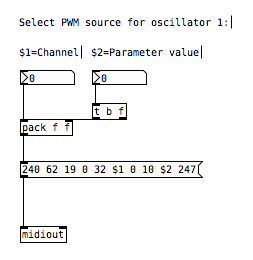
First I simply recorded every single sysex parameter of Blofeld(100's) into Pure data, replaced the parameter value in the parameter value and the channel in the sysex string message with a variable($1+$2), so I can send the data back to Blofeld. I got all parameters working via sysex, but one issue is, that when I change sound/preset in the Pure Data, it sends ALL parameters individually to Blofeld.... Again 100's of parameters sends at once and it does sometimes make Blofeld crash. Still needs a bit of work to be solid and I think learning how to do this decoding/coding of a sysex string can help me get the Blofeld editor working properly too.
I tried several editors for Blofeld, even paid ones and none of them actually works fully they all have different bugs in the parameter assignments or some of them only let's you edit Blofeld in single mode not in multitimbral mode. But good thingis that I actually got ALL parameters working, which is a good start. I just need to find out how to manage the data properly and send it to Blofeld in a manner that does not crash Blofeld, maybe using some smarter approach to sysex.
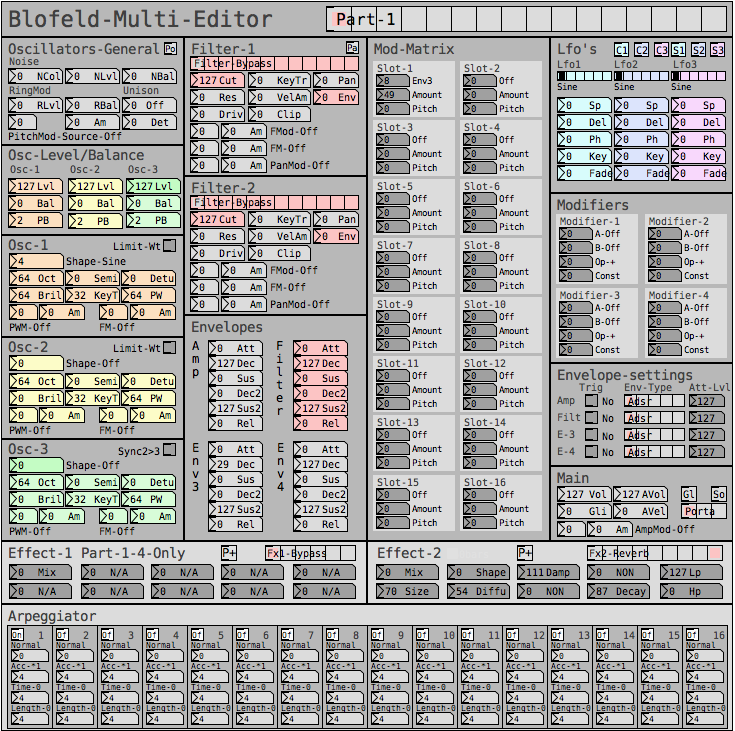
But anyway, here are some snapshots for the Blofeld editor:
Image of the editor as it is now. Blofeld has is 16 part multitimbral, you chose which part to edit with the top selector:
Here is how I send a single sysex parameter to Blofeld:
If I want to request a sysex dump of the current selected sound of Blofeld(sound dump) I can do this:
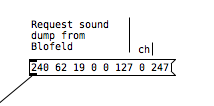
I can then send the sound dump to Blofeld at any times to recall the stored preset. For the sound dump, there are the rules I follow:
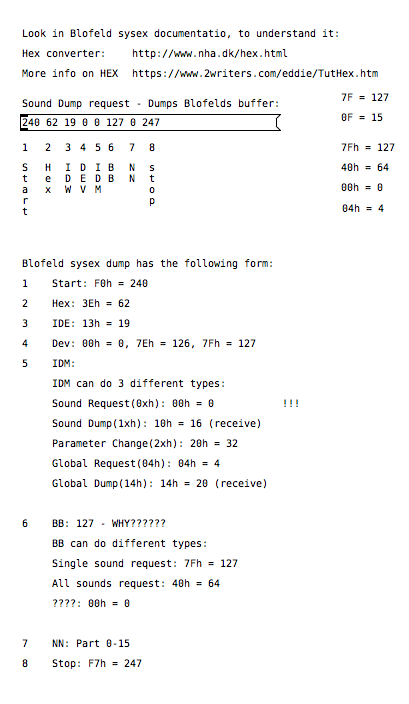
For the parameters it was pretty easy, I could just record one into PD and then replace the parameter and channel values with $1 & $2.
For sound dumps I had to learn a bit more, cause I couldn't just record the dump and replace values, I actually had to understand what I was doing. When you do a sysex sound dump from the Blofeld, it does not actually send back the sysex string to request the sound dump, it only sends the actual sound dump.
I am not really a programmer, so it took a while understanding it. Not saying i fully understand everything but parameters are working, hehe
So making something in Lua would be a big task, as I don't know Lua at all. I know some C++, from coding Axoloti objects and VCV rack modules, but yeah. It's a hobby/fun thing I think i would prefer to keep it all in Pure Data, as I know Pure Data decently.
So I do see this as a long term project, I need to do it in small steps at a time, learn things step by step.
I do appreciate the feedback a lot and it made me think a bit about some things I can try out. So thanks
 posted in technical issues
fx3000~: 30 effect abstraction for use with guitar stompboxes effects racks, etc.
fx3000~
fx3000~ is a 30-effect abstraction (see effects list below) designed to expedite the creation, spec. of guitar, effect "racks".
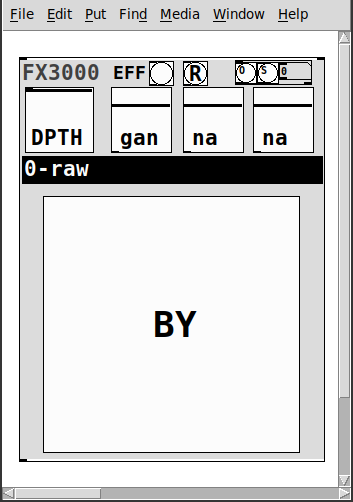
It takes one creation argument, an identifying float, ex. 0, 1, etc.
Has
- two inlets
- left:~: the audio signal
- right: a list of the parameter values: [0-1] for the first 4, [0..29] for the 5th, and [0|1] for the 6th.
- 1-4: depth and parameters' 1-3 values
- 5: the index of the effect
- 6: the bypass for the effect
- a [r~ fx3000-in-$1] and [s~ fx3000-$1-OUT] to better expedite routing multiple instances
- a [r fx3000-rndsetter-$1] to set random values via a send
- 20 preset slots per abstraction creation argument, i.e. index, via "O" and "S" bangs, so abs #0 writes to preset file=pres-0.txt (NOTE: if you have yet to save a preset to a slot nothing will happen, i.e. you must add additional presets sequentially: 0 then 1, then 2, etc.)
- a [r PREIN-$1] to send values in from a global preset-ter
- the names of the parameters/effect are written to labels upon selecting (so I will not list them here)
- and a zexy~ booster-limiter to prevent runaway output~
The help file includes three such abstractions, a sample player, and example s~/r~'s to experiment with configurations.
Note: the origin of each effect is denoted by a suffix to the name according to the following, ex. ""chorus(s)"
- s:Stamp Album
- d:DIY2
- g:Guitar Extended
- v:scott vanya
The available effects are:
- 0 0-raw
- 1 audioflow(v)
- 2 beatlooper(v)
- 3 chorus(s)
- 4 delay(3tap)(d)
- 5 delay(fb)(d)
- 6 delay(pitch)(v)
- 7 delay(push)(v)
- 8 delay(revtape)(g)
- 9 delay(spect)(g)
- 10 delay(tbr)(v)
- 11 delay(wavey)(v)
- 12 detuning(g)
- 13 distortion(d)
- 14 flanger(s)
- 15 hexxciter(g)
- 16 looper(fw-bw)(v)
- 17 octave_harmonizer(p)
- 18 phaser(s)
- 19 pitchshifter(d)
- 20 reverb(pure)(d)
- 21 ringmod(g)
- 22 shaper(d)
- 23 filter(s)
- 24 tremolo(d)
- 25 vcf(d)
- 26 vibrato(d)
- 27 vibrato(step)(g)
- 28 wah-wah(g)
- 29 wavedistort(d)
I sincerely believe this will make it easier for the user,...:-) you, to make stompboxes, effects racks, etc.
I hope I am correct.
Peace. Love through Music.
-S
p.s. of course, let me know if you notice anything awry or need clarification on something.
posted in abstract~
[writesf~] problem
A couple of illustrations.
Let's say we want a sine wave covering 16.5 samples. To illustrate, I used SuperCollider to put two sine wave cycles into 33 samples.
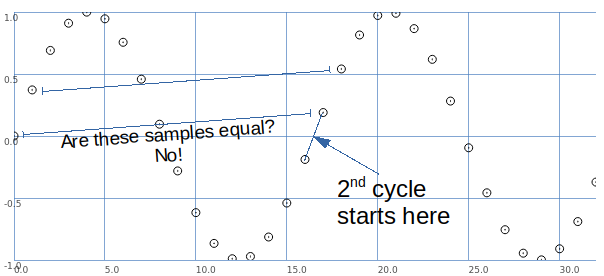
The second cycle begins when the wave crosses the 0 line in the middle.
This is between samples.
So, the second cycle must be represented by sample values that are different from the sample values for the first cycle.
That is, it is possible to have that zero crossing between samples -- but the sampling process produces different values.
Let's look at it a different way: blue samples = one sine wave cycle covering 33 samples; green samples = 2 cycles in 33 samples.
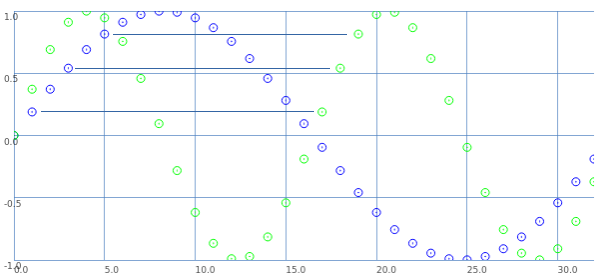
If we start counting samples at 0:
- Blue 0 = Green 0.
- Blue 2 = Green 1.
- Blue 4 = Green 2. etc.
That is: read through the blue samples at double speed, and you get the 16.5 wavelength. (This is exactly what David said.)
What about the second cycle starting at 16.5?
- Blue 1 = Green 17.
- Blue 3 = Green 18. etc.
These are the sample values that were skipped the first time.
So, Green 17 (the first concrete sample value after the second cycle begins) is the value in between Green 0 and Green 1. Green 18 is in between Green 1 and Green 2.
This is interpolation.
Interpolation is the mathematically correct way to represent fractional cycles in a sampled signal.
You can try to say that this "isn't the real problem," but... this is the problem, and interpolation is the solution.
hjh
posted in technical issues
Velocity toggle or something?
@flight453 i have made an abstraction for this, feel free to use as you like. velocity-senitivity.pd just download it and call it in your patch.
when you call a patch (or any normal file) in pd through directory traversing in objects, there are some rules (idk if i know all, because i have just stumbled upon them randomly):
a: to call a patch in the same directory (folder) as your main patch, just type out the name, excluding the ".pd" at the end, so velocity-senitivity.pd becomes velocity-senitivity.
b: to call a patch inside a directory which is inside the same directory as your main patch, just type the directory name for the directory inside the shared directory, then a "/" and then the filename, again, excluding ".pd", so velocity-senitivity.pd inside the directory "abstractions" which shares the directory with your main patch, becomes abstractions/velocity-senitivity. you can go as many directories in as you like, so abstractions/midi&more/velocity-senitivity
c: if it is outside your directory type one "." for as many directories you have to go outside and then "./" (yes, that is a "." followed by a "/") and then your patch name, again, excluding ".pd".
d: you can type what rule "c" says and not entering the patch name, and then type what rule "b" says. here's an example of this in action .../abstractions/midi&more/velocity-senitivity, so the ".../" means that you shold go back 2 directories, and "abstractions/midi&more/" means that you should go inside the folder "abstractions", and then "midi&more", and "velocity-senitivity" is the the patch that you want to use.
e: just typing out the full directory, again excluding the ".pd"
you'r welcome 
 posted in technical issues
PD's scheduler, timing, control-rate, audio-rate, block-size, (sub)sample accuracy,
@lacuna The whole patch is recompiled within Pd and I think that although the data flow model is fantastic it makes it harder to understand the workings.
The blocks (of audio) are read, or generated, and all of the stuff that the patch needs to do to the block is done all at once to every sample in the block, and then the block is sent onwards.
So if you put [x~ 2] >> [/~ 2] then nothing is done..... the code that Pd is running has done the math and the result is "multiply sample values by one".......... so "do nothing". A complex patch will have been boiled down to "subtract x from sample1" "add y to sample2" etc...... up to sample 64, rinse, calculate the next set of additions and subtractions to apply, and do it to the next block.
Those operations..... add to sample value... or subtract from sample value.... are the only possible operations on a sample value.......
Interpolation uses adjacent sample values for the calculation, but adding or subtracting to / from the sample values is what happens when the calculations have been done.
Some objects like [x~] can be controlled by a control signal, and so the new value can only be applied at block boundaries as the control calculations are done between boundaries. The addition will be the same for every sample in the block. Pd didn't know in advance what it's next value might be, so a ramp cannot be applied across the samples in this block.
Some objects though, like [vline~] are scheduling changes of value that will happen across the block, and future blocks, and may finish at sample 43 within a block. Programmatically it is saying, as part of the whole patch "add a bit to sample 1 (if it has a +ve value or subtract if -ve)) and a bit more to sample 2 etc..... etc... and then for the next block, when the audio program runs again add even more to the 1st sample etc..... until.
So it is sample accurate.
And of course if [x~] is controlled by [vline~] it will do as it is told and be sample accurate too.
You can add a start delay to [vline~] so that it's start point is sample accurate too.
 posted in technical issues