
instance specific dynamic patching documentation assistance
@whale-av @ben.wes @ddw_music
I am learning about dynamic patching. The documentation describes instance specific dynamic patching as being able to send messages to a specific instance of an abstraction, by renaming the abstraction using namecanvas. The renaming can be automated using $0 expansion.
I am not familiar with where to locate namecanvas and how to use it and I am not familiar with how to use $0 expansion. Can someone please show a complete visual example of how to use instance specific dynamic patching using the exact instructions given in the documentation link?
https://puredata.info/docs/tutorials/TipsAndTricks#instance-specific-dynamic-patching
And can someone show a visual example of how to use dynamic patching to dynamically create instances of an object in an abstraction? For example, if I create a patch with a sine oscillator that can be assigned a frequency, an amplitude, and has a dac object and then make that patch an abstraction how would I be able to use dynamic patching to allow my gui to let me assign a new sound source in place of the sine oscillator? Objects like the switch object have limitations. I would want to be able to assign/unassign any number of new sounds sources in place of the sine oscillator. For example a phasor object, a noise object, or even synthesizer patch abstraction. Suggestions for other ways to do this are good and I also want to be sure to have explanations for using dynamic patching since that is what I am learning. How could this be done using dynamic patching?
General Dynamic Patching
What is the difference between pd messages and patch messages? Are they both used for dynamic patching? And how are they different from instance specific dynamic patching?
https://puredata.info/docs/tutorials/TipsAndTricks#pd-messages
https://puredata.info/docs/tutorials/TipsAndTricks#patch-messages
 posted in technical issues
understanding a simple feedback oscillator
I was just experimenting with the “classic” feedback FM and stumbled on a related technique that seems quite interesting to me, especially because of its chaotic behavior. It’s actually very simple: The output of an oscillator is delayed and, scaled by some factor, fed back into that same oscillator as its frequency. So there is no external input, no carrier frequency (or a zero carrier frequency if you will), which means that it is a symmetric “through-zero” FM.
By guessing I figured out how the delay time determines the frequency of the oscillator, but I still don’t understand a few things: Why is there a factor of 4 involved so that the delay is one quarter of a cycle? And why is there still some error? I found two ways to fix it, first by oversampling and second by reducing the delay time by the duration of one half sample. To be honest I don’t have a clue why this works ... Any ideas?
What I find particularly interesting is the path from sinusoidal tones at modulation index 1 (which seems to be a critical value) to different modes of periodic oscillation and finally to chaos when the modulation index is increased: First odd harmonics are added, then even harmonics, then a period doubling or “bifurcation” occurs, and shortly after that we get into the chaotic region. This seems to be not too different from the logistic map or related chaotic maps. So I’m wondering if it’s possible to analyze the oscillator in terms of chaos theory to better understand and control its behavior.
Apart from being mathematically interesting, I think this could also be a usable noise generator with spectral control. Other effects can be achieved by adding an external input ... but for now, I’m more interested in understanding that simpler case.
 posted in patch~
Linked abstractions, synth experiment
Hello,
I am new to puredata, just started very recently and still learning how the language works.
I created a minimoog style oscillator where I can change certain parameters like: waveform, fine tuning, panning, volume. This file I named oscillator.pd, after which I created a "synth.pd" file that basically uses two "oscillator.pd" as an abstraction.
The problem is the following: when I modify one oscillator it also modifies the other, so I can't use them separately but it's as if they are linked together.
I attach the files, thanks in advance for the help!
Agustin Davrieux
 posted in technical issues
ways of exponentiation ( / range mapping)
Hi,
I need to be able to convert a value within a given range to an exponential value within the same range. I made an abstraction "autoscale" which remap the highest and lowest received values to a given range.
If incoming is 0.3 and the lowest value so far been 0.2, the highest so far has been 1.2, and the range is set to 3 and 7 the output will be 4.
I would like to be able modify the output value to an exponential or logarithmic curve where you can set the curve steepness.
What options would there be to solve this? Could I have a function within an expression object? Or use an array? Please show me.
Once I got that going I need to be able to set the curve so that a given value will end up as the exact half of the scaled range. Using the values in the example above incoming value 0.3 should then output 5 after the exponential curve has been set.
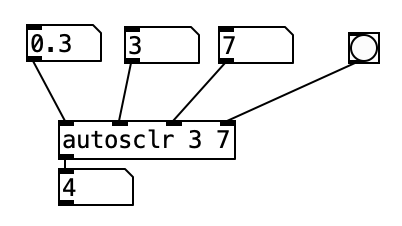
Cheers!
 posted in technical issues
PolyBLEP / BLEP / BLIT etc with oscillator sync
@nuromantix For reference:
PolyBLEP triangle
http://www.martin-finke.de/blog/articles/audio-plugins-018-polyblep-oscillator/
https://www.kvraudio.com/forum/viewtopic.php?t=375517
Hard Sync without Aliasing in this thread:
https://forum.pdpatchrepo.info/topic/5507/antialiasing/7
Did someone do aliasing-free sync without filter in pd yet?
 posted in technical issues
Logarithmic glissando
One of the very early lessons that I teach in my interactive multimedia class is range mapping, where I derive the formulas and then leave them with ready-to-use patch structures for them.
-
If it's based on incoming data, first normalize (0 to 1, or -1 to +1, range). If you're generating a control signal, generate a normal range (e.g. [phasor~] is already 0 to 1).
-
For both linear and exponential mapping, there's a low value
loand a high valuehi. (Or, if the normalized range is bipolar -1 to +1, a center value instead oflo.) -
The "width" of the range is: linear
hi - lo, exponentialhi / lo. -
Apply the width to the control signal by: linear, multiplying (
(hi - lo) * signal); exponential, raising to the power of the control signal =(hi / lo) ** signal. -
Then (linear) add the lo or center; (exponential) multiply by the lo or center.
One way to remember this is that the exponential formula "promotes" operators to the "next level up": + --> *, - --> /, * --> power-of (and / --> log, but that would only be needed for normalizing arbitrary exponential data from an external source). So if you know the linear formula and the operator-promotion rule, then you have everything.
- linear: (width * signal) + lo
- exponential: (width ** signal) * lo
(Then the "super-exponential" that bocanegra was hypothesizing would exponentiate twice: ((width ** signal) ** signal) * lo = (width ** (signal * signal)) * lo.)
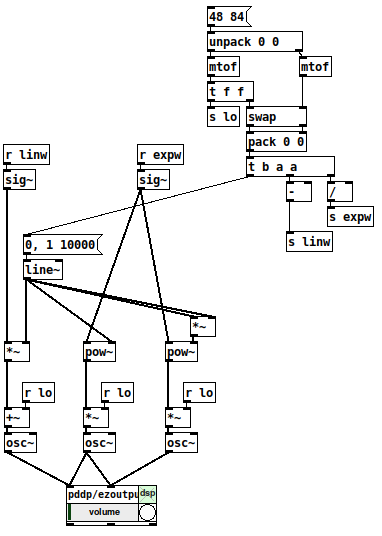
[mtof~] is a great shortcut, of course, but -- I drill this pretty hard with my students because if you understand this, then you can map any values onto any range, not only MIDI note numbers. IMO this is basic vocabulary -- you'll get much further with, say, western music theory if you know what is a major triad, and you can go much further with electronic music programming if you learn how to map numeric ranges.
hjh
 posted in technical issues
additive sine-synth thing
I was watching some of miller's videos on the internals of pd and got inspired to try a different (probably processing intensive) method of parallel processing for multiple oscillators/additive synthesis & came up with this ugly thing after some hours. Basically it uses upsampling to use every "location" in a block as a separate oscillator. (so sample 2 in a block is oscillator 2, etc.) The subpatch is upsampled x64 with 64 block size so every sample 1 sample of 64 oscillators are being processed. [tabsend~] and [tabreceive~] are used for storing the phase of the sine waves in-between samples. It's probably relatively heavy on the processing. still I thought it was kinda cool.
If anyone knows how to get the sum of all samples in a block in vanilla that would also be helpful (I'm using [rfft~] now but don't need to do an entire fft just for the sum)
additive.pd
 posted in patch~
Looking for help for optimisation of Karlsen 24 db ladder filter
@jaffasplaffa Yeah, it is overkill for a bass synth, just threw it out for the info. Craig Anderton wrote an article on putting the theory of the Hutchins article to practice, he tends to be more practical and less theory than Hutchins and his article may give you the exact mixing ratios for the various modes if you want to avoid the math, a search for "Craig Anderton Multiple Identity Filter" should find it. There is also some information in the Matrix 12 and Xpander service manuals. I do not recall how into depth any of these go, but they are certainly more terse than Hutchins.
The pulse really does need to be reworked, I was heading out the door and threw it together quickly in a way that would clearly show how it was done, the [send~] and [recieve~] is a little silly, a couple [*~] would do better and and make PWM much simpler, using the triangle to trigger the threshold might be better, or skipping the triangle and just using a copy of the saw which is 180 degrees out of phase to get the other half. It was done lots of ways in those days. These early waveforms were not completely accident or a failing of the technology, Bob could have gotten perfect waveforms if he wanted them, but perfect waveforms are less useful when it comes to subtractive synthesis, having some extra harmonics to play with is good. While the triangle has a fairly saw like sound to it, once you run it through that filter of yours you will easily be able to get a great sounding triangle when you need it, and unlike a more pure wave you can easily add in more harmonics, even with a very simple signal chain like you have in the mini, just turn up the cutoff frequency or use the filters envelop to do it for you if you want a more dynamic sound, or turn up the triangles volume on the mixer to drive the filter harder and get some distortion, no need for waveshapers or more waveforms. Bob really knew what he was doing, unfortunately others said "our waveforms are more pure!," the market followed. The mini is probably the most nuanced synth ever designed.
 posted in patch~
Synthesis OSC
@8v01d You are using only ring modulation. You can change by adding frequency modulation (it is very powerful and can create very interesting sounds) to some carrier oscillators but not all. Also you could split the output of each oscillator right before the envelope into 2 channels (one left and one right to have stereo). Then you could change the envelope to be different in the stereo section. Also you could use different kinds of oscillators (sine, triangle, saw, square etc.). You made it clear and i like that. Nice.
 posted in patch~
NoxSiren - Modular synthesizer system <- [v15]
NoxSiren is a modular synthesizer system where the punishment of failure is the beginning of a new invention.
--DOWNLOAD-- NoxSiren for :
-
Pure Data :
NoxSiren v15.rar
NoxSiren v14.rar -
Purr Data :
NoxSiren v15.rar
NoxSiren v14.rar
--DOWNLOAD-- ORCA for :
- x64, OSX, Linux :
https://hundredrabbits.itch.io/orca
In order to connect NoxSiren system to ORCA system you also need a virtual loopback MIDI-ports:
--DOWNLOAD-- loopMIDI for :
- Windows 7 up to Windows 10, 32 and 64 bit :
https://www.tobias-erichsen.de/software/loopmidi.html
#-= Cyber Notes [v15] =-#
- added BORG-IMPLANT module.
- introduction to special modules.
- more system testing.
#-= Special Modules [v15] =-#
- BORG-IMPLANT (connects ORCA MIDI system to NoxSiren system)
#-= Current Modules [v15] =-#
- VCO (voltage-controlled-oscillator)
- VCO2 (advance voltage-controlled-oscillator)
- WAVEBANK (additive synthesis oscillator)
- ADSR (Attack-Decay-Sustain-Release envelope)
- C-ADSR (Curved Attack-Decay-Sustain-Release envelope)
- CICADAS (128 steps-Euclidean rhythm generator)
- CICADAS-2 (advance 128-steps polymorphic-Euclidean rhythm generator)
- COMPRESSOR (lookahead mono compressor unit)
- DUAL-COMPRESSOR (2-channel lookahead mono compressor unit)
- STEREO-COMPRESSOR (lookahead stereo compressor unit)
- MONO-KEYS (virtual 1-voice monophonic MIDI keyboard)
- POLY-KEYS-2 (virtual 2-voice polyphonic MIDI keyboard)
- POLY-KEYS-3 (virtual 3-voice polyphonic MIDI keyboard)
- POLY-KEYS-4 (virtual 4-voice polyphonic MIDI keyboard)
- POLY-KEYS-5 (virtual 5-voice polyphonic MIDI keyboard)
- POLY-KEYS-6 (virtual 6-voice polyphonic MIDI keyboard)
- BATTERY (simple manual triggered machine for drumming.)
- REVERB (reverb unit with lowpass control)
- STEREO-REVERB (stereo reverb unit with lowpass control)
- RESIN (advanced rain effect/texture generator)
- NOISE (generates black,brown,red and orange noise)
- NOISE2 (generates yellow,blue,pink and white noise)
- COBALT (6-stage polyrhythm generator)
- SHAPER (basic shaper unit)
- FOLDER (basic wave folding unit)
- STEREO-FOLDER (stereo wave folding unit)
- DUAL-FOLDER (advance wave folding unit)
- POLARIZER (transform a signal into bi-polar, uni-polar, inverted or inverted uni-polar form)
- CLOCK (generates a BPM clock signal for sequencing other modules)
- CLOCKDIVIDER (a clock divider with even division of clock signal)
- CLOCKDIVIDER2 (a clock divider with odd division of clock signal)
- DELAY-UNIT (delay unit)
- STEREO-DELAY (stereo delay unit)
- CHORUS (chorus unit)
- STEREO-CHORUS (stereo chorus unit)
- SEQ (advance 16-step/trigger sequencer)
- KICK (synthesize kick unit)
- KICK2 (synthesize flavor of KICK module)
- KICK3 (synthesize flavor of KICK module)
- SNARE (synthesize snare unit)
- CLAP (synthesize clap unit)
- CYMBAL (synthesize cymbal unit)
- RAND (RNG generator for other modules parameters)
- FMOD (feedback modulation unit)
- AM (amplitude modulation unit)
- RM (ring modulation unit)
- LFO (low-frequency-oscillator)
- LFO2 (advance low-frequency-oscillator)
- COMBINATOR (combine two waves)
- COMBINATOR2 (combine three waves)
- COMBINATOR3 (combine four waves)
- STRING (Karplus-Strong string synthesis unit)
- STRING2 (advance Karplus-Strong string synthesis unit)
- DETUNER (parametric 4-channel detuner unit)
- CRUSHER (basic audio resolution unit)
- STEREO-CRUSHER (basic stereo audio resolution unit)
- DUAL-CRUSHER (advance audio resolution unit)
- FILTER (basic filter)
- VCF (voltage-controlled-filter)
- MAR (Moog-analog-resonant filter)
- VCA (voltage-controlled-amplifier)
- DUAL-VCA (advance voltage-controlled-amplifier)
- FMUX (multiplexer with fast A/D internal envelope)
- MMUX (multiplexer with medium A/D internal envelope)
- SMUX (multiplexer with slow A/D internal envelope)
- FDMX (demultiplexer with fast A/D internal envelope)
- MDMX (demultiplexer with medium A/D internal envelope)
- SDMX (demultiplexer with slow A/D internal envelope)
- MIXER (mix 1-4 possible waves)
- SCOPE (oscilloscope analyzer)
- MASTER (fancy DAC~)
- BOX (useless decorative module)
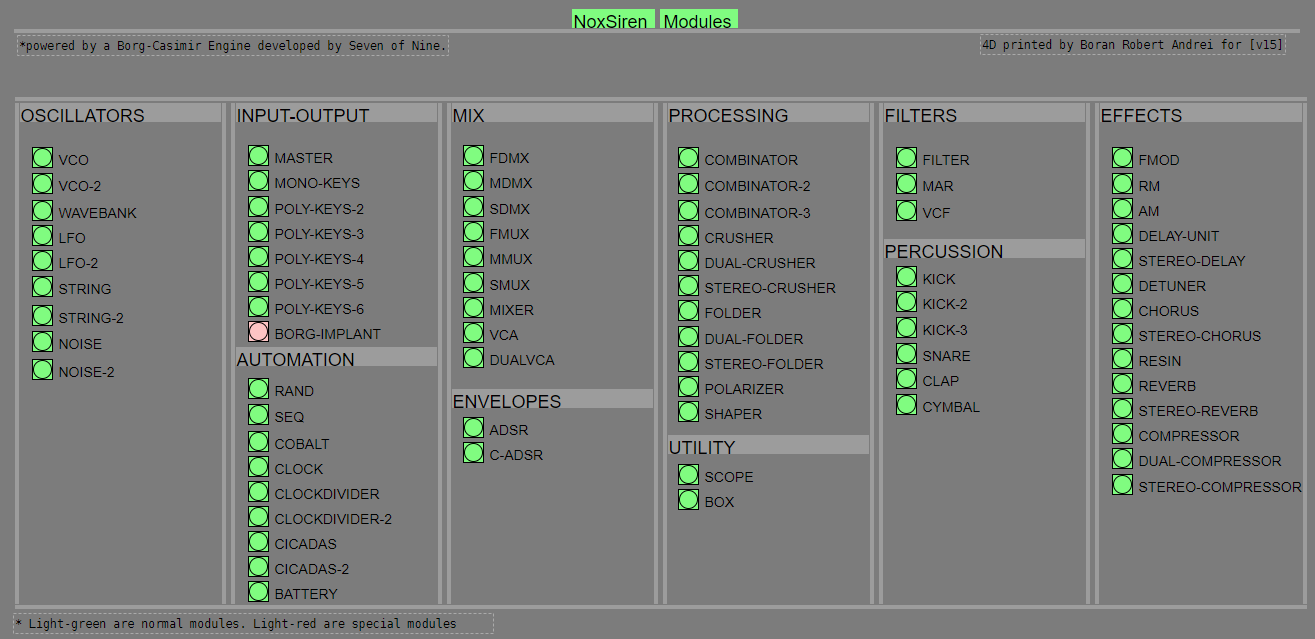
NoxSiren integrated modules menu system.
posted in patch~