
-
ddw_music
posted in technical issues • read more@jamcultur From the source code, the cause is unambiguous: too many MIDI bytes coming in, too quickly.
void sys_midibytein(int portno, int byte)
{
    static int warned = 0;
    t_midiqelem *midiqelem;
    int newhead = midi_inhead +1;
    if (newhead == MIDIQSIZE)
        newhead = 0;
            /* if FIFO is full flush an element to make room */
    if (newhead == midi_intail)
    {
        if (!warned)
        {
            post("warning: MIDI timing FIFO overflowed");
            warned = 1;
        }
        sys_dispatchnextmidiin();
    }
It looks like a circular buffer of incoming MIDI bytes. If the write head (newhead) crashes into the read position, then MIDI data weren't consumed fast enough compared to the incoming data rate. What it does in that case is to run one MIDI message right now, even if it's early according to the timestamp, to make room for the new data.
"I don't have MIDI messages flooding in" but this is the only place in the source code where this message is logged to the console, so something threw an abnormal amount of MIDI at Pd.
Unfortunately these problems are hard to track down, especially if they're not consistently reproducible.
hjh
-
posted in technical issues • read more
@jameslo said:
@ddw_music Both--multiple patches in the same Pd instance, or multiple Pd instances on one machine. Not sure why your single process requirement is necessary since some DAWs sandbox plugins. But I'm way out on a limb.
OK, then, this:
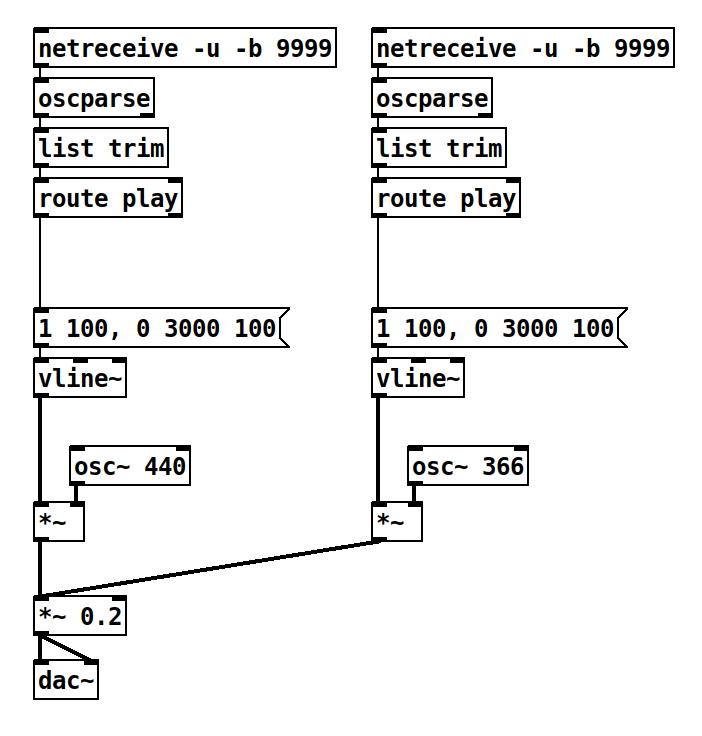
I created the 440 Hz stack first, and the 366 Hz stack second. When I trigger it from SuperCollider like this:
n = NetAddr("127.0.0.1", 9999);
n.sendMsg("/play");
... I get the 366 Hz F#, not the 440 Hz A. I don't have time to split this into two patches and run two instances of Pd at the same time. You're welcome to try. 2-netreceive.pd
At minimum, the silent failure here is a bit troubling: Since it's not valid to have multiple netreceive objects listening to the same port, shouldn't there be a console message, like "port 9999 is already in use")? And since the newer object causes the problem, shouldn't it be the one that doesn't work instead of clobbering any prior netreceives? (FWIW, SC has a different silent failure. Its default UDP receive port is 57120. If that port is busy when an sclang instance starts up, then the second instance will take port 57121 with no warning, so any external software that expects to send OSC to SC on port 57120 will magically not work.)
hjh
-
posted in technical issues • read more
@jameslo said:
@ddw_music Why is this a plugdata issue? Does it work in Pd?
AFAIK in Pd vanilla, there is no way to launch multiple engines within the same process, whereas a DAW manages multiple instances of the same plugin (which, in plugdata's case, happens to contain the full Pd engine). Unless I'm greatly misunderstanding Pd vanilla, I think there's no way to test this case in it.
Or do you mean two patches in the same Pd vanilla?
hjh
-
posted in technical issues • read more
FWIW, [netreceive -u -b ....] is known not to work with multiple plugdata instances: https://github.com/plugdata-team/plugdata/discussions/1497 -- If I have multiple plugdata instances receiving on the same port, only the latest-created plug-in will respond.
I reported this in March 2024 and, no further discussion.
AFAIK each instance needs to grab its own port, which is a pain because there's no shared state among plugdata instances. (IIRC that's different from Max4Live, where anything that's named -- send/receive, arrays, buffers etc. -- is shared across all M4L devices. So in M4L, you could create an ID/port server device with a global [r getID] that would pull from a unified pool of available ports. Plugdata can't do that. The M4L way is a potential gotcha, because you might have to localize some identifiers that you didn't expect to have to, but I'm coming to feel like the lack of any sort of globalized pool of anything in plugdata is a weakness.)
hjh
-
posted in technical issues • read more
@jameslo said:
Like too many things in Pd, it feels perverse to have to tell a new user that in order to display a unique character sequence for a number, you have to turn it into a filename

It's a minority case, I guess...? I'm willing to bet that in most cases, a user who summed up 0.1 ten times wants to see "1" and not "1.00001".
And gosh, it looks like SC has several numeric datatypes, ways to cast between them, and multiple ways to display each. How profligate!

SC has 32-bit int (
Integer) and 64-bit float (Float, not Double) in the language side, and the audio side runs on 32-bit floats like Pd audio does. 64-bit floats can be chopped down to 32 bits, but the value is stored as an int and you can't do 32-bit float math on it. But, converting a couple of such ints to double (Float.from32bits) and doing math on them should be (pretty much) the same as single-precision math, except maybe a bit of noise in the LSB.hjh
-
posted in technical issues • read more
How about this... in SC:
x = 1.00000048.as32Bits;

x.asBinaryString(32).clump(8);
-> [00111111, 10000000, 00000000, 00000100]
Giving sign bit = 0, exponent = 01111111 and mantissa = (implicit) 1.00000000000000000000100 or 20 zeroes before the trailing 1.
SC doesn't have a primitive to convert a 32-bit float into a string. But it does preserve the mantissa when converting to a 64-bit float (zero-pads the mantissa): sign bit = 0, exponent (11 bits) = 01111111111, mantissa = (implicit) 1.000000000000000000001 (same 20 zeroes, dropping the rest of the 53 mantissa bits) -- therefore the mantissas are equivalent in both 32-bit and 64-bit floats.
y = Float.from32Bits(x);
z = [y.high32Bits, y.low32Bits].collect { |b| b.asBinaryString(32).clump(8) };

-> [[00111111, 11110000, 00000000, 00000000], [10000000, 00000000, 00000000, 00000000]]

y
-> 1.0000004768372  // rounds to 1.00000048
So it should be okay to hack the 32-bit by adding to or subtracting from the least significant bits:
x+1= the next possible float for this exponent.[x-2, x-1, x, x+1, x+2].collect(Float.from32Bits(_)) -> [1.0000002384186, 1.0000003576279, 1.0000004768372, 1.0000005960464, 1.0000007152557]... where the difference between subsequent floats ~= 0.0000001192092 or ~= 0.00000012, meaning that at this scale it is not possible for a 32-bit floating point number to represent a different value beginning with 1.0000004. So
%.7g"should" be sufficient (though I wouldn't call myself an expert -- this is an empirical demo, not a proof).hjh
-
posted in technical issues • read more
@jameslo said:
That Fortran discussion I linked to...
Sadly I'm not allowed to read it at the moment because I'm on a tablet right now, and "HTML content omitted because you are logged in or using a modern mobile device" (which... I suppose it would make sense that enthusiasts of an outdated language would not favor "modern" devices for reading 🙄 )
presented the number 1.00000048 as an example of a 9 digit decimal that has a SPFP value that's not representable in 8 decimal digits, but it appears to me that 1.0000005 works fine. How would you prove that 8 digits is sufficient for all SPFP numbers?
No idea. At least, the 24 bit mantissa (23 explicit bits plus an implicit 1 left of the binary point) supports 16,777,216 distinct values, which does comprise 8 decimal digits. But there isn't a 1:1 correspondence in digit count when the exponent goes down, e.g. 16 has 2 decimal digits but its inverse 1/16 = 0.0625 = 6.25x10^-2. So there at least is a counterexample showing that 1/x might need more decimal digits than x (as an integer) would.
hjh
-
posted in technical issues • read more
@jameslo said:
Would [makefilename $.7g] suffice? Or would it have to be .8 or .9 as some argue in this discussion?
%.7gisn't enough, but%.8gseems to catch it.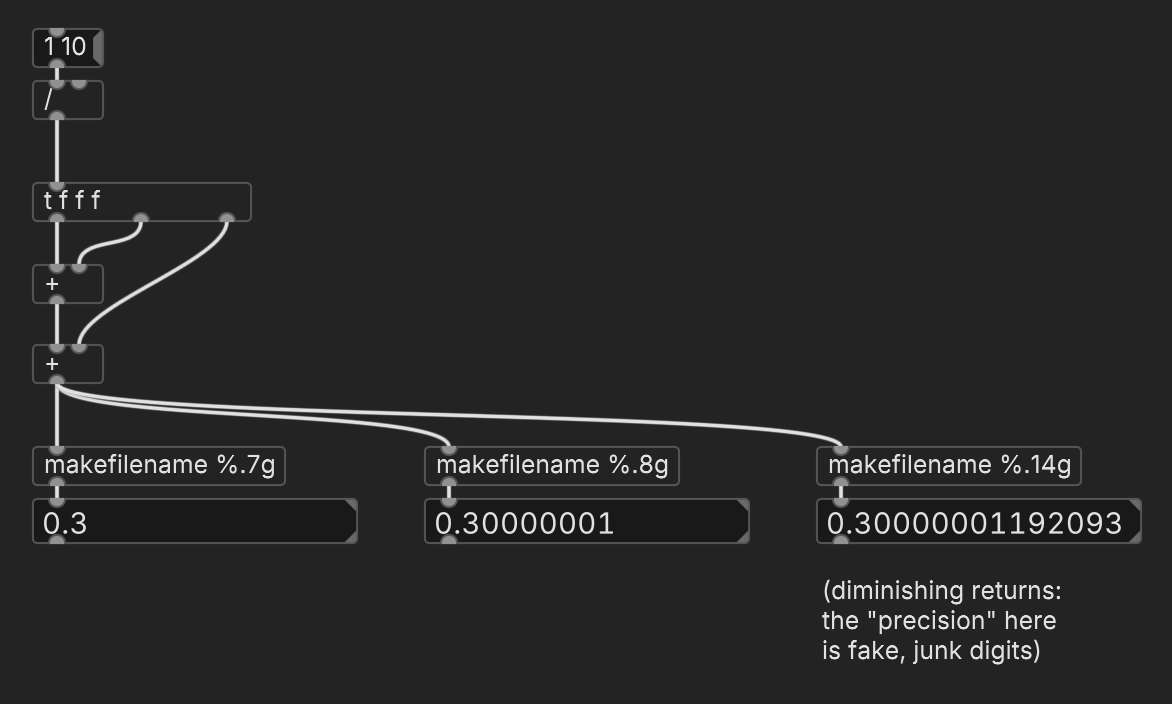
And for all cases 7 8 or 9, it would mean that there could be different displays of floats that actually equal each other, correct?
Yes, but keep in mind: if you ask C to convert a binary floating-point number to a decimal string with more precision than exists in the original binary, the trailing digits are basically garbage. With
%.9gyou will definitely be able to see that two single precision floats are different, but don't rely on the specific value.For
[==], it's kinda better not to use it at all with fractional floats, unless you're sure the denominator will always be a power of two.[==]might be correct but might sometimes give you false negatives; the absdif approach lets you control the precision that's relevant for equivalence.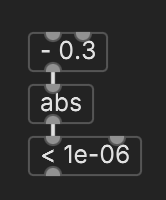
hjh
-
posted in technical issues • read more
@jameslo said:
But what prevents Pd from displaying the inexact result, e.g. in the number box above [expr]? If the goal of patching is to make things more friendly for non-programmers, how is it helpful to hide it?
In fact, when a user types in 0.1 and it displays 0.100001 (I forget how many zeros for single-precision), this is more disturbing to non-programmers.
... because that's exactly what you get when you don't round off the last bit or two for string conversion: a whole lot of 0.n000001 or 0.n999999. SC tried this for awhile, but had to revert to a slightly lower precision for float-to-string because users really hated the more accurate display.
Python can demonstrate with double precision floats -- https://en.wikipedia.org/wiki/Double-precision_floating-point_format says "The 53-bit significand precision gives from 15 to 17 significant decimal digits precision (2−53 ≈ 1.11 × 10⁻¹⁶)" so let's try both:
$ python3
>>> for x in range(1, 10): x = x * 0.1; print(f"{x:.15f}")
...
0.100000000000000
0.200000000000000
0.300000000000000
0.400000000000000
0.500000000000000
0.600000000000000
0.700000000000000
0.800000000000000
0.900000000000000

>>> for x in range(1, 10): x = x * 0.1; print(f"{x:.17f}")
...
0.10000000000000001
0.20000000000000001
0.30000000000000004
0.40000000000000002
0.50000000000000000
0.60000000000000009
0.70000000000000007
0.80000000000000004
0.90000000000000002
Increasing the string representation to include more digits makes it necessary to render into the UI the noise inherent in the least significant bit(s). This isn't appealing to everyone.
Since Pd uses single precision, 6 digits is the low end (and exactly the precision Pd displays). If Pd expanded these strings to 8 digits, you would see trailing digits for fractions that seem like they should be simple.
I think it's pretty common practice with floats to calculate with more precision than you're going to display, and round off for UI strings.
hjh
-
posted in technical issues • read more
When performing division of rational numbers, the result will be exact if the denominator factors out such that all factors are a power of a factor of the numeric base. We're used to decimal, so those factors are 2 and 5. 20 = 2•2•5 so it's ok; 27 = 3•3•3 so we know this will be a repeating fraction (since 3 is not a factor of 10).
Floating point numbers in computers are base 2, so, for non-repeating division, the denominator must be a power of 2.
First you have [/ 1] -- 1 = 2^0 so, ok.
Then you have [/ 64] -- 64 = 2^6 so, ok.
When you introduce division by 44.1, then the denominator includes two 3s and two 7s (plus 2^-1 and 5^-1). These aren't powers of 2, so the fraction will be infinite, and rounding it off to the available precision is an approximation. Multiplying again doesn't restore the precision.
Like, 2/3 = 0.66666...7. Let's pick an arbitrary precision, say, 4 digits. 2/3 = 0.6667 (or, the floating point way, 6.667•10^(-1)). Now you multiply this back by 3 and you get 2.0001 -- there's your "higher than." This must also get rounded off, but at least it shows that inaccuracy when scaled up can eventually become visible.
The assumption that floating point math is exact is basically a good way to set yourself up for confusion or disappointment. (That is, this isn't Pd's fault -- it's IEEE 754.)
hjh