
exponential ADSR envelope using LP filter
Hi. I've played with this method before a bit. A real 1-pole lowpass filter with an impulse passed in is equivalent to multiplying every previous sample by a constant factor to get the next sample, which is also equivalent to an exponential envelope. But you can also add a constant factor for every sample in order to make a linear envelope. So it turns out you can make a variable-slope filter by combining: multiply and add on the previous sample by 2 different factors. If you are interested I have further details in this blog post:
https://sshader.wordpress.com/2014/09/05/programming-an-adsr-envelope/?iframe=true&theme_preview=true
It's not that cpu friendly when you change the settings because you have to take the sample-length-of-the-stageth root or something like that, I haven't looked into it in a while though. However, afterward it simplifies to an add and multiply at every sample
here are the codes: http://forum.pdpatchrepo.info/topic/8490/examp-exponential-envelopes-with-exponential-linear-curve-control
 posted in abstract~
GUI port of Pd-l2ork Alpha 0 release
Hello,
Below are links to the first alpha release of the GUI port of Pd-l2ork.
The GUI has been ported from tcl/tk to nw.js. The biggest visual improvements are ability to zoom in and out of a canvas, smoother animation of canvas objects (like the PacData game), user-friendly editing inside msg/obj boxes, and a more flexible API for visualizing data structures.
I've nicknamed it "Purr Data", because cats.
This is mainly a bug-collecting release. It should be decent enough to do some basic patching for awhile before hitting a bug. Some caveats up front: OSX is missing Gem and PDP, and both OSX and Windows are missing some pd-l2ork-related externals.
Bug tracker is here:
https://puredata.osuosl.org/jwilkes/purr-data/issues
Alpha builds are listed below (I'm abusing gitlab to distribute these, so some may have a zip within a zip):
OSX x_64 - https://puredata.osuosl.org/purr-data-binaries/osx-64-alpha0/repository/archive.zip?ref=master
Ubuntu 15.10 x_64 - https://puredata.osuosl.org/purr-data-binaries/ubuntu-15.10-64-alpha0/repository/archive.zip?ref=master
Ubuntu 14.04 x_64 - https://puredata.osuosl.org/purr-data-binaries/ubuntu-14.04-64-alpha0/repository/archive.zip?ref=master
Ubuntu 14.04 i386 - https://puredata.osuosl.org/purr-data-binaries/ubuntu-14.04-32-alpha0/repository/archive.zip?ref=master
Debian Jessie x_64 - https://puredata.osuosl.org/purr-data-binaries/debian-jessie64-alpha0/repository/archive.zip?ref=master
Debian Jessie i386 - https://puredata.osuosl.org/purr-data-binaries/debian-jessie32-alpha0/repository/archive.zip?ref=master
Windows 32-bit - https://puredata.osuosl.org/purr-data-binaries/win32-alpha0/repository/archive.zip?ref=master
 posted in news
poor performance
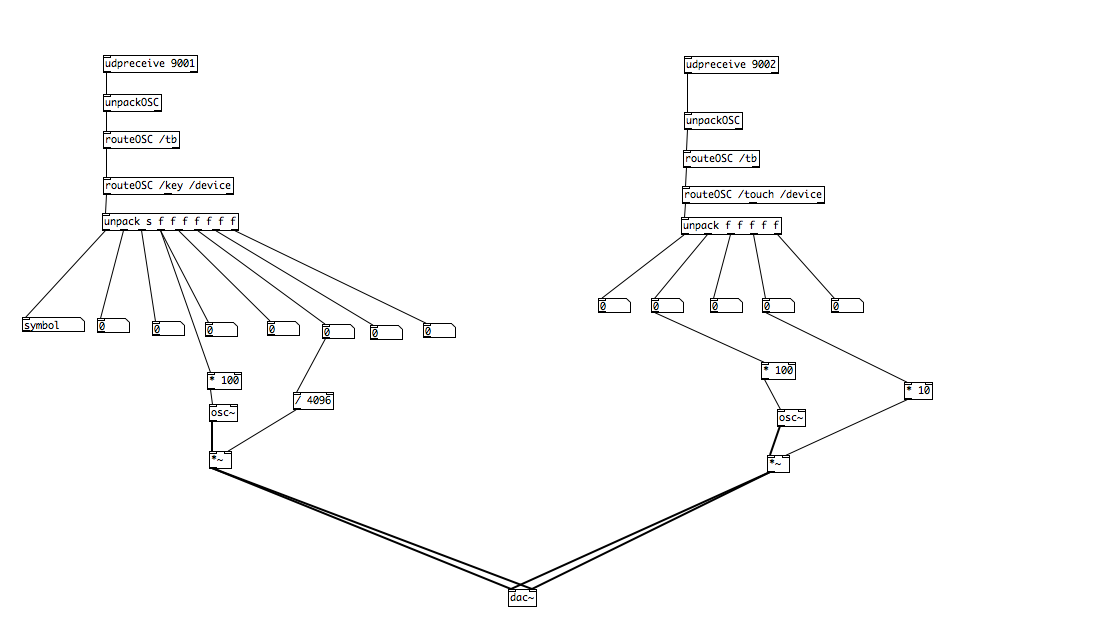
I dont print to the output, I route it to drive an oscillator (and for debugging purposes to num boxes)
Ive got an external audio interface, a saffire pro 14, and that seems to be working fine, and as mentioned, there is no evidence of cpu load... and the audio is glitch free... its just the messages not being processed quickly
as you can see the basic function (for testing) is to drive an oscillators frequency, and mix in another parameter to get the volume (gain)
a few notes:
- Ive tested without the num boxes etc, i.e. just the oscillator and the issue is the same.
- its the same with only one half i.e. one udpreceive 'tree' and its the same
unfortunately, you can't test as such without the relevant controller and application to send the messages.
I'll try netreceive... perhaps that will help.
EDIT: nope, netreceive has exactly the same issue.
EDIT: oops, noticed the 9002 tree, i went via the num boxes to oscillator/gain, but taking directly from the unpack, still has no change
 posted in technical issues
Envelope Curves
Exponential fades are not circles, but they do look a bit like ellipse quadrants. If that's not what you mean, you'll have to find a picture (or look here). If it is, here you go: Exponential curves on linear impulses (not dB) sound smooth and straight, because the ear translates takes a logarithm of them (as it does with frequencies) to become linear. This is called an exponential fade. By changing the base you can affect the sharpness of the fade.
Generally you want to avoid finding matches on a curve for your time & amplitude, so you'll stretch the exponential's known points to your start and end points and amplitude. Exponentials of all bases b go through the points (0,1) and (1,b), and we want them to go through (start, volstart) and (end, volend).
Crop the output by subtracting 1 from the whole function, so that b^time becomes b^time-1 (not b^(time-1) ), and those points become (0,0) and (1,b-1). Stretch the amplitude by dividing by b-1 and multiplying by volend-volstart, sending (1,b-1) to (1,1) then (1,volend-volstart). The function is now: (b^time-1)*(volend-volstart)/(b-1). Raise this clip to meet your desired amplitudes by adding volstart, so that the points are now (0,volend), (1,volend), and the function is (b^time-1)*(volend-volstart)/(b-1)+volstart.
All that's left now is stretching and clipping the input, which can be done a number of ways, but all entail turning start-end into 0-1. You can give this expression a time input from a [line] that ramps from 0 to 1, from start until end in ms. You could, of course, run that line through another function first, which still outputs from 0 to 1, and make a more complex envelope. You can bake the stretching and clipping into the expression by turning time into (time-start)/(end-start), so that as time runs from start to end, the function outputs as if running from 0 to 1.
 posted in technical issues
Low pass filter for smooth fade
@Maelstorm said:
I fairly recently was trying to make one of those smoothed-out sample-and-hold LFOs and discovered that [lop~] generates asymmetric curves: logarithmic going up and exponential going down.
Well, it's actually exponential both ways, but it's always exponentially decaying toward the destination value. So going up it's an inverted exponential decay.
But if you're considering something like an amplitude envelope, you may want the rising portions to be an exponential decay (most analog envelope generators work this way, moving to the next stage at a preset threshold). A DX7 has a true exponentially increasing attack (since it's a linear function passed through an exponential lookup table), but it sounds strange and sort of unmusical, like a sound played in reverse.
As suggested in the tutorials, quartic envelopes are a nice compromise. The curves are exponential-like, but they reach the destination values in a finite amount of time.
 posted in technical issues
Recording my Sig2pix adventures
Thanks.
Here it is. Kind of a messy patch: I use two screens. There are way too many oscillators. It sounds crazy because the block size is set up for visuals and ruins the audio. My favorite idea was using video effects in a feedback chain on the audio. So pix_convolve is messing with the oscillators.
I find that when the oscillators are very close to an exact multiple of the sample-rate divided by the block size (or something like that, idk), it looks & sounds cool. I have yet to try new waveforms with filters. I think that would be cool to modulate a filter on a square-wave that's tuned to the block-size.
http://www.pdpatchrepo.info/hurleur/oscillators_final_nopresets.pd
 posted in pixel#
Korg Monotron emulator
Basically you want to create an oscillator (bandlimited) then feed that through a resonant filter, then to your speakers.
Bear in mind lop~ isn't resonant, other people have created externals that are, or there is the moog~, although this will sound nothing like the monotron filter, from what I remember Korgs might be 12dB/octave (might be wrong!). Good luck in designing your own Analogue modeling filter, I tried and it was solid!
To replicate the monotron ribbon controller, it's probably simplest to control the frequency of the oscillator
create another oscillator (a simple sine wave), this will be your LFO. connect that up to either filter cutoff or amplitude
Amplitude would require you to multiply the output of your main oscillator by the output of LFO
Cutoff would mean multiplying the LFO output by The value you are inputting into your filter cutoff input.
You could incorporate a button switch so you could flick between them like the monotron
It is a very simple synth to emulate, I recommend reading this site to explain the basics of subtractive synthesis in PD , it also mentions bandlimited oscillators, which will stop them aliasing THIS IS VERY IMPORTANT!
http://en.flossmanuals.net/pure-data
A guy from this forum also wrote this site
http://obiwannabe.co.uk/html/music/6SS/six-simple-synthesisers.html
You will soon grow bored of replicating the monotron, and move into doing minimoog replications, and maybe even modular stuff.
I saw a video of someone who did a Swarmatron replication, very impressive. Wish I had that patch...
 posted in technical issues
Swept sine deconvolution
Bassik, there may be some confusion. This last patch chirp~test.pd is only a patch to test the qualities of the generated chirp itself.
I am kind of swallowed by details of the method. Instead of quickly producing a working IR measurement tool, I am now trying to refine the method, starting with refining the chirp itself. Last time I mentioned the sensitivity for parameter settings. Now I have found a systematic method to optimize a chirp. The formula is different from the regular ones as found in texts. This has lead to yet another chirp object [expochirp~] (yes it's exponential, not logarithmic, also see Farina's 2007 article).
The regular exponential chirp formula's make a chirp start at sine phase to avoid a step, but they do not care about the phase at the end of the function, therefore it may well end with a step and produce excessive ripple at the high spectrum end. This is traditionally relieved by windowing, or by manually cutting the chirp at the last zero-crossing as Farina suggests. My new formula computes the chirp in such a way that it will start and stop in sine phase. No need for windowing or cutting, and the ripples are minimized.
Still there will always remain ripples in a chirp's spectrum, and I am now trying to produce inversion-filters to clean up a system's measured IR. For the high spectrum end, this is fairly well possible. But in the low spectrum end, where it is more important, the ripple character of exponential chirps is such that conventional methods fail. I did find some solution but it's not without compromise. Therefore I am investigating alternative methods.
I am sorry that proceedings are slow now. But my hope is to contribute to a good quality tool in the end. I'll post details on the new chirp formula soon.
Katja
 posted in technical issues
Array logarithmic x-scale
I've also wondered about that, how logarithmic x-scales of spectra are done in other applications. But recently I had a peek into Hardoff's sound editor, and the answer is hidden there. He is copying samples from the signal buffer into the visual buffer at fractional speed.
The same could be done, but with exponentially increasing speed, to create a 'logarithmic' frequency scale. You will read some bin values more than once in the low frequencies, and skip bins in the high frequency range. If you read with [tabread4], this could still give a good representation. But to calculate the exact rate of the exponential function could be tricky. I have not tried it yet.
Katja
posted in technical issues
Send and receive global and local far down the rabbit hole + questions
Now I have some questions.
number 1
how do you get your last operation not to be calculated first?
I had made this intricate tuning calculation for a Karplus - Strong 12 string.
It's microtuneable to non octave tunings so in order to detune the second strings it has to be done on the fly. So every now and then the thing plays way out of tune.
I put prints in enough places so I could see what was going on.
Well final operation on calculating the frequency was getting calculated first. Or at least it was getting printed first. So I started tracing trigger bangs and floats all the way back to the first bang that started the calculation. That was crazy While making the thing I had followed the path very carefully down but since some operations depended on other operations to get done first the bangs split in multiple directions. Instead of trying to get more confused in the tangled mess I started replacing
- , [+ ], etc.. with [expr] which made it a lot easier to comprehend still sometimes the thing plays out of tune.
This leads to my next question. The Karplus-Strong patch I started with sets a [block~ 1] is it possible this small block size is causing some of the calculation to get interrupted.
If the things that need to be calculated are not done within one block does that screw things up?
I thought the control operations were only sent once per block anyways.
and is that so if you change the block size to anything other than 64?
And another question is it more processor intensive to use [expr] instead of
- , [+], etc..?
Can a moog like filter be done without writing c code? Where can I learn about designing ladder filters in pure data? I like all the ext moog filters I've heard I'm just wanting to keep my patches vanilla unless I write the external. Propellorhead's Thor Ladder filter does not sound like any of the moog filters I've heard in pure data. Maybe it has something to do with the frequency snapped to the harmonic series or something but I've done that with the pure data moog filters and don't get the same results. Maybe the Propellorheads are upsampling to do the filters.
Another weird thing is I made a bypass for my filters. So I had 6 voices, 6 oscillators per voice, 2 filters per voice so that is 36 oscillators and 12 filters running. I added a 3rd filter per voice and when they were bypassed my machine went up to 90% cpu usage and more. So I removed the 3rd filter. Still CPU usage would go up when the filters were bypassed so I added a switch to turn them off whenever they were bypassed that fixed the problem with that. I probably ought to switch the oscilators off when they are not in use as well so I can add more. Some of them are feedback oscilators and generate chaotic signals so I guess there need to be an option to leave them on.
Now the next question and that will do it for today.
how do you print your entire patch to a ghost script printer?
I tried scaling the page so I could see the patch on the screen and still only get part of the patch in the ps file.
How do I do modulation routing with a matrix and do it polyphonically?
I want anything that has an input to be able to be routed to anything with an output and be scaled along the way. My voices are allready huge and so I would like it all to be done from within the main patch. At what point does your patches get too big? oops.
 posted in technical issues