
Convert analog reading of a microphone back into sound
Hello, here's an update, this is where I am at:
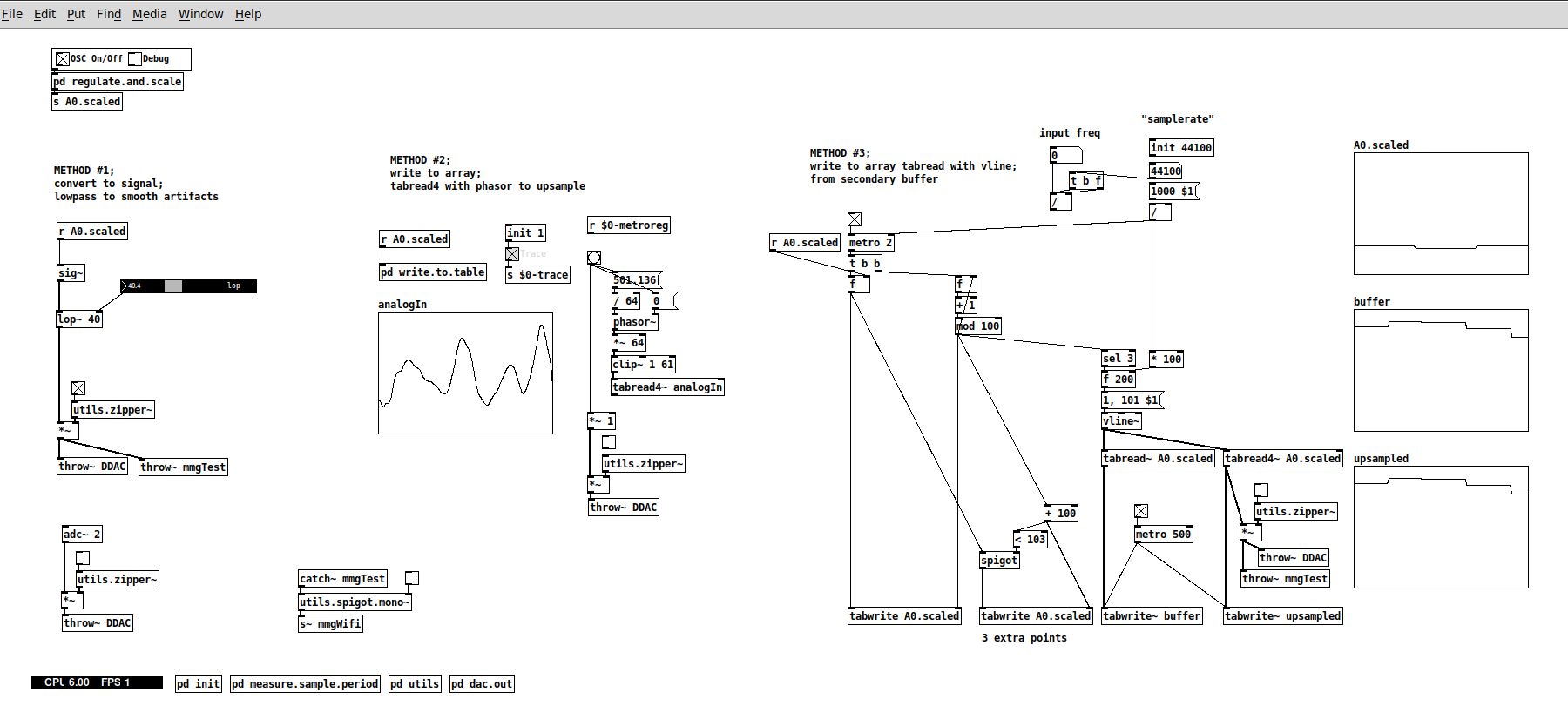
Method #1 with sig~ and lop~ @whale-av
- this works now quite well now. A lop~ at 40 actually hits a sweet spot for the kind of sounds I need to pick up with the mic. Not sure why though. The resulting output is still a bit "noisy", but works well with my patches for the standard XTH Sense, where I use the same mic, but wired. So, this is very good.
Method #2 with tabread4~ @jameslo
- I didn't manage to make it work merely because I didn't understood it fully, not because of the method per se, which looks sound. I didn't put too much work on this, since method #3 seems to be an extension of this, so I focused on the latter.
Method #3 with tabread4~ and vline~ @manuels
- This works well in my patch above, but strangely enough the upsampled signal still presents the steep steps. The output signal sounds as the output from sig~ from method #1. So here I may have missed something in the implementation? or perhaps is the lack of timestamp...
Updates on other solutions we discussed:
- timestamp: I did manage to get a timestamp using the millis() function, which I think should be enough for this use case. This simply counts ms passed from the moment the board has been switched on and attaches it to each reading
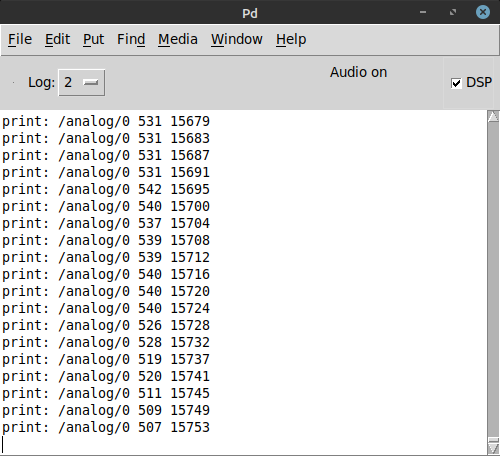
- Increasing the sampling rate on the arduino rp2040 with the microcontroller of the same name seems pretty unexplored (at least after one day of investigation on forums etc..). I need to look more into it. But considering what David pointed out about the brickwall at 689Hz, maybe this is not even an option here.
- FYI, on ARM microcontrollers it is possible to use prescalers, bypass analogRead and read analog data directly from the hardware using register calls at quite fast rates (some people managed to almost 40.000). But I chose the rp2040 for its dimensions, its wifi connectivity (and, partially, for the onboard machine learning features). So if anyone knows of another off-the-shelf board that uses ARM and has similar dimensions and connectivity, please point it to me
 I'll check too of course.
Next steps:
- as it stands, method #1 works well with my patches too and I could just lay back and test this further with my performance software. Especially since by applying the audio signal conditioning and processing I have in my software, the difference with the wired signal is not seriously noticeable and the wireless is even more responsive and less prone to artifacts
- BUT! I would really like to get the upsampling work since it is potentially the most technically sound solution. So I would like now to work more on this using vline~ with the timestamp. A pointer in that direction would be great, since admittedly arrays and tabreads are one of my weak spot in Pd.
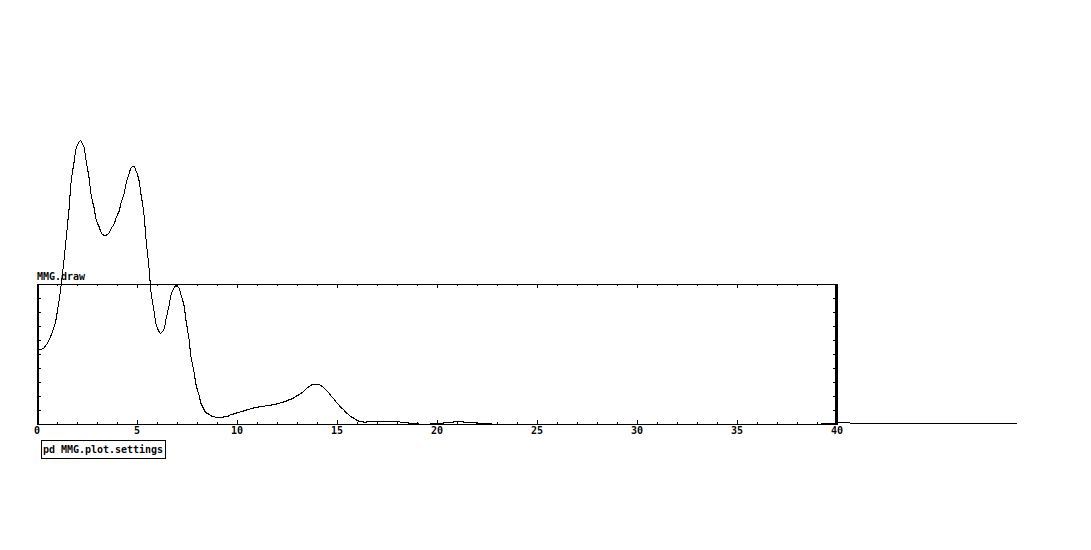
P.S. A clarification, before I stated 40Hz as the max. frequency I need to capture, but, to be precise, the range of muscle sounds (including heartbeat and blood flow) is between 1-25/30Hz, as you can see from this pic (a magnitude spectra of the output signal from lop~ capturing a forearm contraction)
 posted in technical issues
IanniX glissando
@atux @jameslo The error in the console is my fault.. in my post above.
I forgot that I had always used the curve number (ID) to route to a specific abstraction before the [unpack s f f f f f f]...... I think.... it was a long time ago...!
So after a [route curve/] the unpack should in fact be [unpack f s f f f f f f]
The message is.....
curve ID groupID x y z time y-position z-position
symbol "curve"
float curve number (ID)
symbol (group ID)
float (cursor) collision value X
float collision value Y
float collision value Z
float (time) collision X position
float collision Y position
float collision Z position
.... the "positions" are on the iannix graph..... so maybe for visuals.... and I think scalable.... see the inspector ... infos (not a typo)..... messages tab.
.... I assume that unless a group name has been assigned to a bunch of curves the groupID will be an empty symbol and so it doesn't print.
You can get [rawprint] from the "zexy" library and that might well reveal it.
The simplest way to differentiate between the two curves will be to make the bottom or top branch a new curve with a new ID...... say start and bottom branch id1 --- top branch id2
then you can
[route /curve]
|
[route 1 2]
with a couple of [unpack s f f f f f f]'s on the outlets as the ID has been removed from the list.
Then replicate your audio generating patch on the second outlet.
David.
 posted in I/O hardware diy
Controlling Pd from another programme
@Worik Not sure what you are looking for.....
If you want to open a patch from the command line you can open Pd and a patch with a batch file...... in windows it would look something like this....
"C:\Program Files (x86)\pd\bin\pd.com" -path C:\Users\David\Desktop\PDMusic\Minx -path C:\Program_Files_(x86)\pd\extra\readanysf~\ -r 44100 -asio -nomidi -audioindev 20 -audiooutdev 15 -inchannels 32 -outchannels 22 -audiobuf 2 -blocksize 64 -callback -nosleep -open Minx_Run.pd
exit`
which on my system opens Minx_run.Pd and tells Pd where to find it........ \PdMusic\Minx
It also sets a load of command line switches...... to set up audio for this very specific instance (useful!).
There will be similar methods in other os's.
When you want to close the patch (and Pd) you kill the Dos window that the batch file created.
Messages can be sent to Pd to close a specific patch..... but another patch will have to be open (probably the one receiving the message) or Pd will terminate.
It can be done from within the patch but its complicated........ https://forum.pdpatchrepo.info/topic/11710/closing-patches-without-pd-crashing-hopefully-in-an-elegant-way ...... and not easy.
If you want to keep Pd open and control from another program........ then as @seb-harmonik.ar describes........ but the menuclose message might crash Pd if another patch (any patch) is not open........ https://forum.pdpatchrepo.info/topic/4063/close-patch-window-command-object
Anyway, it is cleaner to use a second patch to receive your messages and close the desired patch.
David.
posted in technical issues
Is there a scheduler-queue external?
@ddw_music the issue was that we had to call insert with self:insert(value) instead of NewHeap:insert(value).
Usually in lua OOP the object has its metatable set to the class (table). When you call Newheap:insert(value) you call it with the class as the 1st value (which gets translated to "self" in the function body), rather than the object. because the object inherits from the class metatable, when you call self:insert(value) it instead uses self (the object) as the first value, and because the insert function isn't in the object itself it looks into its metatable, which is the class table. (and that is what we want)
But, I think in this case it might be good to separate the "Heap" code from the rest of the "pd class" code. Then your pd class can have a "private" member that stores the heap object and you can use all of the generic "heap class" functions on it. I also changed the comparison function to >, which will output lower values first (now that seems counterintuitive  ):
):
newheap.pd_lua
 posted in technical issues
Question about canvasses in abstractions
@dfkettle Please don't ask (because so far I have no idea..... it's a hack  )....... hmm.zip
It seems to stick, but might need [initbang] as even a [loadbang] + [delay] wil not automatically activate it.
David.
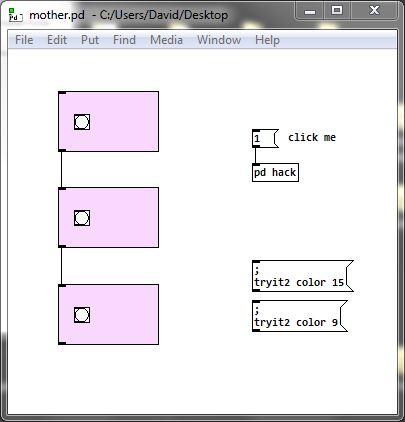
Hmm
 ??????????????????????????????????
posted in technical issues
Identifying an upward or downward trend of a stream of numbers?
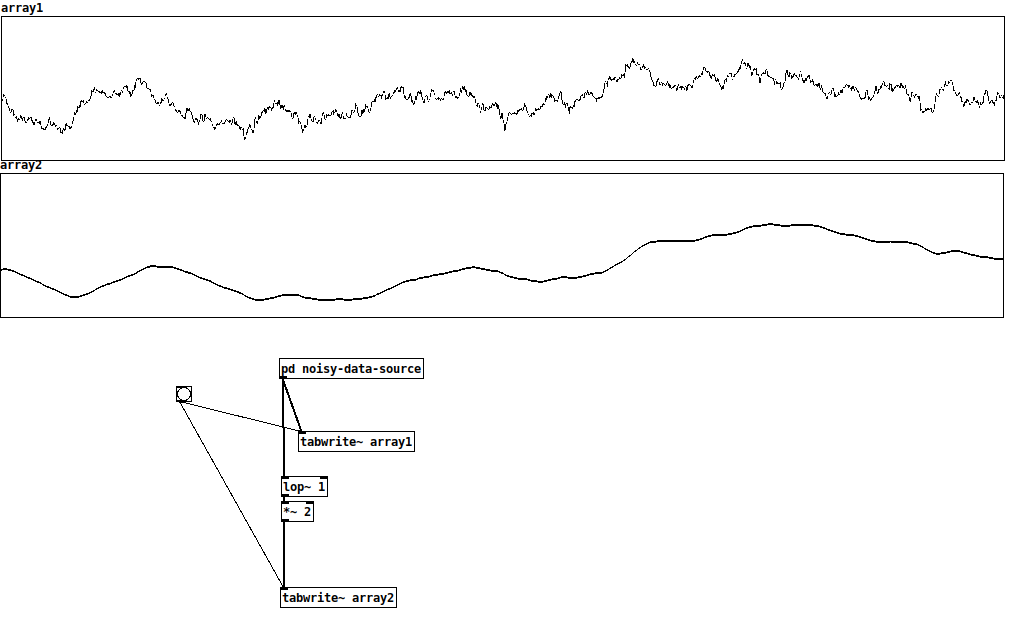
You will need something that calculates trend over various samples, as a single fluctuation downwards doesn't mean the entire trend is down. Consider this set: 2, 4, 5, 7, 6, 8, 9 - the trend is obviously rising but @Obineg 's raw solution will detect a falling trend from 7 to 6. I'd use a simple one pole low-pass filter on the data and measure inclination (like @Obineg suggests) on that instead. Illustrative example:
I take it your data is not an audio signal so you will need to implement the one pole low-pass algorithm in the control message domain. Using this formula: Y[n] = Y[n-1] + (X[n] - Y[n-1]) * T you can do something like this:
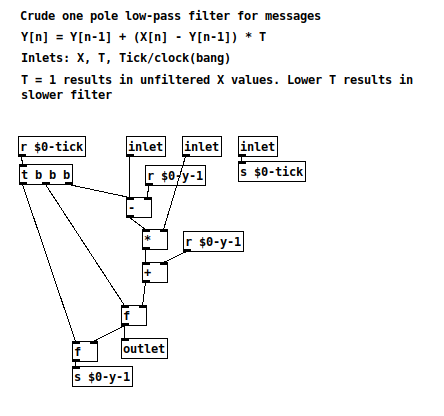
msgLP.pd - You need to feed it a periodical bang/clock on the 3rd inlet for anything to happen
Mess around with the T input (don't use values > 1 ) and use @Obineg 's method to measure whether the output of the filter is rising or falling...
 posted in technical issues
List Comparison
@buzzelljason Yes. Well. Everything sent by a control rate object is a message.
The messages can be floats or symbols or lists.
Lists are a list comprising floats or symbols or a mixture of the two.
Items (atoms) in a list are separated by spaces.
It gets complicated.
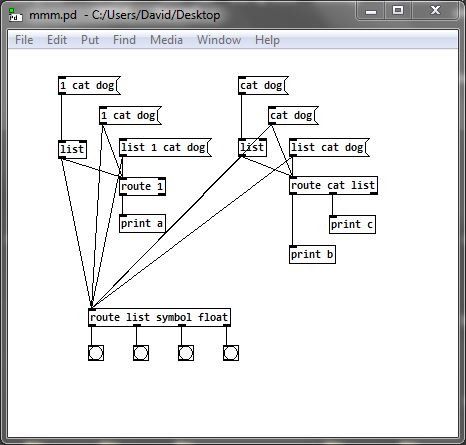
If the first atom in the list is a float then the "list" tag is automatically applied, and then is silently ignored and dropped as it passes through the next object (except for [route list symbol float].......)
If the first atom in the list is a symbol then that symbol becomes the tag.... the list header..... and the list can be routed by that tag. But if the list passes through a [list] object then "list" is added (prepended) as the header. That is why [list trim] is used almost everywhere after a [list] object...... to remove the header and then be able to [route] by the original tag (if it was a symbol).
HINT.. If you install the Zexy library then [rawprint] shows you whether an atom is a "tag", 'symbol' or float....
Trying to work with vanilla OSC objects can be just guesswork without [rawprint].
mmm.pd
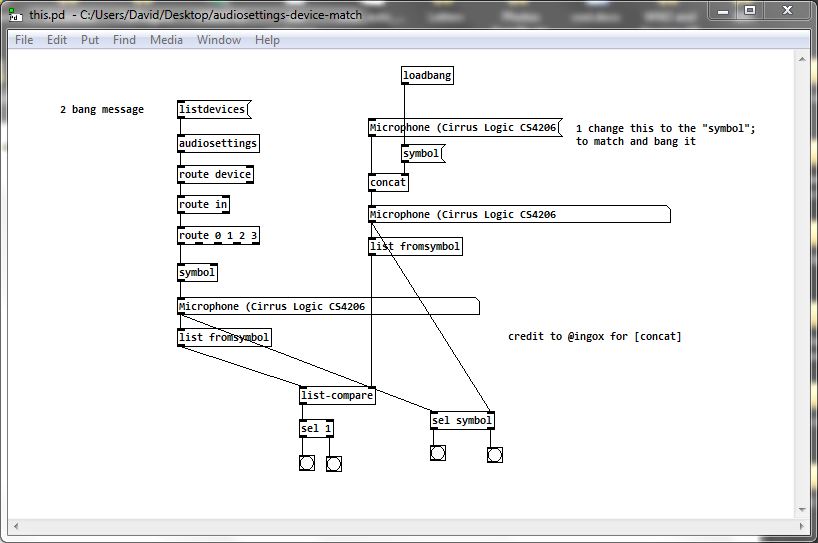
The messages arrive from [audiosettings] as a list which is a mixture of floats and symbols........ but the first atom is a symbol and there is no "list" tag.
[listdevices( returns a series of messages..... they are lists...... with the first atom "device"
That is why "device"....... a symbol.... and "0" or "1" can be routed. "1" could not be routed by [route 0 1] unless it is a float and "device" could not be routed by [route device] unless it is a symbol.
The device name is a symbol........ it can only be sent on in one hit because it is a symbol...... if it were a list then each part would be sent separately as a space normally "means" "next item".
But once it has passed through [route 0 1] it has lost its "symbol" tag. That can be put back by passing it through [symbol].
So the problem for [list-compare] is to create a symbol that is identical. Not easy as a message with component symbols will be treated as a list. Fortunately @ingox gave us a vanilla solution.... [concat].
And then of course to turn them both into lists for the comparison.
This will work........ this.zip
It can probably be simplified (and certainly @ingox will shortly post a more elegant solution....  ).
).
David.
posted in technical issues
Contribute to better Pd Documentation
As a Puredata teacher in a fine art school since 10years (and many workshops in China) the only solution for me to make pd "usable" by my students, was to distributed my own puredata version modified with translated help files from an "computer-scientist" to an "artist" point of view, and with many extra things.
@whale-av said:
Maybe adding a "Documentation" link to the console help menu would be a good first move....?
I agree, if only clickable link could be added to console.
The doc subfolder names are not enticing..... "3.audio.examples" really could be "3.digital.audio.tutorial" for example.
I don't think there is even a link to it in the "HTML Manual" which becomes "PD Documentation" when it is opened.
All very confusing though as the Pd.doc folder is mostly a patching tutorial that complements the Floss manual.
I agree, the documentation could a bit more explicit and well organised. I simply don't use it and added mine.
Finally, Here is an example of my pd version that I throw to students now to have a chance to keep them in the game:
-
I am using ceammc a lot, and added some objets and a simple theme:
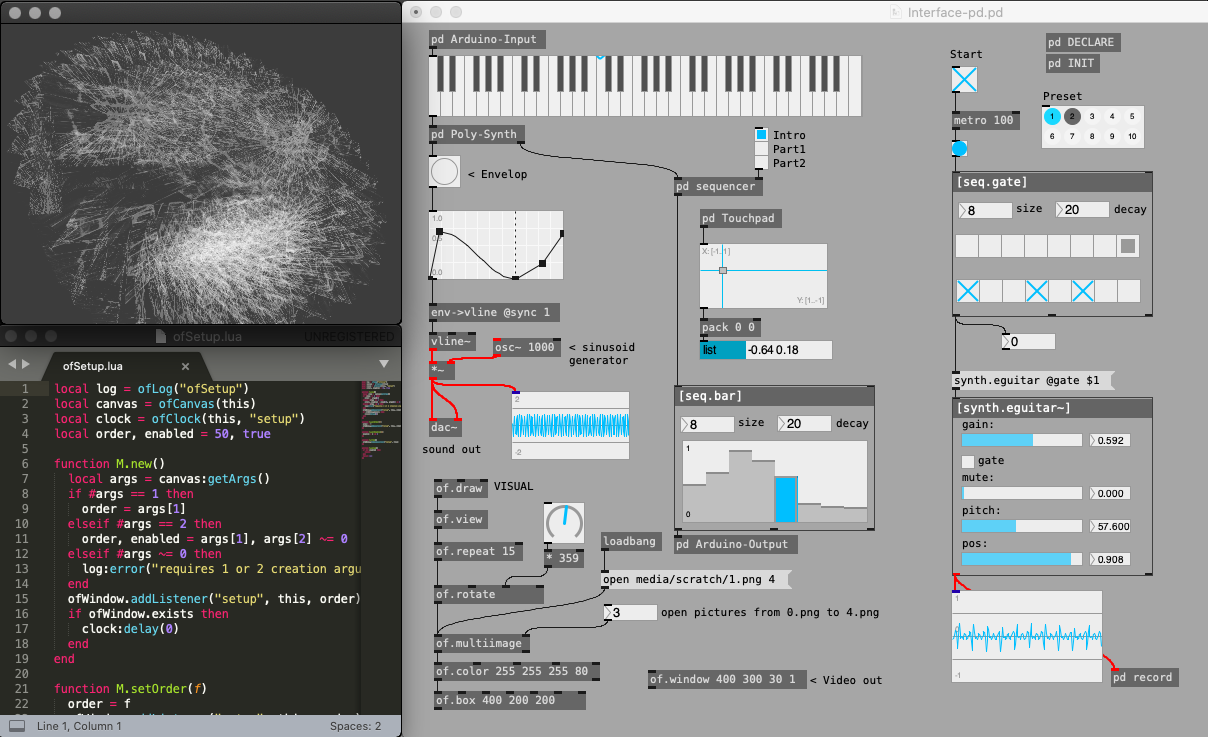
-
I added a template for every new patches and some personnal icons to ceammc bar:
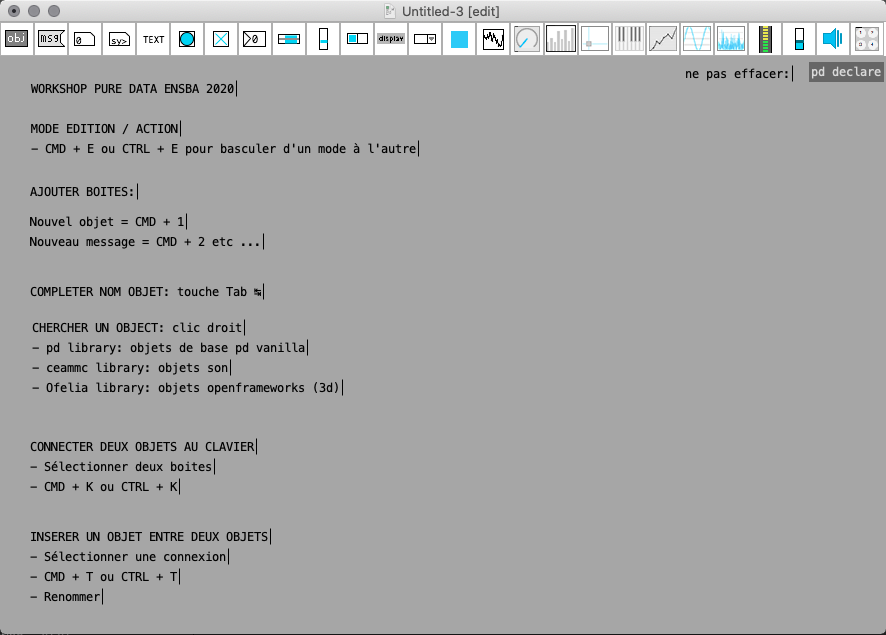
-
Here is my Intro-help.pd (accessible from any right clic in a patch)
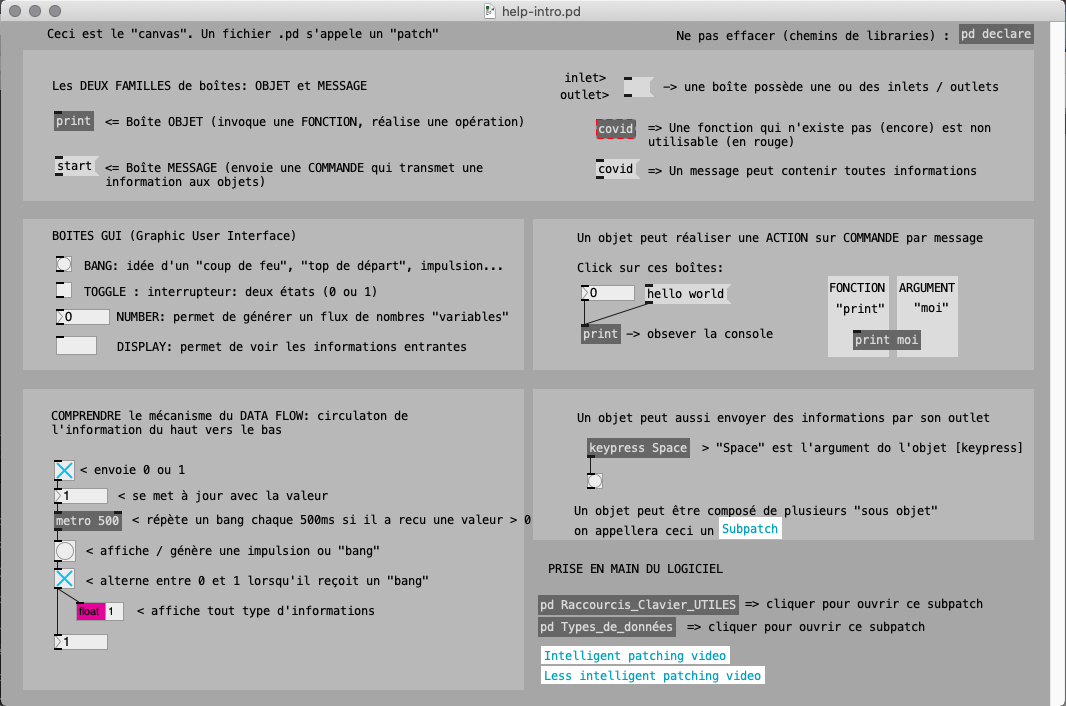
-
I added my own fast prototyping ofelia abstractions:
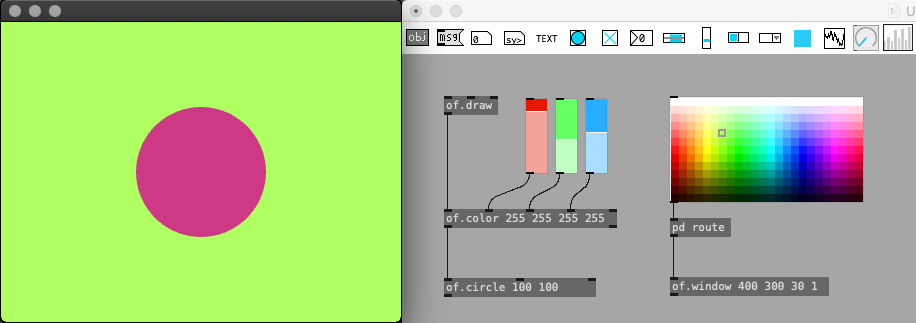
-
The right click show all the objects (also have auto-completion of course)
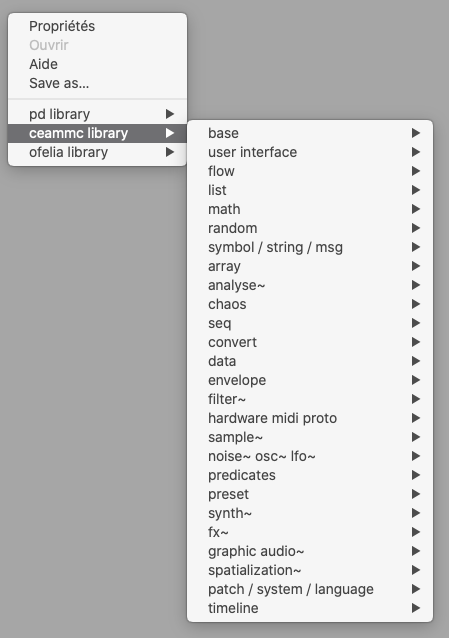
I think right-click on objects should propose "Online Reference" that lead to an online up-to-date documentation... or wiki.
 posted in tutorials
pdjs: JavaScript for PD
@mganss @jancsika Following some ideas from this thread, i made a simple wrapper for pdjs, with which you can write javascript code directly into objects. It is not very pretty and you have to use [] instead of {}, but it is some fun:
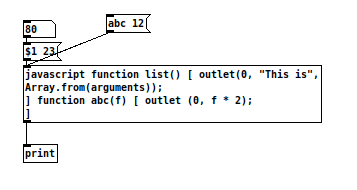
As the script file is rewritten and the code compiled each time the wrapper is called, this could also work as an extension, where javascript.pd and script are within an extension folder and can be called from everywhere. 
This is just experimental and an early idea. No idea if this could go somewhere.
 posted in extra~
Question about Pure Data and decoding a Dx7 sysex patch file....
Hey Seb!
I appreciate the feedback
The routing I am not so concerned about, I already made a nice table based preset system, following pretty strict rules for send/recives for parameter values. So in theory I "just" need to get the data into a table. That side of it I am not so concerned about, I am sure I will find a way.
For me it's more the decoding of the sysex string that I need to research and think a lot about. It's a bit more complicated than the sysex I used for Blofeld.
The 32 voice dump confuses me a bit. I mean most single part(not multitimbral) synths has the same parameter settings for all voices, so I think I can probably do with just decoding 1 voice and send that data to all 16 voices of the synth? The only reason I see one would need to send different data to each voice is if the synth is multitimbral and you can use for example voice 1-8 for part 1, 9-16 for part 2, 17-24 for part 3, 24-32 for part 4. As an example....... Then you would need to set different values for the different voices. I have no plan to make it multitimbral, as it's already pretty heavy on the cpu. Or am I misunderstanding what they mean with voices here?
Blofeld:
What I did for Blofeld was to make an editor, so I can control the synth from Pure Data. Blofeld only has 4 knobs, and 100's of parameters for each part.... And there are 16 parts... So thousand + parameters and only 4 knobs....... You get the idea
It's bit of a nightmare of menu diving, so just wanted to make something a bit more easy editable .
First I simply recorded every single sysex parameter of Blofeld(100's) into Pure data, replaced the parameter value in the parameter value and the channel in the sysex string message with a variable($1+$2), so I can send the data back to Blofeld. I got all parameters working via sysex, but one issue is, that when I change sound/preset in the Pure Data, it sends ALL parameters individually to Blofeld.... Again 100's of parameters sends at once and it does sometimes make Blofeld crash. Still needs a bit of work to be solid and I think learning how to do this decoding/coding of a sysex string can help me get the Blofeld editor working properly too.
I tried several editors for Blofeld, even paid ones and none of them actually works fully they all have different bugs in the parameter assignments or some of them only let's you edit Blofeld in single mode not in multitimbral mode. But good thingis that I actually got ALL parameters working, which is a good start. I just need to find out how to manage the data properly and send it to Blofeld in a manner that does not crash Blofeld, maybe using some smarter approach to sysex.
But anyway, here are some snapshots for the Blofeld editor:
Image of the editor as it is now. Blofeld has is 16 part multitimbral, you chose which part to edit with the top selector:
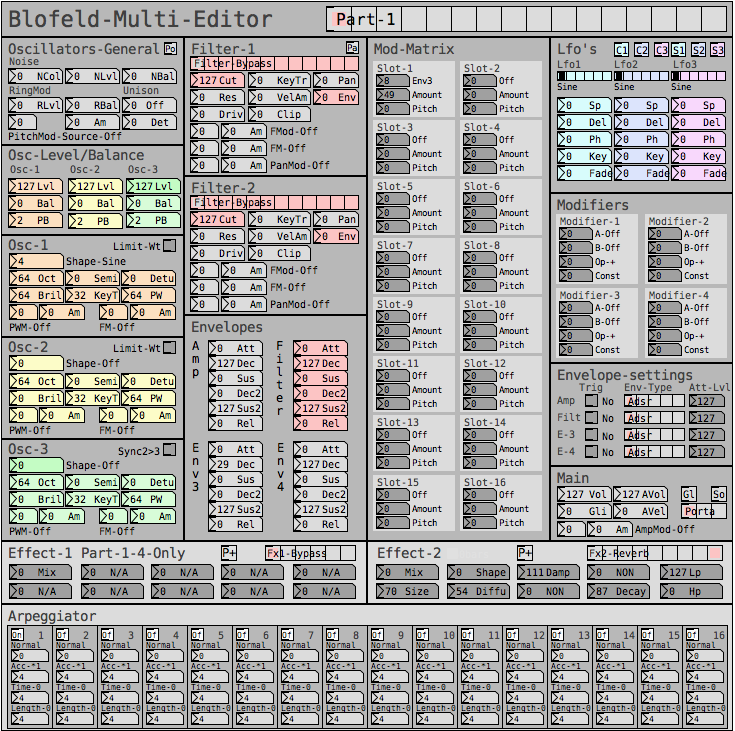
Here is how I send a single sysex parameter to Blofeld:
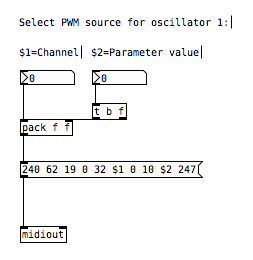
If I want to request a sysex dump of the current selected sound of Blofeld(sound dump) I can do this:
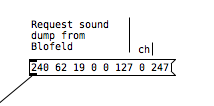
I can then send the sound dump to Blofeld at any times to recall the stored preset. For the sound dump, there are the rules I follow:
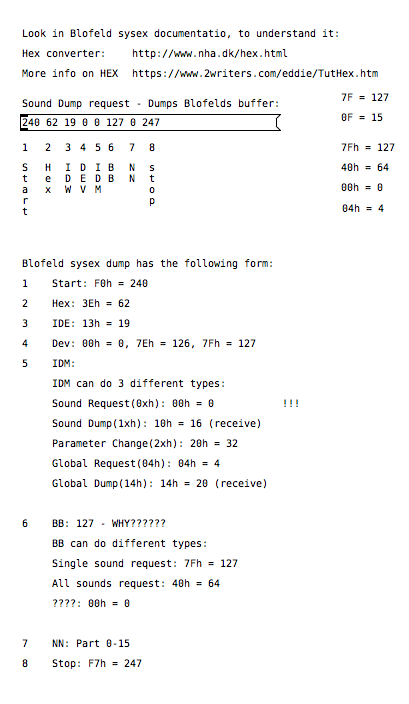
For the parameters it was pretty easy, I could just record one into PD and then replace the parameter and channel values with $1 & $2.
For sound dumps I had to learn a bit more, cause I couldn't just record the dump and replace values, I actually had to understand what I was doing. When you do a sysex sound dump from the Blofeld, it does not actually send back the sysex string to request the sound dump, it only sends the actual sound dump.
I am not really a programmer, so it took a while understanding it. Not saying i fully understand everything but parameters are working, hehe
So making something in Lua would be a big task, as I don't know Lua at all. I know some C++, from coding Axoloti objects and VCV rack modules, but yeah. It's a hobby/fun thing I think i would prefer to keep it all in Pure Data, as I know Pure Data decently.
So I do see this as a long term project, I need to do it in small steps at a time, learn things step by step.
I do appreciate the feedback a lot and it made me think a bit about some things I can try out. So thanks
 posted in technical issues