
Cyclone library stopped suddenly loading (PD Vanilla/Windows 10)
@LiamG @ilpoj
As I suspected, the startup preferences are stored in the registry.
It is likely that windows 10, pursuing the same lockdown techniques as OSX, is not allowing Pd to write to the registry. Google might get you further than this forum.
Everything..... paths, startup options, libraries to be loaded, audio and midi options are stored there.
If you cannot load libraries, or save your settings then that is because you cannot write to the registry.... it's part of the same problem.
I can post my settings that you could paste into your registry (and then modify) if you wish.... obviously at your own risk!........ but first.....
You can right-click the folders in the registry and change permissions.... which should be a zero risk.
 Open Regedit and find the key folders listed below and check their permissions.....
You might need to open regedit with admin permissions.
You could also try opening Pd with admin permissions and trying to install cyclone and set paths, but I think it is wish85.exe that accesses the registry.
Vanilla and Extended preferences are stored separately in the following locations (Windows 7)....
HKEY_CLASSES_ROOT\VirtualStore\MACHINE\SOFTWARE\Wow6432Node\Pd
HKEY_CLASSES_ROOT\VirtualStore\MACHINE\SOFTWARE\Wow6432Node\Pd-extended
HKEY_CURRENT_USER\Software\Classes\VirtualStore\MACHINE\SOFTWARE\Wow6432Node\Pd
HKEY_CURRENT_USER\Software\Classes\VirtualStore\MACHINE\SOFTWARE\Wow6432Node\Pd-extended
This one twice...... probably last known good, and?
HKEY_USERS..."long string" ... Software\Classes\VirtualStore\MACHINE\SOFTWARE\Wow6432Node\Pd(and Pd-extended)
The "long string" will be different to mine on your machine.
@LiamG The garbled paths can be corrected and saved again....... which usually solves the problem.
That seems to be particular to Vanilla.
David.
 posted in technical issues
MobMuPlat NUMPAD "template" (as .json + .pd abstraction) for direct and precise entry of #'s into MMP
Stemming from a different project, I've made a MobMuPlat (MMP) NUMPAD "template" so that numbers may be entered directy (and more Precisely) into MMP instead of selected from siders, knobs, or other controls (which  apparently pd can do by just clicking a number field, typing in the number, and pressing ENTER (Thanks, again, @LiamG)
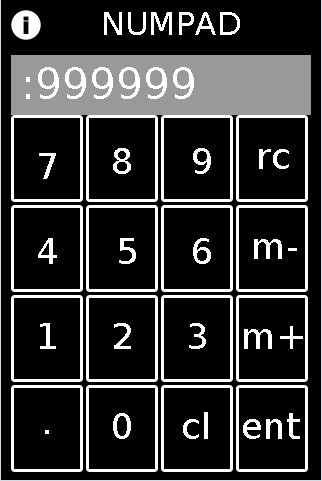
FEATURES:
Integers and Decimals from 1e-8 to 999999;
m+,m-,rcl: for storing (m+), removing stored number (m-) and recalling numbers (rcl)
cl:clear (but no backspace)
HOW-TO:
To test: in the MMP editor open the "mmp_numpad_template.mmp" file and experiment. (note: it will not start entering decimals until after you click "." and Then the next number). It is associated to the "abs_mmp_numpad_test.pd" which has the template embedded as an abstraction in it. It also has a slider on the second page, to test routing the ENTERed number to different "locations".
To implement:
First embed "abs_mmp_numpad_template.pd" as an abstraction in your MMP's .pd file. It has one outlet: the current value after the NUMPAD's ENTer is clicked and will receive all control signals coming from the NUMPAD.
Next, with a text-editor, open the "numpad-codeblock.jsn" file (or copy it from the code block below);
VERY IMPORTANT!!!: make a backup copy of your own mmp file before doing this.
In the text-editor, open "as-text" your .mmp file (or to experiment, the "pasteJSNtest.mmp" file which I have provided);
Past the numpad_template.jsn codeblock (from the file or the codeblock below), in between the mmp 'gui' brackets, as shown here:
{"backgroundColor":[0.5019608,0.5019608,0.5019608,1.0],"pageCount":1,"port":54321,"isPageScrollShortEnd":false,"startPageIndex":0,"canvasType":"widePhone","gui":[],"isOrientationLandscape":false,"version":1.64}
Once you have pasted it in, save your file, and open it in the MMP Editor.
The control and associated labels will be on the first page. You can move them, resize, etc. as you wish. And no matter where you put it (given its precise field names the entered value will get sent to the "abs_mmp_numpad_template" abstraction.
Sounds like a lot of work. But once you get the hang of it. I think it's well worth the effort: you will be able to have exact control over Any mmp value.
numpad-codeblock.jsn
{"mode":1,"highlightColor":[1.0,0.0,0.0,1.0],"borderThickness":3,"address":"/numgrid/0","color":[1.0,1.0,1.0,1.0],"dim":[4,4],"class":"MMPGrid","cellPadding":2,"frame":[10.0,115.0,300.0,360.0]},{"highlightColor":[1.0,0.0,0.0,1.0],"address":"/myLabel","textSize":36,"color":[1.0,1.0,1.0,1.0],"androidFont":"Roboto-Regular","textFontFamily":"Default","text":"cl","textFont":"","class":"MMPLabel","frame":[175.0,405.0,50.0,45.0]},{"highlightColor":[1.0,0.0,0.0,1.0],"address":"/myLabel","textSize":36,"color":[1.0,1.0,1.0,1.0],"androidFont":"Roboto-Regular","textFontFamily":"Default","text":".","textFont":"","class":"MMPLabel","frame":[35.0,400.0,40.0,50.0]},{"highlightColor":[1.0,0.0,0.0,1.0],"address":"/myLabel","textSize":36,"color":[1.0,1.0,1.0,1.0],"androidFont":"Roboto-Regular","textFontFamily":"Default","text":"ent","textFont":"","class":"MMPLabel","frame":[235.0,405.0,75.0,45.0]},{"highlightColor":[1.0,0.0,0.0,1.0],"address":"/myLabel","textSize":36,"color":[1.0,1.0,1.0,1.0],"androidFont":"Roboto-Regular","textFontFamily":"Default","text":"m-","textFont":"","class":"MMPLabel","frame":[245.0,225.0,60.0,45.0]},{"highlightColor":[1.0,0.0,0.0,1.0],"address":"/myLabel","textSize":36,"color":[1.0,1.0,1.0,1.0],"androidFont":"Roboto-Regular","textFontFamily":"Default","text":"m+","textFont":"","class":"MMPLabel","frame":[235.0,315.0,75.0,50.0]},{"highlightColor":[1.0,0.0,0.0,1.0],"address":"/myLabel","textSize":36,"color":[1.0,1.0,1.0,1.0],"androidFont":"Roboto-Regular","textFontFamily":"Default","text":"1","textFont":"","class":"MMPLabel","frame":[30.0,315.0,40.0,50.0]},{"highlightColor":[1.0,0.0,0.0,1.0],"address":"/myLabel","textSize":36,"color":[1.0,1.0,1.0,1.0],"androidFont":"Roboto-Regular","textFontFamily":"Default","text":"2","textFont":"","class":"MMPLabel","frame":[105.0,315.0,40.0,50.0]},{"highlightColor":[1.0,0.0,0.0,1.0],"address":"/myLabel","textSize":36,"color":[1.0,1.0,1.0,1.0],"androidFont":"Roboto-Regular","textFontFamily":"Default","text":"3","textFont":"","class":"MMPLabel","frame":[180.0,315.0,40.0,50.0]},{"highlightColor":[1.0,0.0,0.0,1.0],"address":"/myLabel","textSize":36,"color":[1.0,1.0,1.0,1.0],"androidFont":"Roboto-Regular","textFontFamily":"Default","text":"4","textFont":"","class":"MMPLabel","frame":[30.0,230.0,40.0,50.0]},{"highlightColor":[1.0,0.0,0.0,1.0],"address":"/myLabel","textSize":36,"color":[1.0,1.0,1.0,1.0],"androidFont":"Roboto-Regular","textFontFamily":"Default","text":"5","textFont":"","class":"MMPLabel","frame":[110.0,230.0,40.0,50.0]},{"highlightColor":[1.0,0.0,0.0,1.0],"address":"/myLabel","textSize":36,"color":[1.0,1.0,1.0,1.0],"androidFont":"Roboto-Regular","textFontFamily":"Default","text":"6","textFont":"","class":"MMPLabel","frame":[185.0,230.0,40.0,45.0]},{"highlightColor":[1.0,0.0,0.0,1.0],"address":"/myLabel","textSize":36,"color":[1.0,1.0,1.0,1.0],"androidFont":"Roboto-Regular","textFontFamily":"Default","text":"7","textFont":"","class":"MMPLabel","frame":[30.0,145.0,40.0,40.0]},{"highlightColor":[1.0,0.0,0.0,1.0],"address":"/myLabel","textSize":36,"color":[1.0,1.0,1.0,1.0],"androidFont":"Roboto-Regular","textFontFamily":"Default","text":"9","textFont":"","class":"MMPLabel","frame":[185.0,140.0,40.0,50.0]},{"highlightColor":[1.0,0.0,0.0,1.0],"address":"/myPanel","color":[0.6,0.6,0.6,1.0],"passTouches":false,"class":"MMPPanel","frame":[10.0,55.0,300.0,60.0]},{"highlightColor":[1.0,0.0,0.0,1.0],"address":"/numlabel/0","textSize":42,"color":[1.0,1.0,1.0,1.0],"androidFont":"Roboto-Regular","textFontFamily":"Default","text":":256 ","textFont":"","class":"MMPLabel","frame":[15.0,60.0,290.0,55.0]},{"highlightColor":[1.0,0.0,0.0,1.0],"address":"/myLabel","textSize":36,"color":[1.0,1.0,1.0,1.0],"androidFont":"Roboto-Regular","textFontFamily":"Default","text":"0","textFont":"","class":"MMPLabel","frame":[105.0,405.0,40.0,50.0]},{"highlightColor":[1.0,0.0,0.0,1.0],"address":"/myLabel","textSize":36,"color":[1.0,1.0,1.0,1.0],"androidFont":"Roboto-Regular","textFontFamily":"Default","text":"8","textFont":"","class":"MMPLabel","frame":[105.0,140.0,40.0,50.0]},{"highlightColor":[1.0,0.0,0.0,1.0],"address":"/myLabel","textSize":36,"color":[1.0,1.0,1.0,1.0],"androidFont":"Roboto-Regular","textFontFamily":"Default","text":"rc","textFont":"","class":"MMPLabel","frame":[250.0,135.0,50.0,50.0]}
Hope this may be of use to you.
Enjoy. And as a side comment: MMP is by far the fastest development environment I have ever worked in and is excellent as a ProtoTyper (tho admittedly my experience is limited). It works GREAT as an OSC-Controller, too. Daniel has done us all a great service by building it. Additionally kudos, to the PdDroidParty and libPD developers upon whose backbone it is built.
Many Happy Returns,
Scott
 posted in libpd / webpd
Vanilla struct multislider with jump on click and drag
Hi, after month of research and with the help of many, here is a vanilla multislider that supports jump on click and dragging: 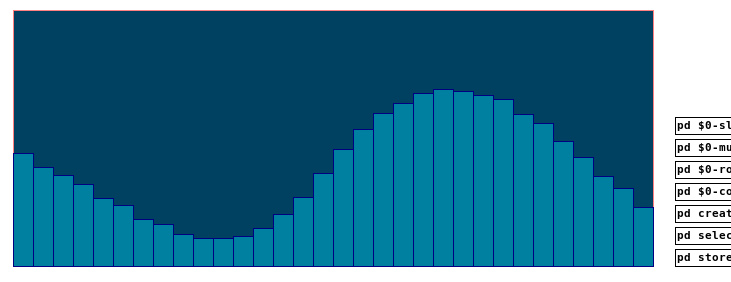
multislider.pd (updated)
@emviveros's post gave the hint: A click can actually go to more than one struct, so i created rows and columns to get the click. From there the slider is set. The idea was to click on it again via click message to drag the sliders. But somehow it is not even necessary. It just does it.
Many thanks to @Balwyn, @whale-av and especially to @Jona, whose idea it was and whom i worked with on the problem from the beginning to the end.
The method still has some limitations and the patch some unresolved issues.
Anyhow, i think it works great.  Enjoy and have fun with it!
 posted in patch~
MMPonBoardEditorTemplate.mmp for creation of MobMuPlat files directly on the handheld (android only)
MMPonBoardEditorTemplate.mmp for creation of MobMuPlat files directly on the handheld (android only)
MMPonBoardEditorTemplate
by svanya
INFO: make copies of this template to use as the starting point for your created .mmp files.
This template is designed to expedite the creation of simple(!) MobMuPlat files on-the-go with only the use of the handheld (i.e. does not require the Java editor).
There are three sections to this document:
the templates (in this commented section)
the mmp header just below this section
the "ENTRIES SECTION"
and
the mmp footer (which closes the .json file).
To use the template:
Open this file in a handheld text-editor (you may need to rename it, ex. adding ".txt" (no quotes) to the end of its file name to associate it to the text-editor and NOT MobMuPlat).
Copy one of the sections from this Templates Section (not including its label and the label colon and paste it into the Entries Section below and for each template you have added more than 1, add a comma after each template except the last one.
The arrangment on the screen can then be edited (in that same text editor) by amending the "frame" section of each Entry according to the following format:
"frame":[left,top,width,height]
(on the JAVA editor the screen is scaled 320px wide by 480px high)
and
Re-open the .mmp file inside MobMuPlat (renaming it back to .mmp as necessary).
Enjoy! And Good Luck! Just post any comments or help you may need here and I will try and get to them as soon as I am able.
Ciao for Now. Peace,
svanya
for those interested here is the code:
/*
MMPonBoardEditorTemplate.mmp for creation of MobMuPlat files directly on the handheld (android only)

MMPonBoardEditorTemplate
by svanya

INFO: make copies of this template to use as the starting point for your created .mmp files.

This template is designed to expedite the creation of simple(!) MobMuPlat files on-the-go with only the use of the handheld (i.e. does not require the Java editor).

There are three sections to this document:
    the templates (in this commented section)
    the mmp header just below this section
    the "ENTRIES SECTION"
and
    the mmp footer (which closes the .json file).

To use the template:

Open this file in a handheld text-editor (you may need to rename it, ex. adding ".txt" (no quotes) to the end of its file name to associate it to the text-editor and NOT MobMuPlat).

Copy one of the sections from this Templates Section (not including its label and the label colon and paste it into the Entries Section below and for each template you have added more than 1, add a comma after each template except the last one.

The arrangment on the screen can then be edited (in that same text editor) by amending the "frame" section of each Entry according to the following format:

 "frame":[left,top,width,height]

(on the JAVA editor the screen is scaled 320px wide by 480px high)

and

Re-open the .mmp file inside MobMuPlat (renaming it back to .mmp as necessary).

TEMPLATES:

MMPLabel:

{"highlightColor":[1.0,0.0,0.0,1.0],"address":"/label/0","textSize":16,"color":[1.0,1.0,1.0,1.0],"androidFont":"Roboto-Bold","textFontFamily":"Default","text":"label","textFont":"","class":"MMPLabel","frame":[150.0,10.0,100.0,40.0]}

MMPButton:

{"highlightColor":[1.0,0.0,0.0,1.0],"address":"/button/0","color":[1.0,1.0,1.0,1.0],"class":"MMPButton","frame":[10.0,70.0,100.0,40.0]}

MMPToggle:

{"highlightColor":[1.0,0.0,0.0,1.0],"borderThickness":4,"address":"/toggle/0","color":[1.0,1.0,1.0,1.0],"class":"MMPToggle","frame":[10.0,130.0,100.0,40.0]}

vSlider:

{"highlightColor":[1.0,0.0,0.0,1.0],"address":"/vSlider/0","color":[1.0,1.0,1.0,1.0],"range":2,"class":"MMPSlider","isHorizontal":false,"frame":[10.0,190.0,100.0,40.0]}

hSlider:

{"highlightColor":[1.0,0.0,0.0,1.0],"address":"/hSlider/0","color":[1.0,1.0,1.0,1.0],"range":2,"class":"MMPSlider","isHorizontal":true,"frame":[10.0,250.0,100.0,40.0]}

MMPKnob:

{"highlightColor":[1.0,0.0,0.0,1.0],"address":"/knob/0","color":[1.0,1.0,1.0,1.0],"indicatorColor":[1.0,1.0,1.0,1.0],"range":2,"class":"MMPKnob","frame":[10.0,300.0,100.0,100.0]}

MMPXYSlider:

{"highlightColor":[1.0,0.0,0.0,1.0],"address":"/xyslider/0","color":[1.0,1.0,1.0,1.0],"class":"MMPXYSlider","frame":[10.0,420.0,100.0,40.0]}

MMPGrid:

{"mode":0,"highlightColor":[1.0,0.0,0.0,1.0],"borderThickness":3,"address":"/grid/0","color":[1.0,1.0,1.0,1.0],"dim":[4,3],"class":"MMPGrid","cellPadding":2,"frame":[150.0,70.0,100.0,40.0]}

MMPMultiSlider:

{"highlightColor":[1.0,0.0,0.0,1.0],"address":"/multislider/0","color":[1.0,1.0,1.0,1.0],"range":8,"outputMode":0,"class":"MMPMultiSlider","frame":[150.0,130.0,100.0,40.0]}

MMPLCD:

{"highlightColor":[1.0,0.0,0.0,1.0],"address":"/lcd/0","color":[1.0,1.0,1.0,1.0],"class":"MMPLCD","frame":[150.0,190.0,100.0,40.0]}

MMPMultiTouch:

{"highlightColor":[1.0,0.0,0.0,1.0],"address":"/multitouch/0","color":[1.0,1.0,1.0,1.0],"class":"MMPMultiTouch","frame":[150.0,250.0,100.0,40.0]}

MMPTable:

{"mode":0,"highlightColor":[1.0,0.0,0.0,1.0],"address":"/table/0","color":[1.0,1.0,1.0,1.0],"selectionColor":[1.0,1.0,1.0,0.5019608],"displayRangeLo":-1.0,"displayRangeHi":1.0,"class":"MMPTable","displayMode":0,"frame":[150.0,310.0,100.0,40.0]}

MMPPanel:

{"highlightColor":[1.0,0.0,0.0,1.0],"address":"/panel/0","color":[1.0,1.0,1.0,1.0],"passTouches":false,"class":"MMPPanel","frame":[150.0,370.0,100.0,40.0]}

THE ACTUAL MMP FILE FOLLOWS THIS
*/

{"pdFile":"osc_controller_mmp.pd","backgroundColor":[0.0,0.0,0.0,1.0],"pageCount":1,"port":54321,"isPageScrollShortEnd":false,"startPageIndex":0,"canvasType":"widePhone","gui":[

/*
ENTRIES SECTION: entries go below here and above the comment below
*/


/*
END: ENTRIES SECTION
The mmp footer is below.
*/


],"isOrientationLandscape":false,"version":1.64}
.MOV/.MP4 glitcher
Hi,
I have built a pd abstraction that glitches .MOV/.MP4 files. This is the result of a long process that involved the study and understanding of the way .MOV files work and their atom structure. Having learned a lot while developping my jpeg and mp3 glitchers, I have been willing to transpose this knowledge to the video realm. To make a long story short, my abstraction locates the mdat atom of the file, reads its length and glitches it in a user-controlable way, while leaving the rest of the filestructure untouched, allowing various degrees of glitchiness with very few unreadable files.
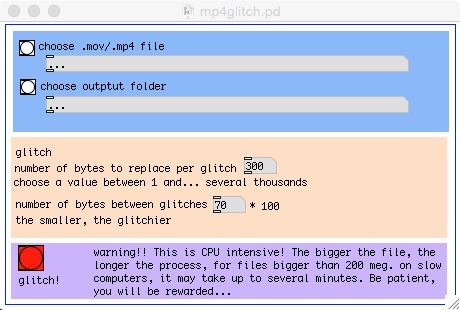
Of course, the bigger the files, he longer the processing time. I have able to glitch a 250 meg MP4 (40 minutes of video) in a bout 1 minute on a macbook pro running under OS 10.10 with the latest stable version of PD extended. On slower computers, processing may take up to 5/6 minutes. Also note that results will vary according to the codec used for compression. I have been able to get good results with H264, but they should all work. As usual with glitch, results will also vary according to the player you use. I personnaly prefer VLC . Some files may appear broken on some players and play just fine on others... Usually, if a file breaks in the process, just tweak the settings a bit to get less glitched file, it should work eventually. This is particulary thrue with small files.
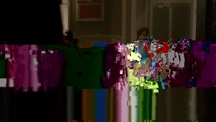
Here's a bunch of stills I took from one processed video:






Here's the pd extend abstraction:
mp4glitcher.pd
It's a graph on parent abstraction, so the idea is to open it like an object in a blank canvas.
And here's the standalone version for mac:
https://1drv.ms/u/s!AjNgShvVLV0XikkivHwWok_tpbYQ
Your comments are welcome!
 posted in abstract~
Compiling externals on OSX
Hi, I tried Icoon's and Enrico's methodes but it doesn't work.
I copied the code from Johannes (helloworld) in a new C file in XCode. Then I did what enrico explains ; but when I type "make", the terminal answers a lot of errors. I probably forgot something, but what?
cc -arch i386 -arch ppc -DPD -O2 -Wall -W -Wshadow -Wstrict-prototypes -Wno-unused -Wno-parentheses -Wno-switch -I../../src -o helloworld.o -c helloworld.c
helloworld.c:11:19: error: m_pd.h: No such file or directory
helloworld.c:12: error: syntax error before ‘*’ token
helloworld.c:12: warning: type defaults to ‘int’ in declaration of ‘helloworld_class’
helloworld.c:12: warning: data definition has no type or storage class
helloworld.c:14: error: syntax error before ‘t_object’
helloworld.c:14: warning: no semicolon at end of struct or union
helloworld.c:15: warning: type defaults to ‘int’ in declaration of ‘t_helloworld’
helloworld.c:15: warning: data definition has no type or storage class
helloworld.c:16: error: syntax error before ‘*’ token
helloworld.c:17: warning: function declaration isn’t a prototype
helloworld.c: In function ‘helloworld_bang’:
helloworld.c:18: warning: implicit declaration of function ‘post’
helloworld.c:11:19: error: m_pd.h: No such file or directory
helloworld.c:12: error: syntax error before ‘*’ token
helloworld.c:12: warning: type defaults to ‘int’ in declaration of ‘helloworld_class’
helloworld.c:12: warning: data definition has no type or storage class
helloworld.c:14: error: syntax error before ‘t_object’
helloworld.c:14: warning: no semicolon at end of struct or union
helloworld.c:15: warning: type defaults to ‘int’ in declaration of ‘t_helloworld’
helloworld.c:15: warning: data definition has no type or storage class
helloworld.c:16: error: syntax error before ‘*’ token
helloworld.c:17: warning: function declaration isn’t a prototype
helloworld.c: In function ‘helloworld_new’:
helloworld.c:22: error: ‘x’ undeclared (first use in this function)
helloworld.c:22: error: (Each undeclared identifier is reported only once
helloworld.c:22: error: for each function it appears in.)
helloworld.c:22: error: syntax error before ‘)’ token
helloworld.c: In function ‘helloworld_setup’:
helloworld.c:26: warning: implicit declaration of function ‘class_new’
helloworld.c:26: warning: implicit declaration of function ‘gensym’
helloworld.c:27: error: ‘t_newmethod’ undeclared (first use in this function)
helloworld.c:27: error: syntax error before ‘helloworld_new’
helloworld.c:30: warning: implicit declaration of function ‘class_addbang’
helloworld.c: In function ‘helloworld_bang’:
helloworld.c:18: warning: implicit declaration of function ‘post’
helloworld.c: In function ‘helloworld_new’:
helloworld.c:22: error: ‘x’ undeclared (first use in this function)
helloworld.c:22: error: (Each undeclared identifier is reported only once
helloworld.c:22: error: for each function it appears in.)
helloworld.c:22: error: syntax error before ‘)’ token
helloworld.c: In function ‘helloworld_setup’:
helloworld.c:26: warning: implicit declaration of function ‘class_new’
helloworld.c:26: warning: implicit declaration of function ‘gensym’
helloworld.c:27: error: ‘t_newmethod’ undeclared (first use in this function)
helloworld.c:27: error: syntax error before ‘helloworld_new’
helloworld.c:30: warning: implicit declaration of function ‘class_addbang’
lipo: can't figure out the architecture type of: /var/folders/Wl/WlZVlPp0Hvu7Q99UrPbdWE+++TI/-Tmp-//ccig9hRY.out
make: *** [helloworld.d_fat] Error 1
flaco
 posted in extra~