
s~/r~ throw~/catch~ latency and object creation order
For a topic on matrix mixers by @lacuna I created a patch with audio paths that included a s~/r~ hop as well as a throw~/catch~ hop, fully expecting each hop to contribute a 1 block delay. To my surprise, there was no delay. It reminded me of another topic where @seb-harmonik.ar had investigated how object creation order affects the tilde object sort order, which in turn determines whether there is a 1 block delay or not. Object creation order even appears to affect the minimum delay you can get with a delay line. So I decided to do a deep dive into a small example to try to understand it.
Here's my test patch: s~r~NoLatency.pd
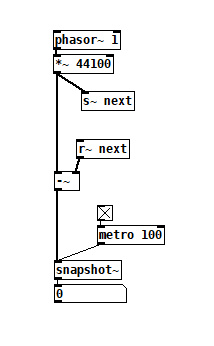 The s~/r~ hop produces either a 64 sample delay, or none at all, depending on the order that the objects are created. Here's an example that combines both: s~r~DifferingLatencies.pd
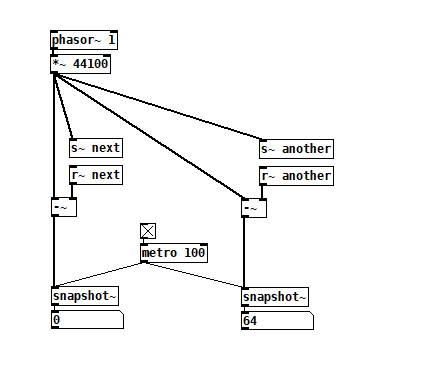 That's pretty kooky! On the one hand, it's probably good practice to avoid invisible properties like object creation order to get a particular delay, just as one should avoid using control connection creation order to get a particular execution order and use triggers instead. On the other hand, if you're not considering object creation order, you can't know what delay you will get without measuring it because there's no explicit sort order control. Well...technically there is one and it's described in G05.execution.order, but it defeats the purpose of having a non-local signal connection because it requires a local signal connection. Freeze dried water: just add water.
To reduce the number of cases I had to test, I grouped the objects into 4 subsets and permuted their creation orders:
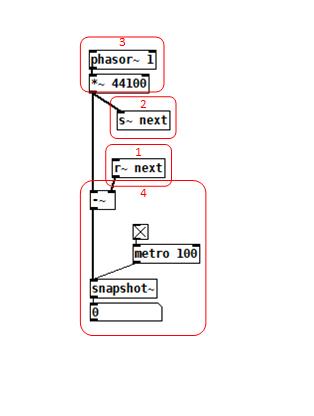 The order labeled in the diagram has no latency and is one that I just stumbled on, but I wanted to know what part of it is significant, so I tested all 24 permuations. (Methodology note: you can see the object creation order if you open the .pd file in a text editor. The lines that begin with "#X obj" list the objects in the order they were created.)
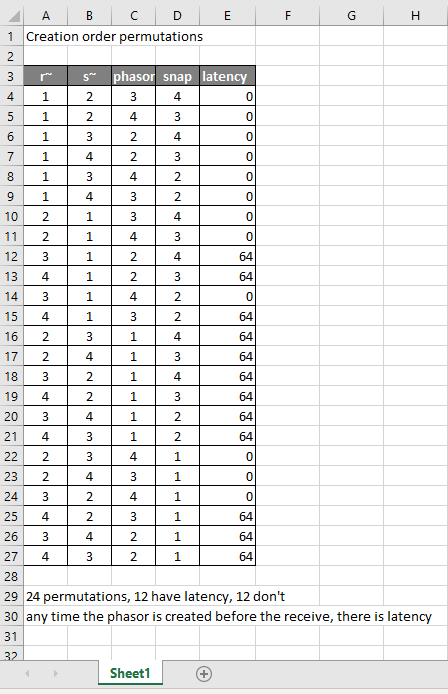
It appears that any time the phasor group is created before the r~, there is latency. Nothing else matters. Why would that be? To test if it's the whole audio chain feeding s~ that has to be created before, or only certain objects in that group, I took the first permutation with latency and cut/pasted [phasor~ 1] and [*~ 44100] in turn to push the object's creation order to the end. Only pushing [phasor~ 1] creation to the end made the delay go away, so maybe it's because that object is the head of the audio chain?
I also tested a few of these permutations using throw~/catch~ and got the same results. And I looked to see if connection creation order mattered but I couldn't find one that did and gave up after a while because there were too many cases to test.
So here's what I think is going on. Both [r~ next] and [phasor~ 1] are the heads of their respective locally connected audio chains which join at [-~]. Pd has to decide which chain to process first, and I assume that it has to choose the [phasor~ 1] chain in order for the data buffered by [s~ next] to be immediately available to [r~ next]. But why it should choose the [phasor~ 1] chain to go first if it's head is created later seems arbitrary to me. Can anyone confirm these observations and conjectures? Is this behavior documented anywhere? Can I count on this behavior moving forward? If so, what does good coding practice look like, when we want the delay and also when we don't?
 posted in technical issues
Few questions about oversampling
Hi,
About a year ago I started to learn a bit pure data in order to create a patch that would act as a groovebox and that should perform on limited cpu resources since I want it to run on a raspberry pi. First I tried to make somekind of fork of the Martin Brinkmann groovebox patch, even if it allowed me to learn a lot about data flow I didn't went to the core of the patch tweaking with sound generation. This led me to end this attempt at forking MNB groovebox patch because even if I could seperate GUI stuff from sound generation and run it on different thread ect... I couldn't go further in optimization in order to reduce the cpu use.
Then a few weeks ago I decided to start again from scratch my project and this time I wanted to be more patient and learn anything needed in order to be capable of optimizing my patch as much as possible. After making a functional drum machine which runs at 2/3% of cpu with 8 different tracks, 126 steps sequencer, a bit of fx ect... I tried to find synths that would opperate well aside the drum machine. And I basicly didn't find any patch that wouldn't use massive amount of cpu time. So I created my own synths, nothing incredible but I'm happy with what I got, though I noticed some aliasing. I read a bit the floss manual about anti aliasing and apply the method used in the manual(http://write.flossmanuals.net/pure-data/antialiasing/), it work well but my synths almost trippled their cpu use, even if I put all my oscilators in the same subpatch in order to use only one instance of oversampling.
I didn't tried to oversample it less than 16 time but since oversampling is so cpu intensive I'm wondering if there's no other option in order to get a good sound definition at a lower cpu cost. I'm already using banlimited waveform so I don't know what I could do in order to limit the aliasing, especialy for my fm patch where bandlimited waveform isn't very useful in order to reduce aliasing.
Since I want to have at least 4 synth track with some at least one synth having 5 voice polyphony I want to know what the best thing to do. Letting FM aside for this project and use switch~ for oversampling 2 or 4 time my synths that use bandlimited waveform ? Or should I try to run different instances of pd for each synth and controling it from a gui/control patch with netsend(though it wouldn't bring down the cpu use at least it would provide somekind of multithreading for my patch) ? Or is there another way to get some antiliasing ? Or should I review lower my expectation because there is no solution that could provide a decent antialiasing for 4 or more synth running at the same time with a low cpu use in pure data in 2021.
Thanks to everyone that would read my topic and try to give some advice in order to get the best antialising/low cpu use solution.
 posted in technical issues
"Things I wish I had known when I started Pd"
Oh wait, I get it -- it's not the order of object creation; it must be the order of connection creation. And I'm pretty sure I had followed the video and used fan-out to make the connections.
In that case, fan-out is not following right-to-left -- if I had shift-dragged to the leftmost number box, it's probably making that connection first and filling in the others later. That would explain why t would be hitting the left one first.
EDIT: Confirmed, that's exactly it. If I shift-drag to the rightmost target object, then the connections are created in right-to-left order, and "triggerize" then accurately reflects that order. (So then the issue is that the video models the behavior of shift-dragging to the leftmost object, without explaining that this will give you a connection order that you didn't expect.)
hjh
 posted in technical issues
A little Pd mod...
@60hz putting these lines in some .tcl file in the pd path (maybe even in the colors-plugin.tcl file..) will do the trick
proc redraw_cords {name, blank, op} {
    foreach wind [wm stackorder .] {
        if {[winfo class $wind] eq "PatchWindow"} {
            set canv ${wind}.c
            foreach record [$canv find withtag cord] {
                set tag [lindex [$canv gettags $record] 0]
                set coords [lreplace [$canv coords $tag] 2 end-2]
                ::pdtk_canvas::pdtk_coords {*}$coords $tag $canv
            }
        }
    }
}

trace variable ::curve_cords w redraw_cords
 posted in news
A static GUI element that display floats without being editable
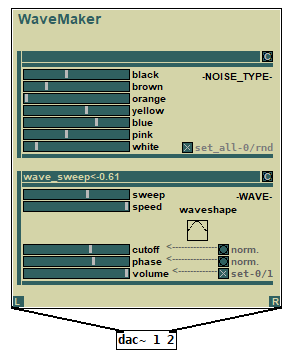
@dom1817 You can use a canvas to display dynamic text from a parameter object like a hslider so that you cannot modify the value but just read it (your canvas is like a screen that just shows your number). You can change the value in an indirect way by using the hslider in your GUI. The advantage of this idea is that you can have many parameters values and all of them can be shown into just one small canvas object saving a lot of space inside your GUI. Having a lot of number boxes inside GUI is not a good idea to show parameters values. The disadvantage is that you need to put more code into your GUI.
You can check this module that i made. It contains a feedback monitor screen for reading parameters. See the small "wave_sweep<-0.61" canvas in the imagine. It shows the values of the sweep hslider.
WaveMaker patch download :
WaveMaker.zip
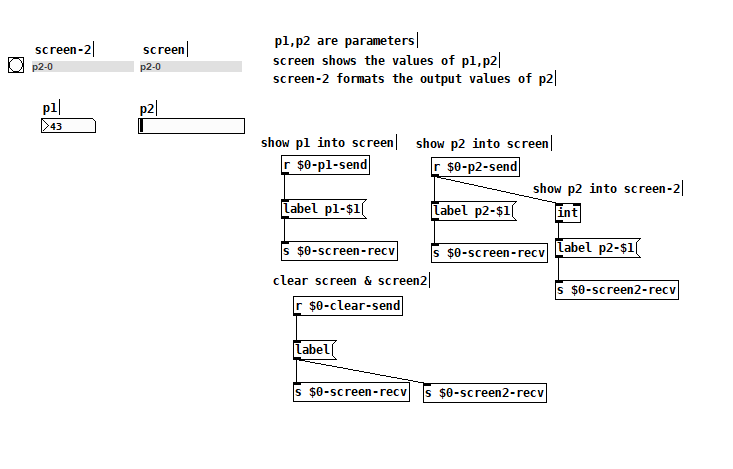
Here is a more simplified version to show how to do it :
ParameterFeedbackScreen.zip
OBS ! the "$0-clear-send" names come from right-click on each objects and set under "Messeges" the "send symbol" and "receive symbol" so that you don't need to use wiring between GUI objects. The "send symbol" is the output of that object and the "receive symbol" is the input. the "$0" symbol is used so that you can have the same GUI multiple times in the same patch without problems. You can also change in "label p1-$1" like "label Value:->$1" so in canvas will look like "Value:-> [your parameter value]" for aesthetics purpose.
snapshot :
 posted in technical issues
canvas colors
Not sure if I should even bother sharing this thread started to get over my head real quick when the rgb tcl talk started. This process does not use rgb messages.
But originally thought i had some things to share so i spent a few minutes writing this so im going to share it anyways. LMAO
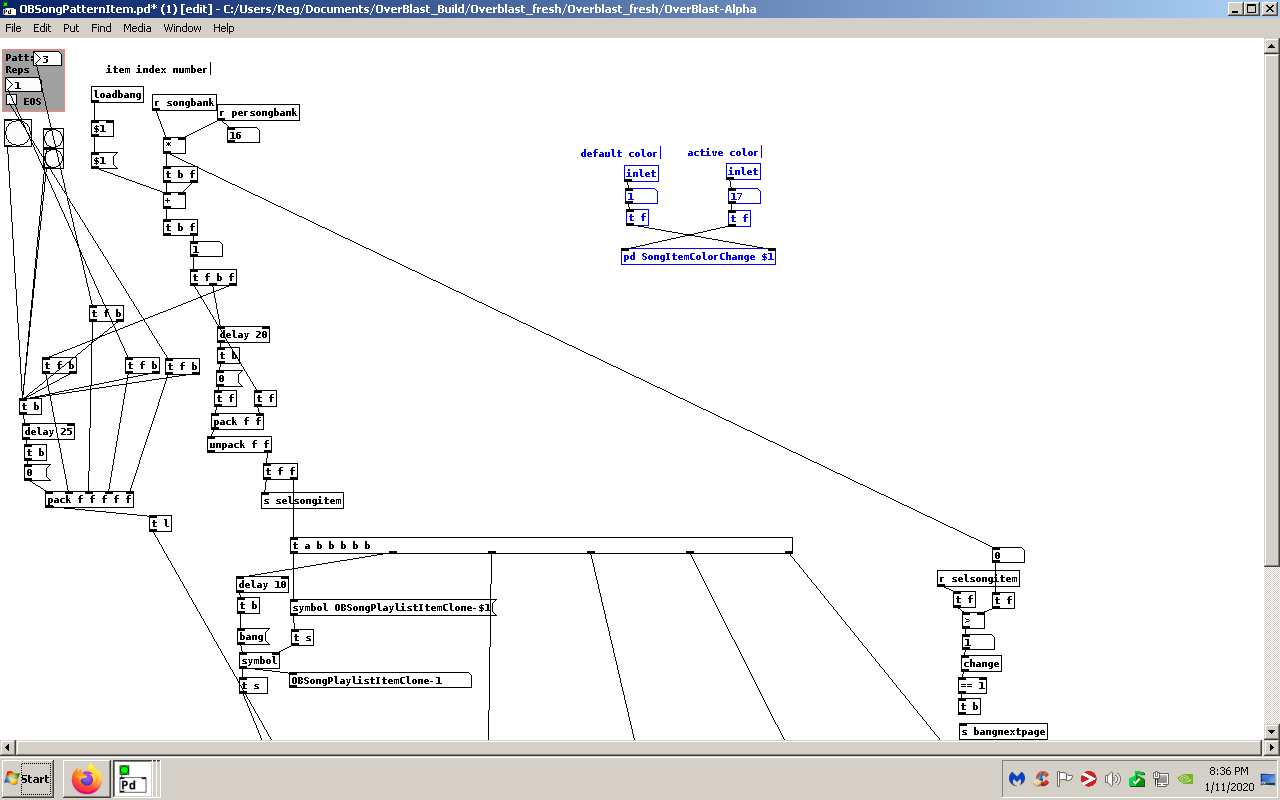
This patch will update the canvas color when a index for the canvas is given.
I should mention I have this setup to be used for multiple items. This is how i am using the patch. i have a [bng] underneath a canvas to keep it hidden we will call this my "songitem" This will make the canvas act as a [bng] just make sure the [bng] has the same dimensions as the canvas. So when a [bng] is pressed the canvas color will change to the active color. Then when any other button is pressed it will then become the "active" color and the previous canvas will return to the "default" color.
So if you had a canvas with the send and recieve symbols set as $1-Canvas-send $1-Canvas-recv you can easily feed the index of the canvas by replacing {r selsongitem}
with a inlet and feed whatever index you desired.
Its usage is highlighted in the screenshot.
Near the bottom of the patch you will find the object [symbol $1-songitem-recv]
change $1-songitem-recv to the proper recv symbol for your canvas.
If anything I hope this patch sparks some ideas for new people to pd. I'm only a year in and I think I'm developing a bald spot. lol i kid. And for the vets please pick this apart i need to learn what to do and what not to Ive been focusing on the order of operations as of late.
Enjoy
 posted in patch~
MIDI into [seq] and Markov chains
@ingox Here it is with state saving. If you open the help patch and click the two iterate bangs you'll see that the two abstractions are saved with different chains of different orders. If there is no state to load, the order initialises to 1.
I had to change a few of things connected with the order, the most significant is that rather than automatically clipping the order according to the length of the indices text, I think it makes more sense to give an error if the input source is too short for making an nth order chain. That is, if I send [order 3( but there are only 3 lines of text, I wouldn't like the abstraction to silently make a second order chain instead.
EDIT: updated zip
 posted in technical issues
How do I make a button with rounded edges in vanilla using [bng]
Ok I'm going to play around with that. If you wouldn't mind giving me your thoughts on what I came up with.
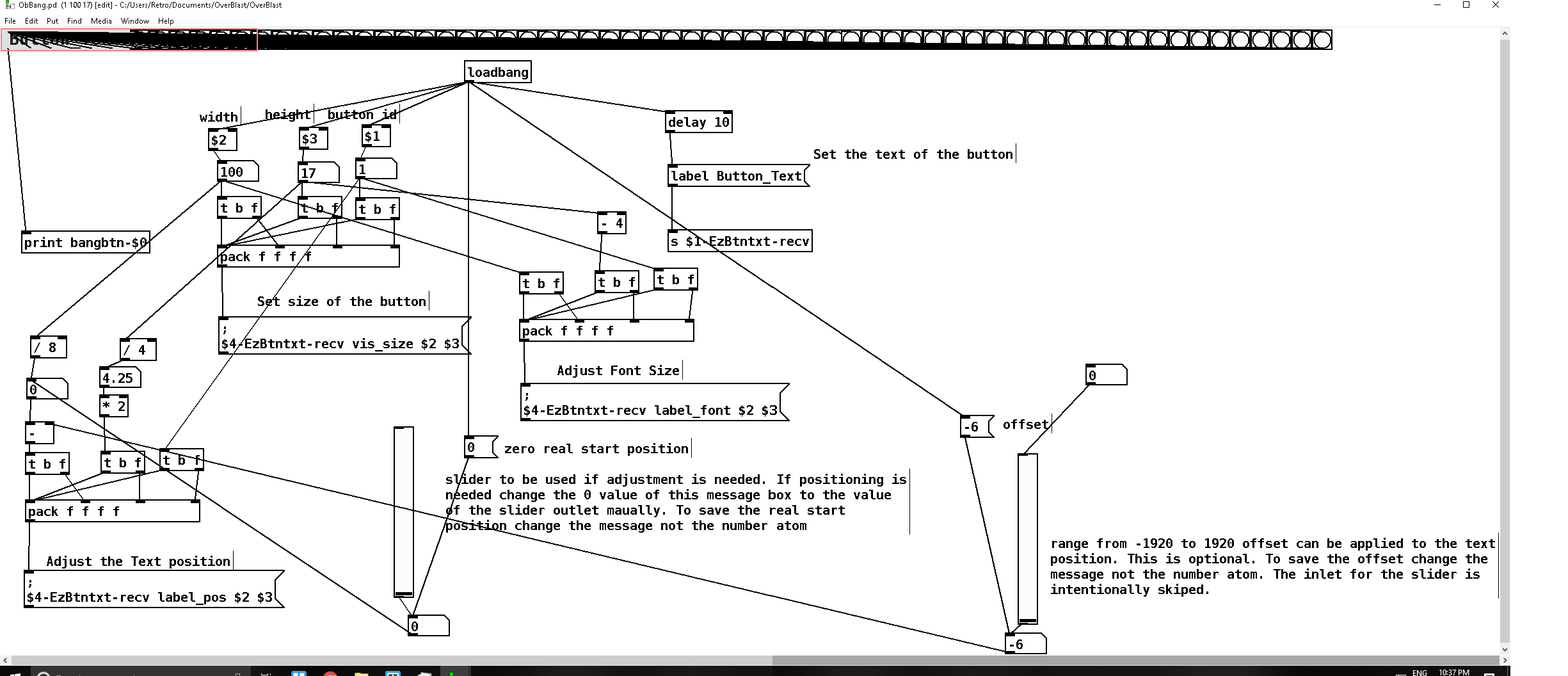
So as of now I need to do 2 more things. Resizes all of the bng's after [loadbang] to the height of the button because bng's can only be square. This is to ensure there is a bang behind the canvas if the button size changes. I have multiple bng's connected to the first bang in the abstract and you can see what it is sent to [bangbtn-$0]. And this is successful whenever I click on the canvas even tho it is above the bng object. I do see a "bangbtn-2104: bang" for example in the pd console.
I need to figure out how to set the canvas size of [OBBang 1 100 17 ] to hide the remaining bng's that should not be shown. I found this doc that showed a small piano and this is the way it described on how to make a custom button.:/ and now I cant seam to find the link to that site but anyways moving along.
I should note I have the inner canvas adjusting successfully to the correct size I'm confused about struct's
This second image displays how it currently looks when its load in a parent abstract. In this case the Sample Editor.
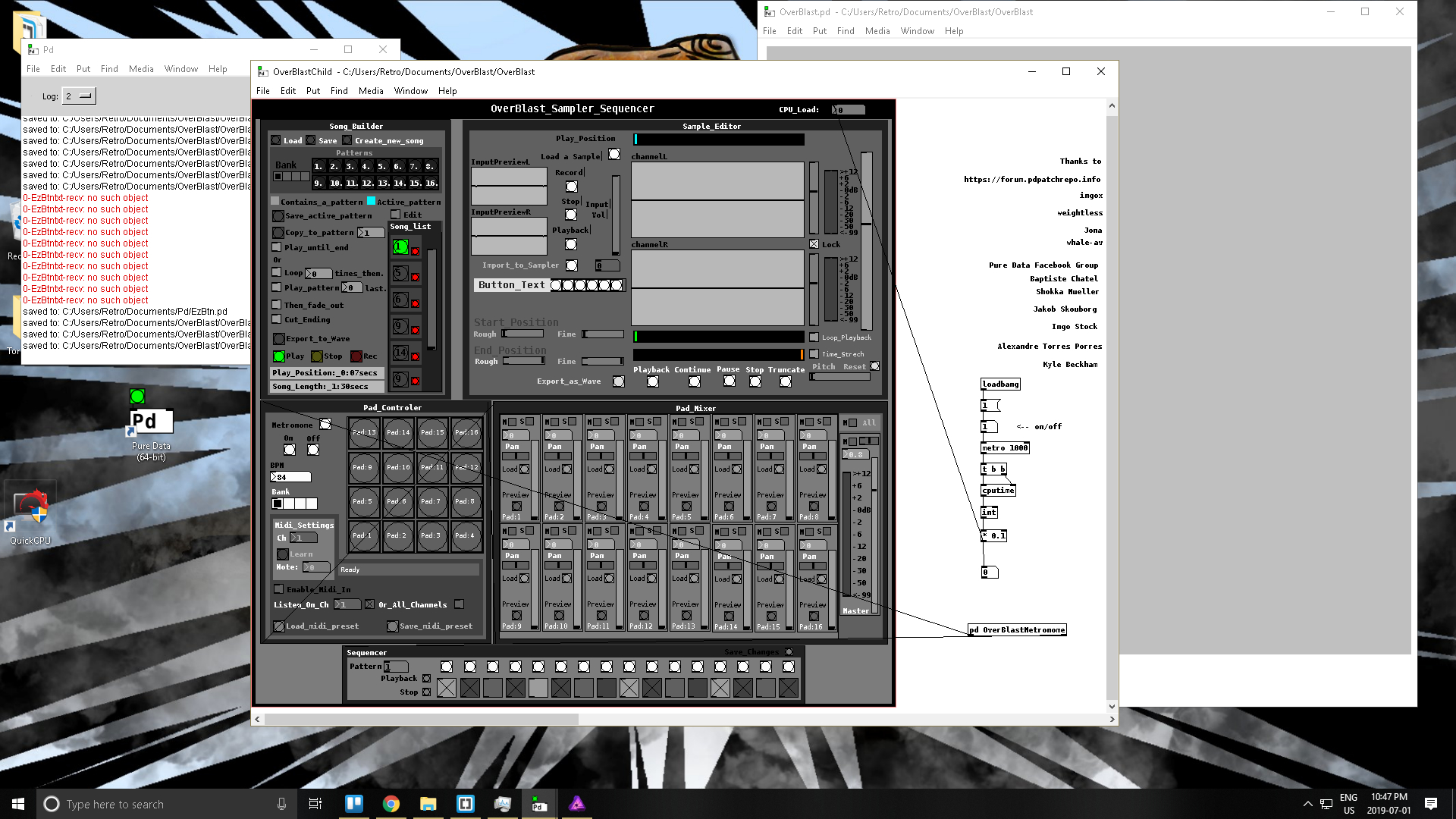
I have been reading that I have to use [struct] to adjust the canvas size somehow but im not to versed on struct aside from that I haven't found anything on creating bng's and any other objects after loadbang as of yet to get rid of all those bng objects in the abstract before it is loaded.
That way I can create something to populate a string of bng objects after [loadbang] to make a cleaner abstract.
Any sort of direction is appreciated.
OBBang.pd
posted in pixel#
question about using messages within runtime....
@nthl0gik Well..... it is a strange concept to grasp.
Pd is all about messages. When you put an object on a canvas Pd gets the mouse position and sends a message to the canvas to put the object on the canvas.
What actually happens is that Pd writes a line into the text file that "is" that canvas..... and that will be saved as your "patch" when you save it........ https://puredata.info/docs/developer/PdFileFormat
The special thing about Pd is that it is always running....... so such things take effect straight away..... there is no "Run" command.
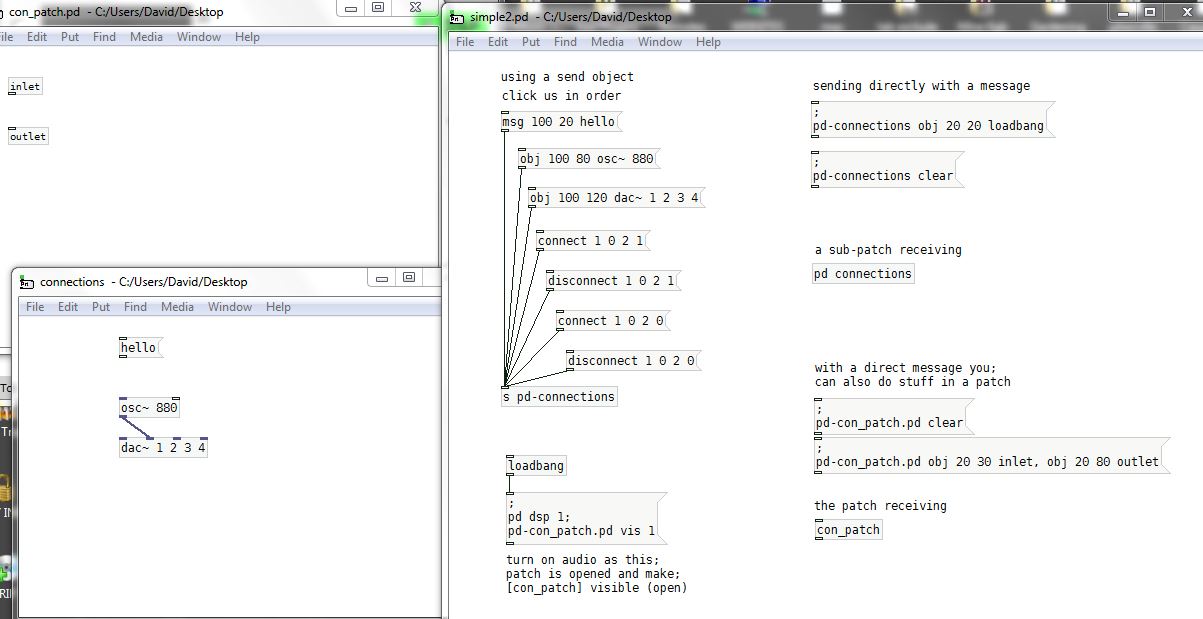
But you can send those very same messages to a patch or sub-patch...... and so create objects and connect and disconnect them....... everything that you could do with the "gui" ...... the menus and the mouse.
this.zip
I have added a message that will add an object to [simple2] as well........ as you can send to the same patch. But keeping track of object "numbers" then becomes more difficult.
If you don't click the messages "Click us in order" from top to bottom, then connections will not be made, because the object "numbers" will be incorrect.
Messages are the "stuff" of Pd and very powerful in dynamic patching.
David.
 posted in technical issues
Messages can not be transmitted
@amirt Check out all the internal messages that can be used for dynamic patching: https://forum.pdpatchrepo.info/topic/10813/collection-of-pd-internal-messages-dynamic-patching 
You can send these messages to a canvas via [s pd-name-of-canvas].
[namecanvas] can be used so you don't have to worry about filenames and can use the name set by [namecanvas] instead.
Like this:
[dynamic patching message(
|
[s mycanvasname]
[namecanvas mycanvasname]
--
Edit: „canvas“ has two meanings in Pd: One is the graphic canvas object that is just a rectangle that can have colors. The other is canvas as Pd patch. Above i am refering to the latter one.  Has nothing to do with the graphical canvas you can insert via put menu.
 posted in technical issues