
Trigger using HTTP requests from Pd
@FFW thanks. That works sort of but since the browser pops up and create a new tab each time it is not functional in this case. But good to know.
Is there a way to send HTTP request from Pd in some manner without going throw the browser, even if [netrecieve] is not suitable? I would have guessed that it was just a formatting problem.
 posted in technical issues
ELSE 1.0-0 with Live Electronics Tutorial Release Candidate #9 is out!
Hi! This has gotta be the biggest update ever. geez... there's too much stuff, and I just decided to stop arbitrarily cause there's still lots of stuff to do. Ok, here goes the highlights!
This is the 1st multichannel (MC) aware release of ELSE (so it needs Pd 0.54-0 or later)! There are many many many objects were updated to become MC aware: 42 of them to be exact. There are also many many new objects, and many of them are MC capable, 20 out of 33! Som in total I have 62 objects that deal with MC... that's a good start. More to come later!
Note that 4 of these new ones were just me being lazy and creating new mc oscillators with [clone], I might delete them and just make the original objects MC aware... so basically these new MC objects bring actual new functionalities and many are tools to deal with MC in many ways, like splitting, merging, etc...
With 33 new objects, this is the first release to reach and exceed the mark of 500 externals, what a milestone! (This actually scares me). We now have 509 objects and for the first time ever I have reached the number of examples in the Tutorial, which is also 509 now! But I guess eventually the tutorial will grow larger than the number of externals again...
Since the last release, ELSE comes with an object browser plugin, I have improved it and also included a browser for Vanilla objects. I think it's silly to carry these under ELSE and I hope I can bring this to Vanilla's core. see https://github.com/pure-data/pure-data/pull/1917
A very exciting new object is [sfz~], which is a SFZ player based on 'SFIZZ'. This is more versatile than other externals out there and pretty pretty cool (thanks alex mitchell for the help)!
I have created a rather questionable object called [synth~] which wraps around [clone] and [voices]/[mono], but I think it will be quite interesting to newbies. It loads synth abstractions in a particular template and makes things a bit more convenient. It also allows you to load different abstraction patches with dynamic patching magic.
[plaits~] has been updated to include new 8 synth engines with the latest firmware. Modular people are happy... (thanks amy for doing this)
One cool new object for MC is [voices~], which is a polyphonic voice manager that outputs the different voices in different channels. If you have MC aware oscillators and stuff this allows you to manage polyphonic patches without the need of [clone] at all. This is kinda like VCV works and it opens the door for me to start designing modular inspired abstractions, something I mentioned before and might come next and soon! So much being done, so much to do... What an exciting year for Pd with the incredibly nice MC feature!
There's lots more stuff and details, but I'l just shut up and link to the full changelog here https://github.com/porres/pd-else/releases/tag/v1.0-rc9
You can get ELSE from deken as well. It's up there for macOS, Windows 64 bits, Linux 64 bits and raspberry pi. Please test and tell me if there's something funny.
Cheers!
Chees.
 posted in news
macOS & iPad - can PureData be controlled from the touchscreen?
@whale-av said:
@esaruoho I have found the very small investment in TouchOSC
Great app!
TouchOSC and Open Stage Control are similar but different.
Open Stage Control is a server and thin client. The server runs in Windows, Mac or Linux. It ships with its own client for editing, but you can also point Firefox or Chrome to it, with full access to editing features in the browser as well. The server can load any number of "sessions." One session is synced across any number of clients. If I open the same session in multiple browsers, moving a control in one window will update all of them at once.
So it's client window --> server --> OSC messages to an address of your choosing.
One nice feature is that starting the server prints a QR code in the console, which you can scan in mobile Firefox to open the page, without typing an IP address. Typing the address always annoyed the **** out of me.
At this point, I feel like this works out better for me than TouchOSC. But, Open Stage Control doesn't send accelerometer data. I never used it extensively, but it was nice to have.
Open Stage Control is also free and open source, no proprietary app you have to install on your device.
Here's Open Stage Control driving SuperCollider:
hjh
 posted in technical issues
How to create nested For loops
How to create nested For loops
Example:
for i=1 to 2
    for j=1 to 3

output would be / trying to get:
1-1
1-2
1-3
2-1
2-2
2-3
I tried this which works for the first For loop.
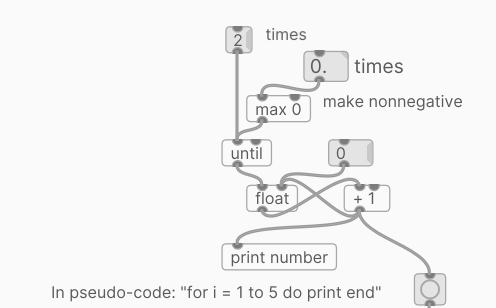
But it didn't work with the second For loop
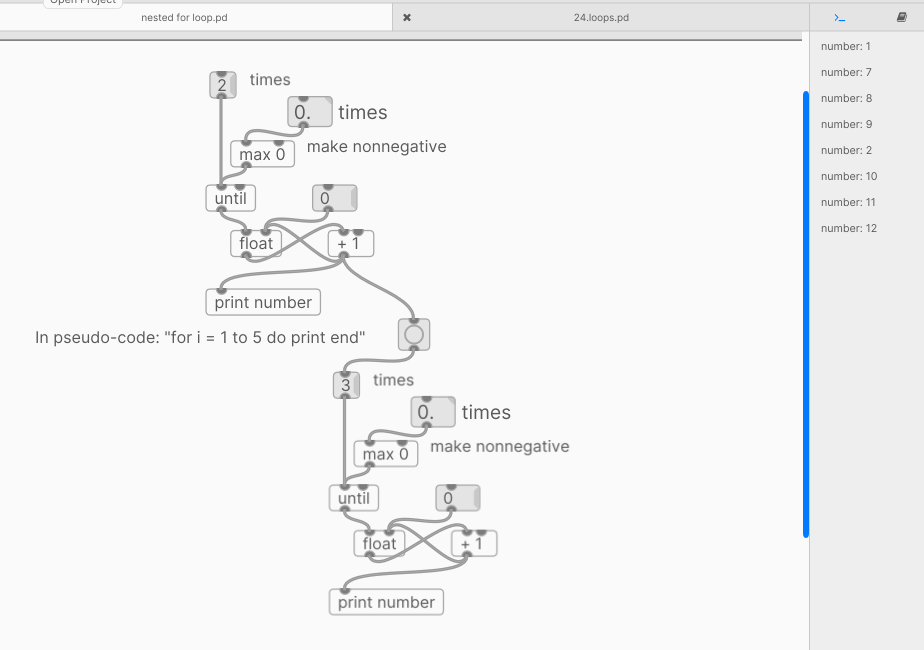
 posted in technical issues
Failed to autostart PD on Pi using service
@KMETE It is many years since I set up my RPI... and I remember different problems with an RPI2 and an RPI3B with different Linux flavours.... it can be complicated.
I wonder whether you should move the ExecStart to the end of the script so that everything else is done before you start the patch and Pd.
But more likely is the audio group setting....... https://forum.pdpatchrepo.info/topic/11146/ubuntu-browsers-and-puredata-wont-share-audio-output-device-solved/7
David.
 posted in technical issues
Puredata on android phone using andronix: no sound!
@sadielcuentas Andronix uses pulseaudio to send a stream to the speakers, and pulseaudio is the intermediate layer for alsa. It will need to be enabled..... https://docs.andronix.app/troubleshoot/sound/
You will then need the appropriate modules for pulseaudio....... https://wiki.archlinux.org/title/PulseAudio
..... and you might need to configure Ubuntu to enable Alsa?
That link says you don't need to add your user to the audio group..... but I have seen people having problems with Pd audio if they have not done so...... including in the link below.
But @1mark had a solution years ago that might work still...... for Pd streaming directly to pulseaudio....... https://forum.pdpatchrepo.info/topic/11146/ubuntu-browsers-and-puredata-wont-share-audio-output-device-solved/3 (you will need to expand the down arrow probably to read it).
That thread could solve all your problems.
David.
posted in technical issues
Sequentially read and act on text files in nested [until] loops
Hello!
I'm struggling a bit trying to come up with a way of reading in multiple textfiles and acting on each individually. I was initially attempting to utilize [until], but I think I don't fully understand its order of operations as it seem to iterate itself while the nested [until] is still attempting to act upon the currently read in text file. Is there a way to:
- Read in multiple text files into a single [text] object, thus eliminating the need to have a nested loop OR
- To prevent [until] from iterating to the next cycle until it receives a bang or something?
Any and all help appreciated. Thanks!
 posted in technical issues
triggering env.adsr~ with a metro ?
@WEIRD1 Built in help browser, assuming CEAMMC did not change the hotkeys just hit control-b, if that does not work go to the help menu and select browser.
 posted in technical issues
triggering env.adsr~ with a metro ?
@oid said:
@WEIRD1 Open the help browser and open Pure Data->3. Audio Examples->D02.adsr.pd. Click on {Bang(, watch what happens, click again, hook up a metro, spend a little time with the other stuff under that Pure Data entry in the help browser.
sorry im having trouble finding this 
is it online? I dont see it in this help list attached am I missing something?
file:///Applications/Pd-ceammc_2021.11.app/Contents/Resources/doc/1.manual/index.htm
 posted in technical issues
Can I assign an ID number to a patch on Pure Data?
@kobe No.
If the patches are on the same computer running in the same instance of Pd then simple [send !D1] and [receive ID1] will work.
But once a router is involved it needs an IP address and port to know where to send the data.
However, all computers on your network register their names in local dns master browser and the IP address can be looked up......... much like "localhost" is translated to 127.0.0.1 or "Google" when looked up by your browser on a web DNS server is 142.250.74.195.
DNS allows IP addresses to change...... while your "name" search will always land (once theDNS servers are updated).
So you should be able to use [connect raspberrypi3 3000( if your other computers name is raspberrypi3
That computer would then make the connection to a patch...... running on that computer...... running a receiver (like netreceive or udpreceive~) set to port 3000
If none of your computers are running a master browser...... or every computer is not running Apple Bonjour....... then it will probably fail.
If you have a number of patches on that receiving computer then they should use different ports.
So if you want to differentiate receiving patches use different ports...... 3001 3002 etc.
And of course if the patches are the same (abstractions) use a $ argument...... i.e.
[mypatch 3001] and [mypatch 3002] where inside you use [udpreceive~ $1].
David.
posted in technical issues