
Miller Puckette's book with MathML (EPUB3/HTML5)
I found that the images depicting equations were a bit difficult to read due to their low resolution, so I converted all of the equations to MathML with the help of LaTeXML.
For the HTML version, I recommend using Firefox to read it, as it's the only browser thus far to offer exceptionally good MathML support. MathJax can also be used to render the MathML in other browsers. It is not included by default but it has been tested and catered to in terms of CSS styling. I would suggest getting a local installation via NPM like so:
npm install --prefix ./ mathjax
and then, using a regex-replace method with your favorite text editor, this line of html would be added to each node*.html file's head section:
<script id="MathJax-script" async src="node_modules/mathjax/es5/tex-mml-chtml.js"></script>
Several EPUB3 readers are able to render MathML via MathJax. A table showing the MathML support for various readers can be found here: https://docs.mathjax.org/en/v2.7-latest/misc/epub.html
book-mathml.zip
(Apr 13, 2021)
 posted in Off topic
[declare] vs help browser
So I'm finally catching up to the [declare] best practice. (The driver was providing Pd and external binaries to one of my colleagues, to install in the media lab, where I don't really have confidence that the search paths and startup libraries would be set correctly in Preferences -- so, to simplify the installation, I had them only add Pd/externals as a search path and I will tell the students to use [declare] for all externals. -- I think this is better, FWIW -- I was getting tired of objects not loading because I had forgotten about dependencies.)
But I discover that, in Windows, the help browser doesn't show any help files in subfolders under Pd/externals, and it doesn't show externals that have been declared. (In Linux, subfolders are visible though -- so maybe it's just a Windows bug.)
The help browser is especially useful for Gem and other large external packs, where I might not remember the exact names of objects (and, for that matter, to help browser is really useful for finding objects that you didn't know about).
How to handle this? (Browsing help in the system's file browser isn't an especially lovely solution.)
hjh
 posted in technical issues
File browser in Linux?
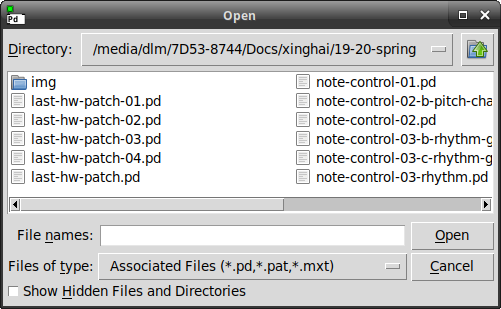
Does anyone know a tcl/tk hack to get it to use the system file browser in Linux?
This one has a... um... should I say "vintage" feel? But not in a pleasant way. 
hjh
posted in technical issues
Reverberation
@weightless said:
@bocanegra https://forum.pdpatchrepo.info/topic/5349/patching-a-good-reverb/6
not from me, but reverbCH~ and reverb282~ from @acreil are by far the best Pd reverbs I've heard.
Thanks for replying. I'll check those out. I'm not big on having to install externals tho. Also, I've been trhotugh the algortithms mentioned in the thread.
I was kinda hoping we could have a discussion about reverberation that will provide techniques for newbs rather than go on about our fave this and that. But maybe I started off wrong by showing of my mutant...
Under all circumstances, here is my experience modelling reverb in short:
While freeverb sucks (sorry), Schoeder is your friend. The trick is to find a way of recycling you allpass series (or even better, nests!) that makes sense to your ears. Dattoro's work is pretty much that. If you look at his "tank" section of his first plate verb emulation, that's what it does, very cleverly so: it creates a simple feedback matrix of phased out echoes bouncing back and forth. My jVerb is in many ways an elaborate Dattoro tank.
Now, you can build reverb tanks in many ways. The jVerb is extremely heavy on CPU (but gaaawd I love the sound). A simple way is having two lines going through a series of N allpass nests and having the two lines feedback into each other like ping pong delay. If you tune the allpass filters right (primes!!!) and add some tiny modulation to delay times you are rid of eigentones or whatever they are called.
I'll make the effort to describe how a Schroeder allpass nest is constructed (no math):
You put three allpass filters in series and give them Z coefficients (that is delay in samples) of dimishing magnitude, following some log rule or another. Schroeder liked to approximate 1/3 for each allpass. MAKING SURE THEY ARE ALL PRIMES!!!
Then you put that chain inside the loop of another allpass filter, and tune it's Z to fit the series in such a way that the outer loop has the highest Z.
A single allpass nest can pass for primitive reverberation with the right tweaking. A handful in series will create a lot of diffusion and sound better (less echo-y). BUT: Make sure every nest has it's unique series of Z values.
Then add low frequency modulators to the Z value (delay time) on each and every allpass loop. Random values are preferable over sinusoids or any other periodical thing. The APN abstractions I used in jVerb have all this built in already.
What's left is to add some pre-delay if you like that, and some bandlimiting somewhere in the feedback loop.
I have a CPU friendly verb following this scheme somewhere. I'll upload it ASAP
 posted in patch~
Controlling mouse+click with pd in browser window.
Hello.
I'm trying to control the curser position and click of the mouse through pd, but outside of a pd window. Specifically in a browser.
There's a button a website that makes a particular sound when clicked, and I would like to sequence some clicks if possible. Of course it would be easier to sample it, but I would like to see if it's possible using pd.
Is there a way to do this? Position the mouse, bang a click? Or perhaps there is a way to communicate with some kind of browser command line? When you receive this, click this button in the browser window.
Looking through other recent threads I've found it's possible through the use of this solution: https://forum.pdpatchrepo.info/topic/11291/mouse-control-objects
But it is, as far as I can see, limited to the pd window itself.
Any ideas?
Thank you.
Mh.
 posted in technical issues
purr-data: nested ds-arrays and pointers
I'm tryig to do a Gui Generator for the lv2plugin~ external with nested-ds. So in the patch i posted above, the knubs -symbol name field would be the controlparameters names, and in the toggles name field i'd like to store the plugins-recieve symbol. But to get both the parameters name and the plugin-slots-recieve symbol from the knubs draw-events I'd need nested data structures. It should be like a channel strip.
I like the idea of having a matrix of widgets and use nested data structures for sequencing, state saving etc.
 posted in technical issues
purr-data: nested ds-arrays and pointers
I´m working on a patch that uses nested ds-arrays with [draw array]. but events from the template for array b throw an error:
scalar: couldn't get array data for event callback
Is this something that is going to be fixed in one of the next releases?
there are some more things i noticed in the patch below.
posted in technical issues
PD-2-ThoughtMap (a patch and its children as a plantuml-usecase) (Linux Shell Script/Package) (v0.1.1 update below)
Background:
The project I have been working on, for over a year now, began to be more complex than I was able to visualize.
As such, I was required to build something which would allow me to "see" it in its entirety.
NOT the audio stream, passing from one object to another, nor the variables, nor sends.
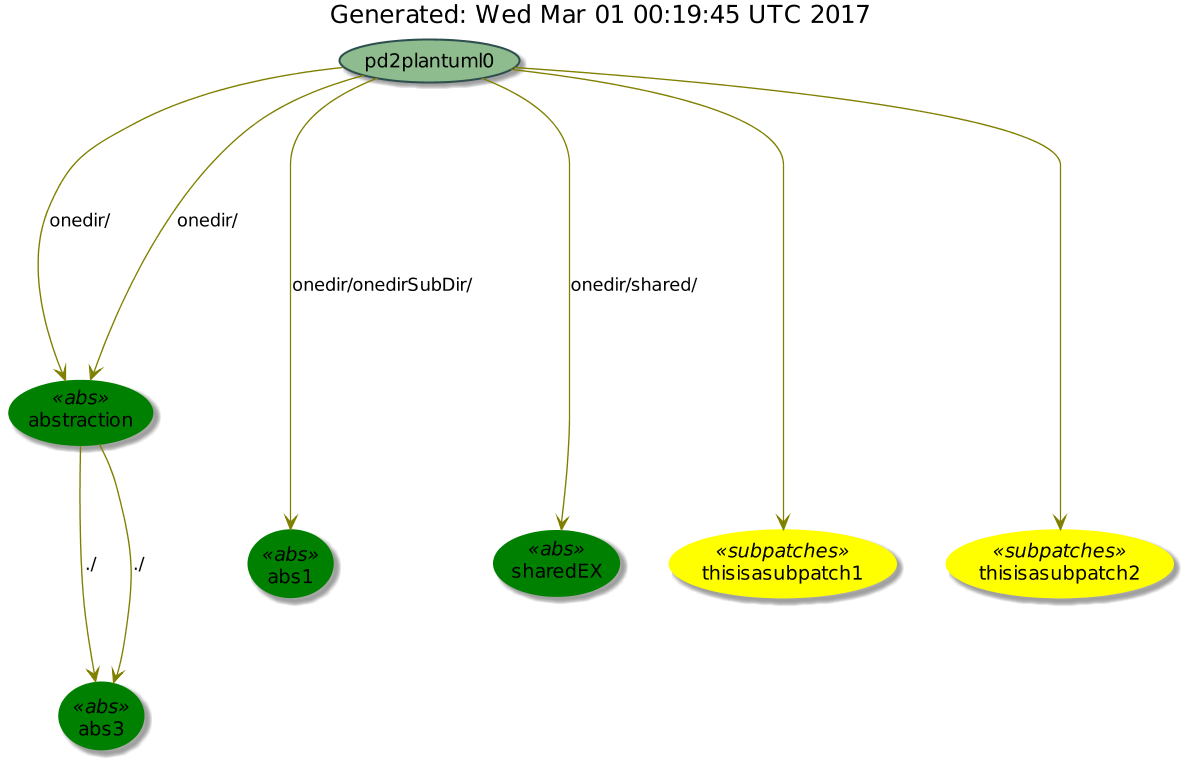
But rather, I needed to see my objects, i.e. subpatches and abstractions themselves. And how they were embedded within one another. I needed to see the "programmatic-flow" from one sub-object to the next.
Which is how this came about. Examples:
simple example
1.poly.synth

Preface:
Miller's bi-recursive/toroidal loop function, i.e. going "../" up and/or going down "/x/y/z.pd" the embedded object-tree has (thus far  eluded me. So the patch for now only recurses down the tree.
Purpose:
By setting up a "Send-To" link to ".pd" filetypes (within Linux), one is able to right-click and send any ".pd" file to the pd2thoughtmap shell script and after a brief time (depending on the complexity of the patch). the "defaultbrowser" will open with a plantuml (http:///www.plantuml.com) usecase diagram showing the "object-flow" from one nested object to the next (clipping branches which have no embedded abstractions).
My hope has been the benefit I have/can gain from this tool, will also benefit the pd community and folks in being able to better "see" what they have done. And how to better organize their patches to suit their vision, the need of the project, or just plain Efficiency.
Instructions:
1-Download the pd2thoughtmap.zip file: pd2thoughtmapv0.1.zip
2-Unzip the file into the /root/pd-externals directory;
3-Right-click on a ".pd" file and go to ~"Configure Send-To" or the equivalent for your linux system;
4-Symlink from the /root/pd-externals/pd2thoughtmap/pd2thoughtmap shell script to the Send-To folder for ".pd" files
5-Right-click on a .pd file and "Send-To pd2thoughtmap";
6-After a pause, your default browser will open with the thoughtmap in a tab. (If your browser is already open it will just open another tab).
note: file processing is managed in the /tmp/pd2thoughtmap folder so unloaded at shutdown.
May this tool expedite your auditory "vision" and make it easier for you to comprehend.
Peace, Love, and Music through us all,
Scott
Footnotes:
It recurses down (the directory-tree finding descendants) just fine but will not go up (find predecessors/ancestors).
It will not recurse abstractions if the filenames have more than one period (i.e. the one in the ".pd" suffix).
It Excludes native pd abstractions/classes, ex. [adc~], etc., if they are 1) on the res/objectlist.txt, 2) a ".pd_linux" file in the pure data paths, i.e. "/root/pd-externals/", "/usr/lib/pd/extra/", or "/usr/lib/puredata/". or 3) manually entered into the "res/exclude.txt" file (in the case where one abstraction is repeated many times and you want to ignore it).
If using the command line, there are four total parameters available (to be used all together): $1=the absolute path to the file, $2={0|1|2,3} to indicate if you want "abs and subpatches", "abs only", "subpatches only", or all pd object types, ex. messages, floatatoms, etc; and $3=the height of the image in pixels, and $4=the width of the image in pixels.
If you want me to debug something, please, attach the outputted .png and the /tmp/pd2plantuml/log.txt to your post.
If you find it outputting things that should have been excluded, you can try to eliminate them by adding the object name to the exclude.txt file. This inconsistency is derived from my complete knowledge of the pd file structure. Perhaps I will address it in the future.
I need to work on the original patch for a while, so will update this patch over time and get back with you when I can.
Tally-Ho! And Joy!
-S
 posted in extra~
WEBSOCKET-SERVER IN A PATCH for Pd-extended (with demo)
Thanks !
For those who want to make their own webpage (i realize that the demo's javascript code is a bit difficult to navigate), here is how to make the very first steps with the server :
-
remove all the demo at the bottom of main window ([pd flames-demo-webapp] and description, [pd output~] and the 'waveform' table)
-
connect a [print] object to the output of lowest object [tof/from_ascii_code -1]
-
create, connected top to bottom in that order : message [hello( , object [tof/to_ascii_code], and an object
itself connected to first inlet of [pd websocket-server]
- type this code in a notepad (or any editor in raw text mode) et save it :
<html><body><script>
var websocket=new WebSocket('ws://127.0.0.1:9998');
websocket.onmessage=function(event){websocket.send(event.data+"!!!");};
</script></body></html>
- rename the resulting file with a .html extension then open it in a web browser on same machine. Nothing is displayed (this is normal) but you should get a '1' value from 3rd outlet of [pd websocket-server]
Now, when you click on [hello( message, the browser should return a message 'hello!!!', printed in Pd console. You may start by replacing 'hello' by another message...
Then you can try to modify the javascript code (just remember to refresh the webpage in browser once you have saved your modified .html file)
If you understand how this tiny piece of javascript works, then you have the basics to make a more interesting web page
 posted in patch~
WEBSOCKET-SERVER IN A PATCH for Pd-extended (with demo)
This single pd patch file contains a reusable and fully documented websocket server, meant as an easy way to experiment with Pd<->web-browsers communications through websockets, without the need of other software or any external to compile.
A demo is included in the same patch : 'Flames', a simple cross-browser, multi-touch and multi-player graphical interface which makes Pd play creepy sounds and its javascript code for websockets is also documented.
Just try it : open it with Pd-extended 0.43.4 on Windows, Mac or Linux, fire any recent web-browsers (on same machine or other computer, smartphone or tablet on same local network) with the URL provided in the main window, and you're good to go !
Feel free to improve it and to let me know of eventual projects based on it.
(i've added a basic tutorial in a post below)
http://www.pdpatchrepo.info/hurleur/websocket-server-in-a-patch.pd
posted in patch~