
Purr Data GSoC and Dictionaries in Pd
If you need to store a bunch of key/value(s) pairs as a group (like an associative array does), a [text] object will allow you to do that with semi-colon separated messages.
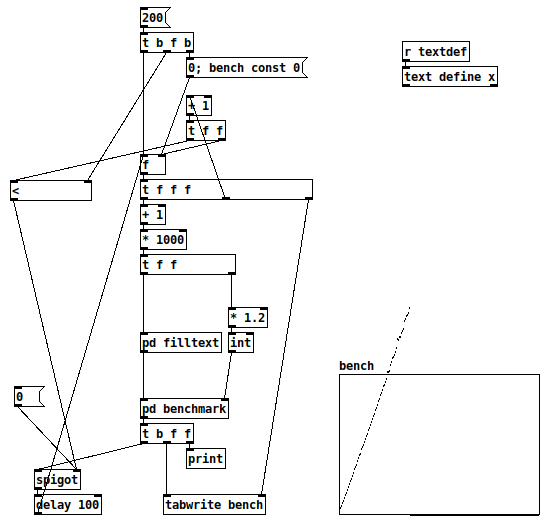
Performance is abysmal, though -- I had guessed this would perform linearly = O(n), and a benchmark proves it.
-
The array y range is 0 to 3000 (= 3 seconds). 10000 lookups per 'pd benchmark'.
-
I had to abandon the test because, long before 100,000 elements, each iteration of the test was already taking 4-5 seconds.
-
[* 1.2]-- in a search, failure is the worst-case. This is an arbitrary choice to generate 1/6 or about 16% failure cases.
I translated this from a quick benchmark in SuperCollider, using its associative collection IdentityDictionary.
(
f = { |n|
    var d = IdentityDictionary.new;
    n.do { |i| d[i] = i };
    d
};

t = Array.fill(200, { |i|
    var n = (i+1) * 1000;
    var d = f.value(n);
    var top = (n * 1.2).asInteger;  // 16% failure
    bench { 100000.do { d[top.rand] } };
});

t.plot;
)
-
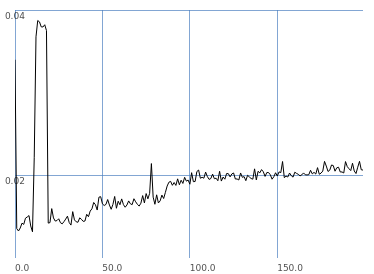
SC's implementation is a hash table, which should give logarithmic performance. The graph more or less follows that.
-
SC is doing 10 times as many lookups per iteration, but:
- In this graph, SC's worst performance between 46000 and 56000 elements is 17.4 ms.
- If I look up in the Pd 'bench' array at 50 (51000 elements), I get 3082.
- Extrapolating for SC's number of iterations, that's 30820 / 17 = 1771 times slower on average per lookup.
- Since Pd is linear and SC is logarithmic, this ratio will get worse as n increases.
"This isn't fair, you're comparing apples to oranges" -- true, but that isn't my point at all. The point is that Pd doesn't have a properly optimized associative table implementation in vanilla. It has [text], but... wow, is it ever slow. Wow. Really not-OK slow.
So than people think, "Well, I've been using Pd for years and didn't need it"... but once it's there, then you start to use it and it expands the range of problems that become practical to approach in Pd... as jancsika said:
It's hard to know because I've gotten so used to the limitations of Pd's data types.
That shouldn't be considered acceptable, not really.
TL;DR I would love to see more robust and well-performing data structures in Pd.
hjh
 posted in technical issues
Purr Data GSoC and Dictionaries in Pd
@whale-av said:
@ingox Solving the users problem it seemed to me that Pd is seething with key/value pairs.
To be clear, I'm talking about dictionaries which are collections of key/value pairs. You can use a list, a symbol or even a float as a single makeshift key/value pair, but that's different than a dictionary. (Also known as an associative array.)
The headers/tags float, symbol etc. are used extensively as key/value for message routing.
This is a flat list where the first atom of the list acts as a selector. That's definitely a powerful data structure but it isn't an associative array.
[list] permits longer value strings.
These are variable-length lists, not associative arrays.
The problem for the OP was only that a series of key/value pairs had been stored as a list and that needed splitting.... but it's not a common problem..... and luckily the key was not also a float.
The OP's problem is instructive:
- If you need to send a single key/value(s) pair somewhere in Pd, a Pd message will suffice.
- If you need to store a bunch of key/value(s) pairs as a group (like an associative array does), a
[text]object will allow you to do that with semi-colon separated messages. The important thing here is that the semi-colon has a special syntactic meaning in Pd, so you don't have to manually parse atoms in order to fetch a "line" of text. - If you want to send a group of key/value(s) pairs downstream, or you want to keep a history of key/value(s) pair groups, you have to start building your own solution and manually parsing Pd messages, which is a pain.
After doing a lot of front end work with Javascript in Purr Data, I can say that associative arrays help not only with number 3 but also number 2. For example, you don't have to search a Javascript object for a key-- you just append the key name after a "." and it spits out the value.
It may be that number 3 isn't so common in Pd-- I'm not sure tbh. But the design of the OP's data storage thingy doesn't look unreasonable. It may just be that those of us used to Pd's limitations tend to work around this problem from the outset.
The old [moonlib/slist] shared keys throughout a patch.
I used to use [slist] extensively as a dictionary, loading it from text files as necessary.
I'll have to play around with that one-- I'm not entirely sure what it does yet.
Keys are already a fundamental part of message passing/parsing.
And the correct way to store them as a string in Pd would have been with comma separators.
(I think...!! ...??)
I tend to use [foo bar, bar 1 2 3, bee 1 2 3 4 5 6 7( as a substitute for an associative array. But again, there's a limitation because you stream each message separately. E.g., if you have a situation where you route your "foo... bar... bee" thingy to some other part of the chain based on some condition, it's way easier to do that with a single message. But again, perhaps we're used to these workarounds and plan our object chains to deal with it.
David.
 posted in technical issues
Passing Audio from Pure Data with Ofelia to shader?
@Cuinjune Hi. Do you know if that is possible? They do that with Shadertoy and it seems also possible with Open Frameworks.
The audio needs to be transformed to a 2D Texture:
“The FFT signal, which is 512 pixels/frequencies long, gets normalized to 0…1 and mapped to 0…255. The wave form, which is also 512 pixels/smapled long, gets renormalized too from -16387…16384 to 0…1. FFT goes in the first row, waveform in the second row. So this is a 512x2 gray scale 8 bit texture.”
Here are some examples:
https://www.shadertoy.com/view/Xds3Rr
https://www.vertexshaderart.com/art/TYoTaksHA6DWsP4aD
https://www.vertexshaderart.com/art/PponkZdtktgJHhipC
 posted in technical issues
Hello everyone
People, especially kids are always restricted from playing video games. It is said that games will improve the violence, affect our health and eyes. However, you may be surprised with what researchers found out. There are endless health benefits to us, especially kids.
Games are now not just aggressive actions in action games or shooting games. Here we with a more gentle game genre that can help people relieve stress, boost the brain, etc. It is art games. Therefore, if you are wondering if art games can be beneficial or not, it’s time to explore over-expected benefits art games.
1. Promote Creativity
Creativity is one of the most significant ability for us to solve almost every single problems in our life. In art games, we will no longer have to face incredible challenges in real life such as global warming, wars, and mass extinctions. Free your soul in colouring games, room decoration, design or music games.

Art games promote creativity.
Paint your best picture with full of colours or mix the clothes of the princesses in dress-up games in your own way. It’s the way to build up the better creativity. If you want to help your kids boost their creativity, here’s top highly rated online art games for 7 to 12 year olds.
2. Support Fine Motor Skills
Now, it’s time to hold the paintbrush, draw lines and dots, mix different colours in games instead of real life. Alternatively, show your ability in decorating the most stunning room ever. These tasks will be the best way to enhance coordination and dexterity. They are fun and rewarding enough to keep gamers, especially kids coming back again and again. Especially, when kids get hooked on these art activities in games over time. Their motor skills can be improved fast. What a deal!
3. Develop Problem-solving Abilities
Art activities in games with epic graphics may give gamers endless opportunity to make choices, come to conclusion, evaluate results, and second-guessing decisions. People will feel comfortable with common uncertainty, and they will be flexible thinkers, more creative and confident people.
Games develop your problem-solving skills.
Which colour should be applied to the character? Which furniture will this house match and need? To play these games with high scores, good techniques are needed for suitable combinations and good ideas. These games are more suitable for girls than boys. So, enjoy art games for girl here!
4. Improve Vision
This game seems to be a little weird; however, some electronic gadgets such as tab, mobile, computer, etc can negatively damage your eyes with too much exposure. However, scientists show that playing games can help improve your vision. Especially, when entering colouring games, people will identify 4 colour shades well.
5. Reduces Stress
Art games are such a quick stress relief for people in depression. In these gentle games, people will quickly throw their worries away and free their mind from all disturbances once they concentrate on gaming sessions. Moreover, the heart rate will be kept at a normal level for certain games.
Reduce stress with amazing art games!
So, now, after understanding all the advantages of art games, it’s time to enjoy Coolest free online art games to play - check out now.
 posted in Off topic
Carriage return in messages from Pd to Arduino?
"print" translates all characters in a message to their ASCII bytes. So, sending "print 0p100v" to [comport], will result in 48 112 49 48 48 118 sent to the Arduino. Check ASCII table to understand this in case you don't know ASCII.
Sending floating point values to control PWM doesn't really make much sense since PWM takes bytes, so integer values from 0 to 255. I don't know if "print" will actually break a floating point value and translate the dot as well (which is ASCII 46). If you want to send floating point values to the Arduino, you should make sure the dot gets translated to ASCII (if it's not done with "print" you should probably do it with [list fromsymbol]) and then in the Arduino code look for byte 46 and do the necessary math to assemble the floating point value.
 posted in I/O hardware diy
semicolon and line break in messages for dynamic patching
Just to let you know, if you did want to dynamically create objects with semi-colons, you can do this using ASCII code 59. You need to use [else/fromany] or some other object to convert from ASCII to text. Semi colons then become normal list items.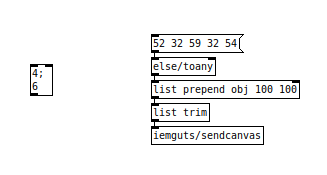
ASCII code:
52 = "4"
32 = " "
59 = ";"
54 = "6"
 posted in technical issues
how to post PD patches here?
Either upload a screenshot of the patch (helpful if the patch is not very complex), or upload the patch (if it's rather complex), or you can even post an ASCII version of it. An ASCII example is this:
[osc~ 440]
|\
|  \
[dac~]
This is an oscillator object connected to a dac object.
Messages in ASCII look like this:
[this is a message(
And numbers like this:
[0\
posted in technical issues
Need help with patch for a glitch project
@Sarabade Hello Sarabade......
If you google the wikepedia pages for all the different file formats for video and still images you will see that all of the files will have a header, which tells the operating system how to interpret the file (even the uncompressed formats like .bmp). If you glitch (corrupt) the header then the file cannot be read.
So you must not corrupt the data until you are a few (or a few thousand) bytes into the file (how many depends upon the file format...... jpg, tiff, bmp etc..)
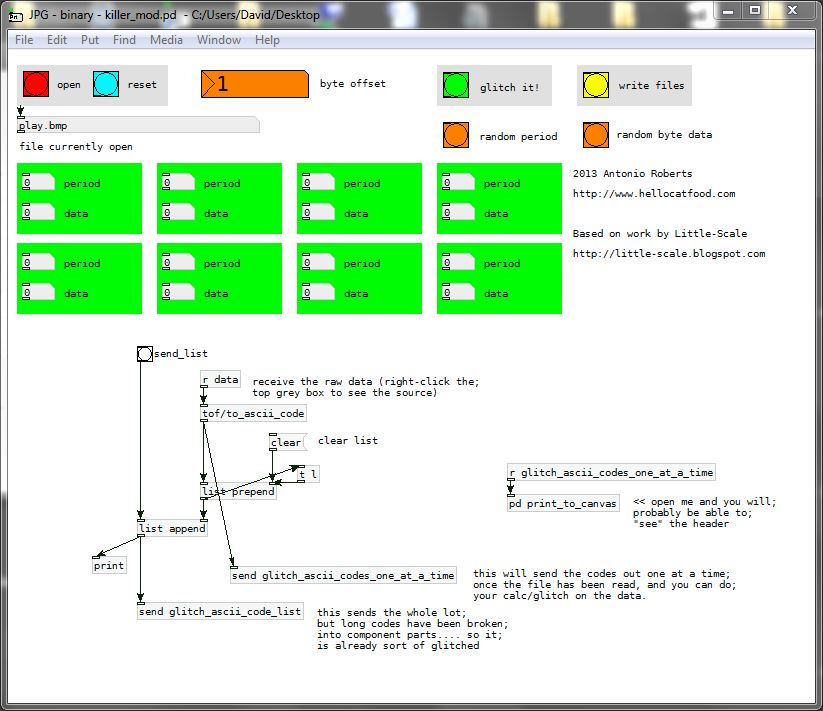
I have found Antonio Roberts file on my computer and modded it to send out the ascii codes...... it might provide a start for your project........
JPG - binary - killer_mod.pd
Look into (right-click-open) one of the green abstraction boxes to see how you could write your new file..... and save it......... and importantly how you can avoid modifying the header.......
You cannot use [send glitch_ascii_code_list] as the header codes are already broken!!...... it is just for viewing in the terminal...........
If you try to write the actual ascii "symbols" to a message file then you will get the "closing brace" messages that you are seeing.......or worse! Pd will try to interpret some characters as "control" messages, and that will crash Pd. You will have to work with the numbers that represent the "characters" (ascii or binary) and not the "text" characters....a,b,c, etc......
David.
 posted in patch~
Sorting Lists Alphabetically
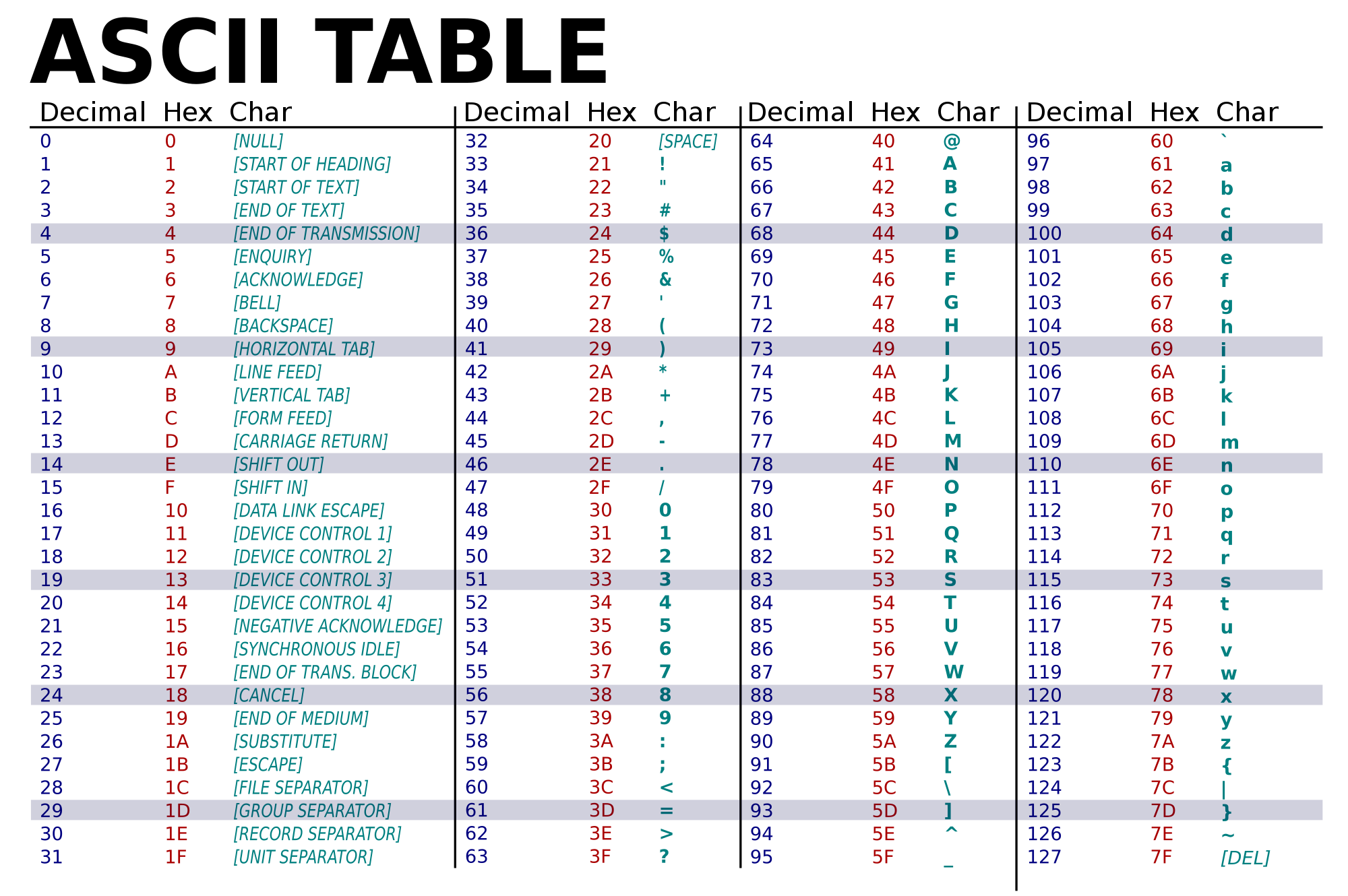
I would suggest using [list fromsymbol] or [moocow/any2bytes] to convert all the characters in your list to ascii values. Then you can split the list at 32 (which is the ascii value for a space) and sort them according to ascii values for a-z, which are 97-122. Take a look at [list-sort] and [list-split-at] in the list-abs library for ideas on how to do this.
Feel free to ask for more direction if I'm not being clear. You can see a full list of ascii characters here: https://upload.wikimedia.org/wikipedia/commons/thumb/1/1b/ASCII-Table-wide.svg/2000px-ASCII-Table-wide.svg.png
 posted in technical issues
Need help with patch for a glitch project
"The byte information that is being printed seems to have no end, is this due it being in byte format and just being that huge, or will it repeat itself from the start if I just keep sending it a bang. Furthermore is there any way to convert the data on the console in ascii code? It is of my interest to keep it in ascii, for my better comprehension and also so that a little alteration of the data would result in a bigger outcome, plus it will be a major part for the artistic side of the project."
As far as I know, [textfile] outputs one line of text when banged. But I think that lines must be separated with a semi-colon. I tried your patch with a .jpg I had and I got some long and some short lines. I don't really know how the .jpg format is, so I can't really answer this question.
To convert to ASCII use [list fromsymbol] and you'll get the ASCII. You can then manipulate the values as you wish, and send them to [list tosymbol] before you write them to a file using [textfile] (I think this should work...).
"The last one is, can the information being printed on the console be printed on the canvas?"
I told you to use [print] to make sure you get the data out of [textfile]. [print] is for debugging. Since you do get the data, instead of [print] use [list fromsymbol] and send that output to your conversion algorithm...
posted in patch~