
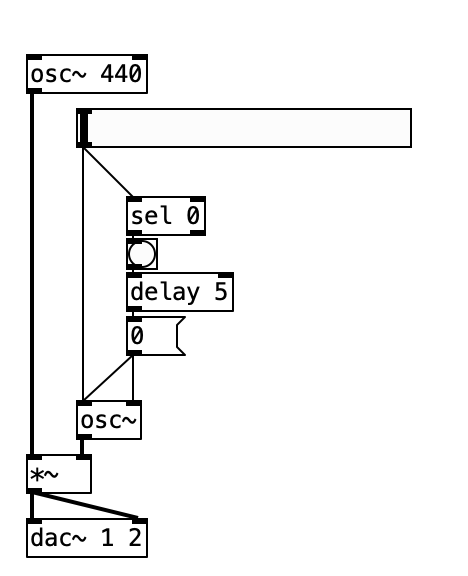
using 0..10hz osc~ as amplitude modulation, when i get to 0, there's an audible click
@whale-av said:
@esaruoho The image is not useful as you say.
The only [osc~] that I see seems to be set to 0Hz and have its phase reset 5ms after receiving data..... so maybe the phase reset causes the click as the [osc~] wave could be at any value when the phase is reset and a sudden jump in value is a click.
David.
yep, that's what's happening. if i don't have the delay5 0( then the amplitude might be set to anything, so then i have to keep resetting it to zero multiple times until it's at the original volume. so hence the phase needs to be reset to 0.
here, maybe this'll help.
clicks when goes to 0.pd
i tried both hooking the 0..10hz osc to the first inlet of [*~] or the second inlet. both "goes to 0" result in an audible click.
how does one reset the phase so that the volume is at the original volume, please?
here's the attached script as a screenshot
 posted in technical issues
Question about [tabread4~]
I would test Pd by recording a few seconds of [phasor~ 1], and measuring the number of samples per cycle. Obviously this should be the system sample rate, give or take floating point rounding error.
The worry in this thread is that Pd is playing at the wrong speed.
The only way this could happen is if [phasor~ 1] is running at the wrong speed, because in the demo patch, phasor~ is the only thing controlling the speed.
Therefore, if there is no evidence of phasor~ running at the wrong speed, then Pd must be playing the file at the true speed!
"But what if the system sample rate differs from the file's?" The file is at the lowest sample rate in common use. If Pd is playing it slower than Audacity, then Pd would have to be running below 44.1 kHz, which is unlikely to be supported in hardware. So I'm comfortable ruling that out (not to mention that scaling the phasor~ by the file's number of samples already accounts for this). Common scenario would be: 44.1 kHz file, 48 kHz system SR, without correcting for this then Pd would play faster, but that isn't the report.
is audacity running at 44100?
I'm pretty sure Audacity has no power to override the hardware sample rate. I've never heard of soundcards issuing separate, per-app interrupts at different rates (imagine how difficult that would be, to make it work, highly implausible). AFAIK Audacity does sample rate conversion when the file is at a different rate from the hardware... just like all other audio software.
Is it 100% guaranteed that Audacity is playing it at the right speed?
hjh
 posted in technical issues
get phase of [osc~]
[phasor~]
|
[cos~]
should be the same as
[osc~]
but this time I need to measure the phase of [osc~]
and do the same as
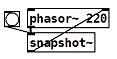
with [osc~] instead of [phasor~].
I have a running patch, but sometimes it flips the phase by 180 degrees.
Do you know why or how to avoid that?
Here is the patch:
phase_of_normalized_cosine~.pd
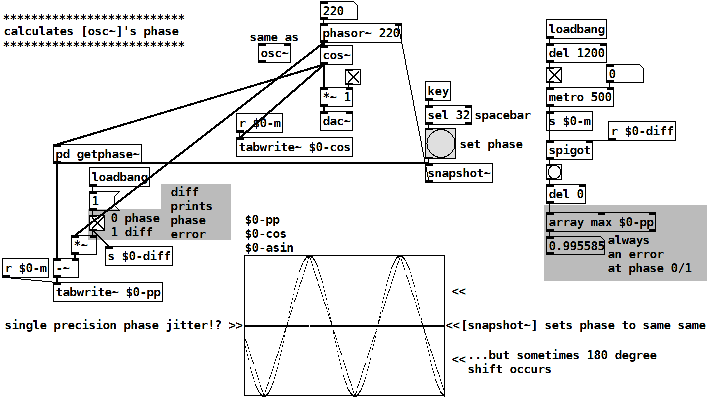
The patch calculates the phase of a normalized cosine y(x) by
asin(y(x)) / (pi/2)
this is a triangle wave, following cosine's shape linearized.
Then a tri-to-saw waveshper:
invert the falling part of the triangle
and divide it's frequency by 2.
late EDIT: also read this: https://forum.pdpatchrepo.info/topic/15128/snapshotting-and-restoring-the-state-of-a-phasor-exactly
 posted in technical issues
phase index of an oscillator and 1 sample delay in pd?
@KMETE
the Max patch looks like feedback-FM to me. For PM the + would be placed between phasor and circle, if I'm not mistaken.
And with 1000 ms delay, as I read the Max patch? there would be no need for 1 sample-blocks.
A thread on this topic:
https://forum.pdpatchrepo.info/topic/6185/feedback-fm-algorithm
DC-blocking you can do with [hip~ 20] for example (I'd put it in the feedback-loop).
cycle object
[cos~] ? Is a cosine-tabel, to get a sine you can drive it like this:
[phasor~]
|
[-~ 0.25]
|
[cos~]
Offtopic: Pd's cosine has a slight DC-offset.
https://forum.pdpatchrepo.info/topic/13709/bug-osc-cos-circle-asymmetry-drifting-out-of-phase
@alexandros said:
Creating a one-sample delay is achieved by placing your objects in a subpatch and putting a
[block~ 1]object in there. Then you have to use[tabsend~]and[tabreceive~]instead of[delwrite~]and[delread~]to achieve the one-sample delay.
Yes. And be aware of the importance of creating [tabsend~] beforehand of [tabreceive~] . You can read about in the Pd documentation 3.audio.example > G05.execution.order.pd
For feedback, I usually build subpatches with such a dummy-connection, save the patch, and delete the dummy cable lastly and save again, for perceving the execution order and avoiding a dsp-loop.
[delwrite~] and [delread~] can become as short as 1 sample, too.
In both [osc~] and [phasor~], the phase is set by control messages, but since you'll have a one-sample block size, that shouldn't be a problem, you can just set the phase to what ever you like and it will be reset at the next sample block (one sample later).
This is one of the biggest myths in Pd (at least for me), but unfortunately not true. (Vanilla 52.2)
See vphasor~-help : https://github.com/dotmmb/mmb
Still the same, if you put it in a subpatch with [block~ 1].
Documentation is lacking here. There are very few timing- sample- or phase-critical control-objects that are able to update (sub-)sample-accurately in-between block-boundaries of 64 samples minimum:
I only know of [bang~], [metro], [delay], [pipe], [vline~]
posted in technical issues
Audio click occur when change start point and end point using |phasor~| and |tabread4~|
@Junzhe-hou said:
@ddw_music Hi professor!?!? good to see you here!
Yes, it's me -- I almost didn't notice your username 
I read your email last week but im so confused with your
patch--varispeed-segment:|noise~|
|
|lop~ 3|
|
|*~ 30|
|
|+~ 1|
This is just a way to generate a modulator for the playback rate. It could be any other modulator (LFO, envelope, anything).
After that, this is multiplied by a sample rate scaling factor.
As you asked jameslo: "if sample rate (in audio setting) changed the result sound different":
-
If the file sample rate is 96 kHz and the soundcard sample rate is 96 kHz, then normal-speed playback is to move forward exactly 1 sample in the file for every output sample.
-
If the file sample rate is 96 kHz and the soundcard sample rate is 48 KHz, then normal-speed playback is to move forward exactly 2 samples in the file for every output sample. (If you playback at 1:1, then the file will sound slower at the lower soundcard sample rate.)
This was one of the big reasons for me to make [soundfiler2] in my abstraction set. It calculates file_sr / system_sr and saves this in a value object named after the ID+"scale". If you multiply the playback rate by this scaling factor, then the file should sound correct at any system sample rate.
(BTW you would have the same issue in SuperCollider: PlayBuf.ar(1, bufnum, rate: 1) will sound different depending on the hardware sample rate, but PlayBuf.ar(1, bufnum, rate: BufRateScale.kr(bufnum)) would sound the same, except maybe for aliasing when downsampling.)
You method "L inlet = rate * scale for sample increment",so is the rate always changing?
Yes -- variable-speed playback.
@jameslo "I'm sorry if I just did your student's homework" -- actually this isn't for my class -- independent project. There are still some students who do hard things just because it's fun to overcome challenges 
hjh
posted in technical issues
Audio click occur when change start point and end point using |phasor~| and |tabread4~|
Hi Junzhe 
I often like to think through something like this with a concrete example.
Let's start with 10 seconds of audio: phasor = 0 --> time 0, phasor = 1 --> time 10000 (ms).
Then, at 5000 ms, you change the end time to 7000 ms.
So, now, phasor = 0.5, time = 5000. And you need phasor = 1 now to map onto 7000 ms.
So two things need to happen:
- The phasor, running at its current speed, would reach its end 5000 ms later -- but you actually need it to reach the end in 2000 ms. So the phasor's speed has to increase by a factor of 5/2 = current_time_to_end / new_time_to_end.
- The linear mapping currently locates phasor = 1 at time = 10000, but now you need phasor = 1 --> time 7000. So the slope of the linear mapping will have to adjust by a factor of 2/5 = new_time_to_end / current_time_to_end (and the linear function's intercept would have to change too).
The changes in phasor frequency and linear slope should cancel out.
Then, at the start of the next cycle (which can be detected by [samphold~]), you would have to recalculate the slope for the entire start <--> end segment.
I might be overthinking it, but e.g. jameslo admits that in a simpler solution "the pitch is not steady as you adjust the start and end" so I think there aren't many shortcuts to be taken.
BTW there is another way to integrate a rate: rpole~. With an integrator, you don't have to worry about rejiggering slopes -- it just continues on its way, and reaches the end value in its own time. But, you would be responsible for triggering the reset at that point. This version uses control messages for triggering, so it would be quantized to block boundaries. To do it sample-accurately involves feedback and I never worked that out.
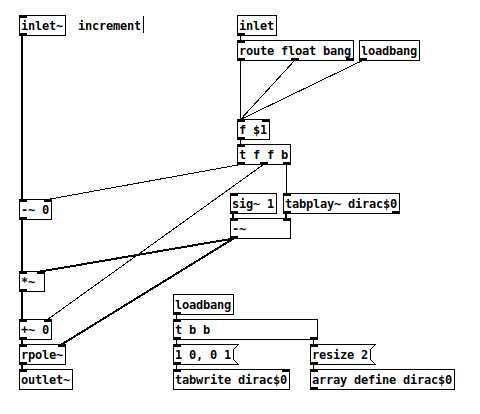
And a quick test patch (array "a" is 44100 samples, vertical range -10 to +50):
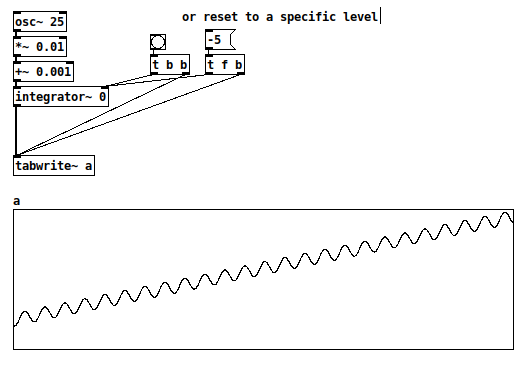
hjh
PS Hm, now I guess the [route float bang] isn't needed after all.
posted in technical issues
Ganymede: an 8-track, semi-automatic samples-looper and percussion instrument based on modulus instead of metro
Ganymede.7z (includes its own limited set of samples)
Background:
Ganymede was created to test a bet I made with myself:
that I could boil down drum sequencing to a single knob (i.e. instead of writing a pattern).
As far as I am concerned, I won the bet.
The trick is...
Instead of using a knob to turn, for example, up or down a metro, you use it to turn up or down the modulus of a counter, ie. counter[1..16]>[mod X]>[sel 0]>play the sample. If you do this then add an offset control, then where the beat occurs changes in Real-Time.
But you'll have to decide for yourself whether I won the bet.  .
.
(note: I have posted a few demos using it in various stages of its' carnation recently in the Output section of the Forum and intend to share a few more, now that I have posted this.)
Remember, Ganymede is an instrument, i.e. Not an editor.
It is intended to be "played" or...allowed to play by itself.
(aside: specifically designed to be played with an 8-channel, usb, midi, mixer controller and mouse, for instance an Akai Midimix or Novation LaunchPad XL.)
So it does Not save patterns nor do you "write" patterns.
Instead, you can play it and save the audio~ output to a wave file (for use later as a loop, song, etc.)
Jumping straight to The Chase...
How to use it:
REQUIRES:
moonlib, zexy, list-abs, hcs, cyclone, tof, freeverb~ and iemlib
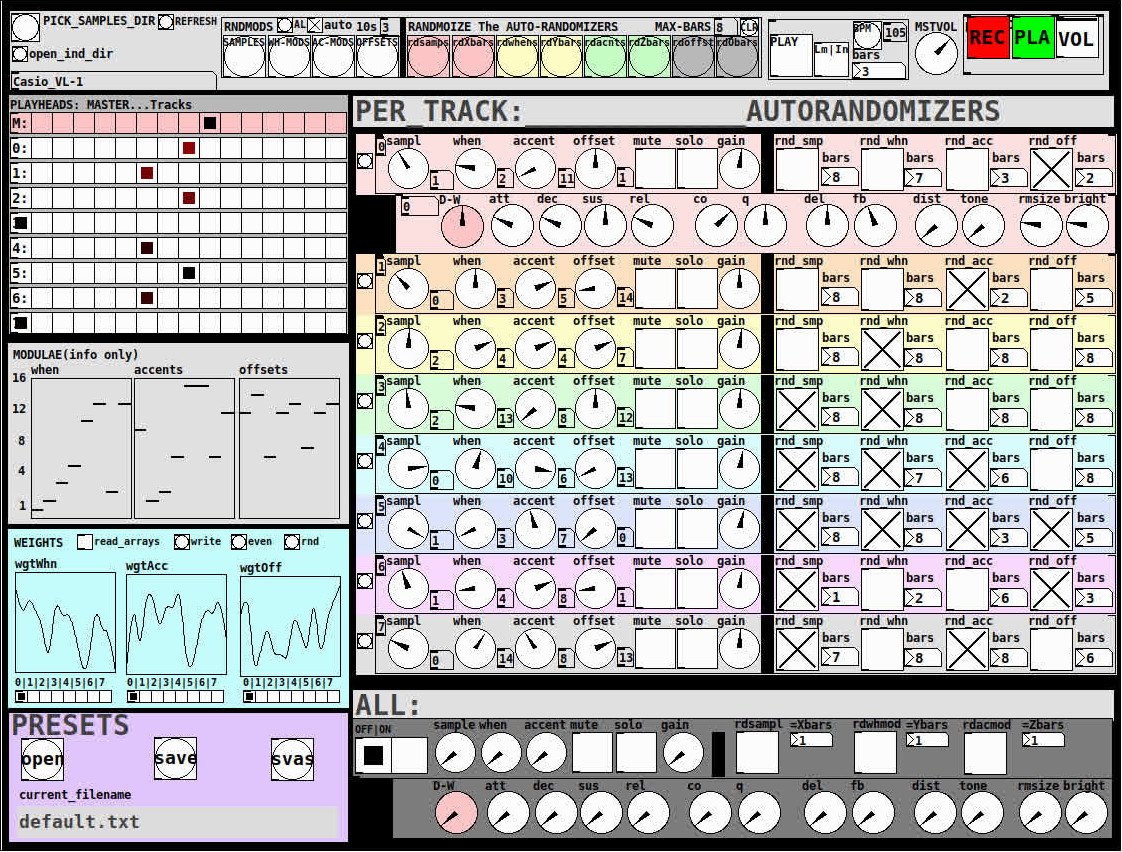
THE 7 SECTIONS:
- GLOBAL:
- to set parameters for all 8 tracks, exs. pick the samples directory from a tof/pmenu or OPEN_IND_DIR (open an independent directory) (see below "Samples"for more detail)
- randomizing parameters, random all. randomize all every 10*seconds, maximum number of bars when randomizing bars, CLR the randomizer check boxes
- PLAY, L(imited) or I(nfinite) counter, if L then number of bars to play before resetting counter, bpm(menu)
- MSTVOL
- transport/recording (on REC files are automatically saved to ./ganymede/recordings with datestamp filename, the output is zexy limited to 98 and the volume controls the boost into the limiter)
- PLAYHEADS:
- indicating where the track is "beating"
- blank=no beat and black-to-red where redder implies greater env~ rms
- MODULAE:
- for information only to show the relative values of the selected modulators
- WEIGHTS:
- sent to [list-wrandom] when randomizing the When, Accent, and Offset modulators
- to use click READ_ARRAYS, adjust as desired, click WRITE, uncheck READ ARRAYS
- EVEN=unweighted, RND for random, and 0-7 for preset shapes
- PRESETS:
- ...self explanatory
-
PER TRACK ACCORDION:
- 8 sections, 1 per track
- each open-closable with the left most bang/track
- opening one track closes the previously opened track
- includes main (always shown)
- with knobs for the sample (with 300ms debounce)
- knobs for the modulators (When, Accent, and Offset) [1..16]
- toggles if you want that parameter to be randomized after X bars
- and when opened, 5 optional effects
- adsr, vcf, delayfb, distortion, and reverb
- D-W=dry-wet
- 2 parameters per effect
-
ALL:
when ON. sets the values for all of the tracks to the same value; reverts to the original values when turned OFF
MIDI:
CC 7=MASTER VOLUME
The other controls exposed to midi are the first four knobs of the accordion/main-gui. In other words, the Sample, When, Accent, and Offset knobs of each track. And the MUTE and SOLO of each track.
Control is based on a midimap file (./midimaps/midimap-default.txt).
So if it is easier to just edit that file to your controller, then just make a backup of it and edit as you need. In other words, midi-learn and changing midimap files is not supported.
The default midimap is:
By track
CCs
| ---TRACK--- | ---SAMPLE--- | ---WHEN--- | ---ACCENT--- | --- OFFSET--- |
|---|---|---|---|---|
| 0 | 16 | 17 | 18 | 19 |
| 1 | 20 | 21 | 22 | 23 |
| 2 | 24 | 25 | 26 | 27 |
| 3 | 28 | 29 | 30 | 31 |
| 4 | 46 | 47 | 48 | 49 |
| 5 | 50 | 51 | 52 | 53 |
| 6 | 54 | 55 | 56 | 57 |
| 7 | 58 | 59 | 60 | 61 |
NOTEs
| ---TRACK--- | ---MUTE--- | ---SOLO--- |
|---|---|---|
| 0 | 1 | 3 |
| 1 | 4 | 6 |
| 2 | 7 | 9 |
| 3 | 10 | 12 |
| 4 | 13 | 15 |
| 5 | 16 | 18 |
| 6 | 19 | 21 |
| 7 | 22 | 24 |
SAMPLES:
Ganymede looks for samples in its ./samples directory by subdirectory.
It generates a tof/pmenu from the directories in ./samples.
Once a directory is selected, it then searches for ./**/.wav (wavs within 1-deep subdirectories) and then ./*.wav (wavs within that main "kit" directory).
I have uploaded my collection of samples (that I gathered from https://archive.org/details/old-school-sample-cds-collection-01, Attribution-Non Commercial-Share Alike 4.0 International Creative Commons License, 90's Old School Sample CDs Collection by CyberYoukai) to the following link on my Google Drive:
https://drive.google.com/file/d/1SQmrLqhACOXXSmaEf0Iz-PiO7kTkYzO0/view?usp=sharing
It is a large 617 Mb .7z file, including two directories: by-instrument with 141 instruments and by-kit with 135 kits. The file names and directory structure have all been laid out according to Ganymede's needs, ex. no spaces, etc.
My suggestion to you is unpack the file into your Path so they are also available for all of your other patches.
MAKING KITS:
I found Kits are best made by adding directories in a "custom-kits" folder to your sampls directory and just adding files, but most especially shortcuts/symlinks to all the files or directories you want to include in the kit into that folder, ex. in a "bongs&congs" folder add shortcuts to those instument folders. Then, create a symnlink to "bongs&congs" in your ganymede/samples directory.
Note: if you want to experiment with kits on-the-fly (while the patch is on) just remember to click the REFRESH bang to get a new tof/pmenu of available kits from your latest ./samples directory.
If you want more freedom than a dynamic menu, you can use the OPEN_IND(depedent)_DIR bang to open any folder. But do bear in mind, Ganymede may not see all the wavs in that folder.
AFTERWARD/NOTES
-
the [hcs/folder_list] [tof/pmenu] can only hold (the first) 64 directories in the ./samples directory
-
the use of 1/16th notes (counter-interval) is completely arbitrary. However, that value (in the [pd global_metro] subpatch...at the noted hradio) is exposed and I will probably incorporate being able to change it in a future version)
-
rem: one of the beauties of this technique is: If you don't like the beat,rhythm, etc., you need only click ALL to get an entirely new beat or any of the other randomizers to re-randomize it OR let if do that by itself on AUTO until you like it, then just take it off AUTO.
-
One fun thing to do, is let it morph, with some set of toggles and bars selected, and just keep an ear out for the Really choice ones and record those or step in to "play" it, i.e. tweak the effects and parameters. It throws...rolls...a lot of them.
-
Another thing to play around with is the notion of Limited (bumpy) or Infinite(flat) sequences in conjunction with the number of bars. Since when and where the modulator triggers is contegent on when it resets.
-
Designed, as I said before, to be played, esp. once it gets rolling, it allows you to focus on the production (instead of writing beats) by controlling the ALL and Individual effects and parameters.
-
Note: if you really like the beat Don't forget to turn off the randomizers. CLEAR for instance works well. However you can't get the back the toggle values after they're cleared. (possible feature in next version)
-
The default.txt preset loads on loadbang. So if you want to save your state, then just click PRESETS>SAVE.
-
[folder_list] throws error messages if it can't find things, ex. when you're not using subdirectories in your kit. No need to worry about it. It just does that.
POSTSCRIPT
If you need any help, more explanation, advise, or have opinions or insight as to how I can make it better, I would love to hear from you.
I think that's >=95% of what I need to tell you.
If I think of anything else, I'll add it below.
Peace thru Music.
Love thru Pure Data.
-s
,
 posted in patch~
I don't understand \[fexpr~\]?
@Obineg [fexpr~] is quite a bit less efficient than [expr~]
so, if you don't need per-sample memory or feedback it is much better to use [expr~]
why? because in order to store each of the output samples for the current processed sample, [fexpr~] needs to operate on single passes of the perform loop, then store the input and output samples.
I think since [expr~] deals with a block (vector) of samples it is generally more efficient since it can pipeline and vectorize the actual instructions. And it's not possible to do that if the next output sample is dependent on the current output sample.
plus, due to the way pd uses the input and output samples in a dsp graph, the input and output buffer might be the same buffer. This means that if you want to read an input sample from the past you first have to store it somewhere to make sure it won't be overwritten when writing to the output. so [fexpr~] also has to do that when [expr~] doesn't (since [expr~] only processes input samples as a vector).
basically: [expr~] operates on the whole vector/block (meaning the constituent functions/operators are applied "at once" over the vector/block for every part of the computation), [fexpr~] operates on the individual samples of that vector/block. (meaning the constituent functions/operators are applied in turn to every sample in the block, one at a time, for every part of the computation)
 posted in technical issues
Just Another (Drum) Sequencer...SortOf, codename: Virgo
Just Another (Drum) Sequencer...SortOf, codename: Virgo
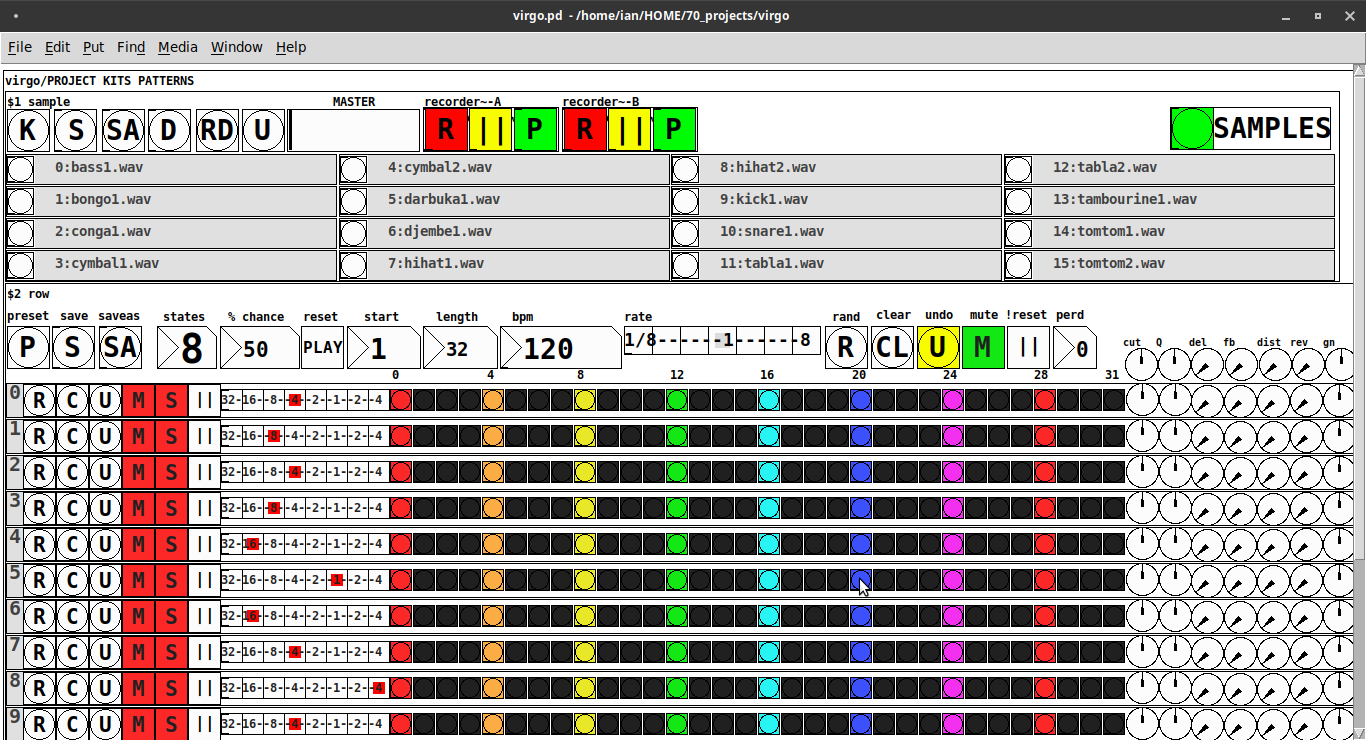
REQUIRES: zexy, moonlib, tof (as of Pd 0.50.2, all of which are in deken) and hcs (which comes by default with Pd 0.50.2 and is in deken (for extended))
Special Features
- Unique playhead per row; each with their own metro (beat)
- Up to 8 Volume states-per-beat (by clicking multiple times on the bang; where an rms=1 is divide among the states (2 states:0=rms=0(black), 1=rms=1(red); 3 states:rms=[0|0.5|1])
- Design approach: using creation arguments to alias abstractions, so subsequently they are referred to by their creation arguments, ex. in [KITS sample] sample is referred to as [$1]; which is how they are listed below)
(notes: what I learned experimenting with this design approach, I will share as a separate post. Currently, it does not include cut-copy-paste (of regions of the pattern)). I good way to start trying it out is clicking the "R" to get a random kit and a random pattern).
virgo:[virgo/PROJECT KITS PATTERNS]
- PROJECT[KITS PATTERNS]
- $1:[KITS sample]
- GUI
- K: openpanel to load a previously saved *.txt (text object) kit of samples; on loadbang the default.txt kit is loaded
- S: save the current set of samples to the most recently opened *.txt (kit) preset
- SA: saveas a *.txt of the current set of samples
- D: foldererpanel a sample directory to load the first (alphabetically) 16 samples into the 16 slots
- RD: load a random kit from the [text samples] object where the samples where previously loaded via the "SAMPLES" bang on the right
- U: undo; return to the previously opened or saved *.txt kit, so not the previously randomized
- MASTER: master gain
- (recorder~: of the total audio~ out)
- record
- ||: pause; either recording or play;
- play: output is combined with the sequencer output just before MASTER out to [dac~]
- SAMPLES: folderpanel to load a (recursive) directory of samples for generating random kits
- ABSTRACTIONS
- $1: sample
- bang: openpanel to locate and load a sample for a track
- canvas: filename of the opened sample; filenames are indexed in alignment with track indices in the PATTERNS section
- $1: sample
- GUI
- $2:[PATTERNS row]
- GUI
- P: openpanel to load a previously saved *.txt (pattern) preset file; on loadbang the default.txt pattern is loaded; the preset file includes the beat, pattern, and effect settings for the row
- S: save the current pattern to the most recently opened pattern .txt
- SA: save as (self-explanatory)
- states: the number of possible states [2..8] of each beat;
- %: weight; chance of a beat being randomized; not chance of what it will result in; ex. 100% implies all beats are randomized ; random beats result in a value)gain) between 1 and states-1
- PLAY(reset): play the pattern from "start" or on stop reset all playheads to start
- start: which beat to start the playheads on
- length: how many beats to play [+/-32]; if negative the playheads will play in reverse/from right to left
- bpm: beats-per-minute
- rate: to change the rate of play (ie metro times) by the listed factor for all playheads
- R: randomize the total pattern (incl period and beats, but not the effect settings; beats of 1/32 are not included in the possibilities)
- CL: clear, set all beats to "0", i.e. off
- U: undo random; return to the previously opened or saved preset, ie. not the previous random one
- M: mute all tracks; the playheads continue moving but audio does not come out of any track
- ||:pause all playheads; play will resume from that location when un-paused
- per: period; if 0=randomizes the period, >0 sets the period to be used for all beats
- Edit Mode
- Check the [E] to enter edit mode (to cut, copy, or paste selected regions of the pattern)
- Entering edit mode will pause the playing of the pattern
- Play, if doing so beforehand, will resume on leavng edit mode
- The top-left most beat of the pattern grid will be selected when first entering edit mode
- Single-click a beat to select the top-left corner of the region you wish to cut or copy
- Double-click a beat to select the bottom-right corner
- You may not double-click a beat "less than" the single-clicked (top-left) beat and vice-versa
- Click [CL] to clear your selection (i.e. start over)
- The selected region will turn to dark colors
- If only one beat is selected it will be the only one darkened
- Click the operation (bang) you wish to perform, either cut [CU] or copy [CP]
- Then, hold down the CTRL key and click the top-left corner of where you want to paste the region
- The clicked cell will turn white
- And click [P] to paste the region
- Cut and copied regions may both be pasted multiple times
- The difference being, cutting sets the values (gains) for the originating region to "0"
- Click [UN] to undo either the cut, copy, or paste operation
- Undoing cut will return the gains from 0s to their original value
- Check the [E] to enter edit mode (to cut, copy, or paste selected regions of the pattern)
- (effect settings applied to all tracks)
- co: vcf-cutoff
- Q: vcf-q
- del: delay-time
- fb: delay-feedback
- dist: distortion
- reverb
- gn: gain
- ABSTRACTIONS
- $1: [row (idx) b8] (()=a property not an abstraction)
- GUI
- (index): aligns with the track number in the KITS section
- R: randomize the row; same as above, but for the row
- C: clear the row, i.e. set all beats to 0
- U: undo the randomize; return to the originally opened one, ie. not the previous random one
- M: mute the row, so no audio plays, but the playhead continues to play
- S: solo the row
- (beat): unit of the beat(period); implying metro length (as calculated with the various other parameters);1/32,1/16,1/8, etc.
- (pattern): the pattern for the row; single-click on a beat from 0 to 8 times to increment the gain of that beat as a fraction of 1 rms, where resulting rms=value/states; black is rms=0; if all beats for a row =0 (are black) then the switch for that track is turned off; double-click it to decrement it
- (effects-per-row): same as above, but per-row, ex. first column is vcf-cutoff, second is vcf-q, etc.
- ABSTRACTIONS
- $1: b8 (properties:row column)
- 8-state bang: black, red, orange, yellow, green, light-blue, blue, purple; representing a fraction of rms(gain) for the beat
- $1: b8 (properties:row column)
- GUI
- $1: [row (idx) b8] (()=a property not an abstraction)
- GUI
- $1:[KITS sample]
Credits: The included drum samples are from: https://www.musicradar.com/news/sampleradar-494-free-essential-drum-kit-samples
p.s. Though I began working on cut-copy-paste, it began to pose a Huge challenge, so backed off, in order to query the community as to 1) its utility in the current state (w/o that) and 2) just how important including it really is.
p.p.s. Please, report any inconsistencies (between the instructions as listed and what it does) and/or bugs you may find, and I will try to get an update posted as soon as enough of those have collect.
Love and Peace through sharing,
Scott
posted in patch~
looking for velvet noise generator
@porres oh yeah I always forget about [expr~] for some reason.. maybe bc of the license it used to have.
There's no real reason to have the phase reset inlet, just more control.
From what I can tell, velvet noise is outputting a 1-sample impulse of value that's either 1 or -1, chosen randomly, at a random point in a regular period.
So I have a [phasor~] to keep track of the period, and the [samphold~] samples a random value from 0-1 when the [phasor~] resets. This will be the point in the phase of that period that the impulse will occur. When the [phasor~] gets to above or equal to this value, the [<~ ] will go from 1 to 0. That goes into [rzero~ 1], which will put out a -1 on the sample that occurs. That goes into the [==~ -1], which acts (together with [*~ ]) as a gate for the noise value that has been manipulated to either be 1 or -1, depending on if the output of [noise~] is positive or not.
The issue with this original implementation was that when the [phasor~] wraps around to start a new phase, it can wrap to a value greater than the new [samphold~] value from the noise. That means that if the noise value is very small, there will be no impulse for that period since the [phasor~] value will never be less than the sampled noise value for that period (and therefore the [<~ ] won't go from 1 to 0, which means the [rzero~ 1] below it won't output a -1, and so on). So, the [rzero~] and [<~ 0] put out a 1-sample value of 1 when the [phasor~] wraps around, which is combined with the other signal in [min~ 1] to take care of this. That way the [rzero~ 1] below the [min~ 1] will get a 1 even if the wrapped-around [phasor~] value is less than the new sampled noise value, and there will be an impulse for that period.
(that is what "make sure there is at least 1 1 on wraparound" means)
edit: after writing all of this it occurred to me that the sampled noise value could also be greater than the value that the [phasor~] will get to before it wraps around.. perhaps the solution is to constrain the sampled noise value depending on the frequency and phase of the [phasor~]...
posted in technical issues