
Wireless OSC/MIDI sensors or inputs with Pipo Interfaces
Hi there,
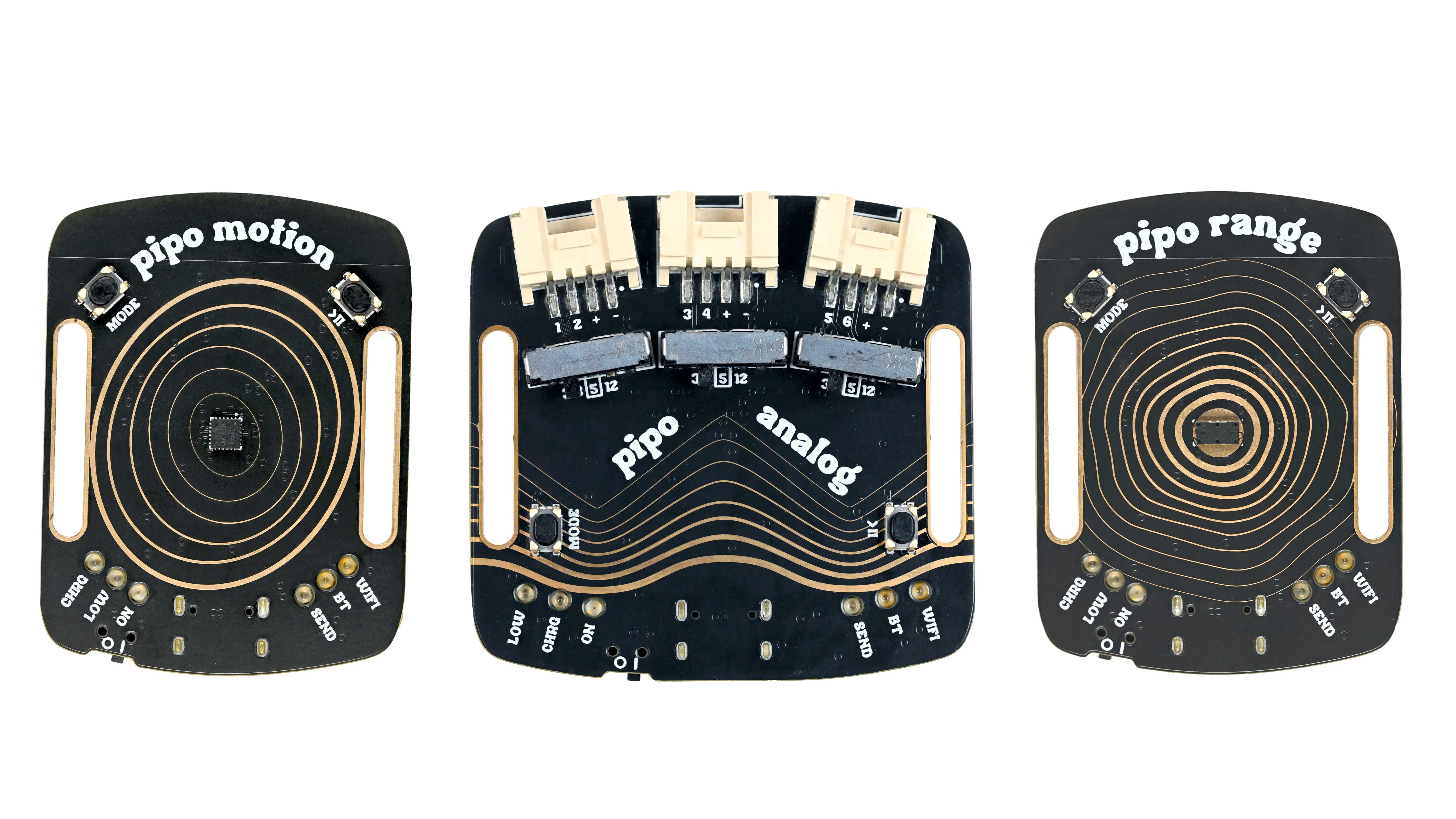
I would like to share a project I am working on for a while which might interest anyone who like making physically interactive or reactive installations.
It’s a plug-and-play sensing platform for creative and audiovisual applications, with MIDI, OSC, wireless capabilities and a convenient web interface.
You can turn movement, touch, distance, or other sensors into wireless controllers in seconds.
I developed this project to ease the connection of sensors to audiovisual and music software. After doing that with arduino for years, but encountering so many limitations and struggles, I decided to make and share a much easier, convenient and robust solution for all: the whole project will be open sourced.
The project is called “Pipo Interfaces”. It is still in the making and will be launched as a pre-order campaign on Crowd Supply (a funding platform for open source electronics).
If you are interested, check out the pre-launch page and subscribe to the project updates !
https://www.crowdsupply.com/pipo-interfaces/pipo
You can also check the Insta @pipo_interfaces
Any feedback or questions welcome !
 posted in I/O hardware diy
Good patches for studying
Hi to all! I'm looking for recommendations of musically oriented articles/books/patches/tutorials to study from. I've reached a stall where I don't really know how to continue. I've been studying and playing with PD for 3 or 4 months now and I've reached a stall where what I find is either too advanced for me to dive into or too basic. I would love to understand a bit more about how do people compose with pd and how they make their advanced abstractions for sound design and composing, so I would really appreciate some recommendations or advice on the matter. Thanks a lot!
 posted in technical issues
Pd compiled for double-precision floats and Windows
@porres He he he...I gotta remember that expression.
it just makes double-precision less usable, that's all. Most programming languages try to make language features orthogonal, which not only helps with usability but also makes them easier to learn. RE file compatibility, the languages I've used do anything from silently convert from one precision to another, to warning you before they do it, to demanding that you explicitly cast one type to the next. As we've been discussing, Pd already knows how to silently convert, so that might be an option.
I'm not a language designer and I don't know the goals and culture of Pd development, so I'm hesitant to make specific recommendations (or even call them "recommendations"). I'm really just telling you what I naively expected when downloaded this experimental release.
 posted in technical issues
How to connect the guitar to pure data?
@romulovieira-me Under preferences > audio> select your sound card's line input. If it is the internal sound card there shouldn't be very many options, just a mic and maybe a line input (depends on your OS). Generally it's default set to the mic. (https://puredata.info/docs/faq/audioinput)
Then in a patch, create an [adc~] object. Normally or initially, this is assigned to the mic on the computer, but if you have selected the signal line input from your soundcard you should be able to get a connection established. Getting the correct input and output set up can be the hardest bit of getting set up, stick with it and you'll find what is right for you. If you struggle with it, post a screenshot of your audio options and we can hopefully help point you in the right direction. If it's just a mono input, you may only have sound form one output of the [adc~] object. If you right click the adc object you can find out more, with examples etc. (you can do this with all patches, and is a great way to learn via practise.
You will still have to connect the input sound to the [dac~] object, which will convert your signal back from digital to audio. Be careful though, it will be at full volume, so it is always recommended to put an object before the dac that will lower the volume (0 is silence, 1 is full volume, so lower decimals of 1 are advised before you know what to expect, maybe [*~ 0.1] to start).
A small diagram to describe:
{adc~]
|
{*~ 0.1]
|
[dac~ 1 2]
It's worth searching this forum too, as you might find a lot more tips and help.
 posted in technical issues
Pd as an accessible programming environment?
Hello @JoshuaACNewman ,
Yes, there's the autocompletion plug-in:
https://github.com/HenriAugusto/completion-plugin
And there's also a pd distribution used in the CEAMMC (Centre for Electroacoustic Music Moscow Conservatory) that comes with this feature as well as a toolbar and a big external library:
https://github.com/uliss/pure-data/releases
Even though it is still in beta, I would recommend Plug Data, it has auto-completion, has a dark theme, comes included with the else library and can be used as a DAW plug-in, although it uses different shortcuts than pd vanilla:
https://github.com/timothyschoen/PlugData
Two other projects I would recommend checking out:
https://www.automatonism.com/ - A modular synthesizer in Pd (you can actually click on buttons to create the modules instead of typing them)
http://malinette.info/en/? - programming interactivity toolkit.
I'm now curious about what software you could use to build this macro keyboard, let me know
 posted in technical issues
Problems with jack on linux.
@bocanegra said:
jack has to be set up properly for the server to run without dropouts (select the correct soundcard, buffer size etc in settings), or even start at all. For this purpose I use qjackctl, which is a GUI control panel for the jack server-
Agreed -- IMO it's highly recommended to manage the JACK server using JACK tools, and not recommended to expect the JACK client app to do it for you.
qjackctl.
Also there are PulseAudio-JACK modules which, when configured correctly, allow JACK and non-JACK apps to coexist peacefully. I've been running this way for 11 years now in Ubuntu. It's unfortunate that it isn't set up like this out of the box, but you don't have to accept the either/or situation.
hjh
 posted in technical issues
Fresh Pd 0.50.2 install comes with broken libs and deken installs broken libs
@ddw_music said:
One way that this could be improved:
- Pd could recommend externals be placed under a specific location. (Actually, here, you could follow SuperCollider's lead and have a system-wide location and a user-specific location.)
well, pd does now prompt/recommend a directory for installing externals (e.g. ~/Documents/Pd). It just so happens that the path isn't in the static paths. It was better when there were just 2 standard library locations: 1 for system-wide libraries and 1 for user-specific libraries (e.g. /Library/Pd and ~/Library/Pd on osx). This is still technically the case, they're just not the directories that pd prompts the user to install externals to. (though they are installed there by default) http://msp.ucsd.edu/Pd_documentation/x4.htm#s2.1
imo prompting the user to create ~/Documents/Pd and install externals there is a mistake
- Per patch file, keep a list of which locations have provided externals or abstractions.
the declare help file does say "WARNING: as of version 0.47, "declare -path" and "declare -stdpath" inside abstractions take effect only within those abstractions. If Pd's compatibility version is set to 0.46 or earlier the old (buggy) behavior takes effect."
perhaps this could be extended to libraries too
- If there is a binary library in the access path, load it automatically. Do not make the user distinguish between lib and path.
I agree that if someone specifies "-lib" it should work for multi-object, abstraction, and single-object libraries. However there should be cases for adding to a path without it being a library imo.
maybe the solution is a general "import" object for libraries like extended used to have, since [declare] seems to be designed to refer to specific binaries and paths without any further method of abstraction.
- If it's the first time this subdirectory provided an object to this patch file, print a message in the console (help the user not overlook the dependency).
I don't think this is a good idea. It would clog up the console. maybe there could be some kind of helper object or something in [pdcontrol] or [declare] that gets a list of all of the library or external dependencies of a patch when the user needs them. (or maybe some external would be better).
- Have a menu option to print a list of dependencies. (If the list of external subdirectories is saved in the patch, this is easy.)
The whole idea of using [declare] is to be able to understand a patch's dependencies just by opening it. Of course when people develop with libraries loaded into their startup path instead of using [declare] or [libraryname/objectname], that doesn't work. But if people actually used [import] or something instead this would be unnecessary
For me, the sticking points are that the search is non-recursive (this design decision, frankly, baffles me, I could not disagree with it more strongly) and that the user is expected to know which external packs provide a single-binary library.
I think it's good that libraries aren't searched recursively. This allows the maintainer/developer full control of loading resources, and doesn't waste time searching potentially large non-object resource directories in a library every time an object is loaded.
 posted in technical issues
Problems using PD on Raspberry Pi
@mswcpt I highly recommend trying a Rpi sound card. The ones I've tried sound so good. Better than my Motu interface on the Mac. I am using an Audio Injector one now. The PiDac+ sounds amazing, but it doesn't work well with other Pi shields, but sounds really amazing, Hi-fi. I recommend going that route. Set it up, in PD select is as your audio interface, save chagnes, and next time you launch Pd it should be the same setting.
 posted in I/O hardware diy
[declare] vs help browser
As a further test -- I hacked ./tcl/helpbrowser.tcl to print to stdout some progress messages while building the help browser directory list. (Doing this in Linux -- I haven't set up the Windows machine to build Pd from source.)
To my surprise, I found that the Externals Install Directory is part of $::sys_staticpath (in Linux).
Each entry in $::sys_staticpath is globbed for any subdirectories -- so this is how it's finding Gem, cyclone, zexy etc.
staticpath add search /home/dlm/pd-externals/Gem
staticpath add search /home/dlm/pd-externals/freeverb~
staticpath add search /home/dlm/pd-externals/zexy
... etc.
A little bit later, it checks $::sys_searchpath -- this comes from preferences. These entries are not globbed for subdirectories.
searchpath add search /home/dlm/pd-externals
(Above is the only entry coming from Preferences > Path.)
So one possible difference is that the "static path" includes my external location in Linux (that isn't speculation -- the stdout listing proves it), while it probably doesn't in Windows.
OK, then, let's grep staticpath... this leads to s_path.c, which says (in an ifdef for Linux):
sys_expandpath("~/pd-externals", pathbuf, MAXPDSTRING);
STUFF->st_staticpath = namelist_append(STUFF->st_staticpath, pathbuf, 0);
So user-home/pd-externals is a special, hardcoded location for Linux, which I happen to be using for my externals.
Looking a bit further down, hardcoded locations in Windows are AppData/Pd and something about common-program-files/Pd -- but the Pd GUI recommends Documents/Pd/externals as the installation directory. (And Mac will have a similar problem, because the hardcoded locations include ~/Library/Pd but again not Documents/Pd/externals.)
I'm satisfied that this explains the difference in behavior between the two environments. But it leaves a bit of an impression that this hasn't been completely thought through. If there are magic locations for help browser search, ideally this would be coordinated with recommended installation directories, but they aren't.
hjh
posted in technical issues
external objects will only load after opening help file
@Il-pleut Yes and also the behavior and recommended way of handling externals have changed over time. In the beginning, you had to do everything manually, then "Find externals" (also called Deken) copied the files but you had to add the path manually, then "Find externals" also automatically added the path.
Now in Pd 0.50.2 there is an option to add the path automatically, but it is recommended to use [declare] instead. The idea is that there is a clear reference inside the patch which externals are used. So if you download a patch from somebody else and some objects are missing, you can find out which externals are used by inspecting the patch. 
 posted in technical issues