
How to keep number until turn knob
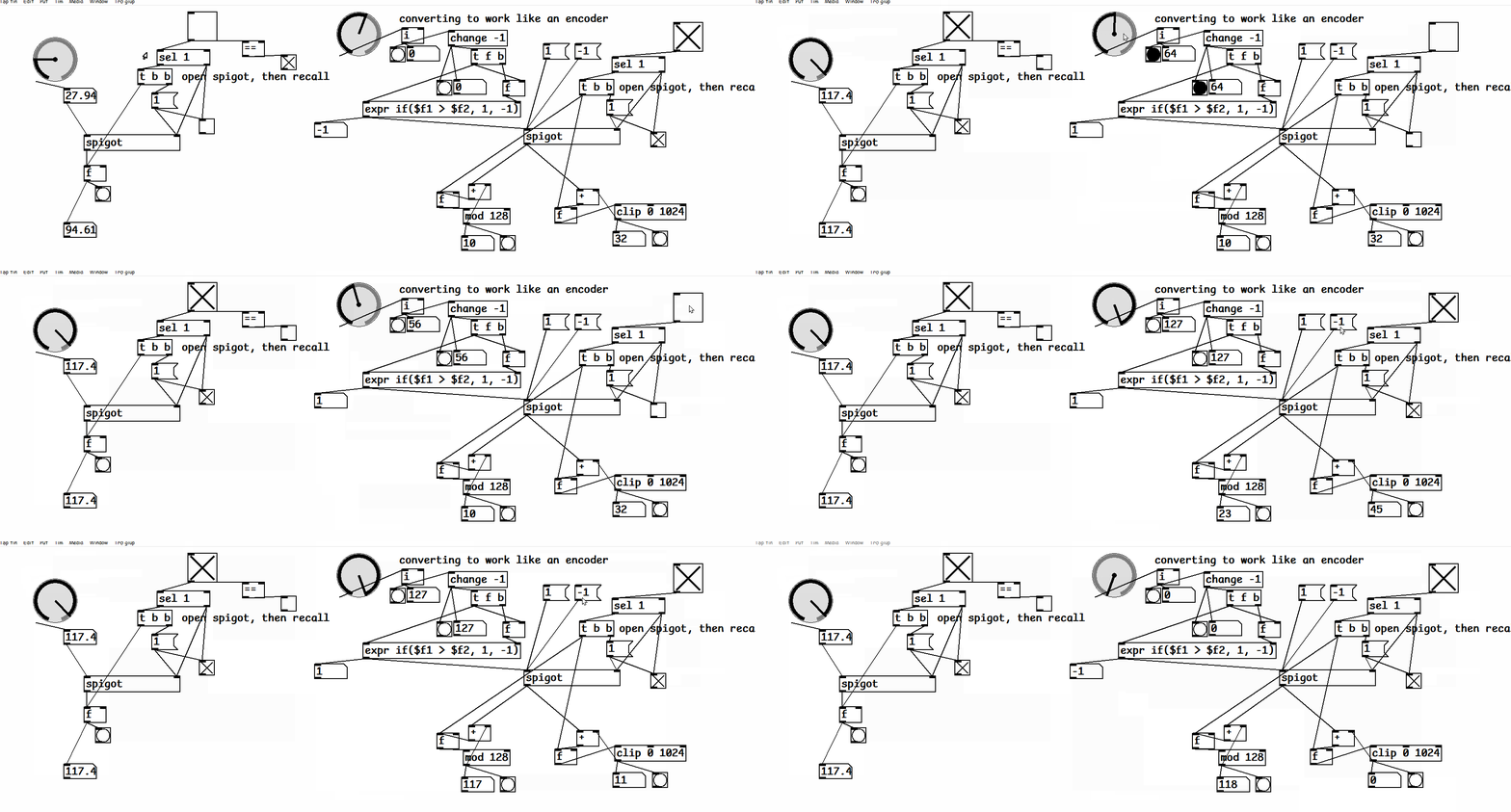
it gets in the weeds - basically you got a problem if your knob isn't a digital encoder which sends things like +1 or -1 to move numbers - typically these also have a push button.
if your knob is a potentiometer/slider/knob/pot like on an electric guitar - these only give discrete values and will Jump like on the left.
if you use one of those like I am on the right - and I apologize for it seeming messy, I'm cleaning up little problems - but the knob is still a potentiometer, so even tho I changed it into something that compares if its going higher or lower it ends up at weird places - so to do it right these needs to be an encoder type of knob - (which I'm simulating by just hitting the 1 and -1, a little surprised acting like an encoder isn't in [knob] yet.)knob-problems-pot-vs-encoder.pd
 posted in technical issues
How to create a multi-mode knob?
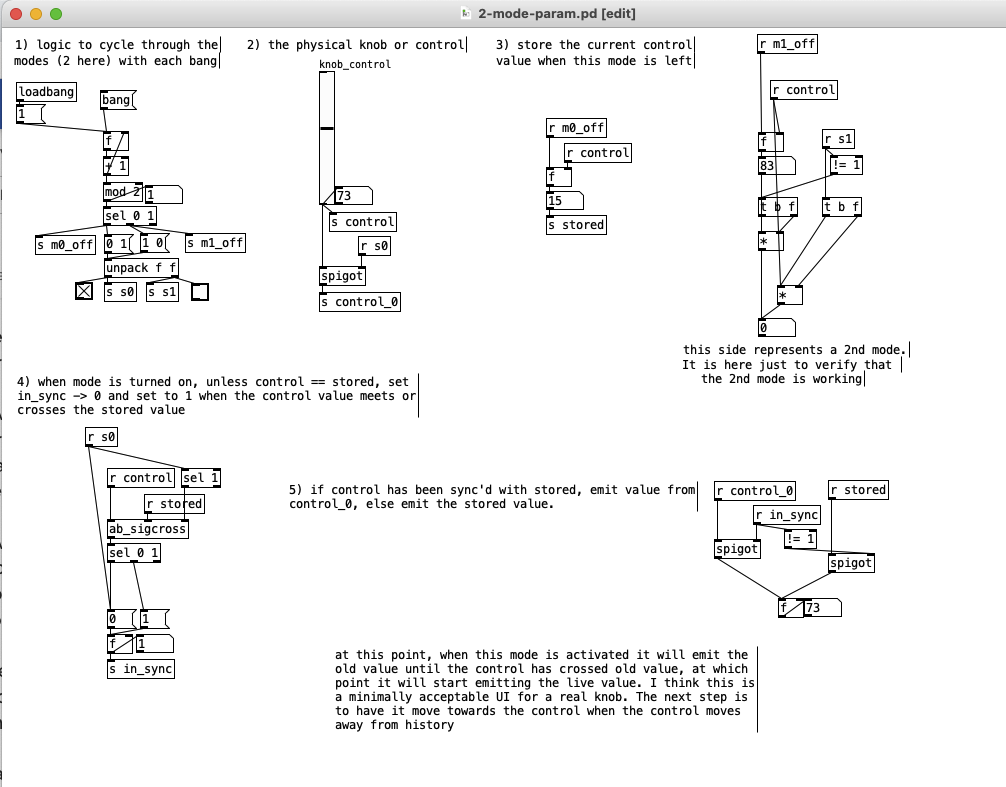
I've been building some patches for the Befaco LICH modular platform which has potentiometers for the parameters that come through the framework as floats in [0-1]
Having run out of knobs on the LICH... I'd like to make it multi-mode so that each knob can control multiple-parameters, one per mode. The knob should remember (and output) each modes' value as the modes are changed. In the event that the knob and it's value get out of sync, it should have a simple way to re-sync the control, like turn it past it's previous value to re-sync.
I have a couple "working-ish" versions but I feel like I'm working too hard at it (against the system?) and there is a more straight-fwd approach that I am not seeing. Does anybody have any experience or thoughts on handling a multi-mode parameter gracefully and implementing it in Pd?
 posted in I/O hardware diy
IanniX glissando
@atux Well...... that is good because it looks like one branch has automatically been given a new id..... or you did that and didn't realise.
So.....
[route /curve]
|
[route 3 4]
| |
[unpack s f f f f f f] [unpack s f f f f f f]
and duplicate your audio generator after each [unpack]
It is time for you to learn about abstractions...... unless of course you already have......
https://forum.pdpatchrepo.info/topic/9774/pure-data-noob
I might revisit that post as the examples are hard...... maybe give it a cursory read and then read.....
https://forum.pdpatchrepo.info/topic/9774/pure-data-noob/4
.... because you can save the audio part of your patch as [glissando] and then put in your main patch [glissando 3] and [glissando 4]
Outside the abstraction
[route /curve]
| |
[glissando 3] [glissando 4]
Inside the abstraction
[inlet]
|
[route $1]
|unpack s f f f f f f] and the rest.....
As you add more curves you can add more [glissando x] to the master.
I will probably build a new tutorial using your patch...... as it will be much easier to demonstrate to a beginner.
Beware.... you will need a volume control as all the [dac~]'s will add together so if you have a lot of curves you will overload the output or your ears......
Use [throw~ out] instead of [dac~] in the abstraction and a [catch~] in the master patch before a volume control.
David.
 posted in I/O hardware diy
Midi Rotary Knob Direction Patch/Algorythm?
@oid said:
@Bangflip
Edit. you are trying to emulate a relative encoder with an absolute encoder, which will not work well, you will run out of knob, depending on the parameter you are editing and the knob movements you make, the knob could very well end up at min or max even though the parameter has not. You would probably be best off updating the knob value after every change, set to midvalue, detect change, determine if it is up or down, set back to mid value. Also make sure your controller can not be set to relative values for the encoders, many can and then all this will be unneeded.
Thank you for your answer. Id did know moses already, it is very helpful. Unfortunately the Houston only is sending absolute values: "The 8 x Rotary-Encoders send MIDI ‘Controller’ MSB/LSB absolute position". There is no option to change that as far as I know. It is an 20 years old controller and the support was dropped years ago.
Yes exacly. I am updating the knob value after every change. But I struggle to get the the up, down detection.
 posted in technical issues
Midi Rotary Knob Direction Patch/Algorythm?
@Bangflip
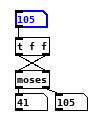
Edit. you are trying to emulate a relative encoder with an absolute encoder, which will not work well, you will run out of knob, depending on the parameter you are editing and the knob movements you make, the knob could very well end up at min or max even though the parameter has not. You would probably be best off updating the knob value after every change, set to midvalue, detect change, determine if it is up or down, set back to mid value. Also make sure your controller can not be set to relative values for the encoders, many can and then all this will be unneeded.
 posted in technical issues
Midi Rotary Knob Direction Patch/Algorythm?
Hey everybody,
Sorry, for a lot of text. But the bold text at the bottom is my main question. The rest will help you to get a better understanding of my situation.
you helped me so much, with my last question here (the Faders are working dope now):
https://forum.pdpatchrepo.info/topic/13849/how-to-smoothe-out-arrays/25
I am doing a Steinberg Houston to Mackie Control emulation at the moment, to use my controller with other DAWs than Cubase/Nuendo. Will upload it to the internet community, when I am finished for the handful of people that maybe are also using this controller.
I made good progress:
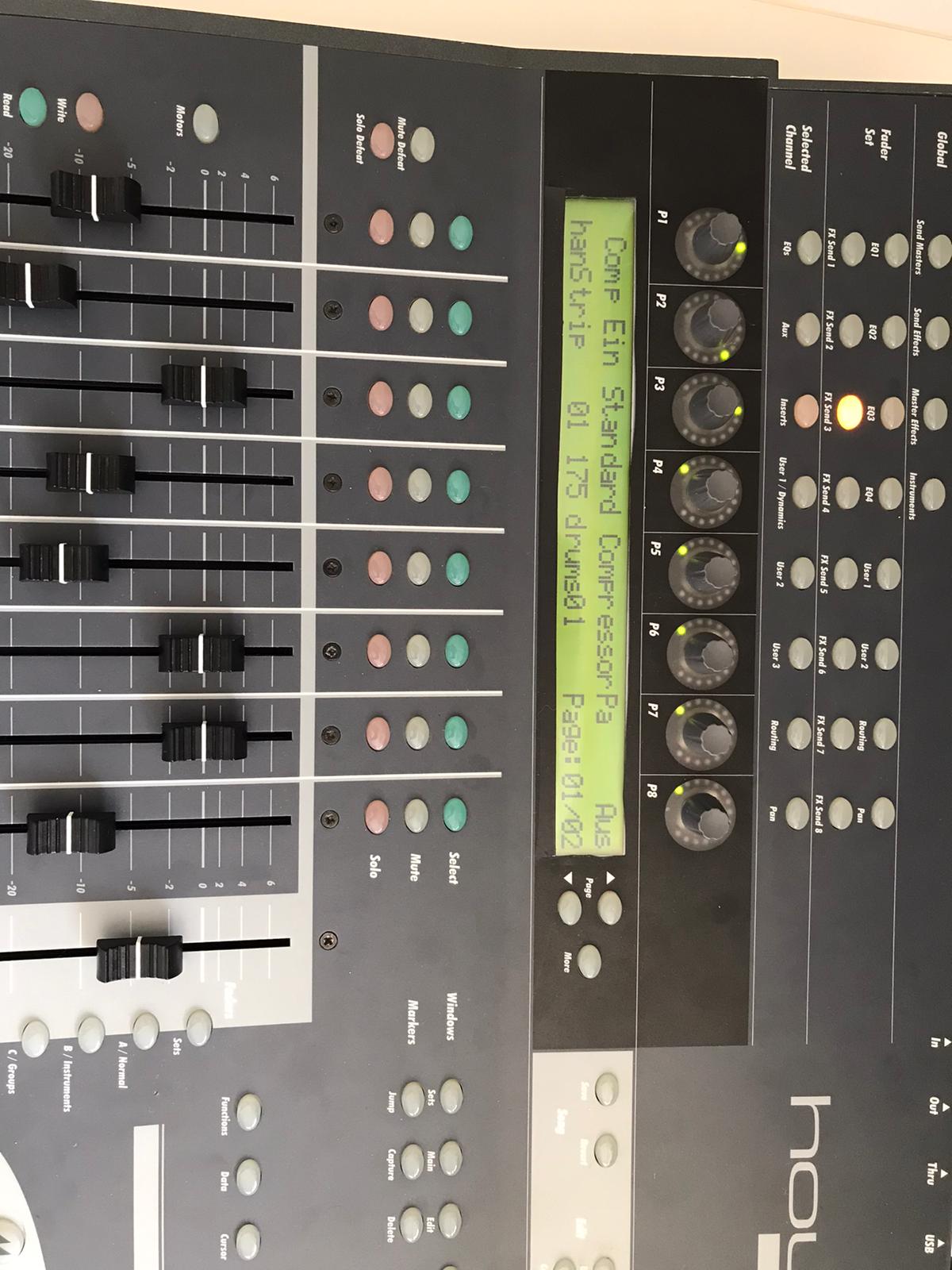
I got the Faders and the normal knobs to work. And the display puts out information. But it is with bugs, because the LCD Screen of the Houston has 40 characters for one line and the Mackie Universal Pro has 56 Characters. So i did a list algorithm, which deletes spaces of the mackie message until the message fits on the 40 character line. Maybe there is a method wich will work better but this subject eats too much time for me at the moment and it works rough okay. One defenitely get's some helpful information on the screen from the DAW.
The Faders and Rotary Knobs and normal knobs are the most important of this controller I guess. The Faders are working fine as I mentioned above, but there is a problem with the rotary knobs, wich I can't handle alone and hope you can help me. 
The problem is, that the Mackie Controller send simple clicks to the DAW. If you are turning a rotary knob, it sends out a number of midi messages:
If you turn it right, it sends midi messages wich contains the value 1 and if you turn it down it sends messages wich are containing the value 65.
"When the VPots are rotated rapidly, a message equal to the number of clicks is sent."
BUT the Houston controller instead is sending values like it's faders with 15 (MSB) and 128(LSB) values. AND it is updating the rotary limit by itself. So if I turn a rotary, it will update it's LEDs and stops sending midi messages when it reaches the maximum or minimum value. So, I did this patch as a momentary state:
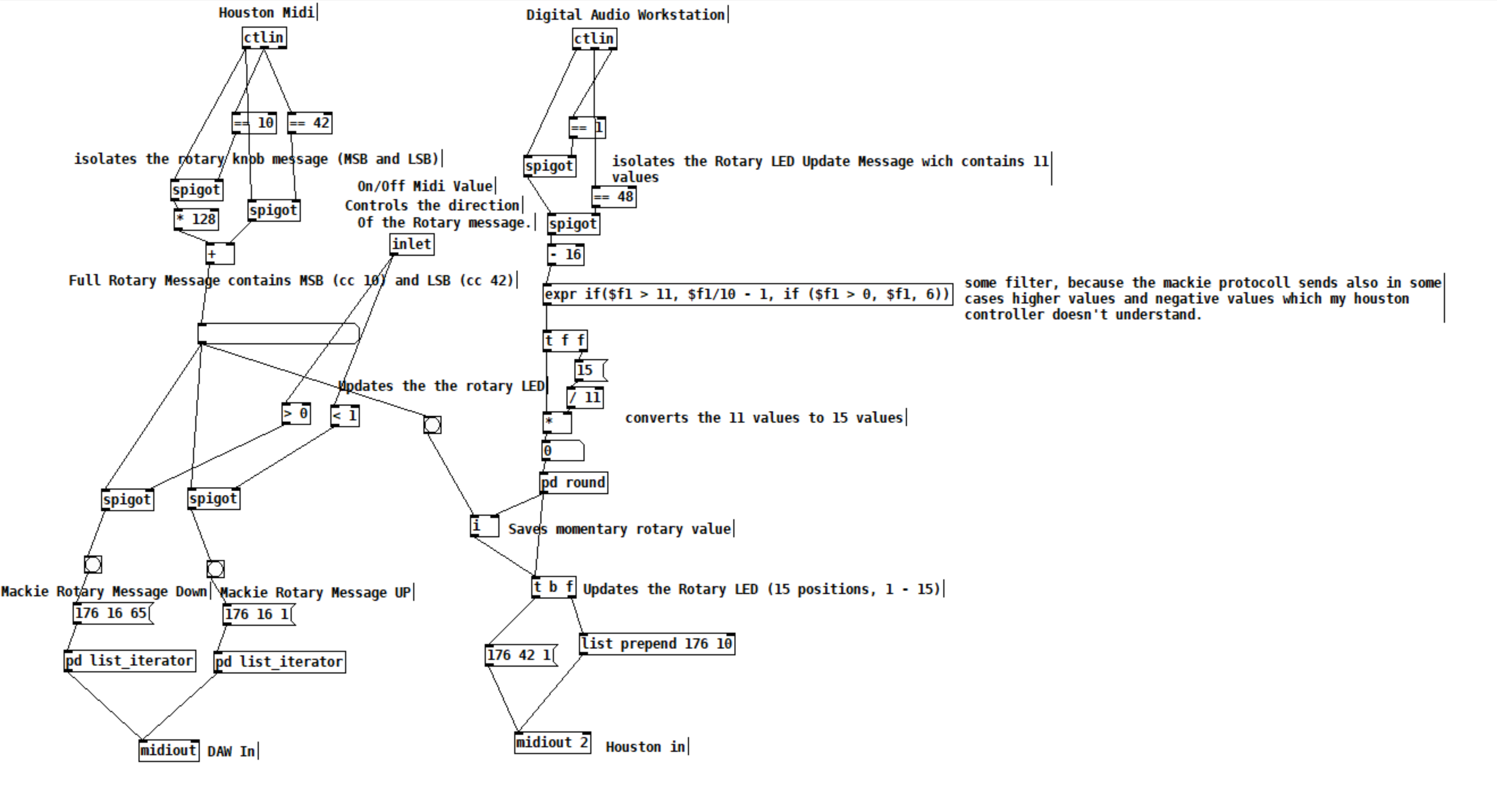
The DAW sends 11 values for the Houston LEDs. 11 is max and 1 is min. This is good, I send this values to my houston controller and can update the rotary values and LEDs.
With this updated values from the DAW, I can force my rotary knobs, that they don't stop to send values, because they are set to the values, which the DAW sends, every time I turn a knob. With this method I got it to work to imitate a Mackie Rotary knob. Everytime the Houston Rotary value changes, it sends Mackie "midi click values" according to the amount of midi value changes of the houston.
BUT the problem is, that this is working only in one direction. Now my main question:
How can I make pure Data know, if I am turning my knob in the left direction or in the right direction? There is also the problem, which I mentioned above, that I set the momentary value everytime, I move the rotary, so that I get a unlimited amount of possible rotary move "clicks". Also the midi values which the houston sends arent perfect smooth. It works fine, but it isn't like that, that if you move a rotary in one direction, every value one by another is perfectly lower or higher.
I think I maybe need a algorythm, which looks if the values in a time period are getting higher or lower and then send out bangs on two seperate outlets. For example the left outlet for lower values and the right outlet for higher values. And it should also detect, if I move the rotary fast or slow. So a constant smoothing or clocked bang is also not an option. This is defenitely to complicated for me. I have no idea and what I tried didn't worked.
Would be super cool, if you could help me out again. 
posted in technical issues
Ganymede: an 8-track, semi-automatic samples-looper and percussion instrument based on modulus instead of metro
Ganymede.7z (includes its own limited set of samples)
Background:
Ganymede was created to test a bet I made with myself:
that I could boil down drum sequencing to a single knob (i.e. instead of writing a pattern).
As far as I am concerned, I won the bet.
The trick is...
Instead of using a knob to turn, for example, up or down a metro, you use it to turn up or down the modulus of a counter, ie. counter[1..16]>[mod X]>[sel 0]>play the sample. If you do this then add an offset control, then where the beat occurs changes in Real-Time.
But you'll have to decide for yourself whether I won the bet.  .
.
(note: I have posted a few demos using it in various stages of its' carnation recently in the Output section of the Forum and intend to share a few more, now that I have posted this.)
Remember, Ganymede is an instrument, i.e. Not an editor.
It is intended to be "played" or...allowed to play by itself.
(aside: specifically designed to be played with an 8-channel, usb, midi, mixer controller and mouse, for instance an Akai Midimix or Novation LaunchPad XL.)
So it does Not save patterns nor do you "write" patterns.
Instead, you can play it and save the audio~ output to a wave file (for use later as a loop, song, etc.)
Jumping straight to The Chase...
How to use it:
REQUIRES:
moonlib, zexy, list-abs, hcs, cyclone, tof, freeverb~ and iemlib
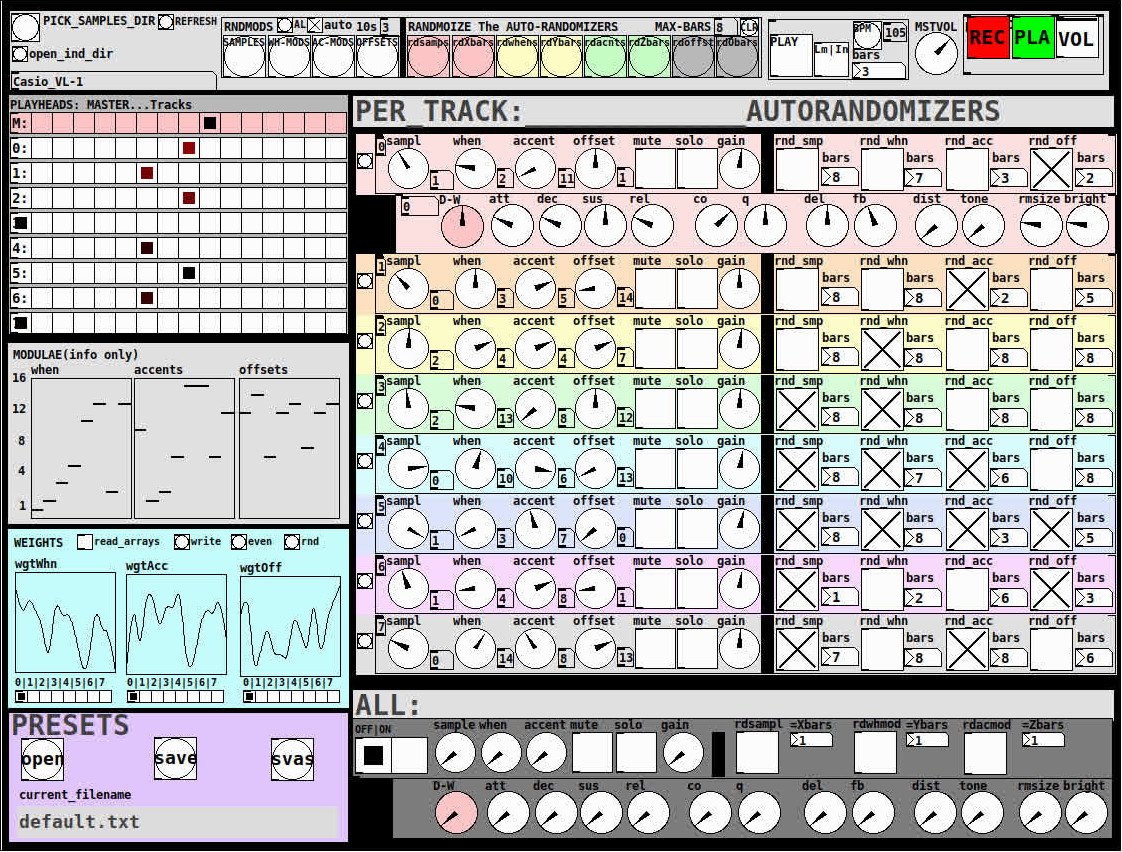
THE 7 SECTIONS:
- GLOBAL:
- to set parameters for all 8 tracks, exs. pick the samples directory from a tof/pmenu or OPEN_IND_DIR (open an independent directory) (see below "Samples"for more detail)
- randomizing parameters, random all. randomize all every 10*seconds, maximum number of bars when randomizing bars, CLR the randomizer check boxes
- PLAY, L(imited) or I(nfinite) counter, if L then number of bars to play before resetting counter, bpm(menu)
- MSTVOL
- transport/recording (on REC files are automatically saved to ./ganymede/recordings with datestamp filename, the output is zexy limited to 98 and the volume controls the boost into the limiter)
- PLAYHEADS:
- indicating where the track is "beating"
- blank=no beat and black-to-red where redder implies greater env~ rms
- MODULAE:
- for information only to show the relative values of the selected modulators
- WEIGHTS:
- sent to [list-wrandom] when randomizing the When, Accent, and Offset modulators
- to use click READ_ARRAYS, adjust as desired, click WRITE, uncheck READ ARRAYS
- EVEN=unweighted, RND for random, and 0-7 for preset shapes
- PRESETS:
- ...self explanatory
-
PER TRACK ACCORDION:
- 8 sections, 1 per track
- each open-closable with the left most bang/track
- opening one track closes the previously opened track
- includes main (always shown)
- with knobs for the sample (with 300ms debounce)
- knobs for the modulators (When, Accent, and Offset) [1..16]
- toggles if you want that parameter to be randomized after X bars
- and when opened, 5 optional effects
- adsr, vcf, delayfb, distortion, and reverb
- D-W=dry-wet
- 2 parameters per effect
-
ALL:
when ON. sets the values for all of the tracks to the same value; reverts to the original values when turned OFF
MIDI:
CC 7=MASTER VOLUME
The other controls exposed to midi are the first four knobs of the accordion/main-gui. In other words, the Sample, When, Accent, and Offset knobs of each track. And the MUTE and SOLO of each track.
Control is based on a midimap file (./midimaps/midimap-default.txt).
So if it is easier to just edit that file to your controller, then just make a backup of it and edit as you need. In other words, midi-learn and changing midimap files is not supported.
The default midimap is:
By track
CCs
| ---TRACK--- | ---SAMPLE--- | ---WHEN--- | ---ACCENT--- | --- OFFSET--- |
|---|---|---|---|---|
| 0 | 16 | 17 | 18 | 19 |
| 1 | 20 | 21 | 22 | 23 |
| 2 | 24 | 25 | 26 | 27 |
| 3 | 28 | 29 | 30 | 31 |
| 4 | 46 | 47 | 48 | 49 |
| 5 | 50 | 51 | 52 | 53 |
| 6 | 54 | 55 | 56 | 57 |
| 7 | 58 | 59 | 60 | 61 |
NOTEs
| ---TRACK--- | ---MUTE--- | ---SOLO--- |
|---|---|---|
| 0 | 1 | 3 |
| 1 | 4 | 6 |
| 2 | 7 | 9 |
| 3 | 10 | 12 |
| 4 | 13 | 15 |
| 5 | 16 | 18 |
| 6 | 19 | 21 |
| 7 | 22 | 24 |
SAMPLES:
Ganymede looks for samples in its ./samples directory by subdirectory.
It generates a tof/pmenu from the directories in ./samples.
Once a directory is selected, it then searches for ./**/.wav (wavs within 1-deep subdirectories) and then ./*.wav (wavs within that main "kit" directory).
I have uploaded my collection of samples (that I gathered from https://archive.org/details/old-school-sample-cds-collection-01, Attribution-Non Commercial-Share Alike 4.0 International Creative Commons License, 90's Old School Sample CDs Collection by CyberYoukai) to the following link on my Google Drive:
https://drive.google.com/file/d/1SQmrLqhACOXXSmaEf0Iz-PiO7kTkYzO0/view?usp=sharing
It is a large 617 Mb .7z file, including two directories: by-instrument with 141 instruments and by-kit with 135 kits. The file names and directory structure have all been laid out according to Ganymede's needs, ex. no spaces, etc.
My suggestion to you is unpack the file into your Path so they are also available for all of your other patches.
MAKING KITS:
I found Kits are best made by adding directories in a "custom-kits" folder to your sampls directory and just adding files, but most especially shortcuts/symlinks to all the files or directories you want to include in the kit into that folder, ex. in a "bongs&congs" folder add shortcuts to those instument folders. Then, create a symnlink to "bongs&congs" in your ganymede/samples directory.
Note: if you want to experiment with kits on-the-fly (while the patch is on) just remember to click the REFRESH bang to get a new tof/pmenu of available kits from your latest ./samples directory.
If you want more freedom than a dynamic menu, you can use the OPEN_IND(depedent)_DIR bang to open any folder. But do bear in mind, Ganymede may not see all the wavs in that folder.
AFTERWARD/NOTES
-
the [hcs/folder_list] [tof/pmenu] can only hold (the first) 64 directories in the ./samples directory
-
the use of 1/16th notes (counter-interval) is completely arbitrary. However, that value (in the [pd global_metro] subpatch...at the noted hradio) is exposed and I will probably incorporate being able to change it in a future version)
-
rem: one of the beauties of this technique is: If you don't like the beat,rhythm, etc., you need only click ALL to get an entirely new beat or any of the other randomizers to re-randomize it OR let if do that by itself on AUTO until you like it, then just take it off AUTO.
-
One fun thing to do, is let it morph, with some set of toggles and bars selected, and just keep an ear out for the Really choice ones and record those or step in to "play" it, i.e. tweak the effects and parameters. It throws...rolls...a lot of them.
-
Another thing to play around with is the notion of Limited (bumpy) or Infinite(flat) sequences in conjunction with the number of bars. Since when and where the modulator triggers is contegent on when it resets.
-
Designed, as I said before, to be played, esp. once it gets rolling, it allows you to focus on the production (instead of writing beats) by controlling the ALL and Individual effects and parameters.
-
Note: if you really like the beat Don't forget to turn off the randomizers. CLEAR for instance works well. However you can't get the back the toggle values after they're cleared. (possible feature in next version)
-
The default.txt preset loads on loadbang. So if you want to save your state, then just click PRESETS>SAVE.
-
[folder_list] throws error messages if it can't find things, ex. when you're not using subdirectories in your kit. No need to worry about it. It just does that.
POSTSCRIPT
If you need any help, more explanation, advise, or have opinions or insight as to how I can make it better, I would love to hear from you.
I think that's >=95% of what I need to tell you.
If I think of anything else, I'll add it below.
Peace thru Music.
Love thru Pure Data.
-s
,
 posted in patch~
Trying to reproduce a sound with Pd
@JMC64 You would need to look up the specs of the VCF on the manufactures website and find its frequency range. They will most likely give the range in hz, so if they say it goes from 8hz to 16khz that would roughly be C1 to C11, so halfway would be C6 or roughly 262hz, remember that frequency is not linear! You can use a chart like http://subsynth.sourceforge.net/midinote2freq.html to convert between note names and hertz or you can have pd do the math for you with the [mtof] and [ftom] objects. Also remember that you do not need to get perfect frequencies, those small knobs have poor resolution and being analog have a fairly wide tolerance, if you went through a dozen of those modules you would find that 0.5 would be slightly different on each of them, so just get close and then tune by ear to perfection.
You can do the same for any module and any parameter, you just need to convert the numbers differently, a VCA will likely have its specs in decibells and a CV input or output in volts.
EDIT: Should mention, you need to look at what the frequency range of the cutoff knob is, not the VCF. Sometimes a VCF or VCO will have a larger range than can be reached by just its frequency knob, the CV inputs can often extend it, so the knob may only go bring you to C8, but a +5 volt signal into the CV input would bring you to C13 because frequency goes up one octave for every volt in a V/oct system like the Doepfers. Generally they will give the tuning range of the knob separately if the VCF can sweep beyond the range of the knob, most modules do not do this though and you should not have to worry about it unless it gives two different values.
posted in patch~
Having lots of switches into Pd
@alexandros now pwm and digital output work fine, but when I try to merge with digital and analog inputs it goes wrong. the leds flicker randomly. If you remove the code below
// do input pins: flicker stops. :/
int outPins[3] = {2, 4, 7};

int pwmPins[6] = {3, 5, 6, 9, 10, 11};

// a global variable to hold which LED we want to control (either digital or PWM)
int channel = 0;

int inPins[2] = {12, 13};

int analogPins[8] = {0, 1, 2, 3, 4, 5, 6, 7};

void setup() {

   for (int i = 0; i < 3; i++) {
    pinMode(outPins[i], OUTPUT);
  }
    for (int i = 0; i < 6; i++) {
    pinMode(pwmPins[i], OUTPUT);
  }
    for(int i = 0; i < 2; i++) {
    pinMode(inPins[i], INPUT);
  }

  pinMode(A0, INPUT_PULLUP);
  pinMode(A1, INPUT_PULLUP);
  pinMode(A2, INPUT_PULLUP);
  pinMode(A3, INPUT_PULLUP);
  pinMode(A4, INPUT_PULLUP);
  pinMode(A5, INPUT_PULLUP);
  pinMode(A6, INPUT);
  pinMode(A7, INPUT);

//DEFAULT works with thermistors,
//INTERNAL with transitor thermostats
  analogReference(DEFAULT);

  Serial.begin(115200);

}

void loop() {

  //do output pins:

  if (Serial.available()) {
    static int temp;
    byte in = Serial.read();
    if (isDigit(in)) temp = temp * 10 + in - '0';
    else if (in == 'c') {
      channel = temp;
      temp = 0;
    }
    else if (in == 'd') {
      digitalWrite(outPins[channel], temp);
      temp = 0;
    }
    else if (in == 'p') {
      analogWrite(pwmPins[channel], temp);
      temp = 0;
    }
  }

  // do input pins:

Serial.print("analog"); // use "knobs" as a keyword so you can receive
  // the knob values as a list with a [r analog] in Pd
  for(int i = 0; i < 8; i++){
    unsigned int analogVal = analogRead (analogPins[i]);
    Serial.print(" "); // first print a white space to separate the "knob" keyword from the values
    // and the values from each other
    Serial.print(analogVal); // then  print the actual knob value
  }
  Serial.println(); // finally print a newline character to denote end of data for keyword "knobs"

  Serial.print("digital");
  for(int i = 0; i < 2; i++) {
    unsigned int digitalVal = digitalRead(inPins[i]);
    Serial.print(" ");
    Serial.print(digitalVal);
  }
  Serial.println();
}
 posted in I/O hardware diy
Having lots of switches into Pd
@alexandros
This code sort of works with wip_multiple_PWM.pd
// merging works but pwm leds are choppy.

// number of elements in arrays need to
// match for() cycles in void setup and void loop
int pinsIn[2] = {2, 4};
int pinsAnalog[8] = {0, 1, 2, 3, 4, 5, 6, 7};

int pin = 0;
int val = 0;
int pinsOut[2] = {7, 12};

//TMP setup pwm:

// variables to hold pin numbers
int pwmLED1 = 3;
int pwmLED2 = 5;
int pwmLED3 = 6;
int pwmLED4 = 9;
int pwmLED5 = 10;
int pwmLED6 = 11;

// variables to hold pin states
int pwmLEDvalue1;
int pwmLEDvalue2;
int pwmLEDvalue3;
int pwmLEDvalue4;
int pwmLEDvalue5;
int pwmLEDvalue6;

//should this be omitted and use the a
// variable to hold and assemble incoming data
int temporary;

//END TMP pwm setup

void setup()
{
  //set up a total of pins for digital input (has to match number of elements in array)
  for(int i = 0; i < 2; i++)
  pinMode(pinsIn[i], INPUT);

  for (int i = 0; i < 2; i++) {
    pinMode(pinsOut[i], OUTPUT);
    digitalWrite(pinsOut[i], LOW);
  }

//DEFAULT works with thermistors,
//INTERNAL with transitor thermostats

  analogReference(DEFAULT);

  pinMode(A0, INPUT_PULLUP);
  pinMode(A1, INPUT_PULLUP);
  pinMode(A2, INPUT_PULLUP);
  pinMode(A3, INPUT_PULLUP);
  pinMode(A4, INPUT_PULLUP);
  pinMode(A5, INPUT_PULLUP);
  pinMode(A6, INPUT);
  pinMode(A7, INPUT);

//TMP test pwm setup:

  pinMode(pwmLED1, OUTPUT);
  pinMode(pwmLED2, OUTPUT);
  pinMode(pwmLED3, OUTPUT);
  pinMode(pwmLED4, OUTPUT);
  pinMode(pwmLED5, OUTPUT);
  pinMode(pwmLED6, OUTPUT);

  Serial.begin(115200); // perhaps use a faster baud rate
}

void loop()
{
  Serial.print("knobs"); // use "knobs" as a keyword so you can receive
  // the knob values as a list with a [r knobs] in Pd
  for(int i = 0; i < 8; i++){
    unsigned int knob = analogRead (pinsAnalog[i]);
    Serial.print(" "); // first print a white space to separate the "knob" keyword from the values
    // and the values from each other
    Serial.print(knob); // then  print the actual knob value
  }
  Serial.println(); // finally print a newline character to denote end of data for keyword "knobs"

  // the same technique applies to the switches too
  // receive the switch values as a list with [r switches]
  Serial.print("switches");
  for(int i = 0; i < 2; i++) {
    int switchVal = digitalRead(pinsIn[i]);
    Serial.print(" ");
    Serial.print(switchVal);
  }
  Serial.println();

  //handle digital outputs
  if (Serial.available()) {
    static int temp;
    byte in = Serial.read();
    if (isDigit(in)) {
      temp = temp * 10 + in - '0';
    }
    else if (in == 'p') {
      pin = temp;
      temp = 0;
    }
    else if (in == 'v')  {
      val = temp;
      temp = 0;
      digitalWrite(pinsOut[pin], val);
    }
}

//TMP merge test PWMs:
while(Serial.available()){
     byte inByte = Serial.read();
     if((inByte >= '0') && (inByte <= '9'))
       temporary = 10 * temporary + inByte - '0';
     else{
       if(inByte == 'p'){
         pwmLEDvalue1 = temporary;
         temporary = 0;
       }
       else if(inByte == 'q'){
         pwmLEDvalue2 = temporary;
         temporary = 0;
       }
       else if(inByte == 'r'){
         pwmLEDvalue3 = temporary;
         temporary = 0;
       }
       else if(inByte == 's'){
         pwmLEDvalue4 = temporary;
         temporary = 0;
       }
       else if(inByte == 't'){
         pwmLEDvalue5 = temporary;
         temporary = 0;
       }
       else if(inByte == 'u'){
         pwmLEDvalue6 = temporary;
         temporary = 0;
       }
     }
     analogWrite(pwmLED1, pwmLEDvalue1);
     analogWrite(pwmLED2, pwmLEDvalue2);
     analogWrite(pwmLED3, pwmLEDvalue3);
     analogWrite(pwmLED4, pwmLEDvalue4);
     analogWrite(pwmLED5, pwmLEDvalue5);
     analogWrite(pwmLED6, pwmLEDvalue6);
     //digitalWrite(dspLED, dspLEDstate);
   }
}
This is the code without PWM control. It works fine.
//number of elements in arrays need to match for() cycles in void setup
int pinsIn[4] = {6, 7, 8, 9};
int pinsAnalog[8] = {0, 1, 2, 3, 4, 5, 6, 7};

int pin = 0;
int val = 0;
int pinsOut[4] = {2, 3, 4, 5};

void setup()
{
  //set up a total of pins for digital input (has to match number of elements in array)
  for(int i = 0; i < 4; i++)
  pinMode(pinsIn[i], INPUT);

  for (int i = 0; i < 4; i++) {
    pinMode(pinsOut[i], OUTPUT);
    digitalWrite(pinsOut[i], LOW);
  }
//DEFAULT works with thermistors,
//INTERNAL with transitor thermostats
// ELLER var det tvartom???
  analogReference(DEFAULT);

  pinMode(A0, INPUT_PULLUP);
  pinMode(A1, INPUT_PULLUP);
  pinMode(A2, INPUT_PULLUP);
  pinMode(A3, INPUT_PULLUP);
  pinMode(A4, INPUT_PULLUP);
  pinMode(A5, INPUT_PULLUP);
  pinMode(A6, INPUT);
  pinMode(A7, INPUT);

  Serial.begin(115200); // perhaps use a faster baud rate
}

void loop()
{
  Serial.print("knobs"); // use "knobs" as a keyword so you can receive
  // the knob values as a list with a [r knobs] in Pd
  for(int i = 0; i < 8; i++){
    unsigned int knob = analogRead (pinsAnalog[i]);
    Serial.print(" "); // first print a white space to separate the "knob" keyword from the values
    // and the values from each other
    Serial.print(knob); // then  print the actual knob value
  }
  Serial.println(); // finally print a newline character to denote end of data for keyword "knobs"

  // the same technique applies to the switches too
  // receive the switch values as a list with [r switches]
  Serial.print("switches");
  for(int i = 0; i < 4; i++) {
    int switchVal = digitalRead(pinsIn[i]);
    Serial.print(" ");
    Serial.print(switchVal);
  }
  Serial.println();

  //handle digital outputs
  if (Serial.available()) {
    static int temp;
    byte in = Serial.read();
    if (isDigit(in)) {
      temp = temp * 10 + in - '0';
    }
    else if (in == 'p') {
      pin = temp;
      temp = 0;
    }
    else if (in == 'v')  {
      val = temp;
      temp = 0;
      digitalWrite(pinsOut[pin], val);
    }
}
}
and here is the code from tutorial5 from Arduino for Pd'ers. It goes with arduinoforpdrs_tut5.pd
// variables to hold pin numbers
int pwmLED = 9;
int dspLED = 2;
// variables to hold pin states
int pwmLEDvalue;
int dspLEDstate;
//variable to hold and assemble incoming data
int temporary;

void setup()
{
  pinMode(pwmLED, OUTPUT);
  pinMode(dspLED, OUTPUT);
  Serial.begin(9600);
}

void loop()
{
  while(Serial.available()){
    byte inByte = Serial.read();
    if((inByte >= '0') && (inByte <= '9'))
    temporary = 10 * temporary + inByte - '0';
    else{
      if(inByte == 'p'){
        pwmLEDvalue = temporary;
        temporary = 0;
      }
      else if(inByte == 'd'){
        dspLEDstate = temporary;
        temporary = 0;
      }
    }
    analogWrite(pwmLED, pwmLEDvalue);
    digitalWrite(dspLED, dspLEDstate);
  }
}
I am aiming at using same type of array handling as for the digital outs.
Thanks a lot
posted in I/O hardware diy