
Converting 0-127 CC Knob Into "Endless" Encoder
Whew... that's a tricky one that I myself have attempted before. There are a few ways to potentially do this, but it depends on some things... Like nodsp said, the range is an important factor as well as the behavior of how it handles jumping between maximum and minimum values... and also the knob that is being used along with how the device handles sending the values received for that knob. If it spins endlessly, but stops sending values after after the knob turns past the minimum or maximum, thats a problem. If the knob reaches the min or max, and continues to send the min or max value each time the knob is turned past the value, then i'd do an endless encoder like this...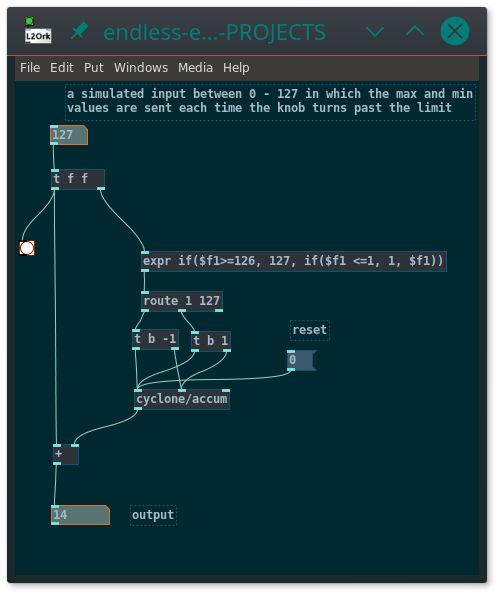 endless-encoder.pd
To make a range constraint, just throw a modulo ( [%] ) object at the output, or something like [cyclone/wrap]
If the device being input does not send values once the knob goes past the limit, it becomes a bit more complicated. Youd have to take the expr object and set it so that when it receives a 0, it outputs 1 and if it receives a 127, it outputs 126, then route that back into the device to set the value so that you will get an output from the device on the next turn of the knob. does that make sense?
 posted in technical issues
New knob GUI object
Hi Pd
Here is a higher precision & functions knob GUI object [abcknob], as a replacement for [knob].
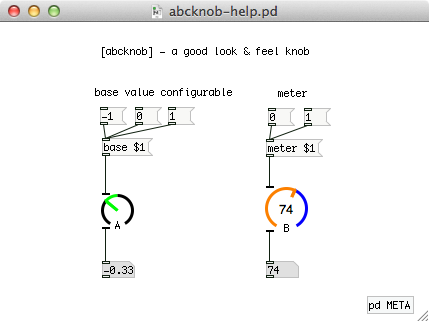
Main features (advantages over the wellknown [knob]) :
- A variable gauge startpoint, not only leftmost but also any point you can set
- Available a numerical meter at the center area of the knob
- Accurately showing knob direction when its degree is 90, 180 or 270
- Downward compatibility for [knob]; Your patch will work well if you replace [knob] with [abcknob] by any text editor
I made this object when the pd-extended was on-going.
Recently I found that the pd-extended is now outdated and the current pd-vanilla does not supply the [knob] object. So I updated my own object and would like to share it to help your patching life.
abcknob - Mac, Win and Linux binaries archive for Pd 0.47
Yoichi
 posted in extra~
1-knob tone_control~: which ramps an EQ3's hi and los in 2 different ways
1-knob tone_control~: which ramps an EQ3's hi and los in 2 different ways
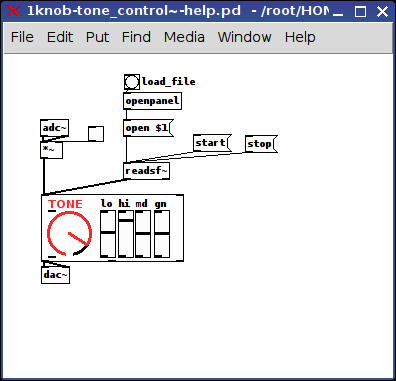
abs_1knob-tone_control~-help.pd
abs_1knob-tone_control~.pd
I figured out the math for this the other day, so thought to package it now and share it.
It uses [knob] so of course any control sending in the right inlet 0-1 will do.
What it does is with the knob less than 0.5 the lo and hi ramp up together to about 0.67 with the differential being made up in the total gain.
Yet, above 0.5 it then changes them in opposite directions via x and [- 1][abs] so the ramp is in different directions yet also covers 0-1 for both hi and lo.
Perhaps, one of you may find it useful.
It's helping me out to consolidate my controls on my arduino guitar app by minizing how many sends I need to  send.
send.
To try it just turn the knobs and you'll see what I mean because the sliders will change accordingly {Note: the sliders are only for visuals and do not send anything. And the EQ3 is from the DIY2 library.}
Ciao for now.
Happy PD-ing.
-Scott
 posted in abstract~
Dynamic Effect/Plugin Loader esp. For Rapsberry PI (DIY2 and Stamp Album effects/plugins)
Dynamic Effect Plugin Loader esp. For Rapsberry PI (DIY2 and Stamp Album effects/plugins)
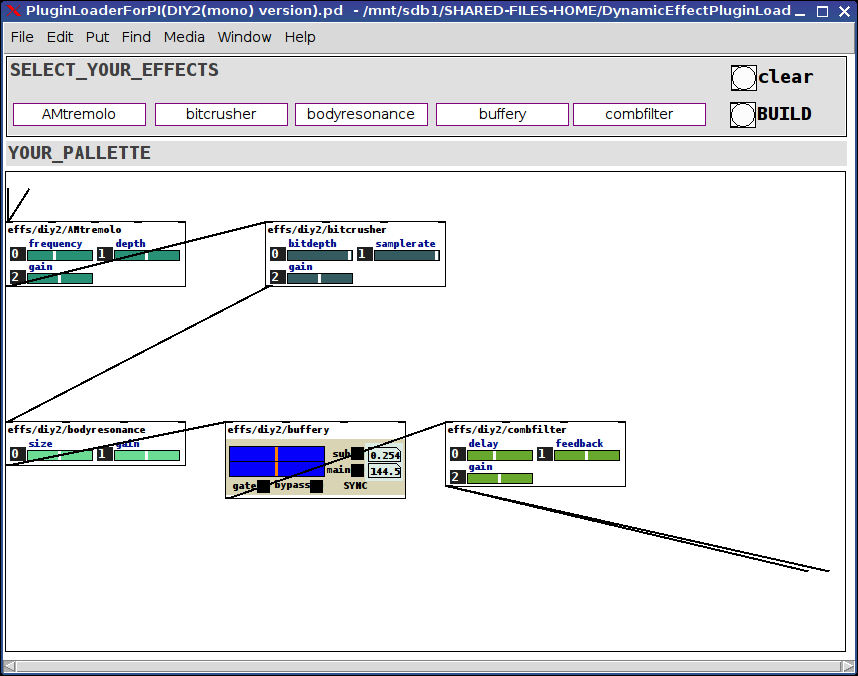
DynamicEffectPluginLoaderForPI.zip
Background:
In the last couple of days I finally built something I have needed and wanted for a while (which later on I will discuss in more detail under a separate thread): an Arduino electric guitar.
In other words, I took the connections off the 5-way and knobs (internally connected to the pickups and line out) and rerouted the switch and knobs to an arduino. The reasoning being I can control Way more with pd and those knobs than what they were originally intended to do if I capture their output using Arduino.
However, the patch I had built for it was clocking in at about 275-300% of the pi's cpu. And while I could have gone back and added switches (which I took out a while back, to replace with fade-mixers for when I change an effect) throughout, the thought of doing that was more daunting than (considering how elaborate the patch is) I wanted to undertake.
Enter: Dynamic Patching.
I found that with just 3 straight-chained effects the pi ran at only about 10%.
So...here's what I built and am sharing now (before tying it into the arduino guitar, because I think others might want to go ahead and learn from it, extend it, expand upon it, use it, etc. etc.).
The patch(es, there are two, one laid out for the DIY2 plugins and one laid out for the Stamp Album ones, will probably consolidate them later, but other things are demanding my attention) is pretty straight forward:
(Dependency on the tof/menubutton, tof can be found via deken)
Click on the menus at the top to select an effect for each of the 5 slots or select the "unchanged" effect to leave that slot open.
Then click the BUILD bang or the CLEAR bang (to start over).
The selected effects will load into the PALLETTE subpatch already connected to adc~ and dac~.
That's really about all there is to it. Very straight-forward, clean, and very cpu light-weight. The racks of all 5 slots I tested ran at about 10-12% on my PI 3r2.
Hope you can make use of it. And would love to hear feedback.
For the future:
Add a hid-stomp controller to load preset racks (which you can send in via the tof/menubotton) to load racks on the fly;
Add a meta-level to send either hid, osc, or arduino commands to each of the loaded effects.
Merry Music to us, one and all.
Peace,
Scott
p.s. Oh! The arduino guitar: though it has no connected pickups it gets its audio signal from an (about) 1" piezo mic fun-tacked to the knob-well inside the guitar. Sounds great. Just pure guitar. The tone, texture, etc. come after the fact via the pd-side.
Ciao for now.
Wanna say: the real genius lies not in what I cobbled together, but the strength of will and purpose it took for the two original developers to make abstractions so completely consistent and thoroughly aligned. My highest regards to you both. Thank you, both, so very much, for helping to make my "job" so easy.
posted in patch~
No mouse external - some success
here is a bit of an update of the knob widget, which is not yet a fully working widget, but does input and output 0-100 so could be used in a sub-patch with messages as properties and math for range. Its not the prettiest circle but colour and thickness help.
gridknob-wip.pd
g-knob-help.pd
Then getting even more sidetracked I realised concentric circles of polygons offered the same mouse events as the grid and in fact would only need as many as the radius/10 would require. But pushing the limits I offer this. Warning it does get quite loud, and has visual hints of Daleks
radiant-knob.pd
radiant-knob-dance.pd
 posted in patch~
A few questions about Pd-L2ork/Purr Data on osX
Unfortunately Gem doesn't build with the 64-bit OSX Purr Data binary.
I don't currently include the externals in the search index. I'll do that in a future release, which will allow you to type "knob" as the search term and find the relevant object. (I'm also considering just adding "knob" as an automatically loaded object to make all this easier.)
Do keep in mind that audio GUI apps are about the only ones that use "knob" widgets. Physical knobs are great because of the control you have with your thumb and forefinger (plus tennis muscle efficiency for large turns). Using a mouse to control a digital knob is like trying to use a physical knob with chopsticks.
 posted in technical issues
Synth patches missing [knob]'s from "flatgui" in Purr Data & Pd
@jancsika said:
[moonlib/mknob]
Got a knob to show !
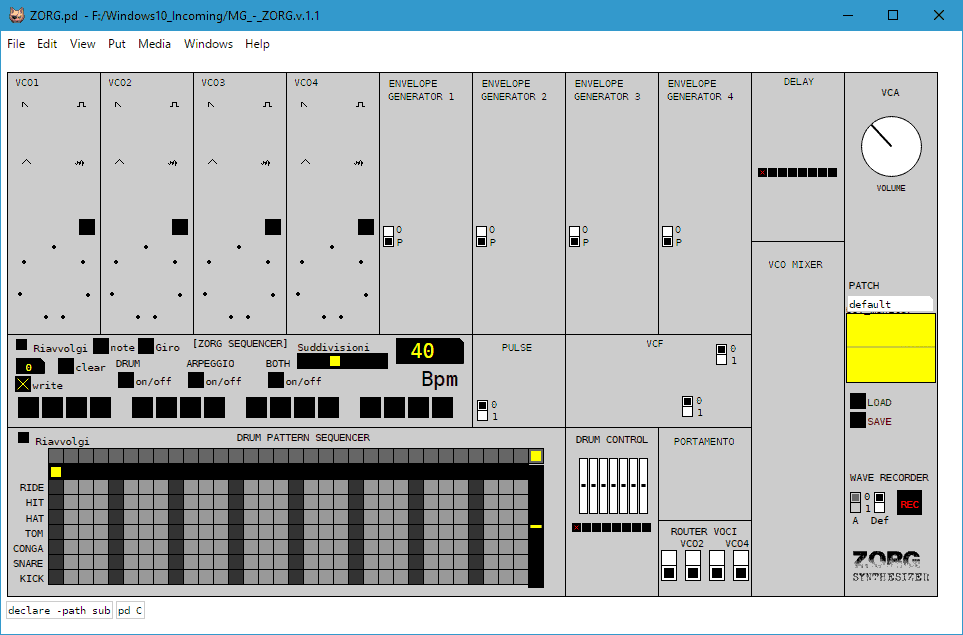
At least there's only one knob now in Britain (you'll only understand this if you're a Brit) ... anyway ...
So, I don't understand how to use the above syntax yet ([moonlib/mknob]). So I added moonlib path and moonlib name to end of lists in Purr Data preferences (I thought PD would just hierarchically read the entire extra directory but whatever) and just changing "knob" to "mknob" creates the control. I have not checked yet if the sound it being altered correctly, however it does respond to mouse control.
EDIT: All controls working and knobs seem to effect sound OK although I don't know what Zorg is supposed to sound like. It does not sound "right" but it just might not be what I was expecting. I'll see what happens with the other synth.
 posted in technical issues
Synth patches missing [knob]'s from "flatgui" in Purr Data & Pd
Hi, I found some really nice looking synths ...
http://www.monologx.com/ecosystem/
https://forum.pdpatchrepo.info/topic/7981/zorg-synthesizer-v-1-1
However, frustratingly they both seem to use the [knob] gui item from "flatgui" library. Purr Data does not come with it so I installed manually, but still no knobs. So I tried it in the default Pure Data download, installing flatgui library through Help --> Find Externals ...
But still no freaking knobs. I want to twiddle my knobs!
The Pd console has a lot of ". couldn't create" messages.
Can anyone confirm the same behaviour to see if its simply something unique to me. Otherwise how do I get these patches to work ?
Cheers.
posted in technical issues
Purr Data Beta 3
I spent some time stabilizing the new data structure features. Since there were several messages to the Pd list recently about various issues with the [knob] external, I thought I'd give a small demo that shows how to make your own with Purr Data objects.
Here's a screenshot:
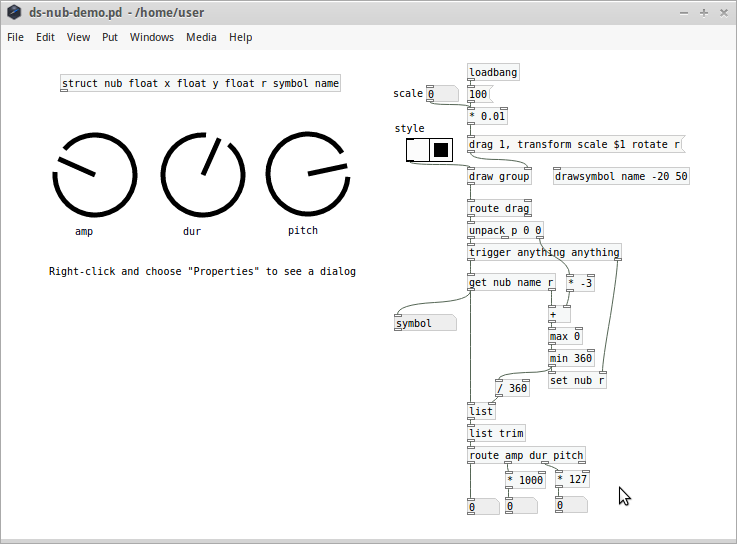
The demo includes two styles for the knobs that you can toggle. The drawing and event logic takes about 20 objects. The entire patch itself is about 45 objects, which is way less complex than over 700 lines of external C code.
posted in news
Knob
I want to create a simple knob(dial) object to control the volume going to the dac but I cannot find the knob object in the vanilla PD. Should it be included? vslider and hslider works fine. In this video http://tinyurl.com/djkdslf the knob object is added by simply typing [knob] but this does not work for me.
Edit: Also just found out that [counter] is missing. This is the first time I use PD vanilla since I used to use pd-extend but I must be missing some installation or configuration steps here. Please advise.
 posted in technical issues