
Routing different signals to clone instances
Hello all!
I’m new to this forum! However I’ve been working with Pd for a while. Currently I’m programming a polyphonic synth in Pd with FM capabilities and I’m facing a problem. I have created some sort of a module which includes one oscillator, a low pass filter and an ADSR envelope generator. The output of this module is an audio signal. It also includes some inputs and one of them is a signal input for frequency modulation (it receives a signal from the outside and uses it to modulate the frequency of the oscillator inside the module). I use clone command to create multiple instances of the same module to make it polyphonic. Then I tried to route a signal from another cloned module to the FM input of the first module and the obvious ocurred: when I play only one note the FM works as supposed to. But when I play multiple notes it sounds terrible and it is because the audio signal of all the notes from the second module goes to the FM input of the first module and then it is routed to all the cloned instances of it. What I need is to route only the signal corresponding to one note and route it to the same note of the first module. Is there any way to achieve this? I understand that a signal goes equally to all instances of a cloned object, but is it possible get separate signals from all instances of the second module and route them separately to the corresponding instances for the first module?
 posted in technical issues
Starting up problem.
@JackOats Yes, it's not easy to understand.
As Pd opens it searches it's "standard paths" for all the objects that it needs, and all the objects that have been added to the "extra" folder....... these added objects are called "externals" as they are not bundled with vanilla Pd.
Unless you have added paths to "Menu/File/Preferences/startup" or "Menu/File/Preferences/Paths" then it will only search Pd/bin and Pd/Extra. Those paths might be a little different on a Mac....?.....http://msp.ucsd.edu/Pd_documentation/x4.htm (The file is also inside your Pd/doc folder).
So Pd will not "find" any objects in other folders....... a path (to search) has not been given and it doesn't know where to look.
But when you open a Pd patch by double-clicking it Pd is pointed to that folder and adds it to the search paths (for this session) so that it can find any necessary abstractions that you have added to that folder (lets call it your "patch folder").
From here on I am guessing based on what @beem has posted....... but I am most likely on the right path 
Automatism seems to have a tool for storing "presets" to a file so that they can be recalled when you reopen your patch.
The files mentioned will be part of that system and I imagine the storage files will be written within the folder.
It would be a disaster (for you) if Pd had already found main.pd (and maybe the folder patch_editor_abs ) somewhere else, as hey presto it would be using those copies from now on and all the (wrong for your project) data stored within.
So the first thing to be sure of is that no copy of those files are within the startup search paths.
Now.... if you double-click main.pd in your folder it will be that copy of main.pd that is found, and because it is in that folder it will save the stored settings within that folder and they will be recalled when you open the patch next time.
The same will be true for another folder containing main.pd + the patch_editor_abs folder.
It could be that opening patches in both folders will save any settings in the wrong place...... beware.... as once Pd has found and loaded one main.pd it will continue using that copy until the next session.
So......
I think you should keep the original Automatism folder out of your search paths so that it is not found.
You should copy the main.pd file and the patch_editor_abs folder from the original Automatism folder into your new patch folder (that you can name freely) and then start work by double-clicking main.pd .
It looks like the settings for your patch will be saved in the "statesave" folder.
The next time you open Pd by double-clicking main.pd in your folder you should have what you need.
David.
Ps...... of course if you will only ever want one copy of Automatism then it can be in the startup paths.
Then you simply open it by double-clicking main.pd. But if you want to save a session with different choices it will not be possible.
 posted in technical issues
Looking for help for optimisation of Karlsen 24 db ladder filter
@solipp said:
why fexpr~ for a simple onepole filter.. when your patch already runs with blocksize 1? you can replace [fexpr~] with [lop~] or [rpole~] or some delays + math like in the original code.
I couldn't resit building the thing following this example: https://www.musicdsp.org/en/latest/Filters/240-karlsen-fast-ladder.htmlspoiler.pd
!filter gets unstable at higher frequenciesalso, do you notice any difference in sound with oversampling + anti aliasing filter..?
maybe make it optional and put the anti aliasing filter in a subpatch with [switch~]Merry christmas to you too!
I tried removing the block~ 1 a while ago, for the reason you mention, that fexpr~ is already processing every sample, but I did not get the same result, So kind of scratched it, but I will look into it again.
I am still beginner with filters, but the reason I used fexpr~ was because of the "processes every sample", so I was kind og thinking this is what I need.
for the lop~ are you sure that these filters are made in the same way, the lop~ and the karlsen filter? There are a few filters that are made feom one pole filters on musicdsp, which are all a bit different. I am thinking the difference makes up different result?
For the oversampling usually oversampling makes sure that it doesn't blow up at higher frequencies. For example bob~, if you don't oversample it blows up too. With oversampling, it's much more stabil.
Ahh yes I should probably do the switch thing for the oversampling/butterworth filter. For now I just set the oversampling to 1, which is no oversampling, but yeah the filter is still running, you are right.
Anyway, thanks I will check your version and you gave me some food for thought here. Some things to check out 
 posted in patch~
NoxSiren - Modular synthesizer system <- [v15]
NoxSiren is a modular synthesizer system where the punishment of failure is the beginning of a new invention.
--DOWNLOAD-- NoxSiren for :
-
Pure Data :
NoxSiren v15.rar
NoxSiren v14.rar -
Purr Data :
NoxSiren v15.rar
NoxSiren v14.rar
--DOWNLOAD-- ORCA for :
- x64, OSX, Linux :
https://hundredrabbits.itch.io/orca
In order to connect NoxSiren system to ORCA system you also need a virtual loopback MIDI-ports:
--DOWNLOAD-- loopMIDI for :
- Windows 7 up to Windows 10, 32 and 64 bit :
https://www.tobias-erichsen.de/software/loopmidi.html
#-= Cyber Notes [v15] =-#
- added BORG-IMPLANT module.
- introduction to special modules.
- more system testing.
#-= Special Modules [v15] =-#
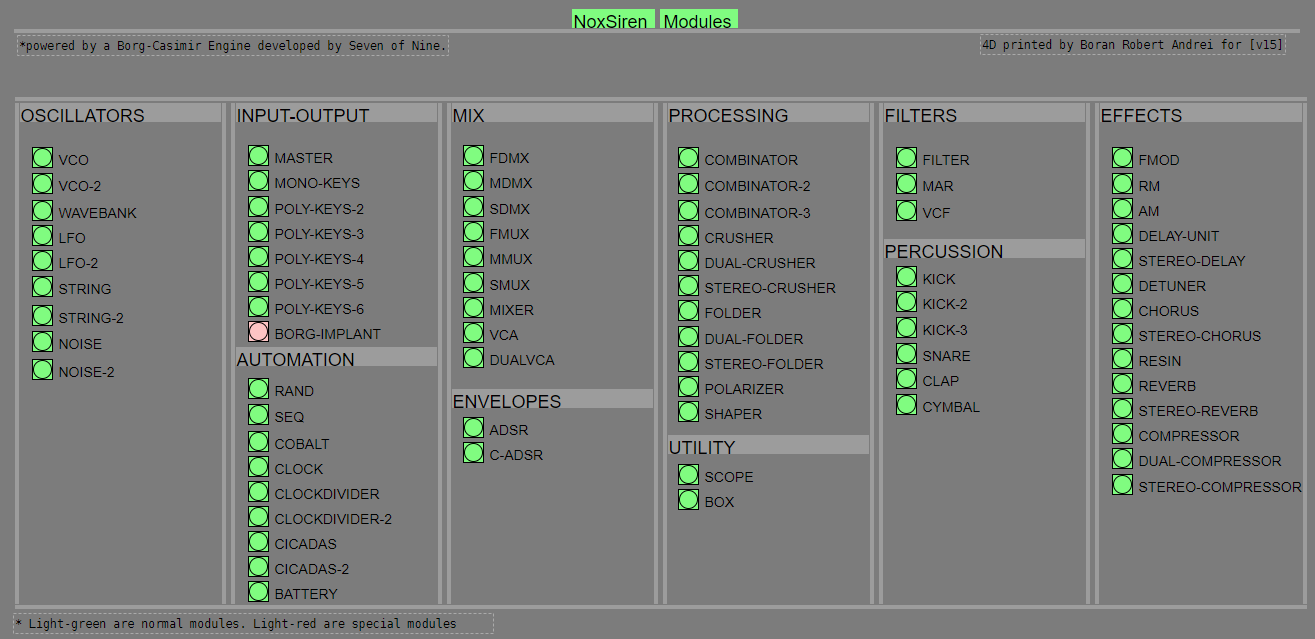
- BORG-IMPLANT (connects ORCA MIDI system to NoxSiren system)
#-= Current Modules [v15] =-#
- VCO (voltage-controlled-oscillator)
- VCO2 (advance voltage-controlled-oscillator)
- WAVEBANK (additive synthesis oscillator)
- ADSR (Attack-Decay-Sustain-Release envelope)
- C-ADSR (Curved Attack-Decay-Sustain-Release envelope)
- CICADAS (128 steps-Euclidean rhythm generator)
- CICADAS-2 (advance 128-steps polymorphic-Euclidean rhythm generator)
- COMPRESSOR (lookahead mono compressor unit)
- DUAL-COMPRESSOR (2-channel lookahead mono compressor unit)
- STEREO-COMPRESSOR (lookahead stereo compressor unit)
- MONO-KEYS (virtual 1-voice monophonic MIDI keyboard)
- POLY-KEYS-2 (virtual 2-voice polyphonic MIDI keyboard)
- POLY-KEYS-3 (virtual 3-voice polyphonic MIDI keyboard)
- POLY-KEYS-4 (virtual 4-voice polyphonic MIDI keyboard)
- POLY-KEYS-5 (virtual 5-voice polyphonic MIDI keyboard)
- POLY-KEYS-6 (virtual 6-voice polyphonic MIDI keyboard)
- BATTERY (simple manual triggered machine for drumming.)
- REVERB (reverb unit with lowpass control)
- STEREO-REVERB (stereo reverb unit with lowpass control)
- RESIN (advanced rain effect/texture generator)
- NOISE (generates black,brown,red and orange noise)
- NOISE2 (generates yellow,blue,pink and white noise)
- COBALT (6-stage polyrhythm generator)
- SHAPER (basic shaper unit)
- FOLDER (basic wave folding unit)
- STEREO-FOLDER (stereo wave folding unit)
- DUAL-FOLDER (advance wave folding unit)
- POLARIZER (transform a signal into bi-polar, uni-polar, inverted or inverted uni-polar form)
- CLOCK (generates a BPM clock signal for sequencing other modules)
- CLOCKDIVIDER (a clock divider with even division of clock signal)
- CLOCKDIVIDER2 (a clock divider with odd division of clock signal)
- DELAY-UNIT (delay unit)
- STEREO-DELAY (stereo delay unit)
- CHORUS (chorus unit)
- STEREO-CHORUS (stereo chorus unit)
- SEQ (advance 16-step/trigger sequencer)
- KICK (synthesize kick unit)
- KICK2 (synthesize flavor of KICK module)
- KICK3 (synthesize flavor of KICK module)
- SNARE (synthesize snare unit)
- CLAP (synthesize clap unit)
- CYMBAL (synthesize cymbal unit)
- RAND (RNG generator for other modules parameters)
- FMOD (feedback modulation unit)
- AM (amplitude modulation unit)
- RM (ring modulation unit)
- LFO (low-frequency-oscillator)
- LFO2 (advance low-frequency-oscillator)
- COMBINATOR (combine two waves)
- COMBINATOR2 (combine three waves)
- COMBINATOR3 (combine four waves)
- STRING (Karplus-Strong string synthesis unit)
- STRING2 (advance Karplus-Strong string synthesis unit)
- DETUNER (parametric 4-channel detuner unit)
- CRUSHER (basic audio resolution unit)
- STEREO-CRUSHER (basic stereo audio resolution unit)
- DUAL-CRUSHER (advance audio resolution unit)
- FILTER (basic filter)
- VCF (voltage-controlled-filter)
- MAR (Moog-analog-resonant filter)
- VCA (voltage-controlled-amplifier)
- DUAL-VCA (advance voltage-controlled-amplifier)
- FMUX (multiplexer with fast A/D internal envelope)
- MMUX (multiplexer with medium A/D internal envelope)
- SMUX (multiplexer with slow A/D internal envelope)
- FDMX (demultiplexer with fast A/D internal envelope)
- MDMX (demultiplexer with medium A/D internal envelope)
- SDMX (demultiplexer with slow A/D internal envelope)
- MIXER (mix 1-4 possible waves)
- SCOPE (oscilloscope analyzer)
- MASTER (fancy DAC~)
- BOX (useless decorative module)
NoxSiren integrated modules menu system.
 posted in patch~
[array quantile]
OK, so I ended up having to read the source code.
It's definitely not a statistical median.
The first difference: [array quantile] assumes all positive values. Anything negative will be clipped to 0. A traditional median requires no such assumption.
What I was looking for earlier today was a traditional median (e.g. [zl median]). So I accidentally chose to use a bipolar distribution, -1 to +1. For this range of values, [zl median] behaves well and [array quantile] will be essentially garbage.
That limitation is noted in the help file... but I was proceeding stubbornly on the assumption that the help file's earlier reference to "median" meant a statistical median. So I missed that.
So the result is the split point where the values before the split are the largest sum <= (sum of all elements * fraction). If f = 0.5, then the two array portions will have roughly equal weight.
Which is fine, but... if a user is looking for a statistical median function and does something crazy like rgrep over the documentation folder for "median" and finds "the 0.5 quantile is the median of the array," then this user is in for a surprise.
hjh
 posted in technical issues
JASS, Just Another Synth...Sort-of, codename: Gemini (UPDATED: esp with midi fixes)
JASS, Just Another Synth...Sort-of, codename: Gemini (UPDATED TO V-1.0.1)
jass-v1.0.1( esp with midi fixes).zip
1.0.1-CHANGES:
- Fixed issues with midi routing, re the mode selector (mentioned below)
- Upgraded the midi mode "fetch" abstraction to be less granular
- Fix (for midi) so changing cc["14","15","16"] to "rnd" outputs a random wave (It has always done this for non-midi.)
- Added a midi-mode-tester.pd (connect PD's midi out to PD's midi in to use it)
- Upgrade: cc-56 and cc-58 can now change pbend-cc and mod-cc in all modes
- Update: the (this) readme
INFO: Values setting to 0 on initial cc changes is (given midi) to be expected.
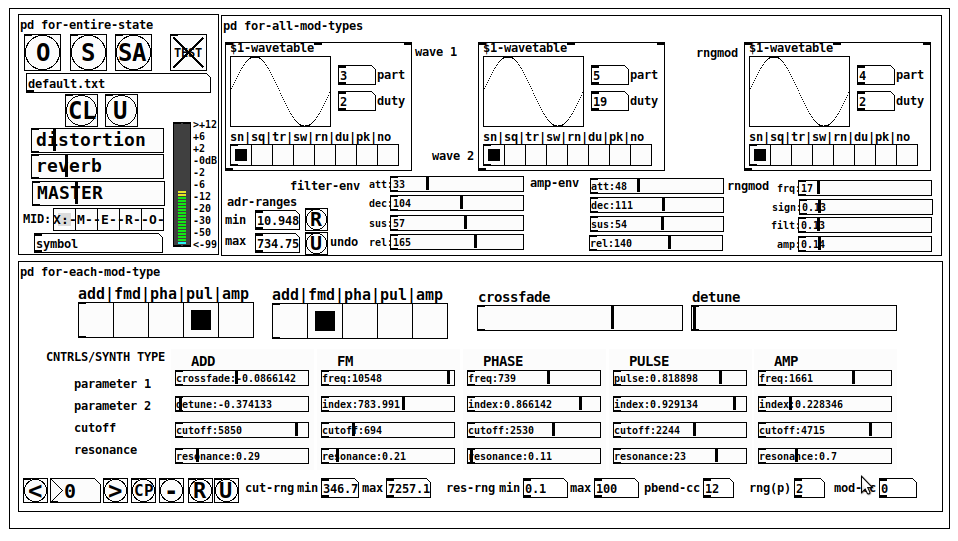
JASS is a clone-based, three wavetable, 16 voice polyphonic, Dual-channel synth.
With...
- The initial, two wavetables combined in 1 of 5 possible ways per channel and then adding those two channels. Example: additive+frequency modulation, phase+pulse-modulation, pulse-modulation+amplitude modulation, fm+fm, etc
- The third wavetable is a ring modulator, embedded inside each mod type
- 8 wave types, including a random with a settable number of partials and a square with a settable dutycycle
- A vcf~ filter embedded inside each modulation type
- The attack-decay-release, cutoff, and resonance ranges settable so they immediately and globally recalculate all relevant values
- Four parameters /mod type: p1,p2, cutoff, and resonance
- State-saving, at both the global level (wavetables, env, etc.), as well as, multiple "substates" of for-each-mod-type settings.
- Distortion, reverb
- Midiin, paying special attention to the use of 8-knob, usb, midi controllers (see below for details)
- zexy-limiters, for each channel, after the distortion, and just before dac~
Instructions
Requires: zexy
for-entire-state
- O: Open preset. "default.txt" is loaded by...default
- S: Save preset (all values incl. the multiple substates) (Note: I have Not included any presets, besides the default with 5 substates.)
- SA: Save as
- TEST: A sample player
- symbol: The filename of the currently loaded preset
- CL: Clear, sets all but a few values to 0
- U: Undo CL
- distortion,reverb,MASTER: operate on the total out, just before the limiter.
- MIDI (Each selection corresponds to a pgmin, 123,124,125,126,127, respectively, see below for more information)
- X: Default midi config, cc[1,7,8-64] available
- M: Modulators;cc[10-17] routed to ch1&ch2: p1,p2,cutoff,q controls
- E: Envelopes; cc[10-17] routed to filter- and amp-env controls
- R: Ranges; cc[10-17] routed to adr-min/max,cut-off min/max, resonance min/max, distortion, and reverb
- O: Other; cc[10-17] routed to rngmod controls, 3 wavetypes, and crossfade
- symbol: you may enter 8 cc#'s here to replace the default [10-17] from above to suit your midi-controller's knob configuration; these settings are saved to file upon entry
- vu: for total out to dac~
for-all-mod-types
- /wavetable
- graph: of the chosen wavetype
- part: partials, # of partials to use for the "rn" wavetype; the resulting, random sinesum is saved with the preset
- duty: dutycycle for the "du" wavetype
- type: sin | square | triangle | saw | random | duty | pink (pink-noise: a random sinesum with 128 partials, it is not saved with the preset) | noise (a random sinesum with 2051 partials, also not saved)
- filter-env: (self-explanatory)
- amp-env: (self-explanatory)
- rngmod: self-explanatory, except "sign" is to the modulated signal just before going into the vcf~
- adr-range: min,max[0-10000]; changing these values immediately recalculates all values for the filter- and amp-env's scaled to the new range
- R: randomizes all for-all-mod-types values, but excludes wavetype "noise"; rem: you must S or SA the preset to save the results
- U: Undoes R
for-each-mod-type
- mod-type-1: (In all cases, wavetable1 is the carrier and wavetable2 is the modulator); additive | frequency | phase | pulse | amplitude modulation
- mod-type-2: Same as above; mod-type-2 May be the same type as mod-type-1
- crossfade: Between ch1 and ch2
- detune: Applied to the midi pitch going into ch2
- for-each-clone-type controls:
- p1,p2: (self-explanatory)
- cutoff, resonance: (self-explanatory)
- navigation: Cycles through the saved substates of for-each-mod-type settings (note: they are lines on the end of a [text])
- CP: Copy the current settings, ie. add a line to the end of the [text] identical to the current substate
- -: Delete the current substate
- R: Randomize all (but only a few) substate settings
- U: Undo R
- cut-rng: min,max[0-20000] As adr-range above, this immediately recalculates all cutoff values
- res-rng: min,max[0-100], same as previously but for q
- pbend: cc,rng: the pitchwheel may be assigned to a control by setting this to a value >7 (see midi table below for possibilities); rng is in midi pitches (+/- the value you enter)
- mod-cc: the mod-wheel may be assigned to a control [7..64] by setting this value
midi-implementation
| name | --- | Description |
|---|---|---|
| sysex | not supported | |
| pgmin | 123,124,125,126,127; They set midi mode | |
| notein | 0-127 | |
| bendin | pbend-cc=7>pitchbend; otherwise to the cc# from below | |
| touch | not supported | |
| polytouch | not supported |
cc - basic (for all midi-configs)
| # | name | --- | desciption |
|---|---|---|---|
| 1 | mod-wheel | (assignable) | |
| 7 | volume | Master |
cc - "X" mode/pgmin=123
| cc | --- | parameter |
|---|---|---|
| 8 | wavetype1 | |
| 9 | partials 1 | |
| 10 | duty 1 | |
| 11 | wavetype2 | |
| 12 | partials 2 | |
| 13 | duty 2 | |
| 14 | wavetype3 | |
| 15 | partials 3 | |
| 16 | duty 3 | |
| 17 | filter-att | |
| 18 | filter-dec | |
| 19 | filter-sus | |
| 20 | filter-rel | |
| 21 | amp-att | |
| 22 | amp-dec | |
| 23 | amp-sus | |
| 24 | amp-rel | |
| 25 | rngmod-freq | |
| 26 | rngmod-sig | |
| 27 | rngmod-filt | |
| 28 | rngmod-amp | |
| 29 | distortion | |
| 30 | reverb | |
| 31 | master | |
| 32 | mod-type 1 | |
| 33 | mod-type 2 | |
| 34 | crossfade | |
| 35 | detune | |
| 36 | p1-1 | |
| 37 | p2-1 | |
| 38 | cutoff-1 | |
| 39 | q-1 | |
| 40 | p1-2 | |
| 41 | p2-2 | |
| 42 | cutoff-2 | |
| 43 | q-2 | |
| 44 | p1-3 | |
| 45 | p2-3 | |
| 46 | cutoff-3 | |
| 47 | q-3 | |
| 48 | p1-4 | |
| 49 | p2-4 | |
| 50 | cutoff-4 | |
| 51 | q-4 | |
| 52 | p1-5 | |
| 53 | p2-5 | |
| 54 | cutoff-5 | |
| 55 | q-5 | |
| 56 | pbend-cc | |
| 57 | pbend-rng | |
| 58 | mod-cc | |
| 59 | adr-rng-min | |
| 60 | adr-rng-max | |
| 61 | cut-rng-min | |
| 62 | cut-rng-max | |
| 63 | res-rng-min | |
| 64 | res-rng-max |
cc - Modes M, E, R, O
Jass is designed so that single knobs may be used for multiple purposes without reentering the previous value when you turn the knob, esp. as it pertains to, 8-knob controllers.
Thus, for instance, when in Mode M(pgm=124) your cc send the signals as listed below. When you switch modes, that knob will then change the values for That mode.
In order to do this, you must turn the knob until it hits the previously stored value for that mode-knob.
After hitting that previous value, it will begin to change the current value.
cc - Modes M, E, R, O assignments
Where [10..17] may be the midi cc #'s you enter in the MIDI symbol field (as mentioned above) aligned to your particular midi controller.
| cc# | --- | M/pgm=124 | --- | E/pgm=125 | --- | R/pgm=126 | --- | O/pgm=127 |
|---|---|---|---|---|---|---|---|---|
| 10 | ch1:p1 | filter-env:att | adr-rng-min | rngmod:freq | ||||
| 11 | ch1:p2 | filter-env:dec | adr-rng-max | rngmod:sig | ||||
| 12 | ch1:cutoff | filter-env:sus | cut-rng-min | rngmod:filter | ||||
| 13 | ch1:q | filter-env:re | cut-rng-max | rngmod:amp | ||||
| 14 | ch2:p1 | amp-env:att | res-rng-min | wavetype1 | ||||
| 15 | ch2:p2 | amp-env:dec | res-rng-max | wavetype2 | ||||
| 16 | ch2:cutoff | amp-env:sus | distortion | wavetype3 | ||||
| 17 | ch2:q | amp-env:rel | reverb | crossfade |
In closing
If you have anywhere close to as much fun (using, experimenting with, trying out, etc.) this patch, as I had making it, I will consider it a success.
For while an arduous learning curve (the first synth I ever built), it has been an Enormous pleasure to listen to as I worked on it. Getting better and better sounding at each pass.
Rather, than say to much, I will say this:
Enjoy. May it bring a smile to your face.
Peace through love of creating and sharing.
Sincerely,
Scott
 posted in patch~
Windowed-sync oscillator: Style questions
@jameslo "Since many programmers seem to want to avoid [fexpr~] at all costs, maybe you could rewrite your [fexpr~] with [expr~ $v1 > $v2] and [rzero_rev~ 0]"
Hmm, yeah. I had thought that both [expr~] and [fexpr~] were said to be bad for performance.
I suppose this might be another way to do a signal-rate comparison:
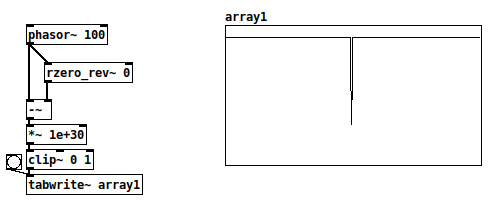
There's a very small chance of the [-~] result being between 0 and 1e-30, where the clip~ value would be between zero and one but not exactly either. With typical signal magnitudes, that's unlikely, so this wouldn't work in cases where only 0 and 1 are acceptable.
+1 RE the mystifying omissions and irregularities in vanilla. Since I started thinking of it as a scripting language (and stopped comparing it to c, c++, c#, Java...) everything became happy and easy-going.
Yes and no... Pd is an important and valuable tool and it's good to make friends with it as it is. At the same time, lack of some core operators can be seen as a usability issue.
I definitely wouldn't compare it to C and such. Miller Puckette himself acknowledges[1] that many algorithms are straightforward to write in procedural languages (and maybe even more straightforward in functional languages), but rip-your-hair-out painful in dataflow patchers. E.g., quicksort, which in Haskell goes:
quicksort :: Ord a => [a] -> [a]
quicksort []     = []
quicksort (p:xs) = (quicksort lesser) ++ [p] ++ (quicksort greater)
    where
        lesser  = filter (< p) xs
        greater = filter (>= p) xs
and in C is... somewhat longer but still a fairly straightforward recursive implementation.
I can literally not even imagine how to implement a quicksort in Pd.
In SuperCollider, I'm doing most of my performances using a sequence-scripting language of my own design, where SC code is parsing the expressions and translating them into SC patterns. That's been a long project but within reach of an object-oriented language with a full suite of data structures. Pd... again, I can't imagine where to begin.
Puckette points out in that interview that Max and Pd are designed to react to input events, and they are very elegant for this. In Pd, you can connect a slider to a number box. In SC, the same is:
(
var number, slider;

w = Window("slider", Rect(800, 200, 500, 400)).front;
w.layout = VLayout(
    nil,
    HLayout(
        number = NumberBox().fixedWidth_(80),
        slider = Slider().orientation_(\horizontal)
    ),
    nil
);

slider.action = { |view|
    number.value = view.value;
};
)
In that case, definitely, Pd's expression of the idea of a value flowing from an interface object toward the display object is as concise as you can imagine, and SC's version is verbose and puzzling until you get used to it. Use the tool that's right for the job.
lacuna:
There are [vphasor~], [vphasor2~] and [vsamphold~] from @Maelstorm .
Oh that's good.
It's hard to find extensions like this, if you don't know where it is.
In your patch [rpole~ 1] is working with a signal-inlet, isn't it?
Yes. The idea is, while the (signal) coefficient is 1, then the left-hand signal gets integrated. If, for a single sample, both the signal and coefficient are 0, then the output is 0, and it will start integrating again as soon as the coefficient flips back to 1.
Which is that other forum you mentioned?
TBH I think SC wins in terms of clear expression of this synthesis algorithm:
(
{
    var sync = LFTri.ar(SinOsc.kr(0.2).exprange(100, 400));
    var phase = Sweep.ar(sync, SinOsc.kr(0.12743).exprange(700/3, 2100));
    var synced = SinOsc.ar(0, (phase % 1) * 2pi);
    dup(LeakDC.ar(synced * sync) * 0.1)
}.play;
)
This is part of what I mean by "usability issues" -- Pd: 7 objects for the triangle wave vs SC: LFTri.ar(freq), or the automatic exponential scaling exprange, and Sweep has a signal-rate retrigger built-in (there's also a range-rewrapping Phasor, and it has an audio-rate trigger too)... SC's initial learning curve is steeper but once you know it well, it took a couple of minutes to write that, vs 30-40 minutes (including head-scratching time) in Pd. (Admittedly I'm less fluent in Pd.)
hjh
[1] https://omny.fm/shows/future-of-coding/47-maxmsp-pure-data-miller-puckette
posted in technical issues
Thermal noise
@whale-av The 3.5mm jack without a resistor would actually add more noise than with it,. The input jack is a switchting type jack, with nothing plugged in the tip and ring is shorted directly to ground, if you just plugged in a bare plug, it would break that short to ground, the plug would become an antenna and while being very short and limited in the wavelengths it could pickup, it would pickup a good deal and certainly more than the Johnson noise of a resistor, if you just plugged in a cable and left the other end unplugged, you would get even more since your antenna is now longer and can pick up longer wavelengths better. A resistor added in, will just resist, those weak RF signals will need to over come that resistance to reach the preamp and be amplified. Johnson noise is a very small factor, it does contribute, but it is not something one would really want to try and exploit as a noise source, a few feet of and wire will give you considerably more. A rather simplified explanation and not completely correct, consider it practical but not technical.
As an aside, the second ring on the standard tip, ring, ring 3.5 mm plug that we see on phones and anything that can take a headset is powered, those headsets use electret microphones which need some voltage to function. I am not sure what this voltage is, but if you can find a zener diode with a reverse breakdown voltage that is less than the voltage supplied by the jack for a microphone, you could likely build a noise generator into a standard 3.5mm plug with little issue. Zener diodes are generally thought of as poor noise generators, their output level is quite erratic, they are too random to be good noise, but that is great when your needs are random and not pure white noise. There is no real gain to building such a noise source into a plug, just plugging in any cable and leaving the other end floating will do just as well and with less effort.
 posted in technical issues
Easy resonant lp filter?
Fair enough about passband attenuation -- sure, it's legit for a filter either to boost the resonance or to attenuate elsewhere.
in all likelihood it's an emulation of the lowpass species.
Rant time.
See, but this gets to my broader point: Why do you have to guess what kind of filter it is?
Why does the help patch not simply say explicitly that it's a lowpass filter?
This shouldn't even be a conversation. Just add one word to the help patch, and then the help answers rather than raises questions.
Same problem with [vcf~]'s help patch (re: "probably the right outlet of vcf~"):
Outlets:
0 signal: - the filtered signal (real part).
1 signal: - the filtered signal (imaginary part).
Now let's suppose you're a digital media artist with some degree of technical sophistication, but not quite enough mathematics to understand Julius Smith's digital filters book.
How, actually, is one supposed to guess, based on the information in the help patch, that real = bandpass and imaginary = lowpass? Oh right. I'm gonna spend a couple of months to grok Hilbert transforms until it finally dawns on me. Now that is user-friendly documentation.
If in fact it really is the right outlet of vcf~ (and it appears to be), then I shouldn't have to open the thread on the forum at all. I should be able to find the answer in the help. (I did look at the help patch before asking, but plainly the help is not written for PD's actual user base.)
FWIW I have a similar complaint with SuperCollider's documentation -- quite often, details are either missing or stated in terms that are not plainly relevant to the user's most likely question.
hjh
posted in technical issues
Installing Sound Design Toolkit (SDT)
@polyphuckin Are you using windows? The following (probably) if you are.
The frameworks stuff says it is the documentation. You need to just open index.html from the doc/html folder to read that. But there could be more to it. I don't know....
1st..
Pd paths and eccentricities.
I doesn't really matter where you put things, but Pd needs to find them.
In this case the (dot)dll's need to be loaded as libraries (or at least one of them does.... please let us know when you find out more..!!).
Unfortunately Pd expects the DLL to have the same name as the library folder (ONLY for libraries like Gem and Zexy that must be loaded at startup), or it will not find it. It will only look for STD.dll or STD.i386 or STD.darwin in the STD folder......

The author has named the folders so that you know which one you want, but that messes it up for the installation.
The folder STD_PD has STD.dll inside so needs to be renamed STD
The folder Win32 has libSTD.dll inside, so needs to be renamed libSTD
Then startup paths need to be set to those folders (it really doesn't matter where they are).
Then startup flags must be set to load the libraries........ -lib libSTD and -lib STD
Don't forget to restart Pd as it loads the libraries only as it starts..
And then, as if by magic, you can remove the declarations -lib in the startup preferences and it will work forever, even for other (32-bit) versions of vanilla.
Annoying.
Actually I think libSTD.dll probably is for other api's to use, and it belongs in the windows "sytem32" folder, but I am unsure. Maybe email the authors through the page you posted.
You do not need to copy SDT.dll outside its folder, as I did in the screenshot.
David.
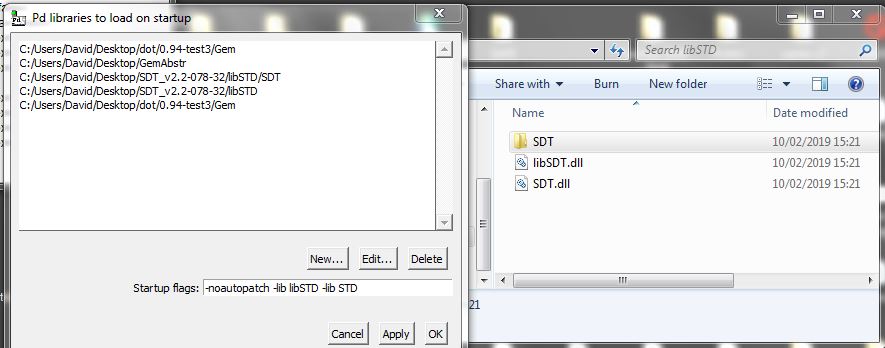
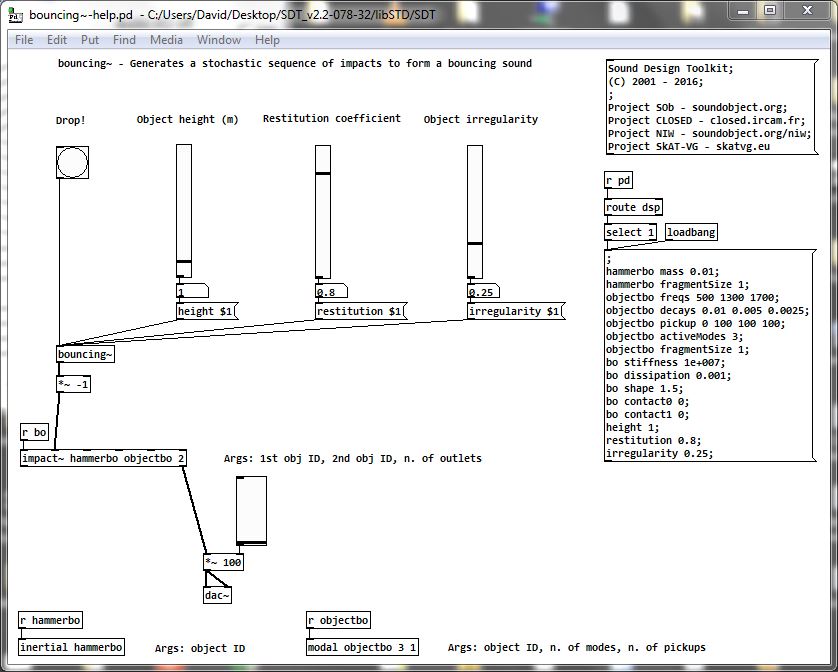
Proof.........
The message below [r pd] needs to be clicked, and dsp needs to be on.
I have checked this file but no others.
If you want help files to be found then you might need to do more. Placing the library STD directly in the "extra" folder might solve that. I didn't.........
posted in technical issues