
On-air light, trouble receiving int via OSC
I'd like to make a suggestion: Pick one set of objects to handle OSC, and just use those. It's in the nature of a tech forum for different people to have different opinions and offer multiple suggestions, but mixing and matching many different approaches can also lead to confusion.
So, for example, your screenshot -- at the top left, you have [packOSCstream] (why this and not [packOSC]? ** ) and then below, [oscformat]. That's a source of confusion. These two objects have quite different ways of handling OSC addresses (or what I've been calling "command paths") -- two idioms. Nah, this is a good way to introduce mistakes. So, pick one that you're more comfortable with.
** Ah, I see, [packOSC} help says "[packOSCstream] is a way to send OSC over TCP or serial connections" -- but you're using UDP, so, not relevant. Again, simplify: [packOSC] or [oscformat], pick one and stick with it.
Also -- you've got elements of this patch where it's already been explained why they are incorrect. If you connect a "send..." message box directly to a [netsend -u -b], it will not send an OSC-formatted message. Since you are sending to devices that expect OSC-formatted messages, for OSC it is always incorrect to pass a "send..." message directly to [netsend]. Never do this. But, in the top left part of your patch, I count 3 "send" message boxes that are patched directly to [netsend]. Delete those patch cables.
(Similarly, at the bottom of your patch, the line of objects coming directly down from [list trim] --> [route ch] --> [route 1 2 3 4] -- this is a part of my example patch that I had labeled with a comment saying "this will not work." Copying and pasting the non-working part is again going to be a source of confusion.)
~~
An OSC message has two parts.
- An address (for command) with slashes, e.g. /cs/chan/at/0.
- A list of arguments.
- The argument list always has datatype tags, even if you don't specify them.
- If you didn't write type tags, it will guess. In Pd, all numbers are floating-point, so outgoing OSC will format numbers as floating-point by default.
- The X32 documentation says that it expects an integer 1 or 0. So, in [oscformat], you can force a number in a specific position to be integer-formatted by giving "i" as the type tag.
So...
Which.. for the message [set /cs/chan/select/47(, might make sense, because there's the 47?
No, it's not the 47. The 47 is part of the command path. How do you know it's part of the command path? Because it's connected with slashes in the device docs. The command path is totally excluded from the type tags -- it's always a string.
It gets a bit confusing with [oscformat] because the vanilla OSC objects write both the OSC address and the arguments as lists (no slashes).
- [packOSC] way: [send /cs/chan/select/47(
- [oscformat] way: [set cs chan select 47, bang(
OK, let's look at those.
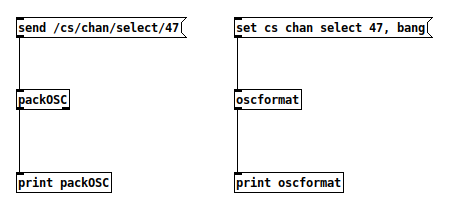
  packOSC: 47 99 115 47 99 104 97 110 47 115 101 108 101 99 116 47 52 55 0 0 44 0 0 0
oscformat: 47 99 115 47 99 104 97 110 47 115 101 108 101 99 116 47 52 55 0 0 44 0 0 0
Notice that these are byte-for-byte identical. So these are just two different ways of expressing the same idea. (I do see in your screenshot where you're mixing and matching syntax, trying to use [oscformat] syntax with [packOSC] -- nope, this is not going to work. They have different programming interfaces.)
I suggest to slow down and do some smaller scale tests to make sure you can get the right result from the lighting board. Integration should come later.
hjh
 posted in technical issues
On-air light, trouble receiving int via OSC
@jbaker said:
I think you're right about the python script... I've finally looked.
It looks like it's sending OSC to 10023, and...it kind of looks like it's receiving on port 1024..? I'll try a [netreceive 1024] object and see what happens.
Python docs say that the number given to recv is the size of the receive buffer, not the port.
The snippet from the X32 docs that you posted is unambiguous: replies are sent back to the requester's IP and port. So the netsend right-outlet approach should be correct.
Everybody gets their head tied in knots over send/receive ports.
When you connect a netsend, this is giving the IP and port TO which messages will be sent: TO port 10023. The message packet itself contains the sender's IP and port. In Pd, the FROM port is chosen randomly and AFAIK there is no way to know it -- so there's no way to open a netreceive on Pd's sending port. So let's say Pd chose port 45227. You send a message to the X32 and the packet includes your computer's IP and port 45227. The X32 (per documentation that you showed) should send its reply to the computer's IP and port 45227, where it would come out the netsend's right outlet.
I'm still suspecting firewall here. You said it's working on the Pi -- if the Pi isn't running a firewall but your computer is, that could block incoming messages.
"Suspecting" may be too strong -- at least, it's necessary to rule that out. (One not-so-ideal thing about Pd's use of random port numbers is that, in this case, you'd have to open a wide range of ports, or disable the firewall. If you could specify Pd's sending port, then you could open only that port in the firewall... but you don't know which one to open, so you'd have to open thousands of them.)
just the [netsend] on the left of the screenshot below........ it must be told to use the same port for send and receive...... so [connect port sameport(
That doesn't sound quite right to me. Pd here should send to 10023, but it will be sending from a port of its choosing, which isn't 10023. The X32 is sending back to the originating port (not to its own receiving port). So I think "connect aaa.bb.cc.ddd 10023 10023" would not work. The replies from the X32 will not be going to port 10023 on the computer.
hjh
posted in technical issues
On-air light, trouble receiving int via OSC
@jbaker older Pd vanilla is silent in the console but 0.55.2 clearly states that UDP [netreceive] cannot send return messages on the same port.
Further investigation required.
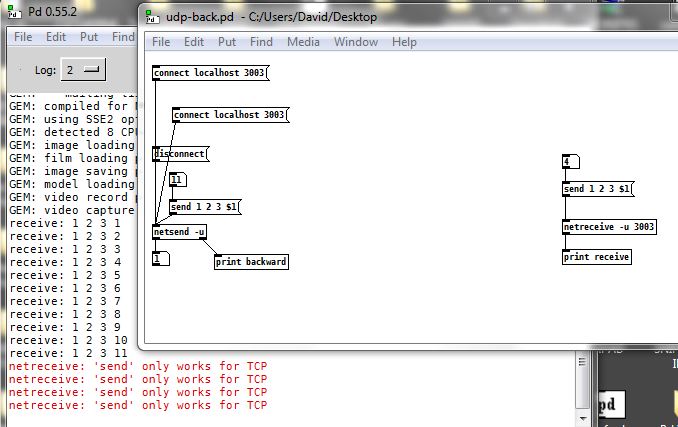
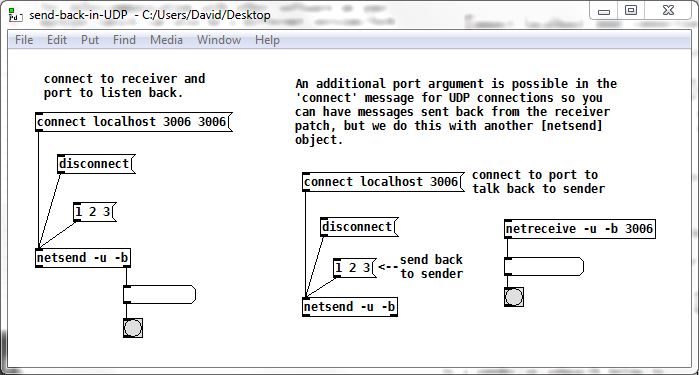
So, as there is more help in pd 0.52.2 what you need is the left part of this..... just the [netsend] on the left of the screenshot below........ it must be told to use the same port for send and receive...... so [connect port sameport(
........ netsend-receive-help-mod.pd ... see [pd send-back-in-UDP] at the bottom left.
The original help specifies separate ports...
So it is not certain that it will work.... the data might only bounce back, but might go through to the X32 at the same time...? But it could fail to connect to the X32 at all.
After more testing....... pretty sure that the X32 will receive the sent data and you will receive back on the same port...... but that the data you send from Pd will also be reflected by the port.
Note that the "send" prefix is no longer needed for a list.
David.
 posted in technical issues
On-air light, trouble receiving int via OSC
@ddw_music Thanks for your reply!
About the two possibilities:
-
No configurable port for receiving or sending
-
Yes- I agree! That wouldn't make sense for the X32 to reply on a random UDP port.
I think you're right about the python script... I've finally looked.
It looks like it's sending OSC to 10023, and...it kind of looks like it's receiving on port 1024..? I'll try a [netreceive 1024] object and see what happens.
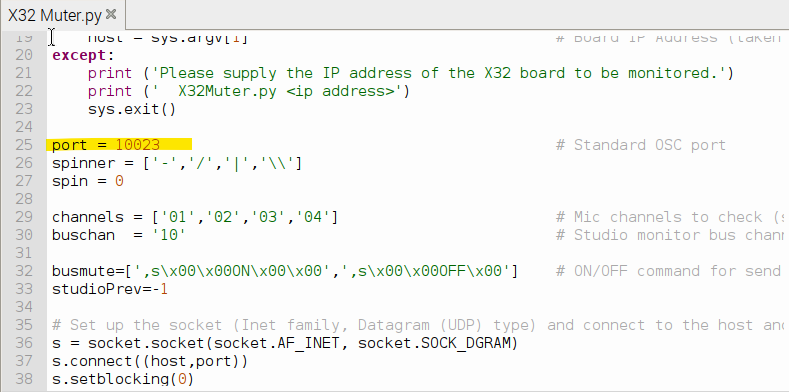
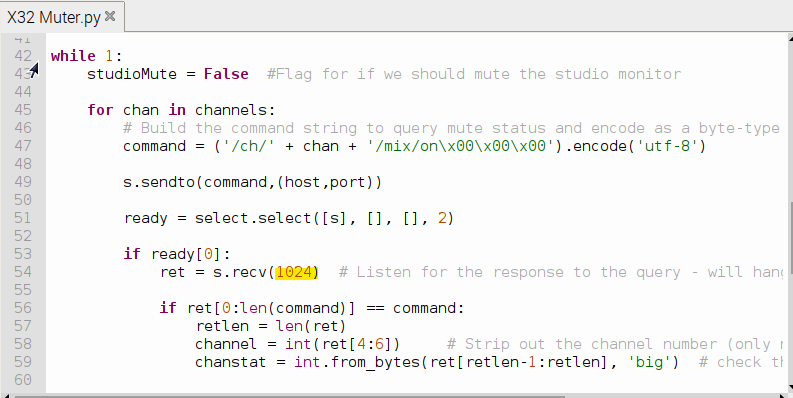
@ddw_music: "One other thing to check -- are you 100% certain that the Pd machine's firewall is not blocking high port numbers?"
I'm not 100% certain. Yes, the LiveToolKit x32 software is running on the Pi and can read the OSC messages from the X32... But if Pd chooses randomly the receive port with [netsend]... Should I just use a [netreceive (port#)] object? But I see what you're saying about the firewall. I'll try SuperCollider (thank you, more tools are always nice) and see what happens... Thanks for including that screenshot of SC to get me started!
Tilda's: Fair enough! I got the idea in my head from the X32 OSC documentation.
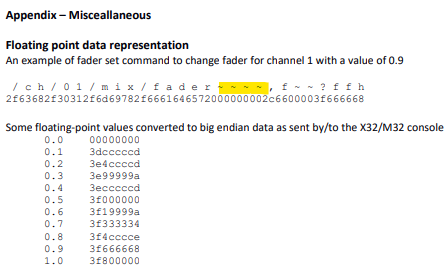
Will reply here with what I find... Thank you both very much! 
 posted in technical issues
netsend not receiving or outputting UDP responses
@chvolow24 said:
@ddw_music said:
Lack of handshaking means (AFAIK) UDP doesn't have a concept of sending back to the originating location.
This actually isn't true. The first two bytes of a UDP datagram specify the source port, and the encapsulating IP packet includes the source address.
Yes (and this info is available e.g. in SuperCollider, where every received message is accompanied by an address object indicating the source).
It is still profoundly weird to me that one would send a return message by passing a list to netreceive, and receive it in netsend. There may be some reason in TCP why that's necessary, but wouldn't surprise me if such an inversion were unnecessary in UDP. I would just use netreceive for receiving and netsend for sending, and be done with it.
hjh
posted in technical issues
netsend not receiving or outputting UDP responses
@chvolow24 said:
What would prevent the responses from being received, output, or printed by
netsend?
UDP is a dumb protocol: no handshaking, no confirmation of message receipt -- it's "I sent it out the port, then we just hope for the best."
Lack of handshaking means (AFAIK) UDP doesn't have a concept of sending back to the originating location. Because it's dumb, it's simpler: [netsend -u] only sends, [netreceive -u] only receives. The idea of passing a message into [netreceive] and it being sent somewhere doesn't make sense in UDP land.
In the helpfile, the "send back" functionality is demonstrated for TCP connections but not for UDP. I don't think this is a casual omission -- I think this actually reflects the functionality.
hjh
posted in technical issues
Controlling PD over internet
@rph-r You can use [netreceive] in the installation patch.
Then use [netsend] in your remote patch.
Once your remote patch is connected you will be able to receive messages back from the installation through those same objects (see the help files).
If you use a tcp connection in [netsend] and [netreceive] then the left outlet of [netsend] indicates whether it connected (the value will change from one to zero when you try to send a message if the connection has been lost).
That is because the TCP protocol needs an acknowledgement packet sent back, or it will send the packet again..... and again until it times out. UDP will not do that.
If you need an "alarm" that the connection has been lost, or that the installation patch has stopped sending messages, then add a [metro] sending a ping back to [netsend] from the [netreceive] in your installation patch.
Then you could set up an auto reconnect in your remote patch.
You can only "find" another computer on the net if its IP has changed by using DNS lookup, and if an address changes it can take up to 2 days for all the worlds DNS servers to be updated.
Maybe something like DynDns is quicker, but if you are instigating the connection using your controller (remote) computer then you don't need that anyway.
You will always be able to reach the installation computer from any internet address.
David.
P.S. of course you can set up and test on your local network before implementation.
posted in technical issues
Trouble Sending OSC Data Using netsend [Resolved]
Hello everyone 
I've created a Pure Data patch that successfully receives OSC data from a Processing sketch. However, I'm struggling to send OSC data back to Processing using the native object netsend, without relying on the outdated "mrpeach" library.
I've researched similar issues in this forum, but haven't found a definitive solution. It's worth noting that the same process, with the same Processing sketch, works perfectly in Max/MSP. Has anyone successfully sent OSC data to Processing using netsend in Pure Data? I'd greatly appreciate any guidance, examples, or advice on configuring the sending part of my patch.
Here are some screenshots and files for reference.
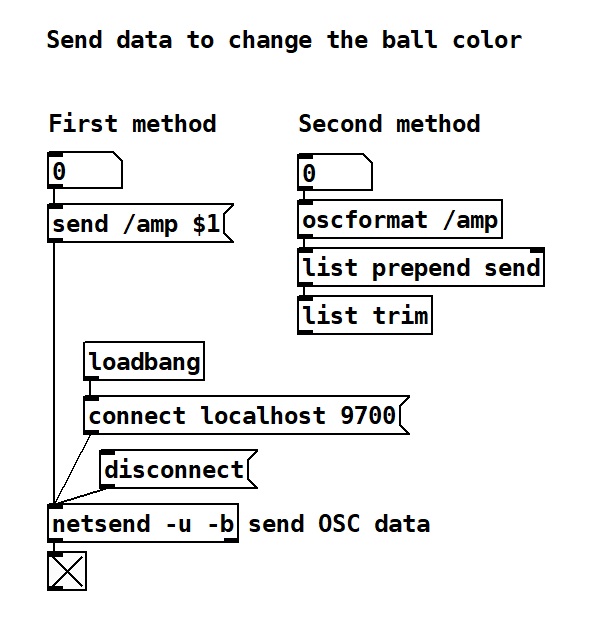
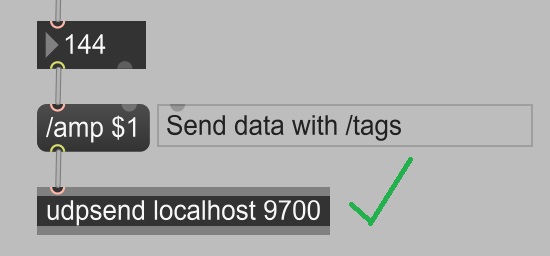
Thank you for your help in advance!
 posted in technical issues
Using TouchOSC to draw into a 16 step array? communication back'n'forth? Show Array content in TouchOSC?
@whale-av said:
I am almost certain that Gui objects in TouchOSC can talk midi and OSC at the same time.
But I doubt that it will communicate over wireless (required for OSC messages) and USB at the same time.
GUI objects in TouchOSC can send Midi and OSC at the same time, and wired USB connection does work for both, no issues. no need for having the iPad on Wi-Fi. just takes a while for TouchOSC on the iPad to realize what the IP address of the laptop is.
The communications between Pd and touchOSC are set in the abstraction [osc-s-r] within the [globpitcharray1] patch in the zip I posted.
There is a TouchOSC layout plom.touchosc in the zip that should be used with this patch (for a test demo).
thanks for breaking this down for me!
You would need to fix the IP address of the Ipad (static address) and use that address for [netsend] and [netreceive] in [osc-s-r] ....... if you ever get over your fear of using Wi-Fi for this.... or just feel like trying it to see what it will do.......
yes, [osc-s-r] is definitely where it's at. thanks for spelling out the [netsend] and [netreceive] to me, cos looking at the screenshot i had, i can now realize where to input 11000 and 11001 for send + receive. the connect portion of the script was throwing me.
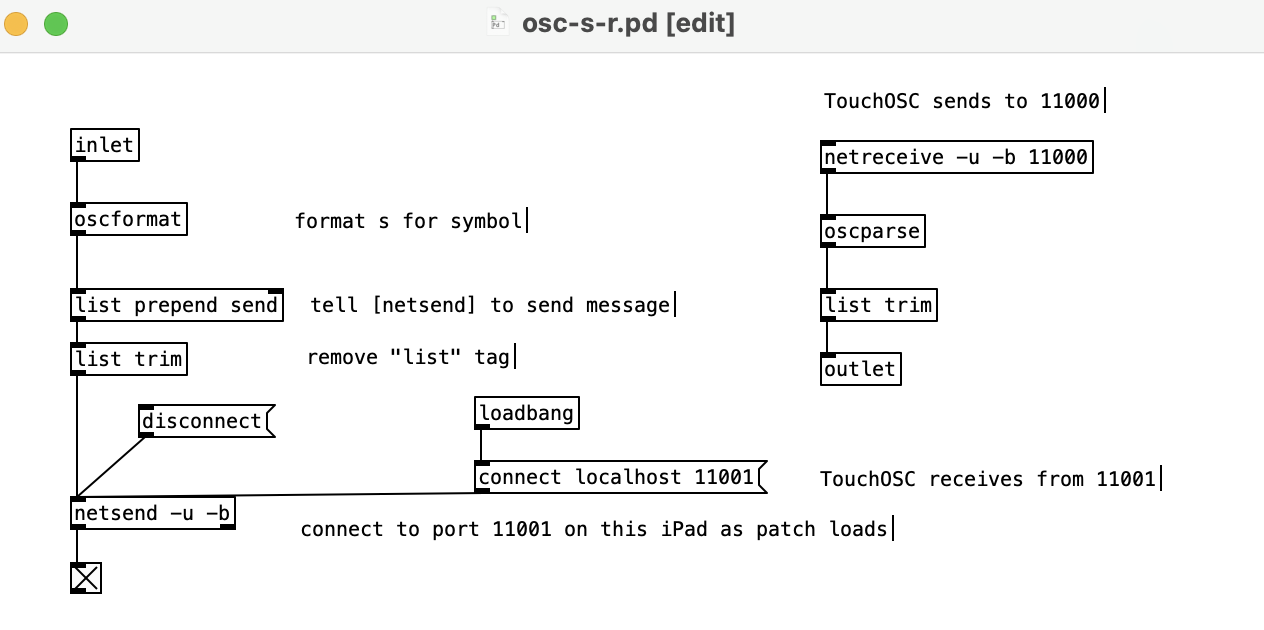
i hope i have it right now, 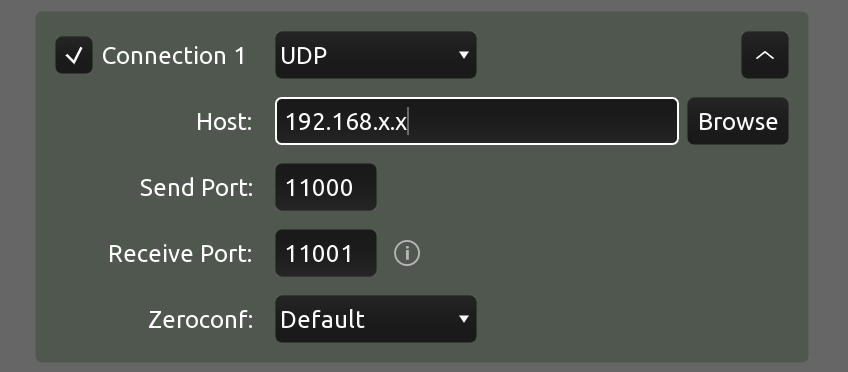
 posted in technical issues
Using TouchOSC to draw into a 16 step array? communication back'n'forth? Show Array content in TouchOSC?
@beep.beep - i'm running fully usb-tethered with all wi-fi bluetooth mobiledata off. can you have a look and see if this will solve your "OSC only works with wi-fi" issue?
@esaruoho Confirmed! Using your clues I was able send OSC over USB with wifi disabled. Nice to discover that my hacky workaround is no longer necessary! I’ve updated my other TouchOSC thread to point back to our present thread here, if there’s more to discuss on this subject please continue to do so here instead of replying to multiple threads, it makes it quite difficult for others to follow over time.
When I connected my iPad to my Mac & ran “arp -a” in the Mac’s terminal, I only saw one listing: the iPad’s IP address (unlike your screenshot, where you had many entries). This did enable me to at least send from Pd to TouchOSC, but since no IP was listed for my Mac I couldn’t send in the other direction.
Then — for reasons unknown — after fiddling with netsend/netreceive for a bit, “arp -a” then returned a 2nd entry for “broadcasthost (255.255.255.255)”. I’m not a networking expert but some quick searching indicates that this IP can be used to broadcast messages over a local network, so I tried entering 255.255.255.255 for “Host” in TouchOSC and voila, I can send to Pd! This also works the other way with “connect 255.255.255.255 9000” into [netsend -u -b], which successfully sends to TouchOSC on port 9000. I don’t know if there’s an efficiency downside to using a broadcast IP versus a direct IP, but if not this seems to simplify things a lot!
@ddw_music looking at your earlier comment, I didn’t know about netreceive’s -f flag either, that’s great to know! I tried your autoconnect logic and it works nicely, although of course it still requires the iPad to be configured correctly before doing its magic. I guess if there’s truly no harm in leaving TouchOSC’s host set to 255.255.255.255 and “broadcasting” all outgoing OSC data, maybe that’s about as close to zero-config as one can get?
edit: the above tests were done with a 2016 Macbook Pro and iPad 5th gen; when I tried these approaches with my much older 2008 Macbook and iPad 4th gen (both with older OS's) I did not succeed... so this all might be dependent on relatively recent hardware/software.
 posted in technical issues