
mrpeach on Raspberry
@Dannielo If you get a solution that works please let everyone know by posting in this thread.
To get you working in the meantime.........
You could just use [netreceive] for data..... you don't absolutely have to use osc.
If you want to use osc there are objects in Vanilla that work....... [oscparse] and [oscformat]
However there is a bug in [oscparse] if you use an integer in the message address (not the data of course!).
There is a solution for that bug included in this zip, as well as a demo of [netsend] and [netreceive] for vanilla.
vanilla osc.zip
And for Python...... to send to [netreceive]......... https://guitarextended.wordpress.com/2012/11/03/make-python-and-pure-data-communicate-on-the-raspberry-pi/
David.
 posted in technical issues
[netreceive] sensor data on local wifi network?
Hi whale-av, thanks for your reply. I managed to get this up another way a couple of months back, but now I'm back making an updated version. I ended up using pd-extended last time and so found that [tcpreceive] work well. However now I am using Raspian Jessie and Pd Vanilla 0.46.2 I cannot use that object any more.
What you said makes sense I am now attempting to use a [netreceive 8010 0] and then using curl to route my data to the same port (8010). This worked with [tcpreceive] in Extended but I couldn't get it to work with [netreceive]. It still isn't working with [netreceive] now.
I know I have some work to do to separate out the data stream once it's coming through but at this stage even connecting [print] to [netreceive] yields no data. Curl (in my terminal) is acting like it's running and connected, for example if I run the curl scrip without running the Pd patch and building the [netrecieve] first the curl doesn't connect (as you explained before).
Do I need to be doing something to somehow "wake up" [netreceive] to receive the data? If so I can't find it in the documentation. Any suggestions would be very much appreciated.
 posted in technical issues
Passing messages from another computer to PD on an Rpi
@alex.vyverman You just need to send and receive (tcp or udp) using [netsend] and [netreceive] objects and specifying the port on the Rpi that you want to use to receive the data. If you are using extended then look at this..........
02.netsend_netreceive.pd
which is in the "pd/doc/manuals/networking" folder.
If you are using vanilla open........ [netsend-help]
netsend-help.pd
which is in "pd/doc/5.reference"
David
posted in technical issues
udpsend and receive
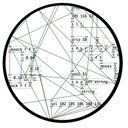
Just a demo patch showing how to use [oscformat] and [oscparse]. The arguments of [netsend] and [netreceive] (-u -b) stand for a UDP connection and binary format, respectively. -b is necessary for [oscformat] and [oscparse]. If you need a TCP connection then just omit the first argument in both [netsend] and [netreceive].
The message to [netsend] should contain the receiver's IP instead of "localhost".
oscformat_parse_usage.pd
 posted in technical issues
udpsend and receive
@toddak Ah!......... so I am sorry toddak, but I have a lot of questions......
So you still want to use the touch screens, and as you have a few Pi's you have backup cards so you have managed to get back to where you were before the update disaster? I hope so as that would make me feel much better!
You do not really want to use netsend and netreceive but in fact OSC objects (so you don't need MrPeach....... and a later vanilla will be ok as Alexandros suggested)? However, extended has many useful objects!
You are using an extra Pi as a router and you want to use [netsend] and [netreceive] on that?
I would think you would be better off with a dedicated router. I just bought another wrt54 on ebay for 99 uk pence.
Are you planning to stream audio to these 4 Pi's (in which case you will need extended) or are you just sending osc messages from them, or just receiving osc messages so as to start/stop playback?
I have not managed to make audio streaming to a Pi work reliably yet without occasional dropouts, and the sound will not work well at all unless you give Pd root privileges............. so remember.... for later...
sudo chmod 4755 /usr/bin/pd-extended
For audio on a Pi it should be run headless, so you should drop your touch screens in that case.
If you are using the Pi's with touch screens just to send osc messages you would be better off with some £40 android 7" tablets running TouchOSC (one licence for all of the android devices you own).
If they are receiving Osc to control their local playback then why do they have touch screens. Is it the touch screens that would not work with Jessie, or some other screen?
Jessie is not very different from Wheezy (it is not a huge update) but it is exclusively armhf. If the touch screens are needed and will not work with Jessie then you are stuck with the current wheezy that you have installed.
If you need to stay with armel then on one of your working Pi,s (armel) you should try this http://puredata.info/downloads/pd-extended-rpi version of extended and install pulse audio and the fonts (manually or with an apt-get) first. A lot of information you can find from here http://puredata.info/docs/raspberry-pi/?searchterm=raspberry
But if you have Rpi B2 (or anything other that an A or a Zero) you should really be running an armhf distribution.
David.
posted in technical issues
Using pd patches in n-Track Studio 8 (official user guide)
Hi everyone,
I'm glad to announce we've finally release the new version of n-Track Studio with Pd patch support.
Here the user guide to know about using Pd in our DAW:
http://it.ntrack.com/help/manual.html#pure-data-for-ntrack
Don't hesitate to contact us for any problem or suggestion!
 posted in tutorials
Pure Data VST3 in n-Track Studio Beta 8 based on libpd
HI Everyone,
I’m one of the developers of n-Track Studio, a cross-platform Digital Audio Workstation available for Mac, Windows, iOs and Android (www.ntrack.com).
The new beta version of n-Track Studio 8 now include a new VST3 to allow to load and use Pure Data patches inside the workstation.
The VST3 is based on libpd and it's included in both Mac and Windows version.
If you want to test it and I have prepared a temporarily FAQ page to help user to create compatible pd patch and test them in n-Track Studio:
http://en.ntrack.com/faq.php?category=13&showAll=1
I hope you’ll enjoy our project to make a new tool for the Pure Data community and every feedback could be useful!
Marco
posted in libpd / webpd
Loading patch in n-Track Studio 8 beta
HI Everyone,
I’m one of the developers of n-Track Studio, a cross-platform Digital Audio Workstation available for Mac, Windows, iOs and Android (www.ntrack.com).
The new beta version of n-Track Studio 8 now include a new VST3 to allow to load and use Pure Data patches inside the workstation.
I'm still working on a complete user guide and I have prepared a temporarily FAQ page to help user to create compatible pd patch and test them in n-Track Studio:
http://en.ntrack.com/faq.php?category=13&showAll=1
I hope you’ll enjoy our project to make a new tool for the Pure Data community.
Marco
posted in tutorials
Pure Data VST3 in n-Track Studio 8 Beta
HI Everyone,
I’m one of the developers at n-Track Software, a little audio software house based in Rome since 1993.
Our main product is n-Track Studio a cross-platform Digital Audio Workstation available for Mac, Windows, iOs and Android (www.ntrack.com).
n-Track Studio is an entry level software, designed for hobbyists and semi-professional musicians, as well as researchers and students.
For these reasons, we have also developed a new VST3 available only for desktop version of the Studio to allow to load and use Pure Data patches inside the workstation.
Currently we only support the patches created using Pure Data Vanilla distribution and we only support the visualization of sliders, canvas, radio buttons, buttons and toggle items.
I’m still working to improve the plugin and its features.
I’m also adding a section in the user guide and a tutorial to help users use the plugin. The links are available as soon as possibile on our web site.
We’re currently looking for beta tester to help us to improve the plugin.
You could download the Studio at this link:
http://en.ntrack.com/download.php
I have also prepared a temporarily FAQ page to help user to create compatible pd patch for n-Track Studio:
http://en.ntrack.com/faq.php?category=13&showAll=1
I hope you’ll enjoy our project to make a new tool for the Pure Data community.
Marco
posted in news
Networked Audio problems
Hey guys,
It's a super old post but since the netsend~ and netreceive~ are old as well I thought to add my 2 cents here.
I ran into similar problems connecting a Linux desktop to a Raspberry Pi with netsend~ and netreceive~. My desktop cpu (x86_64) and the ARMv7 of the Raspberry have different word lengths (64bit vs. 32bit). The problem is that the header tag uses long datatype for the members count and framesize, which the compiler maps to the word length of the current architecture. Thus, the send and receive ends of the transmission interpreted a different sized header tag, causing strange error messages about too many channels and incompatible header size.
To fix it, I simply edited the file netsend~.h and changed the datatypes of the members from long to unsinged int (or to something that is guaranteed to stay as standard size like __u32 just to make sure). I also wonder if the array extension is necessary because if you order the larger datatypes first, the compiler seems to pad the overall size of the struct to 12 in both 64 and 32 bit machines.
typedef struct _tag {       /* size (bytes) */
    __u32 count;            /*    4         */
    __u32 framesize;        /*    4         */
    char version;           /*    1         */
    char format;            /*    1         */
    char channels;          /*    1         */
    //char  extension[5];   /*              */
} t_tag;                    /*--------------*/
                            /*   11         */
Btw, does anyone know if there is a more updated version of netsend~ and netreceive~ available since the 1.0b by Remu?
 posted in technical issues