
Using TouchOSC to draw into a 16 step array? communication back'n'forth? Show Array content in TouchOSC?
@esaruoho said:
I could try again, but it looked like UDP required me to know the IP address of both the laptop and the iPad, and that really threw me (i don't know how to figure out what the IP address of the iPad is, or how to make sure it's always the same, same for macOS).
Ah right, for bidirectional communication.
Actually in the netreceive help file, there is a flag for this: "optional -f flag for from address & port outlet (0.51+)".
Help file example prints from: list ::ffff:127.0.0.1 57120 where ::ffff:127.0.0.1 is an IPv6 address.
So...
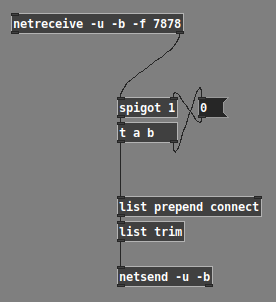
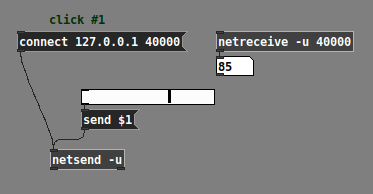
... should configure the [netsend] to send to the first address from which messages were received (and I did a quick test, which worked). If you enable "Ping" in TouchOSC, then it will automatically send a message to the computer, which will trigger the "connect" logic right away.
Incidentally, I didn't know about this feature (never used the "from" address in Pd). My thought process was, "Well... this is a very common requirement, so let me have a look at the [netreceive] help patch and see if there's anything about 'from'" -- and toward the lower right, there's a [print from] box. Hm. Then, what's different about the [netreceive] feeding it is that it isn't only "-u -b xxxx" but rather "-u -b -f xxxx"... what's that "-f"? Then, looking up from there a little bit, there's a list of object creation flags, where "-f" is explained.
So the solution exists, and documentation for that solution is actually reasonably clear.
i have maybe an hour every 2-3 days to try and get something going, and also feel a bit like there's no "TouchOSC with PureData for idiots" blog-post for iPad / macOS going on, or at least i haven't been able to find it.
This I fully understand.
Pd OSC sending, like this. It won't send anything until after you push a connect ip.ad.dr.ess port message into the netsend inlet -- as noted above, you can get the parameters for the connect message from [netreceive].
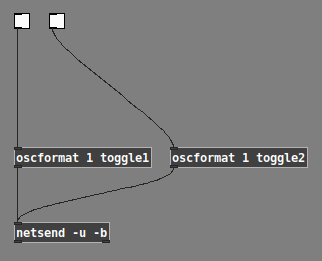
... producing messages like /1/toggle1 1.0 or /1/toggle2 0.0. This type of message format is what you need to change a control's value on the tablet.
It's also possible to "set" the OSC command path before providing the arguments -- but try the simple way first.
hjh
 posted in technical issues
Using TouchOSC to draw into a 16 step array? communication back'n'forth? Show Array content in TouchOSC?
@esaruoho said:
and also feel a bit like there's no "TouchOSC with PureData for idiots" blog-post for iPad / macOS going on, or at least i haven't been able to find it.
As I mentioned in another recent thread of yours where you were exploring iPad control options, I had some experiences with this type of setup several years ago:
https://forum.pdpatchrepo.info/topic/10184/touchosc-direct-usb-connection-finally-possible-with-midimux
I just tested it & it's still working. (7 years later!) I have midimux & TouchOSC running on the iPad, and studiomux & Pd running on my Mac. As mentioned in my old thread, the iPad must be connected to wifi (any active network, doesn't matter which) in order to send OSC data over the tethered USB connection.
And yes, you will most certainly need to know the IP addresses of the Mac & iPad (for use with [netsend] in Pd, and with TouchOSC on the iPad). I don't know of a way to ensure that they will be persistent, I've always had to reenter them manually every time. Also make sure your in/out port numbers are in order (again, on the Pd side for [netsend] and [netreceive], and on the iPad you can set the in/out port numbers in midimux).
Ah, and finally I'm using [netreceive -u -b] into [oscparse] and [list trim] for receiving in Pd, and [oscformat foo bar etc] into [list prepend send] then [list trim] then [netsend -u -b] for sending out from Pd.
 posted in technical issues
How to send int and float values between objects using netsend and netreceive?
@lucassilveira said:
"netsend: no method for 'float'".
Which Pd version are you using?
I ask because of a note in the [netsend] help patch: "lists work like 'send' (as of Pd 0.51)"
This means: If you are using Pd 0.51 or later, you should be able to send a number directly into [netsend] and it will be transmitted.
I confirm that this works in Pd 0.52.2:
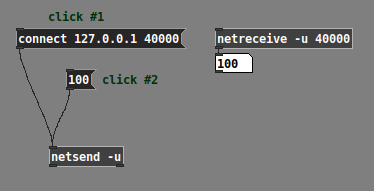
Now, note that all the other examples in [netsend] help use "send" messages, such as "send foo $1" toward the bottom:
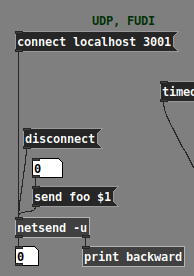
That "as of Pd 0.51" means: if you're using Pd 0.50.x or earlier, then the only way to make [netsend] work is with the "send" prefix:
But... if you're using an old Pd version... why? Probably better for you to upgrade.
(Also assuming here that you will later use [netsend] to send data to another process -- if it's all internal to Pd, then [send] / [receive] are better.)
hjh
posted in technical issues
how would you recreate this mixer channelstrip abstraction?
@oid said:
@esaruoho If you are trying to save CPU than I would just separate UI and DSP, run the UI in its own instance of PD and DSP in another, communicate between them with [netsed]/[netreceive], there comes a time in PD when you just have to either separate UI and DSP or sacrifice. Beyond that it is difficult to say, I do not know what your needs are and what sacrifices are acceptable. What are your requirements? I can optimize these patches in a dozen different ways but I have no idea if any of them will meet your needs since I do not know what your needs are or even why you are trying to change things beyond a vague notion of there possibly being something better.
ok. i have heard about this UI DSP separation. so.. is it a case of every single slider for instance needs to do a [netsend] to some other abstraction that only does DSP? or have two separate patches altogether, one for UI and one for DSP? sorry, i'm really vague on this.
So, my main painpoints with the current channelstrip is that when I set up 16 "LFOs" to "breathe" up and down the volume slider (which also has slider-color-changing while it is moved from 0 to 1) - when i have more than 4 of these LFO counters cycling from 0...1 on the channelstrips, all sliders stop updating. it might be 4, 8 or 12, but by the time i try to get all 16 of the looper volumes to cycle from 0...1 (my "breather" has a setup of cycling from "min-max every 2 seconds" to "min-max every 60 seconds") -- and that to me makes me think that the UI is not as optimized as possible.
i keep hearing that ELSE library supposedly has some larger crossmatrix/channelstrip that i could use, but i have not looked at it.
so ideally i'd prefer to take the channelstrip even further, i.e. have all effect sends be modulatable (well, that word where the effects have LFO modulation) so i could have even larger more complex things going on where the channelstrips that receive audio from loopers, are sent to specific sends like reverbs, delays and so on. this kind of larger modulation on all parameters would be really useful.
the way the channelstrip is built is that the dwL and dwR go to a separate [diskwrite~] abstraction which i use to record audio. the "p" (and p1-p8) defines that any channelstrip that has p enabled, is sending to all the other loopers - so in that case, any audio that goes to a channelstrip, can be sampled into the 64kb loopers (16 of them).
also i have thechannelstrip labels (i.e. volume slider name) dynamically written to, so i can always have them easily understandable / informative.
here's the "init state". i use bunches and bunches of loadbang -> message -> senders to get them to a specific state. .

one thing i've been toying around as an idea is to incorporate highpass and lowpass filters to the channelstrips, and EQ. but i haven't figured out how to solve the EQ issue so that the single band peak EQ could be incorporated into such a small formfactor ( the width is only 38 and height is 189 so it's hard to conceive how an EQ could be usable there).
i also have for the 16 channelstrip looper instances, BCR2000 + BCF2000 volume slider control and so on. but i'm willing to take the whole setup "to the dock" and rewrite it, if i could be sure that it will be lighter on the cpu..
so yeah, i do only have a vague notion of "maybe it could be better, i'm not sure?".. but i've not yet seen much netsend + netreceive stuff so i'm not entirely familiar how it could be done and how much i need to rewrite (i.e. does everything need to be netsend+netreceived with a complete split of DSP and UI, to reap the benefits, or can i just try it with the 16 loopers and see what happens?
 posted in technical issues
Using [netsend] to broadcast or communicate with other computer...
@nicnut 2nd question first.
You need to know the ip address of the computer you will send to....... so really, if you want your patch to work next year it will need a static address.
However, I think you might be able to replace the ip address with the host name.
Anyway, there is an example here........... https://forum.pdpatchrepo.info/topic/10136/netsend-netreceive-os-x-pd-0-47-0/2 with [netsend] in udp mode.
But you can broadcast also with [netsend].... see below.
1st question.
[udpsend] is available for Pd but you need to install either the MrPeach library or the iemnet library or the net library.
It has multicast but for broadcast you can use the reserved broadcast address for your network.
And you can do the same with [netsend].......... https://forum.pdpatchrepo.info/topic/11062/cannot-connect-to-broadcast-ip-on-linux-via-netsend
David.
 posted in technical issues
Stop message computation during network communication
Hi,
I'm facing an issue with [netsend] [netreceive].
I'm sending messages to a python server and like to wait for computation before PD continues.
I currently have an abstraction like
[inlet]
|
[some stuff]
|
[netsend]

[netreceive]
|
[other stuff]
|
[outlet]
with this
[bang(
|
[t b b]
|      |
|      [myAbstraction]
|          |
[print a] [print b]
[print a] is triggered before [print b]
So my question:
Is there a way to stop PD computation to trigger [print b] BEFORE [print a]?
 posted in technical issues
OSC messages on remote IP
@LL1 and @oscarsantis - I just got my remote netsend working with ngrok - it wasn't too hard to set up in the end! As an example of what you get when you run ./ngrok tcp 4000 is Forwarding tcp://2.tcp.ngrok.io:15524 -> localhost:4000 - this gives you the clue to what you then need to setup on your 'netsend' on your remote pd patch (with you local simply setup with 'netreceive 4000' ). So then on your remote, the message box coming in to 'netsend' wants to read 'connect 2.tcp.ngrok.io 15524' (ip and port number respectively).
I tested this with one laptop connected to my wifi, and with another connected to a mobile phone running a 4G hotspot. The next test it too see if it works with someone in Japan! Hope this helps 
 posted in technical issues
Using Pd to remote control OBS
@Harlekin If you want TouchOSC to control OBS you don't need Pd....... just connect TouchOSC directly to the ports of osc4obs and make your remote.touchosc layout file.
If you want to do some other processing in Pd then connect TouchOSC to Pd directly (in and out)...... and then connect your processed control from PD to osc4obs directly (in and out).
osc4obs facilitates that by creating separate OSC in and out ports.
You will have to do that also if you want to use TouchOSC and Pd in an either/or situation as osc4obs only has one set of osc ports and is making a tcp connection with OBS.
OBS websocket is a tcp connection and so it is possible that osc4obs is requiring tcp for the OSC connections...... in which case remove the -u flag from [netsend] and [netreceive] in my examples below.
It could also be expecting ascii instead of binary in which case remove the -b flag (but I doubt that)....
Externals for Pd are written in C so if you are adept there is some help in Pd/doc/6.externs .....
Basically you need to make a websocket client that replicates osc4obs with outlets and inlets instead of the osc ports.
BUT... you could try the iemnet [tcpclient] first (NOT the [udpclient]...!).... and that should work.
Just replace both [netsend] and [netreceive] with the one [tcpclient]...... connect it to OBS and look at the output using a [print] object.
If OBS is on the same computer the connect message will be [connect 127.0.0.1 4444(
Remove the password from the OBS websocket unless you find that a password can be added to the [connect( message for [tcpclient]...... before or after the port number? preceded by "password" or "passwd"?...... guesswork...... and [tcpclient] might well not accept a password as it is not mentioned in the help file.
Once you are looking at a print of the received messages the problem will be to decode the proprietary message format (it will not be OSC)....... it might be easy.... or not.
If lucky there will probably be the ascii strings you are looking for or a decimal representation of them somewhere in the message.
If you go the osc4obs route then it is quite easy to use [oscformat] and [oscparse] in vanilla instead of creating an external.......
...... vanilla osc.zip
P.S. try to avoid integers within the OSC address (header) as they arrive in Pd as symbols at the output of [oscparse] ....... and are then difficult to route. So what/ever/6 data is best avoided if possible and what/ever/six data is easier to deal with in Pd...... but I have included a solution in the zip file above.
Be careful in TouchOSC to avoid message feedback (much like midi feedback)......... and the same applies in Pd. In Pd you can include "set" at the start of a message (without the quote marks)...... which will set a message in the next object or message box but not send it onward until that object or message is banged.
David.
posted in patch~
"Nested instances" for distributing CPU load
@Booberg No you can open at least 64 ports..... maybe more..... so....
[netreceive -u 10000]
[netreceive -u 10001]
..
..
..
[netreceive -u 10063]
and their corresponding [netsend -u] in the control patch.
10000 to 10063 are the port numbers and it is best to make them big.
25 would clash with email for example.
But what do you mean by controller values at audio rate? Do you mean 192000 messages / second ........ or sent as audio signals?
David.
posted in technical issues
"Nested instances" for distributing CPU load
@Booberg Yes [netsend] and [netreceive] will do the control messages.
UDP mode will be faster than TCP as it doesn't ask for the message again if it is incomplete..... and on the same computer they should all make it through complete.
Try it and see I suppose.
Maybe start with TCP......... so you know there are no errors........ and if it saturates the connection try UDP.
But you can distribute the messaging across a large number of ports.
Years ago I ran up against a limit of 64 ports for [netreceive] in Pd but that might no longer be the case.
But I think one [netsend] should cope with as much data as one [notein].
David.
posted in technical issues