
Andúril with Pure Data Front-Ends (fwd/bwd looper + 14 effects + elven cloak)
Andúril with Pure Data Front-Ends (fwd/bwd looper + 14 effects + elven cloak)
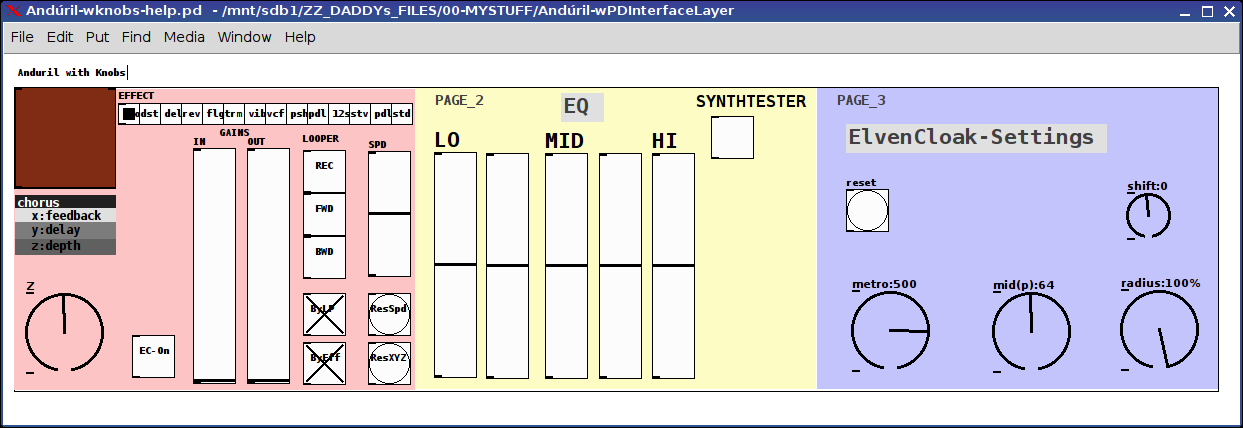
Came to me it didn't make much sense to only make the patch available to MobMuPlat users (for the original post and instructions on what all the controls do see: https://forum.pdpatchrepo.info/topic/10821/andúril-mobmuplat-app-fwd-bwd-looper-14-effects-elven-cloak-control-parameters-via-env-and-pitch-as-you-play/1 ) so built and have included them in the zip (with no changes to the original patch) two parallel guis: one with knobs ("Andúril-wknobs-help.pd") and (in case you don't have the knob external) one with sliders ("Andúril-wsliders-help.pd").
note: the xy-slider does require iemguts and is from @LiamG 's wonderful xy-slider at: https://forum.pdpatchrepo.info/topic/8656/xy-slider-controls-two-variables-at-once
The original mobmuplat patch is included in the patches as an abstraction.
So the GUI's only reroute the control elements to and from the pd controls to the mmp ones. And you now no longer need MMP at all to run it from a computer.
...think that's about all I need to say here.
Sorry for the cross-reference, but I hate repeating myself. So hope you don't mind following the link to read about what it does.
Peace and merry music making thru us all.
Sincerely,
Scott
 posted in patch~
The Harmonizer: Communal Synthesizer via Wifi-LAN and Mobmuplat
The Harmonizer: Communal Synthesizer via Wifi-LAN and Mobmuplat
The Harmonizer
The Harmonizer is a single or multi-player mini-moog synthesizer played over a shared LAN.
(credits: The original "minimoog" patch is used by permission from Jaime E. Oliver La Rosa at the the New York University, Music Department and NYU Waverly Labs (Spring 2014) and can be found at: http://nyu-waverlylabs.org/wp-content/uploads/2014/01/minimoog.zip)
One or more players can play the instrument with each player contributing to one or more copies of the synthesizer (via the app installed on each handheld) depending on whether they opt to play "player 1" or "player 2".
By default, all users are "player 1" so any changes to their app, ex. changing a parameter, playing a note, etc., goes to all other players playing "player 1".
If a user is "player 2", then their notes, controls, mod-wheel etc. are all still routed to the network, i.e. to all "player 1"'s, but they hear no sound on their own machine.
There are 2 pages in The Harmonizer. (See screenshots below.)
PAGE 1:
PAGE 2:
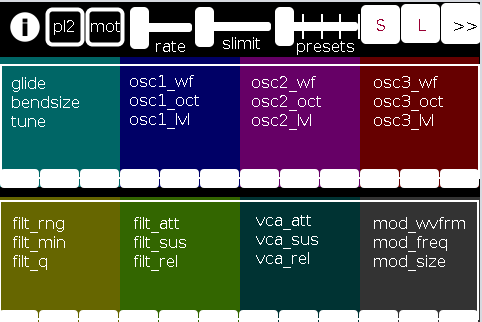
The first page of the app contains all controls operating on a (more or less) "meta"-level for the player: in the following order (reading top-left to bottom-right):
pl2: if selected (toggled) the user is choosing to play "player 2"
mot(ion): triggers system motion controls of the osc1,2&3 levels (volume) based on the accelerometer inside the smartphone (i.e as you twist and turn the handheld in your hand the 3 oscs' volumes change)
rate: how frequently should the handheld update its accelerometer data
slimit: by how much should the app slow down sending the (continuous) accelerometer data over the network
presets: from 1 to 5 preset "save-slots" to record and reload the Grid 1 and Grid 2 settings that are currently active
S: save the current Grid1 and Grid2 selections to the current "save slot"
L: load the currently selected preset into both Grids
">>": go the the next page (page 2 has the reverse, a "<<" button)
Grid 1: the settings, in 4 banks of 3 parameters per-, which are labeled top-down equating to left-right
Grid 2: the same as Grid 1, but with a different set of parameters
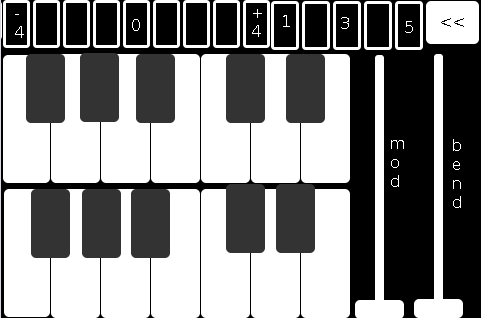
The second page comprises:
the 2-octave keyboard (lower notes on top),
a 9-button octave grid (which can go either up or down 4 octaves),
a quick-preset grid which loads one of the currently saved 5 presets
the "<<" button mentioned above, and
both a mod and pitch-bend wheel (as labeled).
SETUP:
All players install Mobmuplat;
Receive The Harmonizer (in the form of a .zip file either via download or thru email, etc.)
When on your smartphone, click on the zip file, for example, as an attachment in an email.
Both android and iphone will recognize (unless you have previously set a default behavior for .zip files) the zip file and ask if you would like to open it in Mobmuplat. Do so.
When you open Mobmuplat, you will be presented with a list of names, if in android click the 3 dots in the top right of the window and on the settings window , click "Network" Or on an iphone click "Network" just below the name list;
On the Network tab, click "LANDINI".
Switch "LANDINI" from "off" to "on".
(this will allow you to send your control data over your local area network with anyone else who is on that same LAN).
From that window, click "Documents".
You will be presented again, with the previous list of names.
Scroll down to "TheHarmonizer" and click on it.
The app will open to Page 1 as described and shown in the image above.
Enjoy with Or without Friends, Loved, Ones, or just folks who want to know what you mean "is possible" with Pure Data  )!
)!
Theories of Thought on the Matter
My opinion is:
While competition could begin over "who controls" the song, in not too great a deal of time, players will see first hand, that it is better (at least in this case) to work together than against one another.
If any form of competition emerges in the game, for instance loading a preset when a another player was working on a tune or musical idea, the Overall playablilty and gratitude-level will wain.
However, on the other hand, if players see the many, many ways one can constructively collaborate I think the rewards will be far more measurable than the costs, for instance, one player plays notes while the other player plays the controls.
p.s. my thinking is:
since you can play solo: it will be fun to create cool presets when alone then throw them into the mix once you start to play together. (Has sort of a card collecting fee ).
Afterward:
This was just too easy Not to do.
It conjoins many aspects of pure data together (I have been working on lately (afterward: i did this app a long time ago but for some reason and am only now thinking to share it) both logistical and procedural into a single whole.
I think it does both quite well, as well as, offer the user an opportunity to consider or perhaps even wonder: What is 'possible'?"
Always share. Life is just too damn short not to.
Love only.
-svanya
posted in patch~
Simple Mobmuplat App: "spiral2audio" - with parameters + use of [wrap] with LCD visualization
Simple Mobmuplat App: "spiral2audio" - with parameters + use of [wrap] with LCD visualization
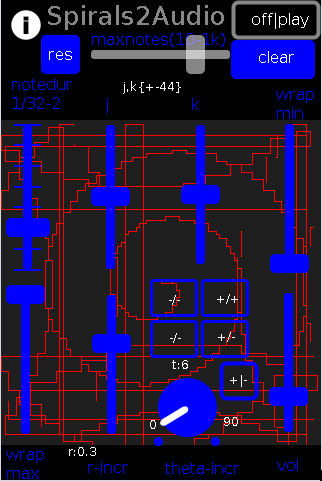
Not sure about how much (in gaming terms) "playability" this has. But it was/is a lot of fun to think about: how does [wrap] operate on a function (not the wrap part but the sound) and how does that combination of function+wrap play out in audio-vsiual space.
It writes the xy-results of the spiral to an LCD control so you can see what's happening. Particularly interesting once the [wrap] kicks in. Parameters can be changed on the fly and you can clear the LCD to watch how the interaction unfolds as you change those parameters.
(Made a similar one for collatz. But, musically speaking, Collatz is horrible! Spirals somehow appeal way more to my sense of "music".)
The xy-coordinate have been mapped to [makenote] as follows: pitch=y, velocity=x, and duration=y*maxduration. (This can be changed very easily within the patch, if you want a different map).
To use the app just download the zip below and install it like a regular mobmuplat app, aka. "Open with Mobmuplat".
The controls are pretty straight forward:
maxnotes: the maximum number of iterations it will play, from 10-1000 (linear);
res(et): resets the loadbanged defaults (just a simple spiral);
clear: clears the LCD grid, where the function is behind the controls; also does this on res(et);
(max)noteduration: (at 120bpm), 1/32 to 2 wholes;
j: the x-offset;
k: the y-offset;
wrapmin: the mininum midi note value, scaled to the 88 midi piano notes, i.e. {0-88}+20;
wrapmax: the maximum midi note value, (ditto) and is scaled so its minimum is never lower than the wrapmin;
r-incr: the radial incrementor for each note;
theta-incr (+ grid): the theta incrementor; the grid allows you select quadrants of 90 degrees, ex. -1,1 changes the knob's range to 90-180;
+|-: to change the theta incrementor to a + (default) or - value;
and
vol(ume).
Have fun. Let me know what you think.
Ciao.
Peace thru love and music,
Scott
note: it has a wierd bug on first run where it shoots up from (0,-1). Currently, don't know why and haven't the patience/energy to fix it. Sorry. Ciao. If anyone wants to diagnosis and fix that that'd be awesome. Thanks. Happy pd-ing. (It works fine even with the anomaly)
posted in libpd / webpd
Audio Ideas (AI) Collection (placeholder, currently only links)-effects, controllers, mmp, etc.
Audio Ideas (AI) Collection (placeholder) currently only links
per @LiamG 's kind suggestion I have begun the process of consolidating my abs and patches, etc. into a single location/zip file or for possible upload to github.
Just to get the ball/me rolling and scope the work I got the links for my shares into a single location to later be consolidated into the single AI Collection.
For now at least, please, bare with me (and the links below) as ideas I am more passionate about currently are demanding my attention. (Which funnily enough will probably also be included in the set, where ever they are shared.)
Thanks, for your patience and all you do for the Pure Data Family.
Sincerely,
Scott
abstract~
pushdelay-envelope-env-driven-delay-line-with-both-delay-time-and-feedback-dependent
numpad-abstraction-for-entry-of-large-numbers-via-click-instead-of-sliders-includes-basic-calculator
abs_delay_fbw-feedbackwards-lifo-last-in-first-out-delay
abs_sequences_by_formula-sequences-by-formula-abstraction-ex-collatz
abs_effects_router-60-effects-in-one-abstraction-router-from-diy2-stamp-album-my-abs
visualcontrolsurface-vsl-values-set-by-their-location-on-the-screen-req-ggee-shell
abs_4-8-14_way_toggle-pair-2-toggles-resulting-in-4-8-or-14-states
audioflow-delay-to-forward-backward-looper-using-speed-control
5-band-equalizer-with-bezier-controller-eq5_mey_w_bezier_sv-pd-updated-to-8-band-below
forward-backward-looper-orig-abs-from-residuum-whale-av
abs_rgb2hex-rgb-0-255-colors-to-hexadecimal-values
pseudo-12-string-effect-6-string-guitar-to-sound-like-a-12-string
jack_midi2pd_2sys_connector_sv-jack-midi_out-to-pd-sys_playback-switcher
abs_4to16pads_bin_conv_sv-convert-4-midi-pads-from-a-binary-value-to-a-decimal-for-rerouting
abs_automatedslider_sv-automated-control-changer-pd-and-mobmuplat-editor-versions
idea-for-effects-stack-ing-technique-control-mother
micin-_abs-abstraction-convert-signal-to-notein-ex-using-a-midi-synth-as-a-guitar-pedal
curve_abs-tri-way-curve-switch-to-change-control-values-in-either-linearly-convex-or-concave-manner
a-preset-control-abstraction-for-saving-parameters-presets-to-text-files
4-tap-delay-with-pitch-shifter-per-delay-line-adaptation-of-diy2-patches
patch~
extra
the-15-owl-faust-patches-compiled-as-32bit-linux-externals-attached
libpd
mmponboardeditortemplate-mmp-for-creation-of-mobmuplat-files-directly-on-the-handheld-android-only
3d-synth-webpd-tree-js-webgl_camera_cinematic-html-example
Off topic
posted in patch~
Maximo (Guitar Rack) - 6 slots with 1 of 60 effects per slot (using "abs_effects_router" + an OSC controller (MobMuPlat)
Maximo (Guitar Rack) - 6 slots with 1 of 60 effects per slot (using "abs_effects_router" + an OSC controller (MobMuPlat)
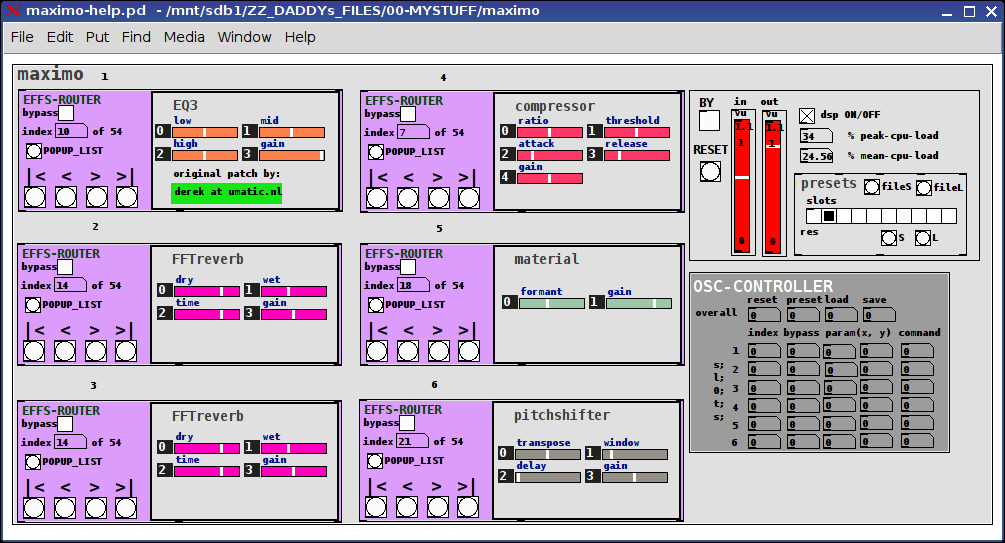
The app is "maximo-help.pd".
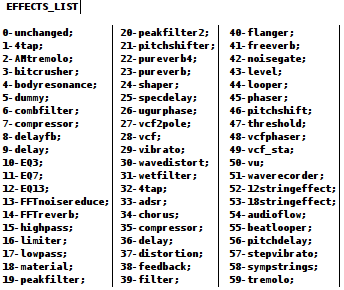
maximo is an effects-chain giving the user 6 slots each one of which may be used to select from 1 of 60 effects (the first being "unchanged").
Check her for details about how to use the "abs_effects_router", http://forum.pdpatchrepo.info/topic/10693/abs_effects_router-60-effects-in-one-abstraction-router-from-diy2-stamp-album-my-abs/1 .
It also includes
- a "maximo/admin.pd" abstraction to control:
dsp, bypass (all), reset (to set all effects to "unchanged"), and 9 presets (0 reserved for program usage) and both save-to-file and load-from-file preset buttons
- an Open Sound Control (OSC) mapper ("maximo/osc_control.pd") for sending values (0 thru 1) to controls /cc/1 thru /cc/34 (see the patch for details).
and
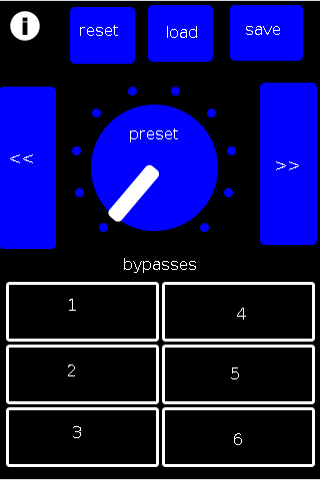
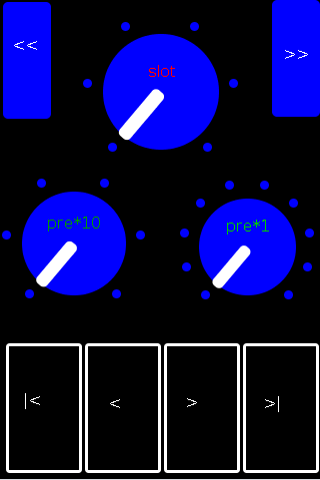
- an example OSC (MobMuPlat) controller at "./maximo-osc.mmp" and "./maximo-osc-mmp.pd"
MAXIMO EXAMPLE
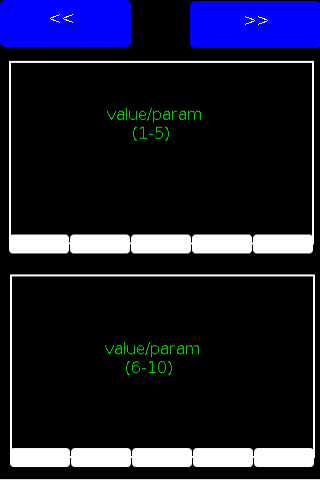
MOBMUPLAT INTERFACE
PAGE 1
PAGE 2
PAGE 3
All of this was contingent on the foundation and resources laid out in the DIY2 and Stamp Album collections and actually this was largely an example of persistence not any real insight and the largest percentage of the success goes to their creators for being so diligent about standardizing their abstractions.
I DO however hope you find it useful.
My GOAL was to eliminate what is often the case with effect stacks (I have seen) of having to connect all the effects. This eliminates that and makes it much cleaner: only having to select from the (tof/pmenu POPUP_LIST button) or navigate to the desired effect with the standard "first, previous, next, last" controls.
I hope you find the work useful and capable of helping you to manifest all those wonderful sounds you have in your head.
Peace and only Love,
Scott
The List of Effects per slot is:
posted in patch~
MMPonBoardEditorTemplate.mmp for creation of MobMuPlat files directly on the handheld (android only)
MMPonBoardEditorTemplate.mmp for creation of MobMuPlat files directly on the handheld (android only)
MMPonBoardEditorTemplate
by svanya
INFO: make copies of this template to use as the starting point for your created .mmp files.
This template is designed to expedite the creation of simple(!) MobMuPlat files on-the-go with only the use of the handheld (i.e. does not require the Java editor).
There are three sections to this document:
the templates (in this commented section)
the mmp header just below this section
the "ENTRIES SECTION"
and
the mmp footer (which closes the .json file).
To use the template:
Open this file in a handheld text-editor (you may need to rename it, ex. adding ".txt" (no quotes) to the end of its file name to associate it to the text-editor and NOT MobMuPlat).
Copy one of the sections from this Templates Section (not including its label and the label colon and paste it into the Entries Section below and for each template you have added more than 1, add a comma after each template except the last one.
The arrangment on the screen can then be edited (in that same text editor) by amending the "frame" section of each Entry according to the following format:
"frame":[left,top,width,height]
(on the JAVA editor the screen is scaled 320px wide by 480px high)
and
Re-open the .mmp file inside MobMuPlat (renaming it back to .mmp as necessary).
Enjoy! And Good Luck! Just post any comments or help you may need here and I will try and get to them as soon as I am able.
Ciao for Now. Peace,
svanya
for those interested here is the code:
/*
MMPonBoardEditorTemplate.mmp for creation of MobMuPlat files directly on the handheld (android only)

MMPonBoardEditorTemplate
by svanya

INFO: make copies of this template to use as the starting point for your created .mmp files.

This template is designed to expedite the creation of simple(!) MobMuPlat files on-the-go with only the use of the handheld (i.e. does not require the Java editor).

There are three sections to this document:
    the templates (in this commented section)
    the mmp header just below this section
    the "ENTRIES SECTION"
and
    the mmp footer (which closes the .json file).

To use the template:

Open this file in a handheld text-editor (you may need to rename it, ex. adding ".txt" (no quotes) to the end of its file name to associate it to the text-editor and NOT MobMuPlat).

Copy one of the sections from this Templates Section (not including its label and the label colon and paste it into the Entries Section below and for each template you have added more than 1, add a comma after each template except the last one.

The arrangment on the screen can then be edited (in that same text editor) by amending the "frame" section of each Entry according to the following format:

 "frame":[left,top,width,height]

(on the JAVA editor the screen is scaled 320px wide by 480px high)

and

Re-open the .mmp file inside MobMuPlat (renaming it back to .mmp as necessary).

TEMPLATES:

MMPLabel:

{"highlightColor":[1.0,0.0,0.0,1.0],"address":"/label/0","textSize":16,"color":[1.0,1.0,1.0,1.0],"androidFont":"Roboto-Bold","textFontFamily":"Default","text":"label","textFont":"","class":"MMPLabel","frame":[150.0,10.0,100.0,40.0]}

MMPButton:

{"highlightColor":[1.0,0.0,0.0,1.0],"address":"/button/0","color":[1.0,1.0,1.0,1.0],"class":"MMPButton","frame":[10.0,70.0,100.0,40.0]}

MMPToggle:

{"highlightColor":[1.0,0.0,0.0,1.0],"borderThickness":4,"address":"/toggle/0","color":[1.0,1.0,1.0,1.0],"class":"MMPToggle","frame":[10.0,130.0,100.0,40.0]}

vSlider:

{"highlightColor":[1.0,0.0,0.0,1.0],"address":"/vSlider/0","color":[1.0,1.0,1.0,1.0],"range":2,"class":"MMPSlider","isHorizontal":false,"frame":[10.0,190.0,100.0,40.0]}

hSlider:

{"highlightColor":[1.0,0.0,0.0,1.0],"address":"/hSlider/0","color":[1.0,1.0,1.0,1.0],"range":2,"class":"MMPSlider","isHorizontal":true,"frame":[10.0,250.0,100.0,40.0]}

MMPKnob:

{"highlightColor":[1.0,0.0,0.0,1.0],"address":"/knob/0","color":[1.0,1.0,1.0,1.0],"indicatorColor":[1.0,1.0,1.0,1.0],"range":2,"class":"MMPKnob","frame":[10.0,300.0,100.0,100.0]}

MMPXYSlider:

{"highlightColor":[1.0,0.0,0.0,1.0],"address":"/xyslider/0","color":[1.0,1.0,1.0,1.0],"class":"MMPXYSlider","frame":[10.0,420.0,100.0,40.0]}

MMPGrid:

{"mode":0,"highlightColor":[1.0,0.0,0.0,1.0],"borderThickness":3,"address":"/grid/0","color":[1.0,1.0,1.0,1.0],"dim":[4,3],"class":"MMPGrid","cellPadding":2,"frame":[150.0,70.0,100.0,40.0]}

MMPMultiSlider:

{"highlightColor":[1.0,0.0,0.0,1.0],"address":"/multislider/0","color":[1.0,1.0,1.0,1.0],"range":8,"outputMode":0,"class":"MMPMultiSlider","frame":[150.0,130.0,100.0,40.0]}

MMPLCD:

{"highlightColor":[1.0,0.0,0.0,1.0],"address":"/lcd/0","color":[1.0,1.0,1.0,1.0],"class":"MMPLCD","frame":[150.0,190.0,100.0,40.0]}

MMPMultiTouch:

{"highlightColor":[1.0,0.0,0.0,1.0],"address":"/multitouch/0","color":[1.0,1.0,1.0,1.0],"class":"MMPMultiTouch","frame":[150.0,250.0,100.0,40.0]}

MMPTable:

{"mode":0,"highlightColor":[1.0,0.0,0.0,1.0],"address":"/table/0","color":[1.0,1.0,1.0,1.0],"selectionColor":[1.0,1.0,1.0,0.5019608],"displayRangeLo":-1.0,"displayRangeHi":1.0,"class":"MMPTable","displayMode":0,"frame":[150.0,310.0,100.0,40.0]}

MMPPanel:

{"highlightColor":[1.0,0.0,0.0,1.0],"address":"/panel/0","color":[1.0,1.0,1.0,1.0],"passTouches":false,"class":"MMPPanel","frame":[150.0,370.0,100.0,40.0]}

THE ACTUAL MMP FILE FOLLOWS THIS
*/

{"pdFile":"osc_controller_mmp.pd","backgroundColor":[0.0,0.0,0.0,1.0],"pageCount":1,"port":54321,"isPageScrollShortEnd":false,"startPageIndex":0,"canvasType":"widePhone","gui":[

/*
ENTRIES SECTION: entries go below here and above the comment below
*/


/*
END: ENTRIES SECTION
The mmp footer is below.
*/


],"isOrientationLandscape":false,"version":1.64}
User Interface to PureData Code for my Bachelor Project
Check out the following:
http://droidparty.net/
https://github.com/danomatika/PdParty
http://danieliglesia.com/mobmuplat/
http://www.iceblinkdigital.com/developers/
MobMuPlat is the only one that I've used personally--it works great on Android devices, and the layout can be very sleek.
(@sunji : looks like your attachment didn't load.)
 posted in technical issues
Psychedellic Audioguide using MobMuPlat or PdParty
-
Recording to RAM has an upper limit on how large of a buffer you can allocate (I don't recall what the limit is), whereas recording to disk is contrainted only by available disk space. Recording to disk should not interrupt audio unless you are simultaneously reading/writing a lot to/from disk (or otherwise overworking the audio thread).
-
Not really. At the moment, PdParty has, in addition to pd vanilla, the externals at https://github.com/danomatika/PdParty. MobMuPlat only has the built-in vanilla externals (fiddle~, etc). There's no way to "drop in" new external objects (because iOS does not allow dynamic loading).
-
LANdini, Ping & Connect, (and, to my knowledge, Abelton link), and merely sending out a ping to other devices over multicast, all require a local network, meaning you'd have to carry around a router and have people connect to that. Otherwise, if over cell data (3G, etc), you'd have to program (in native app code) some sort of shared time (e.g. using NTP, network time protocol, which in my experience works well and will give you sub-second precision across multiple devices set to go off at the same time)
-
Pd vanilla only for both PdParty and MobMuPlat
-
There's a working example on www.mobmuplat.com, go to "rough doc" link.
 posted in technical issues
MobMuPlat Editor / how to run it on Windows 10
Hi,
I'm trying to get the .jar file of MobMuPlat Editor to open in Widnows 10 64 bit so that I can see and use the layout editor. I think I should be able to double click the .jar file in this zip extracted file path:
MobMuPlatEditor-master\MobMuPlatEditor-master\MobMuPlatEditor-Java\lib
I've tried installing Java, the JRE, the JDK, uninstalling and reinstalling, the .jar fix utility (the Google result for why .jar files won't open on Windows 10), and a few other things. I got it to open once before but I can't remember exactly how or figure out what I'm doing differently. What's odd is that I've gotten another .jar file to launch, one that changes the mode of an APC40 MIDI controller.
Best regards,
Truth C.
Links: http://www.mobmuplat.com/
 posted in Off topic
4-tap delay pitchshifter-per-line mounted on guitar as OSC Controller patch on MobMuPlat
Hell, 5:30 in the morning; can't sleep; nervous about "tomorrow", aka. later in the day, might as well get up and do some good.
The video below shows the latest incarnation of my guitar "pedals" concept:
It is an android mounted (temporarily (will be velcro, right now just duck tape) to the front face of my guitar;
on it is MobMuPlat;
the MobMuPlat app I added is an Open Sound Controller frontend connected to my laptop
on my laptop is a pretty bare -bones guitar rig: vcompander (mainly as a noisegate), in&out compressors, my recording abstraction + eq13 (eq with my presets abstraction);
and between the two compressors (which use and require the tb_peakcomp~ external) (the second one is there in case the main plugin gets out of control)
is
my four-tap/pitchshifter-per-line delay abstraction.
The goal (only took a maiden voyage so far) is to learn how to strum and adjust the sliders on the mobmuplat in the same rhythm/timing as I strum and pick.
So pick strings and change settings in the same style and rhythm as I play. So play "effects" in the same moment I am playing guitar.
I am using that 4tappshifter because it has the most radical effects with the least amount of adjustments, plus I just think it just sounds cool.
Test tracks of this rig will be coming out soon, when I can get the time/space etc etc to produce them.
I expect, from one test drive, it is gonna be a pretty steep curve to learn.
I'll zip the whole rig (tho bear in mind it is NOT perfect and has no help files) and put it below.
Ciao! And thanks for listening. Hope it gave you some ideas.
-svanya
p.s. I have and am holding onto the notion of pure data as an "organic" tool, which while it IS capable of being VERY conceptual (and I have even done some works like that) I want for my purposes at least it to stay Close to the Chest, and has been mentioned elsewhere in the forum, NOT be Pre-Music. I think it is fully capable of fulfilling both roles: conceptual/electronica And organic.
And for me, be music as I Feel it not think about it.
Hence, the front-mount and not a stomp box. Also, I Really do NOT want preset voices. I want the voices to change as I change my playing/style.
And while I have experimented with other control-types, mice, keyboard, hid, etc, none of them have come Anywhere close to the amount, variety, and subtlety of tones, styles, and rhythms I can get from my guitar.
So I am holding to the Idea that I will be able to "bend" strings" and "bend" effects in the same moment and on my chosen instrument.
p.s.s. I know no explanation is not needed, but I wanted to hear what it sounded like to see if it rang true for me. Yep. It does.
Oh, and I did not include the tb_peakcomp~ external, but it's pretty easy to get.
-peace
posted in I/O hardware diy