
PurrData on new Mac M4 Max : ~adc not delivering audio!
Previously been using an older MacBook Pro with OSX 10.10, and PurrData, all good.
New MacBook Pro M4 Max, and PurrData v2.19.3 from here... (2.20 was reported as damaged by the OS)...
https://github.com/agraef/purr-data/releases
PurrData v2.19.3 and v2.19.2 work fine, but there's no audio coming in from ~adc.
Opened a DAW, Reaper, set the input channels correctly, and there's audio coming in - to my new MacBook Po M4 Max. So the audio interface - a MOTU, is fine, and set up correctly ...it's just PurrData - there's nothing coming in from ~adc (I tried hooking up all input channels ~adc 1 2 3 4 5 6 7 8, and still nothing). Otherwise midi flows back and forth ok, and audio is sent out to the audio interface (via ~dac), but ~adc is dead ...and just to reiterate Reaper hears the input on those channels fine - but PurrData doesn't.
The audio properties in PurrData are set up fine, the audio interface selected, and multiple channels - so all good there (and I've using PD for many many years).
Anyone come across this - what to do?
 posted in technical issues
[SOLVED] TouchOSC for 'complete n00b'
Hallo good people
I have already searched the relevant forums, and the TouchOSC manual but I am still struggling to get OSC data into Purr Data.
I am able to successfully parse OSC data from, for example, Sonic Pi into PD (via localhost) on the same machine. I have recently installed TouchOSC on my Android tablet, and installed Protokol (network messaging monitor) on my MacBook. All the OSC messages from TouchOSC (tablet) show up inside Protokol (MacBook), but [netreceive -u -b], [listen 800( in PD shows nothing. Do I need to tell [netreceive] where the OSC data is coming from (the connect 192.x.x.x message doesn't work)?
I'm afraid terms like Host, Client, server etc mean nothing to me, so is there a step by step guide out there for my issue please?
[EDIT] Muppet - I had to close Protokol!! All working fine now. Told you I was a n00b :D
<3
Brendan
 posted in technical issues
PD on Mac M2 barely responding and unusable
Hello everyone, I have a question about the performance of Pure Data on mac M2 systems. The software seems to behave very strangely and barely responding, bangs are unclickable and the settings menu is unusable.
I am able to change settings but soon after the whole program does not respond to my trackpad, none of the usual controls work.
However when I operate the mac through an Intel Macbook via screensharing, it works perfectly fine.
Anyone with the same problem or any ideas?
Might it be the ping/latency of the bluetooth trackpad that is not working with the buffersize of puredata? I’m so confused by this since it does not seem to be an OSX/M2 problem only since it works when operated by the trackpad of the Intel macbook.
Thank you all!
 posted in technical issues
Camomile VST3-generated CC messages altered on Mac M2
/mac rant time - got a 2010 13" macbook pro about 5 years ago because it was an incredible value - (the 13" didn't have the graphics card problems) - I hate it now - its such a brick - but it will never die so I could justify getting a better laptop. the battery life is about 2 hours at best but you can open it up and change it but it still feels like a broken battery
my mom tho decided to go to art school a while ago so I bought her a decked out 2015 15" macbook pro one christmas so she could edit video and look like a cool person (she switched to interior design and ended up working at an SBC but that thing was always a champ at anything) - so jealous of that screen - the 13" is like 30hz 1280x700 - that 2015 mbp is really the best value right now - except the battery is legit glued onto the frame- they replace the whole bottom shell when they fix it at the genius shop - you can buy a repair kit that comes with glue dissolver. Well she was using crappy chargers and it quit charging so either the power part or SMC or the whole thing is broken and it's not worth it to try and fix it - fortunately the newish 16" is finally a decent replacement for it - so merry christmas - she uses it to watch TV when she travels - the audio on that sounds so good, and the over a day long battery life, its just the best laptop because its such a huge amount of tradeoffs to get a laptop right - I kind of wonder if people complain enough about the latency theyll focus in on fixing it. Theyre really deep into their own lore at this point - its annoying - even rosetta 2 - if they follow it then things will smooth out around version 6 and version 12 will be the high point
in summation: dongles
I'm curious tho - pretty sure opening the pd doc for the camomile VST3 with plugdata would fix the midi problem (because theyre both libpd under the hood the midi problem might be with the helper code or the JUCE backend besides the older version of PD/libpd camomile is at) and you can just run plugdata and patch live in reaper as a VST3 - has some extra DAW objects too.
it looks like focusright and motu are in a usb3 dac latency war as well .. I dont own anything with a usb-c port - I got dongles tho
 posted in technical issues
Camomile VST3-generated CC messages altered on Mac M2
ARRGH! Using a round-trip latency test I wrote, I just measured 39mS with the M2+01V96i!
So help me understand:
- I finally get shamed into buying a new MacBook after several theater techs comment on it.
- Plus my hand is forced by Qlab 5, which needs a more recent OS than my old MacBook can support, and I only needed Qlab 5 to support a show I was unhappy working on.
- So I upgrade and get better performance in some areas but get almost 4X worse performance in others
- Plus I lose the ability to script little problem solving MIDI widgets
Does that about summarize things, and is this the new normal?
 posted in technical issues
Using TouchOSC to draw into a 16 step array? communication back'n'forth? Show Array content in TouchOSC?
@beep.beep - i'm running fully usb-tethered with all wi-fi bluetooth mobiledata off. can you have a look and see if this will solve your "OSC only works with wi-fi" issue?
@esaruoho Confirmed! Using your clues I was able send OSC over USB with wifi disabled. Nice to discover that my hacky workaround is no longer necessary! I’ve updated my other TouchOSC thread to point back to our present thread here, if there’s more to discuss on this subject please continue to do so here instead of replying to multiple threads, it makes it quite difficult for others to follow over time.
When I connected my iPad to my Mac & ran “arp -a” in the Mac’s terminal, I only saw one listing: the iPad’s IP address (unlike your screenshot, where you had many entries). This did enable me to at least send from Pd to TouchOSC, but since no IP was listed for my Mac I couldn’t send in the other direction.
Then — for reasons unknown — after fiddling with netsend/netreceive for a bit, “arp -a” then returned a 2nd entry for “broadcasthost (255.255.255.255)”. I’m not a networking expert but some quick searching indicates that this IP can be used to broadcast messages over a local network, so I tried entering 255.255.255.255 for “Host” in TouchOSC and voila, I can send to Pd! This also works the other way with “connect 255.255.255.255 9000” into [netsend -u -b], which successfully sends to TouchOSC on port 9000. I don’t know if there’s an efficiency downside to using a broadcast IP versus a direct IP, but if not this seems to simplify things a lot!
@ddw_music looking at your earlier comment, I didn’t know about netreceive’s -f flag either, that’s great to know! I tried your autoconnect logic and it works nicely, although of course it still requires the iPad to be configured correctly before doing its magic. I guess if there’s truly no harm in leaving TouchOSC’s host set to 255.255.255.255 and “broadcasting” all outgoing OSC data, maybe that’s about as close to zero-config as one can get?
edit: the above tests were done with a 2016 Macbook Pro and iPad 5th gen; when I tried these approaches with my much older 2008 Macbook and iPad 4th gen (both with older OS's) I did not succeed... so this all might be dependent on relatively recent hardware/software.
 posted in technical issues
Reading data from a video camera
OK, so I did some reading! Thanks to both posters who responded.
To recap, I'm hoping to track the movement of firefly lights to produce data that I can use to trigger or influence sounds. This will happen live, to create an aleatoric soundscape that a musician can improvise with. We will be staging these performances at dusk or shortly thereafter, so I suspect a big part of this will be making use of the fact that the fireflies are brighter than anything else- hopefully some form of threshold level will help me eliminate the other movement of leaves in the wind, etc.
@whale-av I have been working with the GEM patch from that textbook on my old macbook, and it's going pretty well, especially as the example patch in the book has a threshold control. However, I just found out find that GEM will not work on my new silicon M1 macbook (Ventura OS), which is the one I was hoping to use for the performance. I could use my old laptop, but it's a bit creaky, from 2012. I've looked through the forums and it seems GEM is no longer supported on newer macs, and Ofelia is way more complex to use (and there's no handy textbook for me to follow like with GEM)?
@ddw_music I am just now really reading your post. I'm definitely hoping to track multiple points (fireflies). You think I should look into Processing instead? I have some experience with Arduino sketches, but I'm not a skilled coder. Could you maybe share the sketch that you used, please?
Thanks all!
 posted in technical issues
Running Puredata using xquartz
I want to start puredata installed on a headless Raspberry Pi, using x-window from a macbook.
In my macbook, I have installed Xquartz, and I connect to my raspberry using the
ssh -X pi@myraspberryip
command with my password.
Xquartz start, but don't display pd user interface... only "priority 8 scheduling failed." is printed on the terminal...
It was working well before, is it broken now?
Raspbian Os bulleye
MacOs Monterey
Xquartz 2.8.5
Puredata 0.51-4
 posted in technical issues
Camomile UI Problems
Hey all,
I've been trying to get started with Camomile to make some plugins to share with friends, but I've hit a problem I haven't been able to find mentioned anywhere.
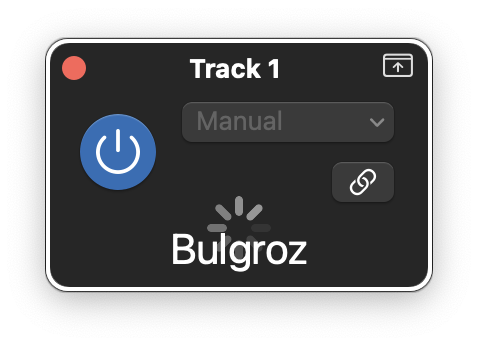
After using the script from the latest stable (I've also tried this with the latest experimental release), to build plugins, when I try to open them in Logic, I just see a loading symbol in the plugin window (see attached picture). This problem occurs with the example plugins and plugins built by others (e.g., Mike Moreno's Lira 8 ).
Even weirder is I've had the same problem on an Intel 2014 MacBook Pro and an M1 2021 MacBook Pro.
Maybe I'm being an idiot and missing something?
Anyone else had this problem and knows a fix? It'd be super appreciated!
 posted in technical issues
No audio input in pd-l2ork
HI!
+1 here on a MacBook M1 running Mavericks. Vanilla works fine, but I get no input with pd-l2ork ether from the macbook's mic or my MOTU interface. Output works fine. Any help will be much appreciated!
 posted in technical issues