
Quality granular processing in pd
OK, here's a basic live input granulator, no really fancy features, just pitch shifting.
The handling of grain playback rate in the one-grain abstraction is a neat trick I had worked out some time ago. For example, if you want to play the grain an octave higher (2x speed), then you need to span 2 * dur ms of audio in dur ms of time. You can do that by modulating the delay time as a straight line, from dur ms to 0 ms -- adding dur to the delay time at the beginning adds that many ms to the amount of audio being used: dur * (rate-1). Or, to play slower, start with a shorter delay and go toward a longer delay, and the boundary is again dur * (rate-1). If rate = 1, then the delay time goes from 0 to 0 = no change = normal speed. That might look a bit funky in the patch you can try it with different transposition intervals, which will show that it's correct.
For sound file processing, replace the delay line with a soundfiler-filled array, and use tabread4~ for the audio source (and the line~ driving it will have to be different too).
IMO granular processing is 99% refinement and more advanced modulation of these basic parameters, which you should be able to tailor to your needs. I think the pitch shifting is more-or-less smooth here, though I'm not sure it matches your comparison plugins -- this is 66.6667 grains per second, with 4x overlap.
one-delay-grain.pd
live-granular.pd
hjh
 posted in technical issues
ELSE+tutorail version 1.0-0 RC14 is out
Hi, after a test phase with Windows errors, it seems we solved the windows compilation issues and here's the update I'm wrapping up for the PdMAXCon in a few days! I just have to ship this, but I had a new [streamin~] and [streamout~] objects for streaming and I'm leaving it out for now cause the build for windows is still failing. Hold on for that. Note that older ELSE versions are not working on Pd 0.56. This one requires 0.56-1!
My last update aimed at a PlugData update but that didn't happen yet, though there's a PlugData 0.9-2 test release, based on 0.55-2. This new ELSE update will hopefully come soon right after at PlugData 0.9.3, or maybe even a newer update. I was hoping to better coordinate releases but it's not happening 
There's a lot of new stuff, but I'm mainly focusing on my MERDA modules, which I'll show at PdMAXCon. They're coming out fancy with lots of stuff and details I can't get into. There's lots of eye candy, like Implementing a new mechanism for minimizing and maximizing the GUI or opening in a new window. Added "tab" navigation for most knobs in the modules. This is just the tip of the iceberg as there's lots of work to support this, so I made several changes and updates to [knob] and [button]. The [knob] object also gained several features and it became a feature-creep monster. Now I'm also including mouse wheel scrolling, for one thing.
There's a new "Super Saw/Square" oscillator (a sum of 7 oscillators based on JP-8000) abstraction object that also became a MERDA module. I wanna highlight a new [mix~] object made for it that makes convenient mixing and panning MC connections. There's also a cool [arpeggiator] abstraction, in the next release I hope I'll have a new MERDA module with that included.
This is the main deal! There are 15 new objects, I'd like to also mention mid/side encoding and stereo widening, and another one for envelope following. Total number of objects now is 587! The tutorial now has 561 examples and an expanded subchapter about stereo imaging and improvements to envelope following.
It's up in deken, let me know if something is wrong...
There are of course many many other numerous changes and fixes. Detailed changelog in https://github.com/porres/pd-else/releases/tag/v.1.0-rc14
As of now, I started being more careful with breaking changes. I'm still allowing old patches to run, but telling people to adapt to new stuff. For instance, I had a [del~ in] and [del~ out] object now split into 2 ([del.in~]/[del.out~]) thanks to a new functionality in Pd 0.56-0, but you can still call the old [del~] object (for now). Like I've been saying, I'm just waiting for PlugData 1.0 to call this a final release as well.
Please support me on https://patreon.com/porres
#puredata #pdvanilla
cheers
Alex
 posted in news
Waveguide/Karplus strong delay time problem
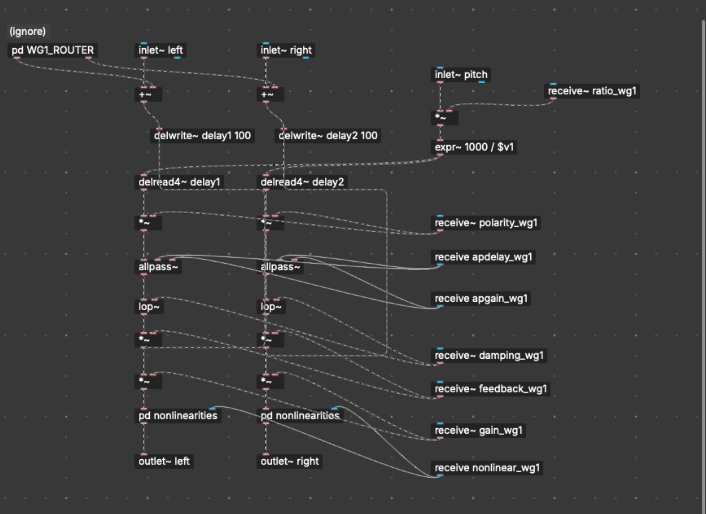
Hello, to put you into context I'm working on a waveguide-style physical modeling synth in PlugData (basically the same as Pure Data), and I'm running into an issue where my delay line won't produce high-pitched notes correctly. I'm using a [delwrite~] and [vd~] or [delread4~] combo, with the delay time calculated from frequency using [expr~ 1000 / $v1], where $v1 is the pitch in Hz (converted from MIDI with [mtof]). The delay time is in milliseconds.
The patch works fine for low and mid frequencies, but when I try to play higher notes (especially MIDI note 100 and up), the pitch output seems stuck. it just keeps playing the same note, i doesn't happen with low notes though.
I've already tried the usual fixes. I made sure the [delwrite~] buffer is small (100 and even around 5–10 ms), verified that the delay time input is a smooth signal ([sig~]), and tried both [vd~] and [delread4~] for interpolation, nothing works.
Out of curiosity, I tested the patch at a global sample rate of 96,000 Hz. That actually allowed the waveguide to reach the correct higher notes, but the patch became very laggy and glitchy, and the CPU usage was noticeably worse (as expected)
At this point, I'm wondering if there's a clean way to make a delay line in Pure Data (or PlugData) that supports very short delay times for high pitches (e.g. MIDI 120+), without needing to oversample the entire patch or push the sample rate to 96kHz. Is there a known solution for sub-millisecond delay accuracy that works well in Pd? Would a local oversampling strategy using [block~] be effective here? Any guidance or best practices would be really appreciated 
 posted in technical issues
ofxOfeliaExtended
These are the contents of the .zip file you mention:
abs/                  CHANGES.txt                    examples/     LICENSE.txt  ofelia-object-help.lua  ofelia_textwindow.tcl   opencv_core4100.dll  opencv_features2d4100.dll  opencv_imgproc4100.dll    README.md
assimp-vc142-mt.dll  classesAndGlobalFunctions.txt  libxml2.dll  ofelia.dll   ofelia-object-help.pd   opencv_calib3d4100.dll  opencv_dnn4100.dll   opencv_flann4100.dll       opencv_objdetect4100.dll  stable-diffusion.dll
Are these supposed to be located in the ofeliaExtendedLib directory? Because, all there is in there, is already in the directory of the ofelia.pd_linux Pd external directory too.
 posted in pixel#
Avoid clicks controlling Time Delay with MIDI Knob
@Zooquest You will hear clicks because there will be jumps between samples.... if the playback was at a sample level of 0 and you change the delay time to a point where the level is 1 then the click will be loud.
You will hear "steps" as the playback point is probably being changed repeatedly by the ctrl messages.
You could experiment with a [lop~] filter in the delayed sound output, with a high value e.g... [lop~ 5000] but you will lose some high frequencies in the echo.
That might sound natural though, like an old tape echo, but you will probably still hear the clicks a little.
Or you could "duck" the echoes by not changing the delay time immediately, reducing the echo volume to zero in say 3msecs using using [vline~] and not bringing the echo volume back up to 1 (in, say, 3msecs again) until you have NOT received a ctrl message to change the delay time...... for again 3msecs.
The last part of that would need a [delay 3] using the property that any new bang arriving at its inlet will cancel the previously scheduled bang.
You would need to duck the FB signal as well though, and all that that might sound worse than the [lop~].
I cannot remember well...... but this "sampler_1.pd" might contain elements useful to demonstrate "ducking" https://forum.pdpatchrepo.info/topic/13641/best-way-to-avoid-clicks-tabread4/12
Or do a crossfade between separate delays once the incoming control messages have stopped..... https://forum.pdpatchrepo.info/topic/12357/smooth-delay-line-change-without-artifacts ..... as you can then avoid the "duck"ing effect.
David.
 posted in patch~
count~ pause option?
@KMETE said:
edit: and my reason is that if I want to do comparison of two numbers - lets say if the timer that s running is larger then constant number - if the timer will not output the numbers constantly I might miss this logic...
What you're talking about is a timeout situation -- checking whether something did or didn't happen within x amount of time.
In the normal case, in Pd, you can do a timeout like this (no [metro], no constant polling):
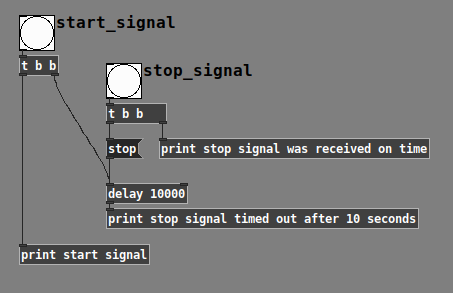
Here, I'm using the word "start" and "stop," but they can be any messages being generated for any reason.
-
If the user hits only "start," then the [delay] time expires, [delay] generates a bang, and you know that the elapsed time >= threshold.
-
If the user hits "start" and then "stop" within the time limit, then 1/ you have the trigger from the user and 2/ the [delay] gets canceled (no erroneous timeout message).
When you're talking about a timer that can pause, that complicates it a bit (because [delay] wouldn't know about the pause).
But, to be honest, based on your requirement from the other thread -- when audio playback pauses (because of user action or the 30-second(?) timeout), you're always resetting the timer. When the timer goes back to 0, then pause is irrelevant. So I kinda wonder if the original question in this post stems from an unclear requirement rather than an actual need (though it is a kinda cool abstraction, and I'll add it to my library later).
After all, if you only want to stop checking for the timeout based on user pause, you can just stop banging the [timer] at that point... then, no check, no false timeout, and no need to over-engineer. Or using the [delay] approach, just "stop" the delay.
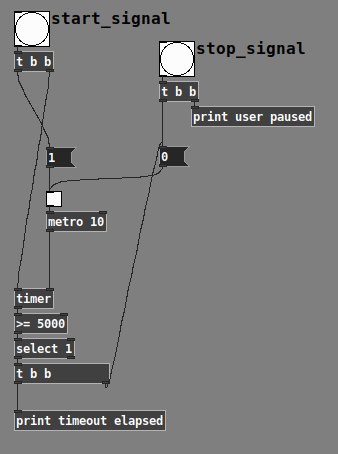
So there's a polling timeout that is aware of paused status, without using a special pausable timer. So this idea that you have to keep banging the timing object and the timing object should be responsible for not advancing when paused is perhaps overcomplicated.
edit2: I could bang the poll message every 10ms using metro but then we again have an issue on cpu?
[timer] shouldn't use much CPU... it's probably fine, and if it's more comfortable for you, feel free to go that way. I'm just pointing out that brute force is not the only way here.
hjh
posted in technical issues
PlugData / Camomile "position" messages: What are these numbers?
@whale-av said:
@ddw_music Yes.... buffer.
Maybe some DAWs have implemented a tempo message since then?
Tempo must be available, since plug-ins have been doing e.g. tempo-synced delays for at least a decade already.
(In fact, it is available via Camomile: [route tempo position].)
Anyway... I've been considering solutions, and I think I can do this.
- Set some threshold close to the beat, but before the beat, say x.9 beats.
- For the first tick past the threshold, get "time to next beat" = roundUp(pos) - pos = int(pos + 0.99999999) - pos.
- [delay] by this many beats ([delay] and the tick-scheduler will have been fed "tempo x permin" messages all along).
- Then issue the tick message to the scheduler, in terms of whole beats (where the time-slice duration is always 1.0).
At constant tempo, I'd expect this to be sub-ms accurate.
If the tempo is changing, especially a large, sudden change, then there might be some overlaps or gaps. But [delay] correctly handles mid-delay tempo changes, so I'd expect these to be extremely small, probably undetectable to the ear.
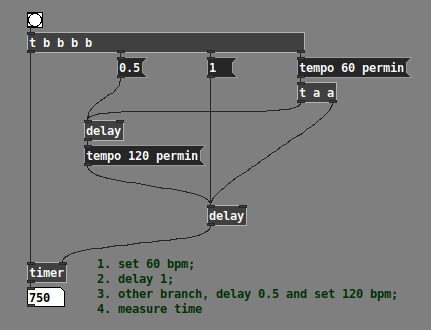
Half a beat at 60 bpm + half a beat at 120 bpm does indeed = 750 ms -- so the delay object is definitively updating tempo in the middle of a wait period.
I'll have to build it out and I don't have time right now, but I don't see an obvious downside.
hjh
posted in technical issues
s~/r~ throw~/catch~ latency and object creation order
For a topic on matrix mixers by @lacuna I created a patch with audio paths that included a s~/r~ hop as well as a throw~/catch~ hop, fully expecting each hop to contribute a 1 block delay. To my surprise, there was no delay. It reminded me of another topic where @seb-harmonik.ar had investigated how object creation order affects the tilde object sort order, which in turn determines whether there is a 1 block delay or not. Object creation order even appears to affect the minimum delay you can get with a delay line. So I decided to do a deep dive into a small example to try to understand it.
Here's my test patch: s~r~NoLatency.pd
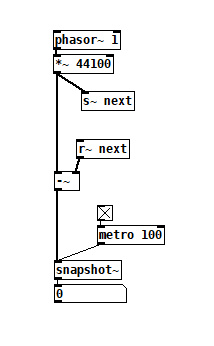 The s~/r~ hop produces either a 64 sample delay, or none at all, depending on the order that the objects are created. Here's an example that combines both: s~r~DifferingLatencies.pd
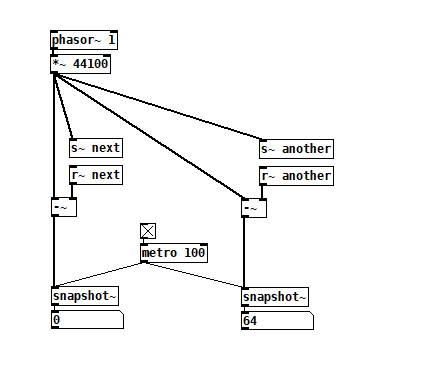 That's pretty kooky! On the one hand, it's probably good practice to avoid invisible properties like object creation order to get a particular delay, just as one should avoid using control connection creation order to get a particular execution order and use triggers instead. On the other hand, if you're not considering object creation order, you can't know what delay you will get without measuring it because there's no explicit sort order control. Well...technically there is one and it's described in G05.execution.order, but it defeats the purpose of having a non-local signal connection because it requires a local signal connection. Freeze dried water: just add water.
To reduce the number of cases I had to test, I grouped the objects into 4 subsets and permuted their creation orders:
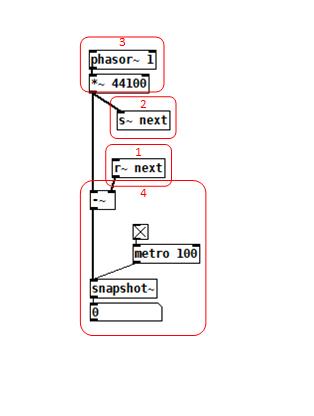 The order labeled in the diagram has no latency and is one that I just stumbled on, but I wanted to know what part of it is significant, so I tested all 24 permuations. (Methodology note: you can see the object creation order if you open the .pd file in a text editor. The lines that begin with "#X obj" list the objects in the order they were created.)
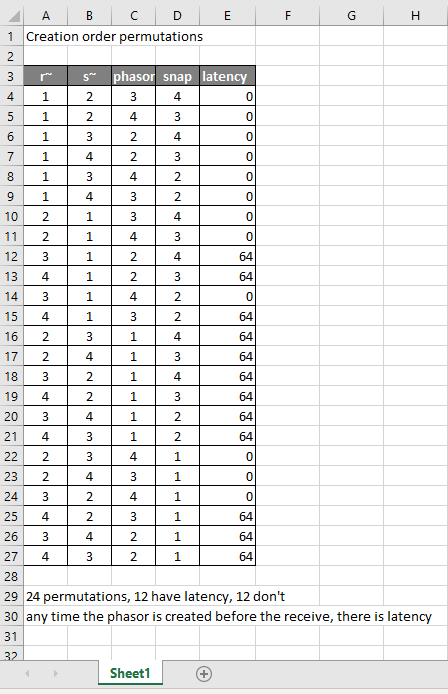
It appears that any time the phasor group is created before the r~, there is latency. Nothing else matters. Why would that be? To test if it's the whole audio chain feeding s~ that has to be created before, or only certain objects in that group, I took the first permutation with latency and cut/pasted [phasor~ 1] and [*~ 44100] in turn to push the object's creation order to the end. Only pushing [phasor~ 1] creation to the end made the delay go away, so maybe it's because that object is the head of the audio chain?
I also tested a few of these permutations using throw~/catch~ and got the same results. And I looked to see if connection creation order mattered but I couldn't find one that did and gave up after a while because there were too many cases to test.
So here's what I think is going on. Both [r~ next] and [phasor~ 1] are the heads of their respective locally connected audio chains which join at [-~]. Pd has to decide which chain to process first, and I assume that it has to choose the [phasor~ 1] chain in order for the data buffered by [s~ next] to be immediately available to [r~ next]. But why it should choose the [phasor~ 1] chain to go first if it's head is created later seems arbitrary to me. Can anyone confirm these observations and conjectures? Is this behavior documented anywhere? Can I count on this behavior moving forward? If so, what does good coding practice look like, when we want the delay and also when we don't?
 posted in technical issues
Miller's Pitch Shifting Example From His Book
@ricky Finally! Someone else who's been studying this book!
Think of the x and y axis as the index of the output and input samples respectively. So if you're not delaying at all, then at output time 42 the delay line will output the input sample at time 42. That's what's expressed by the diagonal line from the origin. Everything above that line would be impossible without a crystal ball: for instance at output time 10 you can't output the input sample at time 50--that would be looking 40 time units into the future!
You're right about D being the maximum delay line length, but I think of it as the horizontal distance between those diagonal lines because that maximum length applies at all times. Everything below the diagonal from D would be impossible because the delay line can't store input samples more than D time units old.
So what you're subtracting are sample indexes, not the samples themselves. All that formula is saying is that at any given output time n, the delay line is outputting an earlier input sample, earlier by d[n]. Does any of this help?
Here's one more observation about this graph that might help clarify it: if one were graphing a fixed 10ms delay, it would be a line parallel to the origin diagonal, but 10ms to the right of it. With that, you can see that the dotted line starts at some delay amount, lengthens as output time progresses, then stops at some greater delay amount.
posted in technical issues
fx3000~: 30 effect abstraction for use with guitar stompboxes effects racks, etc.
fx3000~
fx3000~ is a 30-effect abstraction (see effects list below) designed to expedite the creation, spec. of guitar, effect "racks".
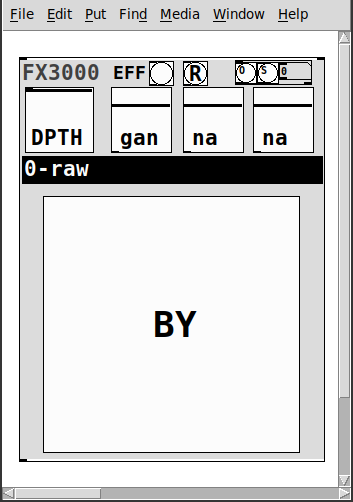
It takes one creation argument, an identifying float, ex. 0, 1, etc.
Has
- two inlets
- left:~: the audio signal
- right: a list of the parameter values: [0-1] for the first 4, [0..29] for the 5th, and [0|1] for the 6th.
- 1-4: depth and parameters' 1-3 values
- 5: the index of the effect
- 6: the bypass for the effect
- a [r~ fx3000-in-$1] and [s~ fx3000-$1-OUT] to better expedite routing multiple instances
- a [r fx3000-rndsetter-$1] to set random values via a send
- 20 preset slots per abstraction creation argument, i.e. index, via "O" and "S" bangs, so abs #0 writes to preset file=pres-0.txt (NOTE: if you have yet to save a preset to a slot nothing will happen, i.e. you must add additional presets sequentially: 0 then 1, then 2, etc.)
- a [r PREIN-$1] to send values in from a global preset-ter
- the names of the parameters/effect are written to labels upon selecting (so I will not list them here)
- and a zexy~ booster-limiter to prevent runaway output~
The help file includes three such abstractions, a sample player, and example s~/r~'s to experiment with configurations.
Note: the origin of each effect is denoted by a suffix to the name according to the following, ex. ""chorus(s)"
- s:Stamp Album
- d:DIY2
- g:Guitar Extended
- v:scott vanya
The available effects are:
- 0 0-raw
- 1 audioflow(v)
- 2 beatlooper(v)
- 3 chorus(s)
- 4 delay(3tap)(d)
- 5 delay(fb)(d)
- 6 delay(pitch)(v)
- 7 delay(push)(v)
- 8 delay(revtape)(g)
- 9 delay(spect)(g)
- 10 delay(tbr)(v)
- 11 delay(wavey)(v)
- 12 detuning(g)
- 13 distortion(d)
- 14 flanger(s)
- 15 hexxciter(g)
- 16 looper(fw-bw)(v)
- 17 octave_harmonizer(p)
- 18 phaser(s)
- 19 pitchshifter(d)
- 20 reverb(pure)(d)
- 21 ringmod(g)
- 22 shaper(d)
- 23 filter(s)
- 24 tremolo(d)
- 25 vcf(d)
- 26 vibrato(d)
- 27 vibrato(step)(g)
- 28 wah-wah(g)
- 29 wavedistort(d)
I sincerely believe this will make it easier for the user,...:-) you, to make stompboxes, effects racks, etc.
I hope I am correct.
Peace. Love through Music.
-S
p.s. of course, let me know if you notice anything awry or need clarification on something.
 posted in abstract~