
Scripting Purr Data - with JavaScript?
Thanks again @lacuna - great to have that thread as reference!
Just tried it for a bit: I cannot seem to find any binary releases in the github, https://github.com/mganss/pdjs (EDIT: found them https://github.com/mganss/pdjs/releases )- so I went along with this:
I don't really understand what this .dek file is supposed to be, but the page itself says it is a zip file, so I tried this (I use MSYS2 bash shell in Windows):
$ wget http://puredata.info/Members/mganss/software/pdjs/1.2.63/pdjs%5Bv1.2.63%5D%28Darwin-amd64-32%29%28Linux-amd64-32%29%28Linux-arm64-32%29%28Windows-amd64-32%29.dek/at_download/file -O pdjs_v1.2.63.dek

$ unzip pdjs_v1.2.63.dek
Archive:  pdjs_v1.2.63.dek
  inflating: pdjs/js.dll
  inflating: pdjs/js.l_arm64
  inflating: pdjs/js.pd_darwin
  inflating: pdjs/js-help.pd
  inflating: pdjs/js.pd_linux
  inflating: pdjs/js-help.js
nice, now I have a pdjs folder; so I tried copying it to my 32-bit copy of PurrData:
$ mv pdjs /c/bin/PurrData_x86_2.15.2/extra/
$ /c/bin/PurrData_x86_2.15.2/bin/pd.exe -verbose
Here, in an empty patch, I place an object [pdjs/js test.js] (see also the note in the Github README about declare -path pdjs); and I get:
...
tried C:\\Program Files (x86)\\Common Files\\Pd-l2ork\\pdjs\\js\\pdjs\\js.pd and failed
tried C:\\bin\\PurrData_x86_2.15.2\\extra\\pdjs\\js.m_i386 and failed
tried C:\\bin\\PurrData_x86_2.15.2\\extra\\pdjs\\js.dll and succeeded
verbose( 1):C:\\bin\\PurrData_x86_2.15.2\\extra\\pdjs\\js.dll: couldn't load
tried C:\\bin\\PurrData_x86_2.15.2\\extra\\pdjs\\js.pd and failed
tried C:\\bin\\PurrData_x86_2.15.2\\extra\\pdjs\\js.pat and failed
tried C:\\bin\\PurrData_x86_2.15.2\\extra\\pdjs\\js\\pdjs\\js.pd and failed
error: couldn't create "pdjs/js test.js"
...
Hmmm... library got found, but is not loaded; then I thought, let's check:
$ file /c/bin/PurrData_x86_2.15.2/bin/pd.exe
/c/bin/PurrData_x86_2.15.2/bin/pd.exe: PE32 executable (GUI) Intel 80386 (stripped to external PDB), for MS Windows

$ file /c/bin/PurrData_x86_2.15.2/extra/pdjs/js.dll
/c/bin/PurrData_x86_2.15.2/extra/pdjs/js.dll: PE32+ executable (DLL) (GUI) x86-64, for MS Windows
Yeah - I cannot load a 64-bit .dll by a 32-bit .exe!
So, apparently, there is no 32-bit build for pdjs (see "Supported platforms" in the Github README), so I installed the 64-bit build of Purr Data ... and tried it there:
$ cp -a /c/bin/PurrData_x86_2.15.2/extra/pdjs /c/bin/PurrData_x86_64_2.15.2/extra/
$ /c/bin/PurrData_x86_64_2.15.2/bin/pd.exe -verbose
... and finally, could see it working - instantiating [pdjs/js test.js] gives messages:
...
tried C:\\bin\\PurrData_x86_64_2.15.2\\extra\\pdjs\\js.m_i386 and failed
tried C:\\bin\\PurrData_x86_64_2.15.2\\extra\\pdjs\\js.dll and succeeded
pdjs version 1.2.63 (v8 version 8.6.395.24)
tried C:\\bin\\PurrData_x86_2.15.2\\test.js and failed
tried C:\\Users\\user\\AppData\\Roaming\\Pd-l2ork\\test.js and failed
tried C:\\Program Files\\Common Files\\Pd-l2ork\\test.js and failed
tried C:\\bin\\PurrData_x86_64_2.15.2\\extra\\test.js and failed
error: Script file 'test.js' not found.
... click the link above to track it down, or click the 'Find Last Error' item in the Edit menu.
error: couldn't create "pdjs/js test.js"
One invocation that works for quick test is [pdjs/js pdjs/js-help.js], which succeeds - and then you can right-click the object and see the Help.
Finally, note this from the README:
There is no built-in editor like in Max, source files have to be created and edited outside of Pure Data.
Well, this is nice! On to see how to work with this object...
Thanks again for the help!
 posted in technical issues
Ninjam external
Hi, I've been playing with ninjam for a few weeks, it's very useful for the current situation (see the date and do a google search if you are from a distant future). I would like to make an external for it, so asking if others pders are interested in collaborating?
Here's some information to kick off this idea.
First of all I have a server up and running for testing the solution. Ask me in PM for the password:
https://ninjam.baldapproved.com
The best client for now is in Reaper or you can use a VST called Jamtaba. Maybe there's a way to simply use the VST (Jamtaba - https://jamtaba-music-web-site.appspot.com/) in PD and then we don't need this external?!
A client close to what we want is the curseclient. I think it's a good starting point for us:
https://github.com/justinfrankel/ninjam/tree/master/ninjam/cursesclient
The Makefile is simple:
CC=gcc
CXX=g++
CFLAGS = -O2

OBJS = cursesclient.o

ifdef MAC
  CFLAGS += -D_MAC
  LFLAGS = -framework coreaudio -lncurses.5 -lm
  OBJS += ../audiostream_mac.o
  COMPILE_VORBIS = 1
else
  LFLAGS = -lncurses -lm -lasound -ljack
  OBJS += ../audiostream_alsa.o ../audiostream_jack.o
endif

OBJS += ../../WDL/jnetlib/asyncdns.o
OBJS += ../../WDL/jnetlib/connection.o
OBJS += ../../WDL/jnetlib/listen.o
OBJS += ../../WDL/jnetlib/util.o
OBJS += ../../WDL/rng.o
OBJS += ../../WDL/sha.o
OBJS += ../mpb.o
OBJS += ../netmsg.o
OBJS += ../njclient.o
OBJS += ../njmisc.o

CXXFLAGS = $(CFLAGS)

default: cninjam

cninjam: $(OBJS)
    $(CXX) $(CXXFLAGS) -o cninjam $(OBJS) -lpthread $(LFLAGS)

clean:
    -rm $(OBJS) cninjam
Ninjam is https://www.cockos.com/ninjam/ (the guy behind Winamp, Reaper). Very smart programmer. It's using WDL (https://www.cockos.com/wdl/) [re]usable C++, modestly].
I think the first step would be to compile njclient, being able to connect to a server (auth or anonymous). If anyone is willing to work on that or if someone have social accounts that can post this call for collaboration please do so. If successful we can then open a dedicated server for puredata.
Cheers!
 posted in extra~
[pix_share_read] and [pix_share_write] under windows
@whale-av, here is a log running pd with -lib Gem -verbose.
tried both 32bit and 64bit pd 0.48-1...
tried ./Gem.m_i386 and failed
tried ./Gem.dll and failed
tried ./Gem/Gem.m_i386 and failed
tried ./Gem/Gem.dll and failed
tried ./Gem.pd and failed
tried ./Gem.pat and failed
tried ./Gem/Gem.pd and failed
tried C:/Users/Raphael Isdant/Documents/Pd/externals/Gem.m_i386 and failed
tried C:/Users/Raphael Isdant/Documents/Pd/externals/Gem.dll and failed
tried C:/Users/Raphael Isdant/Documents/Pd/externals/Gem/Gem.m_i386 and failed
tried C:/Users/Raphael Isdant/Documents/Pd/externals/Gem/Gem.dll and failed
tried C:/Users/Raphael Isdant/Documents/Pd/externals/Gem.pd and failed
tried C:/Users/Raphael Isdant/Documents/Pd/externals/Gem.pat and failed
tried C:/Users/Raphael Isdant/Documents/Pd/externals/Gem/Gem.pd and failed
tried C:/Users/Raphael Isdant/AppData/Roaming/Pd/Gem.m_i386 and failed
tried C:/Users/Raphael Isdant/AppData/Roaming/Pd/Gem.dll and failed
tried C:/Users/Raphael Isdant/AppData/Roaming/Pd/Gem/Gem.m_i386 and failed
tried C:/Users/Raphael Isdant/AppData/Roaming/Pd/Gem/Gem.dll and failed
tried C:/Users/Raphael Isdant/AppData/Roaming/Pd/Gem.pd and failed
tried C:/Users/Raphael Isdant/AppData/Roaming/Pd/Gem.pat and failed
tried C:/Users/Raphael Isdant/AppData/Roaming/Pd/Gem/Gem.pd and failed
tried C:/Program Files/Common Files/Pd/Gem.m_i386 and failed
tried C:/Program Files/Common Files/Pd/Gem.dll and failed
tried C:/Program Files/Common Files/Pd/Gem/Gem.m_i386 and failed
tried C:/Program Files/Common Files/Pd/Gem/Gem.dll and failed
tried C:/Program Files/Common Files/Pd/Gem.pd and failed
tried C:/Program Files/Common Files/Pd/Gem.pat and failed
tried C:/Program Files/Common Files/Pd/Gem/Gem.pd and failed
tried D:/pd-0.48-1.windows.64bit/extra/Gem.m_i386 and failed
tried D:/pd-0.48-1.windows.64bit/extra/Gem.dll and failed
tried D:/pd-0.48-1.windows.64bit/extra/Gem/Gem.m_i386 and failed
tried D:/pd-0.48-1.windows.64bit/extra/Gem/Gem.dll and succeeded
D:\\pd-0.48-1.windows.64bit\\extra\\Gem\\Gem.dll: couldn't load
tried D:/pd-0.48-1.windows.64bit/extra/Gem.pd and failed
tried D:/pd-0.48-1.windows.64bit/extra/Gem.pat and failed
tried D:/pd-0.48-1.windows.64bit/extra/Gem/Gem.pd and failed
tried D:/pd-0.48-1.windows.64bit/doc/5.reference/Gem.m_i386 and failed
tried D:/pd-0.48-1.windows.64bit/doc/5.reference/Gem.dll and failed
tried D:/pd-0.48-1.windows.64bit/doc/5.reference/Gem/Gem.m_i386 and failed
tried D:/pd-0.48-1.windows.64bit/doc/5.reference/Gem/Gem.dll and failed
tried D:/pd-0.48-1.windows.64bit/doc/5.reference/Gem.pd and failed
tried D:/pd-0.48-1.windows.64bit/doc/5.reference/Gem.pat and failed
tried D:/pd-0.48-1.windows.64bit/doc/5.reference/Gem/Gem.pd and failed
Gem: can't load library``` posted in pixel#
Audiolab is now available on deken!
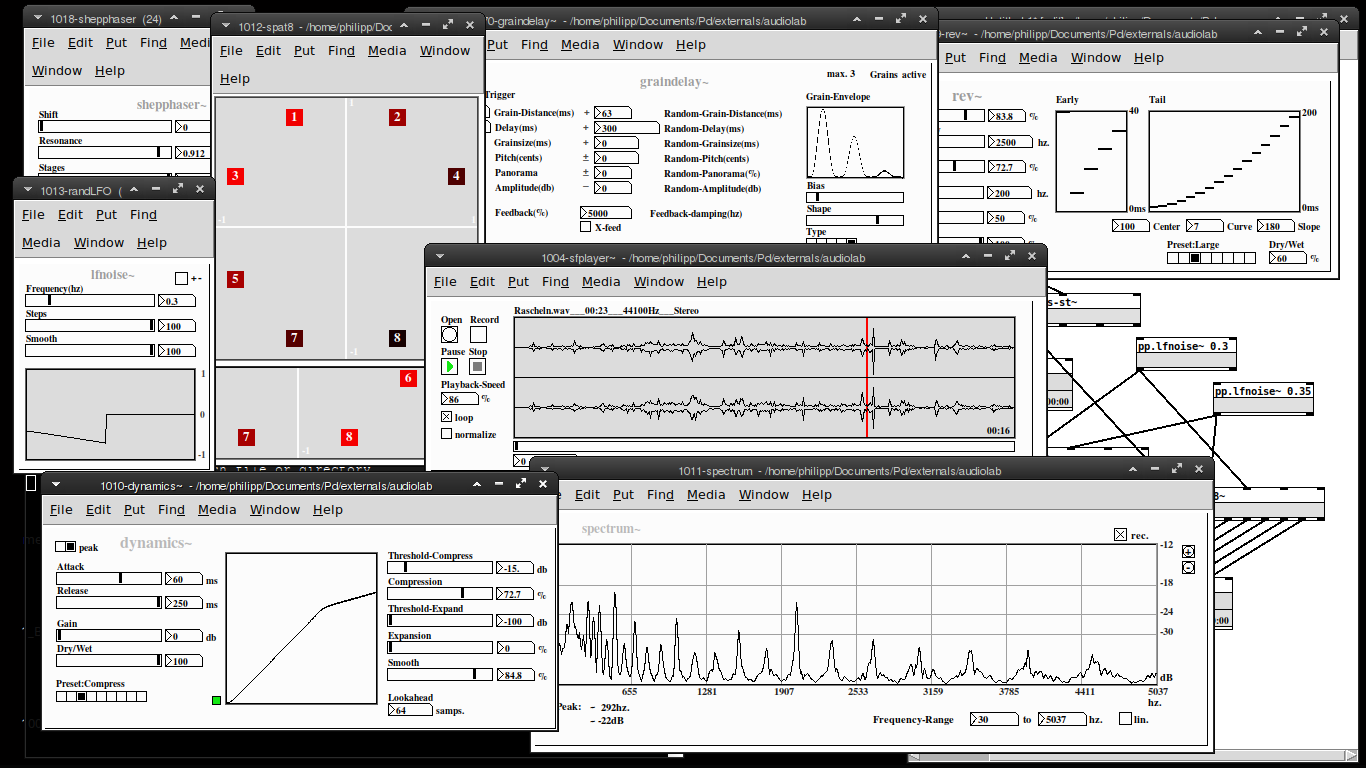
my "audiolab" abstraction library is now available on deken. You'll need Pd-0.50 or later to run this.
Please report any bugs on github: https://github.com/solipd/AudioLab
here is a picture to draw you in (:
Edit:
list of objects:
Soundfle processing
pp.sfplayer~ ... variable-speed soundfile player
pp.grainer~ ... granular sampler
pp.fft-stretch~ ... pvoc time stretching & pitch shifting
Spatialization
pp.pan~ ... constant power stereo panning
pp.midside~ ... mid-side panning
pp. spat8~ ... 8-channel distance based amplitude panning
pp.doppler~ ... doppler effect, damping & amplitude modulation
pp.dopplerxy~ ... xy doppler effect
Effects
pp.freqshift~ ... ssb frequency shifter
pp.pitchshift~ ... pitch shifter
pp.eqfilter~ ... eq-filter (lowpass, highpass, resonant, bandpass, notch, peaking, lowshelf, highshelf or allpass)
pp.vcfilter~ ... signal controlled filter (lowpass, highpass, resonant)
pp.clop~ ... experimental comb-lop-filter
pp.ladder~ ... moogish filter
pp.dynamics~ ... compressor / expander
pp.env~ ... simple envelope follower
pp.graindelay~ ... granular delay
pp.rev~ ... fdn-reverberator based on rev3~
pp.twisted-delays~ ... multipurpose twisted delay-thing
pp.shepphaser~ ... shepard tone-like phaser effect
pp.echo~ ... "analog" delay
Spectral processing
pp.fft-block~ ... audio block delay
pp.fft-split~ ... spectral splitter
pp.fft-gate~ ... spectral gate
pp.fft-pitchshift~ ... pvoc based pitchshifter
pp.fft-timbre~ ... spectral bin-reordering
pp.fft-partconv~ ... partitioned low latency convolution
pp.fft-freeze~ ... spectral freezer
Misc.
pp.in~ .... mic. input
pp.out~ ... stereo output & soundfile recorder
pp.out-8~ ... 8 channel output & soundfile recorder
pp.sdel~ ... samplewise delay
pp.lfnoise~ ... low frequency noise generator
pp.spectrum~ ... spectrum analyser
pp.xycurve
 posted in news
recursive patching
i was thinking about "recursive patching" lately, meaning to call an abstraction inside of an abstraction inside of an abstraction inside of an abstraction inside of an abstraction inside of an abstraction and so on.
It is clear to me, that this has to be done with dynamic patching in order to stop the process at some point. So the question is not how to implement this, but in what case something like this could be useful? Do you know of any "recursive" patches? The only thing i can think about are reverberators and i actually tried this using a feedback-delay line inside of a feedback-delay line inside of a feedback-delay line inside of a feedback-delay line inside of a feedback-delay line inside of a feedback-delay line feedback-delay line inside of a feedback-delay line inside of a feedback-delay line.. with rather unimpressive results.
Any ideas?
posted in technical issues
Web Audio Conference 2019 - 2nd Call for Submissions & Keynotes
Apologies for cross-postings
Fifth Annual Web Audio Conference - 2nd Call for Submissions
The fifth Web Audio Conference (WAC) will be held 4-6 December, 2019 at the Norwegian University of Science and Technology (NTNU) in Trondheim, Norway. WAC is an international conference dedicated to web audio technologies and applications. The conference addresses academic research, artistic research, development, design, evaluation and standards concerned with emerging audio-related web technologies such as Web Audio API, Web RTC, WebSockets and Javascript. The conference welcomes web developers, music technologists, computer musicians, application designers, industry engineers, R&D scientists, academic researchers, artists, students and people interested in the fields of web development, music technology, computer music, audio applications and web standards. The previous Web Audio Conferences were held in 2015 at IRCAM and Mozilla in Paris, in 2016 at Georgia Tech in Atlanta, in 2017 at the Centre for Digital Music, Queen Mary University of London in London, and in 2018 at TU Berlin in Berlin.
The internet has become much more than a simple storage and delivery network for audio files, as modern web browsers on desktop and mobile devices bring new user experiences and interaction opportunities. New and emerging web technologies and standards now allow applications to create and manipulate sound in real-time at near-native speeds, enabling the creation of a new generation of web-based applications that mimic the capabilities of desktop software while leveraging unique opportunities afforded by the web in areas such as social collaboration, user experience, cloud computing, and portability. The Web Audio Conference focuses on innovative work by artists, researchers, students, and engineers in industry and academia, highlighting new standards, tools, APIs, and practices as well as innovative web audio applications for musical performance, education, research, collaboration, and production, with an emphasis on bringing more diversity into audio.
Keynote Speakers
We are pleased to announce our two keynote speakers: Rebekah Wilson (independent researcher, technologist, composer, co-founder and technology director for Chicago’s Source Elements) and Norbert Schnell (professor of Music Design at the Digital Media Faculty at the Furtwangen University).
More info available at: https://www.ntnu.edu/wac2019/keynotes
Theme and Topics
The theme for the fifth edition of the Web Audio Conference is Diversity in Web Audio. We particularly encourage submissions focusing on inclusive computing, cultural computing, postcolonial computing, and collaborative and participatory interfaces across the web in the context of generation, production, distribution, consumption and delivery of audio material that especially promote diversity and inclusion.
Further areas of interest include:
- Web Audio API, Web MIDI, Web RTC and other existing or emerging web standards for audio and music.
- Development tools, practices, and strategies of web audio applications.
- Innovative audio-based web applications.
- Web-based music composition, production, delivery, and experience.
- Client-side audio engines and audio processing/rendering (real-time or non real-time).
- Cloud/HPC for music production and live performances.
- Audio data and metadata formats and network delivery.
- Server-side audio processing and client access.
- Frameworks for audio synthesis, processing, and transformation.
- Web-based audio visualization and/or sonification.
- Multimedia integration.
- Web-based live coding and collaborative environments for audio and music generation.
- Web standards and use of standards within audio-based web projects.
- Hardware and tangible interfaces and human-computer interaction in web applications.
- Codecs and standards for remote audio transmission.
- Any other innovative work related to web audio that does not fall into the above categories.
Submission Tracks
We welcome submissions in the following tracks: papers, talks, posters, demos, performances, and artworks. All submissions will be single-blind peer reviewed. The conference proceedings, which will include both papers (for papers and posters) and extended abstracts (for talks, demos, performances, and artworks), will be published open-access online with Creative Commons attribution, and with an ISSN number. A selection of the best papers, as determined by a specialized jury, will be offered the opportunity to publish an extended version at the Journal of Audio Engineering Society.
Papers: Submit a 4-6 page paper to be given as an oral presentation.
Talks: Submit a 1-2 page extended abstract to be given as an oral presentation.
Posters: Submit a 2-4 page paper to be presented at a poster session.
Demos: Submit a work to be presented at a hands-on demo session. Demo submissions should consist of a 1-2 page extended abstract including diagrams or images, and a complete list of technical requirements (including anything expected to be provided by the conference organizers).
Performances: Submit a performance making creative use of web-based audio applications. Performances can include elements such as audience device participation and collaboration, web-based interfaces, Web MIDI, WebSockets, and/or other imaginative approaches to web technology. Submissions must include a title, a 1-2 page description of the performance, links to audio/video/image documentation of the work, a complete list of technical requirements (including anything expected to be provided by conference organizers), and names and one-paragraph biographies of all performers.
Artworks: Submit a sonic web artwork or interactive application which makes significant use of web audio standards such as Web Audio API or Web MIDI in conjunction with other technologies such as HTML5 graphics, WebGL, and Virtual Reality frameworks. Works must be suitable for presentation on a computer kiosk with headphones. They will be featured at the conference venue throughout the conference and on the conference web site. Submissions must include a title, 1-2 page description of the work, a link to access the work, and names and one-paragraph biographies of the authors.
Tutorials: If you are interested in running a tutorial session at the conference, please contact the organizers directly.
Important Dates
March 26, 2019: Open call for submissions starts.
June 16, 2019: Submissions deadline.
September 2, 2019: Notification of acceptances and rejections.
September 15, 2019: Early-bird registration deadline.
October 6, 2019: Camera ready submission and presenter registration deadline.
December 4-6, 2019: The conference.
At least one author of each accepted submission must register for and attend the conference in order to present their work. A limited number of diversity tickets will be available.
Templates and Submission System
Templates and information about the submission system are available on the official conference website: https://www.ntnu.edu/wac2019
Best wishes,
The WAC 2019 Committee
 posted in news
Calculating Resonance for Delay
@s.elliot.perez "comb filter" refers to 2 simple delays: 1 where you delay the incoming signal, multiply it, and add it to itself (no feedback) and 1 where you take the output, delay it, multiply it and then add it to the input to create the new output (this is the classic "echo" effect and what we generally think of when we think of the "delay" effect with feedback)
the fundamental frequency is equal to the inverse of the delay length (e.g. if your delay length is 1 ms your frequency will be 1000 hz). I don't think the bandpass filters should affect it too much.
in this situation, the delays are feeding back into each other so it's more complex than a simple comb filter. However, the frequencies should still depend on the delay times like that.
Interesting side note: all digital filters can be deconstructed into these 2 simple building blocks, except that they use 1 sample instead of milliseconds or seconds. The feed forward one is called a "zero" and the feedback one is a "pole". This is because the space between the peaks of the comb filter is the inverse of the delay time. So, if you set the delay time to 1 sample you get a "peak" width of the entire spectrum up to the sample rate.
I think you did it right, but you might need to lower your block size within a subpatch to get lower delay times than 64 samples (~1.45 ms @44.1k) also..  and/or do the stuff in the helpfiles G04.control.blocksize.pd and G05.execution.order.pd where you can
 posted in technical issues
MobMuPlat Ready Effects Collection (i.e. 30 Vanilla-compliant MMP effects) w GUI
"The PD trees sometimes bear unexpected fruit."
The zip below includes 29+1(raw) standardized effects (esp.) for use with MobMuPlat.
They all work and have been standardized in the following manner:
- all are MMP-compliant (so include only objects which MMP supports)
- have 3 inlets and 1 outlet~
- the inlets are (from left to right): the incoming signal (i.e. inlet~), the parameters(3), and a switch~
- the effects have all been finessed to only include <= 3 parameters
- the parameters are sent to the second inlet via [0 $1(, [1 $1(, and [2 $1(
- the switch is a toggle so 0|1
and - each window is 186x116 pixels.
I have included an .mmp file to listen to and test them with either adc~ | randomnotes. It also includes a bypass toggle , three parameter knobs (which load the parameter name to each label once an effect is chosen), and a gain. Only the selected effect's switch is turned "on" so it is very low on the cpu.
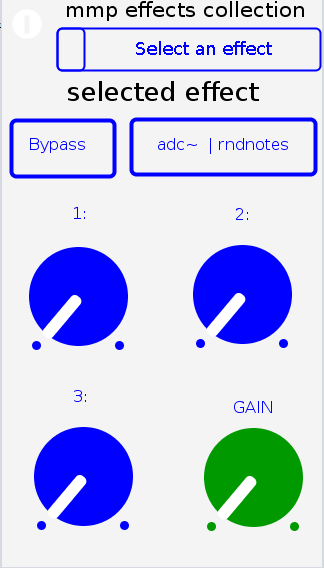
The MMP file, in and of, itself may prove useful to someone as it packages in a single place a 30-effect "pedal-box".
That however is not why I am sharing it.
Since the effects are standardized and mmp-compliant, my hope/thinking is others may include them in their work no matter what it may be and thus build their patches, apps, etc., using the effects as building-blocks.
I have accredit the original effects designers by adding a suffix (in parenthesis) to each effect as follows (in alpha-order):
d=DIY2 Collection
g=Guitar Extended
s=Stamp Album Collection
v=scott vanya (me)
The included effects (basically the best I could find that lent themselves to 3 parameters) are as follows:
audioflow(v).pd
beatlooper(v).pd
bodyresonance(d).pd
chorus(s).pd
delay(3tap)(d).pd
delay(fb)(d).pd
delay(pitch)(v).pd
delay(push)(v).pd
delay(revtap)(g).pd
delay(spect)(d).pd
delay(stag)(v).pd
delay(tbr)(v).pd
delay(wavey)(v).pd
detuning(g).pd
distortion(d).pd
filter(s).pd
flanger(s).pd
hexxciter(g).pd
looper(fw-bw)(v).pd
octaver-harmonizer(p).pd
phaser(s).pd
pitchshifter(d).pd
reverb(pure)(d).pd
ringmod(g).pd
shaper(d).pd
stepvibrato(g).pd
streamStretch(v)-help.pd
streamStretch(v).pd
tremolo(d).pd
vcf(d).pd
vibrato(d).pd
vibrato(step)(g).pd
wah-auto(v).pd
wavedistort(d).pd
Note: there are too many effects to go into detail about what each parameter does. So I leave that for you to either figure out/discover on your own or post here your question and I will answer it as time/energy/etc allow.
Peace and Loving Music Through us all.
Sincerely,
Scott
 posted in patch~
ArguScore
Here is an updated version
arguscore-update.zip
and a few Purr Data compatibility replacement objects: purr-data-compatible-replacements.zip
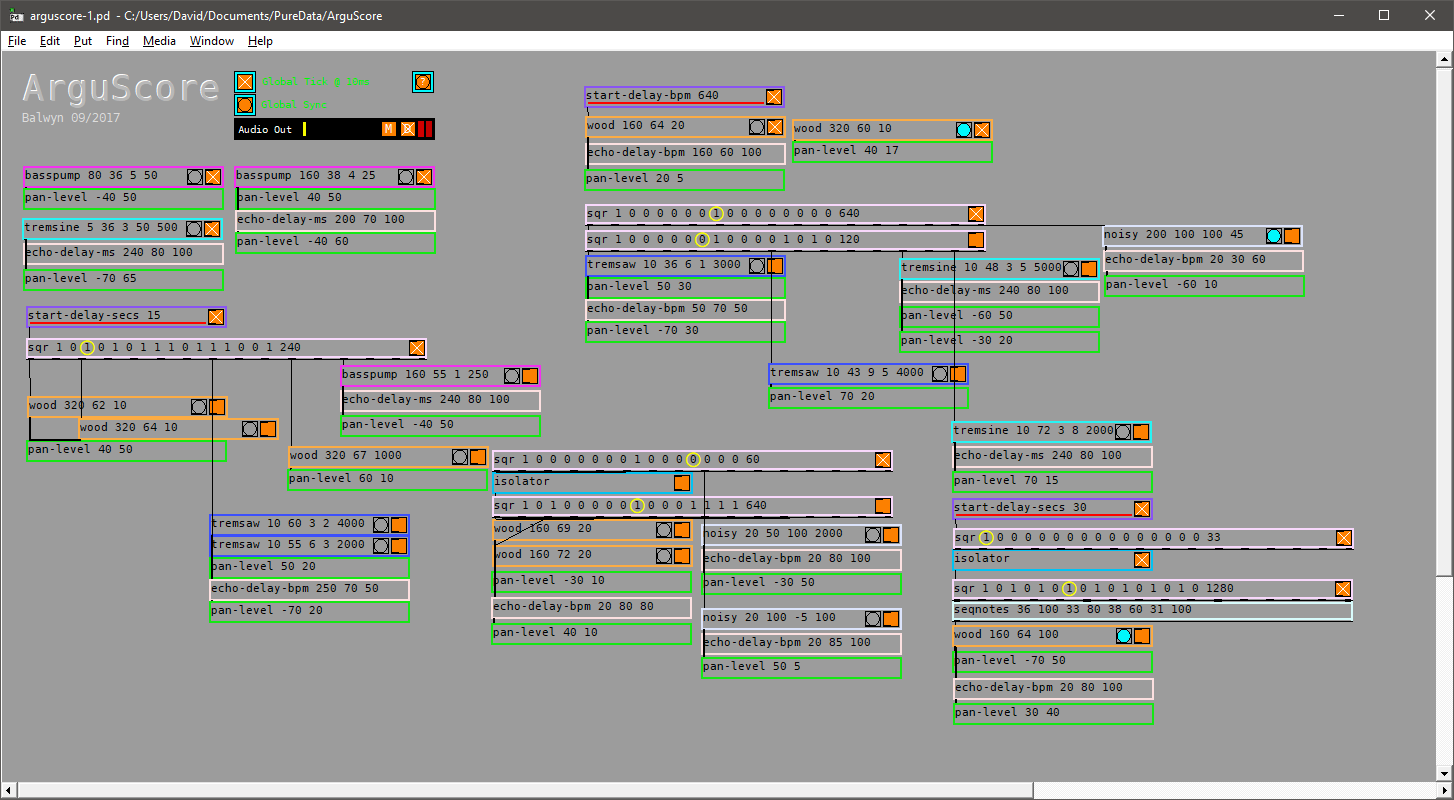
A creation argument only object driven system for instant music making;
Objects so far;
Required;
globaltimer - outputs a 10ms bang to drive all objects;
globalsync - resets all objects to zero or start;
audio~ - dac~ catcher~ for all throws~, output level, mute;
Sound Objects
By default sound objects start playing at the bpm of the first argument
basspump - args - bpm note distortion duration
wood - args - bpm note duration
tremsaw - args - bpm note vibrato distortion duration
tremsine - args - bpm note vibrato noise duration
noisy - args - bpm note vcfq duration
kauplus - args - bpm note string-resonation duration
Effect Objects
sqr - args - 16 required(0 or 1) bpm (starts playing by default)
overides sound objects autoplay
2 optional args for cursor offset and pitch if font different
has 16 outlets to send 0 or 1
echo-delay-bpm - args - bpm feedback(0 to 100) level(0 to 100)
echo-delay-ms - args - millisecs feedback(0 to 100) level(0 to 100)
pan-level - args - pan (-100 to 100) level (0 to 100)
autopan - args - width (0 to 100) frequency (* 0.01) level (0 to 100)
fade - args - millisecs to fade-in pecentage of level to drop to (0 to 100) millisecs to fade-out
filter - args - highpass (midi note to frequency) lowpass (midi note to frequency)
(0 to 135 equates to approx 8Hz to 19912Hz)
start-delay-secs - args - seconds (delays the autostart of the connected object)
start-delay-bpm - args - bpm (delays the autostart of the connected object)
stop-delay-secs - args - seconds (outputs a one at the end of the delay which can connect to a globalsync)
stop-delay-bpm - args - bpm (delays the autostart of the connected object)
isolator - sits between two sqr's and sends a signal to start/stop the receiving sqr
seqnotes - four pairs of note & velocity that receive sqr ones to fire a connected sound object
Notes
Can crash Pd when making lots of edits to arguments, particularly while playing, so save often
There is a [declare -path objects] hiding behind the audio~ object
Fixed missing note and velo message for tremsaw
Two more arguscore patches can be open at the same time providing only one patch contains the globaltimer and audio~ objects (see arguscore-2.pd and arguscore-2-b.pd)
new objects
kauplus, autopan, fade, filter, stop-delay-secs, stop-delay-bpm;
 posted in patch~
ArguScore
ArguScore
A creation argument only object driven system for instant music making
Objects so far:
Required:
globaltimer - outputs a 10ms bang to drive all objects
globalsync - resets all objects to zero or start
audio~ - dac~ catcher~ for all throws~, output level, mute
Sound Objects
By default sound objects start playing at the bpm of the first argument
basspump - args - bpm note distortion duration
wood - args - bpm note duration
tremsaw - args - bpm note vibrato distortion duration
tremsine - args - bpm note vibrato noise duration
noisy - args - bpm note vcfq duration
Effect Objects
sqr - args - 16 required(0 or 1) bpm (starts playing by default), overides sound objects autoplay, 2 optional args for cursor offset and pitch if font different has 16 outlets to send 0 or 1
echo-delay-bpm args - bpm feedback(0 to 100) level(0 to 100)
echo-delay-ms - args - millisecs feedback(0 to 100) level(0 to 100)
pan-level - args - pan (-100 to 100) level (0 to 100);
start-delay-secs - args - seconds (delays the autostart of the connected object)
start-delay-bpm - args - bpm (delays the autostart of the connected object)
isolator - sits between two sqr's and sends a signal to start/stop the receiving sqr;
seqnotes - four pairs of note & velocity that receive sqr ones to fire a connected sound object
Cheers
Balwyn
arguscore.zip
posted in patch~