
4 ch (quad) reverb
Room simulation in reverb is a dead end. Give it a bit of thought... To reproduce all the discrete echoes of a room, their phase difference, how they bounce back and forth between walls, is a hopeless task. All the good reverb designs are based on what sounds good rather than realistic simulation.
@whale-av is right about doubling a nice sounding verb, changing the settings slightly on each and feeding them into each other. But if you are assuming your sound source and receptor to be at the center of the room, you don't need 4 channels, as left distance = right distance, and front distance = back distance. Indeed if you are assuming a quadratic room with speaker and mic at the exact center you only need one channel!
I find Puckette's algorithm to be very efficient and convincing (rev2~ and rev3~) compared to freeverb which is based on a very arcane algorithm (Schroeder back in the 60ties). Both [rev2~] and [rev3~] have 4 outlets so they can be used for quad mixing, What puckette's algorithm is missing maybe is the allpass smudge of the freeverb/schroeder models...
See also this video on reverb design which goes through the history of reverb algorithms:
 posted in technical issues
Reverb
@Claire080499 There are various ways to fake reverb through the control side, they generally do not sound much like reverb but within the context of a song they can achieve the same goal. This sort of trickery was common back when computers could not do real time reverb but often had reasonably capable realtime synthesis or sampling abilities. The most basic approach was just to duplicate the track with decreased pitch and volume and increased decay, from there you can add duplicate tracks with slightly delayed note information to get echos, filtering to making it less clear, options are endless and very idiosyncratic to the sound you are trying to add "reverb" too. Doing that most basic approach in pd with your drum machine would only take having a second drum tuned lower with very little volume and a long decay triggered by the same sequence, and you can use [pipe] to delay the midi to add echos as well. Researching into how they faked it on the old Tracker sequencers and on the old hardware synth chips will give you some ideas.
 posted in technical issues
Reverb
@Claire080499 said:
I've got reverb working on my patch, with my drum machine, using [freeverb~]. I know this is a signal object and works with [dac~] but I was wondering if there is something that works for a midi source created using [makenote] and [noteout]?
No. Reverb is an audio effect.
You can apply reverb to audio produced by MIDI notes.
There is (quite literally) no way to apply reverb directly to MIDI notes. (The synth receiving the MIDI notes can add reverb. Or, with an audio loopback program like JACK in Linux or BlackHole in macOS, you can pipe the synth audio back into Pd and add the reverb there.)
hjh
 posted in technical issues
NoxSiren - Modular synthesizer system <- [v15]
NoxSiren is a modular synthesizer system where the punishment of failure is the beginning of a new invention.
--DOWNLOAD-- NoxSiren for :
-
Pure Data :
NoxSiren v15.rar
NoxSiren v14.rar -
Purr Data :
NoxSiren v15.rar
NoxSiren v14.rar
--DOWNLOAD-- ORCA for :
- x64, OSX, Linux :
https://hundredrabbits.itch.io/orca
In order to connect NoxSiren system to ORCA system you also need a virtual loopback MIDI-ports:
--DOWNLOAD-- loopMIDI for :
- Windows 7 up to Windows 10, 32 and 64 bit :
https://www.tobias-erichsen.de/software/loopmidi.html
#-= Cyber Notes [v15] =-#
- added BORG-IMPLANT module.
- introduction to special modules.
- more system testing.
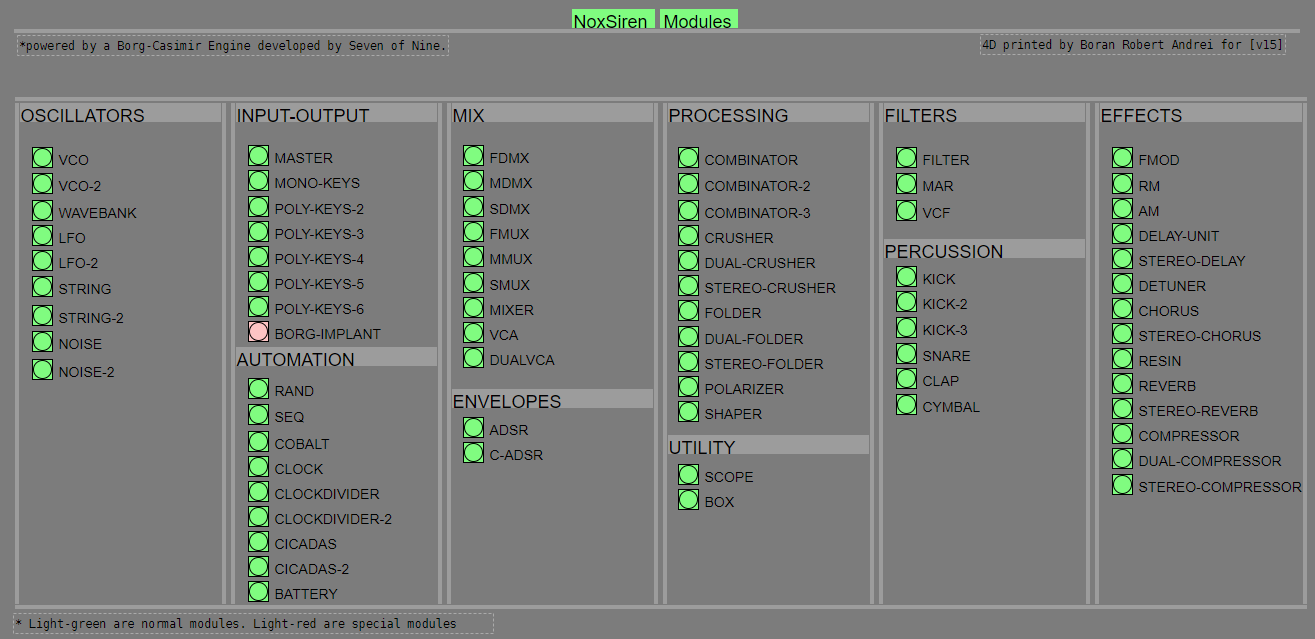
#-= Special Modules [v15] =-#
- BORG-IMPLANT (connects ORCA MIDI system to NoxSiren system)
#-= Current Modules [v15] =-#
- VCO (voltage-controlled-oscillator)
- VCO2 (advance voltage-controlled-oscillator)
- WAVEBANK (additive synthesis oscillator)
- ADSR (Attack-Decay-Sustain-Release envelope)
- C-ADSR (Curved Attack-Decay-Sustain-Release envelope)
- CICADAS (128 steps-Euclidean rhythm generator)
- CICADAS-2 (advance 128-steps polymorphic-Euclidean rhythm generator)
- COMPRESSOR (lookahead mono compressor unit)
- DUAL-COMPRESSOR (2-channel lookahead mono compressor unit)
- STEREO-COMPRESSOR (lookahead stereo compressor unit)
- MONO-KEYS (virtual 1-voice monophonic MIDI keyboard)
- POLY-KEYS-2 (virtual 2-voice polyphonic MIDI keyboard)
- POLY-KEYS-3 (virtual 3-voice polyphonic MIDI keyboard)
- POLY-KEYS-4 (virtual 4-voice polyphonic MIDI keyboard)
- POLY-KEYS-5 (virtual 5-voice polyphonic MIDI keyboard)
- POLY-KEYS-6 (virtual 6-voice polyphonic MIDI keyboard)
- BATTERY (simple manual triggered machine for drumming.)
- REVERB (reverb unit with lowpass control)
- STEREO-REVERB (stereo reverb unit with lowpass control)
- RESIN (advanced rain effect/texture generator)
- NOISE (generates black,brown,red and orange noise)
- NOISE2 (generates yellow,blue,pink and white noise)
- COBALT (6-stage polyrhythm generator)
- SHAPER (basic shaper unit)
- FOLDER (basic wave folding unit)
- STEREO-FOLDER (stereo wave folding unit)
- DUAL-FOLDER (advance wave folding unit)
- POLARIZER (transform a signal into bi-polar, uni-polar, inverted or inverted uni-polar form)
- CLOCK (generates a BPM clock signal for sequencing other modules)
- CLOCKDIVIDER (a clock divider with even division of clock signal)
- CLOCKDIVIDER2 (a clock divider with odd division of clock signal)
- DELAY-UNIT (delay unit)
- STEREO-DELAY (stereo delay unit)
- CHORUS (chorus unit)
- STEREO-CHORUS (stereo chorus unit)
- SEQ (advance 16-step/trigger sequencer)
- KICK (synthesize kick unit)
- KICK2 (synthesize flavor of KICK module)
- KICK3 (synthesize flavor of KICK module)
- SNARE (synthesize snare unit)
- CLAP (synthesize clap unit)
- CYMBAL (synthesize cymbal unit)
- RAND (RNG generator for other modules parameters)
- FMOD (feedback modulation unit)
- AM (amplitude modulation unit)
- RM (ring modulation unit)
- LFO (low-frequency-oscillator)
- LFO2 (advance low-frequency-oscillator)
- COMBINATOR (combine two waves)
- COMBINATOR2 (combine three waves)
- COMBINATOR3 (combine four waves)
- STRING (Karplus-Strong string synthesis unit)
- STRING2 (advance Karplus-Strong string synthesis unit)
- DETUNER (parametric 4-channel detuner unit)
- CRUSHER (basic audio resolution unit)
- STEREO-CRUSHER (basic stereo audio resolution unit)
- DUAL-CRUSHER (advance audio resolution unit)
- FILTER (basic filter)
- VCF (voltage-controlled-filter)
- MAR (Moog-analog-resonant filter)
- VCA (voltage-controlled-amplifier)
- DUAL-VCA (advance voltage-controlled-amplifier)
- FMUX (multiplexer with fast A/D internal envelope)
- MMUX (multiplexer with medium A/D internal envelope)
- SMUX (multiplexer with slow A/D internal envelope)
- FDMX (demultiplexer with fast A/D internal envelope)
- MDMX (demultiplexer with medium A/D internal envelope)
- SDMX (demultiplexer with slow A/D internal envelope)
- MIXER (mix 1-4 possible waves)
- SCOPE (oscilloscope analyzer)
- MASTER (fancy DAC~)
- BOX (useless decorative module)
NoxSiren integrated modules menu system.
 posted in patch~
JASS, Just Another Synth...Sort-of, codename: Gemini (UPDATED: esp with midi fixes)
JASS, Just Another Synth...Sort-of, codename: Gemini (UPDATED TO V-1.0.1)
jass-v1.0.1( esp with midi fixes).zip
1.0.1-CHANGES:
- Fixed issues with midi routing, re the mode selector (mentioned below)
- Upgraded the midi mode "fetch" abstraction to be less granular
- Fix (for midi) so changing cc["14","15","16"] to "rnd" outputs a random wave (It has always done this for non-midi.)
- Added a midi-mode-tester.pd (connect PD's midi out to PD's midi in to use it)
- Upgrade: cc-56 and cc-58 can now change pbend-cc and mod-cc in all modes
- Update: the (this) readme
INFO: Values setting to 0 on initial cc changes is (given midi) to be expected.
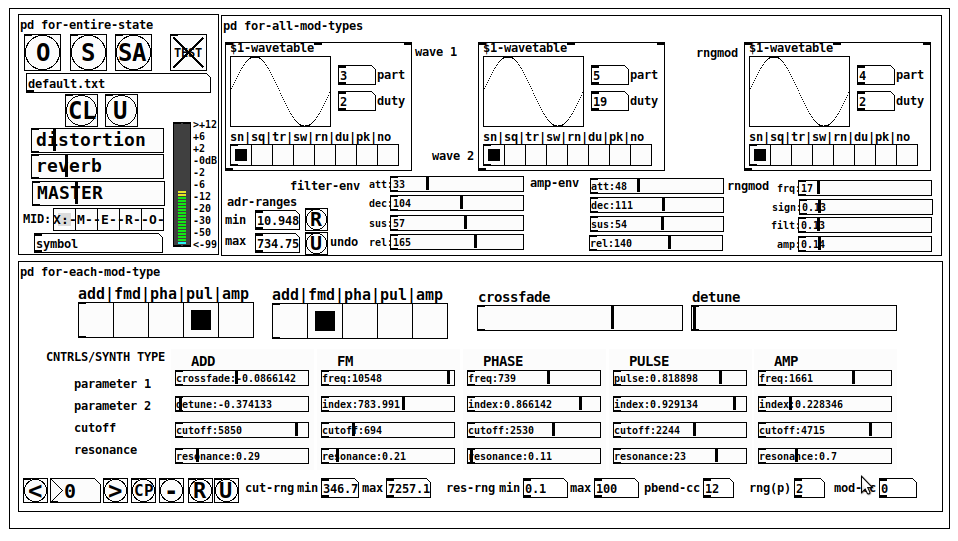
JASS is a clone-based, three wavetable, 16 voice polyphonic, Dual-channel synth.
With...
- The initial, two wavetables combined in 1 of 5 possible ways per channel and then adding those two channels. Example: additive+frequency modulation, phase+pulse-modulation, pulse-modulation+amplitude modulation, fm+fm, etc
- The third wavetable is a ring modulator, embedded inside each mod type
- 8 wave types, including a random with a settable number of partials and a square with a settable dutycycle
- A vcf~ filter embedded inside each modulation type
- The attack-decay-release, cutoff, and resonance ranges settable so they immediately and globally recalculate all relevant values
- Four parameters /mod type: p1,p2, cutoff, and resonance
- State-saving, at both the global level (wavetables, env, etc.), as well as, multiple "substates" of for-each-mod-type settings.
- Distortion, reverb
- Midiin, paying special attention to the use of 8-knob, usb, midi controllers (see below for details)
- zexy-limiters, for each channel, after the distortion, and just before dac~
Instructions
Requires: zexy
for-entire-state
- O: Open preset. "default.txt" is loaded by...default
- S: Save preset (all values incl. the multiple substates) (Note: I have Not included any presets, besides the default with 5 substates.)
- SA: Save as
- TEST: A sample player
- symbol: The filename of the currently loaded preset
- CL: Clear, sets all but a few values to 0
- U: Undo CL
- distortion,reverb,MASTER: operate on the total out, just before the limiter.
- MIDI (Each selection corresponds to a pgmin, 123,124,125,126,127, respectively, see below for more information)
- X: Default midi config, cc[1,7,8-64] available
- M: Modulators;cc[10-17] routed to ch1&ch2: p1,p2,cutoff,q controls
- E: Envelopes; cc[10-17] routed to filter- and amp-env controls
- R: Ranges; cc[10-17] routed to adr-min/max,cut-off min/max, resonance min/max, distortion, and reverb
- O: Other; cc[10-17] routed to rngmod controls, 3 wavetypes, and crossfade
- symbol: you may enter 8 cc#'s here to replace the default [10-17] from above to suit your midi-controller's knob configuration; these settings are saved to file upon entry
- vu: for total out to dac~
for-all-mod-types
- /wavetable
- graph: of the chosen wavetype
- part: partials, # of partials to use for the "rn" wavetype; the resulting, random sinesum is saved with the preset
- duty: dutycycle for the "du" wavetype
- type: sin | square | triangle | saw | random | duty | pink (pink-noise: a random sinesum with 128 partials, it is not saved with the preset) | noise (a random sinesum with 2051 partials, also not saved)
- filter-env: (self-explanatory)
- amp-env: (self-explanatory)
- rngmod: self-explanatory, except "sign" is to the modulated signal just before going into the vcf~
- adr-range: min,max[0-10000]; changing these values immediately recalculates all values for the filter- and amp-env's scaled to the new range
- R: randomizes all for-all-mod-types values, but excludes wavetype "noise"; rem: you must S or SA the preset to save the results
- U: Undoes R
for-each-mod-type
- mod-type-1: (In all cases, wavetable1 is the carrier and wavetable2 is the modulator); additive | frequency | phase | pulse | amplitude modulation
- mod-type-2: Same as above; mod-type-2 May be the same type as mod-type-1
- crossfade: Between ch1 and ch2
- detune: Applied to the midi pitch going into ch2
- for-each-clone-type controls:
- p1,p2: (self-explanatory)
- cutoff, resonance: (self-explanatory)
- navigation: Cycles through the saved substates of for-each-mod-type settings (note: they are lines on the end of a [text])
- CP: Copy the current settings, ie. add a line to the end of the [text] identical to the current substate
- -: Delete the current substate
- R: Randomize all (but only a few) substate settings
- U: Undo R
- cut-rng: min,max[0-20000] As adr-range above, this immediately recalculates all cutoff values
- res-rng: min,max[0-100], same as previously but for q
- pbend: cc,rng: the pitchwheel may be assigned to a control by setting this to a value >7 (see midi table below for possibilities); rng is in midi pitches (+/- the value you enter)
- mod-cc: the mod-wheel may be assigned to a control [7..64] by setting this value
midi-implementation
| name | --- | Description |
|---|---|---|
| sysex | not supported | |
| pgmin | 123,124,125,126,127; They set midi mode | |
| notein | 0-127 | |
| bendin | pbend-cc=7>pitchbend; otherwise to the cc# from below | |
| touch | not supported | |
| polytouch | not supported |
cc - basic (for all midi-configs)
| # | name | --- | desciption |
|---|---|---|---|
| 1 | mod-wheel | (assignable) | |
| 7 | volume | Master |
cc - "X" mode/pgmin=123
| cc | --- | parameter |
|---|---|---|
| 8 | wavetype1 | |
| 9 | partials 1 | |
| 10 | duty 1 | |
| 11 | wavetype2 | |
| 12 | partials 2 | |
| 13 | duty 2 | |
| 14 | wavetype3 | |
| 15 | partials 3 | |
| 16 | duty 3 | |
| 17 | filter-att | |
| 18 | filter-dec | |
| 19 | filter-sus | |
| 20 | filter-rel | |
| 21 | amp-att | |
| 22 | amp-dec | |
| 23 | amp-sus | |
| 24 | amp-rel | |
| 25 | rngmod-freq | |
| 26 | rngmod-sig | |
| 27 | rngmod-filt | |
| 28 | rngmod-amp | |
| 29 | distortion | |
| 30 | reverb | |
| 31 | master | |
| 32 | mod-type 1 | |
| 33 | mod-type 2 | |
| 34 | crossfade | |
| 35 | detune | |
| 36 | p1-1 | |
| 37 | p2-1 | |
| 38 | cutoff-1 | |
| 39 | q-1 | |
| 40 | p1-2 | |
| 41 | p2-2 | |
| 42 | cutoff-2 | |
| 43 | q-2 | |
| 44 | p1-3 | |
| 45 | p2-3 | |
| 46 | cutoff-3 | |
| 47 | q-3 | |
| 48 | p1-4 | |
| 49 | p2-4 | |
| 50 | cutoff-4 | |
| 51 | q-4 | |
| 52 | p1-5 | |
| 53 | p2-5 | |
| 54 | cutoff-5 | |
| 55 | q-5 | |
| 56 | pbend-cc | |
| 57 | pbend-rng | |
| 58 | mod-cc | |
| 59 | adr-rng-min | |
| 60 | adr-rng-max | |
| 61 | cut-rng-min | |
| 62 | cut-rng-max | |
| 63 | res-rng-min | |
| 64 | res-rng-max |
cc - Modes M, E, R, O
Jass is designed so that single knobs may be used for multiple purposes without reentering the previous value when you turn the knob, esp. as it pertains to, 8-knob controllers.
Thus, for instance, when in Mode M(pgm=124) your cc send the signals as listed below. When you switch modes, that knob will then change the values for That mode.
In order to do this, you must turn the knob until it hits the previously stored value for that mode-knob.
After hitting that previous value, it will begin to change the current value.
cc - Modes M, E, R, O assignments
Where [10..17] may be the midi cc #'s you enter in the MIDI symbol field (as mentioned above) aligned to your particular midi controller.
| cc# | --- | M/pgm=124 | --- | E/pgm=125 | --- | R/pgm=126 | --- | O/pgm=127 |
|---|---|---|---|---|---|---|---|---|
| 10 | ch1:p1 | filter-env:att | adr-rng-min | rngmod:freq | ||||
| 11 | ch1:p2 | filter-env:dec | adr-rng-max | rngmod:sig | ||||
| 12 | ch1:cutoff | filter-env:sus | cut-rng-min | rngmod:filter | ||||
| 13 | ch1:q | filter-env:re | cut-rng-max | rngmod:amp | ||||
| 14 | ch2:p1 | amp-env:att | res-rng-min | wavetype1 | ||||
| 15 | ch2:p2 | amp-env:dec | res-rng-max | wavetype2 | ||||
| 16 | ch2:cutoff | amp-env:sus | distortion | wavetype3 | ||||
| 17 | ch2:q | amp-env:rel | reverb | crossfade |
In closing
If you have anywhere close to as much fun (using, experimenting with, trying out, etc.) this patch, as I had making it, I will consider it a success.
For while an arduous learning curve (the first synth I ever built), it has been an Enormous pleasure to listen to as I worked on it. Getting better and better sounding at each pass.
Rather, than say to much, I will say this:
Enjoy. May it bring a smile to your face.
Peace through love of creating and sharing.
Sincerely,
Scott
 posted in patch~
Starting a Pure Data Wiki (Database/Examples Collection)
Just to give an idea of the kind of resource I'm talking about; here is a rough version of the kind of entry that I can put together just using my bookmarks. Nothing too technical, just a collection of useful stuff put together in one place.
Reverb
Reverberation (or reverb) is the effect generated by many copies of a sound with different delays summing together due to reflections off the boundaries of a space. In contrast to echo, the individual copies are not distinguishable but overall effect typically makes the sound richer or fuller.
Pure Data Vanilla comes with three reverb examples in the extras; in Help>Browser they should appear under ‘Externals’.
freeverb~ is a PD external offering ‘studio-quality Schroeder/Moorer reverb’
https://puredata.info/downloads/freeverb
(example usage: https://guitarextended.wordpress.com/2012/01/24/reverb-effect-in-pure-data/)
Examples:
- Tom Erbe’s reverb patches
(allpass, Schroeder, Moorer, Moore, Gerzon/Stautner/Puckett, Dattorro)
http://tre.ucsd.edu/wordpress/?p=625 - Choucroute FX by coloscope
https://patchstorage.com/la_choucroute_fx/
Tremolo/reverb effect : “harmonic tremolo” found in early 1960s amps. - 282~ reverb (Ursa Major SST-282) by acreil / whale-av
https://forum.pdpatchrepo.info/uploads/files/1516212572597-working.zip - Freeverb Vanilla
https://github.com/derekxkwan/pd-vfreeverb
Derekxkwan’s cleanup of Katja Vetter's Pd-vanilla freeverb abstraction - ELSE library
https://github.com/porres/pd-else
Contains [mono.rev~], [stereo.rev~], [echo.rev~], [giga.rev~], [free.rev~]
PD Forum discussion of the subject: https://forum.pdpatchrepo.info/topic/11622/reverberation
Further reading:
https://www.soundonsound.com/techniques/springs-plates-buckets-physical-modelling
Sound on Sound ‘Synth Secrets’ article on Reverb
See also: Delay/Echo, Resonators, Convolution
 posted in Off topic
vanilla partitioned convolution abstraction
Ok, here's the working vanilla partitioned convolution patch!
https://www.dropbox.com/s/05xl7ml171noyjq/convolution~.zip…
there are two subpatches for testing, one is light with a relative big window partition (1024) and a short Impulse Response (2 secs).
The other is quite heavy, it's an 8 sec long IR with a window size of 512! This one takes about 57-58% of my CPU power, and I'm on a last generation macbook pro (2.6Ghz processor)... but I need to increase the Delay (msec) from 5 to 10 in the audio settings, otherwise I get terrible clicks!
William Brent's convolve is ridiculously much more efficient, the same parameters take about 14% of my CPU power and I can use a delay of 5 ms in the audio settings.
But anyway, this is useful for teaching and apps that implement a light convolution reverb (short IR/not too short window) need pure vanilla (libpd/camomille and stuff)
ps. Bug, for some reason, you may need to recreate the object so the sound comes out. I have no idea yet why...
Cheers!
 posted in patch~
Reverberation
@weightless said:
@bocanegra https://forum.pdpatchrepo.info/topic/5349/patching-a-good-reverb/6
not from me, but reverbCH~ and reverb282~ from @acreil are by far the best Pd reverbs I've heard.
Thanks for replying. I'll check those out. I'm not big on having to install externals tho. Also, I've been trhotugh the algortithms mentioned in the thread.
I was kinda hoping we could have a discussion about reverberation that will provide techniques for newbs rather than go on about our fave this and that. But maybe I started off wrong by showing of my mutant...
Under all circumstances, here is my experience modelling reverb in short:
While freeverb sucks (sorry), Schoeder is your friend. The trick is to find a way of recycling you allpass series (or even better, nests!) that makes sense to your ears. Dattoro's work is pretty much that. If you look at his "tank" section of his first plate verb emulation, that's what it does, very cleverly so: it creates a simple feedback matrix of phased out echoes bouncing back and forth. My jVerb is in many ways an elaborate Dattoro tank.
Now, you can build reverb tanks in many ways. The jVerb is extremely heavy on CPU (but gaaawd I love the sound). A simple way is having two lines going through a series of N allpass nests and having the two lines feedback into each other like ping pong delay. If you tune the allpass filters right (primes!!!) and add some tiny modulation to delay times you are rid of eigentones or whatever they are called.
I'll make the effort to describe how a Schroeder allpass nest is constructed (no math):
You put three allpass filters in series and give them Z coefficients (that is delay in samples) of dimishing magnitude, following some log rule or another. Schroeder liked to approximate 1/3 for each allpass. MAKING SURE THEY ARE ALL PRIMES!!!
Then you put that chain inside the loop of another allpass filter, and tune it's Z to fit the series in such a way that the outer loop has the highest Z.
A single allpass nest can pass for primitive reverberation with the right tweaking. A handful in series will create a lot of diffusion and sound better (less echo-y). BUT: Make sure every nest has it's unique series of Z values.
Then add low frequency modulators to the Z value (delay time) on each and every allpass loop. Random values are preferable over sinusoids or any other periodical thing. The APN abstractions I used in jVerb have all this built in already.
What's left is to add some pre-delay if you like that, and some bandlimiting somewhere in the feedback loop.
I have a CPU friendly verb following this scheme somewhere. I'll upload it ASAP
posted in patch~
reverse reverb
@phil123456 "Realtime" reverse is impossible of course.......
Even though all the echoes of the reverb can be calculated faster than real-time, you still have to play them back.
You will need to set a tempo (delay length) for a delay line, record the sample and the added reverb into it, and play it backwards........ https://forum.pdpatchrepo.info/topic/267/reading-a-delwrite-in-reverse
You could play the sample forwards in a separate delay after the reverse Reverb has completed.
If you want complicated rhythms then you will need to use a threshold to detect note length and control a variation of the delay time.
To get the reverse reverb to start as you play the note you could delve into and modify the reflection times and levels in this......... this.zip (inside [pd engine] and [pd auditiontaps] )
David.
 posted in patch~
16 parameters for 1 voice, continued...
@whale-av Im pretty sure that without any groups, its curve number, then X, Y,Z, but i dont know why "Z" is always on zero! I checked with a trigger to see if z dimension worked and it did work!, i had the trigger on Z=0 and it sounded not too loud, the i put the trigger on Z=55 which is the loudest according to how i mapped the cursor on iannix and it was at its loudest, then Z=-73 and it was not listenable.
I checked the message log in iannix, after curve number its X, then Y then Z, but Z is always on 0 i dont know why., those 3 floats after curve number belong to X,Y,Z.
one thing i heard say from one of the iannix people, that z dimension editing was not ready in the software... maybe that is why it is always on 0? that´s all i can think of... I know the first float belongs to x because the message log brings up the message of the time according to the cursor, when the cursor is over the message is 1, when the time on the cursor is at half lets say, the message is .50. the value after it is Y.
If I have a straight curve that is 3/4 the height of the cursor, the message log indicates .75, if the curve were at 1/2 the cursors height the float would be .50.
Plus in past patches where we have used only pitch, we have used the second float, which belongs to Y.
If reverb in general has lets say 5 slidebars or "parameters" to be controlled, then more than one curve would be needed for reverb,,,
If reverb has 5 slidebars to be controlled, and the next effect to be controlled would be chorus lets say, chorus having 3 slidebars, it would be like this.
Curve# 3(for example), Y=1st reverb slidebar, z= 2nd reverb slidebar
Curve# 4, Y=3rd reverb slidebar, Z=4th reverb slide bar
Curve# 5, Y =5th reverb slide bar, Z= 1st Chorus slide bar
Curve #6 Y= second chorus slide bar Z= third chorus slide bar.
etc, etc.
Timbre is the combination of all the sinewave´s volume, and the overall volume of the curve is Volume or Intensity.
Remember a while back when we were working on timbre, that we used graphs to draw how each sinewave´s volume was to behave, its exactly that.
Ill be using 128 sinewaves, so lets say if curve 7 Y dimension is to control timbre, that Y dimension will control the graphs of all the sinewave{s volume.
IF the curve is at the top of the cursor at 1, then the point in time of all the sinewave{s graphs would be at the end.
If the curve is at the middle of the cursor at .5 then the point in time of the sinewave{s graphs would be at the middle.
If the curve is at the bottom of the cursor at 0 then the point in time of the sinewave{s graphs would be at the beginning.
Its confusing!11 haha, Im studying the patches and learning,
 posted in technical issues