-
Trying to understand precision in Pd
-
@alexandros For modf or ceil?
-
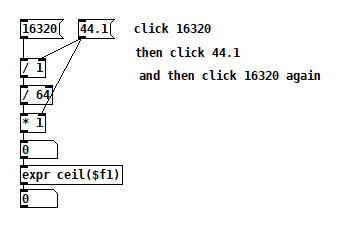
@jameslo for ceil. I only tried the patch of the screenshot in the first post.
-
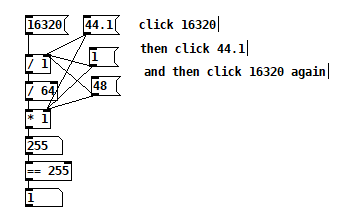
@alexandros Hmm, that's not good. The ceiling of 255 is definitely not zero and that's preventing you from seeing the thing I wanted to draw attention to. Here's another version for you to try: weird poop 2.pd
-
When performing division of rational numbers, the result will be exact if the denominator factors out such that all factors are a power of a factor of the numeric base. We're used to decimal, so those factors are 2 and 5. 20 = 2•2•5 so it's ok; 27 = 3•3•3 so we know this will be a repeating fraction (since 3 is not a factor of 10).
Floating point numbers in computers are base 2, so, for non-repeating division, the denominator must be a power of 2.
First you have [/ 1] -- 1 = 2^0 so, ok.
Then you have [/ 64] -- 64 = 2^6 so, ok.
When you introduce division by 44.1, then the denominator includes two 3s and two 7s (plus 2^-1 and 5^-1). These aren't powers of 2, so the fraction will be infinite, and rounding it off to the available precision is an approximation. Multiplying again doesn't restore the precision.
Like, 2/3 = 0.66666...7. Let's pick an arbitrary precision, say, 4 digits. 2/3 = 0.6667 (or, the floating point way, 6.667•10^(-1)). Now you multiply this back by 3 and you get 2.0001 -- there's your "higher than." This must also get rounded off, but at least it shows that inaccuracy when scaled up can eventually become visible.
The assumption that floating point math is exact is basically a good way to set yourself up for confusion or disappointment. (That is, this isn't Pd's fault -- it's IEEE 754.)
hjh
-
@jameslo The patch you provided indeed shows the bug. When clicking 44.1 the number on the bottom is 0. When clicking on 1 or 48, it's 1. But @ddw_music gave a very good explanation of why this is happening.
-
@ddw_music said:
The assumption that floating point math is exact is basically a good way to set yourself up for confusion or disappointment. (That is, this isn't Pd's fault -- it's IEEE 754.)
But what prevents Pd from displaying the inexact result, e.g. in the number box above [expr]? If the goal of patching is to make things more friendly for non-programmers, how is it helpful to hide it?
-
@jameslo said:
But what prevents Pd from displaying the inexact result, e.g. in the number box above [expr]? If the goal of patching is to make things more friendly for non-programmers, how is it helpful to hide it?
In fact, when a user types in 0.1 and it displays 0.100001 (I forget how many zeros for single-precision), this is more disturbing to non-programmers.
... because that's exactly what you get when you don't round off the last bit or two for string conversion: a whole lot of 0.n000001 or 0.n999999. SC tried this for awhile, but had to revert to a slightly lower precision for float-to-string because users really hated the more accurate display.
Python can demonstrate with double precision floats -- https://en.wikipedia.org/wiki/Double-precision_floating-point_format says "The 53-bit significand precision gives from 15 to 17 significant decimal digits precision (2−53 ≈ 1.11 × 10⁻¹⁶)" so let's try both:
$ python3
>>> for x in range(1, 10): x = x * 0.1; print(f"{x:.15f}")
...
0.100000000000000
0.200000000000000
0.300000000000000
0.400000000000000
0.500000000000000
0.600000000000000
0.700000000000000
0.800000000000000
0.900000000000000

>>> for x in range(1, 10): x = x * 0.1; print(f"{x:.17f}")
...
0.10000000000000001
0.20000000000000001
0.30000000000000004
0.40000000000000002
0.50000000000000000
0.60000000000000009
0.70000000000000007
0.80000000000000004
0.90000000000000002
Increasing the string representation to include more digits makes it necessary to render into the UI the noise inherent in the least significant bit(s). This isn't appealing to everyone.
Since Pd uses single precision, 6 digits is the low end (and exactly the precision Pd displays). If Pd expanded these strings to 8 digits, you would see trailing digits for fractions that seem like they should be simple.
I think it's pretty common practice with floats to calculate with more precision than you're going to display, and round off for UI strings.
hjh
-
@ddw_music Thanks again. If you wanted to see that truncated noisy digit (say, to debug a patch), how would you go about displaying it? The goal is to avoid the situation above where two floats have the same display but don't equal each other. Would [makefilename $.7g] suffice? Or would it have to be .8 or .9 as some argue in this discussion https://fortran-lang.discourse.group/t/how-many-significant-decimal-digits-for-real-single-precision/2287 And for all cases 7 8 or 9, it would mean that there could be different displays of floats that actually equal each other, correct?
-
Suggest a title for this post>> "trying to understand precision in pd"(the current title is starting to annoy me :P)
-
@dreamer Finally! My intention was to solicit a whole bunch of funny titles and to make the thread playful, but I've obviously failed
 Yours wins unless someone posts something funny.
 -
@jameslo said:
Would [makefilename $.7g] suffice? Or would it have to be .8 or .9 as some argue in this discussion?
%.7gisn't enough, but%.8gseems to catch it.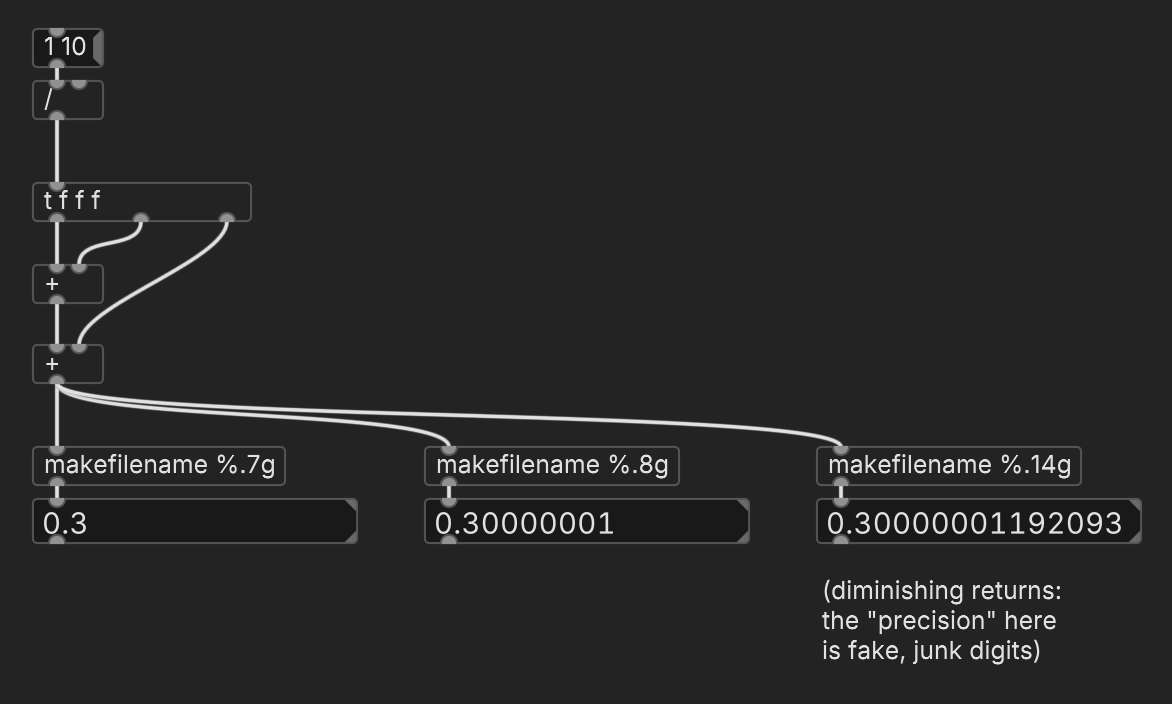
And for all cases 7 8 or 9, it would mean that there could be different displays of floats that actually equal each other, correct?
Yes, but keep in mind: if you ask C to convert a binary floating-point number to a decimal string with more precision than exists in the original binary, the trailing digits are basically garbage. With
%.9gyou will definitely be able to see that two single precision floats are different, but don't rely on the specific value.For
[==], it's kinda better not to use it at all with fractional floats, unless you're sure the denominator will always be a power of two.[==]might be correct but might sometimes give you false negatives; the absdif approach lets you control the precision that's relevant for equivalence.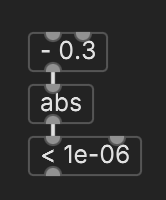
hjh
-
@ddw_music said:
%.7gisn't enough, but%.8gseems to catch it.That Fortran discussion I linked to presented the number 1.00000048 as an example of a 9 digit decimal that has a SPFP value that's not representable in 8 decimal digits, but it appears to me that 1.0000005 works fine. How would you prove that 8 digits is sufficient for all SPFP numbers?
-
@jameslo "The glyphosphate tales" (Roundup). "The Monsanto Tales" "The Bayer Tales"...
"Farming Times"......
"Cancer, my tractor and me"...
None good enough so I didn't post...... but maybe on the right track...
Maybe.."The Prisoner" (I am not a number I am a free man).....
If you need precision and 64-bit integer limits give you enough dynamic range then stick with that.
If you need a really massive dynamic range then you will have to put up with floating point imprecision.
I think.....
I suppose that then the question is how to predict the data shift (*/) necessary to fit in the integer range..?
David.
(when I studied Fortran74 I don't remember anyone talking about this problem). -
@whale-av Your titles made me laugh anyway. If it wasn't my thread I would've suggested "horseshoes, hand grenades, and single precision floating point." Or now, maybe "Who is number 0.1? You are number 255"
I was a software engineer for several life sciences and financial services companies and don't remember anything like 255 != 255, but we also had the luxury of more than one numeric datatype and a lot of formatting options.
-
@jameslo said:
That Fortran discussion I linked to...
Sadly I'm not allowed to read it at the moment because I'm on a tablet right now, and "HTML content omitted because you are logged in or using a modern mobile device" (which... I suppose it would make sense that enthusiasts of an outdated language would not favor "modern" devices for reading 🙄 )
presented the number 1.00000048 as an example of a 9 digit decimal that has a SPFP value that's not representable in 8 decimal digits, but it appears to me that 1.0000005 works fine. How would you prove that 8 digits is sufficient for all SPFP numbers?
No idea. At least, the 24 bit mantissa (23 explicit bits plus an implicit 1 left of the binary point) supports 16,777,216 distinct values, which does comprise 8 decimal digits. But there isn't a 1:1 correspondence in digit count when the exponent goes down, e.g. 16 has 2 decimal digits but its inverse 1/16 = 0.0625 = 6.25x10^-2. So there at least is a counterexample showing that 1/x might need more decimal digits than x (as an integer) would.
hjh
-
How about this... in SC:
x = 1.00000048.as32Bits;

x.asBinaryString(32).clump(8);
-> [00111111, 10000000, 00000000, 00000100]
Giving sign bit = 0, exponent = 01111111 and mantissa = (implicit) 1.00000000000000000000100 or 20 zeroes before the trailing 1.
SC doesn't have a primitive to convert a 32-bit float into a string. But it does preserve the mantissa when converting to a 64-bit float (zero-pads the mantissa): sign bit = 0, exponent (11 bits) = 01111111111, mantissa = (implicit) 1.000000000000000000001 (same 20 zeroes, dropping the rest of the 53 mantissa bits) -- therefore the mantissas are equivalent in both 32-bit and 64-bit floats.
y = Float.from32Bits(x);
z = [y.high32Bits, y.low32Bits].collect { |b| b.asBinaryString(32).clump(8) };

-> [[00111111, 11110000, 00000000, 00000000], [10000000, 00000000, 00000000, 00000000]]

y
-> 1.0000004768372  // rounds to 1.00000048
So it should be okay to hack the 32-bit by adding to or subtracting from the least significant bits:
x+1= the next possible float for this exponent.[x-2, x-1, x, x+1, x+2].collect(Float.from32Bits(_)) -> [1.0000002384186, 1.0000003576279, 1.0000004768372, 1.0000005960464, 1.0000007152557]... where the difference between subsequent floats ~= 0.0000001192092 or ~= 0.00000012, meaning that at this scale it is not possible for a 32-bit floating point number to represent a different value beginning with 1.0000004. So
%.7g"should" be sufficient (though I wouldn't call myself an expert -- this is an empirical demo, not a proof).hjh
-
@ddw_music I think you mean
%.8gbecause you have to count the leading '1' in [makefilename].Assuming I'm right, this is unfortunately making me feel more strongly about the shortcomings of Pd's number box truncation because 0.1 displays as 0.1 under [makefilename %.8g] whereas the problem in my original post displays as 255.00002. At the very least there ought to be a precision setting in each number box's properties. Like too many things in Pd, it feels perverse to have to tell a new user that in order to display a unique character sequence for a number, you have to turn it into a filename
And gosh, it looks like SC has several numeric datatypes, ways to cast between them, and multiple ways to display each. How profligate! 
-
Hey @alexandros, did you look any further into why [expr ceil($f1)] isn't working on your installation? That seems so odd to me and I'm really curious about it.
-
@jameslo said:
Like too many things in Pd, it feels perverse to have to tell a new user that in order to display a unique character sequence for a number, you have to turn it into a filename
It's a minority case, I guess...? I'm willing to bet that in most cases, a user who summed up 0.1 ten times wants to see "1" and not "1.00001".
And gosh, it looks like SC has several numeric datatypes, ways to cast between them, and multiple ways to display each. How profligate!
SC has 32-bit int (
Integer) and 64-bit float (Float, not Double) in the language side, and the audio side runs on 32-bit floats like Pd audio does. 64-bit floats can be chopped down to 32 bits, but the value is stored as an int and you can't do 32-bit float math on it. But, converting a couple of such ints to double (Float.from32bits) and doing math on them should be (pretty much) the same as single-precision math, except maybe a bit of noise in the LSB.hjh
-
@jameslo I just combined all your patches into one and they all behave like yours! I don't know what was going on earlier, perhaps a typo in [expr]? But I guess it wouldn't have been created. Now the numbers are toggling between 255 and 256 and 0 and 1.5258e-05, like your screenshots.