
Inputs into MIDI
@fkberthold Just give the forum a search. All you have to do is save what you want to dynamically patch and then open it up in a text editor, those are the messages you need to send to the subpatch with you dynamically send to. The problem here is that everytime you change the port number you have to clear the subpatch and repatch, not a huge deal but it can easily become less efficient than alternative ways. It is worth learning. Run this like the normal [ctlin] object, argument is initial port number, inlet changes the port, with no argument it defaults to omni just like [ctlin]. After that right click on the abstraction and open it, look in the subpatch [pd $0do] and you will see [ctlin #] connected to [pack f f] which is connected to [s $0output]. We use a [send] instead of outlets directly since creation and deletion of [inlet] and [outlet] is a pain and this lets us just wipe the whole patch which insures things don't get messy, like if you accidentally save the abstraction with something in the subpatch we dynamically patch in.
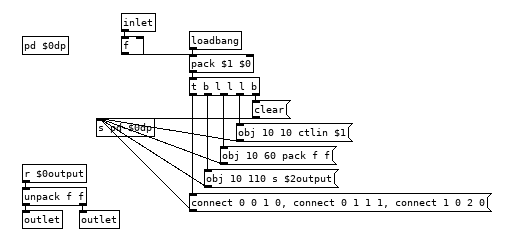
controlin.pd
Edit: Just remembered, we now have actual documentation for dynamic patching as of pd 0.52, open the helpfile for message boxes and then click on the [pd-messages] subpatch bottom left.
 posted in technical issues
Waveguide Wind Instruments: building blocks needed!
- Maybe I'm missing something, but doesn't a [pow 3] work? You could pass your signal trough [abs~] to make sure it is raised to the 3rd power properly, and use the following to correct polarity:
[>~ 0]
|
[*~ 2]
|
[-~ 1]
- Isn't this the opposite sign of a signal? Doesn't a [*~ -1] do the trick?
- Put a [delwrite~] in a subpatch, and a [delread4~] in another subpatch. Connect the two (first subpatch connects to second). Put both subpatches in another subpatch and put a [block~ 1] in there. Send the output of [delread4~] to a [tabsend~ feedback] (or whatever name the table it will write to is called). Connect a [tabreceive~ feedback] to [delwrite~].
 posted in patch~
using the connect feature
Hey,
So, one can use connect to connect two objects in a subpatch. Can one do that in the patch itself?
For instance:
In a patch titled PATCH, one can create a subpatch called SUBPATCH.
Create an inlet and and outlet.
; pd-SUBPATCH connect 0 0 1 0
Is there a way to connect two objects in the actual patch without making an upper subpatch?
Confusing.
 posted in technical issues
moving an abstraction like a subpatch?
I know how to move around a subpatch, What if I have multiple versions of a subpatch that I want to move around the screen? Is there an easy way to do that?
So, for instance, you can open up a subpatch by do: |; pd-subpatch vis 1(
For an abstaction: |; pd-abstraction.pd vis 1(
For move around you can do:
|; vis 0, relocate 270x400+1+1 1x1+1200+20( to |s pd-subpatch|
But what if you have multiples of an abstraction? Can you do something similar with each but have each show up slightly differently?
posted in technical issues
Ganymede: an 8-track, semi-automatic samples-looper and percussion instrument based on modulus instead of metro
Ganymede.7z (includes its own limited set of samples)
Background:
Ganymede was created to test a bet I made with myself:
that I could boil down drum sequencing to a single knob (i.e. instead of writing a pattern).
As far as I am concerned, I won the bet.
The trick is...
Instead of using a knob to turn, for example, up or down a metro, you use it to turn up or down the modulus of a counter, ie. counter[1..16]>[mod X]>[sel 0]>play the sample. If you do this then add an offset control, then where the beat occurs changes in Real-Time.
But you'll have to decide for yourself whether I won the bet.  .
.
(note: I have posted a few demos using it in various stages of its' carnation recently in the Output section of the Forum and intend to share a few more, now that I have posted this.)
Remember, Ganymede is an instrument, i.e. Not an editor.
It is intended to be "played" or...allowed to play by itself.
(aside: specifically designed to be played with an 8-channel, usb, midi, mixer controller and mouse, for instance an Akai Midimix or Novation LaunchPad XL.)
So it does Not save patterns nor do you "write" patterns.
Instead, you can play it and save the audio~ output to a wave file (for use later as a loop, song, etc.)
Jumping straight to The Chase...
How to use it:
REQUIRES:
moonlib, zexy, list-abs, hcs, cyclone, tof, freeverb~ and iemlib
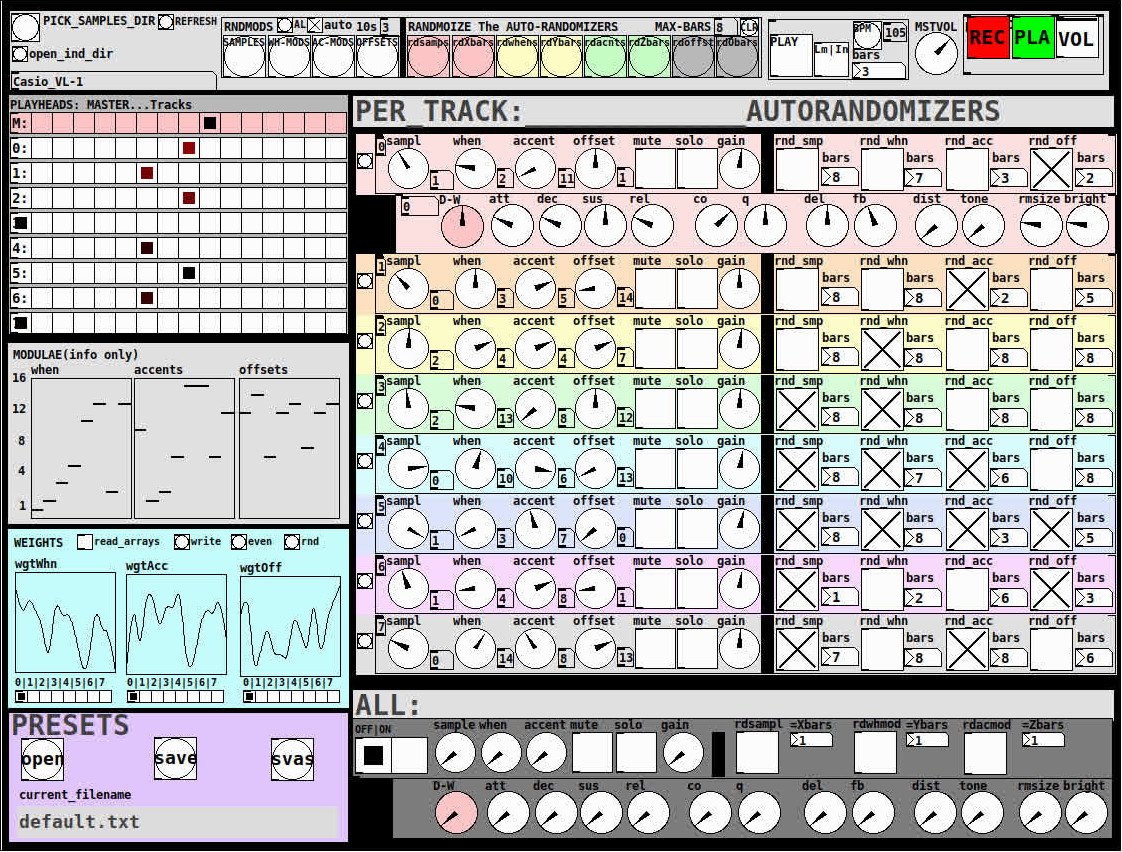
THE 7 SECTIONS:
- GLOBAL:
- to set parameters for all 8 tracks, exs. pick the samples directory from a tof/pmenu or OPEN_IND_DIR (open an independent directory) (see below "Samples"for more detail)
- randomizing parameters, random all. randomize all every 10*seconds, maximum number of bars when randomizing bars, CLR the randomizer check boxes
- PLAY, L(imited) or I(nfinite) counter, if L then number of bars to play before resetting counter, bpm(menu)
- MSTVOL
- transport/recording (on REC files are automatically saved to ./ganymede/recordings with datestamp filename, the output is zexy limited to 98 and the volume controls the boost into the limiter)
- PLAYHEADS:
- indicating where the track is "beating"
- blank=no beat and black-to-red where redder implies greater env~ rms
- MODULAE:
- for information only to show the relative values of the selected modulators
- WEIGHTS:
- sent to [list-wrandom] when randomizing the When, Accent, and Offset modulators
- to use click READ_ARRAYS, adjust as desired, click WRITE, uncheck READ ARRAYS
- EVEN=unweighted, RND for random, and 0-7 for preset shapes
- PRESETS:
- ...self explanatory
-
PER TRACK ACCORDION:
- 8 sections, 1 per track
- each open-closable with the left most bang/track
- opening one track closes the previously opened track
- includes main (always shown)
- with knobs for the sample (with 300ms debounce)
- knobs for the modulators (When, Accent, and Offset) [1..16]
- toggles if you want that parameter to be randomized after X bars
- and when opened, 5 optional effects
- adsr, vcf, delayfb, distortion, and reverb
- D-W=dry-wet
- 2 parameters per effect
-
ALL:
when ON. sets the values for all of the tracks to the same value; reverts to the original values when turned OFF
MIDI:
CC 7=MASTER VOLUME
The other controls exposed to midi are the first four knobs of the accordion/main-gui. In other words, the Sample, When, Accent, and Offset knobs of each track. And the MUTE and SOLO of each track.
Control is based on a midimap file (./midimaps/midimap-default.txt).
So if it is easier to just edit that file to your controller, then just make a backup of it and edit as you need. In other words, midi-learn and changing midimap files is not supported.
The default midimap is:
By track
CCs
| ---TRACK--- | ---SAMPLE--- | ---WHEN--- | ---ACCENT--- | --- OFFSET--- |
|---|---|---|---|---|
| 0 | 16 | 17 | 18 | 19 |
| 1 | 20 | 21 | 22 | 23 |
| 2 | 24 | 25 | 26 | 27 |
| 3 | 28 | 29 | 30 | 31 |
| 4 | 46 | 47 | 48 | 49 |
| 5 | 50 | 51 | 52 | 53 |
| 6 | 54 | 55 | 56 | 57 |
| 7 | 58 | 59 | 60 | 61 |
NOTEs
| ---TRACK--- | ---MUTE--- | ---SOLO--- |
|---|---|---|
| 0 | 1 | 3 |
| 1 | 4 | 6 |
| 2 | 7 | 9 |
| 3 | 10 | 12 |
| 4 | 13 | 15 |
| 5 | 16 | 18 |
| 6 | 19 | 21 |
| 7 | 22 | 24 |
SAMPLES:
Ganymede looks for samples in its ./samples directory by subdirectory.
It generates a tof/pmenu from the directories in ./samples.
Once a directory is selected, it then searches for ./**/.wav (wavs within 1-deep subdirectories) and then ./*.wav (wavs within that main "kit" directory).
I have uploaded my collection of samples (that I gathered from https://archive.org/details/old-school-sample-cds-collection-01, Attribution-Non Commercial-Share Alike 4.0 International Creative Commons License, 90's Old School Sample CDs Collection by CyberYoukai) to the following link on my Google Drive:
https://drive.google.com/file/d/1SQmrLqhACOXXSmaEf0Iz-PiO7kTkYzO0/view?usp=sharing
It is a large 617 Mb .7z file, including two directories: by-instrument with 141 instruments and by-kit with 135 kits. The file names and directory structure have all been laid out according to Ganymede's needs, ex. no spaces, etc.
My suggestion to you is unpack the file into your Path so they are also available for all of your other patches.
MAKING KITS:
I found Kits are best made by adding directories in a "custom-kits" folder to your sampls directory and just adding files, but most especially shortcuts/symlinks to all the files or directories you want to include in the kit into that folder, ex. in a "bongs&congs" folder add shortcuts to those instument folders. Then, create a symnlink to "bongs&congs" in your ganymede/samples directory.
Note: if you want to experiment with kits on-the-fly (while the patch is on) just remember to click the REFRESH bang to get a new tof/pmenu of available kits from your latest ./samples directory.
If you want more freedom than a dynamic menu, you can use the OPEN_IND(depedent)_DIR bang to open any folder. But do bear in mind, Ganymede may not see all the wavs in that folder.
AFTERWARD/NOTES
-
the [hcs/folder_list] [tof/pmenu] can only hold (the first) 64 directories in the ./samples directory
-
the use of 1/16th notes (counter-interval) is completely arbitrary. However, that value (in the [pd global_metro] subpatch...at the noted hradio) is exposed and I will probably incorporate being able to change it in a future version)
-
rem: one of the beauties of this technique is: If you don't like the beat,rhythm, etc., you need only click ALL to get an entirely new beat or any of the other randomizers to re-randomize it OR let if do that by itself on AUTO until you like it, then just take it off AUTO.
-
One fun thing to do, is let it morph, with some set of toggles and bars selected, and just keep an ear out for the Really choice ones and record those or step in to "play" it, i.e. tweak the effects and parameters. It throws...rolls...a lot of them.
-
Another thing to play around with is the notion of Limited (bumpy) or Infinite(flat) sequences in conjunction with the number of bars. Since when and where the modulator triggers is contegent on when it resets.
-
Designed, as I said before, to be played, esp. once it gets rolling, it allows you to focus on the production (instead of writing beats) by controlling the ALL and Individual effects and parameters.
-
Note: if you really like the beat Don't forget to turn off the randomizers. CLEAR for instance works well. However you can't get the back the toggle values after they're cleared. (possible feature in next version)
-
The default.txt preset loads on loadbang. So if you want to save your state, then just click PRESETS>SAVE.
-
[folder_list] throws error messages if it can't find things, ex. when you're not using subdirectories in your kit. No need to worry about it. It just does that.
POSTSCRIPT
If you need any help, more explanation, advise, or have opinions or insight as to how I can make it better, I would love to hear from you.
I think that's >=95% of what I need to tell you.
If I think of anything else, I'll add it below.
Peace thru Music.
Love thru Pure Data.
-s
,
 posted in patch~
s~/r~ throw~/catch~ latency and object creation order
I searched through many of the s~/r~ throw~/catch~ hops in my own code for mistakes based on what I've learned, and it looks like ~50% of all my non-local audio connections carry modulation signals that originate from control rate objects, so those aren't affected much. Only a few programs would have been broken had the non-local connections not matched, but because things were created in signal-flow order where it mattered, there was a consistent (and often unnecessary) 1 block delay everywhere. Many of those patches were later converted to use tabsend~/tabreceive~ under a small block size, and a few were converted to use delay lines. I was burned by the creation order side effect of delwrite~/delread~ once, but it wouldn't have happened had I not taken a lazy shortcut. Hilariously, I also found one test patch that I used to declare definitively, once and for all, that s~/r~ always introduces a 1 block delay if the sort order isn't controlled using the G05 technique. To paraphrase Agent K in the movie Men in Black, imagine what I'll "know" tomorrow!
So as a practical issue, I doubt coders are getting tripped up by this frequently. If you're like me you tend to code in signal flow order, and so you are mostly just introducing latency unnecessarily. RE advice, I agree with @Nicolas-Danet: use local audio connections wherever it matters and never mind the clutter. Even my worst spider web isn't so bad. Subpatches and abstractions can help hide the mess.
But when things are broken and showtime is looming, you'd be foolish not to use what you know, especially when you can always go back after curtain calls and adjust things to satisfy the style police. Here is a summary of the sort rules as best as I've been able to figure them out so far:
- A patch orders its constituent audio subpatches and abstractions, but has no influence over their internal ordering. Consequently, these rules are applied starting at the top level patch and recurse into each subpatch and abstraction.
- Audio chain tributaries and independent audio chains are executed in reverse order of their head's creation, except for those created by [clone], which are executed in the order of their creation (i.e. ascending clone index order).
- Audio branches that start from fanout connections are executed in reverse order of their start connection's creation.
- Whenever the rules conflict, the rule that places the tilde object the latest in line takes precidence.
These sort rules can affect your patch because unless s~ and throw~ buffer their data before their corresponding r~ and catch~ are executed, the latter will have to wait a block to access it. Delread~ will have a minimum 1 block delay.
Finally, I thought of this technique if you're absolutely certain you are going to get burned (or are just paranoid): wrap all s~, r~, throw~, catch~, delwrite~, delread~, and audio chain heads in their own subpatches. I noticed that if you modify the contents of a subpatch, it doesn't change its sort order in the containing patch, so you can add test code (e.g. [sig~ <uniqueNr>]->[tabsend~ <sharedArray>]) to subpatch pairs and check their execution order without changing it. If the order is wrong, then you cut and repaste the appropriate subpatches or audio connections according to the rules above until it isn't. That should take 15 mins, not days.
 posted in technical issues
Question about Pure Data and decoding a Dx7 sysex patch file....
For the Blofeld editor, well, it's a one way communication editor(for now), the editor only sends data to Blofeld, I can not change a parameter directly on Blofeld and then the editors parameter follows. I didn't do that yet, but it's on the to do list.
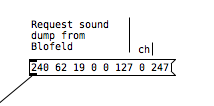
In my last post, when I refer to a sound dump, it's the same as a patch dump. But what I did there was only to start the sound dump on Blofeld by sending the "request sound dump" sysex string from Pd to Blofeld, to dump the current sound from Blofeld and then receive the sound dump in Pd. I did not try to decode the sound dump to get the individual parameters. So can't use that for the Dx7 approach.
I did get an idea from your posts, though, how I might be able to "backwards engineer" the sysex patches from Dx7:
- Use the free Dexed dx7 and export a patch sysex dump for reference.
- Then use the same patch and change ONE single parameter and export the patch as sysex dump.
- Compare the two sysex dumps and see which values have changed. The value changed is the parameter I am looking for. I can then assign it to a fader in my Dx7 editor.
- Do it a few times with a few different parameters, until I find a pattern. Or just do it for every single parameter, to be on the safe side......
(Dexed Dx7 editor/Vst - https://www.kvraudio.com/product/dexed-by-digital-suburban/downloads)
I know, it's not the smartest way, but it worked for Blofeld and since this is "only" around 150 params in total it should be manageable, as a weekende project
About the 32 voices, ahh yes, you are probably right, it's the amount of presets, not actual polyphonic voices. Would love to get that working too, to get all 32 voices/presets of a voice card dump. There are a lot of them around.
Thanks again. I actually though sysex messages for full patch dump was more complicated. If all parameters are just individual numbers in the sysex string, it's doable, just a bit time consuming.
 posted in technical issues
Question about Pure Data and decoding a Dx7 sysex patch file....
Hey Seb!
I appreciate the feedback
The routing I am not so concerned about, I already made a nice table based preset system, following pretty strict rules for send/recives for parameter values. So in theory I "just" need to get the data into a table. That side of it I am not so concerned about, I am sure I will find a way.
For me it's more the decoding of the sysex string that I need to research and think a lot about. It's a bit more complicated than the sysex I used for Blofeld.
The 32 voice dump confuses me a bit. I mean most single part(not multitimbral) synths has the same parameter settings for all voices, so I think I can probably do with just decoding 1 voice and send that data to all 16 voices of the synth? The only reason I see one would need to send different data to each voice is if the synth is multitimbral and you can use for example voice 1-8 for part 1, 9-16 for part 2, 17-24 for part 3, 24-32 for part 4. As an example....... Then you would need to set different values for the different voices. I have no plan to make it multitimbral, as it's already pretty heavy on the cpu. Or am I misunderstanding what they mean with voices here?
Blofeld:
What I did for Blofeld was to make an editor, so I can control the synth from Pure Data. Blofeld only has 4 knobs, and 100's of parameters for each part.... And there are 16 parts... So thousand + parameters and only 4 knobs....... You get the idea 
It's bit of a nightmare of menu diving, so just wanted to make something a bit more easy editable .
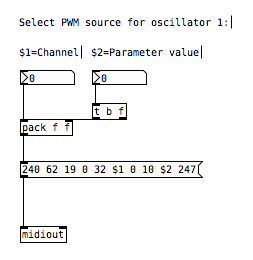
First I simply recorded every single sysex parameter of Blofeld(100's) into Pure data, replaced the parameter value in the parameter value and the channel in the sysex string message with a variable($1+$2), so I can send the data back to Blofeld. I got all parameters working via sysex, but one issue is, that when I change sound/preset in the Pure Data, it sends ALL parameters individually to Blofeld.... Again 100's of parameters sends at once and it does sometimes make Blofeld crash. Still needs a bit of work to be solid and I think learning how to do this decoding/coding of a sysex string can help me get the Blofeld editor working properly too.
I tried several editors for Blofeld, even paid ones and none of them actually works fully they all have different bugs in the parameter assignments or some of them only let's you edit Blofeld in single mode not in multitimbral mode. But good thingis that I actually got ALL parameters working, which is a good start. I just need to find out how to manage the data properly and send it to Blofeld in a manner that does not crash Blofeld, maybe using some smarter approach to sysex.
But anyway, here are some snapshots for the Blofeld editor:
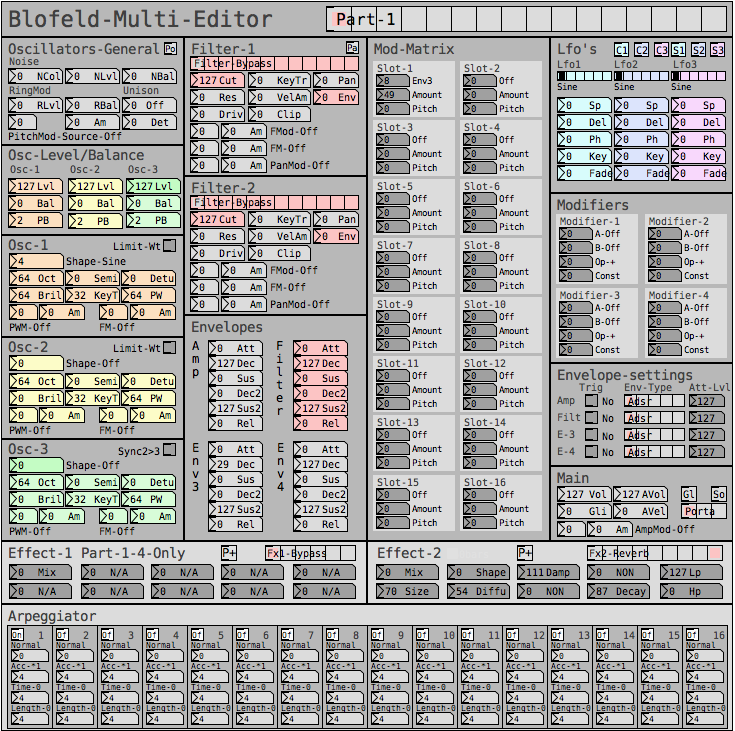
Image of the editor as it is now. Blofeld has is 16 part multitimbral, you chose which part to edit with the top selector:
Here is how I send a single sysex parameter to Blofeld:
If I want to request a sysex dump of the current selected sound of Blofeld(sound dump) I can do this:
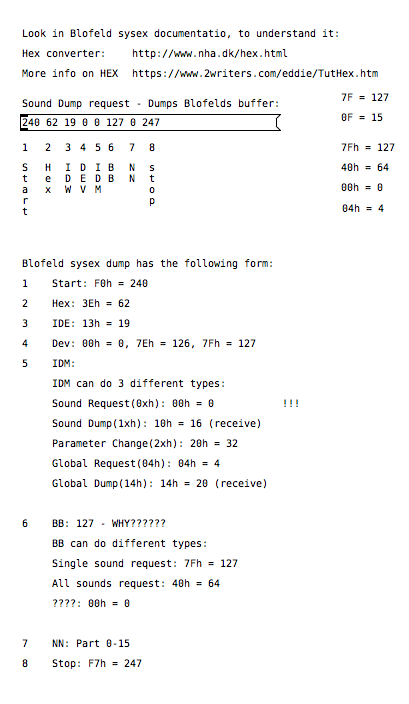
I can then send the sound dump to Blofeld at any times to recall the stored preset. For the sound dump, there are the rules I follow:
For the parameters it was pretty easy, I could just record one into PD and then replace the parameter and channel values with $1 & $2.
For sound dumps I had to learn a bit more, cause I couldn't just record the dump and replace values, I actually had to understand what I was doing. When you do a sysex sound dump from the Blofeld, it does not actually send back the sysex string to request the sound dump, it only sends the actual sound dump.
I am not really a programmer, so it took a while understanding it. Not saying i fully understand everything but parameters are working, hehe
So making something in Lua would be a big task, as I don't know Lua at all. I know some C++, from coding Axoloti objects and VCV rack modules, but yeah. It's a hobby/fun thing I think i would prefer to keep it all in Pure Data, as I know Pure Data decently.
So I do see this as a long term project, I need to do it in small steps at a time, learn things step by step.
I do appreciate the feedback a lot and it made me think a bit about some things I can try out. So thanks
posted in technical issues
Question about Pure Data and decoding a Dx7 sysex patch file....
@jaffasplaffa I think your biggest problem will be routing the info of the various parameters to the appropriate locations. I guess the way to do it might be to have a giant [route] with a counter, for each type of sysex? basically you need a state machine with a counter that counts how many parameters have been received, and changes the routing depending on the values of previous received values
if you want to do the 32-patch sysexs you will need to do some bitshifting of some of the inputs for a few parameters too.
tihs type of thing is really better accomplished in a text format I think, perhaps look into pdlua or py/pyext or pdjs.
if you use one of these you might be able to simplify things by having an array with the name of a recieve, so you can just count the parameters and send to an appropriate receive by reading the right value from the array.
another way to do it would be to have each receive follow a specific naming format (like $0-param0, $0-param1 etc.) and then look up the appropriate number in an array for the different types of sysex. Then you can just change the send name depending on which parameter is being sent using pd's built-in message formatting with $1 etc.
how did you do it with individual sysex parameters?
 posted in technical issues
Issue with subpatches
Hi,
I started a simple project just for fun and I encountered something strange. I use some subpatch on my patch on they work well, though they doing somehting strange. I have made some copies of a few subpatch I've made and when I tweak a value of one subpatch it affect the sound of it's copy, which is strange. It affect all the subpatch I made copy of. And I've tried to made subpatch with the same code but different names and it does the exact same thing. I'm very confused, I don't understand what is going on.
 posted in technical issues