
Andúril (MobMuPlat app): fwd/bwd looper + 14 effects + elven cloak (control parameters via env~ and pitch as you play)
Andúril (MobMuPlat app): fwd/bwd looper + 14 effects + elven cloak (control parameters via env~ and pitch as you play)
UPDATED VERSION (corrected MobMuPlat system crash problem):
anduril.zip
This has been long in coming and I am very glad to finally release it (even tho my handheld hardware is not up to the job of running the elven cloak feature).
First a demo video and some screenshots, , and then the instructions.
DEMO VIDEO
SCREENSHOTS
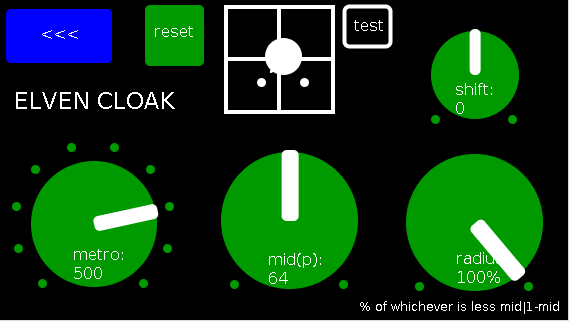
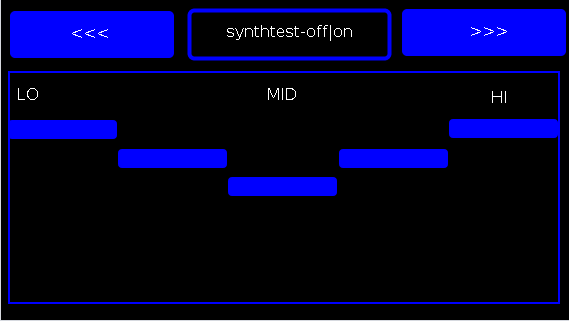
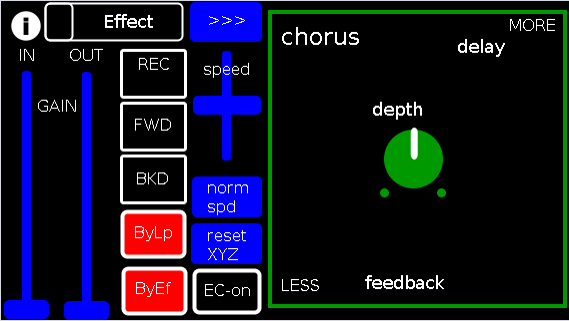
Intention(s):
The app is designed to give (specifically a guitarist) tho really any input (even prerecorded as is the case in the demo (from: "Laura DeNardis Performing Pachabels Canon" from https://archive.org/details/LauraDenardisPerformingPachabelsCanon, specifically the wave file at: https://archive.org/download/LauraDenardisPerformingPachabelsCanon/PachabelsCanon.wav, Attribution-Noncommercial-Share Alike 3.0) FULL Control over the "voice" of their output-sound.
It includes:
a 5-band EQ (on page 2 of the app) (upfront that is applied to all incoming sounds);
a looper: with record, forward, backward, speed, and bypass controls (that runs via a throw along with the effects channel)
14 effects each with 3 controllable parameters (via the xy-slider+centered knob) including: chorus, distortion, delay, reverb, flanger, tremolo, vibrato, vcf, pitchshifter, pitchdelay, 12string, stepvibrato, pushdelay (delayfb driven by magnitude of the env~), and stagdelay (2 out-of-sync delay lines which can be driven in and out of phase by the sum of their delwrite+vd's so what goes in first may come out last)
elven_cloak: which drives the 3 parameter controls via the peak bands amplitude and proximity to a set pitch (midi note) and whose window can be broadened or shrunk and shifted within that window, i.e. the three effect parameters are changed automatically according to what and how you play
and
a tester synth: that randomly sends midi pitches between 20-108, velocities between 20-127, and durations between 250-500ms.
CONTROLS (from top-left to bottom-right):
PAGE 1:
Effect: effects menu where the you choose an effect;
>>>,<<<: page navigation buttons;
IN,OUT: gains (IN is the preamp on the EQ5, and OUT is applied to total output);
REC,FWD,BWD,speed,normspd: the looper toggles and on speed, higher is faster and mid normal and normspd resets to mid;
xy-slider+centered knob: the 3 parameter controls + their labels (the bottom is x, top y and above the knob for the third one), the name of the selected effect and its parameters load each time you choose from the Effects menu, bottom left is lowest, top-right highest;
ByLp,ByEff: bypasses for the looper and effects "channel" (the outputs are summed);
EC-on: elven cloak toggle (default=off);
PAGE 2:
the EQ5 controls;
synthtest: off|on, default is off;
PAGE 3: elven cloak controls
reset: sets shift, metro, mid, and radius to 0, 500(ms),64,100% respectively (i.e. the entire midispectrum, 0-127) respectively;
mini-xyz, test: if test is on, you see a miniature representation of the xyz controls on the first page, so you can calibrate the cloak to your desired values;
shift: throws the center of the range to either the left or right(+/-1);
metro: how frequently in milliseconds to take env~ readings;
mid: the center in midipitch, i.e. 0-127, of the "watched" bands
radius(%): the width of the total bands to watch as a percentage of whichever is lower 1-mid or mid
END CONTROLS
Basic Logic:
There are 4 modes according to the bypass state of the looper and effects.
A throw catch and gain/sum/divide is applied accordingly.
End:
As I mentioned at the first, my handheld(s) are not good enough to let me use this but it runs great on my laptop.
So...
I would love to hear if this Does or Does Not work for others and even better any output others might make using it. I am enormously curious to hear what is "possible" with it.
Presets have not (yet  been included as I see it, esp. with the cloak as a tool to be used for improv and less set work. Tho I think it will work nicely for that too if you just turn the cloak off.
hmmm, hmmm,...
I think that's about it.
Let me know if you need any help, suggestions, ideas, explanations, etc. etc. etc. regarding the tool. I would be more than happy to share what I learned.
Peace, Love, and Ever-Lasting Music.
Sincerely,
Scott
p.s. please let me know if I did not handle the "attribution" part of "Laura DeNardis Performing Pachabels Canon" License correctly and I will correct it immediately.
Ciao, for now. Happy PD-ing!
 posted in patch~
all possible permutations with repetitions of harmonic volume from top to bottom
@weightless the list could be made of integers, one integer would represent a percentage of the volume of a harmonic, or maybe it can be done directly with the percentage numbers (its just easier for me when doing the permutations manually to think of letters), so it would be like this simply with three percentages for three harmonics, how about, initially, harmonic "a" or "1" would have its volume at 34%, harmonic b or 2 at 67%, and harmonic c or 3 at 100% (At the end I want to go all out on this morphing timbre exercise and implement 32 harmonics for maybe 10 or 32 volume percentages, if there are 32 harmonics and 10 volume percentages there would have to be repetitions or maybe 64 harmonics and 100 different volume percentages!).
I think that what is more difficult to grasp here are the repetitions, the permutations are done, we understand that three different elements would have 6 permutations (I checked out your randomize patch, nice, i was thinking of that also, for an option to randomize the list if you wanted of all possible combinations with their repetitions), I think of the repetitions like this: first you have to know how many harmonics you have, and how many percentages you will have , so let´s say three harmonics "A""B""C", and three options for percentages a=34%, b=67% and c=100%, so its three to three options.
The first category would be for there to be one repetition, (so two equal letters), so we start with first harmonic at 34% , second at 34% and third at 67%, Im going to use only letters now for the percentages, so that was a,a,b. then it´s permutations (a,b,a; b,a,a), now same category but "a" against "c" so: aac, aca,caa
then once we have already past letter a against all possible letters in order we go to another category (three equal letters) "aaa", then we are done with "a", now we go back to the first category (one repetition) but we start with the second letter "b", so now its bba, bab,abb, then bbc,bcb,cbb then bbb, then cca, cac, acc, then ccb,cbc,bcc then ccc, now, i think those are all possible repetitions with 3 harmonics. So when the curve in iannix is at the top that means start the list with with different elements (3 harmonics, 6 permutations), then the repetitions (21 combinations). or maybe an option to start first with the repetitions then with the different elements
 posted in technical issues
all possible permutations with repetitions of harmonic volume from top to bottom
Actually my patch doesn't work with repetitions (a list of '1 1 1' doesn't even give 1 permutation but instead it just loops forever trying to find a new permutations).
I think that a way to do it would be to convert the original list to unique floats (so that list 'a b c' becomes '1 2 3'), get all the permutations of that and then scan each permutation and convert each value back to its corresponding original one. In this case, list 'a a a' would give 6 identical permutations. Is that what you are looking for?
I'm pretty sure it can be done with [list-find] and [list-idx], I'll try and update the patch in the next few days.
 posted in technical issues
trying to compile iem_dp on Mac - makefile errors
Hi everyone,
I've been trying for a solid few days to get iem_dp working on my Mac (for double precision lookup of long arrays), but I seem to have reached the limits of my abilities.
I downloaded the library from https://git.iem.at/pd/iem_dp/tree/master which contains the helpfiles, .c files for each object, and four makefiles for different architectures (including makefile_darwin, which I assume is the one I want for MacOS 10.12. I have no experience with compiling files, so I tried downloading Command Line Tools, and ran "make -f makefile_darwin" in Terminal, but I only get errors (see below).
Does anyone know what the problem might be? Or, does anyone happen to have iem_dp compiled for pd_darwin?
touch symtodp.c
cc -DPD -DUNIX -g -Wall -W -Werror -Wno-unused -Wno-parentheses -Wno-switch -O2 -fno-strict-aliasing -I. -I"/Applications/Pd-0.47-1.app/Contents/Resources"/src -DPD -I. -I"/Applications/Pd-0.47-1.app/Contents/Resources"/src -c -o symtodp.o symtodp.c
symtodp.c:86:50: error: unused parameter 's' [-Werror,-Wunused-parameter]
static void symtodp_list(t_symtodp *x, t_symbol *s, int ac, t_atom *av)
^
symtodp.c:96:61: error: unused parameter 'ac' [-Werror,-Wunused-parameter]
static void symtodp_anything(t_symtodp *x, t_symbol *s, int ac, t_atom *av)
^
symtodp.c:96:73: error: unused parameter 'av' [-Werror,-Wunused-parameter]
static void symtodp_anything(t_symtodp *x, t_symbol *s, int ac, t_atom *av)
^
symtodp.c:120:37: error: unused parameter 'x' [-Werror,-Wunused-parameter]
static void symtodp_free(t_symtodp *x)
^
4 errors generated.
make: *** [symtodp.o] Error 1``` posted in technical issues
Using multiples of the same subpatch when it includes a table
Hi,
I created a subpatch that has a sound file loaded into a table (named 'table'). The subpatch works fine when there's just one of them. However, if I want two subpatches (or three, or four, etc.) doing their thing at the same time, I run into problems. I want two subpatches to do the same thing but load/output different soundfiles. However, because the table in both subpactches share the same name, the same sound gets loaded into the table for each of the two subpatches.
I had the same problem with delay lines but was able to get around this by using a $0, which gave each line a unique identifier, so PureData was able to distinguish between the two different lines. $0 doesn't work for me when I use it for the table. I'm sure there's an easy solution for this. I am not experienced enough to know.
Chris
 posted in technical issues
Using serially connected [route] to parse strings
Hi There,
I've made significant progress with the patch, using my initial concept of connecting [route] serially. I have a few problems still to address.
I'm currently connecting sub patches for each parameter serially, which works but is less than ideal.
- Using this approach means that the URL sub patch will need to be manually redone for each video, on each computer.
- Data stops flowing past the pitch parameter whenever it's at a -0 value. -1, -2, -3, and positive values are all okay, but not -0.
- The position parameter is counting in ms., which cause parameters down the line to stutter.
The fix for all of this would be to access each parameter directly from [udpreceive]. I've tried a few of the list-abs objects, but have not gotten anything to work yet.
Attached is an overview of the patch and the fov sub patch.
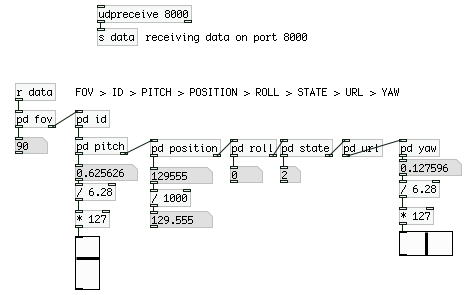
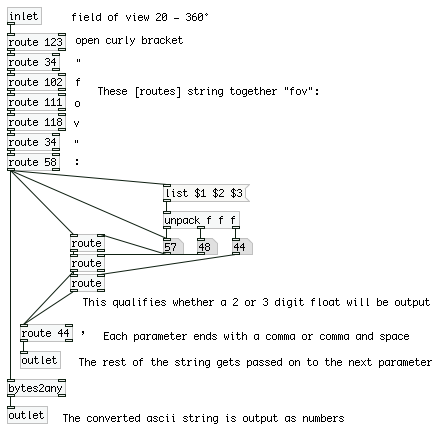
 posted in technical issues
Referencing argument array names in PD subpatches / abstractions?
Consider the following trivial patch (testing on Pd 0.45.4 on Ubuntu 14.04):
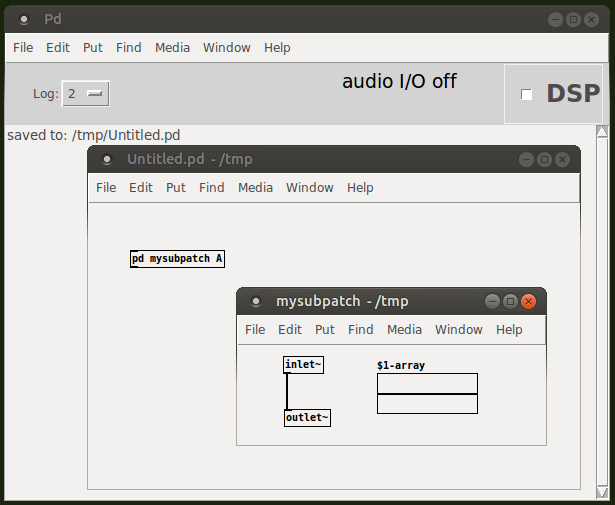
In it, I have a [pd mysubpatch A]. As far as I remember, the A is now an argument of/to the subpatch, in particular it is the first argument - and references to $1 inside the subpatch should expand to A.
So, I've decided to place an array inside the subpatch, and call it $1-array, similar to how in abstractions, arrays are/can be called $0-array - except there the $0 doesn't expand to any arguments, but instead expands to a random number (Dollar signs in objects and messages | PURE DATA forum~). My expectation is that the $1 in my case would expand to the first argument, A, and thus the array name at instantiation time of the object [pd mysubpatch A] would expand to A-array.
The idea is thus to be able to put multiple subpatches in a patch, and control their internal arrays' names by supplying unique arguments. So, I try to copy/duplicate the [pd mysubpatch A] into a [pd mysubpatch B], expecting its array would ultimately be called B-array. So far so good, because I can do this without any problems.
Now consider a slightly more complicated case where I also have a tabwrite~ in the subpatch:
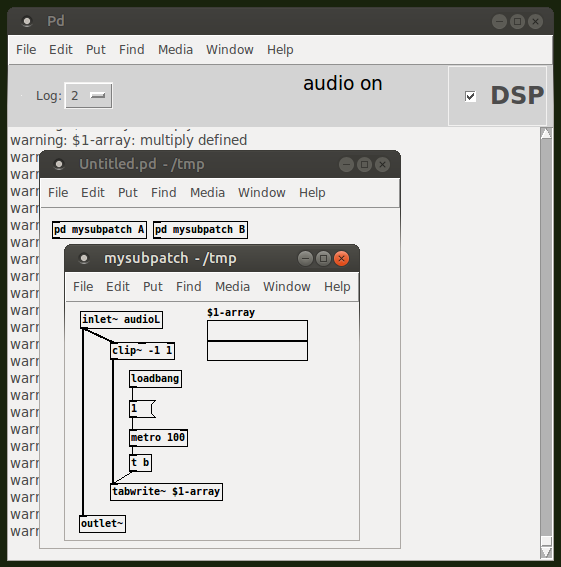
Now that I have [tabwrite~ $1-array] referencing the $1-array in the subpatch, as soon as I turn on DSP/audio, I get a ton of warning: $1-array: multiply defined messages. As I don't get this message when I have only the $1-array in the subpatch, I'm assuming it is not the logic in naming the arrays $1-array via subpatch arguments that is the problem, but instead it is the reference in the [tabwrite~ $1-array] which is causing the warning message.
Note that exactly the same happens, if I save the subpatch as an abstraction mysubpatch.pd, and use it as two objects [pd mysubpatch.pd A] and [pd mysubpatch.pd B]:
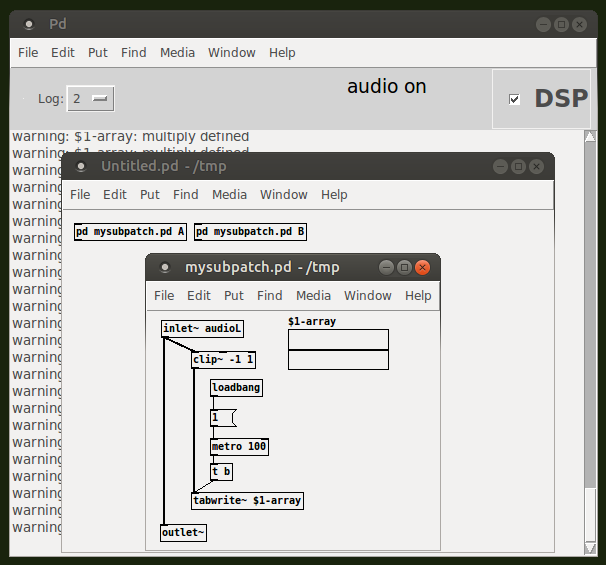
But then, in this case, how would I reference such a subpatch/abstraction array, named through an argument, from inside the subpatch/abstraction itself? Note that I need fixed, explicit, known names of arrays, so a workaround like $0-$1-array wouldn't work for me, since the $0 would expand to a random number, which I in principle do not know from the outside (and I'm not sure $0 even applies to subpatches).
 posted in technical issues
Control Parameter Scalling Issue -- Pd Vanilla
So I'm nearing completion of a somewhat large hardware control patch using Vanilla objects only in the most minimal and elegant manner I can come up with. It's mostly done, but there's one specific scaling issue that's holding things up ATM. I've come up with some ideas to solve the problem but those solutions are a bit ungainly and overly complex relative to the way I've coded the rest of the patch. So I'm interested if anyone on here has any better Vanilla-compatible ideas (trying to avoid use of externals here).
The hardware device has a number of parameters which can be accessed either by standard low-resolution midi control (0-127) OR by higher resolution system exclusive control (in one case, 0-164 thou the hi res max values vary between the different parameters being accessed). The patch contains dual sliders so that the parameters in question can be accessed both ways, and these sliders send data to both the receiving device to change the actual value as well as to a [set $1( message which is then connected to the other slider to reflect the updated value. Obviously this slider update value has to be compressed or expanded before being converted to the "set" value. That's not so much of a problem except that it has to replicate the same exact scaling that the hardware device uses or the updated value will be inaccurate relative to the adjusted hardware parameter.
For example, in the case of the 0-164 parameter, the hardware scales this to standard midi by jumping every 4th digit (so it drops 4, 8, 13, 17 etc from the hi res value). What is the simplest and most elegant way to add or subtract from the control range in order to replicate the same scaling in Pd Vanilla?
 posted in technical issues
Beatmaker Abstract
http://www.2shared.com/photo/mA24_LPF/820_am_July_26th_13_window_con.html
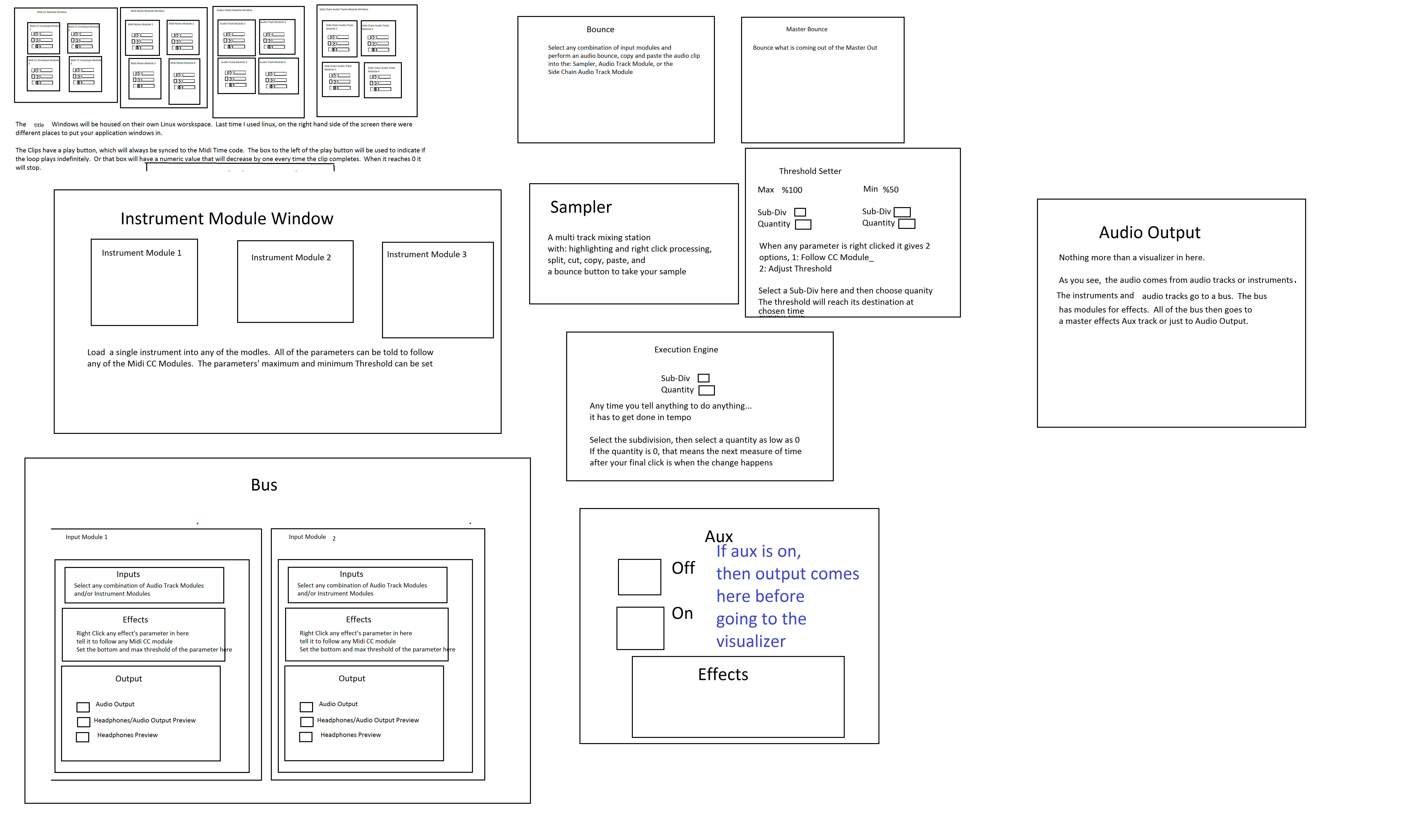
I conceptualized this the other day. The main reason I wanted to make this is because I'm a little tired of complicated ableton live. I wanted to just be able to right click parameters and tell them to follow midi tracks.
The big feature in this abstract is a "Midi CC Module Window" That contains an unlimited (or potentially very large)number of Midi CC Envelope Modules. In each Midi CC Envelope Module are Midi CC Envelope Clips. These clips hold a waveform that is plotted on a tempo divided graph. The waveform is played in a loop and synced to the tempo according to how long the loop is. Only one clip can be playing per module. If a parameter is right clicked, you can choose "Follow Midi CC Envelope Module 1" and the parameter will then be following the envelope that is looping in "Midi CC Envelope Module 1".
Midi note clips function in the same way. Every instrument will be able to select one Midi Notes Module. If you right clicked "Instrument Module 2" in the "Instrument Module Window" and selected "Midi input from Midi Notes Module 1", then the notes coming out of "Midi Notes Module 1" would be playing through the single virtual instrument you placed in "Instrument Module 2".
If you want the sound to come out of your speakers, then navigate to the "Bus" window. Select "Instrument Module 2" with a drop-down check off menu by right-clicking "Inputs". While still in the "Bus" window look at the "Output" window and check the box that says "Audio Output". Now the sound is coming through your speakers. Check off more Instrument Modules or Audio Track Modules to get more sound coming through the same bus.
Turn the "Aux" on to put all audio through effects.
Work in "Bounce" by selecting inputs like "Input Module 3" by right clicking and checking off Input Modules. Then press record and stop. Copy and paste your clip to an Audio Track Module, the "Sampler" or a Side Chain Audio Track Module.
Work in "Master Bounce" to produce audio clips by recording whatever is coming through the system for everyone to hear.
Chop and screw your audio in the sampler with highlight and right click processing effects. Glue your sample together and put it in an Audio Track Module or a Side Chain Audio Track Module.
Use the "Threshold Setter" to perform long linear modulation. Right click any parameter and select "Adjust to Threshold". The parameter will then adjust its minimum and maximum values over the length of time described in the "Threshold Setter".
The "Execution Engine" is used to make sure all changes happen in sync with the music.
IE>If you selected a subdivision of 2, and a length of 2, then it would take four quarter beats(starting from the next quarter beat) for the change to take place. So if you're somewhere in the a (1e+a) then you will have to wait for 2, 3, 4, 5, to pass and your change would happen on 6.
IE>If you selected a subdivision of 1 and a length of 3, you would have to wait 12 beats starting on the next quater beat.
IE>If you selected a subdivision of 8 and a length of 3, you would have to wait one and a half quarter beats starting on the next 8th note.
http://www.pdpatchrepo.info/hurleur/820_am,_July_26th_13_window_conception.png
 posted in abstract~
Pinning objects to other objects.
To create a subpatch named "container" create a new object [pd container]. You can replace "container" with whatever you want your subpatch to be called.
This will open up a new pd window displaying the contents (currently none) of your subpatch. To open the subpatch later on you can click on it in performance mode or right/control click in edit mode and select "open".
To send audio into or out of the subpatch, create [inlet~] or [outlet~] objects.
To send non-audio data into or out of the subpatch, create [inlet] or [outlet] objects.
To enable graph-on-parent control/right click on the subpatch, select properties, and check the box next to graph-on-parent. This will create a red rectangle (resizeable in the properties). Any gui objects within this rectangle will be visible and accessible from the parent patch, all patch cables and non-gui objects will not be displayed in the parent patch.
For more information, check out the subpatch and graph-on-parent sections of the FLOSS manual:
 posted in this forum