
How to express speedlim in messages?
@ddw_music here's a version I recently made for an organelle project
float-speedlim.zip
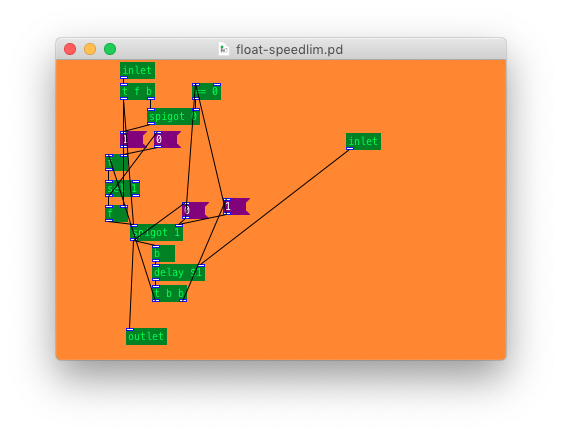
edit: I noticed that cyclone's [speedlim] works for any message (not just floats like iemlib's [speedlim]) so here's a modified version to do that:
any-speedlim.zip
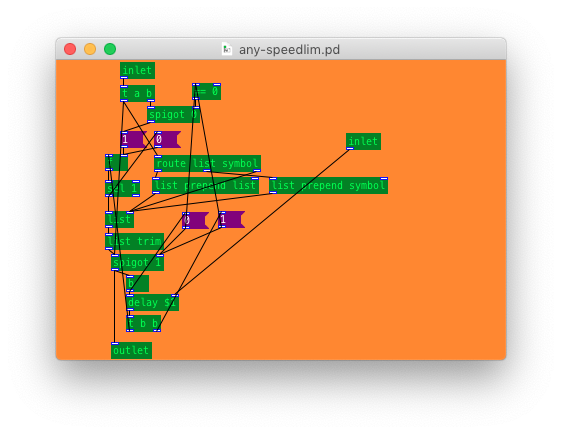
(if a message comes in while a delay/"pending" state is happening, set a flag and store what was received in the [list], and the flag in a [f ]. After the delay/"pending" state, if the flag is set then output the contents of the [list], and restart the delay/"pending" state.
If in the "idle" state the incoming message passes directly through the lower [spigot] and starts a delay/"pending" state. The lower spigot is blocked during the "pending" state, but opens between "pending" states if a message was received during the prior one, before starting a new "pending" state.)
 posted in technical issues
s~/r~ throw~/catch~ latency and object creation order
For a topic on matrix mixers by @lacuna I created a patch with audio paths that included a s~/r~ hop as well as a throw~/catch~ hop, fully expecting each hop to contribute a 1 block delay. To my surprise, there was no delay. It reminded me of another topic where @seb-harmonik.ar had investigated how object creation order affects the tilde object sort order, which in turn determines whether there is a 1 block delay or not. Object creation order even appears to affect the minimum delay you can get with a delay line. So I decided to do a deep dive into a small example to try to understand it.
Here's my test patch: s~r~NoLatency.pd
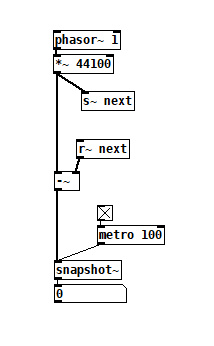 The s~/r~ hop produces either a 64 sample delay, or none at all, depending on the order that the objects are created. Here's an example that combines both: s~r~DifferingLatencies.pd
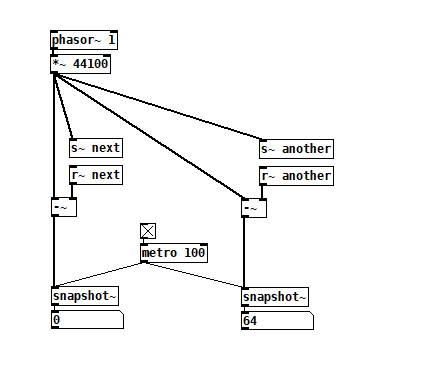 That's pretty kooky! On the one hand, it's probably good practice to avoid invisible properties like object creation order to get a particular delay, just as one should avoid using control connection creation order to get a particular execution order and use triggers instead. On the other hand, if you're not considering object creation order, you can't know what delay you will get without measuring it because there's no explicit sort order control. Well...technically there is one and it's described in G05.execution.order, but it defeats the purpose of having a non-local signal connection because it requires a local signal connection. Freeze dried water: just add water.
To reduce the number of cases I had to test, I grouped the objects into 4 subsets and permuted their creation orders:
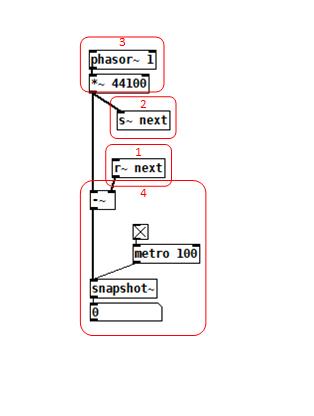 The order labeled in the diagram has no latency and is one that I just stumbled on, but I wanted to know what part of it is significant, so I tested all 24 permuations. (Methodology note: you can see the object creation order if you open the .pd file in a text editor. The lines that begin with "#X obj" list the objects in the order they were created.)
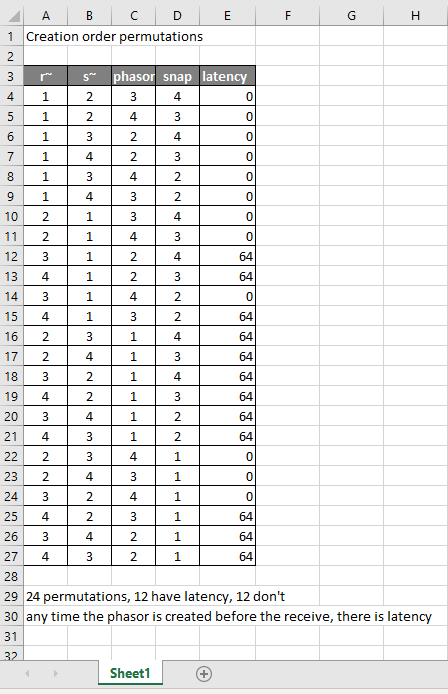
It appears that any time the phasor group is created before the r~, there is latency. Nothing else matters. Why would that be? To test if it's the whole audio chain feeding s~ that has to be created before, or only certain objects in that group, I took the first permutation with latency and cut/pasted [phasor~ 1] and [*~ 44100] in turn to push the object's creation order to the end. Only pushing [phasor~ 1] creation to the end made the delay go away, so maybe it's because that object is the head of the audio chain?
I also tested a few of these permutations using throw~/catch~ and got the same results. And I looked to see if connection creation order mattered but I couldn't find one that did and gave up after a while because there were too many cases to test.
So here's what I think is going on. Both [r~ next] and [phasor~ 1] are the heads of their respective locally connected audio chains which join at [-~]. Pd has to decide which chain to process first, and I assume that it has to choose the [phasor~ 1] chain in order for the data buffered by [s~ next] to be immediately available to [r~ next]. But why it should choose the [phasor~ 1] chain to go first if it's head is created later seems arbitrary to me. Can anyone confirm these observations and conjectures? Is this behavior documented anywhere? Can I count on this behavior moving forward? If so, what does good coding practice look like, when we want the delay and also when we don't?
 posted in technical issues
Signal-rate circular buffer?
@ddw_music I think whichever's easiest depends on if you're (over)writing the circular buffer continuously or not. If you are then [vd~]/[delread4~] with some kind of [samphold~] & [phasor~] combo to keep playing the same grain might be easier than managing your own but maybe the case is specific enough that it's worth making your own delay line that can pause writing.
but then how does it wrap around if you don't pause before the end? AFAICS there is no reliable way to make it do that.
you would have to make sure the array is a multiple of 64 samples and schedule the [tabwrite~] to start the next pass using message-rate (probably [delay]). granted, it might be far messier than the [poke~] object solution. But that would be the vanilla way to do it, and it may be more efficient since you don't have to provide your own [phasor~] (and things may be vectorized better by the compiler).
going that route might be more complicated in coordinating the exact delay time when stopping recording anyways though. (bc signal/message rate interaction).
But the thing about pausing writing is that when you move off of that grain the next time frame won't be available yet, the stuff in the array will be behind by however long you were playing that grain for, so you would have to wait for the entire array to fill up again in order to guarantee consistency in delay time.
What we really need is an object like max/msp's [stutter~] (which copies from a delay-line to another play buffer) with interpolation. I've been meaning to get to making a near-clone..
it may be possible to somehow do the same thing that [stutter~] does with complicated logic, but keeping track of what needs to be played from the delay line vs. what's already been copied to the play buffer (and therefore which should be read from for any given sample) would be even more of a headache in pd than it would be in c imo.
posted in technical issues
How to measure the delay?
@romulovieira-me The audio will arrive pretty much instantaneously at the receiving computer, but the object receiving the audio stream will buffer the data... requesting a resend of corrupt packets.... attempting to prevent dropouts.
That introduces a delay that depends on the size of the buffer.
If you have an oscilloscope you can connect the original audio to one input and the received audio to the other and measure it.
The audio should be a pulse....... every "more than the delay" seconds so that you can see the spikes.
Otherwise use [timer] started by the pulse on the sending computer, and detect the pulse on the receiving computer, and send a message back to the first computer through [netsend] and [netreceive] to stop the timer.
The message coming back should go through with only a minuscule delay (microseconds)..... but in Pd that message will only be processed every 64 audio samples so you could have up to 1.45ms of delay at both ends for the returned message.
It might be possible to timestamp the pulse at each end against internet time for more accuracy if both computers have very recently synced to that.
Or if there are no buffer re-sync requests you could guess (calculate in fact) that the delay will be the length of the buffer of the stream receiver.
That delay will be greater before the sound reaches the speaker of course..... you can add the 1.45ms Pd 64 sample delay and any soundcard latency to that stream buffer.
David.
 posted in technical issues
Miller's Pitch Shifting Example From His Book
@ricky Finally! Someone else who's been studying this book! 
Think of the x and y axis as the index of the output and input samples respectively. So if you're not delaying at all, then at output time 42 the delay line will output the input sample at time 42. That's what's expressed by the diagonal line from the origin. Everything above that line would be impossible without a crystal ball: for instance at output time 10 you can't output the input sample at time 50--that would be looking 40 time units into the future!
You're right about D being the maximum delay line length, but I think of it as the horizontal distance between those diagonal lines because that maximum length applies at all times. Everything below the diagonal from D would be impossible because the delay line can't store input samples more than D time units old.
So what you're subtracting are sample indexes, not the samples themselves. All that formula is saying is that at any given output time n, the delay line is outputting an earlier input sample, earlier by d[n]. Does any of this help?
Here's one more observation about this graph that might help clarify it: if one were graphing a fixed 10ms delay, it would be a line parallel to the origin diagonal, but 10ms to the right of it. With that, you can see that the dotted line starts at some delay amount, lengthens as output time progresses, then stops at some greater delay amount.
posted in technical issues
fx3000~: 30 effect abstraction for use with guitar stompboxes effects racks, etc.
fx3000~
fx3000~ is a 30-effect abstraction (see effects list below) designed to expedite the creation, spec. of guitar, effect "racks".
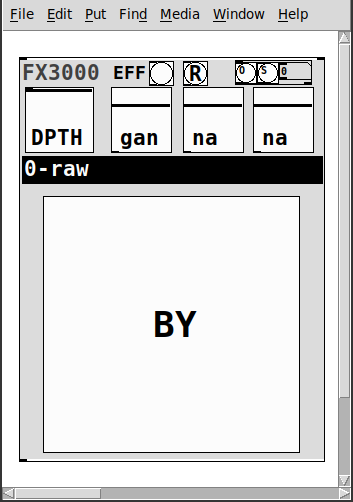
It takes one creation argument, an identifying float, ex. 0, 1, etc.
Has
- two inlets
- left:~: the audio signal
- right: a list of the parameter values: [0-1] for the first 4, [0..29] for the 5th, and [0|1] for the 6th.
- 1-4: depth and parameters' 1-3 values
- 5: the index of the effect
- 6: the bypass for the effect
- a [r~ fx3000-in-$1] and [s~ fx3000-$1-OUT] to better expedite routing multiple instances
- a [r fx3000-rndsetter-$1] to set random values via a send
- 20 preset slots per abstraction creation argument, i.e. index, via "O" and "S" bangs, so abs #0 writes to preset file=pres-0.txt (NOTE: if you have yet to save a preset to a slot nothing will happen, i.e. you must add additional presets sequentially: 0 then 1, then 2, etc.)
- a [r PREIN-$1] to send values in from a global preset-ter
- the names of the parameters/effect are written to labels upon selecting (so I will not list them here)
- and a zexy~ booster-limiter to prevent runaway output~
The help file includes three such abstractions, a sample player, and example s~/r~'s to experiment with configurations.
Note: the origin of each effect is denoted by a suffix to the name according to the following, ex. ""chorus(s)"
- s:Stamp Album
- d:DIY2
- g:Guitar Extended
- v:scott vanya
The available effects are:
- 0 0-raw
- 1 audioflow(v)
- 2 beatlooper(v)
- 3 chorus(s)
- 4 delay(3tap)(d)
- 5 delay(fb)(d)
- 6 delay(pitch)(v)
- 7 delay(push)(v)
- 8 delay(revtape)(g)
- 9 delay(spect)(g)
- 10 delay(tbr)(v)
- 11 delay(wavey)(v)
- 12 detuning(g)
- 13 distortion(d)
- 14 flanger(s)
- 15 hexxciter(g)
- 16 looper(fw-bw)(v)
- 17 octave_harmonizer(p)
- 18 phaser(s)
- 19 pitchshifter(d)
- 20 reverb(pure)(d)
- 21 ringmod(g)
- 22 shaper(d)
- 23 filter(s)
- 24 tremolo(d)
- 25 vcf(d)
- 26 vibrato(d)
- 27 vibrato(step)(g)
- 28 wah-wah(g)
- 29 wavedistort(d)
I sincerely believe this will make it easier for the user,...:-) you, to make stompboxes, effects racks, etc.
I hope I am correct.
Peace. Love through Music.
-S
p.s. of course, let me know if you notice anything awry or need clarification on something.
 posted in abstract~
Scripting Purr Data - with JavaScript?
Thanks again @lacuna - great to have that thread as reference!
Just tried it for a bit: I cannot seem to find any binary releases in the github, https://github.com/mganss/pdjs (EDIT: found them https://github.com/mganss/pdjs/releases )- so I went along with this:
I don't really understand what this .dek file is supposed to be, but the page itself says it is a zip file, so I tried this (I use MSYS2 bash shell in Windows):
$ wget http://puredata.info/Members/mganss/software/pdjs/1.2.63/pdjs%5Bv1.2.63%5D%28Darwin-amd64-32%29%28Linux-amd64-32%29%28Linux-arm64-32%29%28Windows-amd64-32%29.dek/at_download/file -O pdjs_v1.2.63.dek

$ unzip pdjs_v1.2.63.dek
Archive:  pdjs_v1.2.63.dek
  inflating: pdjs/js.dll
  inflating: pdjs/js.l_arm64
  inflating: pdjs/js.pd_darwin
  inflating: pdjs/js-help.pd
  inflating: pdjs/js.pd_linux
  inflating: pdjs/js-help.js
nice, now I have a pdjs folder; so I tried copying it to my 32-bit copy of PurrData:
$ mv pdjs /c/bin/PurrData_x86_2.15.2/extra/
$ /c/bin/PurrData_x86_2.15.2/bin/pd.exe -verbose
Here, in an empty patch, I place an object [pdjs/js test.js] (see also the note in the Github README about declare -path pdjs); and I get:
...
tried C:\\Program Files (x86)\\Common Files\\Pd-l2ork\\pdjs\\js\\pdjs\\js.pd and failed
tried C:\\bin\\PurrData_x86_2.15.2\\extra\\pdjs\\js.m_i386 and failed
tried C:\\bin\\PurrData_x86_2.15.2\\extra\\pdjs\\js.dll and succeeded
verbose( 1):C:\\bin\\PurrData_x86_2.15.2\\extra\\pdjs\\js.dll: couldn't load
tried C:\\bin\\PurrData_x86_2.15.2\\extra\\pdjs\\js.pd and failed
tried C:\\bin\\PurrData_x86_2.15.2\\extra\\pdjs\\js.pat and failed
tried C:\\bin\\PurrData_x86_2.15.2\\extra\\pdjs\\js\\pdjs\\js.pd and failed
error: couldn't create "pdjs/js test.js"
...
Hmmm... library got found, but is not loaded; then I thought, let's check:
$ file /c/bin/PurrData_x86_2.15.2/bin/pd.exe
/c/bin/PurrData_x86_2.15.2/bin/pd.exe: PE32 executable (GUI) Intel 80386 (stripped to external PDB), for MS Windows

$ file /c/bin/PurrData_x86_2.15.2/extra/pdjs/js.dll
/c/bin/PurrData_x86_2.15.2/extra/pdjs/js.dll: PE32+ executable (DLL) (GUI) x86-64, for MS Windows
Yeah - I cannot load a 64-bit .dll by a 32-bit .exe!
So, apparently, there is no 32-bit build for pdjs (see "Supported platforms" in the Github README), so I installed the 64-bit build of Purr Data ... and tried it there:
$ cp -a /c/bin/PurrData_x86_2.15.2/extra/pdjs /c/bin/PurrData_x86_64_2.15.2/extra/
$ /c/bin/PurrData_x86_64_2.15.2/bin/pd.exe -verbose
... and finally, could see it working - instantiating [pdjs/js test.js] gives messages:
...
tried C:\\bin\\PurrData_x86_64_2.15.2\\extra\\pdjs\\js.m_i386 and failed
tried C:\\bin\\PurrData_x86_64_2.15.2\\extra\\pdjs\\js.dll and succeeded
pdjs version 1.2.63 (v8 version 8.6.395.24)
tried C:\\bin\\PurrData_x86_2.15.2\\test.js and failed
tried C:\\Users\\user\\AppData\\Roaming\\Pd-l2ork\\test.js and failed
tried C:\\Program Files\\Common Files\\Pd-l2ork\\test.js and failed
tried C:\\bin\\PurrData_x86_64_2.15.2\\extra\\test.js and failed
error: Script file 'test.js' not found.
... click the link above to track it down, or click the 'Find Last Error' item in the Edit menu.
error: couldn't create "pdjs/js test.js"
One invocation that works for quick test is [pdjs/js pdjs/js-help.js], which succeeds - and then you can right-click the object and see the Help.
Finally, note this from the README:
There is no built-in editor like in Max, source files have to be created and edited outside of Pure Data.
Well, this is nice! On to see how to work with this object...
Thanks again for the help!
 posted in technical issues
Ninjam external
Hi, I've been playing with ninjam for a few weeks, it's very useful for the current situation (see the date and do a google search if you are from a distant future). I would like to make an external for it, so asking if others pders are interested in collaborating?
Here's some information to kick off this idea.
First of all I have a server up and running for testing the solution. Ask me in PM for the password:
https://ninjam.baldapproved.com
The best client for now is in Reaper or you can use a VST called Jamtaba. Maybe there's a way to simply use the VST (Jamtaba - https://jamtaba-music-web-site.appspot.com/) in PD and then we don't need this external?!
A client close to what we want is the curseclient. I think it's a good starting point for us:
https://github.com/justinfrankel/ninjam/tree/master/ninjam/cursesclient
The Makefile is simple:
CC=gcc
CXX=g++
CFLAGS = -O2

OBJS = cursesclient.o

ifdef MAC
  CFLAGS += -D_MAC
  LFLAGS = -framework coreaudio -lncurses.5 -lm
  OBJS += ../audiostream_mac.o
  COMPILE_VORBIS = 1
else
  LFLAGS = -lncurses -lm -lasound -ljack
  OBJS += ../audiostream_alsa.o ../audiostream_jack.o
endif

OBJS += ../../WDL/jnetlib/asyncdns.o
OBJS += ../../WDL/jnetlib/connection.o
OBJS += ../../WDL/jnetlib/listen.o
OBJS += ../../WDL/jnetlib/util.o
OBJS += ../../WDL/rng.o
OBJS += ../../WDL/sha.o
OBJS += ../mpb.o
OBJS += ../netmsg.o
OBJS += ../njclient.o
OBJS += ../njmisc.o

CXXFLAGS = $(CFLAGS)

default: cninjam

cninjam: $(OBJS)
    $(CXX) $(CXXFLAGS) -o cninjam $(OBJS) -lpthread $(LFLAGS)

clean:
    -rm $(OBJS) cninjam
Ninjam is https://www.cockos.com/ninjam/ (the guy behind Winamp, Reaper). Very smart programmer. It's using WDL (https://www.cockos.com/wdl/) [re]usable C++, modestly].
I think the first step would be to compile njclient, being able to connect to a server (auth or anonymous). If anyone is willing to work on that or if someone have social accounts that can post this call for collaboration please do so. If successful we can then open a dedicated server for puredata.
Cheers!
 posted in extra~
PD's scheduler, timing, control-rate, audio-rate, block-size, (sub)sample accuracy,
Hello, 
this is going to be a long one.
After years of using PD, I am still confused about its' timing and schedueling.
I have collected many snippets from here and there about this topic,
-wich all together are really confusing to me.
*I think it is very important to understand how timing works in detail for low-level programming … *
(For example the number of heavy jittering sequencers in hard and software make me wonder what sequencers are made actually for ? lol )
This is a collection of my findings regarding this topic, a bit messy and with confused questions.
I hope we can shed some light on this.


- a)
The first time, I had issues with the PD-scheduler vs. how I thought my patch should work is described here:
https://forum.pdpatchrepo.info/topic/11615/bang-bug-when-block-1-1-1-bang-on-every-sample
The answers where:
„
[...] it's just that messages actually only process every 64 samples at the least. You can get a bang every sample with [metro 1 1 samp] but it should be noted that most pd message objects only interact with each other at 64-sample boundaries, there are some that use the elapsed logical time to get times in between though (like vsnapshot~)
also this seems like a very inefficient way to do per-sample processing..
https://github.com/sebshader/shadylib http://www.openprocessing.org/user/29118
seb-harmonik.ar posted about a year ago , last edited by seb-harmonik.ar about a year ago
• 1
 whale-av
@lacuna An excellent simple explanation from @seb-harmonik.ar.
Chapter 2.5 onwards for more info....... http://puredata.info/docs/manuals/pd/x2.htm
David.
“
There is written: http://puredata.info/docs/manuals/pd/x2.htm
„2.5. scheduling
Pd uses 64-bit floating point numbers to represent time, providing sample accuracy and essentially never overflowing. Time appears to the user in milliseconds.
2.5.1. audio and messages
Audio and message processing are interleaved in Pd. Audio processing is scheduled every 64 samples at Pd's sample rate; at 44100 Hz. this gives a period of 1.45 milliseconds. You may turn DSP computation on and off by sending the "pd" object the messages "dsp 1" and "dsp 0."
In the intervals between, delays might time out or external conditions might arise (incoming MIDI, mouse clicks, or whatnot). These may cause a cascade of depth-first message passing; each such message cascade is completely run out before the next message or DSP tick is computed. Messages are never passed to objects during a DSP tick; the ticks are atomic and parameter changes sent to different objects in any given message cascade take effect simultaneously.
In the middle of a message cascade you may schedule another one at a delay of zero. This delayed cascade happens after the present cascade has finished, but at the same logical time.
2.5.2. computation load
The Pd scheduler maintains a (user-specified) lead on its computations; that is, it tries to keep ahead of real time by a small amount in order to be able to absorb unpredictable, momentary increases in computation time. This is specified using the "audiobuffer" or "frags" command line flags (see getting Pd to run ).
If Pd gets late with respect to real time, gaps (either occasional or frequent) will appear in both the input and output audio streams. On the other hand, disk strewaming objects will work correctly, so that you may use Pd as a batch program with soundfile input and/or output. The "-nogui" and "-send" startup flags are provided to aid in doing this.
Pd's "realtime" computations compete for CPU time with its own GUI, which runs as a separate process. A flow control mechanism will be provided someday to prevent this from causing trouble, but it is in any case wise to avoid having too much drawing going on while Pd is trying to make sound. If a subwindow is closed, Pd suspends sending the GUI update messages for it; but not so for miniaturized windows as of version 0.32. You should really close them when you aren't using them.
2.5.3. determinism
All message cascades that are scheduled (via "delay" and its relatives) to happen before a given audio tick will happen as scheduled regardless of whether Pd as a whole is running on time; in other words, calculation is never reordered for any real-time considerations. This is done in order to make Pd's operation deterministic.
If a message cascade is started by an external event, a time tag is given it. These time tags are guaranteed to be consistent with the times at which timeouts are scheduled and DSP ticks are computed; i.e., time never decreases. (However, either Pd or a hardware driver may lie about the physical time an input arrives; this depends on the operating system.) "Timer" objects which meaure time intervals measure them in terms of the logical time stamps of the message cascades, so that timing a "delay" object always gives exactly the theoretical value. (There is, however, a "realtime" object that measures real time, with nondeterministic results.)
If two message cascades are scheduled for the same logical time, they are carried out in the order they were scheduled.
“
[block~ smaller then 64] doesn't change the interval of message-control-domain-calculation?,
Only the size of the audio-samples calculated at once is decreased?
Is this the reason [block~] should always be … 128 64 32 16 8 4 2 1, nothing inbetween, because else it would mess with the calculation every 64 samples?
How do I know which messages are handeled inbetween smaller blocksizes the 64 and which are not?
How does [vline~] execute?
Does it calculate between sample 64 and 65 a ramp of samples with a delay beforehand, calculated in samples, too - running like a "stupid array" in audio-rate?
While sample 1-64 are running, PD does audio only?
[metro 1 1 samp]
How could I have known that? The helpfile doesn't mention this. EDIT: yes, it does.
(Offtopic: actually the whole forum is full of pd-vocabular-questions)
How is this calculation being done?
But you can „use“ the metro counts every 64 samples only, don't you?
Is the timing of [metro] exact? Will the milliseconds dialed in be on point or jittering with the 64 samples interval?
Even if it is exact the upcoming calculation will happen in that 64 sample frame!?
- b )


There are [phasor~], [vphasor~] and [vphasor2~] … and [vsamphold~]
https://forum.pdpatchrepo.info/topic/10192/vphasor-and-vphasor2-subsample-accurate-phasors
“Ive been getting back into Pd lately and have been messing around with some granular stuff. A few years ago I posted a [vphasor.mmb~] abstraction that made the phase reset of [phasor~] sample-accurate using vanilla objects. Unfortunately, I'm finding that with pitch-synchronous granular synthesis, sample accuracy isn't accurate enough. There's still a little jitter that causes a little bit of noise. So I went ahead and made an external to fix this issue, and I know a lot of people have wanted this so I thought I'd share.
[vphasor~] acts just like [phasor~], except the phase resets with subsample accuracy at the moment the message is sent. I think it's about as accurate as Pd will allow, though I don't pretend to be an expert C programmer or know Pd's api that well. But it seems to be about as accurate as [vline~]. (Actually, I've found that [vline~] starts its ramp a sample early, which is some unexpected behavior.)
[…]
“
- c)


Later I discovered that PD has jittery Midi because it doesn't handle Midi at a higher priority then everything else (GUI, OSC, message-domain ect.)
EDIT:
Tryed roundtrip-midi-messages with -nogui flag:
still some jitter.
Didn't try -nosleep flag yet (see below)
- d)

So I looked into the sources of PD:
scheduler with m_mainloop()
https://github.com/pure-data/pure-data/blob/master/src/m_sched.c
And found this paper
Scheduler explained (in German):
https://iaem.at/kurse/ss19/iaa/pdscheduler.pdf/view
wich explains the interleaving of control and audio domain as in the text of @seb-harmonik.ar with some drawings
plus the distinction between the two (control vs audio / realtime vs logical time / xruns vs burst batch processing).
And the "timestamping objects" listed below.
And the mainloop:
Loop
- messages (var.duration)
- dsp (rel.const.duration)
- sleep
With
[block~ 1 1 1]
calculations in the control-domain are done between every sample? But there is still a 64 sample interval somehow?
Why is [block~ 1 1 1] more expensive? The amount of data is the same!? Is this the overhead which makes the difference? Calling up operations ect.?
Timing-relevant objects
from iemlib:
[...]
iem_blocksize~   blocksize of a window in samples
iem_samplerate~  samplerate of a window in Hertz


------------------ t3~ - time-tagged-trigger --------------------
-- inputmessages allow a sample-accurate access to signalshape --
t3_sig~          time tagged trigger sig~
t3_line~         time tagged trigger line~


--------------- t3 - time-tagged-trigger  ---------------------
----------- a time-tag is prepended to each message -----------
----- so these objects allow a sample-accurate access to ------
---------- the signal-objects t3_sig~ and t3_line~ ------------
t3_bpe           time tagged trigger break point envelope
t3_delay         time tagged trigger delay
t3_metro         time tagged trigger metronom
t3_timer         time tagged trigger timer

[...]
What are different use-cases of [line~] [vline~] and [t3_line~]?
And of [phasor~] [vphasor~] and [vphasor2~]?
When should I use [block~ 1 1 1] and when shouldn't I?
[line~] starts at block boundaries defined with [block~] and ends in exact timing?
[vline~] starts the line within the block?
and [t3_line~]???? Are they some kind of interrupt? Shortcutting within sheduling???
- c) again)

https://forum.pdpatchrepo.info/topic/1114/smooth-midi-clock-jitter/2
I read this in the html help for Pd:
„
MIDI and sleepgrain
In Linux, if you ask for "pd -midioutdev 1" for instance, you get /dev/midi0 or /dev/midi00 (or even /dev/midi). "-midioutdev 45" would be /dev/midi44. In NT, device number 0 is the "MIDI mapper", which is the default MIDI device you selected from the control panel; counting from one, the device numbers are card numbers as listed by "pd -listdev."
The "sleepgrain" controls how long (in milliseconds) Pd sleeps between periods of computation. This is normally the audio buffer divided by 4, but no less than 0.1 and no more than 5. On most OSes, ingoing and outgoing MIDI is quantized to this value, so if you care about MIDI timing, reduce this to 1 or less.
„
Why is there the „sleep-time“ of PD? For energy-saving??????
This seems to slow down the whole process-chain?
Can I control this with a startup flag or from withing PD? Or only in the sources?
There is a startup-flag for loading a different scheduler, wich is not documented how to use.
- e)

[pd~] helpfile says:
ATTENTION: DSP must be running in this process for the sub-process to run. This is because its clock is slaved to audio I/O it gets from us!
Doesn't [pd~] work within a Camomile plugin!?
How are things scheduled in Camomile? How is the communication with the DAW handled?
- f)

and slightly off-topic:
There is a batch mode:
https://forum.pdpatchrepo.info/topic/11776/sigmund-fiddle-or-helmholtz-faster-than-realtime/9
EDIT:
- g)
I didn't look into it, but there is:
https://grrrr.org/research/software/
clk – Syncable clocking objects for Pure Data and Max
This library implements a number of objects for highly precise and persistently stable timing, e.g. for the control of long-lasting sound installations or other complex time-related processes.
Sorry for the mess!
Could you please help me to sort things a bit? Mabye some real-world examples would help, too.

 posted in technical issues
[pix_share_read] and [pix_share_write] under windows
@whale-av, here is a log running pd with -lib Gem -verbose.
tried both 32bit and 64bit pd 0.48-1...
tried ./Gem.m_i386 and failed
tried ./Gem.dll and failed
tried ./Gem/Gem.m_i386 and failed
tried ./Gem/Gem.dll and failed
tried ./Gem.pd and failed
tried ./Gem.pat and failed
tried ./Gem/Gem.pd and failed
tried C:/Users/Raphael Isdant/Documents/Pd/externals/Gem.m_i386 and failed
tried C:/Users/Raphael Isdant/Documents/Pd/externals/Gem.dll and failed
tried C:/Users/Raphael Isdant/Documents/Pd/externals/Gem/Gem.m_i386 and failed
tried C:/Users/Raphael Isdant/Documents/Pd/externals/Gem/Gem.dll and failed
tried C:/Users/Raphael Isdant/Documents/Pd/externals/Gem.pd and failed
tried C:/Users/Raphael Isdant/Documents/Pd/externals/Gem.pat and failed
tried C:/Users/Raphael Isdant/Documents/Pd/externals/Gem/Gem.pd and failed
tried C:/Users/Raphael Isdant/AppData/Roaming/Pd/Gem.m_i386 and failed
tried C:/Users/Raphael Isdant/AppData/Roaming/Pd/Gem.dll and failed
tried C:/Users/Raphael Isdant/AppData/Roaming/Pd/Gem/Gem.m_i386 and failed
tried C:/Users/Raphael Isdant/AppData/Roaming/Pd/Gem/Gem.dll and failed
tried C:/Users/Raphael Isdant/AppData/Roaming/Pd/Gem.pd and failed
tried C:/Users/Raphael Isdant/AppData/Roaming/Pd/Gem.pat and failed
tried C:/Users/Raphael Isdant/AppData/Roaming/Pd/Gem/Gem.pd and failed
tried C:/Program Files/Common Files/Pd/Gem.m_i386 and failed
tried C:/Program Files/Common Files/Pd/Gem.dll and failed
tried C:/Program Files/Common Files/Pd/Gem/Gem.m_i386 and failed
tried C:/Program Files/Common Files/Pd/Gem/Gem.dll and failed
tried C:/Program Files/Common Files/Pd/Gem.pd and failed
tried C:/Program Files/Common Files/Pd/Gem.pat and failed
tried C:/Program Files/Common Files/Pd/Gem/Gem.pd and failed
tried D:/pd-0.48-1.windows.64bit/extra/Gem.m_i386 and failed
tried D:/pd-0.48-1.windows.64bit/extra/Gem.dll and failed
tried D:/pd-0.48-1.windows.64bit/extra/Gem/Gem.m_i386 and failed
tried D:/pd-0.48-1.windows.64bit/extra/Gem/Gem.dll and succeeded
D:\\pd-0.48-1.windows.64bit\\extra\\Gem\\Gem.dll: couldn't load
tried D:/pd-0.48-1.windows.64bit/extra/Gem.pd and failed
tried D:/pd-0.48-1.windows.64bit/extra/Gem.pat and failed
tried D:/pd-0.48-1.windows.64bit/extra/Gem/Gem.pd and failed
tried D:/pd-0.48-1.windows.64bit/doc/5.reference/Gem.m_i386 and failed
tried D:/pd-0.48-1.windows.64bit/doc/5.reference/Gem.dll and failed
tried D:/pd-0.48-1.windows.64bit/doc/5.reference/Gem/Gem.m_i386 and failed
tried D:/pd-0.48-1.windows.64bit/doc/5.reference/Gem/Gem.dll and failed
tried D:/pd-0.48-1.windows.64bit/doc/5.reference/Gem.pd and failed
tried D:/pd-0.48-1.windows.64bit/doc/5.reference/Gem.pat and failed
tried D:/pd-0.48-1.windows.64bit/doc/5.reference/Gem/Gem.pd and failed
Gem: can't load library``` posted in pixel#