
Questions regarding compiling
Hi everyone, insert obligatory “I’m new at this” statement here.
So, I’ve made some patches that I quite like, a few using objects like sigmund~, and some where I lean into the glitchy quality of fiddle~.
So I’m having a great time, decide I want to make a guitar pedal out of one these patches, get a Daisy Seed and shoot, the hvcc compiler won’t work with objects like fiddle or sigmund.
I wanted to ask the forum what my options might be here, how I could maybe do something similar with objects Heavy will accept, or beyond that, what could I do with a different compiler or microcontroller (again, please excuse my ignorance.)
Thank you, I’m here to learn, and I’ve been having a lot of fun with pd.
 posted in technical issues
Quality granular processing in pd
@Moddmo said:
I guess a better question is if pd has disadvantages here compared to other DSP programming languages.
Granular synthesis is sometimes imagined as this magical, complex thing, but the fundamentals are quite simple. Get the fundamentals right, and the sound quality follows from that (and is mainly a matter of parameter tuning).
So you're playing back a block of audio from a buffer or a delay line. (I used a delay line because that's the best way to implement a circular buffer in Pd vanilla. You could also use cyclone [count~] to generate phase for use with [tabwrite~] and [tabread4~].) The important points here are to get the boundaries of the audio segment correct, and to modulate the starting position intelligently. "Boundaries" includes concepts of: how many grains per second should be triggered, how many of them overlap, how fast will the audio be played.
And each grain needs an envelope matching the grain duration.
In my example, I've already tuned it for one specific use case (pitch shifting). But there's no magic here -- it really is just linear audio playback with envelopes, overlapped and added.
Comparison with other DSP environments, then, is just a matter of implementation. E.g., SuperCollider has UGens (single objects) TGrains and GrainBuf that do the audio segment and envelope and overlap/add for you, so that you can concentrate on the parameters:
s.boot;  // sort of like "; pd dsp 1"

(
var rateSl;

a = { |inbus, rate = 1, trigFreq = 66.66667, overlap = 4|
    var sr = SampleRate.ir;
    var maxDelaySamps = 2 * sr;

    var src = In.ar(inbus, 1);

    // "delwrite" part (rolling my own circular buffer)
    var buf = LocalBuf(maxDelaySamps, 1).clear;
    var phase = Phasor.ar(0, 1, 0, maxDelaySamps);
    var writer = BufWr.ar(src, buf, phase);

    // *all* of the rest of it
    var trig = Impulse.ar(trigFreq);
    var grainDur = overlap / trigFreq;
    var delayBound = max(0, grainDur * (rate - 1));
    // grain position in samples, for now
    var pos = phase - (sr * (delayBound + TRand.ar(0.0, 0.003, trig)));

    GrainBuf.ar(2,
        trig, grainDur, buf,
        rate,
        pos: (pos / maxDelaySamps) % 1.0,  // normalized pos in GrainBuf
        interp: 4  // cubic
    ) * 0.4;
}.play(args: [inbus: s.options.numOutputBusChannels]);

rateSl = Slider(nil, Rect(800, 200, 200, 50))
.value_(0.5)
.orientation_(\horizontal)
.action_({ |view|
    a.set(\rate, view.value.linexp(0, 1, 0.25, 4))
})
.onClose_({ a.free })
.front
)
The DSP design here is the same as in the Pd patch (rate-scaled audio segments under Hann windows [GrainBuf gives you Hann windows for free], with a 3 ms randomized timing offset for each grain) so the sound should be basically identical. Personally I find the SC way to be easier to read and write, but I wouldn't expect everyone on a graphical patching forum to feel the same 
hjh
 posted in technical issues
Envelope and LFO
@alexandros said:
@ddw_music you can't really square the value in case it's a volume envelope, because that will square the sustain value as well, and that will reduce the actual value.
Fair -- squaring is a bit of a hack to make up for the lack of a curved-segment envelope generator (like EnvGen in SC, where segments can be linear, exponential, sinusoidal, curved by a curve factor, maybe a couple others, built-in ).
hjh
posted in technical issues
how do I deal with transients from sigmund pitch tracker ?
@vulturev1 Use the right outlet of [sigmund~] with [>] and [spigot] to filter out "silence".
Look at [moses], you can use it to filter big jumps. Maybe use feedback to dynamically adapt the right inlet.
Also play with sigmunds window-size and hop-size.
This is a Vanilla moving average (EDIT now with [arraysum]) :
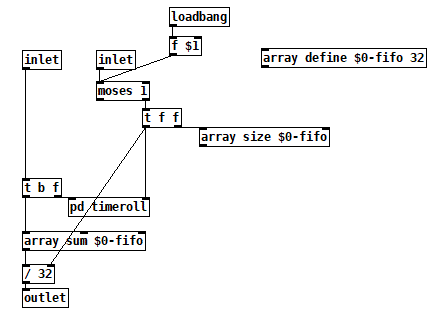
movingaverage3.pd
movingaverage3-help.pd
Moving average is a low pass and it also distorts the good data portion.
Reading your description, maybe a median filter with uneven windowsize is better suited, see this screenshot, made with else/median: https://forum.pdpatchrepo.info/topic/13849/how-to-smoothe-out-arrays/11
EDIT: Pd 0.54 Also study helpfile with -minpower, -quality, tracks ect !
 posted in technical issues
how do I deal with transients from sigmund pitch tracker ?
@vulturev1 Processing the input can help a great deal with [sigmund~] jumping around but how to best go about this depends on what your input is and what you want on the output. When I was using [sigmund~] a lot I found filtering, frequency multiplication and compression all to be useful for getting stable output, especially frequency multiplication. I always found it easier to address the problem on the input instead of the output.
 posted in technical issues
Scrambling samples in an array when playing an audio file.
FWIW -- Pd's native interface for sound files is difficult. While that's consistent with the "minimal core" philosophy, I find it annoying enough to work with that I would sometimes be tempted to avoid using sound files just because of rebuilding basic functionality.
For example, a couple of factors that haven't been mentioned in this thread yet:
- What if the sound file is at a different sample rate from the audio system?
- Also, audio engineering 101, every audio segment hitting the speakers should have an envelope, even if it's just a trapezoidal envelope with a very short attack and release. Otherwise you will get clicks at every splice point. This means, then, using two players and toggling between them (because the ideal splice is a short crossfade, not a jump cut).
A while back, I made a set of abstractions to simplify these problems. Using those, this is how I would do it.
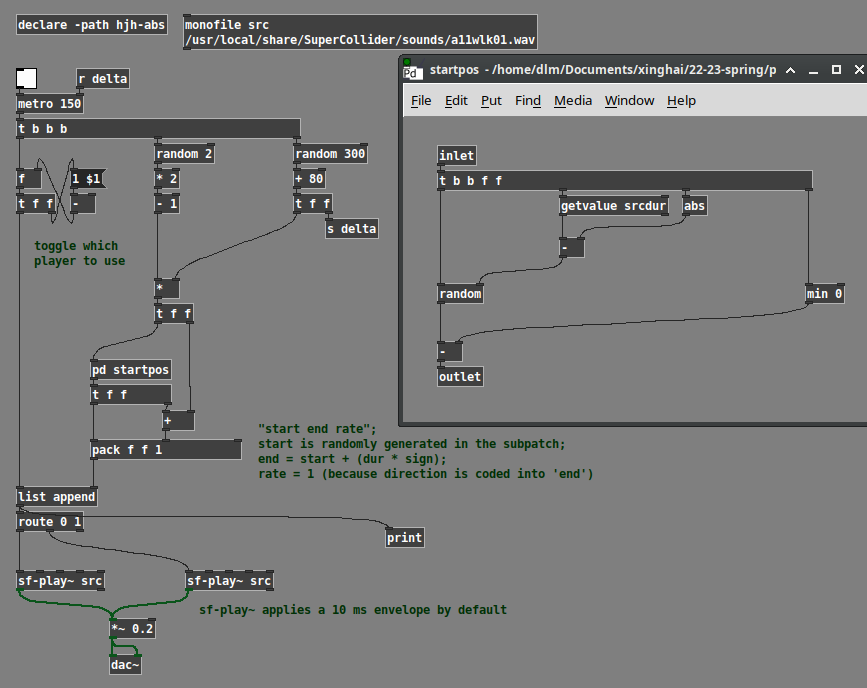
Here, the logic is:
- Choose a random duration.
- Choose a random direction, +1 or -1.
- Random starting position is chosen based on dur * direction.
- Random range is 0 to (soundfile dur - abs(dur)).
- Then, if dur is negative, we have to shift the entire random range up, by subtracting the negative number.
- Then the endpoint in the sound file is start + (dur * direction). Backwards playback is start > end.
- Last, toggle 0 or 1 to choose one of two sound file players.
monofile and sf-play~ are abstractions of mine. sf-play~ uses cyclone. Note that cyclone's play~ claims to take time indices in ms, but it doesn't compensate for sample rate. My abstraction does this automatically -- ms go in, ms come out.
YMMV but I find working with sound files is much easier when the programming interface is more usable.
hjh
posted in technical issues
sigmund~
I am attempting to use sigmund~ to detect low frequencies.
I am putting an osc~ to detect lowest frequencies.
It seems sigmund~ cannot detect frequencies below 45 hertz.
Here is the object I am using:
sigmund~ -hop 65536
 posted in technical issues
Sigmund scaling
@kaimo An envelope follower you want to patch?
Depending on how accurate it should be, such simple tasks can quickly become quite complicated.
Scaling of [sigmund~] or [env~] also depends on your input:
https://en.wikipedia.org/wiki/Root_mean_square#In_common_waveforms
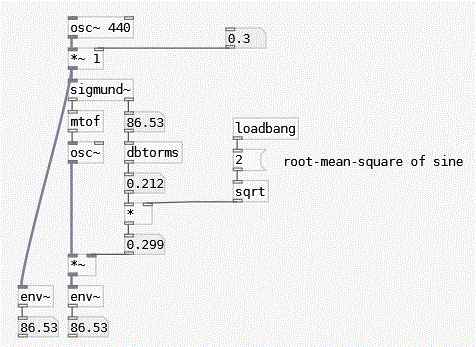
Edit:
crest factor https://en.wikipedia.org/wiki/Crest_factor#Examples
posted in technical issues
Sigmund scaling
Hi All,
I’m trying to figure out how to scale the output of a sigmund~ object so that its value is between 0 and 1.0. Basically I want to make it so that the louder the input the louder the output for an oscillator. I figured I could then multiply the output of the sigmund object with the oscillator.
Any tips are greatly appreciated! Thanks
 posted in technical issues
understanding the [slop~] documentation
@manuels Oh wow, you did a great job on that investigative patch, thanks. It answers many of the follow-up questions I was going to ask:
- what would the avging factor graph look like for those three examples?
- how do you compute the segment slope from the cutoff frequency?
- how is the width of the "linear" segment related to n and p?
And it also looks like you were able to write the equivalent slop~ filter using expr~. So helpful. I didn't understand that that digital low-pass filter equation was literally what they were computing.
So would you agree that it's impossible to make any of the response segment slopes > 1? And is that equivalent to saying that this (or maybe any) low pass filter can't amplify a signal?
From the jitter example, is "either by setting n = 0, p = 1..." a typo? Shouldn't it be "either by setting n = 0, p = a..."? Also, from that same example, "setting kn = kp = inf" must be a typo, right? They meant "set the corresponding frequency input of [slop~] to inf" I think, or they should've been setting kn = kp = 1.
Do you understand the statement about translation-invariance in the Rationale section? And can you anticipate what kind of skullduggery they're referring to that they didn't finish writing up? I'm assuming "soft saturation" means "soft clipping".
 posted in technical issues