
[NEWBIE] pass list
Whenever someone posts something from list-abs I can not help but make a replacement, won't be long now before I have completed updating all of it, good number get fancy new features as well. I went with dynamic patching in my version so probably slower on the creation but faster in operation. No helpfile yet but it is a drop in replacement for [list-sieve] so its helpfile will tell you what you need.
sift.pd
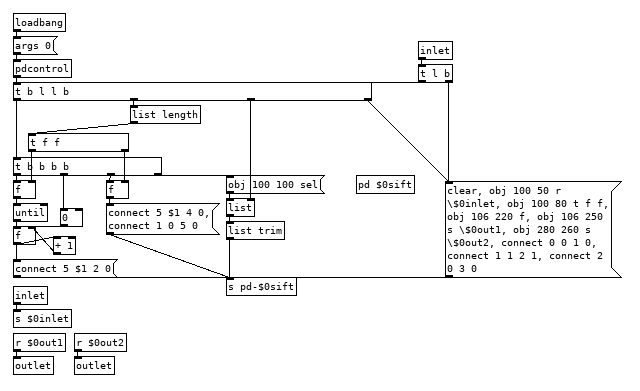
Edit:Fixed some goofiness.
 posted in patch~
On the off chance this might save you some trouble
How to connect multiple outlets to multiple inlets, etc.
(I saw someone do this on a video so looked it up.
The info was originally posted on the newsgroup at:
[link Intelligent Patching](link https://lists.puredata.info/pipermail/pd-list/2018-06/122789.html) by IOhannes m zmoelnig .)
These do work. Just sort of tricky to get the steps right.
quote:
Intelligent Patching
new connection features:
-
select any two objects, and press <Ctrl>+<k> (or <Cmd>+<k> if you insist), to connect them (trivially, so just the first inlet)
-
to connect a (signal) outlet to multiple arbitrary inlets, you can now press <Shift> while hovering the yet-unconnected cord over an inlet
-
to add more connections between two already connected object, select the connection and pressl <Ctrl>+<d> to extend the connections to the right ("duplicate")
-
to fully connect two objects, select both objects before connecting them.
-
to connect multiple objects to a single inlet, select all the source objects (but not the sink object) before connecting them.
-
(the other way round works as well, but will give you fan-outs!!!)
-
to connect multiple objects to a multi-inlet object, select all the source objects and the sink object before connecting the leftmost source to the leftmost inlet.
-
to connect a multi-outlet object to multiple objects, select all the source object and all the sink objects before connecting the leftmost outlet to the leftmost sink.
:end quote
May the info/techniques help to expedite yr work flow.
Peace through sharing.
-S
 posted in tutorials
Windowed-sync oscillator: Style questions
@jameslo "Since many programmers seem to want to avoid [fexpr~] at all costs, maybe you could rewrite your [fexpr~] with [expr~ $v1 > $v2] and [rzero_rev~ 0]"
Hmm, yeah. I had thought that both [expr~] and [fexpr~] were said to be bad for performance.
I suppose this might be another way to do a signal-rate comparison:
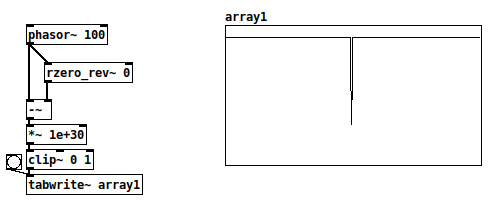
There's a very small chance of the [-~] result being between 0 and 1e-30, where the clip~ value would be between zero and one but not exactly either. With typical signal magnitudes, that's unlikely, so this wouldn't work in cases where only 0 and 1 are acceptable.
+1 RE the mystifying omissions and irregularities in vanilla. Since I started thinking of it as a scripting language (and stopped comparing it to c, c++, c#, Java...) everything became happy and easy-going.
Yes and no... Pd is an important and valuable tool and it's good to make friends with it as it is. At the same time, lack of some core operators can be seen as a usability issue.
I definitely wouldn't compare it to C and such. Miller Puckette himself acknowledges[1] that many algorithms are straightforward to write in procedural languages (and maybe even more straightforward in functional languages), but rip-your-hair-out painful in dataflow patchers. E.g., quicksort, which in Haskell goes:
quicksort :: Ord a => [a] -> [a]
quicksort []     = []
quicksort (p:xs) = (quicksort lesser) ++ [p] ++ (quicksort greater)
    where
        lesser  = filter (< p) xs
        greater = filter (>= p) xs
and in C is... somewhat longer but still a fairly straightforward recursive implementation.
I can literally not even imagine how to implement a quicksort in Pd.
In SuperCollider, I'm doing most of my performances using a sequence-scripting language of my own design, where SC code is parsing the expressions and translating them into SC patterns. That's been a long project but within reach of an object-oriented language with a full suite of data structures. Pd... again, I can't imagine where to begin.
Puckette points out in that interview that Max and Pd are designed to react to input events, and they are very elegant for this. In Pd, you can connect a slider to a number box. In SC, the same is:
(
var number, slider;

w = Window("slider", Rect(800, 200, 500, 400)).front;
w.layout = VLayout(
    nil,
    HLayout(
        number = NumberBox().fixedWidth_(80),
        slider = Slider().orientation_(\horizontal)
    ),
    nil
);

slider.action = { |view|
    number.value = view.value;
};
)
In that case, definitely, Pd's expression of the idea of a value flowing from an interface object toward the display object is as concise as you can imagine, and SC's version is verbose and puzzling until you get used to it. Use the tool that's right for the job.
lacuna:
There are [vphasor~], [vphasor2~] and [vsamphold~] from @Maelstorm .
Oh that's good.
It's hard to find extensions like this, if you don't know where it is.
In your patch [rpole~ 1] is working with a signal-inlet, isn't it?
Yes. The idea is, while the (signal) coefficient is 1, then the left-hand signal gets integrated. If, for a single sample, both the signal and coefficient are 0, then the output is 0, and it will start integrating again as soon as the coefficient flips back to 1.
Which is that other forum you mentioned?
TBH I think SC wins in terms of clear expression of this synthesis algorithm:
(
{
    var sync = LFTri.ar(SinOsc.kr(0.2).exprange(100, 400));
    var phase = Sweep.ar(sync, SinOsc.kr(0.12743).exprange(700/3, 2100));
    var synced = SinOsc.ar(0, (phase % 1) * 2pi);
    dup(LeakDC.ar(synced * sync) * 0.1)
}.play;
)
This is part of what I mean by "usability issues" -- Pd: 7 objects for the triangle wave vs SC: LFTri.ar(freq), or the automatic exponential scaling exprange, and Sweep has a signal-rate retrigger built-in (there's also a range-rewrapping Phasor, and it has an audio-rate trigger too)... SC's initial learning curve is steeper but once you know it well, it took a couple of minutes to write that, vs 30-40 minutes (including head-scratching time) in Pd. (Admittedly I'm less fluent in Pd.)
hjh
[1] https://omny.fm/shows/future-of-coding/47-maxmsp-pure-data-miller-puckette
 posted in technical issues
Windowed-sync oscillator: Style questions
Hi,
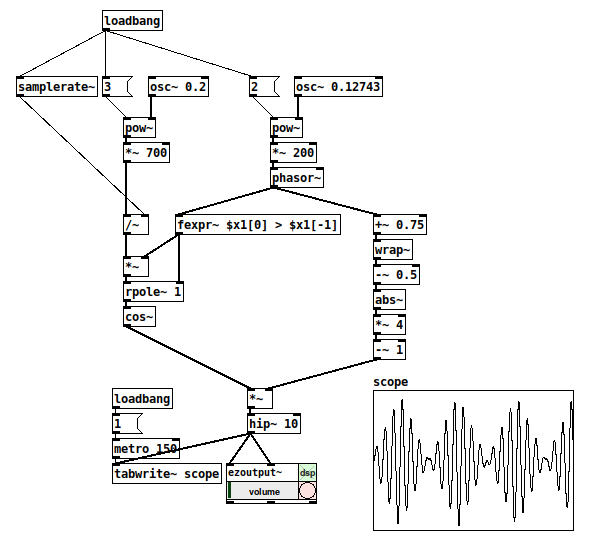
The topic of windowed sync oscillators came up on another forum. For fun, and also to improve my Pd chops -- this is what I came up with. (One reason for sharing is that I feel like this is a new level of Pd-idiomatic patching for me.)
I have a couple of questions, below the patch.
-
Is [fexpr~] the best way to check for the phasor reset? With cyclone I could do [rzero~ 1] --> [>~ 0] I think. The goal is a signal that is 1 while the phasor is incrementing, and 0 for exactly one sample when it wraps around. It must be 0 for exactly one sample, because this is used to reset the [rpole~] accumulator (syncing the sine oscillator).
(I've struggled with the lack of signal-rate comparators before. Yes, they're in cyclone, but... aren't these fundamental operators? Why not in vanilla? From past conversations, I gather that often, when a "basic" feature isn't present in vanilla, it's because you can build it from objects that do exist in vanilla. But I never figured out a good way, apart from [expr~] / [fexpr~], to do that for signal comparisons -- which feels like cheating in a way.)
-
The [rpole~ 1] is essentially a phasor with a signal-rate reset (as opposed to [phasor~], which can be reset, but only with control messages). Is there a better way? (Tbh I'm a little bit proud of this one
 )
)
Thanks,
hjh
posted in technical issues
Ninjam external
When I enter a room I see the metronome and a "sync with vst" button. Perhaps the Jam Taba VST thinks PD is another VST? But when I press "sync with vst" PD crashes (and what should it sync to?). Maybe an external would be the only way to sync Pure Data and Ninjam?
 posted in extra~
Writesf~ start recording from "grid" possible?
@mariuste Then you will have to adjust (snap) them in the DAW afterwards.
Two two channel files are possible......... synced-record.pd ...... or a single 4-ch if you wish.... 64-ch max I think.
But what is the source? How do you know when the 2nd sound will start. Will you make the sound yourself and so start it at the right time?
Surely you will always be late with the second recording?
I have added a visual aid 2 seconds after you start recording....... synced-record-cue.pd
David.
 posted in technical issues
Rewind and fast forward?
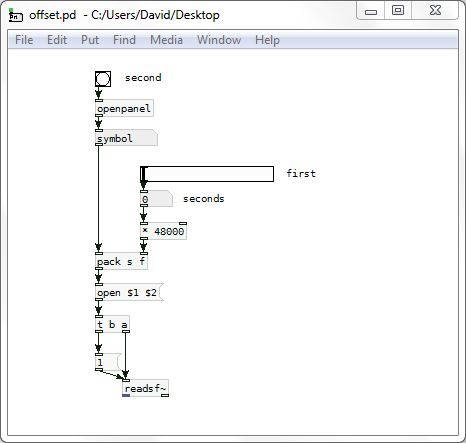
If you want to scrub a file it will need to be loaded to ram.
This will do it and then start at the point you choose.......... av-sync.pd
Vanilla or extended....... delete any objects that throw errors in vanilla (if they annoy you...!).
It will scrub video in sync as well if you have GEM, but you need to strip the audio from the video into a wav file.
It works without the video though...... just load a wav file into the audio block, and then use the video block scrub controls.
David.
PS there was a mistake in [av-sync] now corrected.
posted in technical issues
Scheduler queue object?
I think that it doesn't matter what the sample rate is. The point is that it is the same for all the programs that are linked, and so they have to be in sync.
https://ableton.github.io/link/
Ableton documents no strict requirement that all connected applications must share the same sample rate. Reading this document, it seems to me that such a requirement would be contrary to what they are trying to achieve.
They are using that common distributed clock
The Link session state is defined in terms of tempo, beat and phase -- not samples. I believe it's up to each application to translate the session state into its own timing.
But the answer is no, in that there is no inaccuracy in a computer.
When two computers, or even two sound cards, are involved, there is no guarantee of the clocks running at exactly the same rate. If you set up two PD sequences on two different computers and start them in sync, within a few minutes, you will notice sync problems. To make them play together, it's necessary for one or the other or both to adjust timing periodically. If the adjustments are frequent enough and small enough, then they are undetectable to the ear (but they would be detectable if you record pulses to an audio file and count the samples between pulses).
So there may be no inaccuracy within one computer by itself. When you involve a second machine, then machine B is inaccurate from A's perspective and vice versa.
FWIW, I tried to hack up a quick beat sync but quickly ran into trouble (it was firing on every tick, instead of waiting for the next tick). Perhaps it's just that I'm not familiar enough with the Pure Data way of thinking, but I often find that things are unnecessarily difficult in PD. Maybe I'll try again later today.
hjh
posted in technical issues
Scheduler queue object?
@ddw_music The time variance is because the event was triggered within the last audio block and arrives before the next block is processed. So as the beat clock is not a perfect division of the audio clock it has to skip to compensate.
You are right that event inaccuracy at that scale is not important, so Link is quite accurate enough for events.
But for the audio it is vital that the programs are in sync because our brains are wired to detect phase, but more importantly the program hasn't got a clue what to do with data that doesn't match its expectations.
It doesn't matter what the sample rate is.
The point is that it is the same for all the programs that are linked by the audio, and so they have to be in sync.
They are using that common distributed clock, with a natural sync every 64 samples, if that is the block size chosen for the audio..... so every 1.45ms roughly at 44.1 with a 64 sample buffer.
They all have to process those chunks and spit them out in sync.
It is not difficult for a modern computer to calculate time at every sample, or we would not be blessed with ASIO, DAW's and all. My DAW will show me the calculated time stamp of every sample within the 64 sample window.
Every block must pass or there would be dropouts somewhere.
The soundcard also uses the same clock as it counts it's way inexorably through the blocks.
The computer doesn't make mistakes as it counts through the blocks, unless another process blocks the calculations for too long because of a deferred procedure call. DPC latency is something to look out for when running audio applications and there are some tools available for analysis.
But the answer is no, in that there is no inaccuracy in a computer until you reach the limits of its bit depth.
David.
posted in technical issues
abl_link~ midi and audio sync setup
Hi Folks,
I thought I’d share this patch in the hopes that someone might be able to help improve upon it. I am by no means even semi competent with PD and jumped into this task without actually bothering to learn the basics of PD or RPi, but nevertheless here we are: maybe you can share a better implementation.
Mods/experienced folks, if I am sharing irrelevant/wrong/confusing info, mea culpa and please correct me.
I wanted to make a patch for PD in Raspberry Pi that would do 3 things:
- Get the abl_link~ temp data over wifi
- Create a midi clock output using a 5-pin midi adapter (I have one of the cheapo usb-to-midi cable things here)
-simultaneously create an audio pulse ‘clock’ output such as those used by volcas, Teenage Engineering Pocket operators, and the like (I am not sure if such an audio signal over a 3.5mm jack would be hot enough to be considered a CV pulse too, maybe you can help clear that up?)
As I say, after much struggles I have globbed something together that sort of does this.
A couple of things for newcomers like myself:
The abl_link~ object in the patch isn’t initially part of the standard pure data install as I write. I was able to use deken (ie the code that powers the ‘help/find externals’ bit of PD) to look for abl_link~. Search for it. At the time of writing there is a version for Arm7 devices like the Raspberry Pi 3 which was put together by the illustrious mzero with code from antlr. Go ahead and install the abl_link~ object. (Possibly you may have to uncheck the ‘hide foreign architectures’ box to get the arm7 version to show up. This is usually a safeguard to stop users from trying to install versions of externals that won’t work on their systems. So long as you see ‘arm7’ in the description it should hopefully be the one you want) PD will ask where you want to store the external, and I would just leave it at the default unless you have a special reason to do otherwise.
To get the patch to hook up to your preferred audio and midi outputs by default you may have to take certain steps. In my version of it I have deemed the built in audio and my cheapo USB midi output to be good enough for this task.
[As part of my troubleshooting process I ended up installing amidiauto which is linked to here: https://community.blokas.io/t/script-for-launching-pd-patch-with-midi-without-aconnect/1010/2
I undertook several installations in support of amidiauto which may be helping my system to see and link up my USB midi and PD, but nothing worked until I took the step in the following paragraph about startup flags in PD. (It may also be that I did not need to put in amidiauto at all. Maybe I’ll try that on another card to see if it simplifies the process. I’m saying you might want to try it without amidiauto first to see).]
Midi: - (ALSA is the onboard audio and midi solution that is part of Raspbian). To have PD use ALSA midi at the start I made the following setting in the preferences/startup dialog - within that window there is a section (initially blank) for startup flags. Here you can set instructions for PD to take note of when it starts up. I put in -alsamidi to tell it that alsamidi will be my preferred midi output. (I also took the step of going to file/preferences/midi settings, then ‘apply’ and ‘ok’ to confirm the Alsa midi ports that showed up. Then I went back to file/preferences/save all preferences. This seems to have (fingers crossed) saved the connection to my USB midi output.
Audio: I used the terminal and sudo raspi-config to set my audio out to the internal sound card (advanced options/audio/3.5mm jack). Since I had a fairly unused installation of PD I’d never asked it to do anything but work with the system defaults so getting audio out was fairly simple.
[nb I initially stuck this patch together on my Mac where everything worked pretty trouble free in terms of audio and midi selection]
About the patch. Obviously it is sort of horrible but there it is. It is a combination of stuff I cribbed from the demo example of abl_link~ in the example, and two example patches created by users NoDSP and jpg in this forum post https://forum.pdpatchrepo.info/topic/9545/generate-midi-clock-messages-from-pd/2
As well as some basic synthesis to make the bip bip noises I learned from LWMs youtube channel
https://www.youtube.com/channel/UCw5MbnaoDDuRPFsqaQpU9ig
Any and all errors and bad practice are mine alone.
The patch has some comments in it that doubtless expose my own lack of understanding more than anything. Undoubtedly many users can do a better job than I can.
Some observations on limitations/screwups of the patch:
-
If you disconnect from the stream for a bit, it will attempt to catch up. There will be a massive flurry of notes and/or audio bips as it plays all the intervening notes.
-
It doesn’t seem to be too fussy about where in the bar it is getting started (It will be "on" the beat but sometimes the ‘1’will be the ‘2’ etc. This is okay if I’m using internal sequencers from scratch (in the volca, say) but not if there is an existing pattern that I am trying to have come in 'on the 1'.
-
My solution to more detailed subdivision of bars was to make a big old list of numbers up to 32 so that abl_link~ can count up to more than 4. There’s probably a better solution for this. If you find that you need even more subdivisions because you are making some sort of inhumanly manic speed gabba, add even yet more numbers and connections.
I haven’t tested this much. And since it’s taken me the better part of 18 months to do this at all, I’m really not your guy to make it work any better. I’m posting here so that wiser souls can do a better job and maybe share what I think has the potential to be a useful midi sync tool.
I plan to revisit https://community.blokas.io/t/script-for-launching-pd-patch-with-midi-without-aconnect/1010/3
for some pointers on setting this up to launch the patch at startup to give me a small, portable midi Link sync device for 5-pin and audio-pulse clocked devices.
This is my first ever bit of quasi productive input to any technical community (mostly I just hang around asking dumb questions… So be kind and please use your giant brains to make it better) I look forward to spending some time learning the basics now.  link-sync.pd
 posted in patch~