
CPU usage of idle patches, tabread4~?
Hi zigmhount!
This is a copy paste of a message I (hopefully) sent via chat as well:
I figured I’d tell you a bit more about my patch so we can see if there’s overlap. Switch is definitely an overlap. I’m not using a metronome at all on mine. The inspiration was two loopers I love: the line 6 DL4 and the EHX 45000. It’s going to be 4 foot switches. Record, play, previous and next. Record and play function the way they do in the DL4. Record to start a new loop, record again to set length and start overdubbing or play to simply set length and start looping. From there record works like overdub on/ off toggle and play stop or restarts the loop. Previous and next are where it gets interesting.
There’s a 7 segment display (meaning a 1 digit number read out) that tells you what loop you’re “focused” on. It starts on 0. You can’t change focus until you have a loop going. Once you do, prev or next change focus. If you change focus while recording, it closes the loop you’re on and starts playing it, then immediately starts recording the next loop. The next loop though can be as long as you want. However, silence gets added to the end of the loop when you are done so that it matches up with a multiple of “loop 0”
In other words, loop 0, acts as a measure length and all other loops are set to a multiple of that measure length.
But...they can start anywhere you want. To the person playing the looper, it will feel like individual loops are all overdubs of the first loop, just at any length you want. I don’t know if I’m explaining this so well, but the point is, you don’t have to worry about timing or a metronome with this. You don’t have to wait for the beginning of measures to start or end loops. Once you have the timing of the first loop down there’s no waiting... you start recording and playing whenever you want as long as you want t and if it’s in time when you play it it will be i the recording.
So far I have recording and overdubbing down on loop 0 WITHOUT CLICKS. this took a lot of work and messing. Sounds like you are struggling with that now. Hardware is important yes.
I’m running it on a rasberry pi 4b 4 gig memory but with a pi sound audio interface. It’s more expensive than the pi but the latency and sound quality are GREAT. I also wanted to make the hardware all independent eventually and have the whole thing fit i it’s own box. The foot pedals run on an arduino that talks through comport to the pi and pure data.
In pure data I’m timing the loops and recording them via tabwrite. I’m then playing them with tabplay with a 0 $1 message box where 0 is start and $1 is the length, rounded to block size, of the recording. I record and play the same arrays for each loop at the same time while overdubbing, but delay the recording so it’s a few blocks back from the tabplay. The delay on the recording seemed to help elimate clocks as well. So did using tabplay instead of tabread 4. I think the phasor is CPU expensive or something. I don’t know. When I start / stop recording I use a line ramp on the volume going into the recording of 5 msecs. This is also necessary to eliminate clicks. Also, I had to stop resizing or clearing arrays as both cause clicks. Now I just overwrite what I need and don’t read from what I didn’t overwrite (If that makes sense).
If you are getting clicking I would try upping block size, buffer size and just delaying the actual recording (delay the audio in the same amount) giving the computer time to think avoids drop outs. Also you don’t want monitoring if you can avoid it. I don’t know if you are using a mic or what.
Hopefully some of this made sense.
 posted in technical issues
vstplugin~ 0.2.0
[vstplugin~] v0.2.0
WARNING: on macOS, the VST GUI must run on the audio thread - use with care!
searching in '/Users/boonier/Library/Audio/Plug-Ins/VST' ...
probing '/Users/boonier/Library/Audio/Plug-Ins/VST/BreakBeatCutter.vst'... failed!
probing '/Users/boonier/Library/Audio/Plug-Ins/VST/Camomile.vst'... failed!
probing '/Users/boonier/Library/Audio/Plug-Ins/VST/Euklid.vst'... failed!
probing '/Users/boonier/Library/Audio/Plug-Ins/VST/FmClang.vst'... failed!
probing '/Users/boonier/Library/Audio/Plug-Ins/VST/Micropolyphony.vst'... failed!
probing '/Users/boonier/Library/Audio/Plug-Ins/VST/PhaserLFO.vst'... failed!
probing '/Users/boonier/Library/Audio/Plug-Ins/VST/pvsBuffer.vst'... failed!
probing '/Users/boonier/Library/Audio/Plug-Ins/VST/smGrain3.vst'... failed!
probing '/Users/boonier/Library/Audio/Plug-Ins/VST/smHostInfo.vst'... failed!
probing '/Users/boonier/Library/Audio/Plug-Ins/VST/smMetroTests.vst'... failed!
probing '/Users/boonier/Library/Audio/Plug-Ins/VST/smModulatingDelays.vst'... failed!
probing '/Users/boonier/Library/Audio/Plug-Ins/VST/smTemposcalFilePlayer.vst'... failed!
probing '/Users/boonier/Library/Audio/Plug-Ins/VST/smTrigSeq.vst'... failed!
probing '/Users/boonier/Library/Audio/Plug-Ins/VST/SoundwarpFilePlayer.vst'... failed!
probing '/Users/boonier/Library/Audio/Plug-Ins/VST/SpectralDelay.vst'... failed!
probing '/Users/boonier/Library/Audio/Plug-Ins/VST/SyncgrainFilePlayer.vst'... failed!
probing '/Users/boonier/Library/Audio/Plug-Ins/VST/Vocoder.vst'... failed!
found 0 plugins
searching in '/Library/Audio/Plug-Ins/VST' ...
probing '/Library/Audio/Plug-Ins/VST/++bubbler.vst'... failed!
probing '/Library/Audio/Plug-Ins/VST/++delay.vst'... failed!
probing '/Library/Audio/Plug-Ins/VST/++flipper.vst'... failed!
probing '/Library/Audio/Plug-Ins/VST/++pitchdelay.vst'... failed!
probing '/Library/Audio/Plug-Ins/VST/ABL2x.vst'... failed!
probing '/Library/Audio/Plug-Ins/VST/BassStation.vst'... failed!
probing '/Library/Audio/Plug-Ins/VST/BassStationStereo.vst'... failed!
probing '/Library/Audio/Plug-Ins/VST/Camomile.vst'... failed!
probing '/Library/Audio/Plug-Ins/VST/Crystal.vst'... failed!
probing '/Library/Audio/Plug-Ins/VST/Ctrlr.vst'... failed!
probing '/Library/Audio/Plug-Ins/VST/Dexed.vst'... failed!
probing '/Library/Audio/Plug-Ins/VST/Driftmaker.vst'... failed!
probing '/Library/Audio/Plug-Ins/VST/GTune.vst'... failed!
probing '/Library/Audio/Plug-Ins/VST/Independence FX.vst'... failed!
probing '/Library/Audio/Plug-Ins/VST/Independence.vst'... failed!
probing '/Library/Audio/Plug-Ins/VST/JACK-insert.vst'... failed!
probing '/Library/Audio/Plug-Ins/VST/Lua Protoplug Fx.vst'... failed!
probing '/Library/Audio/Plug-Ins/VST/Lua Protoplug Gen.vst'... failed!
probing '/Library/Audio/Plug-Ins/VST/mda Ambience.vst'... failed!
probing '/Library/Audio/Plug-Ins/VST/mda Bandisto.vst'... failed!
probing '/Library/Audio/Plug-Ins/VST/mda BeatBox.vst'... failed!
probing '/Library/Audio/Plug-Ins/VST/mda Combo.vst'... failed!
probing '/Library/Audio/Plug-Ins/VST/mda De-ess.vst'... failed!
probing '/Library/Audio/Plug-Ins/VST/mda Degrade.vst'... failed!
probing '/Library/Audio/Plug-Ins/VST/mda Delay.vst'... failed!
probing '/Library/Audio/Plug-Ins/VST/mda Detune.vst'... failed!
probing '/Library/Audio/Plug-Ins/VST/mda Dither.vst'... failed!
probing '/Library/Audio/Plug-Ins/VST/mda DubDelay.vst'... failed!
probing '/Library/Audio/Plug-Ins/VST/mda DX10.vst'... failed!
probing '/Library/Audio/Plug-Ins/VST/mda Dynamics.vst'... failed!
probing '/Library/Audio/Plug-Ins/VST/mda ePiano.vst'... failed!
probing '/Library/Audio/Plug-Ins/VST/mda Image.vst'... failed!
probing '/Library/Audio/Plug-Ins/VST/mda Leslie.vst'... failed!
probing '/Library/Audio/Plug-Ins/VST/mda Limiter.vst'... failed!
probing '/Library/Audio/Plug-Ins/VST/mda Looplex.vst'... failed!
probing '/Library/Audio/Plug-Ins/VST/mda Loudness.vst'... failed!
probing '/Library/Audio/Plug-Ins/VST/mda MultiBand.vst'... failed!
probing '/Library/Audio/Plug-Ins/VST/mda Overdrive.vst'... failed!
probing '/Library/Audio/Plug-Ins/VST/mda Piano.vst'... failed!
probing '/Library/Audio/Plug-Ins/VST/mda RePsycho!.vst'... failed!
probing '/Library/Audio/Plug-Ins/VST/mda RezFilter.vst'... failed!
probing '/Library/Audio/Plug-Ins/VST/mda RingMod.vst'... failed!
probing '/Library/Audio/Plug-Ins/VST/mda RoundPan.vst'... failed!
probing '/Library/Audio/Plug-Ins/VST/mda Shepard.vst'... failed!
probing '/Library/Audio/Plug-Ins/VST/mda Splitter.vst'... failed!
probing '/Library/Audio/Plug-Ins/VST/mda Stereo.vst'... failed!
probing '/Library/Audio/Plug-Ins/VST/mda SubBass.vst'... failed!
probing '/Library/Audio/Plug-Ins/VST/mda TestTone.vst'... failed!
probing '/Library/Audio/Plug-Ins/VST/mda ThruZero.vst'... failed!
probing '/Library/Audio/Plug-Ins/VST/mda Tracker.vst'... failed!
probing '/Library/Audio/Plug-Ins/VST/mda Transient.vst'... failed!
probing '/Library/Audio/Plug-Ins/VST/mda VocInput.vst'... failed!
probing '/Library/Audio/Plug-Ins/VST/mda Vocoder.vst'... failed!
probing '/Library/Audio/Plug-Ins/VST/mdaJX10.vst'... failed!
probing '/Library/Audio/Plug-Ins/VST/mdaTalkBox.vst'... failed!
probing '/Library/Audio/Plug-Ins/VST/ME80v2_3_Demo.vst'... failed!
probing '/Library/Audio/Plug-Ins/VST/Metaplugin.vst'... failed!
probing '/Library/Audio/Plug-Ins/VST/MetapluginSynth.vst'... failed!
probing '/Library/Audio/Plug-Ins/VST/Molot.vst'... failed!
probing '/Library/Audio/Plug-Ins/VST/Nektarine.vst'... failed!
probing '/Library/Audio/Plug-Ins/VST/Nektarine_32OUT.vst'... failed!
probing '/Library/Audio/Plug-Ins/VST/Nithonat.vst'... failed!
probing '/Library/Audio/Plug-Ins/VST/Obxd.vst'... failed!
probing '/Library/Audio/Plug-Ins/VST/Ozone 8 Elements.vst'... failed!
probing '/Library/Audio/Plug-Ins/VST/PlogueBiduleVST.vst'... failed!
probing '/Library/Audio/Plug-Ins/VST/PlogueBiduleVST_16.vst'... failed!
probing '/Library/Audio/Plug-Ins/VST/PlogueBiduleVST_32.vst'... failed!
probing '/Library/Audio/Plug-Ins/VST/PlogueBiduleVST_64.vst'... failed!
probing '/Library/Audio/Plug-Ins/VST/PlogueBiduleVSTi.vst'... failed!
probing '/Library/Audio/Plug-Ins/VST/PlogueBiduleVSTi_16.vst'... failed!
probing '/Library/Audio/Plug-Ins/VST/PlogueBiduleVSTi_32.vst'... failed!
probing '/Library/Audio/Plug-Ins/VST/PlogueBiduleVSTi_64.vst'... failed!
probing '/Library/Audio/Plug-Ins/VST/sforzando.vst'... failed!
probing '/Library/Audio/Plug-Ins/VST/Sonic Charge/Cyclone FX.vst'... failed!
probing '/Library/Audio/Plug-Ins/VST/Sonic Charge/Cyclone.vst'... failed!
probing '/Library/Audio/Plug-Ins/VST/Soundtoys/Devil-Loc.vst'... failed!
probing '/Library/Audio/Plug-Ins/VST/Soundtoys/LittlePlate.vst'... failed!
probing '/Library/Audio/Plug-Ins/VST/Soundtoys/LittleRadiator.vst'... failed!
probing '/Library/Audio/Plug-Ins/VST/Soundtoys/SieQ.vst'... failed!
probing '/Library/Audio/Plug-Ins/VST/SPAN.vst'... failed!
probing '/Library/Audio/Plug-Ins/VST/Spitter2.vst'... failed!
probing '/Library/Audio/Plug-Ins/VST/Surge.vst'... failed!
probing '/Library/Audio/Plug-Ins/VST/Synth1.vst'... failed!
probing '/Library/Audio/Plug-Ins/VST/TAL-Chorus-LX.vst'... failed!
probing '/Library/Audio/Plug-Ins/VST/TAL-Reverb-2.vst'... failed!
probing '/Library/Audio/Plug-Ins/VST/TAL-Reverb-3.vst'... failed!
probing '/Library/Audio/Plug-Ins/VST/TAL-Reverb-4.vst'... failed!
probing '/Library/Audio/Plug-Ins/VST/TAL-Sampler.vst'... failed!
probing '/Library/Audio/Plug-Ins/VST/TX16Wx.vst'... failed!
probing '/Library/Audio/Plug-Ins/VST/u-he/Diva.vst'... failed!
probing '/Library/Audio/Plug-Ins/VST/u-he/Protoverb.vst'... failed!
probing '/Library/Audio/Plug-Ins/VST/u-he/Repro-1.vst'... failed!
probing '/Library/Audio/Plug-Ins/VST/u-he/Repro-5.vst'... failed!
probing '/Library/Audio/Plug-Ins/VST/u-he/Satin.vst'... failed!
probing '/Library/Audio/Plug-Ins/VST/u-he/TyrellN6.vst'... failed!
probing '/Library/Audio/Plug-Ins/VST/u-he/Zebra2.vst'... failed!
probing '/Library/Audio/Plug-Ins/VST/u-he/Zebralette.vst'... failed!
probing '/Library/Audio/Plug-Ins/VST/u-he/Zebrify.vst'... failed!
probing '/Library/Audio/Plug-Ins/VST/u-he/ZRev.vst'... failed!
probing '/Library/Audio/Plug-Ins/VST/UltraChannel.vst'... failed!
probing '/Library/Audio/Plug-Ins/VST/ValhallaFreqEcho.vst'... failed!
probing '/Library/Audio/Plug-Ins/VST/ValhallaRoom_x64.vst'... failed!
probing '/Library/Audio/Plug-Ins/VST/VCV-Bridge-fx.vst'... failed!
probing '/Library/Audio/Plug-Ins/VST/VCV-Bridge.vst'... failed!
probing '/Library/Audio/Plug-Ins/VST/WaveShell1-VST 10.0.vst'... failed!
found 0 plugins
searching in '/Users/boonier/Library/Audio/Plug-Ins/VST3' ...
found 0 plugins
searching in '/Library/Audio/Plug-Ins/VST3' ...
probing '/Library/Audio/Plug-Ins/VST3/TX16Wx.vst3'... error
couldn't init module
probing '/Library/Audio/Plug-Ins/VST3/WaveShell1-VST3 10.0.vst3'... error
factory doesn't have any plugin(s)
probing '/Library/Audio/Plug-Ins/VST3/Nektarine.vst3'... failed!
probing '/Library/Audio/Plug-Ins/VST3/Nektarine_32OUT.vst3'... failed!
probing '/Library/Audio/Plug-Ins/VST3/OP-X PRO-II.vst3'... failed!
probing '/Library/Audio/Plug-Ins/VST3/SPAN.vst3'... failed!
probing '/Library/Audio/Plug-Ins/VST3/Surge.vst3'... failed!
probing '/Library/Audio/Plug-Ins/VST3/Zebra2.vst3'...
[1/4] 'Zebrify' ... failed!
[2/4] 'ZRev' ... failed!
[3/4] 'Zebra2' ... failed!
[4/4] 'Zebralette' ... failed!
found 0 plugins
search done
print: search_done
 posted in news
PD's scheduler, timing, control-rate, audio-rate, block-size, (sub)sample accuracy,
Hello, 
this is going to be a long one.
After years of using PD, I am still confused about its' timing and schedueling.
I have collected many snippets from here and there about this topic,
-wich all together are really confusing to me.
*I think it is very important to understand how timing works in detail for low-level programming … *
(For example the number of heavy jittering sequencers in hard and software make me wonder what sequencers are made actually for ? lol )
This is a collection of my findings regarding this topic, a bit messy and with confused questions.
I hope we can shed some light on this.


- a)
The first time, I had issues with the PD-scheduler vs. how I thought my patch should work is described here:
https://forum.pdpatchrepo.info/topic/11615/bang-bug-when-block-1-1-1-bang-on-every-sample
The answers where:
„
[...] it's just that messages actually only process every 64 samples at the least. You can get a bang every sample with [metro 1 1 samp] but it should be noted that most pd message objects only interact with each other at 64-sample boundaries, there are some that use the elapsed logical time to get times in between though (like vsnapshot~)
also this seems like a very inefficient way to do per-sample processing..
https://github.com/sebshader/shadylib http://www.openprocessing.org/user/29118
seb-harmonik.ar posted about a year ago , last edited by seb-harmonik.ar about a year ago
• 1
 whale-av
@lacuna An excellent simple explanation from @seb-harmonik.ar.
Chapter 2.5 onwards for more info....... http://puredata.info/docs/manuals/pd/x2.htm
David.
“
There is written: http://puredata.info/docs/manuals/pd/x2.htm
„2.5. scheduling
Pd uses 64-bit floating point numbers to represent time, providing sample accuracy and essentially never overflowing. Time appears to the user in milliseconds.
2.5.1. audio and messages
Audio and message processing are interleaved in Pd. Audio processing is scheduled every 64 samples at Pd's sample rate; at 44100 Hz. this gives a period of 1.45 milliseconds. You may turn DSP computation on and off by sending the "pd" object the messages "dsp 1" and "dsp 0."
In the intervals between, delays might time out or external conditions might arise (incoming MIDI, mouse clicks, or whatnot). These may cause a cascade of depth-first message passing; each such message cascade is completely run out before the next message or DSP tick is computed. Messages are never passed to objects during a DSP tick; the ticks are atomic and parameter changes sent to different objects in any given message cascade take effect simultaneously.
In the middle of a message cascade you may schedule another one at a delay of zero. This delayed cascade happens after the present cascade has finished, but at the same logical time.
2.5.2. computation load
The Pd scheduler maintains a (user-specified) lead on its computations; that is, it tries to keep ahead of real time by a small amount in order to be able to absorb unpredictable, momentary increases in computation time. This is specified using the "audiobuffer" or "frags" command line flags (see getting Pd to run ).
If Pd gets late with respect to real time, gaps (either occasional or frequent) will appear in both the input and output audio streams. On the other hand, disk strewaming objects will work correctly, so that you may use Pd as a batch program with soundfile input and/or output. The "-nogui" and "-send" startup flags are provided to aid in doing this.
Pd's "realtime" computations compete for CPU time with its own GUI, which runs as a separate process. A flow control mechanism will be provided someday to prevent this from causing trouble, but it is in any case wise to avoid having too much drawing going on while Pd is trying to make sound. If a subwindow is closed, Pd suspends sending the GUI update messages for it; but not so for miniaturized windows as of version 0.32. You should really close them when you aren't using them.
2.5.3. determinism
All message cascades that are scheduled (via "delay" and its relatives) to happen before a given audio tick will happen as scheduled regardless of whether Pd as a whole is running on time; in other words, calculation is never reordered for any real-time considerations. This is done in order to make Pd's operation deterministic.
If a message cascade is started by an external event, a time tag is given it. These time tags are guaranteed to be consistent with the times at which timeouts are scheduled and DSP ticks are computed; i.e., time never decreases. (However, either Pd or a hardware driver may lie about the physical time an input arrives; this depends on the operating system.) "Timer" objects which meaure time intervals measure them in terms of the logical time stamps of the message cascades, so that timing a "delay" object always gives exactly the theoretical value. (There is, however, a "realtime" object that measures real time, with nondeterministic results.)
If two message cascades are scheduled for the same logical time, they are carried out in the order they were scheduled.
“
[block~ smaller then 64] doesn't change the interval of message-control-domain-calculation?,
Only the size of the audio-samples calculated at once is decreased?
Is this the reason [block~] should always be … 128 64 32 16 8 4 2 1, nothing inbetween, because else it would mess with the calculation every 64 samples?
How do I know which messages are handeled inbetween smaller blocksizes the 64 and which are not?
How does [vline~] execute?
Does it calculate between sample 64 and 65 a ramp of samples with a delay beforehand, calculated in samples, too - running like a "stupid array" in audio-rate?
While sample 1-64 are running, PD does audio only?
[metro 1 1 samp]
How could I have known that? The helpfile doesn't mention this. EDIT: yes, it does.
(Offtopic: actually the whole forum is full of pd-vocabular-questions)
How is this calculation being done?
But you can „use“ the metro counts every 64 samples only, don't you?
Is the timing of [metro] exact? Will the milliseconds dialed in be on point or jittering with the 64 samples interval?
Even if it is exact the upcoming calculation will happen in that 64 sample frame!?
- b )


There are [phasor~], [vphasor~] and [vphasor2~] … and [vsamphold~]
https://forum.pdpatchrepo.info/topic/10192/vphasor-and-vphasor2-subsample-accurate-phasors
“Ive been getting back into Pd lately and have been messing around with some granular stuff. A few years ago I posted a [vphasor.mmb~] abstraction that made the phase reset of [phasor~] sample-accurate using vanilla objects. Unfortunately, I'm finding that with pitch-synchronous granular synthesis, sample accuracy isn't accurate enough. There's still a little jitter that causes a little bit of noise. So I went ahead and made an external to fix this issue, and I know a lot of people have wanted this so I thought I'd share.
[vphasor~] acts just like [phasor~], except the phase resets with subsample accuracy at the moment the message is sent. I think it's about as accurate as Pd will allow, though I don't pretend to be an expert C programmer or know Pd's api that well. But it seems to be about as accurate as [vline~]. (Actually, I've found that [vline~] starts its ramp a sample early, which is some unexpected behavior.)
[…]
“
- c)


Later I discovered that PD has jittery Midi because it doesn't handle Midi at a higher priority then everything else (GUI, OSC, message-domain ect.)
EDIT:
Tryed roundtrip-midi-messages with -nogui flag:
still some jitter.
Didn't try -nosleep flag yet (see below)
- d)

So I looked into the sources of PD:
scheduler with m_mainloop()
https://github.com/pure-data/pure-data/blob/master/src/m_sched.c
And found this paper
Scheduler explained (in German):
https://iaem.at/kurse/ss19/iaa/pdscheduler.pdf/view
wich explains the interleaving of control and audio domain as in the text of @seb-harmonik.ar with some drawings
plus the distinction between the two (control vs audio / realtime vs logical time / xruns vs burst batch processing).
And the "timestamping objects" listed below.
And the mainloop:
Loop
- messages (var.duration)
- dsp (rel.const.duration)
- sleep
With
[block~ 1 1 1]
calculations in the control-domain are done between every sample? But there is still a 64 sample interval somehow?
Why is [block~ 1 1 1] more expensive? The amount of data is the same!? Is this the overhead which makes the difference? Calling up operations ect.?
Timing-relevant objects
from iemlib:
[...]
iem_blocksize~   blocksize of a window in samples
iem_samplerate~  samplerate of a window in Hertz


------------------ t3~ - time-tagged-trigger --------------------
-- inputmessages allow a sample-accurate access to signalshape --
t3_sig~          time tagged trigger sig~
t3_line~         time tagged trigger line~


--------------- t3 - time-tagged-trigger  ---------------------
----------- a time-tag is prepended to each message -----------
----- so these objects allow a sample-accurate access to ------
---------- the signal-objects t3_sig~ and t3_line~ ------------
t3_bpe           time tagged trigger break point envelope
t3_delay         time tagged trigger delay
t3_metro         time tagged trigger metronom
t3_timer         time tagged trigger timer

[...]
What are different use-cases of [line~] [vline~] and [t3_line~]?
And of [phasor~] [vphasor~] and [vphasor2~]?
When should I use [block~ 1 1 1] and when shouldn't I?
[line~] starts at block boundaries defined with [block~] and ends in exact timing?
[vline~] starts the line within the block?
and [t3_line~]???? Are they some kind of interrupt? Shortcutting within sheduling???
- c) again)

https://forum.pdpatchrepo.info/topic/1114/smooth-midi-clock-jitter/2
I read this in the html help for Pd:
„
MIDI and sleepgrain
In Linux, if you ask for "pd -midioutdev 1" for instance, you get /dev/midi0 or /dev/midi00 (or even /dev/midi). "-midioutdev 45" would be /dev/midi44. In NT, device number 0 is the "MIDI mapper", which is the default MIDI device you selected from the control panel; counting from one, the device numbers are card numbers as listed by "pd -listdev."
The "sleepgrain" controls how long (in milliseconds) Pd sleeps between periods of computation. This is normally the audio buffer divided by 4, but no less than 0.1 and no more than 5. On most OSes, ingoing and outgoing MIDI is quantized to this value, so if you care about MIDI timing, reduce this to 1 or less.
„
Why is there the „sleep-time“ of PD? For energy-saving??????
This seems to slow down the whole process-chain?
Can I control this with a startup flag or from withing PD? Or only in the sources?
There is a startup-flag for loading a different scheduler, wich is not documented how to use.
- e)

[pd~] helpfile says:
ATTENTION: DSP must be running in this process for the sub-process to run. This is because its clock is slaved to audio I/O it gets from us!
Doesn't [pd~] work within a Camomile plugin!?
How are things scheduled in Camomile? How is the communication with the DAW handled?
- f)

and slightly off-topic:
There is a batch mode:
https://forum.pdpatchrepo.info/topic/11776/sigmund-fiddle-or-helmholtz-faster-than-realtime/9
EDIT:
- g)
I didn't look into it, but there is:
https://grrrr.org/research/software/
clk – Syncable clocking objects for Pure Data and Max
This library implements a number of objects for highly precise and persistently stable timing, e.g. for the control of long-lasting sound installations or other complex time-related processes.
Sorry for the mess!
Could you please help me to sort things a bit? Mabye some real-world examples would help, too.

 posted in technical issues
abl_link~ midi and audio sync setup
Hi Folks,
I thought I’d share this patch in the hopes that someone might be able to help improve upon it. I am by no means even semi competent with PD and jumped into this task without actually bothering to learn the basics of PD or RPi, but nevertheless here we are: maybe you can share a better implementation.
Mods/experienced folks, if I am sharing irrelevant/wrong/confusing info, mea culpa and please correct me.
I wanted to make a patch for PD in Raspberry Pi that would do 3 things:
- Get the abl_link~ temp data over wifi
- Create a midi clock output using a 5-pin midi adapter (I have one of the cheapo usb-to-midi cable things here)
-simultaneously create an audio pulse ‘clock’ output such as those used by volcas, Teenage Engineering Pocket operators, and the like (I am not sure if such an audio signal over a 3.5mm jack would be hot enough to be considered a CV pulse too, maybe you can help clear that up?)
As I say, after much struggles I have globbed something together that sort of does this.
A couple of things for newcomers like myself:
The abl_link~ object in the patch isn’t initially part of the standard pure data install as I write. I was able to use deken (ie the code that powers the ‘help/find externals’ bit of PD) to look for abl_link~. Search for it. At the time of writing there is a version for Arm7 devices like the Raspberry Pi 3 which was put together by the illustrious mzero with code from antlr. Go ahead and install the abl_link~ object. (Possibly you may have to uncheck the ‘hide foreign architectures’ box to get the arm7 version to show up. This is usually a safeguard to stop users from trying to install versions of externals that won’t work on their systems. So long as you see ‘arm7’ in the description it should hopefully be the one you want) PD will ask where you want to store the external, and I would just leave it at the default unless you have a special reason to do otherwise.
To get the patch to hook up to your preferred audio and midi outputs by default you may have to take certain steps. In my version of it I have deemed the built in audio and my cheapo USB midi output to be good enough for this task.
[As part of my troubleshooting process I ended up installing amidiauto which is linked to here: https://community.blokas.io/t/script-for-launching-pd-patch-with-midi-without-aconnect/1010/2
I undertook several installations in support of amidiauto which may be helping my system to see and link up my USB midi and PD, but nothing worked until I took the step in the following paragraph about startup flags in PD. (It may also be that I did not need to put in amidiauto at all. Maybe I’ll try that on another card to see if it simplifies the process. I’m saying you might want to try it without amidiauto first to see).]
Midi: - (ALSA is the onboard audio and midi solution that is part of Raspbian). To have PD use ALSA midi at the start I made the following setting in the preferences/startup dialog - within that window there is a section (initially blank) for startup flags. Here you can set instructions for PD to take note of when it starts up. I put in -alsamidi to tell it that alsamidi will be my preferred midi output. (I also took the step of going to file/preferences/midi settings, then ‘apply’ and ‘ok’ to confirm the Alsa midi ports that showed up. Then I went back to file/preferences/save all preferences. This seems to have (fingers crossed) saved the connection to my USB midi output.
Audio: I used the terminal and sudo raspi-config to set my audio out to the internal sound card (advanced options/audio/3.5mm jack). Since I had a fairly unused installation of PD I’d never asked it to do anything but work with the system defaults so getting audio out was fairly simple.
[nb I initially stuck this patch together on my Mac where everything worked pretty trouble free in terms of audio and midi selection]
About the patch. Obviously it is sort of horrible but there it is. It is a combination of stuff I cribbed from the demo example of abl_link~ in the example, and two example patches created by users NoDSP and jpg in this forum post https://forum.pdpatchrepo.info/topic/9545/generate-midi-clock-messages-from-pd/2
As well as some basic synthesis to make the bip bip noises I learned from LWMs youtube channel
https://www.youtube.com/channel/UCw5MbnaoDDuRPFsqaQpU9ig
Any and all errors and bad practice are mine alone.
The patch has some comments in it that doubtless expose my own lack of understanding more than anything. Undoubtedly many users can do a better job than I can.
Some observations on limitations/screwups of the patch:
-
If you disconnect from the stream for a bit, it will attempt to catch up. There will be a massive flurry of notes and/or audio bips as it plays all the intervening notes.
-
It doesn’t seem to be too fussy about where in the bar it is getting started (It will be "on" the beat but sometimes the ‘1’will be the ‘2’ etc. This is okay if I’m using internal sequencers from scratch (in the volca, say) but not if there is an existing pattern that I am trying to have come in 'on the 1'.
-
My solution to more detailed subdivision of bars was to make a big old list of numbers up to 32 so that abl_link~ can count up to more than 4. There’s probably a better solution for this. If you find that you need even more subdivisions because you are making some sort of inhumanly manic speed gabba, add even yet more numbers and connections.
I haven’t tested this much. And since it’s taken me the better part of 18 months to do this at all, I’m really not your guy to make it work any better. I’m posting here so that wiser souls can do a better job and maybe share what I think has the potential to be a useful midi sync tool.
I plan to revisit https://community.blokas.io/t/script-for-launching-pd-patch-with-midi-without-aconnect/1010/3
for some pointers on setting this up to launch the patch at startup to give me a small, portable midi Link sync device for 5-pin and audio-pulse clocked devices.
This is my first ever bit of quasi productive input to any technical community (mostly I just hang around asking dumb questions… So be kind and please use your giant brains to make it better) I look forward to spending some time learning the basics now.  link-sync.pd
 posted in patch~
Web Audio Conference 2019 - 2nd Call for Submissions & Keynotes
Apologies for cross-postings
Fifth Annual Web Audio Conference - 2nd Call for Submissions
The fifth Web Audio Conference (WAC) will be held 4-6 December, 2019 at the Norwegian University of Science and Technology (NTNU) in Trondheim, Norway. WAC is an international conference dedicated to web audio technologies and applications. The conference addresses academic research, artistic research, development, design, evaluation and standards concerned with emerging audio-related web technologies such as Web Audio API, Web RTC, WebSockets and Javascript. The conference welcomes web developers, music technologists, computer musicians, application designers, industry engineers, R&D scientists, academic researchers, artists, students and people interested in the fields of web development, music technology, computer music, audio applications and web standards. The previous Web Audio Conferences were held in 2015 at IRCAM and Mozilla in Paris, in 2016 at Georgia Tech in Atlanta, in 2017 at the Centre for Digital Music, Queen Mary University of London in London, and in 2018 at TU Berlin in Berlin.
The internet has become much more than a simple storage and delivery network for audio files, as modern web browsers on desktop and mobile devices bring new user experiences and interaction opportunities. New and emerging web technologies and standards now allow applications to create and manipulate sound in real-time at near-native speeds, enabling the creation of a new generation of web-based applications that mimic the capabilities of desktop software while leveraging unique opportunities afforded by the web in areas such as social collaboration, user experience, cloud computing, and portability. The Web Audio Conference focuses on innovative work by artists, researchers, students, and engineers in industry and academia, highlighting new standards, tools, APIs, and practices as well as innovative web audio applications for musical performance, education, research, collaboration, and production, with an emphasis on bringing more diversity into audio.
Keynote Speakers
We are pleased to announce our two keynote speakers: Rebekah Wilson (independent researcher, technologist, composer, co-founder and technology director for Chicago’s Source Elements) and Norbert Schnell (professor of Music Design at the Digital Media Faculty at the Furtwangen University).
More info available at: https://www.ntnu.edu/wac2019/keynotes
Theme and Topics
The theme for the fifth edition of the Web Audio Conference is Diversity in Web Audio. We particularly encourage submissions focusing on inclusive computing, cultural computing, postcolonial computing, and collaborative and participatory interfaces across the web in the context of generation, production, distribution, consumption and delivery of audio material that especially promote diversity and inclusion.
Further areas of interest include:
- Web Audio API, Web MIDI, Web RTC and other existing or emerging web standards for audio and music.
- Development tools, practices, and strategies of web audio applications.
- Innovative audio-based web applications.
- Web-based music composition, production, delivery, and experience.
- Client-side audio engines and audio processing/rendering (real-time or non real-time).
- Cloud/HPC for music production and live performances.
- Audio data and metadata formats and network delivery.
- Server-side audio processing and client access.
- Frameworks for audio synthesis, processing, and transformation.
- Web-based audio visualization and/or sonification.
- Multimedia integration.
- Web-based live coding and collaborative environments for audio and music generation.
- Web standards and use of standards within audio-based web projects.
- Hardware and tangible interfaces and human-computer interaction in web applications.
- Codecs and standards for remote audio transmission.
- Any other innovative work related to web audio that does not fall into the above categories.
Submission Tracks
We welcome submissions in the following tracks: papers, talks, posters, demos, performances, and artworks. All submissions will be single-blind peer reviewed. The conference proceedings, which will include both papers (for papers and posters) and extended abstracts (for talks, demos, performances, and artworks), will be published open-access online with Creative Commons attribution, and with an ISSN number. A selection of the best papers, as determined by a specialized jury, will be offered the opportunity to publish an extended version at the Journal of Audio Engineering Society.
Papers: Submit a 4-6 page paper to be given as an oral presentation.
Talks: Submit a 1-2 page extended abstract to be given as an oral presentation.
Posters: Submit a 2-4 page paper to be presented at a poster session.
Demos: Submit a work to be presented at a hands-on demo session. Demo submissions should consist of a 1-2 page extended abstract including diagrams or images, and a complete list of technical requirements (including anything expected to be provided by the conference organizers).
Performances: Submit a performance making creative use of web-based audio applications. Performances can include elements such as audience device participation and collaboration, web-based interfaces, Web MIDI, WebSockets, and/or other imaginative approaches to web technology. Submissions must include a title, a 1-2 page description of the performance, links to audio/video/image documentation of the work, a complete list of technical requirements (including anything expected to be provided by conference organizers), and names and one-paragraph biographies of all performers.
Artworks: Submit a sonic web artwork or interactive application which makes significant use of web audio standards such as Web Audio API or Web MIDI in conjunction with other technologies such as HTML5 graphics, WebGL, and Virtual Reality frameworks. Works must be suitable for presentation on a computer kiosk with headphones. They will be featured at the conference venue throughout the conference and on the conference web site. Submissions must include a title, 1-2 page description of the work, a link to access the work, and names and one-paragraph biographies of the authors.
Tutorials: If you are interested in running a tutorial session at the conference, please contact the organizers directly.
Important Dates
March 26, 2019: Open call for submissions starts.
June 16, 2019: Submissions deadline.
September 2, 2019: Notification of acceptances and rejections.
September 15, 2019: Early-bird registration deadline.
October 6, 2019: Camera ready submission and presenter registration deadline.
December 4-6, 2019: The conference.
At least one author of each accepted submission must register for and attend the conference in order to present their work. A limited number of diversity tickets will be available.
Templates and Submission System
Templates and information about the submission system are available on the official conference website: https://www.ntnu.edu/wac2019
Best wishes,
The WAC 2019 Committee
 posted in news
[gme~] / [gmes~] - Game Music Emu
Allows you to play various game music formats, including:
AY - ZX Spectrum/Amstrad CPC
GBS - Nintendo Game Boy
GYM - Sega Genesis/Mega Drive
HES - NEC TurboGrafx-16/PC Engine
KSS - MSX Home Computer/other Z80 systems (doesn't support FM sound)
NSF/NSFE - Nintendo NES/Famicom (with VRC 6, Namco 106, and FME-7 sound)
SAP - Atari systems using POKEY sound chip
SPC - Super Nintendo/Super Famicom
VGM/VGZ - Sega Master System/Mark III, Sega Genesis/Mega Drive,BBC Micro
The externals use the game-music-emu library, which can be found here: https://bitbucket.org/mpyne/game-music-emu/wiki/Home
[gme~] has 2 outlets for left and right audio channels, while [gmes~] is a multi-channel variant that has 16 outlets for 8 voices, times 2 for stereo.
[gmes~] only works for certain emulator types that have implemented a special class called Classic_Emu. These types include AY, GBS, HES, KSS, NSF, SAP, and sometimes VGM. You can try loading other formats into [gmes~] but most likely all you'll get is a very sped-up version of the song and the voices will not be separated into their individual channels. Under Linux, [gmes~] doesn't appear to work even for those file types.
Luckily, there's a workaround which involves creating multiple instances of [gme~] and dedicating each one to a specific voice/channel. I've included an example of how that works in the zip file.
Methods
- [ info ( - Post game and song info, and track number in the case of multi-track formats
- this currently does not include .rsn files, though I plan to make that possible in the future. Since .rsn is essentially a .rar file, you'll need to first extract the .spc's and open them individually.
- [ path ( - Post the file's full path
- [ read $1 ( - Reads the path of a file
- To get gme~ to play music, start by reading in a file, then send either a bang or a number indicating a specific track.
- [ goto $1 ( - Seeks to a time in the track in milliseconds
- Still very buggy. It works well for some formats and not so well for others. My guess is it has something to do with emulators that implement Classic_Emu.
- [ tempo $1 ( - Sets the tempo
- 0.5 is half speed, while 2 is double. It caps at 4, though I might eventually remove or increase the cap if it's safe to do so.
- [ track $1 ( - Sets the track without playing it
- sending a float to gme~ will cause that track number to start playing if a file has been loaded.
- [ mute $1 ... ( - Mutes the channels specified.
- can be either one value or a list of values.
- [ solo $1 ... ( - Mutes all channels except the ones specified.
- it toggles between solo and unmute-all if it's the same channel(s) being solo'd.
- [ mask ($1) ( - Sets the muting mask directly, or posts its current state if no argument is given.
- muting actually works by reading an integer and interpreting each bit as an on/off switch for a channel.
- -1 mutes all channels, 0 unmutes all channels, 5 would mute the 1st and 3nd channels since 5 in binary is 0101.
- [ stop ( - Stops playback.
- start playback again by sending a bang or "play" message, or a float value
- [ play | bang ( - Starts playback or pauses/unpauses when playback has already started, or restarts playback if it has been stopped.
- "play" is just an alias for bang in the event that it needs to be interpreted as its own unique message.
Creation args
Both externals optionally take a list of numbers, indicating the channels that should be played, while the rest get muted. If there are no creation arguments, all channels will play normally.
Note: included in the zip are libgme.* files. These files, depending on which OS you're running, might need to accompany the externals. In the case of Windows, libgme.dll almost definitely needs to accompany gme(s)~.dll
Also, gme can read m3u's, but not directly. When you read a file like .nsf, gme will look for a file that has the exact same name but with the extension m3u, then use that file to determine track names and in which order the tracks are to be played.
 posted in extra~
Multiple track audio to MIDI signal
Hi!
Well first of all I should say that I'm very new to Pure Data, and this is the first time I'm using it on a real project. It's still a bit confusing for me, and there is a kind of complicated setup for what I'm trying to do,
Short question (my take on the issue):
Is there a way to assign a Pd patch to separate tracks in a DAW,? Like making the patch into a plugin.
Or is there an audio device that I can use with my DAW that supports multiple output channels, so I can assign each track to the desired patches within Pd.
Long explanation:
For this project I'm building a live music+visuals set with a band. I use a DAW to receive the sound of a full band via mic and line inputs on an USB interface. I also use a built-in sampler and synthesizer to play on certain songs and interact with the band, while sometimes also playing plain audio files that are too on separate tracks.
For the visuals I use Resolume Arena. As I kind of also play in the band (with the synth and the sampler), I need to be able to operate the visuals in a very simple yet interesting way, so audio-responsive effects are a nice option. I want to be able to assign as many parameters as I can to be responsive to the individual audio tracks that come from the band and my instrument. So my idea is to use the MIDI mapping feature on Resolume, which gives me many options.
On Pd I found a patch that takes audio signals and interprets them via [fiddler~] giving out MIDI. Now I only need to assign individual instances of the patch to individual tracks, and then restrict each of their MIDI output signals to a different note range so I can map them to Resolume.
In a perhaps less confusing way, this is what I need:
Starting point: live audio feed and audio files on DAW tracks
Ending result: A distinct MIDI signal for each track.
I hope this is understandable. If you can come up with any other way of achieving the main goal of this proyect (make audio responsive visuals on Resolume via MIDI mapping) and would like to share it, I would really appreciate your ideas.
Thanks in advance for your help!
 posted in technical issues
How to maintain pitch, when playing an audio file with a 44.1k samplerate when PD samplerate is 48k
@ablue It is possible to up / downsample internally in Pd using [block~]..... but only in multiples of 2.... so not useful here.
In extended you could simply change the samplerate for Pd for each track played.......... https://forum.pdpatchrepo.info/topic/10302/openpanel-and-readsf-play-audio-file-detuned-and-slowed-down
and of course that can still be done for vanilla if all the externals are available (compiled) for your os. Try "find externals" "deken" in Pd to see if you can get them. Very unlikely for iOS I think.
The patch I posted there simply gets info about the file to be played and changes the Pd samplerate before playing it. It cannot deal with playing two tracks at different rates at the same time. Sound generation within Pd... [osc~] etc would be unaffected though...... which is all good.
Changing the samplerate of Pd might not change the soundcard rate in iOS (unsure). The os might do the up / downsampling itself.
If you cannot use the externals from extended then I think you will have to add the samplerate info to all your tracks..... in their names........ like this...... "my-track 48.wav" and extract the 48 or 44 value to do the same.
You can still send the [audio-dialog( message to Pd in Vanilla....... so that part of this patch will still work........ set_audio_parameters.pd
There is a complete list of the values that need to be set by the message in there as well, and by clicking the [audio-properties( message at bottom right you can get your current parameters........ then change the sample-rate.... then send the new message back to Pd.
Or you could load tracks into a table and calculate the new values for the table as they are loaded..... horrible..... and you would still need to know the track samplerate.
Probably easier to just re-sample all the audio for your project first, at 48K, using another program.
David.
 posted in technical issues
Ubuntu - Browsers and Puredata wont share audio output device. [SOLVED]
I found this solution and it worked
@sdaau_ml said:
Sorry to necro this thread, but I finally found out how to run PureData under Pulseaudio (which otherwise results with "ALSA output error (snd_pcm_open): Device or resource busy").
First of all, run:
pd -alsa -listdevPD will start, and in the message window you'll see:
audio input devices:
1. HDA Intel PCH (hardware)
2. HDA Intel PCH (plug-in)
audio output devices:
1. HDA Intel PCH (hardware)
2. HDA Intel PCH (plug-in)
API number 1

no midi input devices found
no midi output devices found
... or something similar.
Now, let's add the
pulseALSA device, and run-listdevagain:pd -alsa -alsaadd pulse -listdevThe output is now:
audio input devices:
1. HDA Intel PCH (hardware)
2. HDA Intel PCH (plug-in)
3. pulse
audio output devices:
1. HDA Intel PCH (hardware)
2. HDA Intel PCH (plug-in)
3. pulse
API number 1

no midi input devices found
no midi output devices found
Notice, how from the original two ALSA devices, now we got three - where the third one is
pulse!Now, the only thing we want to do, is that at startup (so, via the command line), we set
pdto run in ALSA mode, we add thepulseALSA device, and then we choose the third (3) device (which is to say,pulse) as the audio output device - and the command line argument for that inpdis-audiooutdev:pd -alsa -alsaadd pulse -audiooutdev 3 ~/Desktop/mypatch.pdYup, now when you enable DSP, the patch
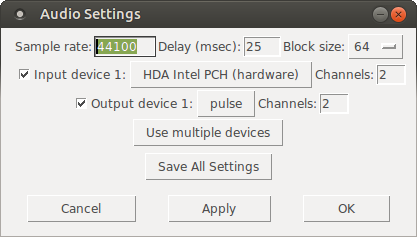
mypatch.pdshould play through Pulseaudio, which means it will play (and mix) with other applications that may be playing sound at the time! You can confirm that the correct output device has been selected from the command line, if you open Media/Audio Settings... oncepdstarts:
As the screenshot shows, now "Output device 1" is set to "pulse", which is what we needed.
Hope this helps someone!
EDIT: I had also done changes to
/etc/pulse/default.paas per https://wiki.archlinux.org/index.php/PulseAudio#ALSA.2Fdmix_without_grabbing_hardware_device beforehand, not sure whether that makes a difference or not (in any case, trying to adddmixas a PD device and playing through it, doesn't work on my Ubuntu 14.04)
 posted in technical issues
The Harmonizer: Communal Synthesizer via Wifi-LAN and Mobmuplat
The Harmonizer: Communal Synthesizer via Wifi-LAN and Mobmuplat
The Harmonizer
The Harmonizer is a single or multi-player mini-moog synthesizer played over a shared LAN.
(credits: The original "minimoog" patch is used by permission from Jaime E. Oliver La Rosa at the the New York University, Music Department and NYU Waverly Labs (Spring 2014) and can be found at: http://nyu-waverlylabs.org/wp-content/uploads/2014/01/minimoog.zip)
One or more players can play the instrument with each player contributing to one or more copies of the synthesizer (via the app installed on each handheld) depending on whether they opt to play "player 1" or "player 2".
By default, all users are "player 1" so any changes to their app, ex. changing a parameter, playing a note, etc., goes to all other players playing "player 1".
If a user is "player 2", then their notes, controls, mod-wheel etc. are all still routed to the network, i.e. to all "player 1"'s, but they hear no sound on their own machine.
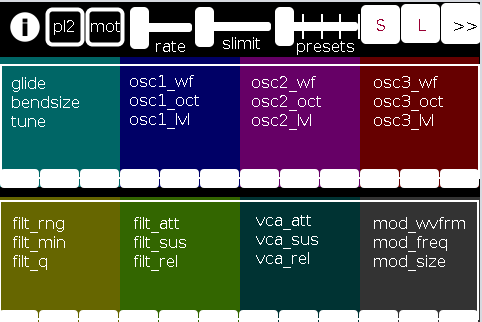
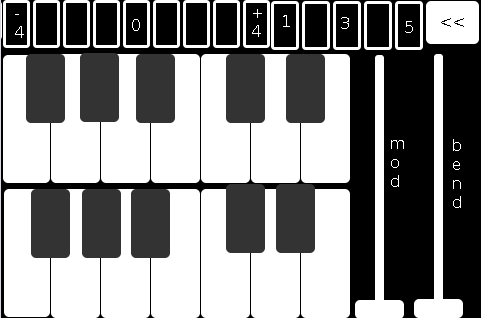
There are 2 pages in The Harmonizer. (See screenshots below.)
PAGE 1:
PAGE 2:
The first page of the app contains all controls operating on a (more or less) "meta"-level for the player: in the following order (reading top-left to bottom-right):
pl2: if selected (toggled) the user is choosing to play "player 2"
mot(ion): triggers system motion controls of the osc1,2&3 levels (volume) based on the accelerometer inside the smartphone (i.e as you twist and turn the handheld in your hand the 3 oscs' volumes change)
rate: how frequently should the handheld update its accelerometer data
slimit: by how much should the app slow down sending the (continuous) accelerometer data over the network
presets: from 1 to 5 preset "save-slots" to record and reload the Grid 1 and Grid 2 settings that are currently active
S: save the current Grid1 and Grid2 selections to the current "save slot"
L: load the currently selected preset into both Grids
">>": go the the next page (page 2 has the reverse, a "<<" button)
Grid 1: the settings, in 4 banks of 3 parameters per-, which are labeled top-down equating to left-right
Grid 2: the same as Grid 1, but with a different set of parameters
The second page comprises:
the 2-octave keyboard (lower notes on top),
a 9-button octave grid (which can go either up or down 4 octaves),
a quick-preset grid which loads one of the currently saved 5 presets
the "<<" button mentioned above, and
both a mod and pitch-bend wheel (as labeled).
SETUP:
All players install Mobmuplat;
Receive The Harmonizer (in the form of a .zip file either via download or thru email, etc.)
When on your smartphone, click on the zip file, for example, as an attachment in an email.
Both android and iphone will recognize (unless you have previously set a default behavior for .zip files) the zip file and ask if you would like to open it in Mobmuplat. Do so.
When you open Mobmuplat, you will be presented with a list of names, if in android click the 3 dots in the top right of the window and on the settings window , click "Network" Or on an iphone click "Network" just below the name list;
On the Network tab, click "LANDINI".
Switch "LANDINI" from "off" to "on".
(this will allow you to send your control data over your local area network with anyone else who is on that same LAN).
From that window, click "Documents".
You will be presented again, with the previous list of names.
Scroll down to "TheHarmonizer" and click on it.
The app will open to Page 1 as described and shown in the image above.
Enjoy with Or without Friends, Loved, Ones, or just folks who want to know what you mean "is possible" with Pure Data )!
Theories of Thought on the Matter
My opinion is:
While competition could begin over "who controls" the song, in not too great a deal of time, players will see first hand, that it is better (at least in this case) to work together than against one another.
If any form of competition emerges in the game, for instance loading a preset when a another player was working on a tune or musical idea, the Overall playablilty and gratitude-level will wain.
However, on the other hand, if players see the many, many ways one can constructively collaborate I think the rewards will be far more measurable than the costs, for instance, one player plays notes while the other player plays the controls.
p.s. my thinking is:
since you can play solo: it will be fun to create cool presets when alone then throw them into the mix once you start to play together. (Has sort of a card collecting fee ).
Afterward:
This was just too easy Not to do.
It conjoins many aspects of pure data together (I have been working on lately (afterward: i did this app a long time ago but for some reason and am only now thinking to share it) both logistical and procedural into a single whole.
I think it does both quite well, as well as, offer the user an opportunity to consider or perhaps even wonder: What is 'possible'?"
Always share. Life is just too damn short not to.
Love only.
-svanya
 posted in patch~