
markovGenerator: A music generator based on Markov chains with variable length
Edit: There is a general [markov] abstraction now at https://forum.pdpatchrepo.info/topic/12147/midi-into-seq-and-markov-chains/45
This is one of the early projects by @Jona and me. Happy to finally release it. 
markovGenerator
Generates music from learned material using Markov chains. It is polyphonic, plays endlessly and supports Markov chains with variable length.
markovGenerator.zip (updated)
Usage:
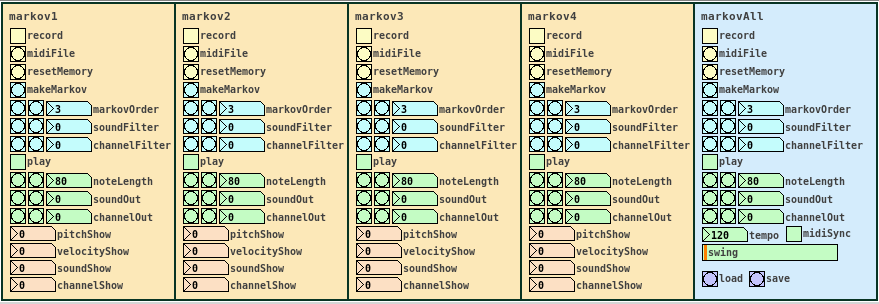
- Record midi notes or load midi files
- Make Markov system
- Play
-
Record midi notes or load midi files
Until you reset the memory, each new recording will be added to the memory. The recorded material is seen as a loop, so that the last note is followed by the the first note, for endless play. markovGenerator handles recording midi and loading midi files differently: When you record midi, it will record notes according to the midi clock every sixth midi tick. This is defined in the counter in [pd midiclock]. So that way, breaks are being recorded and the rhythm is preserved. When loading midi files, no breaks are being recorded, the notes are just recorded in order, so the rhythm will be lost. In any case, simultaneous notes will be recorded as chords, so polyphony is preserved. -
Make Markov system
Set markovOrder to specify the length of the Markov chain. The higher the order, the more musical information will be kept, the lower the order, the more random it gets. You can use soundFilter and channelFilter to only use notes of the specified sound or channel. This is especially useful when working with midi files. Note that if there are no notes of the specified sound or channel, the Markov system will be empty and nothing will be played. Set the filters to zero to disable them. If you change the settings for the Markov system, click makeMarkov again for them to take effect. You can make new Markov systems with different settings out of the same recorded material over and over again, even when playing. If you record additional notes, click makeMarkov again to incorporate them into the Markov system. -
Play
While playing, you can change the note length, sound and midi out channel. Set soundOut and channelOut to zero to use the sound and channel information of the original material. Playing starts with the Markov chain of the last recorded notes, so the first note might be played first.
Use the markovAll section on the right to control all Markov channels at once. Here you can also set tempo, swing and midiSync, and you can save the project or load previous projects.
Have fun!
If it does not play, make sure that
- you recorded some notes,
- you hit the makeMarkov button,
- soundFilter and channelFilter are not set to values where there are no notes. Try setting the filters to zero and hit makeMarkov again.
About the Markov system:
You can see the Markov system of each Markov channel in [text define $0markov]. Notes are stored as symbols, where the values are joined by "?". A note might look like 42?69?35?10 (pitch?velocity?sound?channel). Chords are joined by "=". A chord of two notes might look like 40?113?35?10=42?49?35?10. Notes and chords are joined to Markov chains by "-". The velocity values are not included in the chains. Sound and midi channel values are only included, if soundFilter or channelFilter are off, respectively. Markov chains of order three may look like 42?35?10-36?35?10=42?35?10-60?35?2 with filters off and simply like 42-37-40 with both filters active, only using the pitch value.
Requires Pd 0.47.1 with the libraries cyclone, zexy and list-abs.
 posted in patch~
ALSA output error (snd\_pcm\_open) Device or resource busy
Sorry to necro this thread, but I finally found out how to run PureData under Pulseaudio (which otherwise results with "ALSA output error (snd_pcm_open): Device or resource busy").
First of all, run:
pd -alsa -listdev
PD will start, and in the message window you'll see:
audio input devices:
1. HDA Intel PCH (hardware)
2. HDA Intel PCH (plug-in)
audio output devices:
1. HDA Intel PCH (hardware)
2. HDA Intel PCH (plug-in)
API number 1

no midi input devices found
no midi output devices found
... or something similar.
Now, let's add the pulse ALSA device, and run -listdev again:
pd -alsa -alsaadd pulse -listdev
The output is now:
audio input devices:
1. HDA Intel PCH (hardware)
2. HDA Intel PCH (plug-in)
3. pulse
audio output devices:
1. HDA Intel PCH (hardware)
2. HDA Intel PCH (plug-in)
3. pulse
API number 1

no midi input devices found
no midi output devices found
Notice, how from the original two ALSA devices, now we got three - where the third one is pulse!
Now, the only thing we want to do, is that at startup (so, via the command line), we set pd to run in ALSA mode, we add the pulse ALSA device, and then we choose the third (3) device (which is to say, pulse) as the audio output device - and the command line argument for that in pd is -audiooutdev:
pd -alsa -alsaadd pulse -audiooutdev 3 ~/Desktop/mypatch.pd
Yup, now when you enable DSP, the patch mypatch.pd should play through Pulseaudio, which means it will play (and mix) with other applications that may be playing sound at the time! You can confirm that the correct output device has been selected from the command line, if you open Media/Audio Settings... once pd starts:
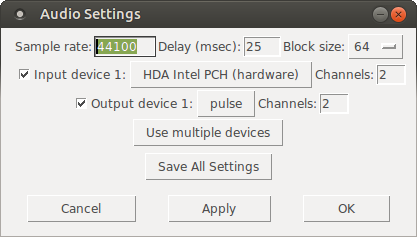
As the screenshot shows, now "Output device 1" is set to "pulse", which is what we needed.
Hope this helps someone!
EDIT: I had also done changes to /etc/pulse/default.pa as per https://wiki.archlinux.org/index.php/PulseAudio#ALSA.2Fdmix_without_grabbing_hardware_device beforehand, not sure whether that makes a difference or not (in any case, trying to add dmix as a PD device and playing through it, doesn't work on my Ubuntu 14.04)
 posted in technical issues
Is PD for me?
Hi,
I don't know anything to PD for now. I'm a French programmer and guitarist playing (among others) in a Pink Floyd Tribute band. Our shows can be pretty complex. Using many keyboard sounds, guitar sounds, settings on our XR32, playing audio samples, playing videos... As we don't play using a click track, all of these actions are done by each of us at the right moment. It works, but sometimes it gets "tricky"; we have to play the right chord and sing in tune without forget to start the sample and change the guitar sound... It can disturb us from our primary goal; play good music!
So I'm looking for tool that could handle many (all?) of those things and be controlled in a very simple way. I imagine it like this; I would define the "actions" that have to be done (send program changes to differents hardware, play an audio sample, play a video, send OSC to the XR32...). Actions that have to be made at the same time would be grouped in a "script". And these scripts would be ordered in a "playlist". Then, when pressing a single (midi) footswitch the scripts will be fired sequentially at the right moment.
So is Pure Data is the right tool to make this? If it is not do you know some tool that will do it?
 posted in technical issues
Multiple patches sending to the same Arduino / change block size?
I'm working on a project involving Pure Data and Arduino. The idea is to play an audio file while controlling a pump that breathes air into an aquarium, based on the envelope of the audio, so that the bubbles correspond to the voice that you hear in headphones.
My problem is, while it works perfectly with one aquarium (playing the audio file + controlling the pump), it's less precise, and sometimes completely off, when I'm adding the others.
Files : main.pd, aquarium.pd, arduino.pd
The logic of one aquarium is inside an abstraction, [aquarium], with the file, threshold, audio output and Arduino pin as creation arguments. Every instance of the abstraction is playing its own file into a given audio output, and sending messages to the Arduino ("turn on pump X" or "turn off pump X"). It works quite well for most of the aquariums, so I guess (hope) the fix must be simple.
I tried different ideas to limit the message flow but didn't quite succeed (hence the mess below the [dac~] object, this stuff is not used anymore).
I only recently thought about increasing block size, thinking that would reduce the number of messages sent to the Arduino. However using the audio settings, it didn't seem to change anything, and I'm not sure how to use the [block~] object. Do I have to send the audio output through an [outlet~] object? I guess that would mean each of my 9 [aquarium…] blocks would need to have 9 outlets going into a [dac~] object in my main patch, and that would be a big spaghetti plate
I'd be curious to know if any of you has ever encountered this kind of issue, or has an idea to fix it, either with block size, pure data magic or anything else…
Thanks!
 posted in technical issues
Beatmaker Abstract
http://www.2shared.com/photo/mA24_LPF/820_am_July_26th_13_window_con.html
I conceptualized this the other day. The main reason I wanted to make this is because I'm a little tired of complicated ableton live. I wanted to just be able to right click parameters and tell them to follow midi tracks.
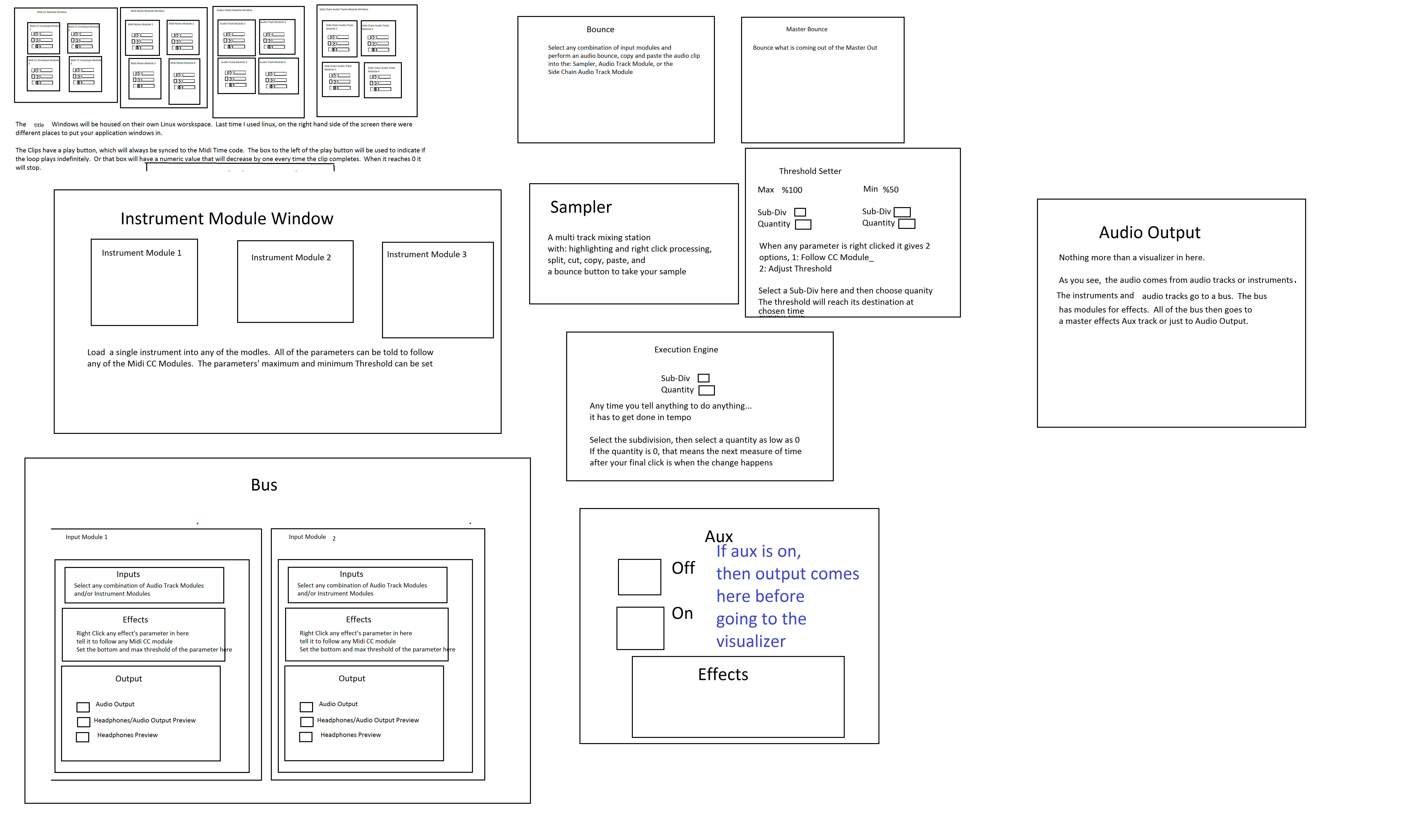
The big feature in this abstract is a "Midi CC Module Window" That contains an unlimited (or potentially very large)number of Midi CC Envelope Modules. In each Midi CC Envelope Module are Midi CC Envelope Clips. These clips hold a waveform that is plotted on a tempo divided graph. The waveform is played in a loop and synced to the tempo according to how long the loop is. Only one clip can be playing per module. If a parameter is right clicked, you can choose "Follow Midi CC Envelope Module 1" and the parameter will then be following the envelope that is looping in "Midi CC Envelope Module 1".
Midi note clips function in the same way. Every instrument will be able to select one Midi Notes Module. If you right clicked "Instrument Module 2" in the "Instrument Module Window" and selected "Midi input from Midi Notes Module 1", then the notes coming out of "Midi Notes Module 1" would be playing through the single virtual instrument you placed in "Instrument Module 2".
If you want the sound to come out of your speakers, then navigate to the "Bus" window. Select "Instrument Module 2" with a drop-down check off menu by right-clicking "Inputs". While still in the "Bus" window look at the "Output" window and check the box that says "Audio Output". Now the sound is coming through your speakers. Check off more Instrument Modules or Audio Track Modules to get more sound coming through the same bus.
Turn the "Aux" on to put all audio through effects.
Work in "Bounce" by selecting inputs like "Input Module 3" by right clicking and checking off Input Modules. Then press record and stop. Copy and paste your clip to an Audio Track Module, the "Sampler" or a Side Chain Audio Track Module.
Work in "Master Bounce" to produce audio clips by recording whatever is coming through the system for everyone to hear.
Chop and screw your audio in the sampler with highlight and right click processing effects. Glue your sample together and put it in an Audio Track Module or a Side Chain Audio Track Module.
Use the "Threshold Setter" to perform long linear modulation. Right click any parameter and select "Adjust to Threshold". The parameter will then adjust its minimum and maximum values over the length of time described in the "Threshold Setter".
The "Execution Engine" is used to make sure all changes happen in sync with the music.
IE>If you selected a subdivision of 2, and a length of 2, then it would take four quarter beats(starting from the next quarter beat) for the change to take place. So if you're somewhere in the a (1e+a) then you will have to wait for 2, 3, 4, 5, to pass and your change would happen on 6.
IE>If you selected a subdivision of 1 and a length of 3, you would have to wait 12 beats starting on the next quater beat.
IE>If you selected a subdivision of 8 and a length of 3, you would have to wait one and a half quarter beats starting on the next 8th note.
http://www.pdpatchrepo.info/hurleur/820_am,_July_26th_13_window_conception.png
 posted in abstract~
Polyphonic voice management using \[poly\]
Keeping track of note-ons and note-offs for a polyphonic synth can be a pain. Luckily, the [poly] object can be used to take care of that for you. However, the nuts and bolts of how to use it may not be immediately obvious, particularly given its sparse help patch. Hopefully this tutorial will clarify its usefulness. It will probably be easier to follow along with this explanation if you open the attached patch. I'll try to be thorough, which hopefully won't actually make it more confusing!
To start, [poly] accepts a MIDI-style message of note number and velocity in its left and right inlets, respectively...
[notein]
| \
[poly 4]
...or as a list in it left inlet.
[60 100(
|
[poly 4]
The first argument is the maximum number of voices (or note-ons) that [poly] will keep track of. When [poly] receives a new note-on, it will assign it a voice number and output the voice number, note number, and velocity out its outlets. When [poly] gets a note-off, it will automatically match it with its corresponding note-on and pass it out with the same voice number.
By [pack]ing the outputs, you can use [route] to send the note number and velocity to the specified voice. For those of you not familiar, [route] will take a list, match the first element of the list to one of its arguments, and send the rest of the list through the outlet that goes with that argument. So, if you have [route 1 2 3], and you send it a list where the first element is 2, then it will pass the rest of the list to the second outlet because 2 is the second argument here. It's basically a way of assigning "tags" to messages and making sure they go where they are assigned. If there is no match, it sends the whole list out the last outlet (which we won't be using here).
[poly 4]
| \ \
[pack f f f] <-- create list of voice number, note, and velocity
|
[route 1 2 3 4] <-- send note and velocity to the outlet corresponding to voice number
At each outlet of [route] (except the last) there should be a voice subpatch or abstraction that can be triggered on and off using note-on and note-off messages, respectively. In most cases, you'll want each voice to be exact copies of each other. (See the attached for this. It's not very ASCII art friendly.)
The last thing I'll mention is the second argument to [poly]. This argument is to activate voice-stealing: 1 turns voice-stealing on, 0 or no argument turns it off. This determines how [poly] behaves when the maximum number of voices has been exceeded. With voice-stealing activated, once [poly] goes over its voice limit, it will first send a note-off for the oldest voice it has stored, thus freeing up a voice, then it will pass the new note-on. If it is off, new note-ons are simply ignored and don't get passed through.
And that's it. It's really just a few objects, and it's all you need to get polyphony going.
[notein]
| \
| \
[poly 4 1]
| \ \
[pack f f f]
|
[route 1 2 3 4]
| | | |
( voices )
 posted in tutorials
NVidia puredyne vs vista
Hey
Once again I'm back on vista. My brief journey to puredyne goes something like this.
from puredyne
partitioned new hard drive with 4 partitions 1-swap , 2 ext4 200Gib, 1 NTFS 200GB . Copied Vista to NTFS partition with gparted(started to do this with dd but with new Gibabits stuff I was skeered but hey a platter is a platter and a cluster is a cluster right). Actually there was a 5th partition in there which was the vista restoration partition but I eventually deleted it for obvious reasons.
Removed old drive ,
took machine to ethernet connection with internet,
booted to vista ,
installed Norton virus scanner - only 1 virus, 2 tracking cookies, and one gain trickler after over a year with no virus scanner, Thats pretty good and shows you can be selective about what you download and where you visit on the web and not get any viruses.
Was trying to get windows movie maker to work with mov codec which it doesnt.
Installed auto updates for the first and only time. this took about 3 hours and still needed to install service pack 1, 2. Aborted trying to update win movie maker
****Problem 1***** MS movie maker does not work with GEM mov video output codec.
Installed latest Nvidia drivers for vista.
Woohooo OpenGl hardware acceleration GEM works so much better in vista now.
*****Problem 2********ASIO for all does not allow 2 applications to run with audio and midi at the same time. If I wanted to run Widi and play my guitar so puredata can receive midi input from guitar ASIO will not allow it but ASIO for all is the only way I can get latency down so this would be feasible.
Got frustrated.
Installed fresh copy of puredyne onto 2nd ext4 partition.
ran puredata audio latency good with fresh install. gem video bad.
used synaptics to install nvidia drivers. v185 I think.
ran GEm error no opengl config.
downloaded gdeb , flash player, google chrome, nvidia drivers from nvidia site.
installed gdeb from terminal, flash and chrome from gdeb.
rebooted to log in as root and iunstalled nvidia drivers.
woohoo hardware acceleration for opengl
******problem 3************
gem works great but audio glitches with puredata window visible.
when only gem window is visible i can unaudioglitchily move the mouse around to control same parameters that would normaly be controled with sliders in pd window.
Seems like before i upgraded nvidia video drivers hw:do o whatever it is, was listed in JackD as realtek HD Audio, now it is listed as NVIDIA HD Audio.
So Gem works great but not when Pd window is open and I think my audio drivers were replaced with Nvidia.
I would really like to get back to my patch and stop wasting time on these operating systems and hardware configurations I thought in the last 15 years all this hardware acelleration and autodetection would be figured out but no all we got is rc.0, rc.01, rc.02, rc, etc...... instead of just rc.d.
Ok I'm getting an error when I exit puredyne that says pid file not found is jackd running. anyone know what that means?
Also does anyone have a keymap for gem keyboard for linux, windows and mac so I don't have to record them.
Any suggestions about what to do about my ASIO problems in windows?
Any suggestions about my audio driver in Linux?
Any suggestions about my GEM mov video / windows incompatibilities?
I can import the mov video and audio to SF Acid 3.0 and output a 2Gb avi then import it into windows movie maker but this is crazy to do for a 7 minute 12fps 320x240 video.
Ahhhhhhhhh!
Any suggestions are welcome!
PS I believe someone could rewrite puredata's audio and video interface in assembly language to control their hardware before figuring out how to get these operating systems to do it.
 posted in I/O hardware diy
Audio glitch with portaudio in PD
Hi everyone,
I'm having an issue with audio output in PD : when setting audio to output via portaudio, all the audio that gets out of PD has audio glitch in it, some kind of random-spaced crackles or clicks. It is completly useless as such. Increasing the delay in PD's audio settings doesn't change a thing.
However, using Jack as an audio outlet supresses all this problem, and the audio is clean that way.
Would anyone know the reason for this? I would be glad to know it as there may be a link with another issue about audio on my hardware : system audio of mac os X has the same kind of glitches that I got with PD on portaudio, only it's only occasional glitches so it's bearable. Solving this issue would be a big relief to me.
My hardware is a hackintosh (pc with osX installed on it), and mbox2 as audio interface (but I have tested with an m-audio transit and I have the same crackling issue). My soft is osX Snow Leopard 10.6.5.
Any help appreciated!
 posted in technical issues
Interaction Design Student Patches Available
Greetings all,
I have just posted a collection of student patches for an interaction design course I was teaching at Emily Carr University of Art and Design. I hope that the patches will be useful to people playing around with Pure Data in a learning environment, installation artwork and other uses.
The link is: http://bit.ly/8OtDAq
or: http://www.sfu.ca/~leonardp/VideoGameAudio/main.htm#patches
The patches include multi-area motion detection, colour tracking, live audio looping, live video looping, collision detection, real-time video effects, real-time audio effects, 3D object manipulation and more...
Cheers,
Leonard
Pure Data Interaction Design Patches
These are projects from the Emily Carr University of Art and Design DIVA 202 Interaction Design course for Spring 2010 term. All projects use Pure Data Extended and run on Mac OS X. They could likely be modified with small changes to run on other platforms as well. The focus was on education so the patches are sometimes "works in progress" technically but should be quite useful for others learning about PD and interaction design.
NOTE: This page may move, please link from: http://www.VideoGameAudio.com for correct location.
Instructor: Leonard J. Paul
Students: Ben, Christine, Collin, Euginia, Gabriel K, Gabriel P, Gokce, Huan, Jing, Katy, Nasrin, Quinton, Tony and Sandy
GabrielK-AsteroidTracker - An entire game based on motion tracking. This is a simple arcade-style game in which the user must navigate the spaceship through a field of oncoming asteroids. The user controls the spaceship by moving a specifically coloured object in front of the camera.
Features: Motion tracking, collision detection, texture mapping, real-time music synthesis, game logic
GabrielP-DogHead - Maps your face from the webcam onto different dog's bodies in real-time with an interactive audio loop jammer. Fun!
Features: Colour tracking, audio loop jammer, real-time webcam texture mapping
Euginia-DanceMix - Live audio loop playback of four separate channels. Loop selection is random for first two channels and sequenced for last two channels. Slow volume muting of channels allows for crossfading. Tempo-based video crossfading.
Features: Four channel live loop jammer (extended from Hardoff's ma4u patch), beat-based video cross-cutting
Huan-CarDance - Rotates 3D object based on the audio output level so that it looks like it's dancing to the music.
Features: 3D object display, 3d line synthesis, live audio looper
Ben-VideoGameWiiMix - Randomly remixes classic video game footage and music together. Uses the wiimote to trigger new video by DarwiinRemote and OSC messages.
Features: Wiimote control, OSC, tempo-based video crossmixing, music loop remixing and effects
Christine-eMotionAudio - Mixes together video with recorded sounds and music depending on the amount of motion in the webcam. Intensity level of music increases and speed of video playback increases with more motion.
Features: Adaptive music branching, motion blur, blob size motion detection, video mixing
Collin-LouderCars - Videos of cars respond to audio input level.
Features: Video switching, audio input level detection.
Gokce-AVmixer - Live remixing of video and audio loops.
Features: video remixing, live audio looper
Jing-LadyGaga-ing - Remixes video from Lady Gaga's videos with video effects and music effects.
Features: Video warping, video stuttering, live audio looper, audio effects
KatyC_Bunnies - Triggers video and audio using multi-area motion detection. There are three areas on each side to control the video and audio loop selections. Video and audio loops are loaded from directories.
Features: Multi-area motion detection, audio loop directory loader, video loop directory loader
Nasrin-AnimationMixer - Hand animation videos are superimposed over the webcam image and chosen by multi-area motion sensing. Audio loop playback is randomly chosen with each new video.
Features: Multi-area motion sensing, audio loop directory loader
Quintons-AmericaRedux - Videos are remixed in response to live audio loop playback. Some audio effects are mirrored with corresponding video effects.
Features: Real-time video effects, live audio looper
Tony-MusicGame - A music game where the player needs to find how to piece together the music segments triggered by multi-area motion detection on a webcam.
Features: Multi-area motion detection, audio loop directory loader
Sandy-Exerciser - An exercise game where you move to the motions of the video above the webcam video. Stutter effects on video and live audio looper.
Features: Video stutter effect, real-time webcam video effects
 posted in news
Seq Sampler Loop
No sound out of this Oscar.
Here's a bit of the error message:
ch file or directory
error: soundfiler_read: /home/pelao/Documentos/audio/loops/terminus13.wav: No such file or directory
error: soundfiler_read: /home/pelao/Documentos/audio/loops/terminus15.wav: No such file or directory
error: soundfiler_read: /home/pelao/Documentos/audio/loops/terminus15.wav: No such file or directory
error: soundfiler_read: /home/pelao/Documentos/audio/loops/terminus15.wav: No such file or directory
error: soundfiler_read: /home/pelao/Documentos/audio/loops/terminus15.wav: No such file or directory
error: soundfiler_read: /home/pelao/Documentos/audio/loops/terminus16.wav: No such file or directory
error: soundfiler_read: /home/pelao/Documentos/audio/loops/terminus16.wav: No such file or directory
error: soundfiler_read: /home/pelao/Documentos/audio/loops/terminus15.wav: No such file or directory
error: soundfiler_read: /home/pelao/Documentos/audio/loops/terminus15.wav: No such file or directory
error: soundfiler_read: /home/pelao/Documentos/audio/loops/terminus14.wav: No such file or directory
error: soundfiler_read: /home/pelao/Documentos/audio/loops/terminus14.wav: No such file or directory
error: soundfiler_read: /home/pelao/Documentos/audio/loops/terminus15.wav: No such file or directory
error: soundfiler_read: /home/pelao/Documentos/audio/loops/zapa06.wav: No such file or directory
error: soundfiler_read: /home/pelao/Documentos/audio/loops/terminus15.wav: No such file or directory
error: soundfiler_read: /home/pelao/Documentos/audio/loops/terminus15.wav: No such file or directory
error: soundfiler_read: /home/pelao/Documentos/audio/loops/terminus15.wav: No such file or directory
error: soundfiler_read: /home/pelao/Documentos/audio/loops/terminus15.wav:
But, it looks awesome.
Keep well ~ Shankar
 posted in patch~