
Audiolab is now available on deken!
@qhr33k Thanks!
about this sidechain thing; yes you would need to feed the compressor an audio signal and use the sidechain output to let's say duck the tail of a reverb (that's just an example, you can do whatever you want with this). In this case you would multiply the 100% wet reverb with the signal from the sidechain outlet of the compressor like this:
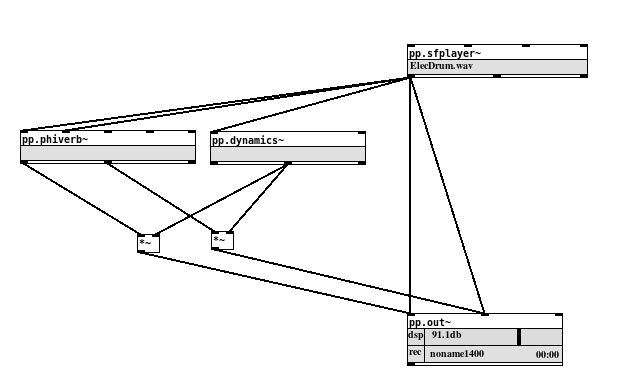
sidechain_compression.pd
The presets are more or less didactic, you can use them as a starting point and then change the parameters until they fit your needs. In the case above you'd use the "compress" preset. I think what confuses you is the preset "Env.follow(sidechain)". This one is an envelope follower, the comment (sidechain) hints that the envelope is the signal from the sidechain outlet. Hope that makes sense?
 posted in news
Audiolab is now available on deken!
@solipp said:
https://github.com/solipd/AudioLab
Fantastic patches!
I can't figure out how to use the sidechain in the compressor. There's no key input, just an enelope out. Should I feed the compressor an audio signal somewhere or an envelope? I am confused. What is the sidechain preset for? Can anyone help? Thanks.
 posted in news
knee compressor
@oid said:
hopefully no stupid errors like last night. No time to test now.
And first object after the inlet is a [*~ 0] that I forgot to delete, really doing a great job at being consistent with this one. And it turns out the attack does nothing and the release affects overall response instead of just release despite this being copy and pasted directly from the patch where I have been developing it and where the attack and release work properly. Would love an explanation as to why, guessing one of those bugs that goes away after restarting pd but which is the bug, the working one or the not working one?
@whale-av Analog world always clips and will do it hard but may do it soft for awhile before it gets to hard. it is limited by the power supply and circuitry. In an analog compressor the gain computer will never see a signal greater than it was designed for, the circuitry before it will just clip it back down to size if you feed it a ridiculously large signal. With this compressor in its current state you can feed it a -200 - 200 signal and it will happily do its job and a very different job than that analog compressor in the same situation which would clip the signal back down to its limits and then let you compress that heavily distorted signal to a level manageable by what ever gear the compressor is running into. We can use this compressor to compress ridiculously large signals to manageable levels but you will probably get aliasing from the heavy gain reduction; upsampled clipping on the input alleviates that, if executed well can help manage troublesome peaks and reduce lookahead/delay of the signal as well.
Not sure if I will make a ui for this, I am trying to keep it generic enough that people can use it to make the compressor they want with it instead of use my idea of a compressor which would lack things like reassuring visual confirmations or knees and would be made fun of by all the other compressors. It is mostly an exercise to get better with the audio side of pd, but I have considered doing a ui so maybe there is a gain reduction meter in the future.
 posted in technical issues
knee compressor
@oid Analogue world sometimes semi-soft clips as you say... especially on magnetic tape, but in the digital world you cannot clip without distortion. So maybe add metering and an input gain.
If you add expansion to your compressor then you should add output metering and gain reduction as the final stage
Some digital compressors also mimic old analogue compressors and add "makeup" gain after the compressor, but that I find hard to work with in a live environment. In the studio it can be useful.
A meter showing the gain reduction of the compressor would also be a nice touch.... visual confirmation of the depth of the effect.
David.
 posted in technical issues
knee compressor
Possibly complete, at least working. Curious for some feedback, not completely certain everything works as it should but I haven't really put the time into running measurements yet. The smoothing filter will probably be improved and another detection mode added and eventually I will probably switch to using some externals for some of it but probably done with this for a couple weeks beyond the slight tweak/fix. No help file yet, threshold, gain and knee are in dbs, ratio is ratio and everything else is in ms. It can take startup args, look in [pd $0args] for the flags.
kcomp~.pd
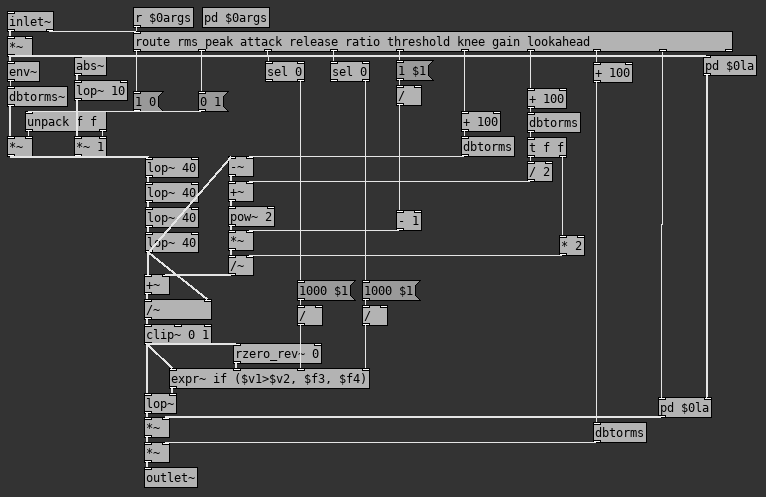
A question, what is a digital compressor supposed to do for inputs beyond the -1 to 1 audio range? In the analog world we always have limits imposed by the components and the power supply, we know what the maximums are, but not in digital. As this compressor stands things out of the -1 to 1 range do not work as I would like or expect from my analog sensibility. My instinct says too put an upsampled clipper on the input but I am curious as to what is considered proper in the digital world.
Edit: Just realized I forgot to test the abstraction after some changes and adding creation args, hopefully no stupid errors like last night. No time to test now.
posted in technical issues
crossover bank with 32 bands
@jameslo @manuels thank you so much for your feedback and taking the time!
For the 32band spectral ballancer, I will dig into fft now.
It's very interesting to see the different ways in the testpatch. It helps for a future module in my patch, a 5band multiband expander/compressor which I will probably build with shelf filters.
Again, thanks a lot. 
 posted in technical issues
crossover bank with 32 bands
Hello All.
what would be the most elegant, cpu-cheap and phase-accurate way to build a 32band 'crossover-bank' where I can manipulate the volume of the bands and sum them back together afterwards?
bpbank~ has gotten me quite far, but I think it's not really a crossover, but a filter bank. With low quantity of bands it would not work for me as it does not cover the whole frequency spectrum then.
I also tried building a crossoverbank with 32 Linkwitz–Riley filters ( 2 hip.bw~ & 2 lop.bw~) but they don't sum back together accurately. (probably doing something wrong)
I am also aware that most multiband compressors solve the problem with a filterbank for measurement and a chain of shelf filters for manipulation, but I guess it's cpu-expensive and almost impossible for me to figure out the values for all 32 shelf filters across the frequency spectrum.
Context: I am patching a 32band processor that manipulates the loudness of the bands depending on certain criteria like 'loudness of a band compared to loudness of fullrange signal and a target-curve'. It will be what I call a 'spectral ballancer'.
Here is what works quite well with bpbank~ sb_demo.pd
Thanks!
posted in technical issues

how to ott?
@whale-av
thank you very much!
i'm on ios plugdata.
i think i cannot use the iem lib filters.
but i also think any lp hp would do.
butterworth3~ from vanilla?
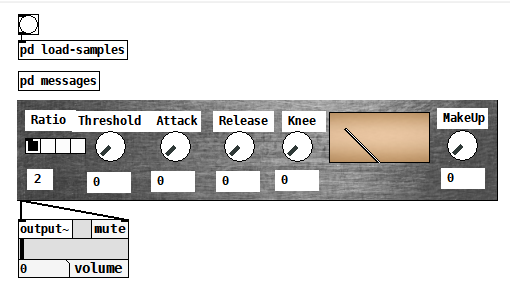
the compressor used in the multiband example is from
http://pd-tutorial.com/english/ch03s09.html
a very interesting chapter about limiter, compressor, expander.
think i will start from there.
the other example you mentioned from pd audio examples...
somehow very strange kind of compressor:)
and
i tried from the else library else/norm~, which seems to do sort of normalising/expansion thing.
 posted in technical issues
how to ott?
@breze Multiband compressor.
First problem is splitting the signal into ranges and preserving the phase relationship.
That was done here........ https://forum.pdpatchrepo.info/topic/7006/multiband-compressor/4 in the patch posted by @seb-harmonik.ar "multiband_compressor.pd"
You will need some externals... at least the iem library, maybe others.
You could replace the [pd compressor] sub-patches with the one to be found in the Pd audio examples folder...... pd/doc/3.audio.examples/I05.compressor.pd
That will do very OTT without having to set envelopes... good or bad depending on what you want to be able to do.
David.
posted in technical issues