
How do band splitters work?
@schitz
The difference of a modified signal to it's dry one is the opposite:
LP-Original=-HP
Original-BP=Notch
Dry-Notch=BP
....
see this post:
https://forum.pdpatchrepo.info/topic/13409/how-can-i-create-a-switchable-filter/4
If I'm not mistaken, using a Butterwoth filter instead, makes a quick and dirty digital Linkwitz-Riley-Filter https://en.wikipedia.org/wiki/Linkwitz–Riley_filter
[years later EDIT: Also see this patch: https://forum.pdpatchrepo.info/topic/7006/multiband-compressor/5 ]
@schitz said:
close to the original as possible
@whale-av said:
phase correlation
That's the difficult part:
I would love to have a chat and see examples of linear-phase
and minimal-phase filters in Pd!
anyone ported this to Pd yet?
2 speakers
would make the topic infinitely complicated, as different positions and responses of the speakers come into play.
 posted in technical issues
Failsafe Against Audio Volume Slips
PureData does have limits and it will clip when it reaches those limits, but there is no sane way for it to predict what the user is listening through, is it a 1500watt amp cranked or a 1/2watt headphone amp at moderate volume? You can stick a [clip~] before [dac~], but this just makes it clip earlier than it normally would so you will have to turn the volume down or listen to the clipping. You can patch up a compressor to live before [dac~] with little effort and in the process you will learn a great deal about amplitude and signal flow, but all a compressor does for you is turn down the volume for you when a strong transient happens so you have to turn your volume down bellow the threshold of the compressor to avoid altering the sound. No matter what you do the solution is the same, you turn down the volume.
It is a system built of user, computer, os, puredata, soundcard, amplifier, speakers, and anything else you put in the chain, you designed the overall system and you are the only one who can make it optimal. Applying blanket standards to all things just does not work, the design of my kitchen knives are sub-optimal because they can cut me, but if they can not cut me they will not be able to cut up my pineapple. Get a book on audio engineering if you are worried.
 posted in technical issues
NoxSiren - Modular synthesizer system <- [v15]
NoxSiren is a modular synthesizer system where the punishment of failure is the beginning of a new invention.
--DOWNLOAD-- NoxSiren for :
-
Pure Data :
NoxSiren v15.rar
NoxSiren v14.rar -
Purr Data :
NoxSiren v15.rar
NoxSiren v14.rar
--DOWNLOAD-- ORCA for :
- x64, OSX, Linux :
https://hundredrabbits.itch.io/orca
In order to connect NoxSiren system to ORCA system you also need a virtual loopback MIDI-ports:
--DOWNLOAD-- loopMIDI for :
- Windows 7 up to Windows 10, 32 and 64 bit :
https://www.tobias-erichsen.de/software/loopmidi.html
#-= Cyber Notes [v15] =-#
- added BORG-IMPLANT module.
- introduction to special modules.
- more system testing.
#-= Special Modules [v15] =-#
- BORG-IMPLANT (connects ORCA MIDI system to NoxSiren system)
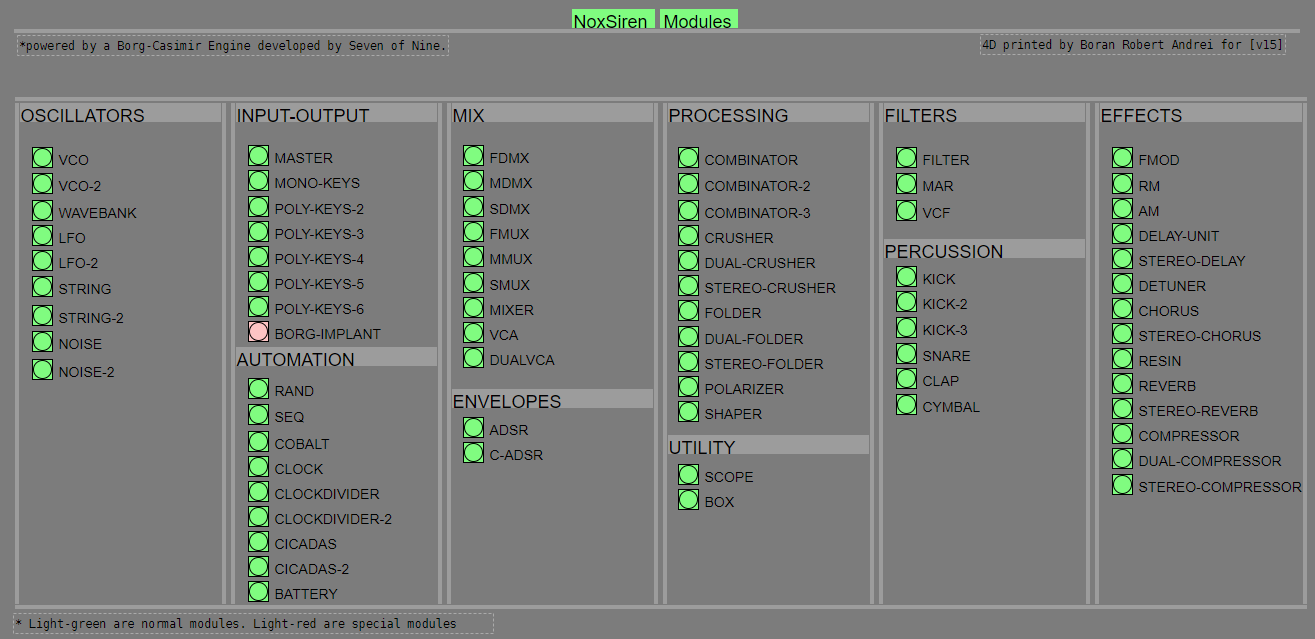
#-= Current Modules [v15] =-#
- VCO (voltage-controlled-oscillator)
- VCO2 (advance voltage-controlled-oscillator)
- WAVEBANK (additive synthesis oscillator)
- ADSR (Attack-Decay-Sustain-Release envelope)
- C-ADSR (Curved Attack-Decay-Sustain-Release envelope)
- CICADAS (128 steps-Euclidean rhythm generator)
- CICADAS-2 (advance 128-steps polymorphic-Euclidean rhythm generator)
- COMPRESSOR (lookahead mono compressor unit)
- DUAL-COMPRESSOR (2-channel lookahead mono compressor unit)
- STEREO-COMPRESSOR (lookahead stereo compressor unit)
- MONO-KEYS (virtual 1-voice monophonic MIDI keyboard)
- POLY-KEYS-2 (virtual 2-voice polyphonic MIDI keyboard)
- POLY-KEYS-3 (virtual 3-voice polyphonic MIDI keyboard)
- POLY-KEYS-4 (virtual 4-voice polyphonic MIDI keyboard)
- POLY-KEYS-5 (virtual 5-voice polyphonic MIDI keyboard)
- POLY-KEYS-6 (virtual 6-voice polyphonic MIDI keyboard)
- BATTERY (simple manual triggered machine for drumming.)
- REVERB (reverb unit with lowpass control)
- STEREO-REVERB (stereo reverb unit with lowpass control)
- RESIN (advanced rain effect/texture generator)
- NOISE (generates black,brown,red and orange noise)
- NOISE2 (generates yellow,blue,pink and white noise)
- COBALT (6-stage polyrhythm generator)
- SHAPER (basic shaper unit)
- FOLDER (basic wave folding unit)
- STEREO-FOLDER (stereo wave folding unit)
- DUAL-FOLDER (advance wave folding unit)
- POLARIZER (transform a signal into bi-polar, uni-polar, inverted or inverted uni-polar form)
- CLOCK (generates a BPM clock signal for sequencing other modules)
- CLOCKDIVIDER (a clock divider with even division of clock signal)
- CLOCKDIVIDER2 (a clock divider with odd division of clock signal)
- DELAY-UNIT (delay unit)
- STEREO-DELAY (stereo delay unit)
- CHORUS (chorus unit)
- STEREO-CHORUS (stereo chorus unit)
- SEQ (advance 16-step/trigger sequencer)
- KICK (synthesize kick unit)
- KICK2 (synthesize flavor of KICK module)
- KICK3 (synthesize flavor of KICK module)
- SNARE (synthesize snare unit)
- CLAP (synthesize clap unit)
- CYMBAL (synthesize cymbal unit)
- RAND (RNG generator for other modules parameters)
- FMOD (feedback modulation unit)
- AM (amplitude modulation unit)
- RM (ring modulation unit)
- LFO (low-frequency-oscillator)
- LFO2 (advance low-frequency-oscillator)
- COMBINATOR (combine two waves)
- COMBINATOR2 (combine three waves)
- COMBINATOR3 (combine four waves)
- STRING (Karplus-Strong string synthesis unit)
- STRING2 (advance Karplus-Strong string synthesis unit)
- DETUNER (parametric 4-channel detuner unit)
- CRUSHER (basic audio resolution unit)
- STEREO-CRUSHER (basic stereo audio resolution unit)
- DUAL-CRUSHER (advance audio resolution unit)
- FILTER (basic filter)
- VCF (voltage-controlled-filter)
- MAR (Moog-analog-resonant filter)
- VCA (voltage-controlled-amplifier)
- DUAL-VCA (advance voltage-controlled-amplifier)
- FMUX (multiplexer with fast A/D internal envelope)
- MMUX (multiplexer with medium A/D internal envelope)
- SMUX (multiplexer with slow A/D internal envelope)
- FDMX (demultiplexer with fast A/D internal envelope)
- MDMX (demultiplexer with medium A/D internal envelope)
- SDMX (demultiplexer with slow A/D internal envelope)
- MIXER (mix 1-4 possible waves)
- SCOPE (oscilloscope analyzer)
- MASTER (fancy DAC~)
- BOX (useless decorative module)
NoxSiren integrated modules menu system.
 posted in patch~
Need help understanding compression patch
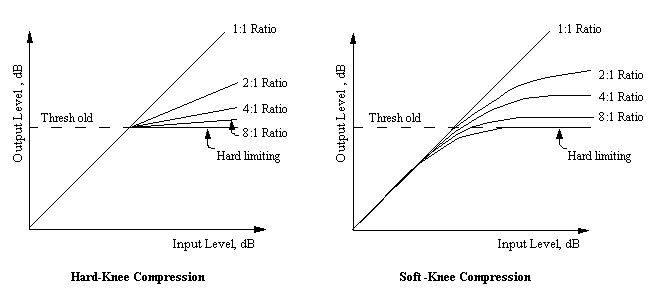
@djpersonalspace Easiest to understand through a drawing.......
The [expr~] sets the threshold and does the ratio calc.
There is a delay to the audio so as to allow the compression to act early enough....... before the signal actually gets through....... would be called "feed forward" in a classic analogue compressor. 100ms is too long. 3ms would be plenty.
Attack and release times are applied with [line~]
There is a "compensation" adjustment in the final volume control...... used a lot for studio compressors..... and often a complete disaster for live work when it is automated according to the ratio.
Not sure what "reference" is......... I will post again when I have worked that one out.
David.
 posted in technical issues
Need help understanding compression patch
@djpersonalspace
yeah, approximately (because you always measure a mean dB value with [env] depending on its window size). or exactly, the part of the signal, which exceeds threshold level - in this case, it would works as an upward-expander: the signal below threshold level would be left untouched, while the part of the signal, which exceeds it, will be amplified towards the reference value. a constant sine wave is not really illustrative for this purpose, try it witch a dynamic sample loop. have a look here, i added a small loop sampler abstraction to your patch.
compsampler.zip
in most cases, you will not want to use the compressor like this:
the benefit of a compressor is, that it attenuates peaks above a given threshhold by a given ratio, which at first makes the signal quiter. after the compression, you can then increase the volume again. the effect is, that the mean-loudness of the signal is higher than before compression. this is why most compressors have so calles "makeup" control to adjust the level of the compressed signal. in addition, you could also add a gain control, for the input level.
if you want to use the compressor the usual way, you can simply save on the reference control an put the threshold control in its place, so you have the same level for both parameters. although you wont be able to use it as expander anymore.
the compression factor is pretty much the same as in usual compressors: a factor of 10 is equal to a ratio of 1:10, a factor of 2, would mean 1:2 as ratio.... this means that the level of the signal above the threshold will be halved (towards the threshold level (which the is the equal to the reference level).
 posted in technical issues
Need help understanding compression patch
@toxonic hey thanks for the explanation. So am I right in saying that with pd a reference of 100 is setting the compressor to push the signal towards 0db rms? Also, how does compression factor relate to compression ratio that you might expect to see on commercial compressors?
Thanks again
 posted in technical issues
Need help understanding compression patch
@djpersonalspace
a compressor is used to attenuate peaks, so if your incoming signal is simply too quiet, you have to amplify it (what you already have done in the osc subpatch with a multiplier). threshold and reference are both values in dB, while the compression factor is a ratio (1:x), which means, that the audio signal, which exceeds the threshold level will be attenuated / amplified by this ratio towards the reference point. this dpends on, if the reference level is higher (expander) oder lower (compressor) than the audio level.
posted in technical issues
Need help understanding compression patch
Hi guys, so ive made a compressor patch from Johannes Kreidler's Loadbang book, but there isnt loads of information about how to use it and how it works. Ive used compressors before, but this is the first time I've made one. The book progresses the patch from a limiter, which when I tested I found worked pretty much how I expected but I'm struggling to understand how I'm supposed to use the compressor. Say I have a signal coming in too quiet and I want to amplify it - what settings do I diall in ? I cant seem to get this behaviour. Have I missed something? Also, what are the threshold, reference and "compression factor" measured in in this case? Any help much appreciated.
compressorJK.pd
posted in technical issues
Wind and Rain....
after years of "pd-abstinence" and not doing anything dsp-related at all, i built a new patch in the past few days, which is roughly inspired by "space drones" from NI Reaktor. the patch can be used to create wind- and rain-like soundscapes or something like this... 
my main intention was to get into pd again and learn a bit about data structures to visualize sound particles and figure out, how the [clone] object works, which - afaik - was'n available last time i patched with pd.
i built a similar patch years ago, but i remember that voice management was a real pain in the ass, so i had to use dynamic patching for this, etc.
now, there's still a lot to do:
- adjust parameters and their relations
- gain compensation for high filter q
- enhance visualisation of sound particles
- and a lot more....
you will need to get some external libraries in order to get the patch working, i guess mainly zexy, cyclone and else.... there's an additional compressor external (t_comp~) in the abs-folder which is the stereo compressor from the FAUST libraries. since i'm on linux i compiled the external for osx and win32 via the FAUST online editor and couldn't test them afterwards - i hope they work for you... EDIT: here's the DSP file, for those who want to compile it with Faust Works or whatever.... t_comp.dsp
however, suggestions on how to enhance the patch are welcome! thanks in advance for trying! 
EDITS:
-
winds2_r001.zip
a few changes in signal flow, added a master volume with vu meter, fixed a bug (double triggered notes), put reverb after compressor -
winds2_r002.zip
now in one-window-mode
posted in patch~
Kraken a low-cpu, compact, highly versatile guitar effects stompbox
Kraken a low-cpu, compact, highly versatile guitar effects stompbox
Intent:
Make a guitar effects rack that would
- do a lot (includes 8000 pedal combinations)
- cost very little cpu; and
- eliminate the need to "connect" effects abstractions
(Master-Kraken-help.pd is the main patch.)
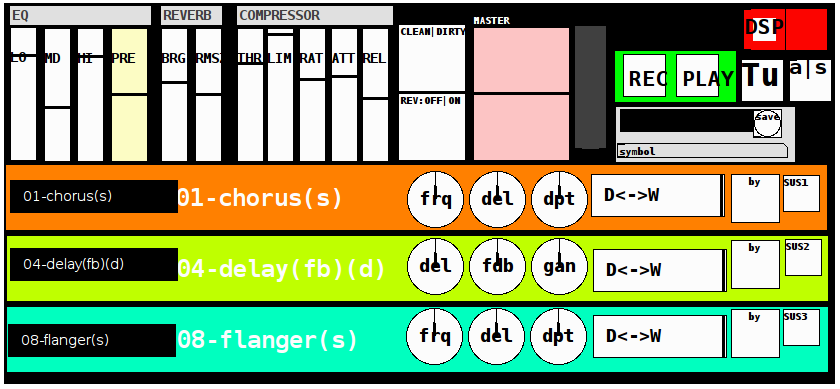
The Stack (in this order):
eq3
pre (gain)
3 effect/pedal slots (with clean-dirty "bypass" toggle for the whole set)
with each slot containing
a (tof) menu to select from 21 effects (0 being raw)
3 parameters (mknobs)
a dry-wet slider
a bypass toggle (for that line which crossfades in and out (set by the crossfade control, in ms)
and
an infinite sustain toggle (for that line)
reverb (with brightness and roomsize control and off|on toggle)
compressor (with threshold, limit, ratio, attack, release (zexy~))
master out level.
Kraken also includes:
a simple recorder (record and play (loop) toggles and recording the entire result)
a popup (standard tuning) guitar tuner
an [ adc~ | sample ] (a|s) switch (to test the sound or even post-process a track/file using openpanel)
and
a presets control which loads or saves the current settings (for the entire rack and includes a date+time prefix as well as an entered name for each preset).
Additional Info:
OpenSoundControl (OSC) has been exposed for a future/additional post ("Kraken-OSC") which I have almost finished in Mobmuplat (only, for now, PdParty and others to be added later) and can be accessed via the send and receive to network abstractions inside the patch.
**
EFFECTS LIST:
00-raw
01-chorus
02-compressor
03-delay(3-tap)
04-delay(fb)
05-delay(spectr)
06-distortion
07-filter
08-flanger
09-fuzz
10-looper(fw-bw) (>0.5 on, <0.5 off to record, play forward, or play backward)
11-octave_harmonizer
12-overdrive
13-phaser
14-pitchshifter
15-reverb
16-step-vibrato
17-tremolo
18-vcf
19-vibrato
20-wah-wah
Dependencies:
(which I believe are all available in Deken)
zexy
cyclone
moonlib
iemlib
ggee
plus zexy~ "load on startup"
Credits/Thanks/Acknowledgements:
As I think with most pure data patches Kraken is built on the back of lots of other people's hardwork and diligent effort. In particular, it owes its effects to predominantly the DYI2 library (by Hardoff), the Stamp Album library (by Balwyn), those on the Guitar Extended website (by Pierre), and less so to a few others. And to all of them, I am deeply thankful.
Tally-Ho! Happy playing.
I am very thankful to finally "Release the Kraken!". I hope it may bring you many hours of pleasure, entertainment, and possibly education.
p.s. if you see some of your work inside this, DO please let me know and I will credit you more specifically.
Thanks again. Feel free to ask any questions you may like regarding using the tool, the abstractions, etc., and I will respond to them as soon as I am able. -Peace
 posted in patch~