
4 point interpolation increases peaks, but by how much?
@whale-av I'm not sure that ringing is relevant or helps quantify the issue, but I support all efforts to keep Spinal Tap relevant in international discourse. 
I found this explanation of 4 point interpolation helpful: interpolation.pdf .
It's kind of surprising how straightforward it is to construct a 3rd degree polynomial that hits all 4 points, and useful to know that the resulting polynomial is only for interpolating the interval x2..x3. That explains why tabread4-help says "Indices should range from 1 to (size-2) so that the 4-point interpolation is meaningful", e.g. if you have a 4 point table, you can only interpolate between indices 1 and 2 (the 2nd and 3rd table value). That in turn implies that I only need to characterize the overshoot produced by any given vector of 4 consecutive samples because everything before and after doesn't matter. You can see it in @whale-av's plot--those sharp points at some of the integer indices as the algorithm switches abruptly from one polynomial to another.
In a cursory search of the web I can find tutorials on how to find the local minima and maxima of a given 3rd degree polynomial, but not a family of them (varying over all yn). I think this means I need multivariable calculus to answer my question analytically.  Which in turn means it's probably not happening.
 posted in technical issues
Crackling noises in Wave Generator
@JackCrescent Not sure about finding the project folder. Try doing a "saveas" from the pd menu. The OS tree box that pops up should show you where Pd is trying to save the patch..... hopefully the same place as it was last saved to.
The graphs will jump if the [metro] is not in sync with the [osc~]..... difficult to achieve especially with incoming midi notes (you could reset the phase of [osc~] as the metro bangs but that will cause clicks in the output of [osc~]......
And if you are reading from the arrays they need to be a complete waveform so that the first level in the graph is the same as the last.
Otherwise the signal jumps as the reader wraps back to the beginning.... which causes a click (they will probably sound like a buzz..... or "motor exhaust sound" as they arrive so rapidly).
That means the length of the array (the number of points) needs to be correct for a complete waveform.
It should be a better idea to construct the waveforms only once....... and then read them at different speeds (adjusted for the midi note) using [phasor~] connected to [tabread~] or better still [tabread4~].
There is a very good guide here...... http://write.flossmanuals.net/pure-data/generating-waveforms/ that uses [tabread4~] for interpolation...
It also shows (but doesn't explain unfortunately) the maths necessary for the interpolation (in fact the length of the array... 2051... is 2048 samples.... a good multiple of 64 that contains enough data points for a fairly smooth wave..... plus 3 for the interpolation as [tabread4~] is reading 4 samples at a time and "smoothing" the samples even when the [phasor~] is wrapping around the end of the array).
And it shows how the playback speed is controlled by midi note input.
You should look at the help files for the objects (right-click them for "help") [osc~] [phasor~] and [tabread4~] and then google the terms you don't understand.
Pd itself is quite easy to understand but digital audio requires some basic knowledge or it looks like fairy dust.......
Welcome to the forum!
David.
 posted in technical issues
tabread2~ / tabosc2~ - linear-interpolating table readers with adjustable threshold
While working with square and pulse waves, I found that certain frequencies produce a sort of overlapping effect, which I believe happens when the frequency and the precision level of a float don't mix well together. In any case, it can be remedied by adding a slope between value changes.
Much like tabread4~ and tabosc4~, these objects work best with tables whose size is a power of 2, plus three. Linear interpolation really only requires 1 additional point, such that the first and last points are the same value, but for the sake of compatibility, the wave starts at index 1, while index 0 is just ignored. Pd's 4-point interpolation has 1 look-behind point and expects the beginning of the wave to be at index 1. Messages like sinesum and cosinesum generate arrays with this in mind.
The 2nd inlet is a signal inlet and it adjusts the interpolation threshold, which can be thought of as the percentage of each point that should remain as the original value. So if the threshold is 0.9, that means that only the last 10% of the point will be dedicated to interpolation.
The zip comes with help files and Linux/Windows/Mac builds of the externals.
tab2.zip
 posted in extra~
abstractions-as-creation-arguments...Things I wish I knew before
@svanya I would not do it that way personally, as like @ingox says when someone wants to open your patch to see how it works they will have to mentally substitute "$1", "$2" etc. for the objects, and have to remember what each one is as they look at your patch if they want to understand it.
what this IS useful for imo is if you have a bunch of objects with exactly the same interface and want to use arguments to choose which ones your abstraction will use. for instance, all relational objects have the same interface. Therefore I made an abstraction to pass numbers to the left outlet if they met a certain condition and the right outlet if not by using "$1" inside to be able to choose what relational object to use for the test:
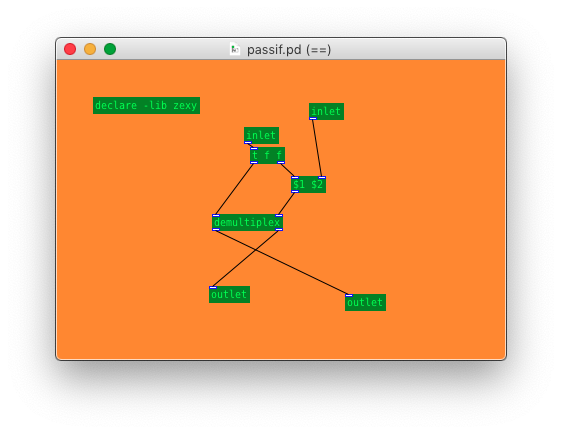
then when you use the object you can use e.g. [passif == 5] to pass the numbers out of the left outlet if they are equal to 5/the right inlet, and out the right outlet if not equal, or [passif < 5] to pass out the left outlet if the numbers are less than 5/the right inlet, and out the right outlet if not less.
this could also be useful in a sorting algorithm in order to choose how to sort elements
another example might be if you had multiple objects that interpolate values, all with the same interface but with different interpolation methods. then you could do something like [myabs~ linear] to select linear interpolation, and [myabs~ cubic] to select cubic interpolation.
 posted in tutorials
[writesf~] problem
A couple of illustrations.
Let's say we want a sine wave covering 16.5 samples. To illustrate, I used SuperCollider to put two sine wave cycles into 33 samples.
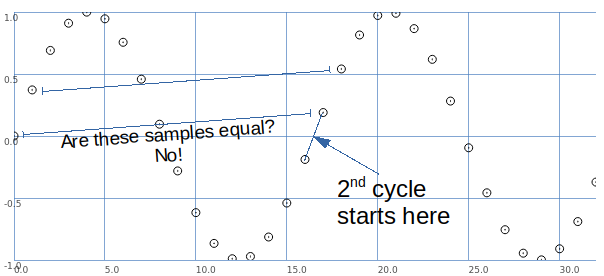
The second cycle begins when the wave crosses the 0 line in the middle.
This is between samples.
So, the second cycle must be represented by sample values that are different from the sample values for the first cycle.
That is, it is possible to have that zero crossing between samples -- but the sampling process produces different values.
Let's look at it a different way: blue samples = one sine wave cycle covering 33 samples; green samples = 2 cycles in 33 samples.
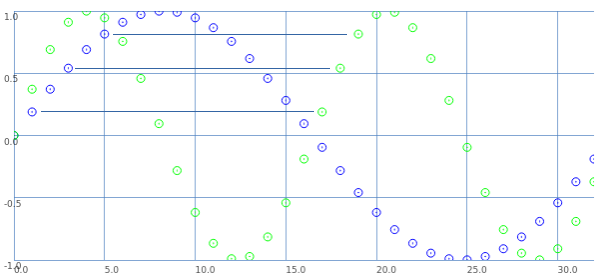
If we start counting samples at 0:
- Blue 0 = Green 0.
- Blue 2 = Green 1.
- Blue 4 = Green 2. etc.
That is: read through the blue samples at double speed, and you get the 16.5 wavelength. (This is exactly what David said.)
What about the second cycle starting at 16.5?
- Blue 1 = Green 17.
- Blue 3 = Green 18. etc.
These are the sample values that were skipped the first time.
So, Green 17 (the first concrete sample value after the second cycle begins) is the value in between Green 0 and Green 1. Green 18 is in between Green 1 and Green 2.
This is interpolation.
Interpolation is the mathematically correct way to represent fractional cycles in a sampled signal.
You can try to say that this "isn't the real problem," but... this is the problem, and interpolation is the solution.
hjh
 posted in technical issues
[writesf~] problem
@EMR66 "I have only got a real precision, using soundfiler (although this limits me since the table only accepts whole samples as we have already spoken ..)"
This, of course, is not a limitation of soundfiler... It's a limitation of all sampled audio files.
There is no way to create an audio file, in any software, containing a fractional number of samples. Period, end of discussion.
In theory, if the frequency is a rational number, you could find the least common multiple of the wavelength and 1.0 and then have all the required sample values precalculated. But this would disallow irrational wavelengths because the LCM would be infinite. So if the desire is to support every possible real number frequency, without interpolation, it's mathematically impossible because of irrational numbers.
To handle every possible real number frequency requires interpolation. There is no way out of that.
"So, until I get that [writesf ~] record correctly, it is useless for me to use [tabread4 ~] or [tabplay ~] ..."
A fractionally sized wavetable is impossible. Literally, impossible.
Meanwhile, it's very easy to play a wavetable at an arbitrary frequency, with interpolation.
The practical solution here is to create the wavetable with a whole number of samples and interpolate in the wavetable oscillator.
hjh
posted in technical issues
[writesf~] problem
@EMR66 As above.
For [tabread4~] the table should be 3 samples longer as it is interpolating.... see the help file.
That could explain the truncation to the previous block boundary.
But you should be able to record at a 24 bit depth from [soundfiler] with the message [write -bytes 3 Ak1.wav(
Although I don't know why you would want to do that.
16 bits is enough.
Pd is 32 bit floating internally and will write that with a -bytes 4 command which will keep all information....... and give higher resolution at smaller amplitudes........ and preserve 24 bits if that was what was actually captured by an adc.
Of course the table will not be true 32 bit floating if the source was 24 bit......... but the output from [tabread4~] will be a 32 bit representation of it by interpolation.
But you don't gain anything by interpolation before writing. If you want to preserve the original file you should use [tabplay~] or you are just introducing quantization (errors) that are functional for a dac or varispeed (up/downsampling) but not for a file.
24 bit is actually 23 bits and the sign for amplitudes between -1 and 1.
Our hearing is 14 bit.
David.
posted in technical issues
Possible audio file playback methods
@Transcend Yes. [tabread4~] interpolates using 4 consecutive samples. It uses the one before and the two following the one it is assessing.... and in effect it guesses (by calculation) what the original analogue waveform would have been.
Because samples are taken by an Adc at precise times the individual samples, especially for high frequencies, are necessarily NOT the peak and trough values..... so by doing some math it tries to estimate the original. The more math is done the closer it will get, but it rapidly becomes very expensive in processing. Failure is called aliasing. Usually those frequencies likely to fail are filtered out in the Adc, but of course Pd can make its own. Digital video and even fonts on your computer screen have the same problem...... data points that fall between two possible digital representations of the original.
It is likely that a decent Dac in a quality soundcard will do it better, along with a lot of other clever stuff.
Included in the Pd doc folder in your installation is a sort of tutorial. Interpolation is demonstrated in "B04.tabread4.interpolation.pd"
Work your way through that doc folder (3.audio.examples)..... and it will gently introduce you to FFT..... although you will then probably need to do some external reading as well.
David.
posted in Off topic
Tabread4~~ example (or alternative)
@Gabriel-Lecup If you just want to loop at normal speed then you can use [tabplay~]
It will be sample perfect.
You just have to deal with waveform mismatch at the loop point..... which will cause clicks.
If you want to change the playback speed then you have another problem.
Artefacts are unavoidable. Well I will qualify that. As you reduce the playback speed you have to increase the original sample-rate of the Sample compared to your output sample-rate to avoid them. Half speed... double the sample-rate of the Sample. You cannot do that in Pd as far as I know.
If you cut the playback speed in half. This causes everything to sound an octave lower because the time stretching makes all the soundwaves twice as long, which means their frequencies will be cut in half and thus sound an octave lower.
This leads the problem that every single sample you use needs to be played twice or else there will be gaps (a much worse "artefact"). To avoid this problem you can use [tabread4~], which interpolates intermediate values that it generates using information from the values that ultimately precede and follow it.
If you increase the playback speed then samples are dropped. This unavoidably creates artefacts as well. As you say, with a tone they will be audible.
Filters can help with high frequency ringing, but might already be built into the object.... though probably not, because you can see the ringing in [B04.tabread4.interpolation].pd in the doc folder.
Someone might know whether [tabread4~] (or [tabread4~~] even), uses quadratic or cubic interpolation. Checking the processing overhead might tell you....... https://www.maximalsound.com/mastering/interpolation methods.pdf
You need to add 2 samples to the array for [tabread4~] ((see [tabread4~-help])) to do it's math playing back the whole sample.
I had never thought about it, but 2 zero samples should probably be inserted after a loop point to allow the curve to interpolate to zero. This would also avoid any post Sample clicks. But how?
I assume that [tabread4~~] which seems not to be available to me on windows, uses double precision.
That will give more accuracy for bit depth, but the samples still arrive at the same speed, so I cannot see how it helps you here. 64-bit precision interpolation over 32-bit precision. Audible? I would be very surprised.
If it is working well for the patch that @beep.beep has kindly posted then I can only assume that [tabread4~~] deals automatically with the 2 sample overhang.
David.
posted in technical issues
Ofelia Jump On Click Slider
@Jona I quickly tried to implement the mouse interpolation in your multislider patch.
Here's the patch. multislider.pd
You will notice I added "@mouseX = $i1;" in [ofDefine] below [ofTouchListener] and I also added a subpatch called "pd interpolate".
Although it seems to work fine, it currently interpolates the value hundred times at once using [ofCountUntil 0 99]. I think there should be a solution to calculate the minimum step needed to interpolate the value. (according to @width maybe?) If this fix is applied, it would be more efficient.
 posted in pixel#