
Pure Data external GEM on Raspberry Pi
@playinmyblues [declare -lib Gem] does what you did by loading Gem from Pd->Preferences->Edit Preferences etc, but only for a specific patch and not every time you launch Pd. If you use Gem a lot, then your approach is probably better, but if you use it in specific patches, then you might want to remove the startup and path stuff in Pd's preferences and just use [declare -lib Gem] in the patches where you use Gem.
As for formatting your messages in this forum, when you want to highlight something inline, use a single ` character (below the tilde character, at the left side of key 1) at the beginning and another one at the end, for example: `[declare -lib Gem]`
If you want to highlight a chunck of code (or a one-liner but separated from the rest of the text), then use three ` characters at the beginning and the end. For example:
```
Put your code (with many lines)
in here
```
and it will be highlighted with a black background.
 posted in technical issues
Pure Data external GEM on Raspberry Pi
@ddw_music Thank you so much. That helped immensely and was much easier than I thought once I knew where GEM installed.
It was as simple as:
$ sudo apt install gem
// Then just to see what came up:
$ apt show gem
// Then to see that gem installed where you said it would:
$ dpkg -L gem
// and /usr/lib/pd/extra showed. I hope it does not cause any problems there.
Sorry about the hacked together reply with odd formatting. I do not know how to add the blackbackground formatting yet. I imagine there is a sticky somewhere about that.
From there I opened Pd, went to Preferences > Edit Preferences > Path > New > went to the root and selected /lib/pd/extra/Gem.
Then went to the Startup tab > New > typed in Gem + Enter > OK.
Then I closed and opened Pd and it showed GEM loaded. I opened a basic example from the Browser and it ran. I see now what you meant by [declare -lib Gem]. I am very new to Pd and have also been learning SuperCollider. A lot of the things get forgotten until I get into the relative platform environment. In that example, [declare -lib Gem] was there. It looks just like it does on the Mac.
 posted in technical issues
Pure Data external GEM on Raspberry Pi
@playinmyblues said:
In my op, I provide what I used to install it but I think that was just for Ruby.
Actually not:
$ apt show gem
... skipped some stuff...
Description: Graphics Environment for Multimedia - Pure Data library
So it's definitely gem for pd.
I could not find the library anywhere on my Raspberry Pi...
I always forget this and I always have to do a google search for "linux apt list installed files," but:
$ dpkg -L gem
... long list of files, including a lot of them like this:
/usr/lib/pd/extra/Gem/GEMglBegin-help.pd
/usr/lib/pd/extra/Gem/GLdefine-help.pd
/usr/lib/pd/extra/Gem/Gem-meta.pd
/usr/lib/pd/extra/Gem/Gem.pd_linux
... where I pasted these specifically because the last one, Gem.pd_linux, is the actual library that gets loaded when you [declare -lib Gem].
Then you can infer that /usr/lib/pd/extra/Gem is the location to which the package is installed. (The point being that even in a command-line environment, there are ways to find out what was installed where. You might have to do some searching to find the commands. BTW I'm not using rpi now but its OS is based on debian, so these commands "should" be OK.)
As I see it, there are just a few possibilities:
- (1) Maybe
sudo apt install gemdidn't install it properly. That seems unlikely (but, worth it toapt show gemto check the package metadata). - (2) Or, maybe
sudo apt install gemdid install it properly. That divides into a couple of sub-cases:- (2a) Maybe Pd can't find the package. If that's the case, then what I would do is: go to the pd path preferences and make sure
/usr/lib/pd/extrais in the list. Then [declare -lib Gem] should find it. - (2b) Or maybe the package is incompatible with RPi. In that case, everything would look right environmentally but the package simply wouldn't load.
- (2a) Maybe Pd can't find the package. If that's the case, then what I would do is: go to the pd path preferences and make sure
For 2a, everybody -- everybody -- gets tripped up on pd external loading. For me, the best strategy has been to keep the Pd "path" preferences as simple as possible -- /home/your_user_name/Documents/Pd/externals for user-specific externals, and maybe add /usr/lib/pd/extra for systemwide packages -- and nothing else. Then the Gem/ root folder would go directly into one of these, e.g. /usr/lib/pd/extra/Gem. I rigorously avoid putting externals in any other locations.
Then, use a [declare] in the patch. [declare -lib Gem] tries path ++ "/Gem" for each of the entries in your path preferences. If you have kept things in standardized locations, this will work.
Maybe try this with a different external package first, one that is RPi compatible, to make sure that you understand the mechanics. (I've seen a lot of threads where people were haphazard about external installation and got tied up in knots. It's really worth some time to get it right, to be certain that this case can be ruled out.)
For 2b, if there is no pre-compiled package available for RPi, the only alternative is to compile it yourself, unfortunately. The ./configure script should tell you if that's supported for your machine or not.
sudo installs gem for you
Well, not exactly. sudo is "superuser do," which runs a command with elevated privileges so that, for instance, files can be installed in system executable locations that are normally write-protected. sudo itself doesn't install anything.
sudo apt install gem would install Gem. apt is the package manager -- this is the component that actually installs it.
I mean, now I see what you were trying to say, but there were enough pieces left out of your comment that the meaning was unclear.
hjh
 posted in technical issues
Pure Data external GEM on Raspberry Pi
Hi. I am trying to install the GEM external for Pure Data on my Raspberry Pi. I have always found installing source code troubling as I do not know nearly enough about programming to work with all the options during the install.
I did find out that you can install GEM with the command line so I did that:
sudo apt install gem
I cannot find where it installed to and typing $ gem
gives me nothing but $ sudo apt install gem
gives me:
gem is already the newest version (1:0.94-8+b5).
Summary:
Upgrading: 0, Installing: 0, Removing: 0, Not Upgrading: 1
I can point Pure Data to a normally installed external when I know where it is. How do I find GEM so I can point Pd to it?
posted in technical issues
Troubles compiling old version 0.43-4
Does this forum not send email notifications when a topic you create gets replies? I didn't get any.
Anyway...
My patch used Vanilla plus GEM and a few externals. I got all the updated versions of all the externals and Gem.
Gem is the one that's causing most of the trouble... or rather all of the trouble.
I get GL stack underflows, crashes when closing the gemwin, "someone sent a bogus pointer..." and other errors, none of which existed back when I created the patch. I have started reporting the bugs to Gem, but it's hard to isolate them, narrow them down and create minimal reproducing examples, as the patch is very, very complex, and the last time I touched it (and Pd) 12 years ago it was running seamlessly and very stable. I also tested on Windows and it's even worse: there it crashes when opening the gemwin.
My goal is not to use the old version of Pd and Gem to run the patch. That would be my very, very last resort. One one hand I suspected a bc-breaking change in how Pd handled some kinds of messages and wanted to test that, but I have already discarded that; on the other hand I wanted to see if I could run the patch without issues on the old versions, and from there either (a) start trying to narrow down the issues, always comparing between the two versions (because I don't remember how half of the stuff works, so if I reduce it to a minimal patch and still get issues, I'm never sure whether I'm introducing errors in the patch) or maybe (b) offer the Gem developers my whole patch (I cannot publish it but I would trust them) as a black box that certainly triggers a bunch of bugs even though it's very far from a minimal test case. I can still do that but it would be nice to confirm that the patch runs with no errors with the older version on a modern machine and OS.
In the end I was able to compile Pd 0.43-3 (pretty sure it would have been the same with 0.43-4) with the "new" build system by using CXXFLAGS="-std=c++98" for configure.
Now I have another issue:
Pd runs but only if I launch it from the correct folder. That is if I do from a terminal:
cd /path/to/pd-043-3/src
pd
it works (that is where the compiled binary was created; anyway everything holds true if I move it to ../bin/).
But if I do:
cd /path/to/pd-043-3
src/pd
then I get the error:
Error in startup script: couldn't read file "../tcl//pd-gui.tcl": no such file or directory
Not a huge deal, I can write a shell script that cds into the directory and runs pd, but it makes me think that something is not quite right.
I'm also trying and unable to compile the old version of Gem, but I'll open a separate thread about that.
 posted in technical issues
CPU load with Purr-Data and GEM
Hi there,
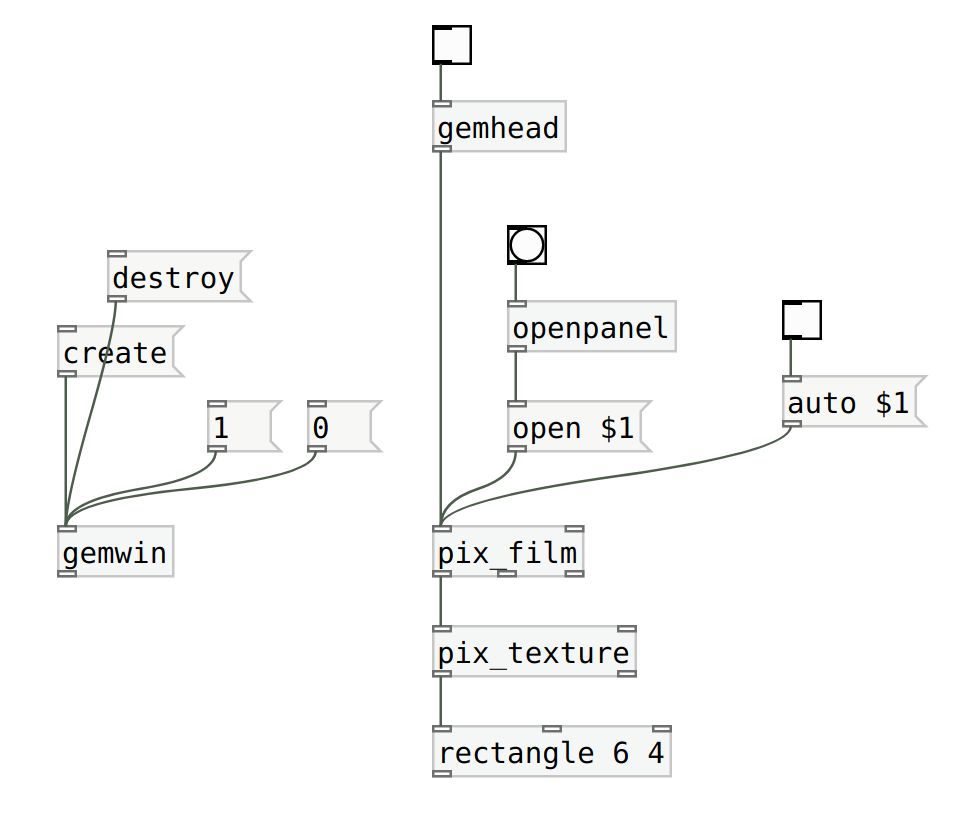
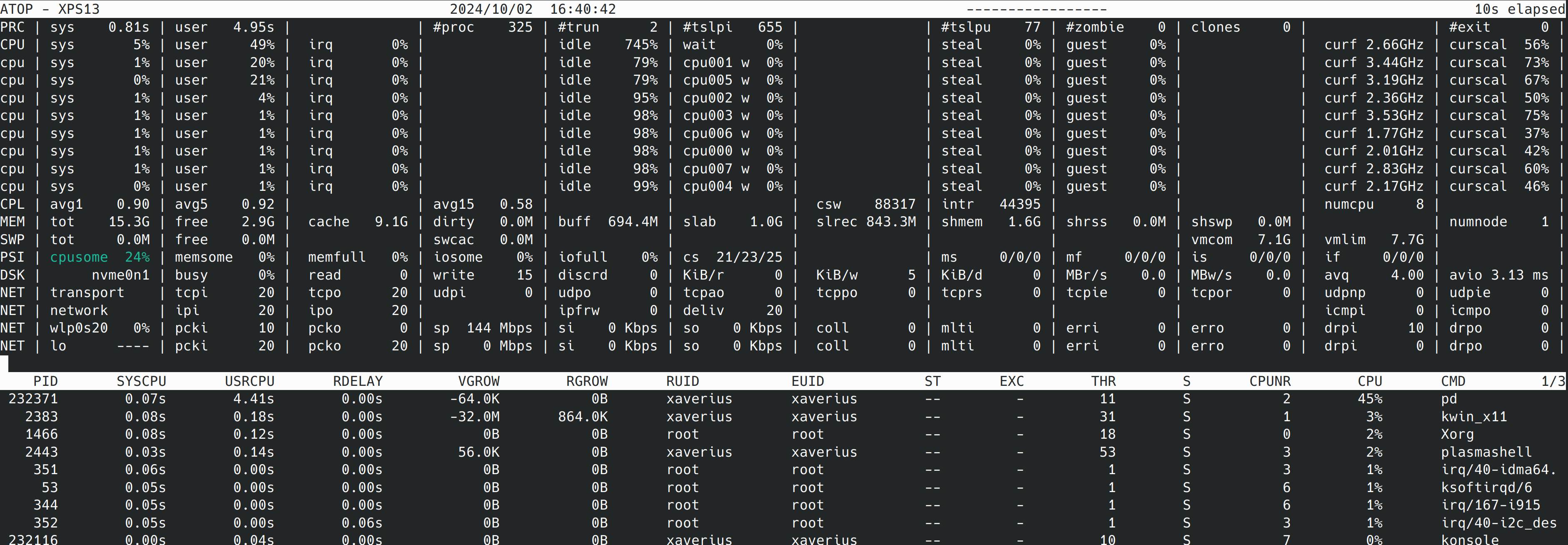
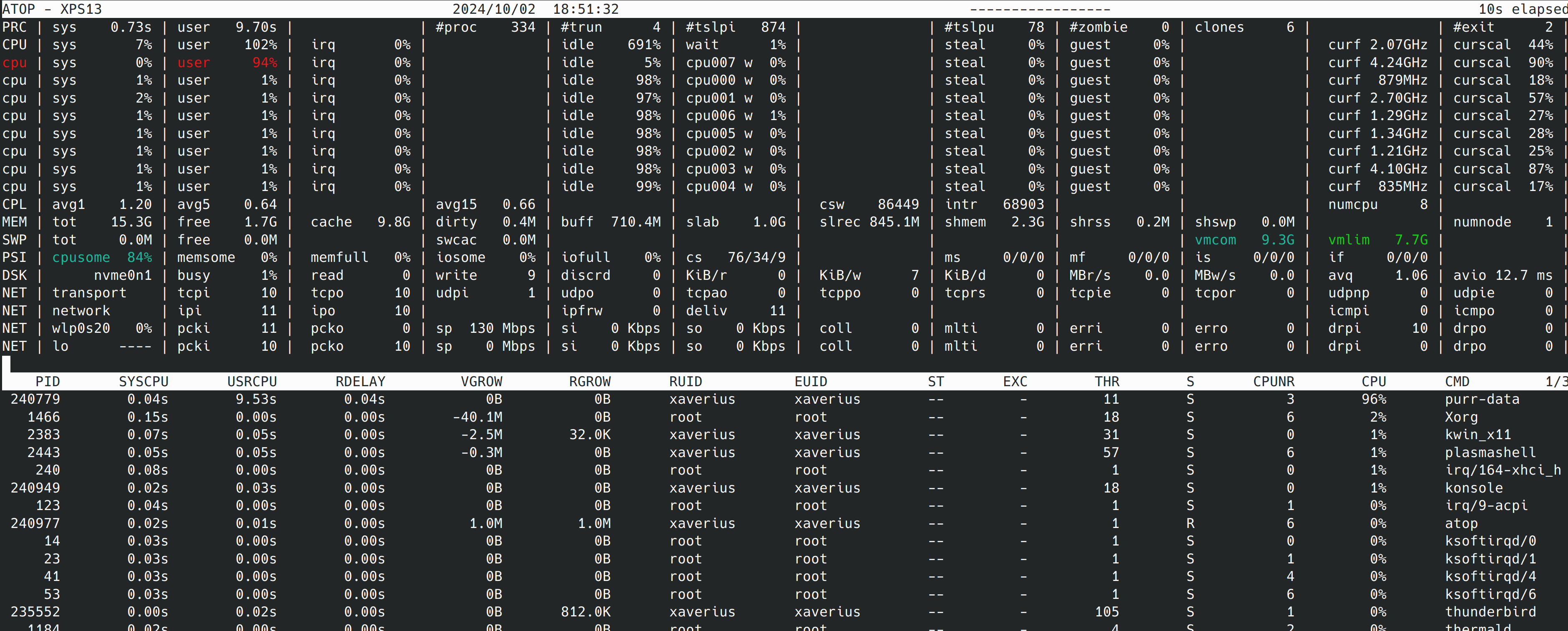
I started dealing with GEM and implemented a very simple patch that simply plays back a video. When I run this patch with pd-gem the playback is all good. But with purr-data the playback stutters since the CPU load is too high. Please find attached screenshots of the patch and atop while running the patch with purr-data and pd-gem.
The pd version with purr-data and pd-gem is slightly different, but I assume that this is not the root cause. So, what is the problem with purr-data and how can I solve it?
Thank you in advance!
Andre
-- purr-data --
Purr-Data 2.19.3
Pd version 0.48.0
GEM version 0.94
-- pd-gem --
Pd version 0.52.1
GEM version 0.94
 posted in technical issues
Reading data from a video camera
I think the file I create are blocked by apple security system, since their system automatically tag downloaded binaries to block them... you can type this in Terminal to untag the files:
sudo xattr -cr path/to/Gem
But good news, there is now automatic builds up on deken... Here is the news from IOhannes, who is actively maintaining Gem:
just for the record: since yesterday there's snapshot builds of Gem available on deken.
- this is a snapshot of the current git 'master'. there hasn't been a
release. things might be more broken then in a normal release (on the
upside: if you report bug, they are fixed faster than in a normal release) - there is only a single version "0.94-snapshot". the package will be
updated whenever a i change something in the git repository. there is no
turning back (if things worked with yesterday's snapshot, but not with
the one downloaded today, then you are out of luck) - Windows: both 32bit and 64bit binaries are available
- macOS: the binary is universal (amd64 and arm64). they should run at
least on "Big Sur" (i've tested them[*] on Catalina/amd64 and Monterey/M1) - Linux: there are binaries available, but unlike with Windows/macOS
binaries, there are no dependencies included. I do advise Linux people
to just build Gem themselves (or use a distribution that offers packages
for Gem's git snapshots). this is because on Linux you typically have a
proper package manager (that allows you to easily install all the stuff
needed, starting with a compiler), whereas on macOS/Windows you don't
(unless you count the variants of "app stores" - which I don't).
the pre-built binaries will most likely not work out of the box on
your system. (having said that: the binaries where produced on a
Debian/bullseye system, so if you are running something similar it
should be possible to just install the missing dependencies with your
package manager; a good start is to just install the "gem" package that
comes with your distribution, as this should pull in most dependencies)
gfds
IOhannes
 posted in technical issues
gem and big sur
@godinpants said:
I goofed. I fell for it again and upgraded my OS and destroyed GEM. But this time I can't see any solution to getting it running again.
Anyone had luck hacking your way through getting GEM running on Big Sur?
Yeah, my multimedia exam is screwed for one student because of this too.
I'd asked on github and received this suggestion:
i don't really know, but she could try changing the windowing backend, by changing the gemdefaultwindow.pd abstraction in the Gem/-folder and replacing the [gemmacoswindow] (or whatever is there) to one of the other
gem*windowoptions installed on your system. (just look out for any externals (.pd_darwin,...) in the Gem/-folder that match thegem*windowpattern).
possibly good choices are: [gemglfw3window], [gemglutwindow].
FWIW this is the nail in Gem's coffin for me. Too risky to try to keep it working for a room of 40-50 students.
hjh
posted in pixel#
Fast Prototyping for Ofelia
FWIW, I don't think it needs to be a replacement for GEM, or pretend to make the interfaces similar to GEM. As noted at the top of the thread, GEM is outdated.
If an obstacle is converting Ofelia's pixel system into something like GEM's normalized coordinates, then... why not simply abandon the idea of normalized coordinates? Unless it's really necessary for practical use. If the only reason to normalize the coordinates was to make it "similar to GEM," I'd say, don't waste time on it.
FWIW, I'm not going to be able to tolerate GEM for another year. Like today -- it took me over two hours to figure out how to extract the alpha channel from pixes. (Like, how many years has GEM existed, and nobody thought it would be useful to have an object to transfer the alpha channel to the main channel of a grayscale pix? Or, if you don't need an object for it, this still seems to me a pretty basic use case... but of course hard to find in the documentation...)
I realize that a set of abstractions on top of Ofelia is not likely to be fully-featured -- but I could cobble together enough Lua to add abstractions myself where needed (and contribute them back), whereas trying to add objects to Gem is impractical (1, my C is not that good and 2, I could build in Linux but not Mac or Windows). Even a partial set of abstractions might be a starting point to get around the kinds of problems I'm facing now, where the existing objects don't quite do what I want and there's not a good way to add functionality.
Otherwise, for this course, I might not have a choice but to jump ship and go to jitter (which some of the students have already done). It pains me to think of switching away from FLOSS but where I am right now is simply not sustainable.
TL;DR Even if the current state is incomplete, would you mind sharing so I could have a look?
hjh
posted in pixel#
GEM error message
@jb1439 Spaces are a bad idea in path or file names in Pd but that is probably not the reason.
This might be a long thread.
If you don't have it on your computer.... in the Windows/system32 folder, or the Pd/extra/Gem folder for example..... try putting........ this in the Pd/extra/Gem folder.
Unzipped of course.
I doubt it's that actually but it will do no harm
Also..... do you have gem_filmAVI.dll in your Gem folder. It could be in extra/Gem/plugins-disabled in which case it should be copied into the extra/Gem folder.
Also.... which Pd version and are you sure that you have Gem that matches its bits (32/64)
David.
 posted in technical issues