
Help with audio patch on off based on some condition
@KMETE said:
One reason I needed to use the loop 1 message is that the track was always paused for some reason before it ends when no in loop mode.
Ohhhhhh... now I see what it is.
When you ask sf-play(2)~ to play a timed region, it also runs a timed envelope. When you pause / resume, the playback timing doesn't match the envelope timing, so the envelope closes before the end of the source audio.
I'd rather not complicate sf-play(2)~ to allow the envelope to be disabled. But you can back out of one layer of abstraction and use play~ directly.
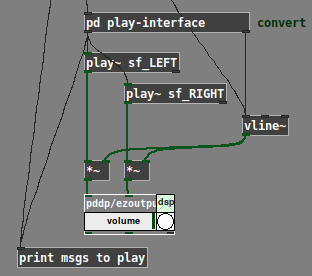
play~ doesn't take "start end rate" lists like sf-play~ does -- but I have a translator object for that. Since there's already a [pd] subpatch to translate "start/resume" messages, I'd just stick the play translator in there:
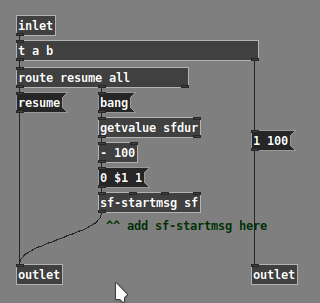
Now there's no timed envelope and you should get the play~ native pause/resume behavior without interference (I hope  ).
).
hjh
 posted in technical issues
help with polyphonic synth
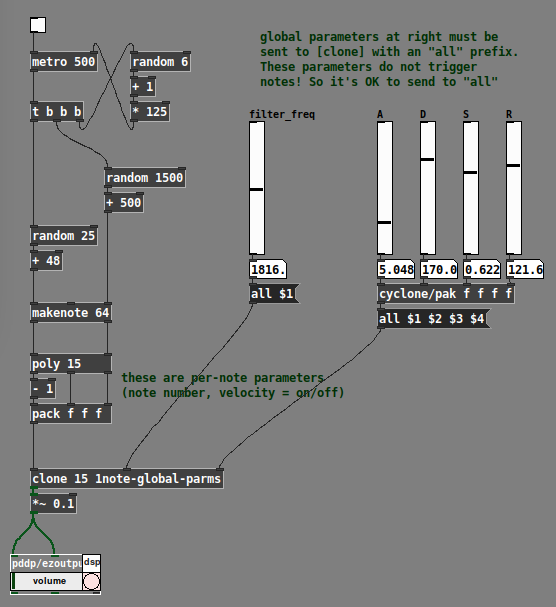
I realized, after posting that, that there are two ways of thinking about the "extra parameters" going into the synth clone, which for lack of a better term I could call "global" vs "local" parameters.
Local parameters are "per-note" -- they are set at the time the note begins, and they hold their value for the duration of the note. The next note (which might overlap) could have completely different values.
Global parameters affect all notes simultaneously. This is the usual way that, for instance, filter frequency works. You twist the filter cutoff knob and all notes' cutoff changes simultaneously (even though each note could have its own filter cutoff envelope).
At minimum, pitch (note number or frequency) and velocity (on/off trigger) should be per-note. Other parameters could be global or local (and you can mix those styles).
As far as I can see, the best way is:
- All local parameters get packed into a list, along with the clone instance number (which is supplied by [poly]). The "local" list goes into the leftmost input, and only the leftmost.
- "Global" parameters add one or more inlets to the right. Note carefully in the [clone] help file that control inlets need to tag their values for specific instances. If we're using these as global parameters, then the tag should be
all. Signal inlets are always global.
IMO it's best to be consistent about the handling of these input types, to avoid introducing bugs into your patch.
Example with filter cutoff and envelope parameters treated globally:
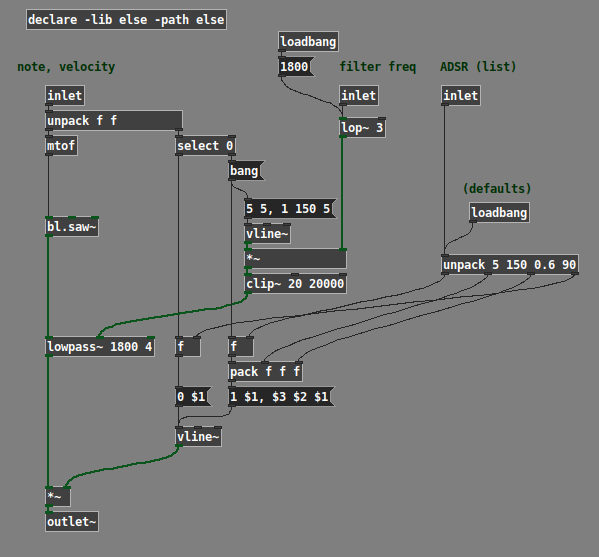
Example with filter cutoff and envelope parameters treated locally:
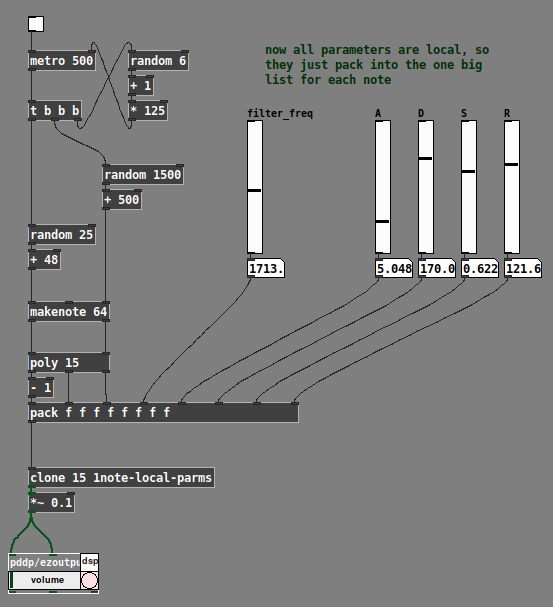
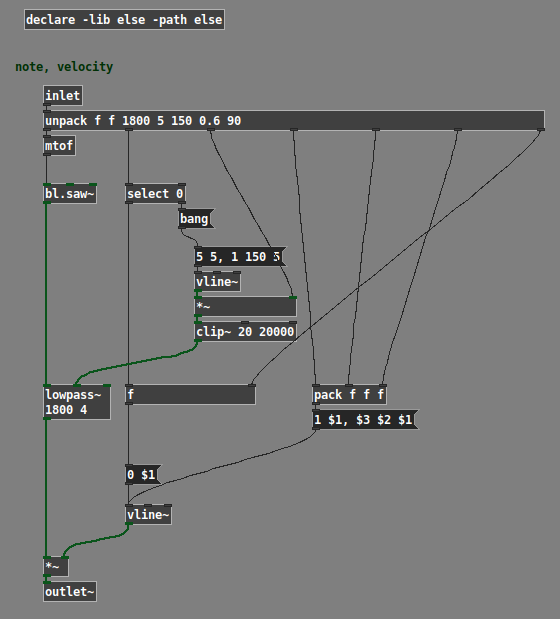
(Note: The example patches use the ELSE external library, and the global one uses cyclone.)
Hope this helps. IMO polysynth is a basic use case for any audio programming environment; if what I've posted here can't be easily figured out from the documentation, then it suggests a gap in the help. (One reason why I worked it out is that I teach a class in Pd; if the students ask "how do I make a poly synth?" then I'd better have an answer at the ready. So I tried a few ways and came up with this as a basic template that Just Works... then, just do it that way.)
hjh
posted in technical issues
Vline~
@ddw_music said:
@gentleclockdivider said:
So when I have two separate messages 1 0 1000 , and 0 0 1000 , both messages will wait for 1000 ms and have the exact same behaviour as when clicking the toggles ( see screenshot )
Do you want the envelope segments to run at the same time?
No. You want one after the other.
Therefore the two times should not be the same.
Making them both 1000 means it will of course not work.
Putting two messages into one message is afaik separated by a comma , this just does not work
It absolutely does work. Here, there's one message box with two messages in it, and you clearly see two envelope segments being drawn.
hjh
Now change that delay time time for the attack stage to 1000 , it won't work anymore
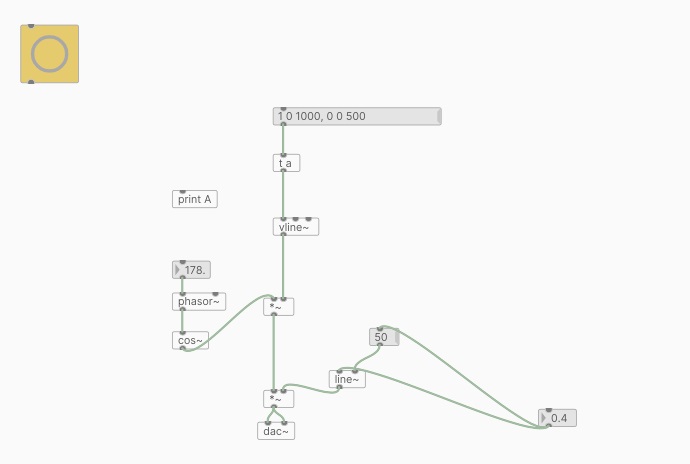
 posted in technical issues
Vline~
@gentleclockdivider said:
So when I have two separate messages 1 0 1000 , and 0 0 1000 , both messages will wait for 1000 ms and have the exact same behaviour as when clicking the toggles ( see screenshot )
Do you want the envelope segments to run at the same time?
No. You want one after the other.
Therefore the two times should not be the same.
Making them both 1000 means it will of course not work.
Putting two messages into one message is afaik separated by a comma , this just does not work
It absolutely does work. Here, there's one message box with two messages in it, and you clearly see two envelope segments being drawn.
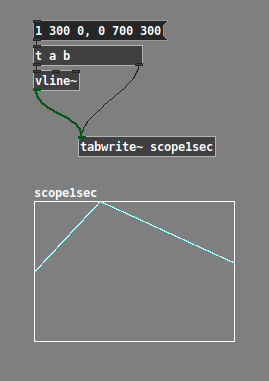
hjh
posted in technical issues
Best way to avoid clicks (tabread4~)
Amplitude modulation of any sort, including envelopes, always distorts the spectrum to some extent.
Normally we don't notice because typical sounds have a complex spectrum, which masks the distortion.
But here, you are applying it to an artificially simple spectrum, containing only DC offset. DC offset is silent, and the spectral distortion is not, so there is nothing to cover it.
I generated an audio file with a 30 ms ramp up and 50 ms ramp down. For comparison, I applied this envelope to a sine wave in the right channel. Then I opened this file in Audacity and looked at the spectrogram.
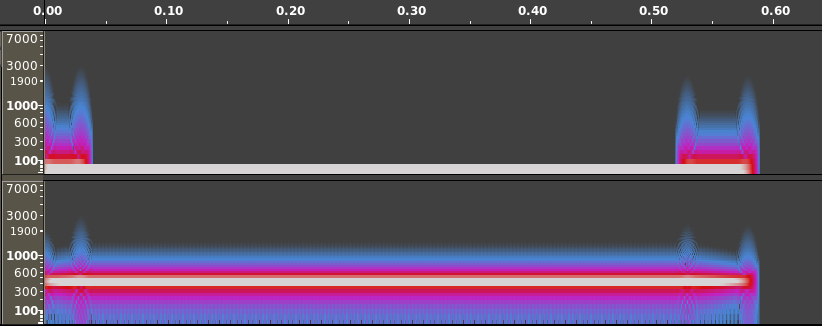
I think it's pretty easy to see here why the envelope might be audible in the case of DC * envelope, but not perceptible in the case of the audible signal * envelope.
Bottom line is, just because you hear spectral distortion in an artificial scenario which you would never encounter with audible signals, doesn't mean that it will be noticeable in real world scenarios.
(Carrying it further: If there is no envelope, there's a risk of an instantaneous transition from non-zero to zero or vice versa. Instantaneous transitions require a lot of high-frequency content, which we hear as a click. A linear transition effectively lowpass-filters the instantaneous transition -- there are still artifacts, but they are relatively low amplitude, and in a frequency range normally occupied by musical tones at a much higher amplitude. A ramp-enveloped sound will never be perfect, but it's better than a rectangular envelope.)
"replaced by something better" -- A sinusoidal envelope shows a smoother spectrogram. You might try that: cos * 0.5 + 0.5 -- from pi to 2pi is your ramp up, 0 to pi is the ramp down.
Edit: You can eliminate the +0.5 by squaring the cos and halving theta, because cos^2 x = cos(2x) * 0.5 + 0.5. Actually cos~, IIRC, scales radians down to 0 .. 1, so you could do line~ --> cos~ --> [*~] (cos~ to both inlets) and drive it by "0.25, 0.5 30" for the ramp up, and "0, 0.25 50" for the ramp down. Haven't verified this at the computer but I think it's right.
hjh
posted in technical issues
NoxSiren - Modular synthesizer system <- [v15]
NoxSiren is a modular synthesizer system where the punishment of failure is the beginning of a new invention.
--DOWNLOAD-- NoxSiren for :
-
Pure Data :
NoxSiren v15.rar
NoxSiren v14.rar -
Purr Data :
NoxSiren v15.rar
NoxSiren v14.rar
--DOWNLOAD-- ORCA for :
- x64, OSX, Linux :
https://hundredrabbits.itch.io/orca
In order to connect NoxSiren system to ORCA system you also need a virtual loopback MIDI-ports:
--DOWNLOAD-- loopMIDI for :
- Windows 7 up to Windows 10, 32 and 64 bit :
https://www.tobias-erichsen.de/software/loopmidi.html
#-= Cyber Notes [v15] =-#
- added BORG-IMPLANT module.
- introduction to special modules.
- more system testing.
#-= Special Modules [v15] =-#
- BORG-IMPLANT (connects ORCA MIDI system to NoxSiren system)
#-= Current Modules [v15] =-#
- VCO (voltage-controlled-oscillator)
- VCO2 (advance voltage-controlled-oscillator)
- WAVEBANK (additive synthesis oscillator)
- ADSR (Attack-Decay-Sustain-Release envelope)
- C-ADSR (Curved Attack-Decay-Sustain-Release envelope)
- CICADAS (128 steps-Euclidean rhythm generator)
- CICADAS-2 (advance 128-steps polymorphic-Euclidean rhythm generator)
- COMPRESSOR (lookahead mono compressor unit)
- DUAL-COMPRESSOR (2-channel lookahead mono compressor unit)
- STEREO-COMPRESSOR (lookahead stereo compressor unit)
- MONO-KEYS (virtual 1-voice monophonic MIDI keyboard)
- POLY-KEYS-2 (virtual 2-voice polyphonic MIDI keyboard)
- POLY-KEYS-3 (virtual 3-voice polyphonic MIDI keyboard)
- POLY-KEYS-4 (virtual 4-voice polyphonic MIDI keyboard)
- POLY-KEYS-5 (virtual 5-voice polyphonic MIDI keyboard)
- POLY-KEYS-6 (virtual 6-voice polyphonic MIDI keyboard)
- BATTERY (simple manual triggered machine for drumming.)
- REVERB (reverb unit with lowpass control)
- STEREO-REVERB (stereo reverb unit with lowpass control)
- RESIN (advanced rain effect/texture generator)
- NOISE (generates black,brown,red and orange noise)
- NOISE2 (generates yellow,blue,pink and white noise)
- COBALT (6-stage polyrhythm generator)
- SHAPER (basic shaper unit)
- FOLDER (basic wave folding unit)
- STEREO-FOLDER (stereo wave folding unit)
- DUAL-FOLDER (advance wave folding unit)
- POLARIZER (transform a signal into bi-polar, uni-polar, inverted or inverted uni-polar form)
- CLOCK (generates a BPM clock signal for sequencing other modules)
- CLOCKDIVIDER (a clock divider with even division of clock signal)
- CLOCKDIVIDER2 (a clock divider with odd division of clock signal)
- DELAY-UNIT (delay unit)
- STEREO-DELAY (stereo delay unit)
- CHORUS (chorus unit)
- STEREO-CHORUS (stereo chorus unit)
- SEQ (advance 16-step/trigger sequencer)
- KICK (synthesize kick unit)
- KICK2 (synthesize flavor of KICK module)
- KICK3 (synthesize flavor of KICK module)
- SNARE (synthesize snare unit)
- CLAP (synthesize clap unit)
- CYMBAL (synthesize cymbal unit)
- RAND (RNG generator for other modules parameters)
- FMOD (feedback modulation unit)
- AM (amplitude modulation unit)
- RM (ring modulation unit)
- LFO (low-frequency-oscillator)
- LFO2 (advance low-frequency-oscillator)
- COMBINATOR (combine two waves)
- COMBINATOR2 (combine three waves)
- COMBINATOR3 (combine four waves)
- STRING (Karplus-Strong string synthesis unit)
- STRING2 (advance Karplus-Strong string synthesis unit)
- DETUNER (parametric 4-channel detuner unit)
- CRUSHER (basic audio resolution unit)
- STEREO-CRUSHER (basic stereo audio resolution unit)
- DUAL-CRUSHER (advance audio resolution unit)
- FILTER (basic filter)
- VCF (voltage-controlled-filter)
- MAR (Moog-analog-resonant filter)
- VCA (voltage-controlled-amplifier)
- DUAL-VCA (advance voltage-controlled-amplifier)
- FMUX (multiplexer with fast A/D internal envelope)
- MMUX (multiplexer with medium A/D internal envelope)
- SMUX (multiplexer with slow A/D internal envelope)
- FDMX (demultiplexer with fast A/D internal envelope)
- MDMX (demultiplexer with medium A/D internal envelope)
- SDMX (demultiplexer with slow A/D internal envelope)
- MIXER (mix 1-4 possible waves)
- SCOPE (oscilloscope analyzer)
- MASTER (fancy DAC~)
- BOX (useless decorative module)
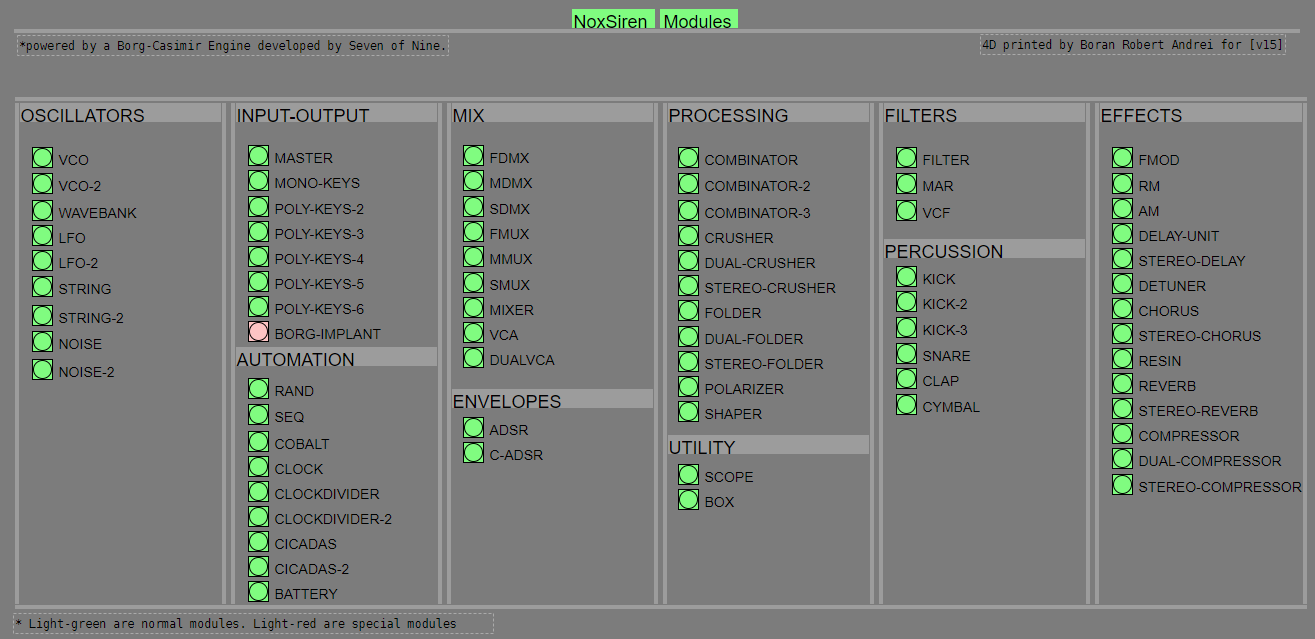
NoxSiren integrated modules menu system.
 posted in patch~
Always seams to be one underlying note when poly synth stops playing from external sequencer.
I found a simple enough poly synth patch taht uses a cloned object to achieve a poly synth from a [osc~] object. I got it working then modified it with a envelope. Now I don't know where Im going wrong the [sel 0] in ploysynthclone dose not seam to work. There always seams to be one underlying note when my external sequencer a "trigger finger pro" stops playing notes.
I should note the poly synth works inside the cloned object. This all began when I added the envelope.
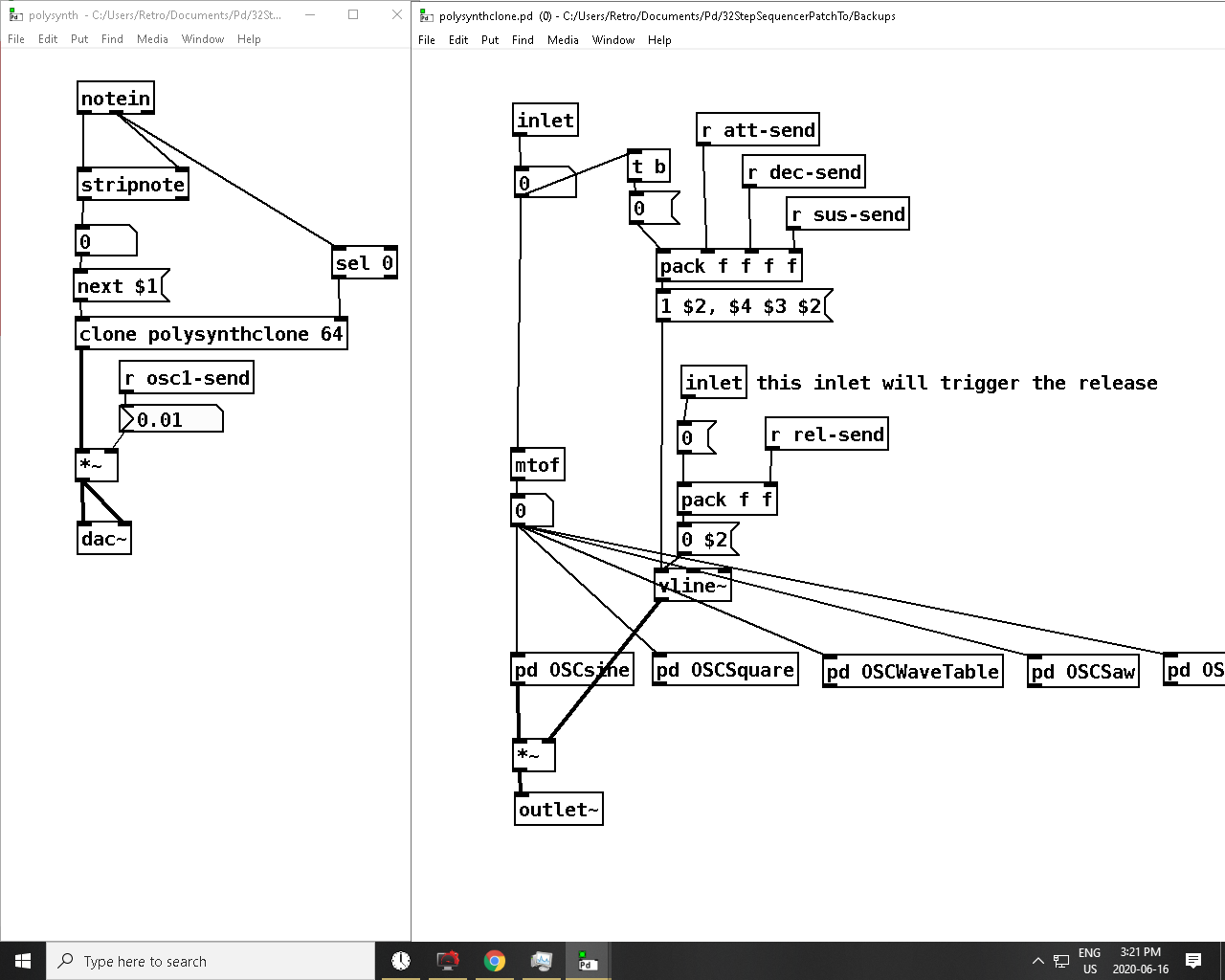
This is the patch I found to handle the envelope. As you can see a clone object is not used so I feel like that is where my issue is I have a feeling this is happening because of the [next $1< message.
Also my patch is not exact to the original I am drawing the envelope line in a separate sub-patch and it is being drawn correctly.
 posted in technical issues
issue with array bounds rectangle inside gop subpatch (purr data)
Hi all,
Part of my patch involves a looping sampler with envelope generator. I had it working just fine with sliders to control the points of the envelope but they were kinda clunky GUI-wise so I am trying to draw an envelope on top of the sample array using Purr Data's [draw]. This is giving me some issues:
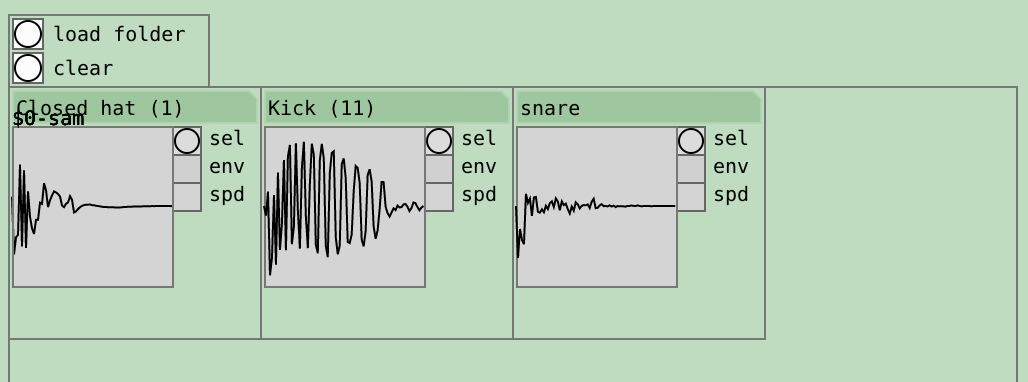
- I want a grid of instances of my sample abstraction, like a drumrack, and I want individual ADSR envelopes with each sample. In vanilla I could put a [namecanvas] inside the array but this doesn't seem possible anymore with Purr Data. I figured the way to go would be to put the array in a graph-on-parent subpatch, and use [namecanvas] and [draw] to draw the envelope on top of it. But the bounds rectangles do not seem to be following even though the graphs are, and I'm wondering if I need to use something like [donecanvasdialog( to hack it into shape. Image of this phenomenon attached. The first label is covered up by its symbol box as intended but the next two show up on top of it. When I make another instance on the parent parent patch, the array shows up all the way at x=0 no matter where I put the abstraction. Maybe I need to pass the (x,y) coords of each abstraction as arguments too?
- In vanilla I could set the arguments of [drawcurve] to variables and it would automatically let me interact with those via click-dragging. I see the "drag" mouse event in the documentation for the new SVG functions, but I am used to the old way and wondering what the new way to do this is.
- It seems like my initial attempts at using [draw] were drawing underneath whatever was already there, is there a way to make it draw on top instead?
I have put many many hours into this crazy just intonation synthesizer project, have made a ton of progress and would love to share it with you guys once I have something a little more polished, I am just trying to get this GUI a little nicer and it is giving me headache. So thanks in advance for any guidance you may be able to offer.
 posted in technical issues
best practices, sample-accurate polyphonic envelope, note stealing
Hi everyone. I have frequently revised designs for polyphonic envelopes. i've often misunderstood things about vline~ and scheduling voices in such a way to avoid unwanted clicks while also keeping things on time and snappy.
i'd be really happy to know what your methods are for envelopes.
i submit this patch, a reflection on envelope practices and how i address certain challenges. envwork.pd
this patch makes these assertions:
1- because vline~ maintains sample accuracy by scheduling events for the next block, you can switch dsp on in a subpatch with block~ while sending a message to vline~ and the dsp will be active by the start of the vline~ output. This also works if you need to configure a non-signal inlet before triggering a voice. send a message to such an inlet concurrently with a vline~ message and the parameters will update on the block boundary before the vline~ plays.
2- accounting for note stealing can cause issues in a polyphonic patch. if the stealing note has a slow attack and the envelope of the stolen note is not closed, there will be a click as the pitch of the new note jumps. the voices in my patch apply slight portamento to smooth out this click. if, however, the attack time of the stealing note is faster than this slight portamento it is counterproductive and will soften the attack of stolen notes. Stolen notes need every bit of snap they can get because the envelopes may be starting at a non-zero value. so i limit the time of the portamento to the attack time.
3- to make sure a note that is still in its release phase is treated as a stolen note, it is necessary to monitor the state of the envelopes like so:
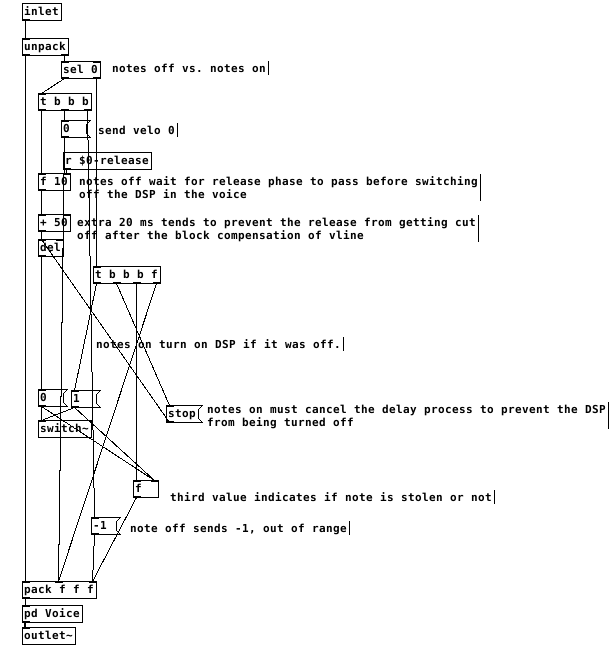
switching the dsp off too close to the end of the release causes clicks. after testing, my system liked a full 50ms of extra delay after the end of a release before it was safe to switch off dsp. I don't think this is attributable just to the scheduling delay of vline~ but it's a small mystery to me. possibly there's a problem with my voices.
This all gets a little more complex when there are multiple envelopes per voice. The release time that affects the final output of the voice must reset all envelopes to when it is finished and before dsp is switched off. Otherwise an envelope with a long release affecting something like filter frequency can be held at a non-zero value when dsp is switched off and spoil the starting state of the vline~ on a new note.
finally, on vline~ and sample accuracy and timing, let me type out what i believe is the case. i could be wrong about this. if you programmed a synth using line~ for the envelopes, it would be faster than vline~ but not all notes equally faster. all notes would sound at the block boundary. Notes arriving shortly after the last block boundary might take 90% of the block period to sound. notes arriving just before the block boundary might take 10% of the period to sound.
vline~ will always be delayed by 100% of the block boundary. but the events will be scheduled sample-accurately, so the vline~ will trigger at exactly the real time intervals of the input. a synth with line~ envelopes will trigger any two events within a single block at the same time.
this should mean that vline~ envelopes can be accurately delay compensated and stay absolutely true to input timing, in the case of something like a Camomile plugin.
however, if one was to build a synth for something like a raspberry pi that will act as hardware, would it be better to use line~ envelopes and gain a little bit of speed? is the restriction of locking envelopes to block boundaries perceptible under normal playing conditions?! i could test some midi input and see if the notes in a chord ever achieve a timing spread greater than the block period anyway...
 posted in technical issues
Parody- vanilla analog fakery
that's great and lucky! With the delay lines in the oscillators it's lucky they don't cost more cpu.
i've changed my practices with vline~ envelopes a lot lately. I am working on some updates to envelope design that i am going to do a write-up on and post about soon. there are a couple things about note stealing and envelope times that i want to hear peoples opinions on.
posted in patch~