
percussion patches?
@porres Sound On Sounds Synth Secrets has some, it is widely available on the web as a PDF and I think they have also have it all on their website. The name of the series is rather misleading, it is more Synth Standards. Are you looking for particular sounds or just the general way various sounds were made?
The standard drum sound was almost always just a resonating filter fed a trigger or a decay envelope. These often had issues with feed through and the trigger would cause a thump or click throwing in an impact sound for free, sometimes they would send the trigger through a simple RC lowpass so they could tune the impact sound separate of the shell resonance tone created by the oscillating filter. Add in a white noise generator and it is a snare, many classics used just filtered noise for the snare. The standard circuit used by most of the classic drum machines was just Twin-Tee or Bridged-Tee bandpass stuck in the feedback loop of a gain element, should not be too difficult to mimic in PD, PAiA gives a decent run down on the circuit https://paia.com/syndrum/. That is most of the classic drum sounds right there, they got a little more complex by the time of the 808, but not much and much of the added complexity is just to deal with the less than ideal world of electronics. The other sounds tend to be multiple oscillators and/or white noise through differently tuned filters.
I can not give much in the way of resources, I learned from the schematics. For many of the more popular sounds like anything from an 808 or 909 and many others, you should be able to just search for something like "808 kick drum circuit analysis" and get a write on it that will lay out the signal flow and tuning and timing of the various parts, just need to read around all the electronics non-sense.
 posted in technical issues
[declare] vs help browser
Are you looking at the same directory?
Do you mean the Linux machine or the Windows machine?
If the Linux machine -- I'm aware of the ~/.pdsettings file -- its contents match the display (nloadlib = 0 meaning no startup libs, npath = 1 and only a path1). There is no registry in Linux, so that comment isn't relevant to the Linux machine.
On the Windows machine, there isn't any other Pd library folder, and I keep only one version of Pd. But I don't think this question quite makes sense -- if there are multiple versions of Pd sharing the same settings, how would the two versions behave differently? Wouldn't I see the same behavior in multiple versions?
FWIW, I checked the registry and, just like the Linux machine, nloadlib is 0 and npath is 1. So Pd on the Windows machine should not be loading any startup libraries (and indeed, I don't see any output from Gem or zexy), and there should be only one search path (which I can confirm by creating an object in a subfolder, and it isn't found).
"This Pc" is pretty clearly just a display convention in the Windows Explorer, and has nothing to do with the actual file system structure.
hjh
 posted in technical issues
RMS vs FFT complex magnitudes
I'm up to the beginning of Katja V's Fourier Transform section and I've already found a few answers to my questions. I also managed to get the sum of FFT term amplitudes to match the RMS value for arbitrary input. Here's the patch:
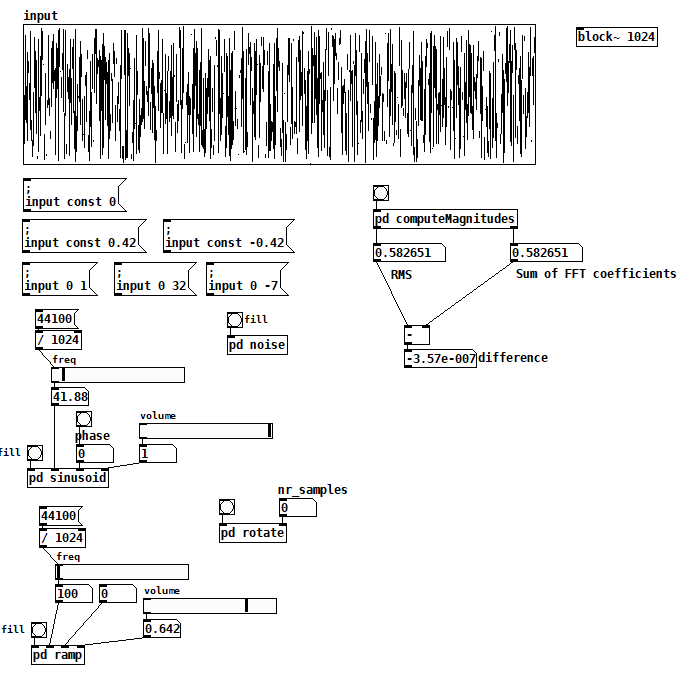 Inside [pd computerMagnitudes]: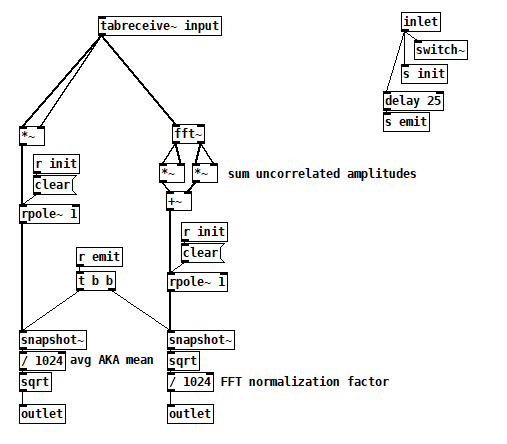
compareTimeFreqAmpl2.pd
All the things on the left are just tools to fill the input table, but you can also just draw. Once you have your signal, bang computeMagnitudes to measure its amplitude both ways.
I made a couple of simplifications that not only got the test working but also gave me more confidence that I was comparing apples to apples:
- I'm computing RMS and the FFT from a single static 1024 vector, so I'm now comparing two views of the exact same signal and there's no need for averaging.
- I learned from Katja that if you perform a complex FFT on a real signal, you don't have to worry about which terms to double because the FFT gives you those terms's double in the upper half of the output explicitly. The real FFT skips the upper half for efficiency because it's related to the lower half.
- I also learned that even the cosine and sine components of each harmonic are uncorrelated signals, so I now sum their magnitudes individually across all harmonics. There's no need to compute the magnitude of each FFT term first.
So I think the issue I was having with noise was just an artifact of a badly programmed test, probably having to do with the way I was averaging term magnitudes, but I don't really know.
7/18/2020 update: I've found info in Katja's blog that suggests that this patch is wrong (or maybe even not possible). Exhibit A:
 IMHO, this contradicts what she spent so much effort establishing on the prior two pages (http://www.katjaas.nl/sinusoids2/sinusoids2.html
http://www.katjaas.nl/correlation/correlation.html), that the cos and sine components of all FFT terms are orthogonal. If they're orthogonal, how could they cancel each other out?
She raises a another point on the FFT output page that really makes me wonder why my patch seems to work:
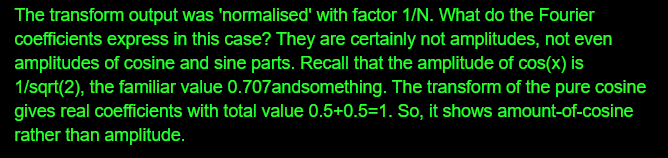 In this case I agree--Fourier coefficents are really the peak amplitudes of the cos and sine components--but my confusion over this is what made me program the patch the way that I did. So why is it working?
 posted in technical issues
RMS vs FFT complex magnitudes
Here's another version of the inverse FT using the complex coefficients in rectangular form rather than polar form. It doesn't shed additional light on my original problem, but it's interesting to see the phase angles rendered implicitly. For some reason, you have to reverse the output. Also note that I'm adding sine to cosine, while most texts I've found show sine subtracted from cosine. Why and why?
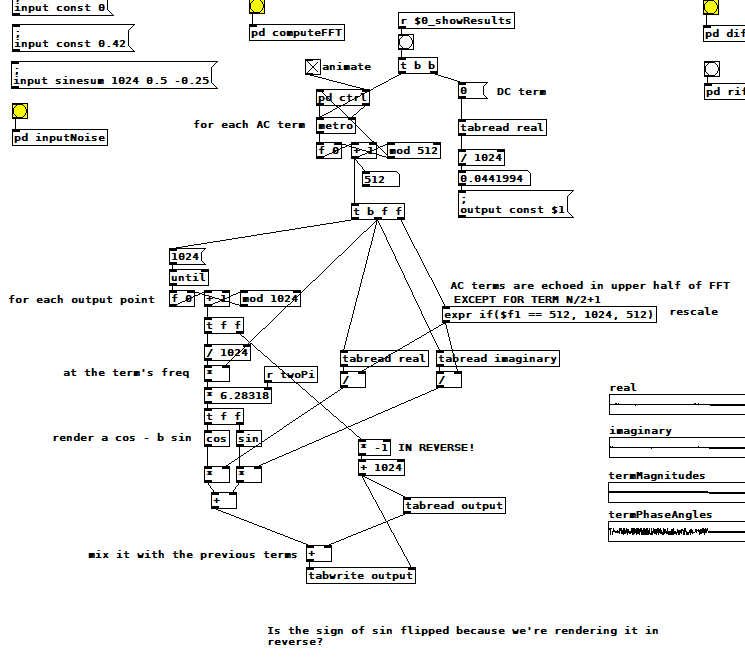
For those following along at home, here's a summary of what I still don't know:
-Why the RMS noise measurment is ~1.13 times the sum of the FFT term magnitudes
-Why some FFT term magnitudes are doubled and others not
-Why, in the polar version of the inverse FT, phase angles are all relative to the whole window (i.e. term 1's sinusoid) rather than to each term's sinusoid
-Why, in the rectangular version, the output is reversed, and why the sine is added instead of subtracted
-If any of the "conclusions" I've drawn from these tests are in fact wrong (e.g. is windowing really not relevant? After all, "no window" is a rectangular window, isn't it?)
posted in technical issues
RMS vs FFT complex magnitudes
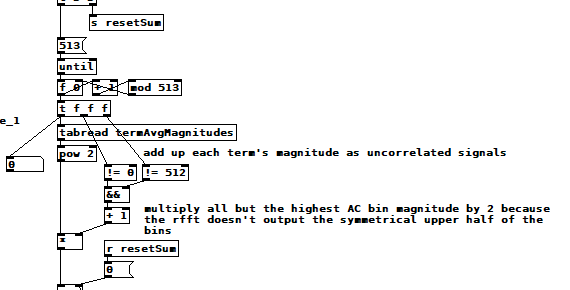
Today's refinements: it turns out that if N is the window size, [rfft~] returns N/2+1 complex coefficients! Gosh, and there it is, right in the help patch! That means I haven't been including the highest frequency explicit term in the magnitude sum. Together with the fact that white noise has stronger upper partials than cosines and ramps, I'm certain that that omission explains why my noise measurement is low!!!
Nope. Makes no difference. To pile on even further, I later discovered that that last term's magnitude, like the DC term, should not be doubled (more on this after the picture). Here are the latest changes to the patch:
OK, here's another toy I built which helped me discover the N/2+1 term and how to use it. It performs an inverse real FFT by tediously accumulating all the sinusoids at the frequencies, amplitudes, and phase angles determined by the FFT, additive synthesis style. You can wave your hands and theorize all you want but the rubber hits the road when you gotta code it. The result is super fun (to me) because you can "animate" the sum and watch it converge on the original input signal. It feels kind of miraculous. No matter how ef'd up the input signal is, [rfft~] can tell you how to reproduce it using DC and a bunch of sines! 19th c mathematics!
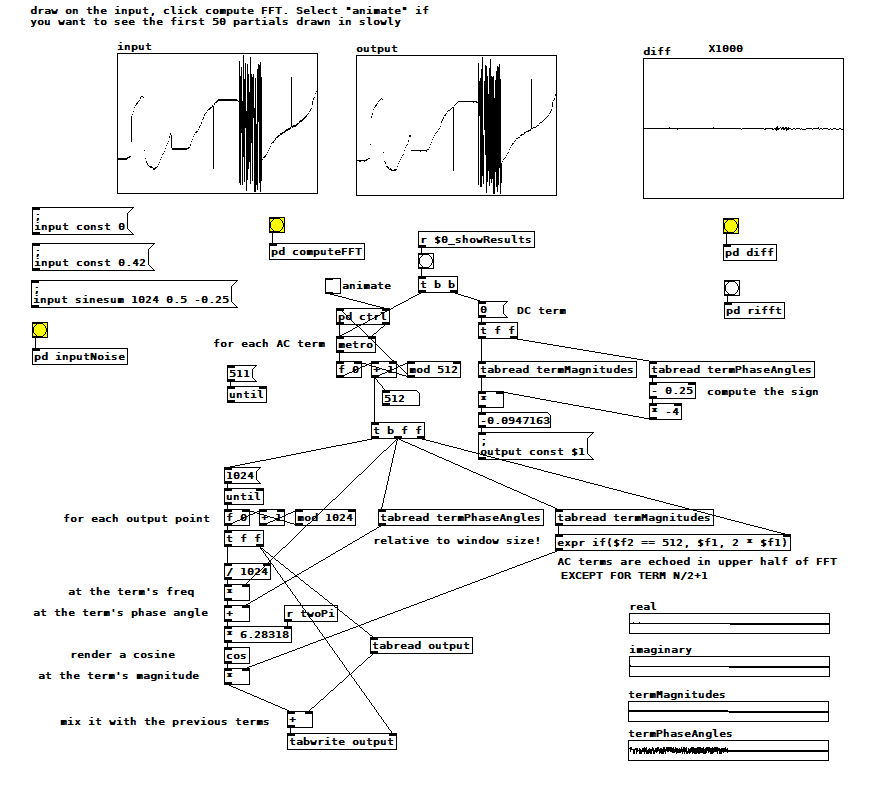 manual reverse FT.pd
posted in technical issues
RMS vs FFT complex magnitudes
If it turns out to be possible to measure how much a signal aliases using an oversampled FFT I think I need to know how to sum the complex magnitudes of an FFT and how that sum relates to the signal's RMS amplitude. I'm trying to figure it out with this patch: compareTimeFreqAmpl.pd . 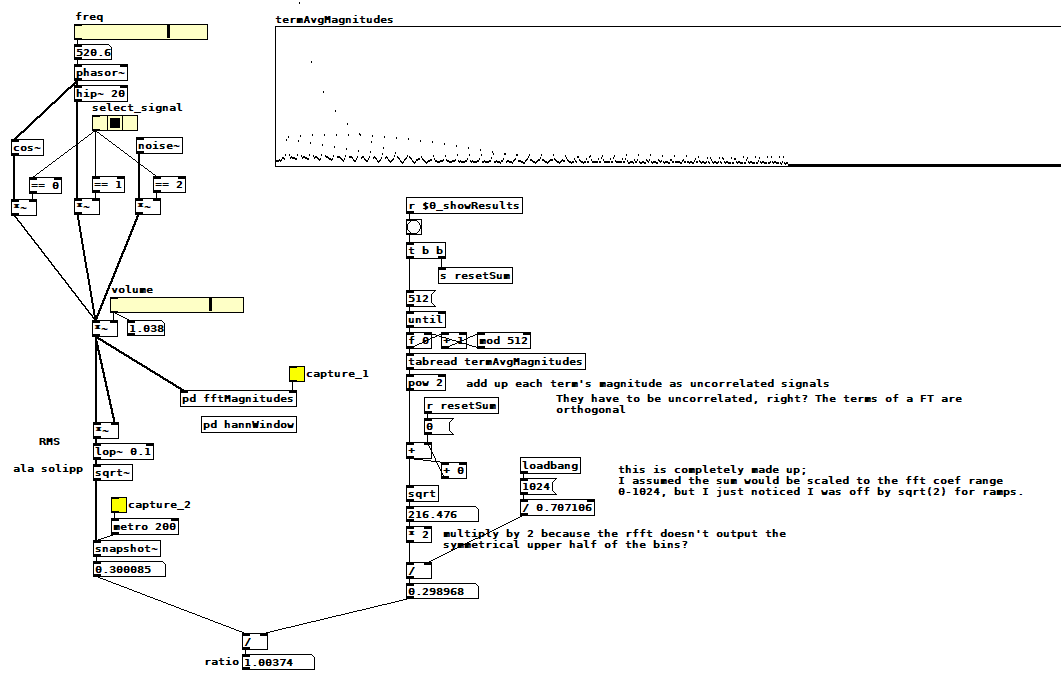 Select one of the three signals, pick a frequency if applicable, pick a volume, then capture the average magnitude of each FFT term (it computes the magnitude of the sum of all terms when you clear the capture toggle). Next, capture the RMS amplitude, which displays the ratio between the two measurements as a side effect. I hacked the ratio to be close to 1 for cos~ and ramps, but it's ~1.125 for noise. Note that I'm not using a hann window inside the fft subpatch--I think it's not relevant to this problem, and it seems to only change the ratio by 3/2, which is the expected effect of a hann window with 4x overlap.
You can see my ratio hack in the divide operation just before the ratio computation. I saw that I was off by sqrt(2) so I just included it, but is it sqrt(2), and if so, why? Why is noise different? Is it right to sum the FFT term magnitudes as uncorrelated signals? Is it right to double the sum because the rfft skips the symmetrical upper half of the terms for efficiency? What else am I doing wrong?
Edit: Hmm, that symmetrical upper half of terms? Probably uncorrelated as well. So the doubling has to happen before the sqrt, and then you get...sqrt(2)! Is that plausible?
posted in technical issues
Building a Linux Desktop
Hi, looking for advice on selecting components for my dream Linux Puredata machine.
-Ubuntu Studio, maybe an RME PCI card
-Really only doing audio (oscillators, arrays, filtering, delays) No graphics.
-Lots of MIDI and OSC.
-Keeping the the machine quiet (low fan noise) is VERY important.
What CPU specs matter most for common audio and MIDI tasks in PD? Number of cores? Thread count? Clock speed?
If I run other apps (VCV rack, Carla, various Jack plugins) will those processes distribute to the other Cores?
Does Pd benefit from a more powerful GPU card? Or will there be no difference if I use the GPU embedded in the CPU? Is it different if I launch Pd without the gui? (-nogui)
Thanks for any advice. I want to build the most powerful machine I can, but I don't want to waste money on extra specs that won't result in better performance.
Ed
 posted in I/O hardware diy
abl_link~ maintenance?
@jancsika said:
Where is the specification for ableton link?
Relevant bit is: https://github.com/Ableton/link#latency-compensation
"In order for multiple devices to play in time, we need to synchronize the moment at which their signals hit the speaker or output cable. If this compensation is not performed, the output signals from devices with different output latencies will exhibit a persistent offset from each other. For this reason, the audio system's output latency should be added to system time values before passing them to Link methods."
abl_link~, by default, doesn't do this. But, at https://github.com/libpd/abl_link/issues/20, I was told that [abl_link~] response to a "offset $1" message where a positive number of milliseconds pushes the timing messages earlier.
Using that, it's actually easy to tune manually.
This was undocumented -- intentionally undocumented, for a reason that I can't say I agree with. So I'll put in a PR to document it.
Also-- Assuming that arbitrary devices are to be able to connect through ableton link, I don't see how there could be any solution to the design of abl_link that doesn't require a human user to choose an offset based on measuring round-trip latency the given arbitrary device/configuration. You either have to do that or have everyone on high end audio interfaces (or perhaps homogenous devices like all iphones or something).
As far as I know (and I haven't gone deeply into Link's sources), Link establishes a relationship between the local machine's system time and a shared timebase that is synchronized over the network. Exactly how the shared timebase is synchronized, I couldn't tell you in detail, but linear regressions and Kalman filters are involved -- so I imagine it could make a prediction, based on the last n beats, of the system time when beat 243.5 is supposed to happen, and adjust the prediction by small amounts, incrementally, to keep all the players together.
Then, as quoted above, it stipulates that the sound for beat 243.5 should hit the speakers at the system time associated with that beat. The client app knows what time it is, and knows the audio driver latency, and that's enough.
So, imagine one machine running one application on one soundcard with a 256 sample hardware buffer and another app on a different soundcard with a 2048 sample hardware buffer. The system times will be the same. If both apps compensate for audio driver latency, then they play together -- and because the driver latency figure is provided by the driver, the user doesn't have to configure it manually.
The genius of Link is that they got system times (which you can't assume to be the same on multiple machines) to line up closely enough for musical usage. Sounds impossible, but they have actually done it.
Put another way-- if you can figure out an automated way to tackle this problem for arbitrary Linux configurations/devices, please abstract out that solution into a library that will be the most useful addition to Linux audio in decades.
Ableton Link actually is that library.
https://github.com/Ableton/link/blob/master/include/ableton/Link.hpp#L5-L9
license:
This program is free software: you can redistribute it and/or modify
it under the terms of the GNU General Public License as published by
the Free Software Foundation, either version 2 of the License, or
(at your option) any later version.
posted in extra~
Raspberry Pi GPIO and PureData? Does it work?
Yes it works very well. I own 2 of them. It also react very well with OSC protocol. I made a Drum machine based on it:
The interface is on my main PC developed in Python + WxPython and the Terminal module is in my rack.. I have a fully flexible drum machine. I can share the patch + code if anyone is interested.
 posted in I/O hardware diy
Issues with this save abstraction
Hello all.
I have been stuck for the past day or two with this save abstraction and slowly have been piecing it together. I almost have the end result I want. But for some reason only the first line is being updated for example If any information is updated by the abstraction those changes will be saved to the first line and not its own designated line.
Also I should be seeing a file path as the last argument in the text doc but "symbol" and "float" shows up for every line except for the first few lines.
Here is the save abstraction. OBBuildSongSavePatternPath.pd
Below are the results of the save abstraction.
0 0 0 0 C:/Users/Retro/Documents/Samples/TCustomz Productionz Drum Sample Pack Vol. II_hsud0hsldkf/TCustomz Productionz Drum Sample Pack Vol. II/hi hats/hat 06.wav
;
0 0 0 0 C:/Users/Retro/Documents/Samples/TCustomz Productionz Drum
Sample Pack Vol. II_hsud0hsldkf/TCustomz Productionz Drum Sample Pack
Vol. II/kicks/kick 02.wav;
0 0 0 0 symbol;
0 0 0 0 symbol;
0 0 0 0 symbol;
0 0 0 0 symbol;
0 0 0 0 symbol;
0 0 0 0 symbol;
0 0 0 0 symbol;
0 0 0 0 symbol;
0 0 0 0 symbol;
0 0 0 0 symbol;
0 0 0 0 symbol;
0 0 0 0 symbol;
0 0 0 0 symbol;
0 0 0 0 symbol;
0 0 0 0 symbol;
0 0 0 0 float;
0 0 0 0 float;
0 0 0 0 float;
0 0 0 0 float;
0 0 0 0 float;
0 0 0 0 float;
0 0 0 0 float;
0 0 0 0 float;
0 0 0 0 float;
0 0 0 0 float;
0 0 0 0 float;
0 0 0 0 float;
0 0 0 0 float;
0 0 0 0 float;
0 0 0 0 float;
0 0 0 0 float;
0 0 0 0 float;
0 0 0 0 float;
0 0 0 0 float;
0 0 0 0 float;
0 0 0 0 float;
0 0 0 0 float;
0 0 0 0 float;
0 0 0 0 float;
0 0 0 0 float;
0 0 0 0 float;
0 0 0 0 float;
0 0 0 0 float;
0 0 0 0 float;
0 0 0 0 float;
0 0 0 0 float;
0 0 0 0 float;
0 0 0 0 float;
0 0 0 0 float;
0 0 0 0 float;
0 0 0 0 float;
0 0 0 0 float;
0 0 0 0 float;
0 0 0 0 float;
0 0 0 0 float;
0 0 0 0 float;
0 0 0 0 float;
0 0 0 0 float;
0 0 0 0 float;
0 0 0 0 float;
0 0 0 0 float;
0 0 0 0 float;
0 0 0 0 symbol;
 posted in technical issues