
Drum Power a different kind of drum machine
Hello again,
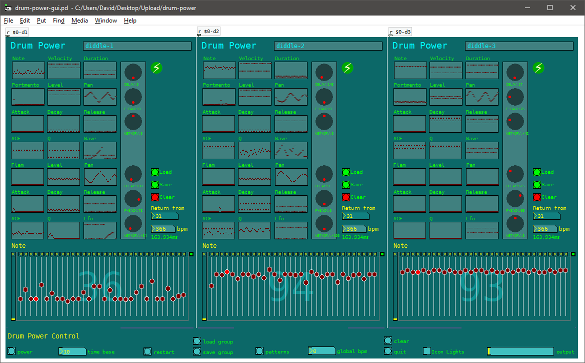
Here is yet another drum machine. A bit different to normal and inspired somewhat by the @LiamG post 'looking for good drum synths' reference to Elastic Drums.
While this offering has no where near the same quality or ability, it does make some quite interesting sounds. There is an overview.pd patch that explains a bit more and has some usage instructions (and here overview.txt ).
Requires pd-extended, or vanilla with cyclone/tanh~, motex/pan~, cyclone/mousestate and iemlib/splitfilename
Warning! It is important to use the 'quit button' or minimise the patch and quit pd when closing or puredata will appear to hang, requiring a force close.
Cheers
Balwyn
 posted in abstract~
Install PD extend on Ubuntustudio
I just installed Ubuntustudio 15.10 Wily Werewolf 32bit on a thinkpad and I am trying to upgrade PD to extend. I am fairly new to linux but it seems like the instructions on https://puredata.info/docs/faq/debian fails.
This is the log from executing the commands. Any suggestions and help will be appreciated
myuser@machine:~$  sudo add-apt-repository "deb http://apt.puredata.info/releases `lsb_release -c | awk '{print $2}'` main"[sudo] password for zoundart:
myuser@machine:~$ sudo apt-key adv --keyserver keyserver.ubuntu.com --recv-key 9f0fe587374bbe81
Executing: gpg --ignore-time-conflict --no-options --no-default-keyring --homedir /tmp/tmp.beJyKhm5Lr --no-auto-check-trustdb --trust-model always --keyring /etc/apt/trusted.gpg --primary-keyring /etc/apt/trusted.gpg --keyserver keyserver.ubuntu.com --recv-key 9f0fe587374bbe81
gpg: requesting key 374BBE81 from hkp server keyserver.ubuntu.com
gpg: key 374BBE81: "Hans-Christoph Steiner <hans@guardianproject.info>" not changed
gpg: Total number processed: 1
gpg:              unchanged: 1
myuser@machine:~$ sudo apt-key adv --keyserver keyserver.ubuntu.com --recv-key D63D3D09C39F5EEB
Executing: gpg --ignore-time-conflict --no-options --no-default-keyring --homedir /tmp/tmp.BDfXAe3l5j --no-auto-check-trustdb --trust-model always --keyring /etc/apt/trusted.gpg --primary-keyring /etc/apt/trusted.gpg --keyserver keyserver.ubuntu.com --recv-key D63D3D09C39F5EEB
gpg: requesting key C39F5EEB from hkp server keyserver.ubuntu.com
gpg: key C39F5EEB: "Launchpad Pure Data" not changed
gpg: Total number processed: 1
gpg:              unchanged: 1
myuser@machine:~$ sudo apt-get update
Hit http://no.archive.ubuntu.com wily InRelease
Get:1 http://no.archive.ubuntu.com wily-updates InRelease [64,4 kB]
Get:2 http://no.archive.ubuntu.com wily-backports InRelease [64,5 kB]
Get:3 http://security.ubuntu.com wily-security InRelease [64,4 kB]
Ign http://apt.puredata.info wily InRelease
Ign http://apt.puredata.info wily Release.gpg
Ign http://apt.puredata.info wily Release
Get:4 http://security.ubuntu.com wily-security/main Sources [17,0 kB]
Get:5 http://no.archive.ubuntu.com wily-updates/main Sources [24,1 kB]
Get:6 http://no.archive.ubuntu.com wily-updates/restricted Sources [3 741 B]
Get:7 http://security.ubuntu.com wily-security/restricted Sources [2 854 B]
Get:8 http://no.archive.ubuntu.com wily-updates/universe Sources [6 112 B]
Get:9 http://no.archive.ubuntu.com wily-updates/multiverse Sources [1 922 B]
Get:10 http://security.ubuntu.com wily-security/universe Sources [3 691 B]
Get:11 http://no.archive.ubuntu.com wily-updates/main i386 Packages [59,3 kB]
Get:12 http://no.archive.ubuntu.com wily-updates/restricted i386 Packages [13,4 kB]
Get:13 http://security.ubuntu.com wily-security/multiverse Sources [1 922 B]
Get:14 http://no.archive.ubuntu.com wily-updates/universe i386 Packages [31,0 kB]
Get:15 http://no.archive.ubuntu.com wily-updates/multiverse i386 Packages [6 052 B]
Get:16 http://security.ubuntu.com wily-security/main i386 Packages [43,4 kB]
Err http://apt.puredata.info wily/main i386 Packages
  404  Not Found
Ign http://apt.puredata.info wily/main Translation-en_US
Get:17 http://no.archive.ubuntu.com wily-backports/main Sources [750 B]
Get:18 http://security.ubuntu.com wily-security/restricted i386 Packages [10,8 kB]
Get:19 http://no.archive.ubuntu.com wily-backports/restricted Sources [28 B]
Ign http://apt.puredata.info wily/main Translation-en
Get:20 http://no.archive.ubuntu.com wily-backports/universe Sources [833 B]
Get:21 http://no.archive.ubuntu.com wily-backports/multiverse Sources [28 B]
Get:22 http://no.archive.ubuntu.com wily-backports/main i386 Packages [606 B]
Get:23 http://security.ubuntu.com wily-security/universe i386 Packages [24,8 kB]
Get:24 http://no.archive.ubuntu.com wily-backports/restricted i386 Packages [28 B]
Get:25 http://no.archive.ubuntu.com wily-backports/universe i386 Packages [714 B]
Get:26 http://security.ubuntu.com wily-security/multiverse i386 Packages [6 052 B]
Get:27 http://no.archive.ubuntu.com wily-backports/multiverse i386 Packages [28 B]
Hit http://no.archive.ubuntu.com wily-backports/multiverse Translation-en
Hit http://no.archive.ubuntu.com wily-backports/restricted Translation-en
Get:28 http://security.ubuntu.com wily-security/main Translation-en [23,2 kB]
Hit http://no.archive.ubuntu.com wily/main Sources
Hit http://no.archive.ubuntu.com wily/restricted Sources
Hit http://no.archive.ubuntu.com wily/universe Sources
Get:29 http://security.ubuntu.com wily-security/multiverse Translation-en [2 536 B]
Hit http://no.archive.ubuntu.com wily/multiverse Sources
Hit http://no.archive.ubuntu.com wily/main i386 Packages
Hit http://no.archive.ubuntu.com wily/restricted i386 Packages
Hit http://no.archive.ubuntu.com wily/universe i386 Packages
Get:30 http://security.ubuntu.com wily-security/restricted Translation-en [2 666 B]
Hit http://no.archive.ubuntu.com wily/multiverse i386 Packages
Hit http://no.archive.ubuntu.com wily/main Translation-en
Hit http://no.archive.ubuntu.com wily/multiverse Translation-en
Hit http://no.archive.ubuntu.com wily/restricted Translation-en
Get:31 http://security.ubuntu.com wily-security/universe Translation-en [15,2 kB]
Hit http://no.archive.ubuntu.com wily/universe Translation-en
Hit http://no.archive.ubuntu.com wily-updates/main Translation-en
Hit http://no.archive.ubuntu.com wily-updates/multiverse Translation-en
Hit http://no.archive.ubuntu.com wily-updates/restricted Translation-en
Hit http://no.archive.ubuntu.com wily-updates/universe Translation-en
Hit http://no.archive.ubuntu.com wily-backports/main Translation-en
Hit http://no.archive.ubuntu.com wily-backports/universe Translation-en
Fetched 496 kB in 7s (70,7 kB/s)
W: Failed to fetch http://apt.puredata.info/releases/dists/wily/main/binary-i386/Packages  404  Not Found

E: Some index files failed to download. They have been ignored, or old ones used instead.
myuser@machine:~$ sudo apt-get install pd-extended
Reading package lists... Done
Building dependency tree
Reading state information... Done
Package pd-extended is not available, but is referred to by another package.
This may mean that the package is missing, has been obsoleted, or
is only available from another source

E: Package 'pd-extended' has no installation candidate
 posted in technical issues
Minimal percussion patch Alva Noto style?
Hi people,
thanks to this community I had my first electro gig with PD which is now part of my rig.
I'm needing more and more percussive sound, in a minimalistic way. I love very much Alva Noto works, so I'd like to find a drum machine with some preset clicks, pops, sines and so on.
If not does anybody know a good and live-friendly drum machine where I can prepare drum scores and load samples or synthesize clicks, pops, sines and so on?
Thanks
 posted in technical issues
Drum machine sequence editor like micro redrum
Hey
I figured I would share this before it get s anymore complicated. It is not a complete drum machine sequencer yet only the pattern editing is done. I figured it would be good to share it as is so you can add your own drums, triggering, and preset saving.
So far it has a 16 pattern memory with 4 drum channels. The pattern storage goes into 4 arrays - 1 for each drum channel. Each pattern array is 256 bytes? Should be 2 bits but hey.
You should add a loadbang to set the initial values of pattern, BANK, and D_SELECT.
I didn't want to clutter it up for future preset saving.
I ought to be easy to add more pattern memory and more drum channels.
If anyone can figure out a better - less atom way to implement the color changing of the toggles or anything else in the patch I would be glad to know.
I 'm about frizzled over a messagebox phenomenon I ran into.
I tried every way shape and form possible to get this to work.
When reading the memory and repainting the sequence edit display after a pattern or drum select.
[r onoff]
|
| [r nametosendto]
| |
| | [r color]
| | |
[pack f s f]
\
[$2 $3; (
[$2 color $1 $1 $1;(
That is one messagebox.
A loop cycled through the toggles and that message tried to paint them and set their value but it would only do one depending on which order I changed it to.
If the colors worked then when I would switch to a new pattern the toggles would change color but not their state of 0 or 1. Some toggles would have to be clicked 2wice to change state.
I managed to get it working by sending 2 separate messages to a send.
Why doesn't the multi line message work?
Enjoy!
 posted in abstract~
Synthetic drum-machine with chaos super-powers
hi!
this is my first 'big' patch, i'm a noob, so advice/critique/encouragement welcome!
it's a completely synthetic, controllable percussion machine. it has five tracks and four sequencers which makes it polyphonic. kick, snare, hihat and two other digital percussive sounds. then there are few randomizers and a slicer.
edit: apologies. trying to upload again.
 posted in patch~
Sending record/play/pause/stop etc. to a sequencer supporting mmc/cc
Hey,
Now I've pretty much been looking for a solution to this problem for days now(literally). I've searched Google, this forum and a couple of other sources, but there doesn't seem to be any information on this.
Now, what I want to do is simply send either play, pause, record or stop to my sequencer(Propellerhead's Record) in order to make it easier to record the drum loops i built with the step sequencer I made in PD.
I got sending midi notes over midi yoke working flawlessly, but when it comes to recording, my timing is just off most of the time making it quite frustrating to get these drum loops into Record. Don't get me wrong, it does work, but having to go in and adjusting stuff every time just defeats the purpose for which i built my step sequencer(I know, I could just use the sequencer built into Record's drum machine, but I plan on building a peripheral to get hands on control over my drum loop creation and then send that data to PD in order to be interpreted and change into midi signals)
Is there any way of sending mmc messages out of pd? Has anybody ever managed to control the transport controls of another software sequencer from PD?
 posted in technical issues
Carly wendos
drums are just analogue-style subtractive synthesis, plus noise. the rhythm of the bass drum was hooked into the filter cutoff of the snare drum, and the rhythm of the snare drum was controlling the pitch of the bass drum.
i totally thought the sound was a cheapo autechre ripoff, but if it's not that bad, i am happy.
 posted in output~
How to Enjoy Your Favorite Videos on Portable Devices at Will For Mac
Are you a Mac user?
Do you still feel frustrated that you can't enjoy your favorite videos on portable devices at will?
Now, a professional software---Aiseesoft Video Converter for Mac(http://www.aiseesoft.com/video-converter-for-mac.html)
can help you to solve all the problems. With it, you can convert between all popular video and audio formats with super fast conversion speed and high output quality, such as AVI, MP4, MOV, MKV, WMV, DivX, XviD, MPEG-1/2, 3GP, 3G2, VOB Video, MP3, AAC, and AC3 Audio etc. In addition, the best video converter for Mac can also extract audio from video file and convert video to MP3, AC3, and AAC...as you want.
OK, let's move to how to use the amazing software.
Step 0: Download and install Aiseesoft Video Converter for Mac.
After a while, you can use the following interface:
http://www.aiseesoft.com/images/guide/dvd-converter-suite-mac/video.jpg
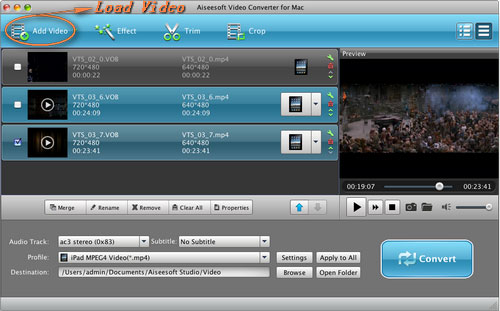
Step 2. Load Video
You can load your video by clicking "Add File" button or clicking "File" button, you can choose "add file" on a drop-down list.
Step 3. Output format and Settings
From the "Profile" drop-down list you can find one format that meets your requirement.
After doing the 3 steps above, you can click "start" button to start conversion.
Wait a minute, the conversion will be soon finished.
Tips:
1. Trim
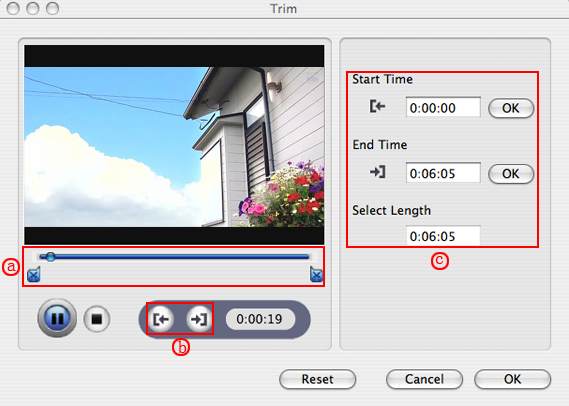
"Trim" function is for you to select the clips you want to convert.
There are 3 ways that you can trim your video.
a. You can drag the buttons(1) to set the start and end time
b. You can preview the video first and when you want to start trim click the left one of the pair buttons(2) when you want to end click the right one.
c. You can set the exact start and end time on the right side of the pop-up window.
It is for you to select the clips you want to convert.
http://www.aiseesoft.com/images/guide/dvd-ripper-for-mac/trim.jpg
2. Crop
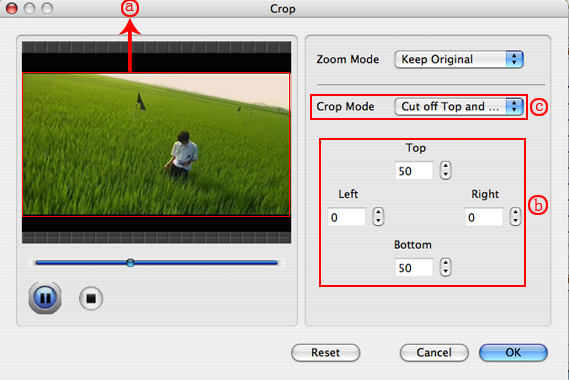
Cut off the black edges of the original movie video and watch in full screen using the "Crop" function.
There are 3 ways that you can crop your video.
a. We provide 7 modes on our "Crop Mode"(1)
b. You can set your own mode on the right side of the pop-up window(2)
c. You can drag frame to set your own crop mode(3)
You can cut off the black edges of the original movie video and watch in full screen using the "Crop" function.
http://www.aiseesoft.com/images/guide/dvd-ripper-for-mac/crop.jpg
3. Snapshot and merge into one file
If you like the current image of the video you can use the "Snapshot" option. Just click the "Snapshot" button the image will be saved and you can click the "Open" button next to "Snapshot" button to open your picture.
If you want to make several files output as one you can choose "Merge into one file".
If you are windows users, you can go to Aiseesoft Total Video Converter(http://www.aiseesoft.com/total-video-converter.html) to get more information.
 posted in technical issues
Non-audio "stutter"
maybe you didn't understand what i was trying to say or maybe my explanation wasn't clear.
what i want to do shouldn't involve the sampler as a device (an electribe, by the way), only the bangs being sent to it. all the sampler is doing is storing the sounds that i am triggering. maybe i should have said "drum machine" instead of sampler.
for example, i have it set up on the sampler to be note 1 = bass drum, note 2 = snare, etc. so if i send 1 1 2 1 to the sampler, it will play bass bass snare bass. i want to have a stutter-style effect that will be able to grab whatever sequence of numbers that is playing and repeat that little snippet of information. this would (in my own theory) replace the use of an audio-based stutter effect and achieve (sort of) the same effect by just repeating a short pattern of numbers going to the device (sampler, drum machine, whatever)
does that make more sense, or is this just a stupid idea to begin with? i'm thinking i could record the note numbers into some sort of array and play them back out of the array in a little loop or something. i just got home from work and i am going to start trying some things.
just wondering if anyone else has done this and what kind of results they got. thanks.
 posted in technical issues
Midi control = phase issue?
I just tried controlling my boss dr-770 drum machine with a step sequencer in Pd and when I get it going the audio sounds kinda phasey. It is coming directly out of the drum machine like that, and it only sounds that way when I have the sequencer playing. If I stop it and just hit the pads the sound is normal...
I'm guessing it is some sort of timing issue, but I have never heard of midi control effecting the sound of a device like that. I went through all the midi settings on the machine to see if I could correct it but no luck.
posted in technical issues