
can't set plugdata's VST3 latency
In plugdata v0.9.2 hosted on REAPER v7.48 running on both Windows 10 and 11, I can't set the plugin's latency under Settings...->Latency (samples). When I enter the number of samples and close the dialog box, it immediately reverts to 0 and REAPER reports a plugin delay compensation amount of 64 samples which is what it reports when plugdata is first loaded. I fell back to plugdata v0.8.3 on my Win10 machine and was again able to set the latency, so there's my workaround.
Surprisingly, if I copy that same REAPER project hosting plugdata v0.8.3 over to the Win11 machine that has plugdata v0.9.2, it retains the latency I set on the Win10 machine, but as soon as I try to edit it, it reverts to 0.
Anyone else seeing this issue?
I'd also love to know if there is a way of setting the plugdata latency setting within Pd. My patch has a look-ahead detector, and when I change the look-ahead amount, the latency has to change accordingly.
 posted in technical issues
Is there a way to trigger Ctrl+ from loadbang?
@benalb That works if I open the patch on the machine where the option was set, but not when the patch is opened on another machine. I'm working on patches that will be distributed to other people, some of whom have very little experience with Pd. Is there a way to trigger zoom from within the patch, so that people on other machines don't have to change their options?
And a related question, is there a way to turn on the DSP from within a patch?
 posted in technical issues
[midiin] to note values?
"Easy," not really -- because the meaning of byte 'n' depends on what was byte 'n-1'. The current received byte has to set the routing for the next byte, which is a bit outside of normal straight-shot patching.
However I tested this with some simulated messages (including running status bytes) and it does seem to parse them out correctly. You could extend it for other message types too, but I don't have time to go further than this.
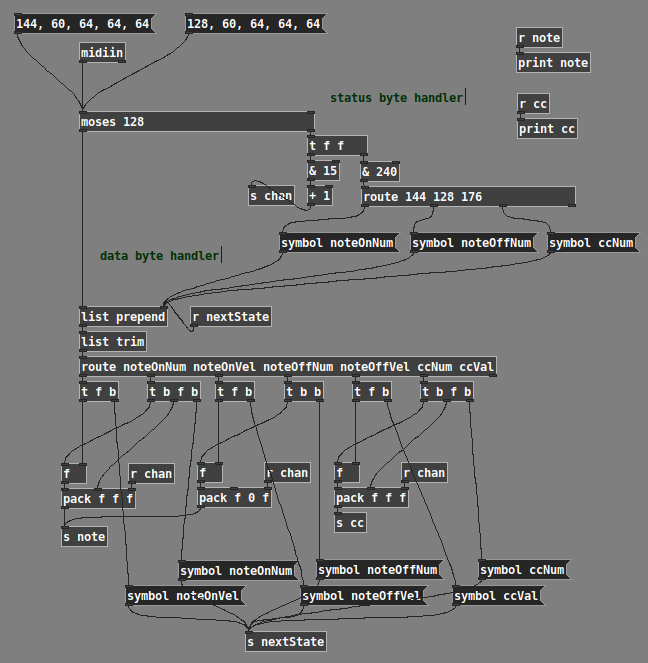
23-0916-midiin-state-machine.pd
hjh
 posted in technical issues
Manually install later version of deken?
@frenziedcurtain If it is talking between machines it's a good idea to fix their ip addresses on the network..... then they will always be found.
In the Wi-Fi (or Ethernet if they are cabled together) choose static instead of DHCP for all the machines and give them an individual address that will stay fixed.
It's a bit (very small) of a PITA if you travel with your laptop and join other networks...... i.e. in hotels.... because you will need to go back to dhcp as they will probably not use the same network range as your home router.
My home and work routers have 50 addresses reserved for static IP's..... that way the router doesn't try to hand them out to other machines.
David.
 posted in technical issues
Turing Machine Sequencer
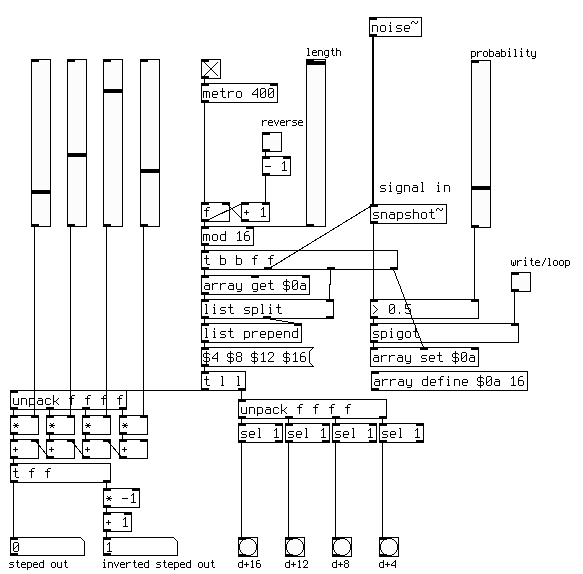
An ancient and long forgotten neuron has fired. The Turning Machine Sequencer is pretty much a slight tweak on the original version of the Klee Sequencer. Turing Machine replaced the 4 bit analog DAC operating on every 4th bit with a proper 8 bit DAC which operates on the first 8 bits and then added the Volts and Pulses expansion to bring out its inner Klee. The Klee has one trick which the Turing Machine lacks, Klee does not have a internal noise source, just an input so the Klee also can function as a tracking generator, which could be added to the above versions easily enough.
klee.pd
 posted in technical issues
A bug just for @jameslo on his expensive holiday
@whale-av I'm a proponent of Donald Knuth's view that "premature optimization is the root of all evil" and so will not tolerate any eye rolling over what an insane cpu hog this initial attempt at a port is. I'm kind of amazed it works at all, frankly, but it may not work for you if you don't have a fast machine. Let me know. On my machine the load meter shows between 100% and 130%, so either the load meter is exaggerating or my machine has been inspired by American football coaches ("Give me 110%!"). I had to leave out some features in order to get it to not hang Pd, but I don't hear any artifacts of those omissions with your tape echo patch.
I doubt that there is anything I can do to speed up this particular design by any significant factor, but I'd be willing to try if anyone has any ideas. The original author coded it with a few generalizations, e.g. interpolating between two adjacent indexes reduces to just writing out the next value, so I worry that things like that are expensive in Pd. I used a lot of values and subpatches to keep from becoming crosseyed, maybe those are expensive? I dunno. I wonder if CPU consumption is proportional to the number of edges that have to be traversed? Last night I dreamt of doing this in signal domain at 2x oversampling, but this morning that seems less promising. I wonder if there's a way to distribute the load among Pd processes?
vipoke~.pd
Davids-space_echo.pd
posted in technical issues
Best way to avoid clicks (tabread4~)
@whale-av Hi, finally I got some time  So, first of all I deleted this dumb line, which was breaking my code, making the pipe useless.
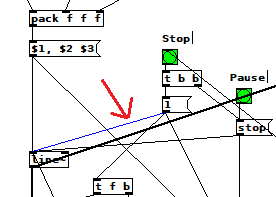
I thought this would fix everything, but since a fast transition to 0 is necessary, I still get the puff mentioned in the original problem of my first post. This is the mechanism I used to solve the clicks:
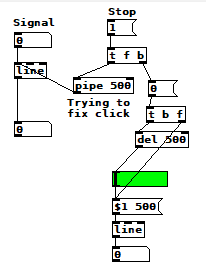
The idea is: whenever I press my custom Stop button, immediately pause the [line~] reading the array (with the [stop( message) and send a [0 fade_time( message to the [line~] responsible for the volume, but don't go to the beginning of the array immediately, wait fade_time (which is what the [pipe] is doing, in this example with fade_time = 500). Also, I just added a delay object to make the volume come back to where it was before.
Except for the send/receive design (and the state of the overall volume), I could only spot one difference comparing your patch and mine: when the Stop button is pressed, you don't [stop( it immediately like me, but you wait fade_time and only then you pause the [line~] and go to the beginning of the array. However, the [stop( message doesn't introduce a click, so I still don't know why your patch works flawlessly and not mine, am I missing something? 
 posted in technical issues
Midi Noteout with velocity 0 on different machines with Linux Debian
Hi all,
I am having a weird issue, not sure whether it is actually due to Pd or not: in order to turn on and off the LEDs of my Midi controller, I need to send it a noteon message with a velocity of 1 (turn on), 2 (blink) or 0 (off). This works very well on one of my machines with Debian 10, Pd vanilla version 0.49.0-3 or Pd-L20rk 2.15.2, by sending [64 1( or [64 2( or [64 0( to [noteout 1], however on another machine with also Debian 10, Pd vanilla 0.49.0-3, only the velocities of 1 or 2 make the LED turn on or blink, but impossible to turn it off with a velocity of 0!
I first thought that it may be due to Pd interpreting NoteOn with velocity of 0 as NoteOff, but it works fine on one of the computers.
Jack is started on both machines with -dalsa -Xseq and I run a2j -e to access the Midi devices through Alsa. If I stop a2j I can successfully turn the LEDs on and off with amidi -phw,2 -S "90 40 01" or 00". So I am ruling out the hardware/driver issue.
What else could it be, any idea anyone? I shall check the version of a2j later today, but they are both up-to-date using Debian buster repos so I doubt I'll find any difference there...
Sorry if this turns out to actually not be related to Pd, but I hope someone may be able to help anyway
Thanks!
 posted in technical issues
[declare] vs help browser
Are you looking at the same directory?
Do you mean the Linux machine or the Windows machine?
If the Linux machine -- I'm aware of the ~/.pdsettings file -- its contents match the display (nloadlib = 0 meaning no startup libs, npath = 1 and only a path1). There is no registry in Linux, so that comment isn't relevant to the Linux machine.
On the Windows machine, there isn't any other Pd library folder, and I keep only one version of Pd. But I don't think this question quite makes sense -- if there are multiple versions of Pd sharing the same settings, how would the two versions behave differently? Wouldn't I see the same behavior in multiple versions?
FWIW, I checked the registry and, just like the Linux machine, nloadlib is 0 and npath is 1. So Pd on the Windows machine should not be loading any startup libraries (and indeed, I don't see any output from Gem or zexy), and there should be only one search path (which I can confirm by creating an object in a subfolder, and it isn't found).
"This Pc" is pretty clearly just a display convention in the Windows Explorer, and has nothing to do with the actual file system structure.
hjh
posted in technical issues
[declare] vs help browser
It takes 10 minutes to boot that machine, but OK, here are the screenshots.
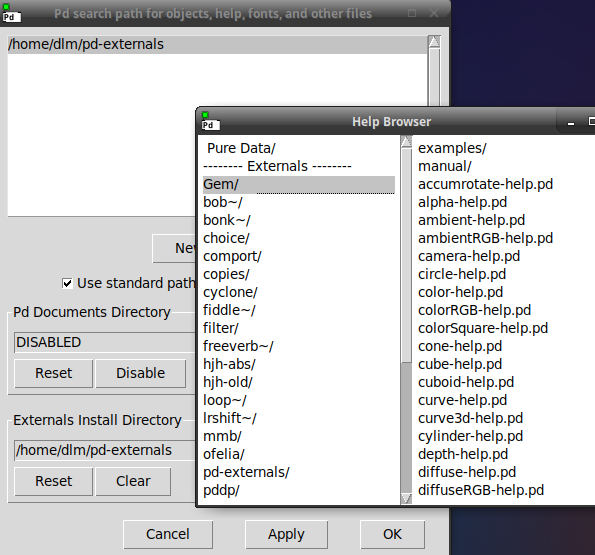
On my Linux machine, I have this. (Startup preferences are empty.) E.g. Gem is not listed under either "path" or "startup," but it does appear in the help browser.
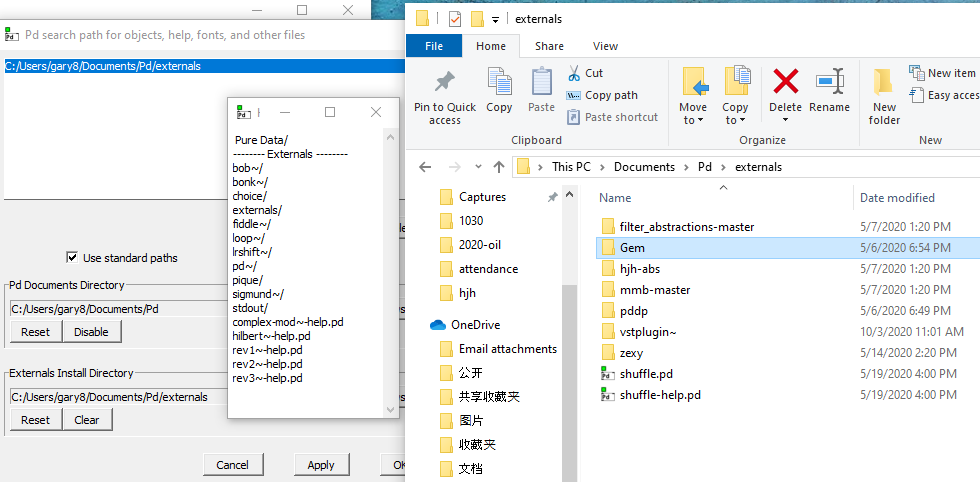
On my Windows machine -- observe -- "Externals Install Directory" is the same as the single search path (specific path is not the same as in Linux, but the configurations are functionally identical), and at right, you can see that under Documents/Pd/externals, Gem and a couple of others live here.
But the help browser omits Gem and zexy.
Because from your description it seems most likely that it was added to the paths on Linux but not Windows.
No, that isn't it. Functionally equivalent configurations, different behavior = platform-specific bug (IMO).
hjh
posted in technical issues