
Building a Linux Desktop
Hi, looking for advice on selecting components for my dream Linux Puredata machine.
-Ubuntu Studio, maybe an RME PCI card
-Really only doing audio (oscillators, arrays, filtering, delays) No graphics.
-Lots of MIDI and OSC.
-Keeping the the machine quiet (low fan noise) is VERY important.
What CPU specs matter most for common audio and MIDI tasks in PD? Number of cores? Thread count? Clock speed?
If I run other apps (VCV rack, Carla, various Jack plugins) will those processes distribute to the other Cores?
Does Pd benefit from a more powerful GPU card? Or will there be no difference if I use the GPU embedded in the CPU? Is it different if I launch Pd without the gui? (-nogui)
Thanks for any advice. I want to build the most powerful machine I can, but I don't want to waste money on extra specs that won't result in better performance.
Ed
 posted in I/O hardware diy
Conways Game of Life made with Ofelia
@Jona Great work ! in a 2D automata it is possible to create Turing machines using complex oscillators. Another very interesting automata is Wireworld. Wireworld is design to create digital circuits using cellular automata. Another interesting automata is John Von Neumann's universal constructor It uses 29 states/cell but you can make machines that replicate other machines. Another more advance automata is Quantum dot cellular automata (QCA). QCA is design in software programs but recently there are physical implementations, this could lead to an entire new design for CMOS technology.Fantastic stuff.
 posted in patch~
abl_link~ maintenance?
@jancsika said:
Where is the specification for ableton link?
Relevant bit is: https://github.com/Ableton/link#latency-compensation
"In order for multiple devices to play in time, we need to synchronize the moment at which their signals hit the speaker or output cable. If this compensation is not performed, the output signals from devices with different output latencies will exhibit a persistent offset from each other. For this reason, the audio system's output latency should be added to system time values before passing them to Link methods."
abl_link~, by default, doesn't do this. But, at https://github.com/libpd/abl_link/issues/20, I was told that [abl_link~] response to a "offset $1" message where a positive number of milliseconds pushes the timing messages earlier.
Using that, it's actually easy to tune manually.
This was undocumented -- intentionally undocumented, for a reason that I can't say I agree with. So I'll put in a PR to document it.
Also-- Assuming that arbitrary devices are to be able to connect through ableton link, I don't see how there could be any solution to the design of abl_link that doesn't require a human user to choose an offset based on measuring round-trip latency the given arbitrary device/configuration. You either have to do that or have everyone on high end audio interfaces (or perhaps homogenous devices like all iphones or something).
As far as I know (and I haven't gone deeply into Link's sources), Link establishes a relationship between the local machine's system time and a shared timebase that is synchronized over the network. Exactly how the shared timebase is synchronized, I couldn't tell you in detail, but linear regressions and Kalman filters are involved -- so I imagine it could make a prediction, based on the last n beats, of the system time when beat 243.5 is supposed to happen, and adjust the prediction by small amounts, incrementally, to keep all the players together.
Then, as quoted above, it stipulates that the sound for beat 243.5 should hit the speakers at the system time associated with that beat. The client app knows what time it is, and knows the audio driver latency, and that's enough.
So, imagine one machine running one application on one soundcard with a 256 sample hardware buffer and another app on a different soundcard with a 2048 sample hardware buffer. The system times will be the same. If both apps compensate for audio driver latency, then they play together -- and because the driver latency figure is provided by the driver, the user doesn't have to configure it manually.
The genius of Link is that they got system times (which you can't assume to be the same on multiple machines) to line up closely enough for musical usage. Sounds impossible, but they have actually done it.
Put another way-- if you can figure out an automated way to tackle this problem for arbitrary Linux configurations/devices, please abstract out that solution into a library that will be the most useful addition to Linux audio in decades.
Ableton Link actually is that library.
https://github.com/Ableton/link/blob/master/include/ableton/Link.hpp#L5-L9
license:
This program is free software: you can redistribute it and/or modify
it under the terms of the GNU General Public License as published by
the Free Software Foundation, either version 2 of the License, or
(at your option) any later version.
 posted in extra~
This Loop Machine (4 tracks) nearly perfect but.....
Hi @whale-av or somebody else,
https://github.com/undessens/Lucibox/tree/master/machines/1
This Loop Machine (4 tracks) nearly perfect but there are 2 points I would like to change. The points I would like to change:
-
The stop record button. Now you need to push the record button again to finish a record. I would like to change it by pushing the record button again (track 1) OR another record track (track 2). By pushing the record track loop 2 the record loop 1 will stop and the new record on loop 2 will start.
-
The stop/play button. To stop a loop you have to wait until the loop finish. When there are multiple loops and you will stop a loop you have to wait until the whole loop finish. To play the stopping loop you have to wait the whole loop start from the beginning. So a good solution is the mute a loop when you push the stop button. The stop/play all button works perfect, I am talking about the stop/play button on a loop track.
Can you help me with this? I am very new in Pure Data so I REALLY need your help.
Thank you for any help.
 posted in technical issues
Scheduler queue object?
With [abl_link~] you are syncing Pd to the other programs at the audio rate.... the audio "is" the time.
I'm quite sure this is not the point of Ableton Link at all.
Link, AFAICS, does not follow a master/slave clock model. It's a cooperative negotiation among equal peers to maintain best-possible (or, musically useful) sync. There is no concept of Pd originating time, or not originating time.
When you use Link, you voluntarily sacrifice sample accuracy in exchange for a coherent musical pulse shared across multiple machines. Samples run according to the machine's local soundcard (and soundcards are famously inaccurate -- in SuperCollider, if I do s.actualSampleRate, I get numbers like 44099.234426884 or 44099.40771005, but never 44100.0). So a "beat" at, say, 120 bpm is not necessarily exactly 22050 samples -- but it doesn't matter because everyone is slightly inaccurate, together. (If typical musical events are at least 80 ms apart, inaccuracy within 1-2 ms will be undetectable to the ear.)
Here (connected to a SuperCollider client running a LinkClock at 60 bpm), the time between beat ticks varies between 998 and 1001.36. Most of the time it's 999.909 but occasionally it "adjusts" for the inevitable time variance between clocks.
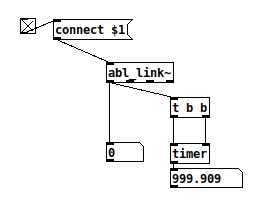
The point of Link is, if I have a musical event that is supposed to happen on the "and of 2," then Link determines that time point to coordinate with the other machines, within an acceptable margin of error. Pd's sample clock is totally irrelevant to this. (Corollary: If you need sample accuracy, don't use Link.)
The phase will be 0-1 I imagine
Nope, it's 0 - (quantum-1). "Quantum" is a Link property corresponding to the number of beats in the bar. So my "and of 2" example should happen at phase = 1.5.
You can do a [text] lookup every tick
That seems wasteful. I would rather calculate the beat index for the next event and store it in a [float] box -- because this value is likely to be stable for hundreds or thousands of audio ticks.
@EEight The cue system seems a bit heavyweight for note sequences, but I might be able to steal some code design ideas from it 
hjh
posted in technical issues
VulcanBX Drum Machine Synthesizer using Pure Data Extended update 1
Hello. I modify my VulcanBX drum machine synthesizer with new GUI and also
i added volume and pan control for individual instruments. The effect section is partially finished. And also i added more effects.
posted in patch~
VulcanBX Drum Machine Synthesizer using Pure Data Extended
I just want to share about my drum machine synthesizer.
Currently you can save,load your own rhythms and also you can make your own types of kick,snare,open-hat,closed-hat,bass instruments. You can save,load your instrument.
Effect section is not finished yet but i am planning to add much more...
Here are is a Youtube video to see how it looks and sound.
Youtube Video :
Patch Download : Vulcan BX Drum Machine.zip
posted in patch~
Save Settings Not Working PD_Vanilla
@flagpuppy On my Windows7 machines they are stored here.......
Vanilla and Extended stored separately in the following locations (Windows 7)........ Pd and Pd-extended folders in each address.

HKEY_CLASSES_ROOT\VirtualStore\MACHINE\SOFTWARE\Wow6432Node\
HKEY_CURRENT_USER\Software\Classes\VirtualStore\MACHINE\SOFTWARE\Wow6432Node\

Here the "big string" will be different for your machine.....

HKEY_USERS\......big string......Software\Classes\VirtualStore\MACHINE\SOFTWARE\Wow6432Node\
This one twice...... probably last known good, and?
It could be the same for Windows8.......?
I do not have Vanilla "installed".... I have many versions just sitting in a folder on my desktop, and the settings in the registry at those addresses are applied to all of them when any one of them is changed.
The prefs are put there by Windows....... google "UAC Virtualization" for more info..... which might help you resolve your problem........ https://blogs.msdn.microsoft.com/oldnewthing/20150902-00/?p=91681
It could be that you did not remove a block that was automatically put on your Pd folder by Windows8 when you downloaded the Pd program. Right-click the folder after it is unzipped and "unblock" might work.....?
Also..... check the security permissions for pd.exe (in pd/bin).
David.
 posted in technical issues
About to install a new distro. But which one?
Hi @jancsika, and thanks for this. I have had an absolute nightmare of a weekend. I installed Linux Mint, and was rooting around in the terminal, trying to manually install dependencies for pd, got side-tracked into updating other stuff (I can't recall the exact steps I took), and I broke grub!! Something to do with "initramfs". Dead computer, no bootable media found!! So, on a borrowed Windows machine I managed to create a bootable pen drive, and I have returned to Fedora (27). I now have PD (vanilla) and SC talking to each other over OSC/UDP. I found the process so much less painful, using PlanetCCRMA and RPMFusion (
). This current machine is very old, I'll be investing in a new machine soon, and when I do I promise to try Mint and the package you kindly provided. Thanks again for you input and support. posted in technical issues
Purr Data and Fedora 26 (*again*)
Hallo all,
I have decided to 'bite the bullet' and install purr data on my Linux machine (it's running fine on Sierra and Windoze10). As there appears to be no idiot-proof method/tutorial for Fedora users, I am following the instructions here: https://agraef.github.io/purr-data/#building-from-source, and here (to install dependencies): https://github.com/agraef/purr-data/blob/master/README.md#linux. However, I cannot even get off the starting block: doing "sudo dnf install . . . . " for the listed dependencies gives me a huge list as follows
"No match for argument: libasound2-dev
No match for argument: libjack-jackd2-dev
No match for argument: libbluetooth-dev
. . ."
I am quite desperate to get PD (any fekn flavor) on my machine. I have previously tried vanilla pure data (rpm package), the planetccrma pd package. None of them will run, and it's starting to get me down. Any n00b-friendly guidance out there please. I don't want to have to install a dual boot system, just to get pd running on this machine.
Brendan
posted in technical issues