
Canvas Properties not working.
@_ish FWIW... in PlugData (a JUCE wrapper around Pd, which can run as a plugin or standalone), you can:
- Create a [pd something] box and open it for editing.
- Right-click in an empty area of the canvas --> Properties.
- Set "Is graph" = Yes.
At this point, there are a couple of differences from the classic Pd GUI. One is that the graph-on-parent area is locked to the top left corner -- origin is always (0, 0). That's a limitation, but not an outrageous one. The other is that you can grab the lower right corner and resize by mouse -- both in the subpatch window and in the parent window. (In the PlugData version installed on my machine, however, there is a UI inconsistency -- the canvas properties panel shows width and height, but the numbers here do not sync up with the size that you set by mouse -- in fact, they seem to have no effect at all. That's obviously a bug; I'll report it later.)
Should I do the rant? I kind of feel like doing the rant.
The classic Pd GUI was designed in the mid-90s, and it looks like it, and it acts like it. It's not going to improve. You'll get people on this forum telling you that it doesn't need to improve, because they've been using it for a long time and they're used to it. As an opinion, that's fair enough, but being used to it doesn't negate the observation that this GUI has been sleeping through three decades of UI standards development (and it contradicts those UI standards in some areas -- "no GOP resize by mouse" is one -- the weird behavior of entering edit mode after moving an object by mouse is another).
This GUI is holding Pd back. I've had students tell me, when they see the classic GUI, basically... "Uh. Just no." They won't touch it. They don't care that it's nice and comfy and familiar for old-guard users on the forum. For them, this is not how software is supposed to look.
PlugData is a much-needed shot in the arm, to keep Pd going for a few more decades and attract users who would otherwise look at the chunky black-and-white non-anti-aliased* UI (edit: I forgot about only monospaced fonts in object boxes!) and think, "Why are these people still stuck in 1996?"
* (IIRC Tcl/Tk line drawing is anti-aliased on Mac but it isn't on Windows or Linux. But even suggesting this really basic UI improvement can be controversial on this forum. Few years back, I saw someone on here say that anti-aliased diagonal lines are "too smudgy," preferring stair-stepped pixels because they're "sharp." If that's the climate, then the only way to bring Pd's UI into the modern era is for somebody just do it... which Timothy Schoen did.)
Speaking of being stuck in the 90s, I'll now say "flame suit on" 
Anyway, do try PlugData. I use it routinely, pretty much only using the classic GUI if I found a bug and somebody asks, "Did you reproduce it in vanilla?"
hjh
 posted in technical issues
Send data from pd to py
@whale-av said:
@atux You can try that....... pd2py_v2.pd
Does it work?
If not then post your Python code and someone will tell you why not.
David.
Thanks, it works fine.
But in order for python to receive the values correctly, I had to remove "-b" from [netsend -u -b].
These are some values received from pd:
$ python3 py_from_pd.py
Socket bind completed on 127.0.0.1:9999. Waiting for messages...
Raw data received from ('127.0.0.1', 51903): b'z 0.5;\n'
Decoded message: z 0.5;
Value of z: 0.5
Raw data received from ('127.0.0.1', 51903): b'z 0.509868;\n'
Decoded message: z 0.509868;
Value of z: 0.509868
Raw data received from ('127.0.0.1', 51903): b'z 0.519737;\n'
Decoded message: z 0.519737;
It seems good to me.
I attach both files, so it can be useful:
py_from_pd.py
pd2py_v2.pd
Thank you,
a.
 posted in technical issues
Expandable GOP?
@FFW That is because you are not sending 0 to the third argument and then 1 or 2 as I do in mine. Sending 0 to that argument disables GOP then sending 1 or 2 reenables it which tells pd to redraw and the reason for all that extra stuff at the bottom of mine. Try something like this for your minimal test:
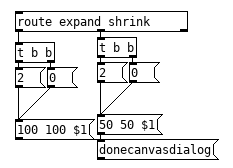
This should make it work, donecanvasdialog does the exact same thing as the canvas properties dialog does when you click "ok" or "apply," this is the exact message the tcl/tk frontend sends to the pd core so if your canvas properties dialog works than this should work.
Edit: Fixed some errors in the image, had 1 instead of $1.
 posted in technical issues
PurrData on new Mac M4 Max : ~adc not delivering audio!
@mathsound said:
is actively being developed
Not really "actively" I'd say... the development pace really slowed down in the last couple of years with less releases. Pd-L2ork seems much more active. About 'multiple cord connection', Vanilla has the same and actually more "intelligent patching" options.
I check in PD Vanilla 0.55-2, and adc~ works (on my new M4 Mac),
so it's definitely a Purr Data issue (with newer Macs / OS) - maybe
as it's based on PD 0.48.
0.55 down to 0.48 is basically 7 years of development behind
So actually you did provide the solution!
yeah, I had a hunch Pd-L2ork is performing and doing better
Now I wonder why Purr Data exists alongside L2Ork, as to me they look and act the same?
well, they are similar, but they're not the same, they are independently developed and not fully compatible to each other. It happens because this is open source and people can fork and work on their own branch. This has advantages and disadvantages depending on the project. For something like Pd, where the community is relatively small, I think it's bad, as it divides the community, specially if it involves incompatibilities, which is the case with Purr/L2ork, which are not only incompatible to each other, but with Vanilla, specially that. And also quite outdated, though they are finally catching up. Seems like the last Pd-L2ork version made the jump from 0.48 to 0.55! Updating libraries like Cyclone is next in the to do list, as they have a version from 20 years ago and don't have the developments from the newer phase that is almost a decade long now.
I like to point this because I think many people don't seem to grasp the differences and caveats, and maybe they don't even mind them but it's worth noting and knowing!
Even if you finally have it synced to the latest updates in Vanilla and the external libraries they carry, there are also the incompatibilities issue that I find most problematic, as you can't run the same patches on other forks (not only Vanilla), and some external GUIs weren't ported yet and I wonder if they ever will (there aren't that many of them anyway). So full Pd-Extended compatibility is still better guaranteed with Vanilla, this is a fact.
What maybe people don't really also get is that there are things beyond Pd-Extended, and new things and new external libraries that came to be after the demise of Extended over a decade ago... with pd-l2ork/purr data you are stuck with the limited set they offer and the incompatibilities are so big that you can't even run externals made for Vanilla in them. So you're missing out on some stuff...
If you can't stand Vanilla and really like GUI enhancements you can look into PlugData, which comes with some external libraires but also allows you to install libraries in the standalone app. There's also the same issue with some GUI objects in external libraries not being ported, but there aren't that many and they do offer lots that are ported anyway.
 posted in technical issues
GPU usage with GEM
I might be totally wrong here, but I think that the GPU is used by shaders only
I think that GPU is used for all but video decoding and classic pixels processing...
So the more you decode high resolution media and use [pix_*] objects for effects, the more you stress the cpu .
One solution for FX is using shaders.
For media decoding... you can check what is the default backends used (check help files) and try different ones. Also There is a [certainly] more efficient ffmpeg plugin somewhere that could be compiled and used instead of the default decoder...
You might open issues here to see what could be done?
https://github.com/umlaeute/Gem/issues
Also, I see that ofelia is far more efficient than Gem at decoding videos...
 posted in technical issues
Purr Data GSoC and Dictionaries in Pd
So here's what I'm thinking about. I'm not sure if this makes sense in Pd...
In SuperCollider, I can do:
s.boot;

(instrument: \something, midinote: 60, sustain: 2, amp: 0.7).play;
... and the sound comes from SC's own engine, based on a synth template named \something.
And I can also do:
MIDIClient.init;
m = MIDIOut(0).connect(0);

(type: \midi, midiout: m, midinote: 60, sustain: 2, amp: 0.7).play;
... and the same parameters midinote: 60, sustain: 2, amp: 0.7 are translated into MIDI noteon/noteoff messages, and performed by any MIDI software or hardware synth listening on that port.
A concrete benefit is: If I write some compositional algorithm and I want to decide later whether to play it within SC or using an external instrument, I don't have to change the composition logic at all. That part simply stuffs data into Event objects, and the event determines what finally happens.
In Pd, the data and the path the data take through the system are tightly coupled -- positional access to specific values is one way that this manifests, but more significantly, in a way, tight coupling is just the nature of dataflows.
So I'm wondering if this is a way to decouple: you could describe an action as a set of key-value pairs, forward the set to any event-player, and the event player would look up the data that it needs.
To some extent, you can already do this by discrete "key value" messages and [route]ing them into different parts of the player, but this isn't totally transparent: 1. If they are discrete messages, how do you know when the event is complete? Needs a sentinel. 2. [route] takes a little time to ignore irrelevant data (while a dictionary lookup would simply not look up irrelevant data). 3. If the pairs arrive out of order, math ops could be tricky, e.g. the following spits out a spurious 5 before the dog value comes through:
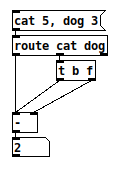
But with this hypothetical, you could control the order of access in the patch, instead of relying on well-behaved data:
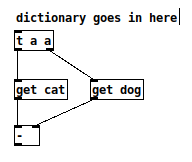
This use case suggests that a dictionary should be lightweight, like a list, easy to pass around in the system (so, different from [text] or [array]). That matches up with jancsika's use cases (passing this type of dictionary into [expr] or getting it out of [soundfiler])... but it perhaps doesn't fit easily into the current message-passing scheme.
hjh
posted in technical issues
Question about Pure Data and decoding a Dx7 sysex patch file....
Hey Seb!
I appreciate the feedback 
The routing I am not so concerned about, I already made a nice table based preset system, following pretty strict rules for send/recives for parameter values. So in theory I "just" need to get the data into a table. That side of it I am not so concerned about, I am sure I will find a way.
For me it's more the decoding of the sysex string that I need to research and think a lot about. It's a bit more complicated than the sysex I used for Blofeld.
The 32 voice dump confuses me a bit. I mean most single part(not multitimbral) synths has the same parameter settings for all voices, so I think I can probably do with just decoding 1 voice and send that data to all 16 voices of the synth? The only reason I see one would need to send different data to each voice is if the synth is multitimbral and you can use for example voice 1-8 for part 1, 9-16 for part 2, 17-24 for part 3, 24-32 for part 4. As an example....... Then you would need to set different values for the different voices. I have no plan to make it multitimbral, as it's already pretty heavy on the cpu. Or am I misunderstanding what they mean with voices here?
Blofeld:
What I did for Blofeld was to make an editor, so I can control the synth from Pure Data. Blofeld only has 4 knobs, and 100's of parameters for each part.... And there are 16 parts... So thousand + parameters and only 4 knobs....... You get the idea 
It's bit of a nightmare of menu diving, so just wanted to make something a bit more easy editable .
First I simply recorded every single sysex parameter of Blofeld(100's) into Pure data, replaced the parameter value in the parameter value and the channel in the sysex string message with a variable($1+$2), so I can send the data back to Blofeld. I got all parameters working via sysex, but one issue is, that when I change sound/preset in the Pure Data, it sends ALL parameters individually to Blofeld.... Again 100's of parameters sends at once and it does sometimes make Blofeld crash. Still needs a bit of work to be solid and I think learning how to do this decoding/coding of a sysex string can help me get the Blofeld editor working properly too.
I tried several editors for Blofeld, even paid ones and none of them actually works fully they all have different bugs in the parameter assignments or some of them only let's you edit Blofeld in single mode not in multitimbral mode. But good thingis that I actually got ALL parameters working, which is a good start. I just need to find out how to manage the data properly and send it to Blofeld in a manner that does not crash Blofeld, maybe using some smarter approach to sysex.
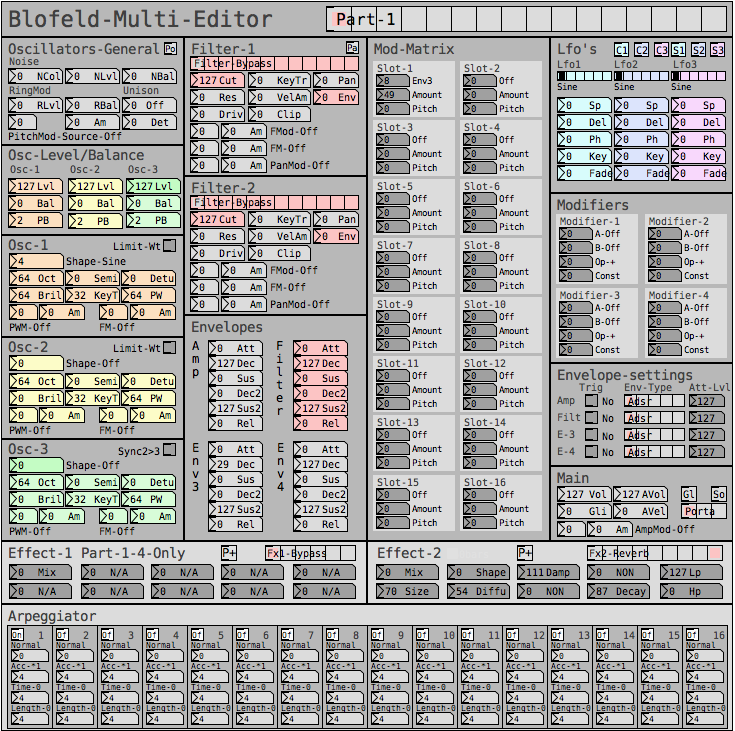
But anyway, here are some snapshots for the Blofeld editor:
Image of the editor as it is now. Blofeld has is 16 part multitimbral, you chose which part to edit with the top selector:
Here is how I send a single sysex parameter to Blofeld:
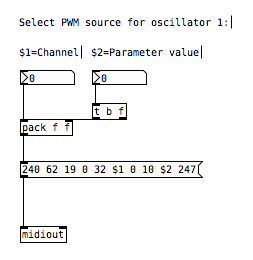
If I want to request a sysex dump of the current selected sound of Blofeld(sound dump) I can do this:
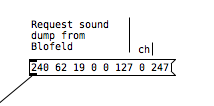
I can then send the sound dump to Blofeld at any times to recall the stored preset. For the sound dump, there are the rules I follow:
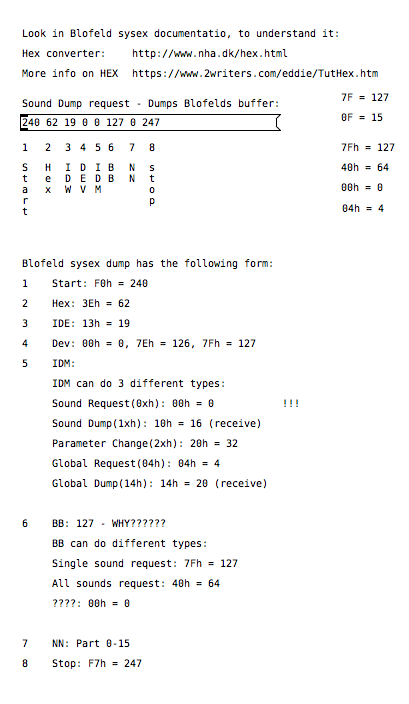
For the parameters it was pretty easy, I could just record one into PD and then replace the parameter and channel values with $1 & $2.
For sound dumps I had to learn a bit more, cause I couldn't just record the dump and replace values, I actually had to understand what I was doing. When you do a sysex sound dump from the Blofeld, it does not actually send back the sysex string to request the sound dump, it only sends the actual sound dump.
I am not really a programmer, so it took a while understanding it. Not saying i fully understand everything but parameters are working, hehe
So making something in Lua would be a big task, as I don't know Lua at all. I know some C++, from coding Axoloti objects and VCV rack modules, but yeah. It's a hobby/fun thing I think i would prefer to keep it all in Pure Data, as I know Pure Data decently.
So I do see this as a long term project, I need to do it in small steps at a time, learn things step by step.
I do appreciate the feedback a lot and it made me think a bit about some things I can try out. So thanks
 posted in technical issues
MIDI pitchbend
ouahou thanks for your enthousiasm!
@beem, yes violonaroue.fr is my website.
We are different users of the Orguanous, but personnaly I control it with Pd Vanilla. I send only MIDI notes on/off to a MIDI interface and then, the midi signal goes to each module of the Organous, where there is a MIDI decoder from Orgautomatech, which transform MIDI notes in current to open the corresponding electrovalve. The MIDI decoder understand only MIDI notes ON/OFF.
I developped the Pd patches myself, but sometimes I use parts of what I can find on the internet (like the sequencer for example).
And yes, I understand, "pitchbend" is not the right word! I mean TRANSPOSE in realtime! without ghost notes!
There are also many different ways to bend the sound of the pipes, but not like this of course. Just by pushing with your feet on the below, that's very very interesting. I also work on proportionnal electrovalves that can change airflow to the pipe, You can also play with your hands near the mouth of the pipes, that make the sound lower.
 posted in technical issues
To Purr or not to Purr?
@Duckett Your welcome. This forum is about exchanging ideas and learning from each other. It is like physics, if you do it alone it doesn't make any sense. So feel free to ask any questions regarding Pure Data. PS: Reaktor is very powerful and useful so this will only help you with Pure Data,
Robert
 posted in technical issues
To Purr or not to Purr?
@Duckett You should start with Pure Data Vanilla first. When you know the programming language environment, then you can switch to Pure Data extended or Purr Data or Pure Data on Raspberry etc. I do not recommend jumping into a fork version of Pure Data full of many libraries because this can lead to confusion. With Pure Data Vanilla you can build externals, so you can add very complicated objects by yourself to do anything you want (but this is for a later objective). Also i recommend that you first try to use only Pure Data. Connecting Pure Data to other tools is possible but this is not fundamental. Start small and simple then go crazy and optimize and change what you know. A little note about the GUI of Pure Data Vanilla. The idea of the GUI is very smart. You can build your own GUI in a very fancy way but it requires a lot of UI knowledge (not fundamental). Here is an example snapshot of a GUI that i made with Pure Data Vanilla.
Here is something for you start with in Pure Data :
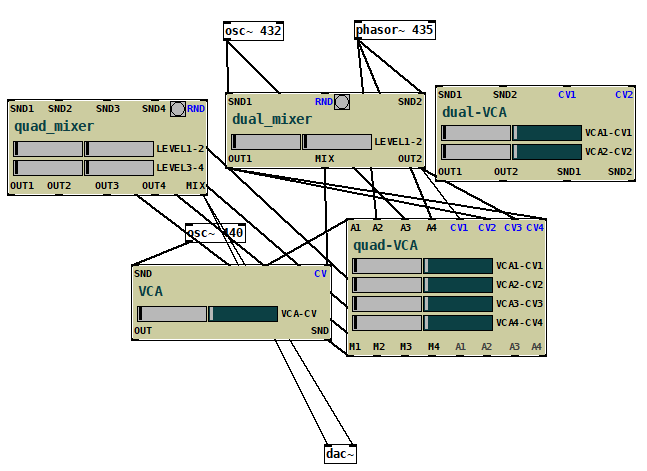
Here is a more advance GUI using Pure Data extended
You could also make this in Pure Data if you want :
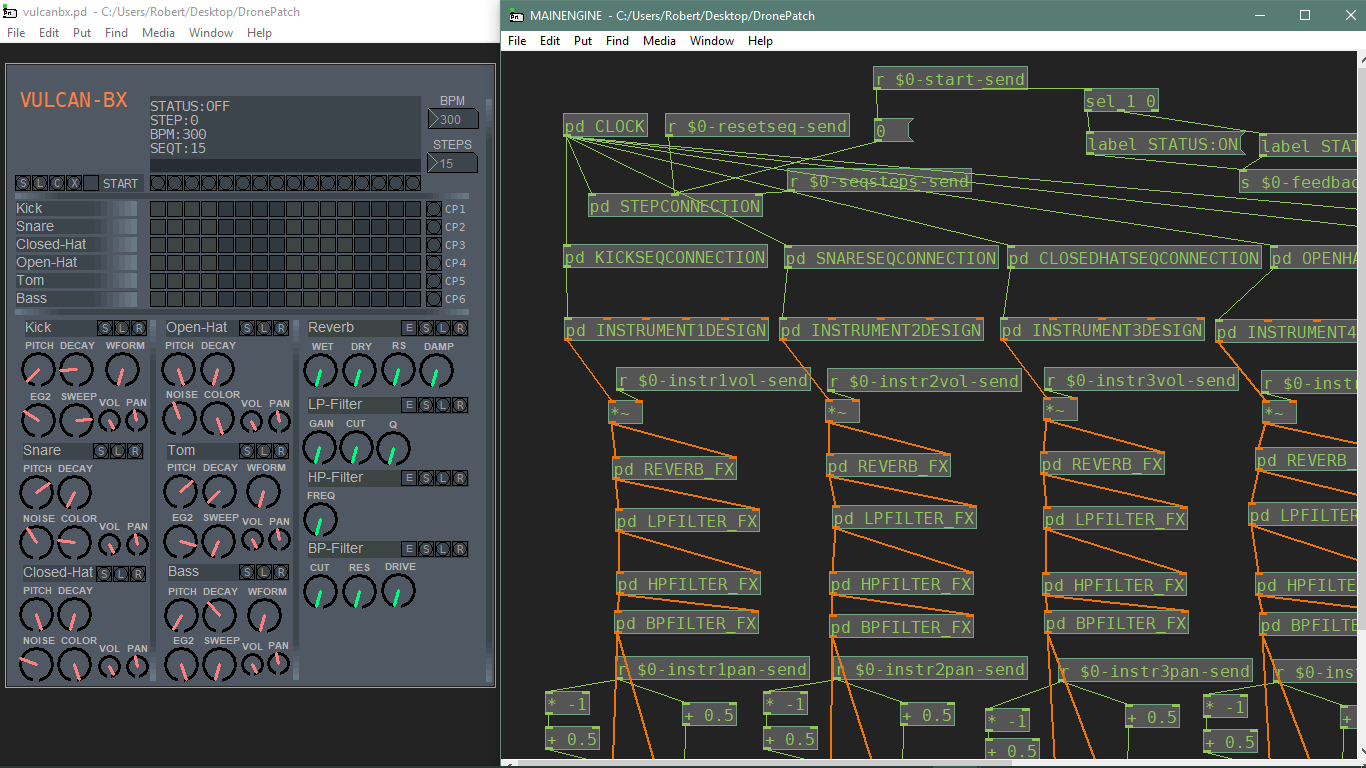
posted in technical issues