
CONFIG_PREEMPT_RT -- experiences and upgrade path
@Zygomorph lsmod could offer some insights, perhaps not all the required kernel modules are being loaded. Use a here statement >> to redirect the output to a text file lsmod >> patchbox-modules.txt so you can compare the Wheezy and Patchbox kernels. ps -aux or top could also be helpful, something may just be eating up the cpu and or ram, ps is a little more useful than top since you can easily use here statements to redirect to a text file and keep a record. Comparing the kernel configs can also be helpful, generally you can find the config at /proc/config.gz, just copy it and decompress, if you have the kernel source you can also put the config there and run make menu config and get an interactive program to browse it that offers easy access to help/descriptions/references to all the kernel options and modules.
The old pi should not be a deterrent here, the Patchbox kernel may not support it well but that is not an issue for you since you want to build your own, even the bleeding edge kernel supports the old pis, you just need to sit down and figure out what is different between the two kernels/systems.
If you want to go towards custom kernels and optimizing things it might be worthwhile to investigate a more simple distro that can be more easily be stripped down, Slackware and Crux are good for this since their lack of systemd means everything is less tied together and changes in one spot have less chance of affecting other things. Linux From Scratch would not be a bad exercise for learning more if you want to go all out.
 posted in technical issues
extra backslashes appearing in Pd messages after save/reopen
Hi everyone!
I bumped recently into this difficulty and I am not sure if this is a bug or a feature: when I create a message with contents
;
pd-test.pd obj 10 10 expr $f1/$1;
pd-test.pd obj 110 10 expr $f1 / $1;
and I save and re-open this patch, the message reads
;
pd-test.pd obj 10 10 expr $f1/\$1;
pd-test.pd obj 110 10 expr $f1 / $1;
which is obviously interpreted differently because of the inserted backslash before the first $1. Apparently the space prevents Pd from inserting this backslash in the second line of the message. Is this the expected behavior? If so, is there a specification regarding escaped sequences and/or dollar signs appearing at the beginning or middle of symbols that explains it?
I would like to emphasize that my question refers exclusively to how PdFileFormat encodes and decodes Pd messages in general, and bears no relationship with the [expr] object or with dynamic patching (though the reference to them is obvious).
A follow-up difficulty has to do with the internal representation of the first message in the saved file, which is:
#X msg 10 135 ; pd-test.pd obj 10 10 expr $f1/\$1 ; pd-test.pd obj 110 10 expr $f1 / \$1 ;;
where Pd interprets the backslash in the symbol $f1/\$1 as an independent character. On the other hand, when I duplicate this message in Pd, the internal representation for the 2nd copy becomes
#X msg 10 135 ; pd-test.pd obj 10 10 expr $f1/\\\$1 ; pd-test.pd obj 110 10 expr $f1 / \$1 ;;
denoting that an independent backslash character would require to be backslash-escaped in the PdFileFormat. The fact that these two latter versions (with \$1 and \\\$1 in the file) appear and behave the same in the patch also struck me as unintuitive, so if anyone may shed some light into this I'd really appreciate.
Thanks in advance for your help!
 posted in technical issues
Some patches won't open. (was: Why Vanilla fails at reading some Purr Data patches?)
Why is that?
For example:
This helpfile of PDjs appears blank in Vanilla:
js-help.pd
#N canvas 2802 562 675 300 12;
#X obj 312 53 bng 15 250 50 0 empty empty empty 17 7 0 10 -262144 -1
-1;
#X msg 314 74 compile;
#X obj 240 253 print js;
#X text 412 204 Load JavaScript file js-help.js;
#X text 412 225 args are available through;
#X text 413 244 property jsarguments in JS;
#X obj 244 202 js js-help.js arg1 arg2;
#X text 371 73 recompile source;
#X text 11 9 js: Execute JavaScript;
#X floatatom 314 102 5 0 0 0 - - -;
#X msg 320 129 1 2 3;
#X text 331 51 call function bang;
#X text 357 99 call function msg_float;
#X text 373 129 call function list;
#X msg 142 61 setprop name test;
#X msg 143 87 getprop name;
#X text 25 59 set JS property;
#X text 26 88 get JS property;
#X msg 322 167 test x y z;
#X text 409 165 call function test;
#X text 41 28 https://github.com/mganss/pdjs;
#X connect 0 0 6 0;
#X connect 1 0 6 0;
#X connect 6 0 2 0;
#X connect 9 0 6 0;
#X connect 10 0 6 0;
#X connect 14 0 6 0;
#X connect 15 0 6 0;
#X connect 18 0 6 0;
That one is made in Vanilla and opens:
js-help-vanilla.pd
#N canvas 80 229 1014 606 12;
#X obj 142 191 js js-help.js arg1 arg2;
#X msg 127 59 setprop name test;
#X msg 127 85 getprop name;
#X obj 290 45 bng 15 250 50 0 empty empty empty 17 7 0 10 -262144 -1
-1;
#X msg 293 65 compile;
#X floatatom 293 93 5 0 0 0 - - -;
#X msg 304 118 1 2 3;
#X msg 308 149 test x y z;
#X obj 142 215 print js;
#X text 13 58 set JS property;
#X text 13 85 get JS property;
#X text 14 10 js: Execute JavaScript;
#X text 63 26 https://github.com/mganss/pdjs;
#X text 312 41 call function bang;
#X text 354 63 recompile source;
#X text 345 93 call function msg_float;
#X text 358 119 call function list;
#X text 394 149 call function test;
#X text 309 191 Load JavaScript file js-help.js;
#X text 309 212 args are available through;
#X text 309 234 property jsarguments in JS;
#X connect 0 0 8 0;
#X connect 1 0 0 0;
#X connect 2 0 0 0;
#X connect 3 0 0 0;
#X connect 4 0 0 0;
#X connect 5 0 0 0;
#X connect 6 0 0 0;
#X connect 7 0 0 0;
One more example:
A patch from the pd-list, does not open in Vanilla:
lock-in-amplifier.pd
 posted in technical issues
banging [switch~] performs audio computations offline!
According to block~ help, if you bang [switch~] it runs one block of DSP computations, which is useful for performing computations that are more easily expressed as audio processing. Something I read (which I can't find now) left me with the impression that it runs faster than normal audio computations, i.e. as if it were in control domain. Here are some tests that confirm it, I think: switch~ bang how fast.pd
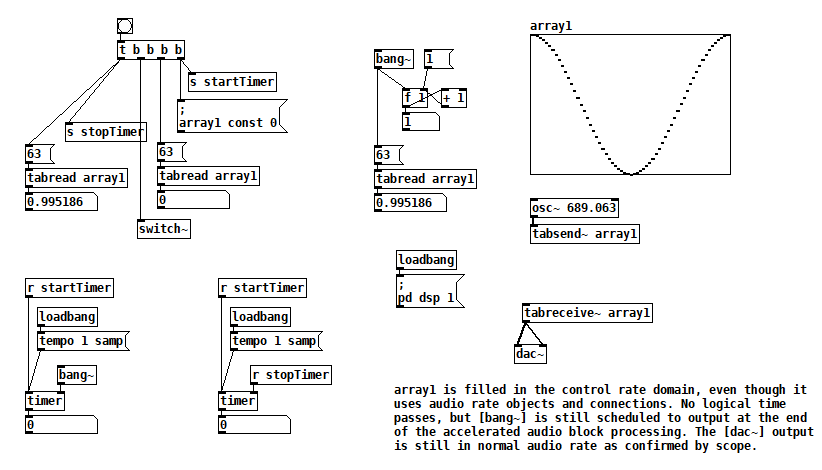
The key to this test is that all of the bangs sequenced by [t b b b b] run in the same gap between audio block computations. When [switch~] is banged, [osc~] fills array1, but you can see that element 63 of array1 changes after [switch~] is banged. Furthermore, no logical time has elapsed. So it appears that one block of audio processing has occurred between normal audio blocks. [bang~] outputs when that accelerated audio block processing is complete.
This next test takes things further and bangs [switch~] 10 times at control rate. Still, no logical time elapses, and [bang~] only outputs when all 10 bangs of [switch~] are complete. [rzero_rev~ 0] is just an arcane way of delaying by one sample, so this patch rotates the contents of array1 10 samples to the right. switch~ bang how fast2.pd
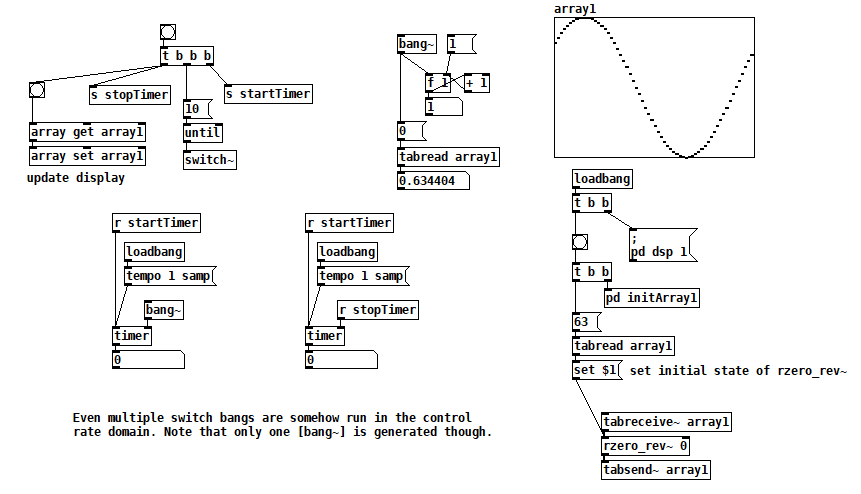
(There are better ways to rotate a table than this, but I just needed something to test with. Plus I never pass up a chance to use [rzero_rev~ 0]  )
)
Finally, I've seen some code that sends a 1 to [switch~] and then sends 0 after one block of processing. In this test you can see that one block of audio is processed in one block of logical time, i.e. the normal way. switch~ bang how fast3.pd
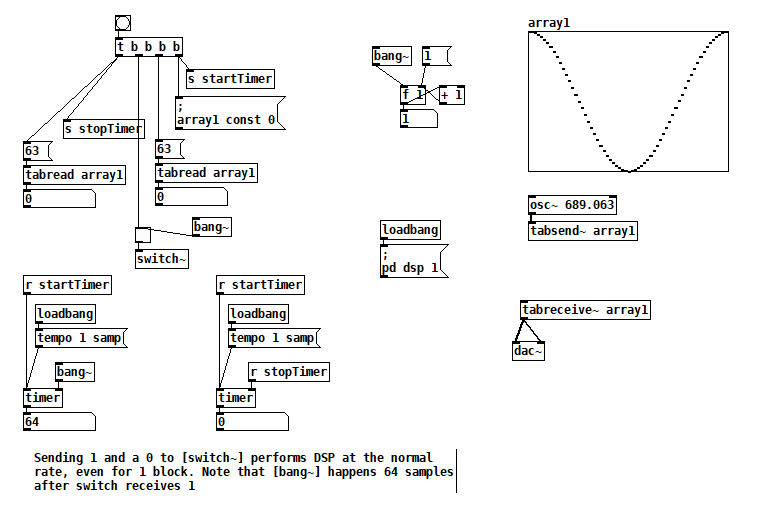
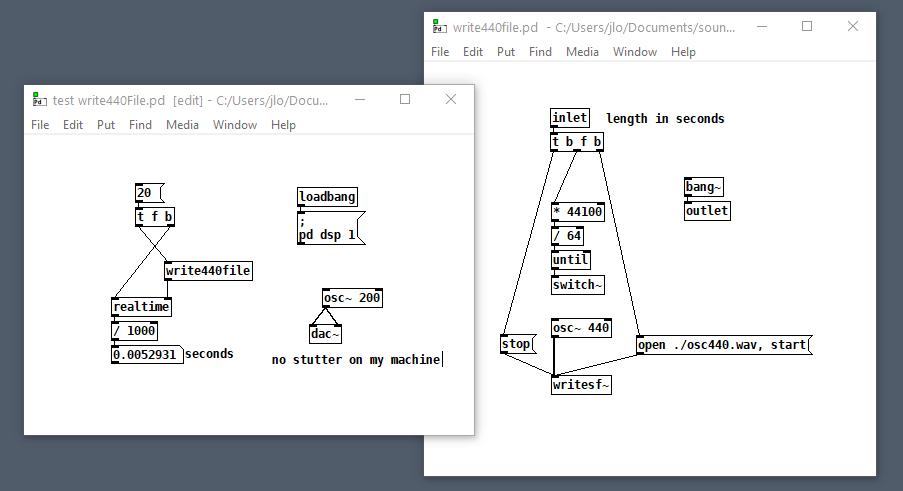
But that second test suggests how you could embed arbitrary offline audio processing in a patch that's not being run with Pd's -batch flag or fast-forwarded with the fast-forward message introduced in Pd 0.51-1. Maybe it's an answer to two questions I've seen posted here: Offline analysis on a song and Insant pitch shift. Here's a patch that writes 20s of 440 Hz to a file as fast as possible (adapted from @solipp's patch for the first topic). You just compute how many blocks you need and bang away. write440File.zip
Here's another that computes the real FFT of an audio file as fast as possible: loadFFT.zip
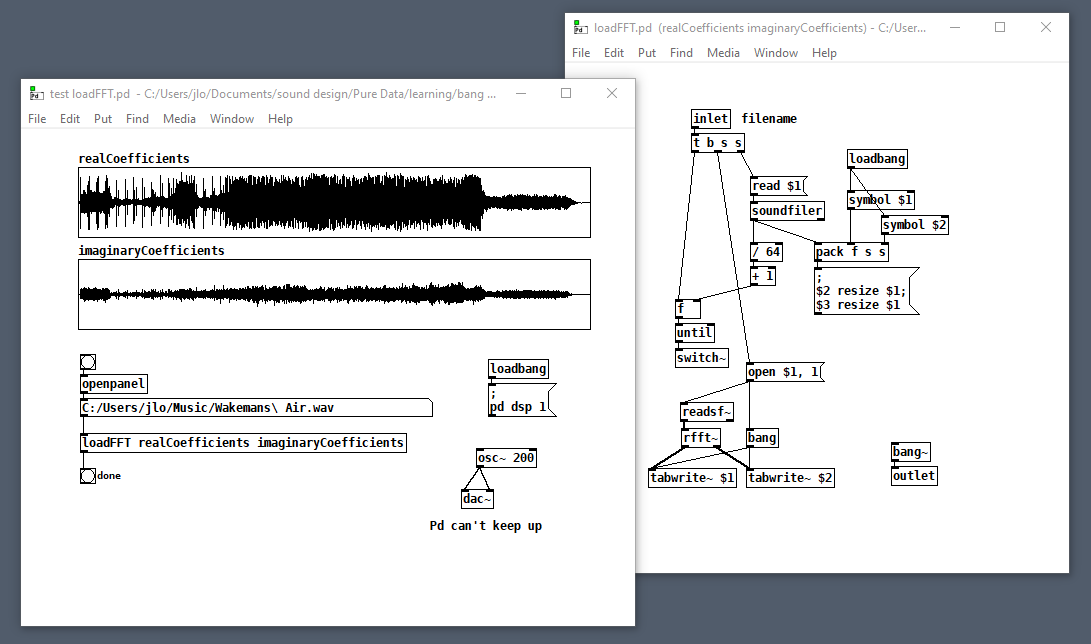
But as with any control rate processing, if you try to do too much this way, Pd will fall behind in normal audio processing and stutter (e.g. listen to the output while running that last patch on a >1 minute file). So no free lunch, just a little subsidy.
 posted in technical issues
s~/r~ throw~/catch~ latency and object creation order
For a topic on matrix mixers by @lacuna I created a patch with audio paths that included a s~/r~ hop as well as a throw~/catch~ hop, fully expecting each hop to contribute a 1 block delay. To my surprise, there was no delay. It reminded me of another topic where @seb-harmonik.ar had investigated how object creation order affects the tilde object sort order, which in turn determines whether there is a 1 block delay or not. Object creation order even appears to affect the minimum delay you can get with a delay line. So I decided to do a deep dive into a small example to try to understand it.
Here's my test patch: s~r~NoLatency.pd
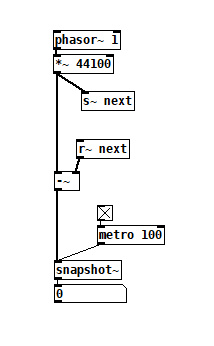 The s~/r~ hop produces either a 64 sample delay, or none at all, depending on the order that the objects are created. Here's an example that combines both: s~r~DifferingLatencies.pd
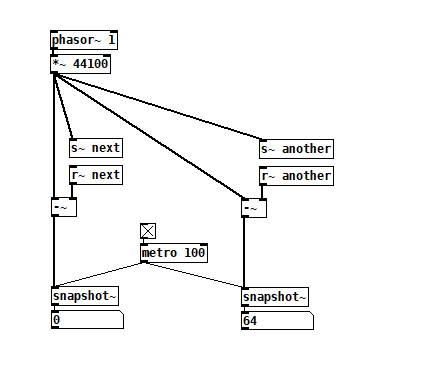 That's pretty kooky! On the one hand, it's probably good practice to avoid invisible properties like object creation order to get a particular delay, just as one should avoid using control connection creation order to get a particular execution order and use triggers instead. On the other hand, if you're not considering object creation order, you can't know what delay you will get without measuring it because there's no explicit sort order control. Well...technically there is one and it's described in G05.execution.order, but it defeats the purpose of having a non-local signal connection because it requires a local signal connection. Freeze dried water: just add water.
To reduce the number of cases I had to test, I grouped the objects into 4 subsets and permuted their creation orders:
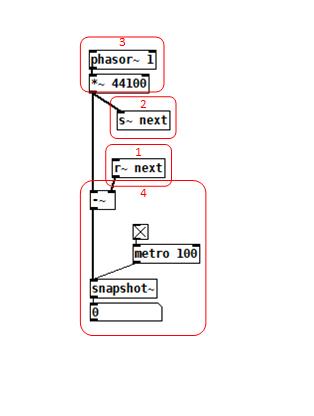 The order labeled in the diagram has no latency and is one that I just stumbled on, but I wanted to know what part of it is significant, so I tested all 24 permuations. (Methodology note: you can see the object creation order if you open the .pd file in a text editor. The lines that begin with "#X obj" list the objects in the order they were created.)
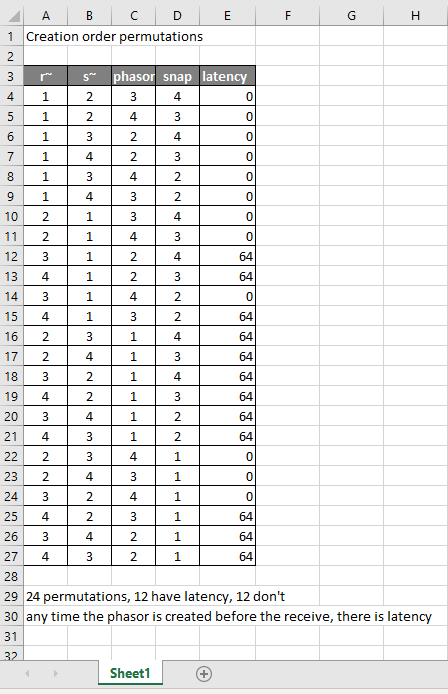
It appears that any time the phasor group is created before the r~, there is latency. Nothing else matters. Why would that be? To test if it's the whole audio chain feeding s~ that has to be created before, or only certain objects in that group, I took the first permutation with latency and cut/pasted [phasor~ 1] and [*~ 44100] in turn to push the object's creation order to the end. Only pushing [phasor~ 1] creation to the end made the delay go away, so maybe it's because that object is the head of the audio chain?
I also tested a few of these permutations using throw~/catch~ and got the same results. And I looked to see if connection creation order mattered but I couldn't find one that did and gave up after a while because there were too many cases to test.
So here's what I think is going on. Both [r~ next] and [phasor~ 1] are the heads of their respective locally connected audio chains which join at [-~]. Pd has to decide which chain to process first, and I assume that it has to choose the [phasor~ 1] chain in order for the data buffered by [s~ next] to be immediately available to [r~ next]. But why it should choose the [phasor~ 1] chain to go first if it's head is created later seems arbitrary to me. Can anyone confirm these observations and conjectures? Is this behavior documented anywhere? Can I count on this behavior moving forward? If so, what does good coding practice look like, when we want the delay and also when we don't?
posted in technical issues
Faster list-drip with [list store] (Pd 0.48)
@ingox Here are some measurements. I stripped out the iemguis in the middle of the test object chains from your test4.pd to trim down the tests to the bare bones:
list_length = 10,000 (which looks like it generates a 100,000 element list from that)
- list-drip (matju's older version): 28.319 ms average time
- list_drip (newer
[list store]version): 9.1206 ms - My makeshift implementation of a core
[list drip]object in x_list.c: 0.3393 ms - Sending the
$0-listlist used in your test to the right inlet of a[list store]object, and doing nothing else: 0.8410 ms
That last one is quite revealing-- it actually takes the list family objects longer to copy an incoming 100,000 element list from an incoming connection to an ancillary inlet than it does to drip out a 100,000 elements from an incoming 100,000 element list!
Another point-- in performance tests for Pd we really want to know the worst case time it takes to complete computation. I don't think there would be any surprises in these tests, but you never know. For example, it appears my makeshift [list drip] with a list of 100,000 still performs well within the boundaries of time needed for computing one block of audio at 44,100. However, if even one of those tests took 1.5 milliseconds to complete then all bets are off.
 posted in abstract~
Scripting Purr Data - with JavaScript?
Thanks again @lacuna - great to have that thread as reference!
Just tried it for a bit: I cannot seem to find any binary releases in the github, https://github.com/mganss/pdjs (EDIT: found them https://github.com/mganss/pdjs/releases )- so I went along with this:
I don't really understand what this .dek file is supposed to be, but the page itself says it is a zip file, so I tried this (I use MSYS2 bash shell in Windows):
$ wget http://puredata.info/Members/mganss/software/pdjs/1.2.63/pdjs%5Bv1.2.63%5D%28Darwin-amd64-32%29%28Linux-amd64-32%29%28Linux-arm64-32%29%28Windows-amd64-32%29.dek/at_download/file -O pdjs_v1.2.63.dek

$ unzip pdjs_v1.2.63.dek
Archive:  pdjs_v1.2.63.dek
  inflating: pdjs/js.dll
  inflating: pdjs/js.l_arm64
  inflating: pdjs/js.pd_darwin
  inflating: pdjs/js-help.pd
  inflating: pdjs/js.pd_linux
  inflating: pdjs/js-help.js
nice, now I have a pdjs folder; so I tried copying it to my 32-bit copy of PurrData:
$ mv pdjs /c/bin/PurrData_x86_2.15.2/extra/
$ /c/bin/PurrData_x86_2.15.2/bin/pd.exe -verbose
Here, in an empty patch, I place an object [pdjs/js test.js] (see also the note in the Github README about declare -path pdjs); and I get:
...
tried C:\\Program Files (x86)\\Common Files\\Pd-l2ork\\pdjs\\js\\pdjs\\js.pd and failed
tried C:\\bin\\PurrData_x86_2.15.2\\extra\\pdjs\\js.m_i386 and failed
tried C:\\bin\\PurrData_x86_2.15.2\\extra\\pdjs\\js.dll and succeeded
verbose( 1):C:\\bin\\PurrData_x86_2.15.2\\extra\\pdjs\\js.dll: couldn't load
tried C:\\bin\\PurrData_x86_2.15.2\\extra\\pdjs\\js.pd and failed
tried C:\\bin\\PurrData_x86_2.15.2\\extra\\pdjs\\js.pat and failed
tried C:\\bin\\PurrData_x86_2.15.2\\extra\\pdjs\\js\\pdjs\\js.pd and failed
error: couldn't create "pdjs/js test.js"
...
Hmmm... library got found, but is not loaded; then I thought, let's check:
$ file /c/bin/PurrData_x86_2.15.2/bin/pd.exe
/c/bin/PurrData_x86_2.15.2/bin/pd.exe: PE32 executable (GUI) Intel 80386 (stripped to external PDB), for MS Windows

$ file /c/bin/PurrData_x86_2.15.2/extra/pdjs/js.dll
/c/bin/PurrData_x86_2.15.2/extra/pdjs/js.dll: PE32+ executable (DLL) (GUI) x86-64, for MS Windows
Yeah - I cannot load a 64-bit .dll by a 32-bit .exe!
So, apparently, there is no 32-bit build for pdjs (see "Supported platforms" in the Github README), so I installed the 64-bit build of Purr Data ... and tried it there:
$ cp -a /c/bin/PurrData_x86_2.15.2/extra/pdjs /c/bin/PurrData_x86_64_2.15.2/extra/
$ /c/bin/PurrData_x86_64_2.15.2/bin/pd.exe -verbose
... and finally, could see it working - instantiating [pdjs/js test.js] gives messages:
...
tried C:\\bin\\PurrData_x86_64_2.15.2\\extra\\pdjs\\js.m_i386 and failed
tried C:\\bin\\PurrData_x86_64_2.15.2\\extra\\pdjs\\js.dll and succeeded
pdjs version 1.2.63 (v8 version 8.6.395.24)
tried C:\\bin\\PurrData_x86_2.15.2\\test.js and failed
tried C:\\Users\\user\\AppData\\Roaming\\Pd-l2ork\\test.js and failed
tried C:\\Program Files\\Common Files\\Pd-l2ork\\test.js and failed
tried C:\\bin\\PurrData_x86_64_2.15.2\\extra\\test.js and failed
error: Script file 'test.js' not found.
... click the link above to track it down, or click the 'Find Last Error' item in the Edit menu.
error: couldn't create "pdjs/js test.js"
One invocation that works for quick test is [pdjs/js pdjs/js-help.js], which succeeds - and then you can right-click the object and see the Help.
Finally, note this from the README:
There is no built-in editor like in Max, source files have to be created and edited outside of Pure Data.
Well, this is nice! On to see how to work with this object...
Thanks again for the help!
 posted in technical issues
[bang~] bangs before the end of a dsp block at startup
I was hoping to use [bang~] to tell me when a 1024 sample FFT was finished so I could process the results ASAP, but it often bangs after only 64 samples when DSP is first turned on. Here's my test patch after one such run:
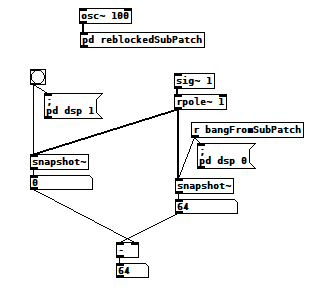 And here's what's inside the reblocked subpatch:
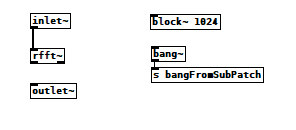 bang~runsAtTheEndOfEachDSPblock2.pd
After the first run it consistently reports 1024 as expected, but that first run usually shows 64, and only occasionally 1024. I saw 128 once, but haven't been able to reproduce it. I tried connecting the signal inlets and outlets in various ways but it didn't seem to matter. Am I overlooking something?
Update: I get similar results using [switch~]:
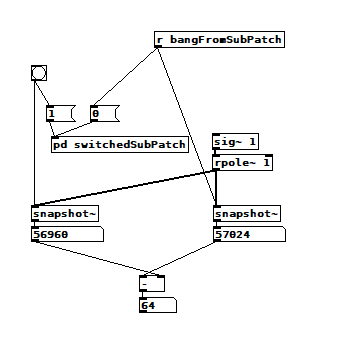 And the switched subpatch:
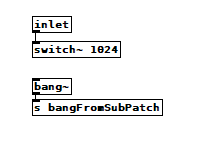 switch~ vs bang~.pd
Update #2: I added another test to the switch test and it contradicts the other two tests  When viewed from inside [pd switchedSubPatch2], [bang~] happens at the right time, But if I run the original test immediately afterward, it still shows 64. There must be something about reblocking I don't understand.
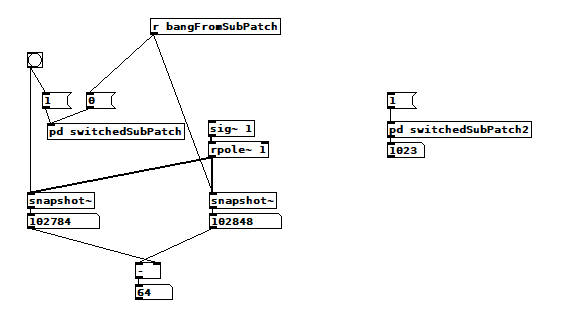 switchedSubPatch2:
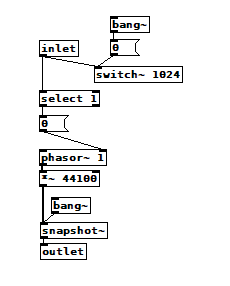 switch~ vs bang~.pd
posted in technical issues
problem receiving int via OSC
@nzfs TL;DR [oscparse] outputs integer arguments as numbers, not symbols. So, if you're getting a symbol, then it must be sent as a symbol -- so, check your nodejs code. It's probably applying an incorrect type tag.
My test:
This patch is a little simpler but it should still work with the multi-level command path:
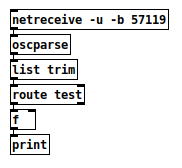
And in SuperCollider, I wrote a quick function to hex-print the packet and send it. (The operative part for OSC transmission is n.sendMsg(*msg); -- the rest of the function is only for printing.)
(
n = NetAddr("127.0.0.1", 57119);

f = { |msg|
    // not necessary for sending -- just for printing
    var osc = msg.asRawOSC;
    osc.clump(32).do { |row|
        // hex
        row.do { |ch, i|
            "% ".postf(ch.asHexString(2));
            if(i % 8 == 7) { "  ".post };
        };
        // chars
        "    ".post;
        row.do { |ch, i|
            ch = ch.asAscii;
            if(ch.isPrint) { ch.post } { ".".post };
            if(i % 8 == 7) { " ".post };
        };
        "".postln;
    };
    n.sendMsg(*msg);
};
)
And, run it:
f.(['/test', 123]);  // integer
2F 74 65 73 74 00 00 00   2C 69 00 00 00 00 00 7B       /test... ,i.....{

f.(['/test', 123.0]);  // float
2F 74 65 73 74 00 00 00   2C 66 00 00 42 F6 00 00       /test... ,f..B...

f.(['/test', '123']);  // symbol
2F 74 65 73 74 00 00 00   2C 73 00 00 31 32 33 00       /test... ,s..123.
Note the 10th byte, the type tag for the argument: i, f or s.
For the integer, in Pd, I get "print: 123".
For the float, I get "print: 123".
For the symbol, I get "float: no method for '123'".
So... I'm 100% certain in the first case that it is being sent with an integer type tag, but that doesn't reproduce the problem. The only way I can reproduce the problem is by encoding the number as a symbol.
So my conclusion is that something is wrong on the sending side, not the receiving side.
hjh
 posted in technical issues
Assistance with select function needed...
@Ikeobob I don't know why an "is it equal" test fails with fast changing floats even when the value is printed numerous times.
Someone clever will tell us...... @jancsika
A "greater than" or "less than" test will work, and the [change] object will force the test to trigger only once....... but only on the rising part of the [osc~] curve with a "greater or equal" test.
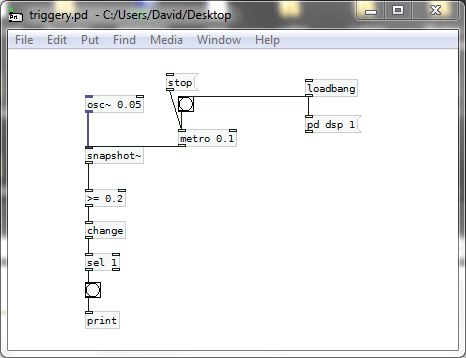
SO....  .... that gets complicated as for a trigger on other parts of the curve a different test would be needed.
The other problem you will have with [osc~] for this application is that a sine wave is not giving you a linear output.... so for timing purposes you are lost.....
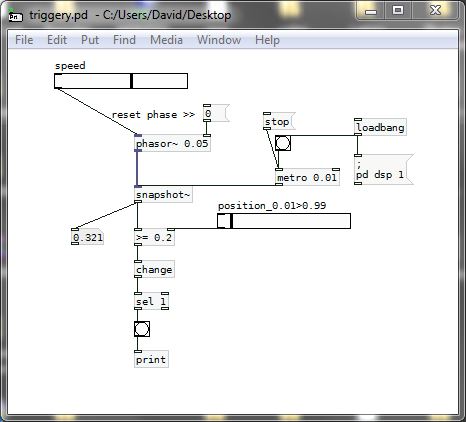
You should use a sawtooth wave instead........ so [phasor~] is a better friend than [osc~]...... and as there are only positive values the test can stay the same. You are simply choosing a point on the ramp, and it is linear......
triggery.pd
And then you could be better off using [line] to trigger as the cpu use should be less.
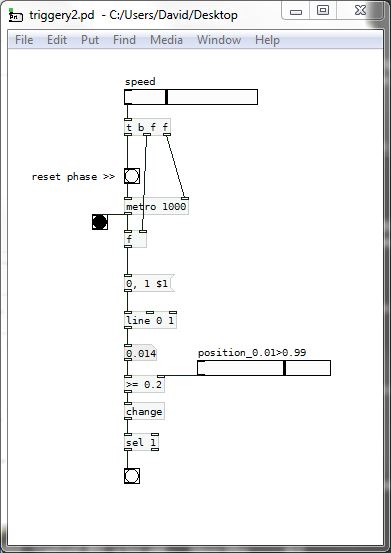
AND...... much better.......
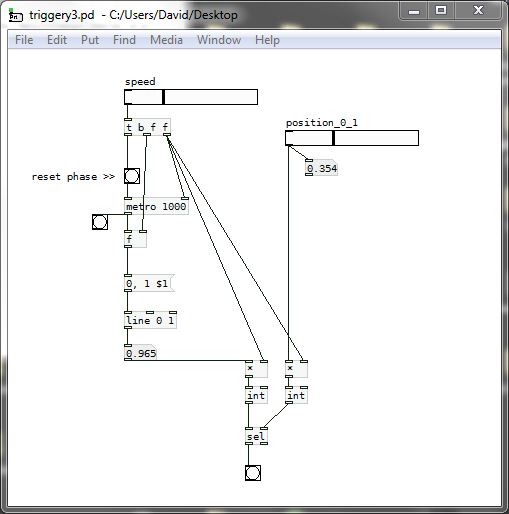
If we scale up the "equals" test to integers then we can test from zero to one and [select] works.......
It should also work with the [phasor~] example above...... BUT..... with [phasor~] you would have to scale in a way that makes sure that a match occurs and that you do not get more than one trigger per cycle.
triggery3.pd
David.
 posted in technical issues