
Two beginner "what object should I use?" questions.
@alexandros said:
Am I missing something, or the patch below isn't correct?
It's correct if you use the right outlet instead of the left outlet of threshold~.
supercollider in the early 2000s
SC person here!
ignored PD for the most part under an impression it lacked refinement
Just the other day, I already did the rant about how Pd's 1990s-style GUI gives people the wrong impression about its capabilities, and how PlugData is a good way forward that deserves more support... so I'll stop there.
Pd is solid. What's lacking in the built-in feature set is convenience. For example, if you load a soundfile... how long is it? What is its sample rate? In SC, you have BufFrames, BufDur, BufSampleRate, BufRateScale. Pd does spit this information out of soundfiler at the moment of loading, but if you didn't retain those values at that time, then they're gone. So with SC, I feel like it's more straightforward to get into it incrementally -- you're hacking away, and then you find that you need the buffer's sample rate, no problem! It's right there. In Pd, at minimum, you'll have to issue a dummy read command to soundfiler, and unpack the list.
I got annoyed enough about this that I created some abstractions to help deal with soundfiles: https://github.com/jamshark70/hjh-abs :
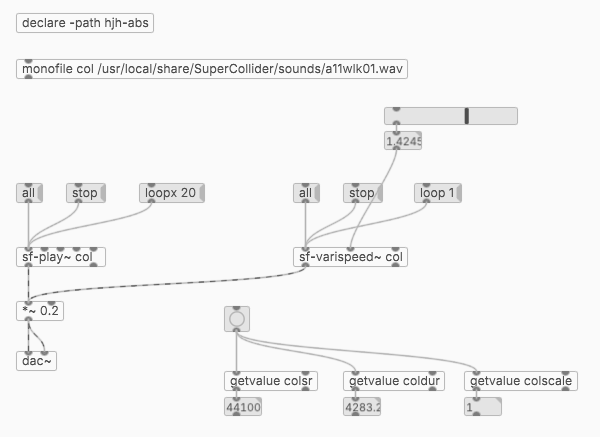
[monofile] and [stereofile] for basic reading. Mono files play by sf-play~ or sf-varispeed~; stereo by sf-play2~ and sf-varispeed2~. Rate = 1.0 is always the file's normal speed. Also it creates [value] vars for buffer stats, and I have a read-only [getvalue] abstraction to access them without risk of overwriting.
... Strictly speaking, you don't "need" these -- they're only using information that is available in vanilla anyway -- but I just don't think users should have to deal with these fiddly details routinely. So it's not a matter of lacking refinement, but rather that it takes more work to rearchitect features that you might take for granted in other platforms.
I suppose it depends on the task, but in most cases, I can get there faster in SC; the threshold of complexity that I'm willing to attempt in SC is higher than that in Pd. (I usually find patching to be more cumbersome than code.)
hjh
 posted in technical issues
Soundfiler question [OK I SOLVED IT - maybe there's a nicer way to achieve it?]
I spent a day and a half trying different methods without success. I searched the forum but I can't find an answer to my exact problem.
When I used the method "open samples/xxx.wav, 1" and then "readsf~" to open an audio file chosen randomly between different files (xxx being 0 or 1 or 2 etc etc) all worked fine.
But I have to be able to change the speed of the audio file playing, and the "readsf~" doesn't allow it.
I have to mention that my audio files are quite long and I chosed a length limit of 4min50sec (it seems to be the limit for the audio file to play without issue).
As far as I understand, I need to use "soundfiler" to be able to change the speed of an audio file.
This is working fine with one audio file that is loaded when the patch is getting opened.
But as soon as I want to load automatically a different audio file (chosen randomly in a list of audio files), then it won't work.
SCREENSHOT 1 = If I first chose the file and then read it (adding a delay or not between events), the file will not read, it doesn't appear in the array, it doesn't play.
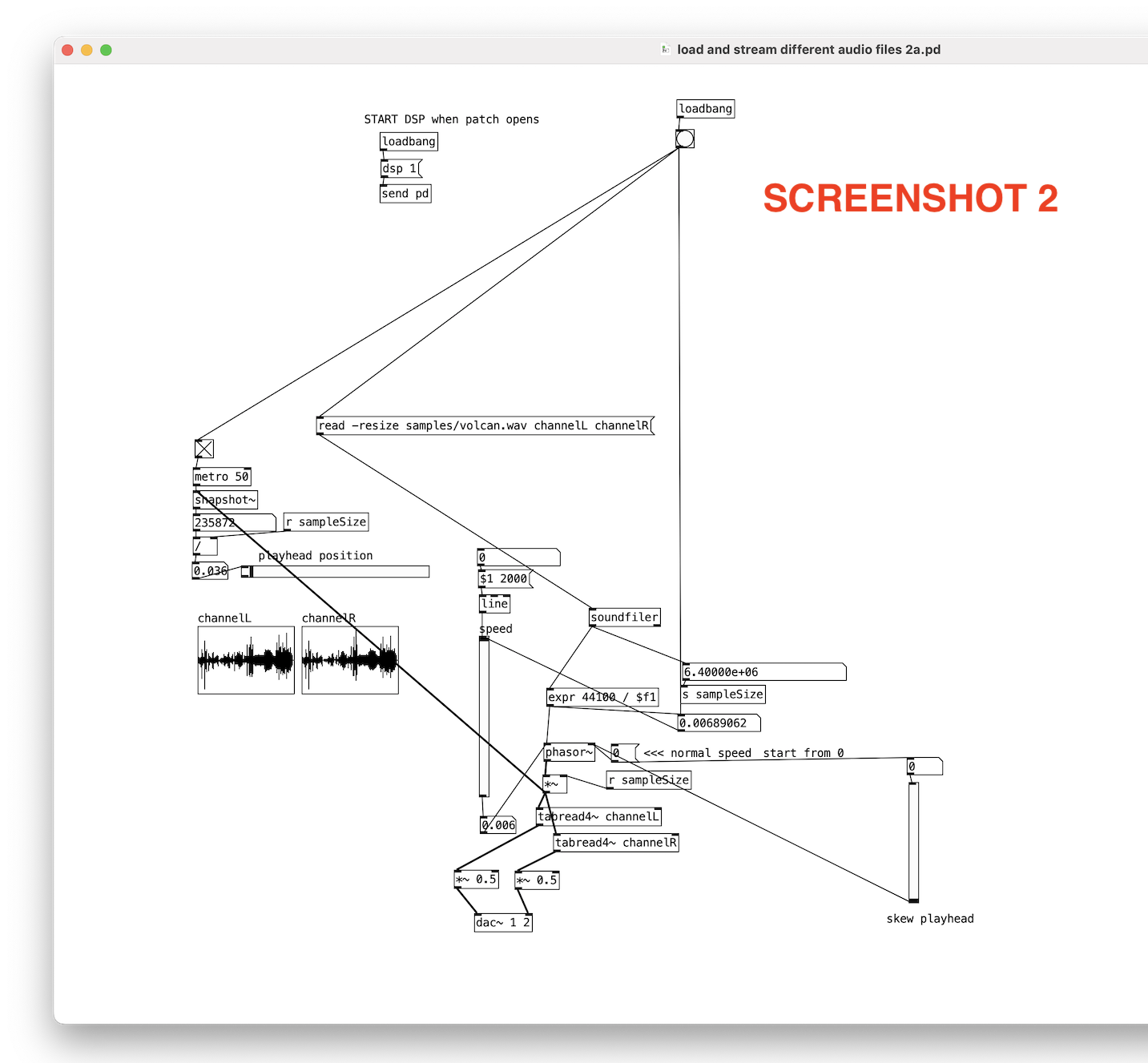
SCREENSHOT 2 = showing that if I don't chose first the file between different files, then it works. Array ok and audio plays.
Is there a solution for what I'm trying to do?
I need to solve SCREENSHOT 1 to be able to develop the patch further.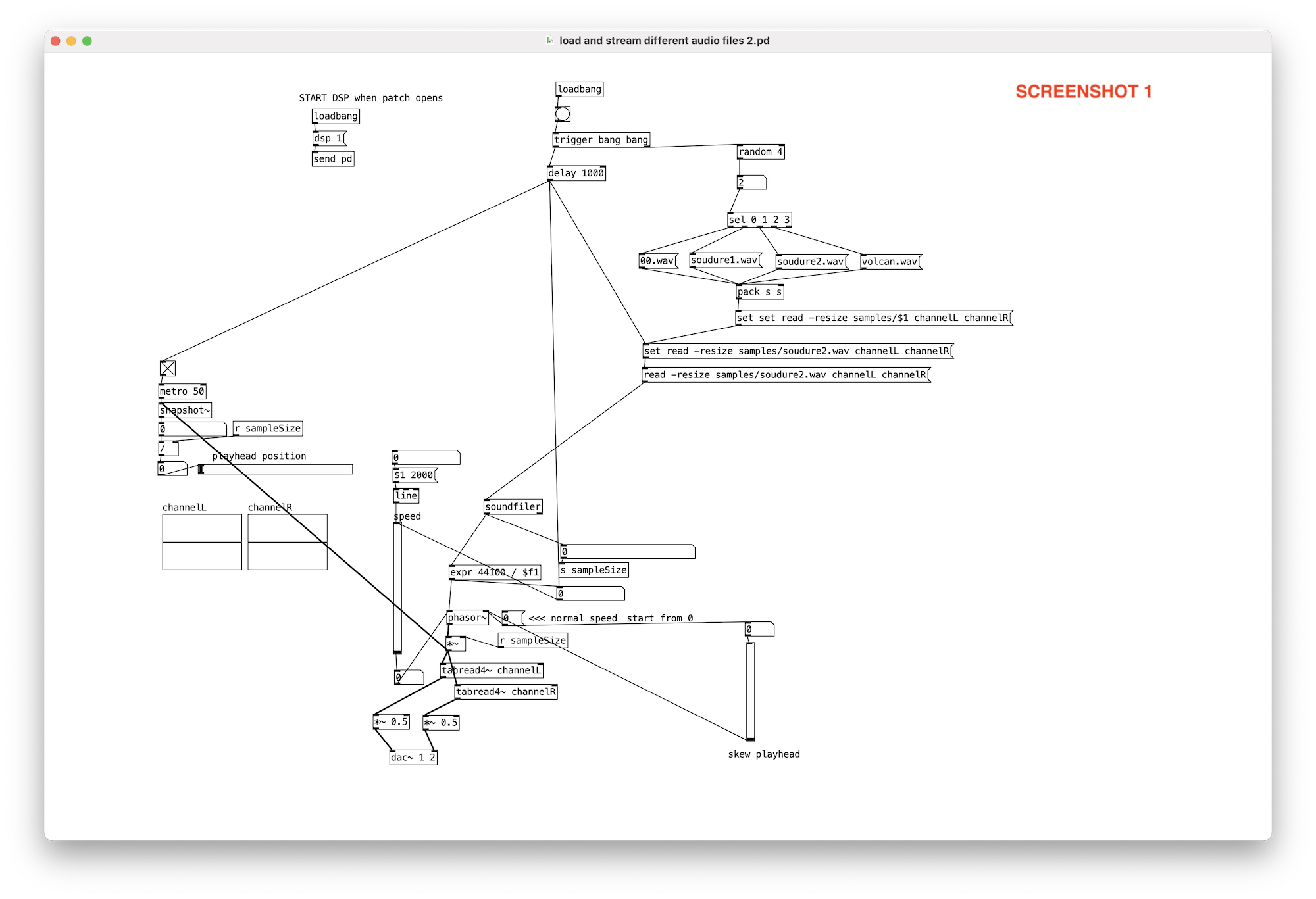
 posted in technical issues
Looking for advice on using phasor~ to randomize tabread4~ playback
@nicnut said:
There is a number box labeled "transpose." The first step is to put a value in there, 1 being the original pitch, .5 is an octave down, 2 is an octave up, etc.
Here, you'd need to calculate the phasor frequency corresponding to normal playback speed, which is 1 / dur, where dur is the soundfile duration in seconds. Soundfile duration = soundfile size in samples / soundfile sample rate, so the phasor~ frequency can be expressed as soundfile sample rate / soundfile size in samples. Then you multiply this by a transpose factor, ok.
But I don't see you accounting for the soundfile's size or sample rate, so you have no guarantee of actually hitting normal playback speed.
After that you can change the frequency of the phasor in the other number box labled "change phasor frequency without changing pitch."
If you change the phasor frequency here, you will also change the transposition.
This way, I can make the phasor frequency, say .5 and the transposition 2,
Making the eventual playback speed 1 (assuming it was 1 to begin with), undoing the transposition.
which I don't think I can do using line~ with tabread4~.
The bad news is, you can't do this with phasor either.
hjh
posted in technical issues
can pure data vanilla create a date-based folder to store txt + wav files into?
@esaruoho You seem to already have the bang for the messages sent to [soundfiler] as @lacuna suggests..... but you are not sticking the parts of your symbol together as shown in his and @oid's examples.
So have the files been written to the /plom directory instead of the /plom/2023_04_04 directoryintended?
You are breaking up your messages.
A space between two parts of a message will create 2 separate messages.
If you need one symbol you do not need [makefilename].
You need to stick the message dollar variables together..... including at the output of [pack s s s].
So for one message composed of 3 variables do not put [$1 $2 $3( but put instead [$1$2$3(
Sort of the same principle as that you used with the [else/format list]] arguments to create a single date message.
[soundfiler] and [readsf~] are both a bit "picky" about the messages they receive and do need explicit symbols.
Try [symbol $1$2( where $1 and $2 are directory and filemame from the previous message.... banged into [write $1( where $1 is now the combined path and filename.... and send that to [soundfiler].
David.
P.S. If you start your message with "symbol" or "list" or another tag then the message sent onwards prepended by "set" is not broken up into separate "symbol" and "message".
The tag takes effect on the following message and is silent in the next message window.
If you [print] that following message then you will see that.
For a "list" tag...... which is automatically applied by the [list] objects..... often it is necessary afterwards to remove the tag with [list trim] to get back to a symbol..... as you can see in some of the examples above.
Standard tags (also called "selector") are list, symbol, float (implied) and pointer.
A PITA is that a text string is considered "text" unless tagged as a symbol.
If you are unsure of the tag then you can use "a" for "anything" in a trigger and the message will pass...... as in [t b a].
You can also add your own tags to a message..... which is what you are doing when you send [this woof( into [route this that].
It is a little complicated, but essentially the first atom in a message is considered to be the tag and the following atoms parts of a list, except........
It is nasty. I made this tag.zip to help me through the quagmire..... especially to remember to use [bug_protected] when necessary as a list sent into [route] will change its arguments when unrecognised.
It is horrible...... e.g. you need to know that list is stripped if the list starts with a symbol......
but added back if it starts with a float....... but that doesn't show up in a [print].
You need [rawprint] to see that..... maybe the most useful external ever made...?......
 posted in technical issues
Pd on a Mac with Jack
Dummy check please. Is it true that:
- Jack can serve as audio loopback software between MacOS audio apps such as Pd
- Jack can run on an M2 processor
- The Qjackctl.app that is bundled with the Jack MacOS download runs on Monterrey without any additional runtime frameworks installed
- For Pd to send/receive from a Jack channel, Jack has to be running and you have to select Jack in the audio settings before you can select which particular Jack channel you want for input or output
- Soundflower is obsolete; Jack is current
?
Edit: I can confirm the 2nd through 4th bullet point but not the first and last. I've seen 2 tutorial videos on Mac audio loopback where you can see that the presenter has Soundflower installed in addition to whatever loopback software they were demonstrating, so that makes me scratch my head. RE that first point, I'm tentatively concluding that an audio app has to be Jack-aware (like Pd) in order for it to be routed by Jack, which isn't a requirement of other loopback drivers like Soundflower or Blackhole. Finally, it's worth noting that Jack doesn't come with an uninstaller, so to get rid of it you have to manually remove files from /usr/local and below, and the list of files can be found on one of the windows of the installation package if you scroll down. If that's not your cup of tea, don't install it!
TLDR: I'm not sure why anyone would want to use Jack on a Mac. Still happy to be schooled though.
 posted in technical issues
How to loop/reset an audio file to the beginning
OK, here are a couple of test patches. Be sure to save them in the same directory with the audio files (to test relative-path file access).
The first one checks the basic behavior of soundfiler. If neither of these tests is OK, then nothing is going to work.
I'm suggesting this test because -- in your original patch, you're using soundfiler with a relative path "G2001.wav" and this is OK. Using [stereofile], you've tried a full path "/Users/...../G1001.wav" and this was not OK. (Also known is that both relative and full paths are fine on my machine.)
Experimentally, that's two variables: soundfiler vs stereofile, and relative vs full path. So it's impossible to say which one of those causes the problem, with the available information. To figure that out, we have to test basic soundfiler usage with both types of path.
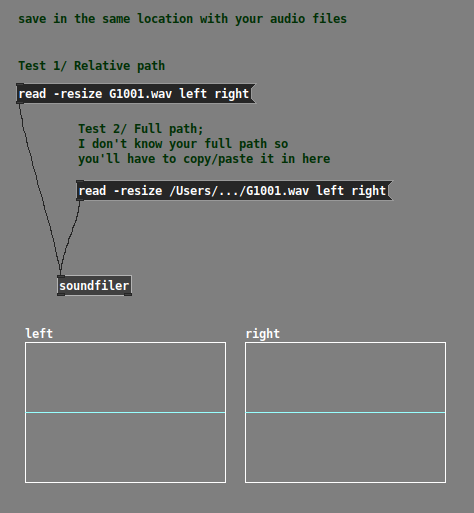
Check the Pd console window for "no such file or directory" errors, and copy/paste those errors into your message.
One possible issue here is non-ASCII (non-English) characters. The relative path "G1001.wav" consists entirely of ASCII characters, but based on your first screenshot, I might guess that part of your full path could include characters outside of the 0-127 ASCII code points. I've seen Pd choke on this before. I thought this was fixed in recent versions, but maybe there are still issues in Mac?
Second file tests relative vs full paths with stereofile.
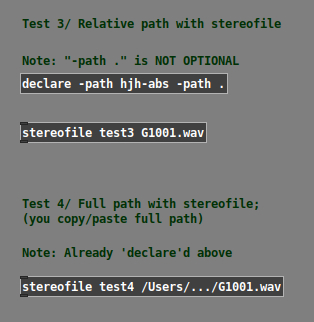
Last -- I added a [print] object into one of the abstractions to verify the "read" message (locally, you don't have this): "read -resize -skip 0 test-audio.wav test3_LEFT test3_RIGHT" -- it's fine.
Last last -- are you using [dac~ 1 2] or something else? The ezoutput~ in my demo patch routes to 1 and 2. If you are using different dac~ channels, this could be another reason why you're hearing left only. (I assumed that you know your studio's channel layout and that you would substitute an appropriate output object.)
hjh
posted in technical issues
Get the size of a large wav file without loading it
@lacuna said:
The helpfile of soundfiler says:
"If no array name is given, no samples are read but the info is provided anyway."
Not sure if this is actually the case, as I get drop outs occasionally. Does it read the header only?
As Ross Bencina points out in a justifiably famous article, "All sources of audio glitches within your code boil down to doing something that takes longer than the buffer period. ... The main problems I’m concerned with here are with code that runs with unpredictable or un-bounded execution time. That is, you’re unable to predict in advance how long a function or algorithm will take to complete. ... Doing anything that makes your audio code wait for something else in the system would be blocking. This could be acquiring a mutex, ... snip snip..., waiting for data to be read from disk..." (hmmmm).
If [soundfiler] is blocking for filesystem access and it affects the audio thread, then it would explain the glitches. In that case, it might not even need to read a large amount of data -- if the data aren't in the filesystem RAM cache already, spinning the HD to the right speed and pushing the drive head to the right position could take longer than the available time. A SSD might fare better but there are no guarantees. Filesystem access should be treated as time-unbounded and not safe for real-time audio -- even just reading a header.
IOW if my guess is correct about [soundfiler]'s behavior, then it is breaking Bencina's prescriptions for real-time safety = bug. ("Especially if your software is going to be used to perform to a stadium full of fans... you do not want your audio to glitch. Period.")
SC's solution (shunt time-unbounded ops into a queue running in a lower priority thread) is one correct way. There might be others. I just wonder why Pd seems not to be doing that.
hjh
posted in technical issues
Get the size of a large wav file without loading it
@lacuna said:
Here is another thread with [soundfile_info], - where I tried to get the info running [soundfiler] on a different cpu-thread with [pd~], but it still glitches for me with very long files (why?):
Here, I wonder if it would be feasible for soundfiler to be changed so that it could use a lower priority background thread for filesystem access. There isn't any need, really, for it to lock up the engine while doing time-unbounded things with the filesystem. Soundfiler pops out a message when it's done; I can't see any reason why this must be synchronous -- just load up in the background and the patch continues in response to the output message.
SuperCollider doesn't glitch the audio when manipulating soundfiles because 1/ the audio server pushes expensive ops like file access onto a lower priority thread, running a command queue and 2/ for this topic's initial question, you can query a soundfile's header without loading the contents and this is in a completely separate process from the audio engine.
I'm just wondering if anyone knows whether the blocking behavior of soundfiler is due to a necessary design factor or if it's just because nobody implemented a background thread for it.
(Still wondering why Vanilla can't read the header info only, without loading the whole file?)
Minimal core 
hjh
posted in technical issues
Get the size of a large wav file without loading it
With not short numbers, Pd runs into single precision truncation.
So this will not be very accurate.
(Also, Pd's message schedueling has a resolution of 64 samples)
In your screenshot patch above, you can use [realtime] with [readsf~] to know about how long the play time has been.
But if you don't want to load:
Here is another thread with [soundfile_info], - where I tried to get the info running [soundfiler] on a different cpu-thread with [pd~], but it still glitches for me with very long files (why?):
.
And this is my attempt with [file size]:
around 1minute.pd [EDIT: updated] and 30 minutes
getdur.pd [Updated, again]
(Still wondering why Vanilla can't read the header info only, without loading the whole file?)
Edit: with [file handle] it might actually be possible to read the info out of the header.
 posted in technical issues
Get the size of a large wav file without loading it
Hi,
I know that if I use soundfiler with the message "read -resize soundfile.wav array". I can get the size of the soundfile. However, this method is limited to short wavfile. I am trying to load 30 minutes long soundfile into pure data. I can read it with readsf (thank to the help of this forum).
However, readsf will not give me the size of the file. It will just bang at the end of the file.
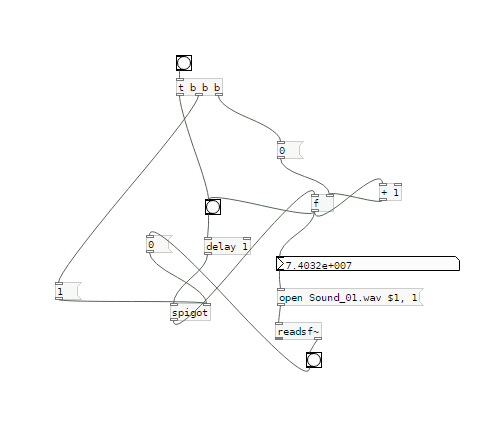
I have found a clumsy way. but I am open to any better solution.
Thanks
 posted in technical issues