
Problems with jack on linux.
@bocanegra said:
jack has to be set up properly for the server to run without dropouts (select the correct soundcard, buffer size etc in settings), or even start at all. For this purpose I use qjackctl, which is a GUI control panel for the jack server-
Agreed -- IMO it's highly recommended to manage the JACK server using JACK tools, and not recommended to expect the JACK client app to do it for you.
qjackctl.
Also there are PulseAudio-JACK modules which, when configured correctly, allow JACK and non-JACK apps to coexist peacefully. I've been running this way for 11 years now in Ubuntu. It's unfortunate that it isn't set up like this out of the box, but you don't have to accept the either/or situation.
hjh
 posted in technical issues
Problems with jack on linux.
It's hard to tell without knowing your setup. OS? Hardware?
I run PD vanilla on xubuntu 20.?? (latest LTS) and an external sound card/mixer (cheap behringer). I can get audio both with and without jack
If I set up PD to run just with ALSA (no jack) and I have some other programs running that are using the sound card (like a browser or whatever) PD will tell me:
ALSA input error (snd_pcm_open): No such file or directory
ALSA output error (snd_pcm_open): No such file or directory
However, closing my browser and/or other programs that route sound through ALSA solves this
Using jack instead gives me the advantage of running other DAW software along side PD and route both midi and audio back and forth between them (non jack programs will be silenced), but jack has to be set up properly for the server to run without dropouts (select the correct soundcard, buffer size etc in settings), or even start at all. For this purpose I use qjackctl, which is a GUI control panel for the jack server- should be in your distro's repositories.
The errors you get with jack simply states that the jack server is not running- it has to be started manually. You can do that with a command from your terminal or get the qjackctl software for the GUI (which I reckon you will prefer as a windows convert). Run: sudo apt install qjackctl from your terminal to install it if you are using a debian based distro (*ubuntu, mint et al)
 posted in technical issues
How to send guitar signal to Pd?
Hi, I'm a complete Pd and audio engineering beginner trying to connect an electric guitar to my Macbook and process the signal to create some effects for a school project. I'm trying to use JACK for that purpose, but I searched the entire internet including this forum, and can't seem to figure out how to do it.
What I'm working with is:
- jack -> USB Behringer cable
- Pd 0.51.1
- JACK 1.9.16 installed with an installer from jackaudio.org and running the bundled Qjackctl
- macOS Catalina 10.15.6
When I run JACK in messages I can see that it recognizes the USB guitar interface C-Media USB Device:

In the connection graph I can only see these available:
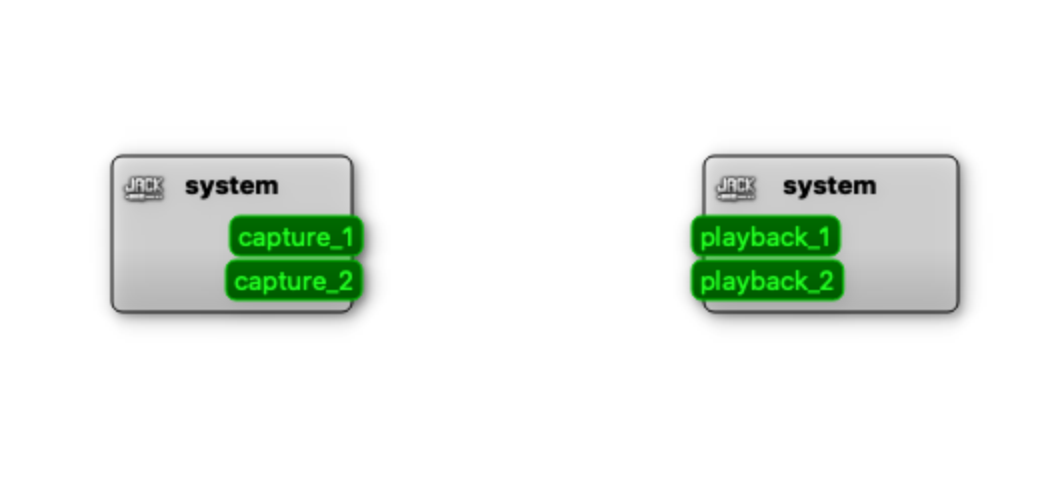
Also while having JACK running, I go to MEDIA -> JACK in Pd and in the logs I get "Can't open Jack (it seems not to be installed)" error message.
I've also tried alternatives to JACK like Soundflowe or Blackhole, but don't understand how to use it to send the guitar signal to Pd or even how to send it to the speakers (is that even possible?).
My JACK settings look like this:
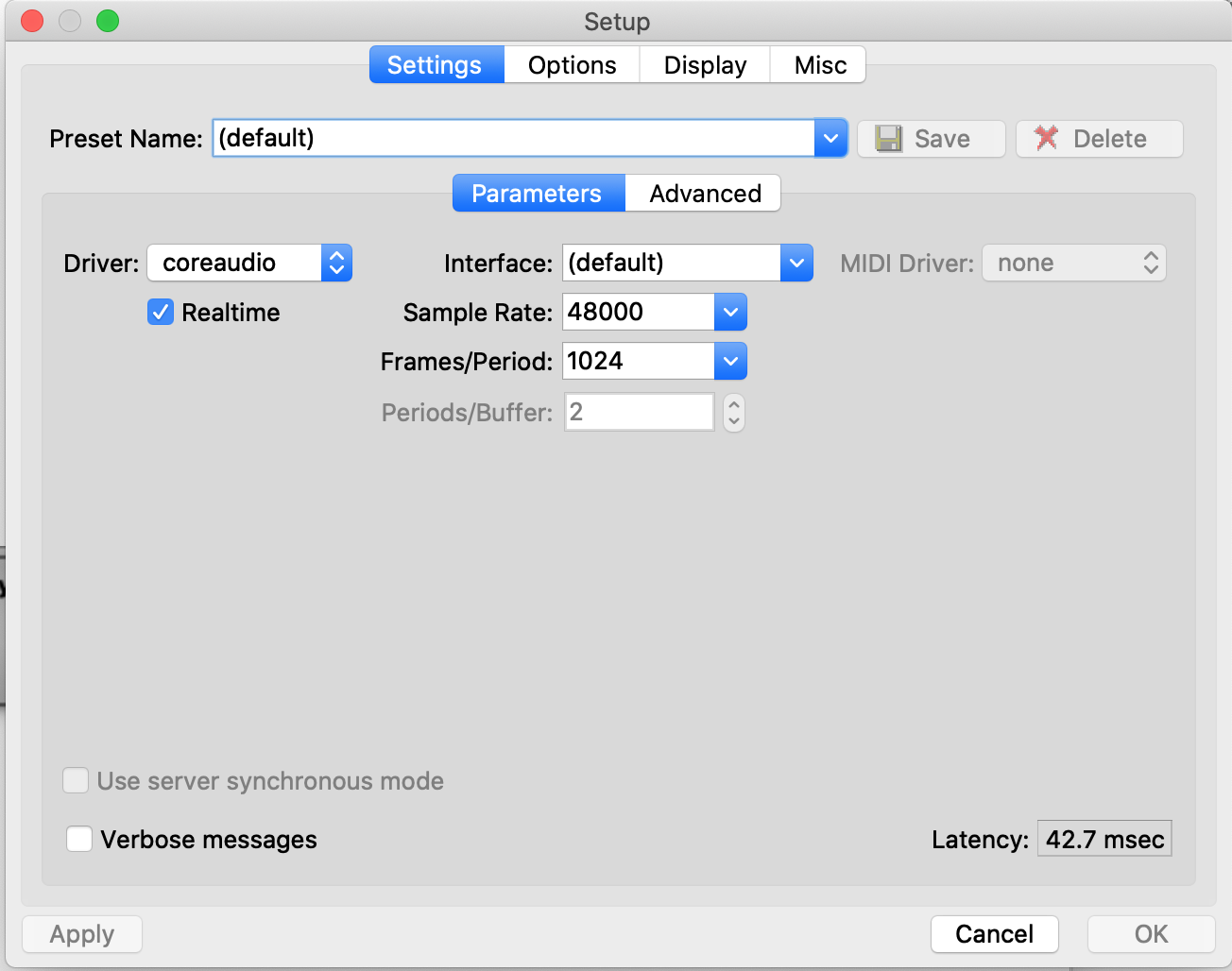
Any help would be greatly appreciated!
 posted in technical issues
[SOLVED] Stack Overflow question on Rpi 4, 8 gigs of Ram
Hi,
I had been using an Raspberry Pi 4 with 4 gigs of Ram for 3 or 4 months and it was working really great. One thing I noticed about it, which was different from every other Pi i've used was it seemed like it was doing multi-threading on it's own.
I would put " htop" in the terminal and I could see the different processors workload changing, increasing, decreasing, etc.
I upgraded to a Pi 4 with 8 gigs of Ram. One of the Pure Data pieces I was able to play pretty easily on the other pi with 4 gigs I am having a hard time doing on the Pi that is 8 gigs of Ram. I ran htop in the terminal and I was surprised that it's not multi threading. I had one processor doing almost all the work, and I am getting Stack Overflow in the Pd terminal, and the audio will sound crappy and just cut out sometimes.
My question is should I increase the buffer size? Will this make it less likely to have a stack overflow?
Also, is there some setting I need to do to get the multi threading that I don't know about?
Thank you for the help in advance.
By the way, I accidentally corrupted my Pi 4, 4 gigs of ram disc image so I can't go back and look at it. I know, stupid mistake.
 posted in technical issues
Aftertouch last note priority
@Jona said:
and you need Jack to route ALSA MIDI:
aconnect -l in any terminal will list all available software and hardware midi ports and then you can connect any of them by name or port number aconnect 'Pure Data:4' Blofeld or aconnect 128:4 28:0 will connect pd's midi out to my Blofeld and aconnect -x will disconnect everything or just one conenction if specified. Generally this sort of work is just handled by a script, so for me midiup will check what programs I have open and what hardware connected and figure out how they should be connected . For audio between applications we use the alsa loopback device to create a virtual soundcard to route the audio through using the alsaloop utility, with a script or through alsa configuration files. Alsa can do a great deal more than most think and often can do it better than Jack, Jack is just intuitive, alsa requires you to study up. The main drawback to alsa is that some applications have dropped alsa support, mainly DAWs, which is odd since they generally have no use for Jack since it is rare for a user to route audio between a DAW and another application, it is all internally connected in the DAW to the various plugins, everything is a plugin and Jack is often a redundant requirement that just consumes.
My setup is as simple as possible, midi controller to USB, alsa, pd, no jack. This problem has persisted through multiple pd versions and two different systems, the only commonalities between them are that both systems are source based and use old fashioned SysV. I have spent a fair amount of time in the past in both the alsa and pd IRC channels trouble shooting this and the best guess so far is that under certain circumstances pd does not clean up properly on shutdown and leaves alsa unable to make a proper midi connection into pd, midi out seems unaffected, aconnect -l shows the midi connection into pd hangs at 'connecting.' When this happens midi still works properly in all other applications, it is just pd and I have not been able to recreate the garbled midi in any other application.
Yes, [max], I have been learning [expr] lately and have become somewhat fixated on it, I often find myself using it for things which pd already offers a simple solution for, but I am getting better about that.
Edit; Forgot to mention, you can automate a great deal of the alsa connection, with the use of udev rules you can have the hardware to software connections made automaticaly when a device is plugged in and you can have a script that starts up all your programs and makes the connections between them, so one command or one click and everything is done for you. This works best for those that always use the same setup, but it can be worked to adapt to changing setups as well.
 posted in patch~
Configure audio jack on Windows
@edcarvalhu You installed the 32/64bit version of Jack "currently being tested" on the Desktop computer? Pd 0.49 and 0.50 are 64-bit..... 0.48 is 32-bit...... and that might explain your experience.
If you have the 32/64 bit version then you will need to report a bug to the Jack developers I think.
It could be that Jack is needing a windows 64-bit DLL that you don't have on the Desktop machine?
However Jack needs its own 64-bit dll registered manually...... https://jackaudio.org/faq/jack_on_windows.html
regsvr32 "C:\Program Files (x86)\Jack v1.9.8\64bits\JackRouter.dll"
.........from a Command prompt..... having unregistered previous versions.....
For Cubase...... it is possible that the "in 1" is a 2 channel "in". Some programs report 2-channel pairs for asio....... not each channel individually.
I agree with @liamorourke though...... that Asio4All is the best solution for low latency windows asio.
You don't get a virtual channel router though. But you can use https://www.vb-audio.com/Cable/ for internal routing.
But if you want to use the JackRouter you can still register other asio drivers with Jack.... see the FAQ above for details.
Each virtual cable gives you 8in and 8out @ up to 192kHz 24-bit..... and you can install 5....... so 40ch..... and they will resample if necessary.
David.
 posted in technical issues
Configure audio jack on Windows
UPDATING...
Changing the JackRouter.ini file, as suggested by @ whale-av, worked! But in parts ...
1º - I'm testing Jack on two Windows machines. A descktop and a notebook. Same version of PD and system.
2º - On both machines the JackRouter.ini file contained 4 channels as standard.
3º - On the notebook, when I started the PD, I got 4 channels on Jack. In the descktop the result is the print attached above.
4º - After changing the JackRouter.ini file on the notebook, I got the expected result. But ...
5º - In the descktop I still got two PD channels in Jack.
6º - I installed PD 0.48 on the descktop and Jack introduced me to the channels corresponding to those edited in the JackRouter.ini file.
7º - I tried the versions 0.49 and 0.50 of the PD in the descktop and I am still presented with only two channels in Jack, even reinstalling Jack and changing JackRouter.ini.
8º - In Cubase LE I also have the same problem ...
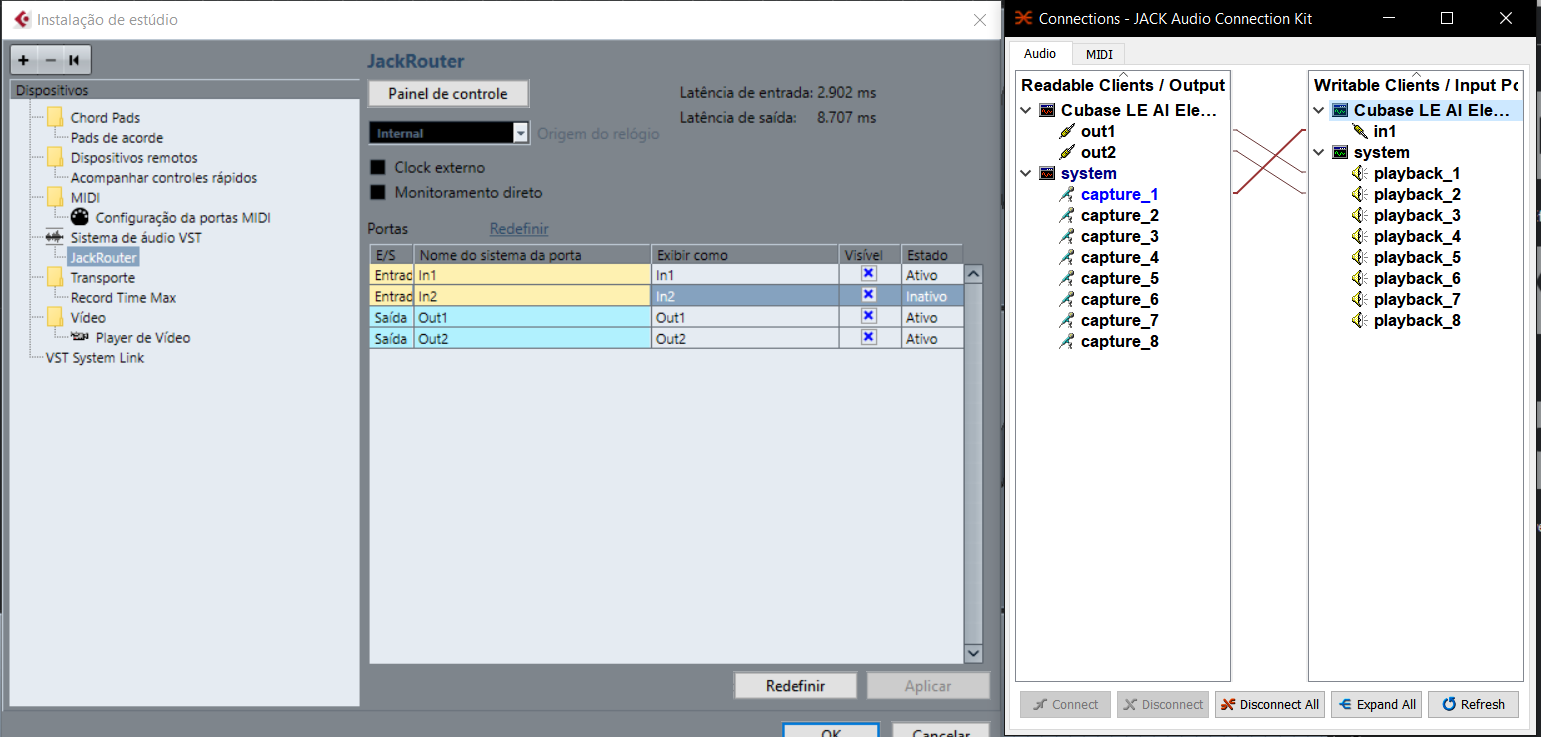
ps: sorry, english is not my native language
 posted in technical issues
No audio in PD-CEAMMC but working fine in PD-vanilla (Ubuntu 18.04)
Hi, I have both vanilla and CEAMMC installed in ubuntu 18.04 and have Jack configured, open and runnning. for some reason Jack is available and works fine in vanilla but is not showing up in either audio preferences or in the media menu in CEAMMC (so not working). I'm guessing this issue is to do with CEAMMC and not with my Jack configs as jack audio is working fine in vanilla.
Does anyone have any ideas why this might be.
If not, does anyone know how i can import the extra objects from CEAMMC into vanilla? in particular the GUI control objects such as [slider 2d], [breakpoint function] and [presets].
in the image below the left version of pd is vanilla (with jack working) and the right one is CEAMMC (no jack/ no audio).
By the way I have tried closing both versions and reopening CEAMMC on it's own and it still doesn't work.
Thanks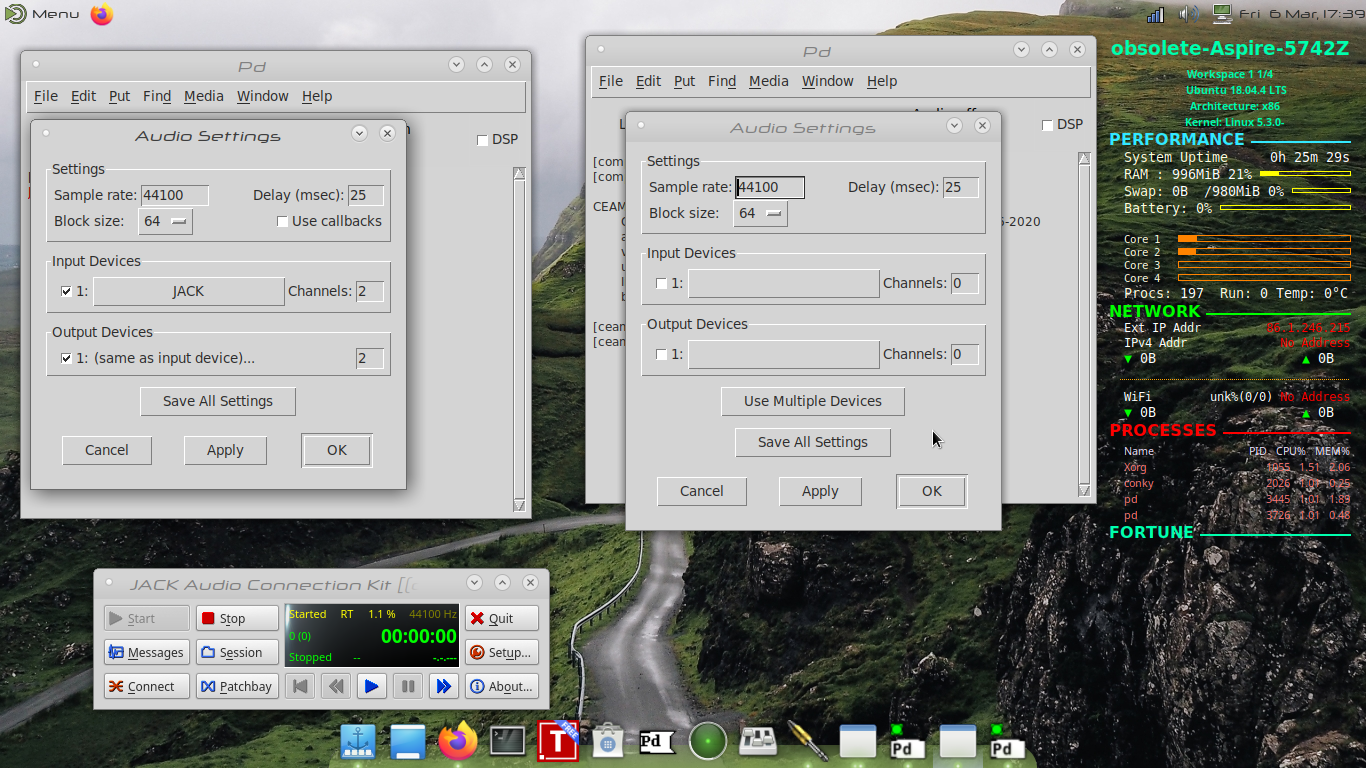
 posted in technical issues
Web Audio Conference 2019 - 2nd Call for Submissions & Keynotes
Apologies for cross-postings
Fifth Annual Web Audio Conference - 2nd Call for Submissions
The fifth Web Audio Conference (WAC) will be held 4-6 December, 2019 at the Norwegian University of Science and Technology (NTNU) in Trondheim, Norway. WAC is an international conference dedicated to web audio technologies and applications. The conference addresses academic research, artistic research, development, design, evaluation and standards concerned with emerging audio-related web technologies such as Web Audio API, Web RTC, WebSockets and Javascript. The conference welcomes web developers, music technologists, computer musicians, application designers, industry engineers, R&D scientists, academic researchers, artists, students and people interested in the fields of web development, music technology, computer music, audio applications and web standards. The previous Web Audio Conferences were held in 2015 at IRCAM and Mozilla in Paris, in 2016 at Georgia Tech in Atlanta, in 2017 at the Centre for Digital Music, Queen Mary University of London in London, and in 2018 at TU Berlin in Berlin.
The internet has become much more than a simple storage and delivery network for audio files, as modern web browsers on desktop and mobile devices bring new user experiences and interaction opportunities. New and emerging web technologies and standards now allow applications to create and manipulate sound in real-time at near-native speeds, enabling the creation of a new generation of web-based applications that mimic the capabilities of desktop software while leveraging unique opportunities afforded by the web in areas such as social collaboration, user experience, cloud computing, and portability. The Web Audio Conference focuses on innovative work by artists, researchers, students, and engineers in industry and academia, highlighting new standards, tools, APIs, and practices as well as innovative web audio applications for musical performance, education, research, collaboration, and production, with an emphasis on bringing more diversity into audio.
Keynote Speakers
We are pleased to announce our two keynote speakers: Rebekah Wilson (independent researcher, technologist, composer, co-founder and technology director for Chicago’s Source Elements) and Norbert Schnell (professor of Music Design at the Digital Media Faculty at the Furtwangen University).
More info available at: https://www.ntnu.edu/wac2019/keynotes
Theme and Topics
The theme for the fifth edition of the Web Audio Conference is Diversity in Web Audio. We particularly encourage submissions focusing on inclusive computing, cultural computing, postcolonial computing, and collaborative and participatory interfaces across the web in the context of generation, production, distribution, consumption and delivery of audio material that especially promote diversity and inclusion.
Further areas of interest include:
- Web Audio API, Web MIDI, Web RTC and other existing or emerging web standards for audio and music.
- Development tools, practices, and strategies of web audio applications.
- Innovative audio-based web applications.
- Web-based music composition, production, delivery, and experience.
- Client-side audio engines and audio processing/rendering (real-time or non real-time).
- Cloud/HPC for music production and live performances.
- Audio data and metadata formats and network delivery.
- Server-side audio processing and client access.
- Frameworks for audio synthesis, processing, and transformation.
- Web-based audio visualization and/or sonification.
- Multimedia integration.
- Web-based live coding and collaborative environments for audio and music generation.
- Web standards and use of standards within audio-based web projects.
- Hardware and tangible interfaces and human-computer interaction in web applications.
- Codecs and standards for remote audio transmission.
- Any other innovative work related to web audio that does not fall into the above categories.
Submission Tracks
We welcome submissions in the following tracks: papers, talks, posters, demos, performances, and artworks. All submissions will be single-blind peer reviewed. The conference proceedings, which will include both papers (for papers and posters) and extended abstracts (for talks, demos, performances, and artworks), will be published open-access online with Creative Commons attribution, and with an ISSN number. A selection of the best papers, as determined by a specialized jury, will be offered the opportunity to publish an extended version at the Journal of Audio Engineering Society.
Papers: Submit a 4-6 page paper to be given as an oral presentation.
Talks: Submit a 1-2 page extended abstract to be given as an oral presentation.
Posters: Submit a 2-4 page paper to be presented at a poster session.
Demos: Submit a work to be presented at a hands-on demo session. Demo submissions should consist of a 1-2 page extended abstract including diagrams or images, and a complete list of technical requirements (including anything expected to be provided by the conference organizers).
Performances: Submit a performance making creative use of web-based audio applications. Performances can include elements such as audience device participation and collaboration, web-based interfaces, Web MIDI, WebSockets, and/or other imaginative approaches to web technology. Submissions must include a title, a 1-2 page description of the performance, links to audio/video/image documentation of the work, a complete list of technical requirements (including anything expected to be provided by conference organizers), and names and one-paragraph biographies of all performers.
Artworks: Submit a sonic web artwork or interactive application which makes significant use of web audio standards such as Web Audio API or Web MIDI in conjunction with other technologies such as HTML5 graphics, WebGL, and Virtual Reality frameworks. Works must be suitable for presentation on a computer kiosk with headphones. They will be featured at the conference venue throughout the conference and on the conference web site. Submissions must include a title, 1-2 page description of the work, a link to access the work, and names and one-paragraph biographies of the authors.
Tutorials: If you are interested in running a tutorial session at the conference, please contact the organizers directly.
Important Dates
March 26, 2019: Open call for submissions starts.
June 16, 2019: Submissions deadline.
September 2, 2019: Notification of acceptances and rejections.
September 15, 2019: Early-bird registration deadline.
October 6, 2019: Camera ready submission and presenter registration deadline.
December 4-6, 2019: The conference.
At least one author of each accepted submission must register for and attend the conference in order to present their work. A limited number of diversity tickets will be available.
Templates and Submission System
Templates and information about the submission system are available on the official conference website: https://www.ntnu.edu/wac2019
Best wishes,
The WAC 2019 Committee
 posted in news
i/o-errors in pd
Have you given Pd root priority (chmod 4755)?
why should I do that? this would make pd run as root always right?
pd already runs with realtime priority, as far as I can see:
$ pd -rt &
Jack: JackClient::SetupDriverSync driver sem in flush mode
Jack: JackLinuxFutex::Connect name = jack_sem.1000_default_pure_data
Jack: Clock source : system clock via clock_gettime
Jack: JackLibClient::Open name = pure_data refnum = 4
Jack: JackClient::PortRegister ref = 4 name = pure_data:input0 type = 32 bit float mono audio port_index = 7
Jack: JackClient::PortRegister ref = 4 name = pure_data:input1 type = 32 bit float mono audio port_index = 8
Jack: JackClient::PortRegister ref = 4 name = pure_data:output0 type = 32 bit float mono audio port_index = 9
Jack: JackClient::PortRegister ref = 4 name = pure_data:output1 type = 32 bit float mono audio port_index = 10
Jack: JackClient::Activate
Jack: JackPosixThread::StartImp : create non RT thread
Jack: JackPosixThread::ThreadHandler : start
Jack: JackClient::kBufferSizeCallback buffer_size = 256
Jack: JackClient::Init : period = 5804 computation = 100 constraint = 5804
Jack: JackPosixThread::AcquireRealTimeImp priority = 5
Jack: JackClient::ClientNotify ref = 4 name = pure_data notify = 2
Jack: JackClient::kActivateClient name = pure_data ref = 4
Jack: JackClient::Connect src = system:capture_1 dst = pure_data:input0
Jack: JackClient::ClientNotify ref = 4 name = pure_data notify = 18
Jack: JackClient::ClientNotify ref = 4 name = pure_data notify = 18
Jack: JackClient::Connect src = system:capture_2 dst = pure_data:input1
Jack: JackClient::Connect src = pure_data:output0 dst = system:playback_1
Jack: JackClient::Connect src = pure_data:output1 dst = system:playback_2
Jack: JackClient::ClientNotify ref = 4 name = pure_data notify = 18
Jack: JackClient::ClientNotify ref = 4 name = pure_data notify = 18

$ ps al | grep pd
F   UID   PID  PPID PRI  NI    VSZ   RSS WCHAN  STAT TTY        TIME COMMAND
0  1000  1212   746  -7   - 259980 183892 -     SLl  pts/0      0:19 pd -rt
0  1000  1214  1212  20   0  58984 24812 -      Sl   pts/0      0:02 wish /usr/lib/pd/tcl//pd-gui.tcl 5401
0  1000  1216  1212  -9   -   2308   796 -      S    pts/0      0:00 /usr/lib/pd/bin/pd-watchdog
0  1000  1311   746  20   0  15064  3088 -      R+   pts/0      0:00 ps al
...
 posted in technical issues