
Control MIDI sampler rate from -2x to 2x with CC messages
Hello.
I need help implementing logic.
Let me explain :
I have a MIDI sampler and I would like to take control of the rate (speed/pitch) via MIDI CC messages.
The rate goes from -2x (reverse) to 2x (forward. It takes CC values from 0-127.
With a value of 64, the rate is at 0, so the sampler on pause, kind of
With a value of 127, the sampler plays forward 2x the original rate
With a value of 0, it plays reverse 2x the original rate
And with a value of 95, it plays forward at the original rate (1x)
Here’s what I’m trying to achieve :
I would like to be able to play with the rate and at some point, momentarily, thru a CC message, jump to the opposite side with the same rate ; for example, from 1x to -1x or from 0.5x to -0.5. I know that from 1x to -1x need the CC value 95 (1x) and 31 (-1x). I found that by subtracting 64 to the CC values received and I get the value that correspond to the reverse rate value of the sampler. But I get confused when I send values below 64, then I get negative values. It would be great if when I get under 64, then the logic would be reversed and I would get values over 64. I don’t know if my explanations are clear.
Thank a lot for you help.
Regards.
 posted in technical issues
Just Another (Drum) Sequencer...SortOf, codename: Virgo
Just Another (Drum) Sequencer...SortOf, codename: Virgo
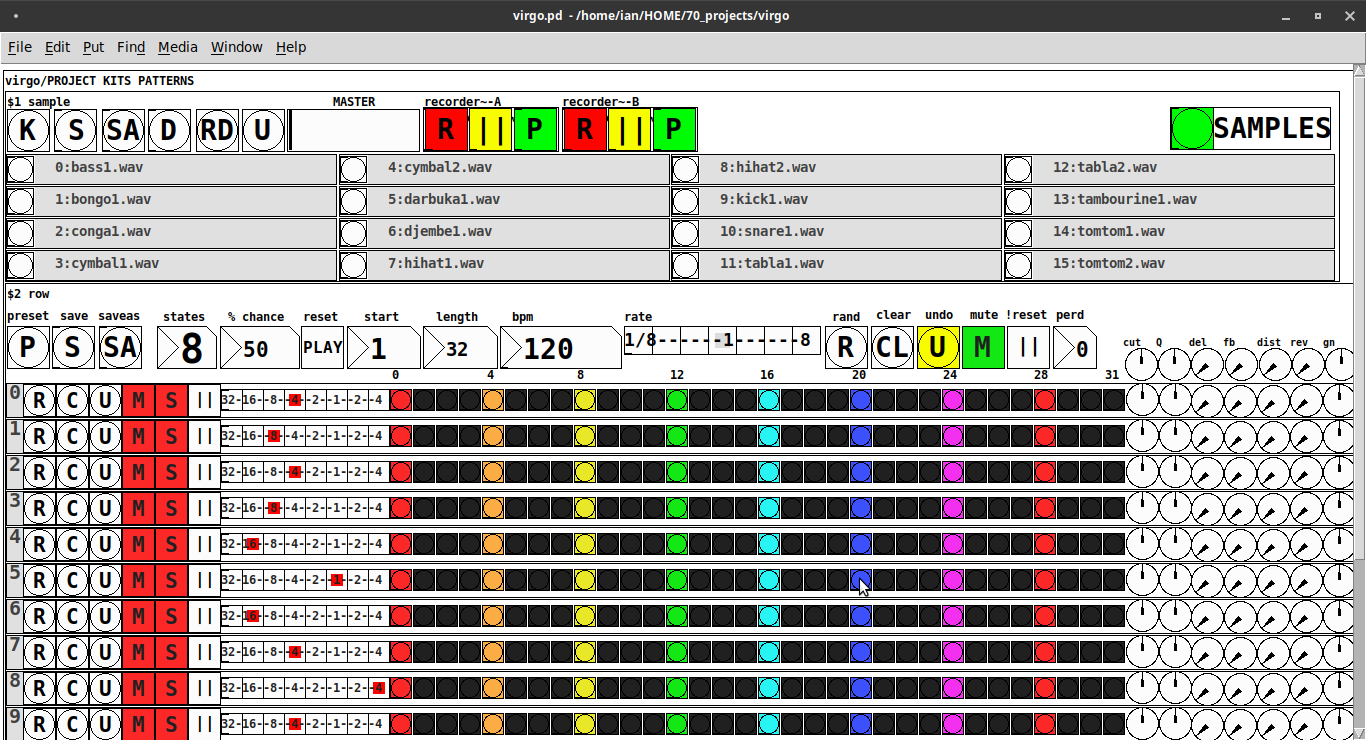
REQUIRES: zexy, moonlib, tof (as of Pd 0.50.2, all of which are in deken) and hcs (which comes by default with Pd 0.50.2 and is in deken (for extended))
Special Features
- Unique playhead per row; each with their own metro (beat)
- Up to 8 Volume states-per-beat (by clicking multiple times on the bang; where an rms=1 is divide among the states (2 states:0=rms=0(black), 1=rms=1(red); 3 states:rms=[0|0.5|1])
- Design approach: using creation arguments to alias abstractions, so subsequently they are referred to by their creation arguments, ex. in [KITS sample] sample is referred to as [$1]; which is how they are listed below)
(notes: what I learned experimenting with this design approach, I will share as a separate post. Currently, it does not include cut-copy-paste (of regions of the pattern)). I good way to start trying it out is clicking the "R" to get a random kit and a random pattern).
virgo:[virgo/PROJECT KITS PATTERNS]
- PROJECT[KITS PATTERNS]
- $1:[KITS sample]
- GUI
- K: openpanel to load a previously saved *.txt (text object) kit of samples; on loadbang the default.txt kit is loaded
- S: save the current set of samples to the most recently opened *.txt (kit) preset
- SA: saveas a *.txt of the current set of samples
- D: foldererpanel a sample directory to load the first (alphabetically) 16 samples into the 16 slots
- RD: load a random kit from the [text samples] object where the samples where previously loaded via the "SAMPLES" bang on the right
- U: undo; return to the previously opened or saved *.txt kit, so not the previously randomized
- MASTER: master gain
- (recorder~: of the total audio~ out)
- record
- ||: pause; either recording or play;
- play: output is combined with the sequencer output just before MASTER out to [dac~]
- SAMPLES: folderpanel to load a (recursive) directory of samples for generating random kits
- ABSTRACTIONS
- $1: sample
- bang: openpanel to locate and load a sample for a track
- canvas: filename of the opened sample; filenames are indexed in alignment with track indices in the PATTERNS section
- $1: sample
- GUI
- $2:[PATTERNS row]
- GUI
- P: openpanel to load a previously saved *.txt (pattern) preset file; on loadbang the default.txt pattern is loaded; the preset file includes the beat, pattern, and effect settings for the row
- S: save the current pattern to the most recently opened pattern .txt
- SA: save as (self-explanatory)
- states: the number of possible states [2..8] of each beat;
- %: weight; chance of a beat being randomized; not chance of what it will result in; ex. 100% implies all beats are randomized ; random beats result in a value)gain) between 1 and states-1
- PLAY(reset): play the pattern from "start" or on stop reset all playheads to start
- start: which beat to start the playheads on
- length: how many beats to play [+/-32]; if negative the playheads will play in reverse/from right to left
- bpm: beats-per-minute
- rate: to change the rate of play (ie metro times) by the listed factor for all playheads
- R: randomize the total pattern (incl period and beats, but not the effect settings; beats of 1/32 are not included in the possibilities)
- CL: clear, set all beats to "0", i.e. off
- U: undo random; return to the previously opened or saved preset, ie. not the previous random one
- M: mute all tracks; the playheads continue moving but audio does not come out of any track
- ||:pause all playheads; play will resume from that location when un-paused
- per: period; if 0=randomizes the period, >0 sets the period to be used for all beats
- Edit Mode
- Check the [E] to enter edit mode (to cut, copy, or paste selected regions of the pattern)
- Entering edit mode will pause the playing of the pattern
- Play, if doing so beforehand, will resume on leavng edit mode
- The top-left most beat of the pattern grid will be selected when first entering edit mode
- Single-click a beat to select the top-left corner of the region you wish to cut or copy
- Double-click a beat to select the bottom-right corner
- You may not double-click a beat "less than" the single-clicked (top-left) beat and vice-versa
- Click [CL] to clear your selection (i.e. start over)
- The selected region will turn to dark colors
- If only one beat is selected it will be the only one darkened
- Click the operation (bang) you wish to perform, either cut [CU] or copy [CP]
- Then, hold down the CTRL key and click the top-left corner of where you want to paste the region
- The clicked cell will turn white
- And click [P] to paste the region
- Cut and copied regions may both be pasted multiple times
- The difference being, cutting sets the values (gains) for the originating region to "0"
- Click [UN] to undo either the cut, copy, or paste operation
- Undoing cut will return the gains from 0s to their original value
- Check the [E] to enter edit mode (to cut, copy, or paste selected regions of the pattern)
- (effect settings applied to all tracks)
- co: vcf-cutoff
- Q: vcf-q
- del: delay-time
- fb: delay-feedback
- dist: distortion
- reverb
- gn: gain
- ABSTRACTIONS
- $1: [row (idx) b8] (()=a property not an abstraction)
- GUI
- (index): aligns with the track number in the KITS section
- R: randomize the row; same as above, but for the row
- C: clear the row, i.e. set all beats to 0
- U: undo the randomize; return to the originally opened one, ie. not the previous random one
- M: mute the row, so no audio plays, but the playhead continues to play
- S: solo the row
- (beat): unit of the beat(period); implying metro length (as calculated with the various other parameters);1/32,1/16,1/8, etc.
- (pattern): the pattern for the row; single-click on a beat from 0 to 8 times to increment the gain of that beat as a fraction of 1 rms, where resulting rms=value/states; black is rms=0; if all beats for a row =0 (are black) then the switch for that track is turned off; double-click it to decrement it
- (effects-per-row): same as above, but per-row, ex. first column is vcf-cutoff, second is vcf-q, etc.
- ABSTRACTIONS
- $1: b8 (properties:row column)
- 8-state bang: black, red, orange, yellow, green, light-blue, blue, purple; representing a fraction of rms(gain) for the beat
- $1: b8 (properties:row column)
- GUI
- $1: [row (idx) b8] (()=a property not an abstraction)
- GUI
- $1:[KITS sample]
Credits: The included drum samples are from: https://www.musicradar.com/news/sampleradar-494-free-essential-drum-kit-samples
p.s. Though I began working on cut-copy-paste, it began to pose a Huge challenge, so backed off, in order to query the community as to 1) its utility in the current state (w/o that) and 2) just how important including it really is.
p.p.s. Please, report any inconsistencies (between the instructions as listed and what it does) and/or bugs you may find, and I will try to get an update posted as soon as enough of those have collect.
Love and Peace through sharing,
Scott
 posted in patch~
Higher sampling rates and such
Hello all,
I am trying to make a granular synthesis operation and have an idea to make it more precise but do not know how to do a few things. Hoping someone can help.
I want to make a granular synthesis object that can play grains in a wide variety of ways. So what was my new concept?
Record the audio that I am going to manipulate.four times sampling rate faster if possible. then play it four times slower which would bring it down four 2 octaves of course. My thought was that I would record at a 44100 * 4 = 176400 sampling rate. Then play the file at 44100 sampling rate. Which would play it down 2 octaves, but the files would not be "grainy.."
Then I could use the granular synthesis operation to play each grain 4x faster which would bring the file back up to speed but would play the sound 4x longer in duration. Does this make sense?
This is coming up because there is too much distortion when I play the file 4x slower and then use granular synthesis to bring the speed back up.
OK, so I tried to use:
writesf~
With the rate changed to 176400. This does not seem to work.
I wrote it like this:
writesf~ -rate 176400
But that did not seem to work. So, I just am thinking, can you use sampling rate higher than set by preferences?
 posted in technical issues
ffplay~ - An implementation of FFmpeg for audio playback of almost any media format
An implementation of FFmpeg for audio playback of almost any media format
When building, the FFmpeg libraries are dynamically linked by default, which means that you'll need a local installation of these libraries in order for the external to work.
Includes the following features:
-
play/pause and seek functionality.
-
changing the speed of playback.
-
reading and iterating through m3u playlists.
-
It reads pseudo m3u playlists. Each line in the m3u should be just the file name, preceded by a path relative to the location of the m3u if they don't reside in the same folder.
-
The m3u reader can also read nested m3u's. For example, an m3u could consist of the following three lines:
disc1.m3u disc2.m3u disc3.m3u -
-
opening files from http urls.
-
retrieving metadata.
Creation args
- numeric list
-
The channel layout. Defaults to stereo if no args given.
-
Numbers specified represent the bits of an audio channel bit-mask. A full list of available channels can be found here: https://github.com/FFmpeg/FFmpeg/blob/master/libavutil/channel_layout.h
-
Inlets
-
bang - Play/pause the currently loaded track.
- Sends a 1 or 0 through the last outlet to indicate whether it's playing or paused.
float - (Re)start playback of a given track number
- Zero will stop playback.
anything - Look for matching metadata
- If metadata is found, it will be sent through the right-most outlet.
- A file must be successfully opened for any of the above to work
- signal - Change the playback speed.
-
speed can be a factor between 16 and 1/16th.
-
speed can also be altered by sending the message [ speed $1 ( to the 1st inlet.
-
Outlets
-
signal - Left channel
-
signal - Right channel
- The number of signal outlets there are depends on the number of creation args given, with the default being 2 signals for stereo.
-
list - Outputs various messages including information regarding whether a file was successfully opened, whether a track is currently playing, track metadata, etc.
Messages
-
[ print $.. ( or [ info $.. ( - Prints metadata info.
-
If no args given, it will print general info. Otherwise, it will print custom info.
-
metadata needs to be surrounded with percent signs.
- Example [ print %artist% - %title% (
-
-
[ send $.. ( - Sends metadata info through the
last outlet. -
[ open $1 ( - Attempts to open a file.
- Sends a 1 or 0 through the last outlet to indicate success or failure.
-
[ seek $1 ( - Seek to a track position.
-
[ speed $1 ( - Set the playback speed.
-
[ play $1 ( - Set playback state to either playing or paused.
- Acts as a toggle when no args are given.
- When an arg is given, state is forced to playing(1) or paused(0).
-
[ interp $1 ( - Change the interpolation algorithm.
- Options include:
- Sinc (good | medium | fast)
- Zero-order hold
- Linear (the default)
- Options include:
-
[ stop ( - An alias for [ 0 (.
-
[ pos ( - Returns the track position.
-
Any unrecognized message is assumed to be a metadata term. If there is a match, the metadata will be sent through the last outlet.
Update - March 16 2022:
ffplay~ now uses Secret Rabbit Code for resampling, which makes playback speed transitions much smoother. Playback speed can also be manipulated with signals via the 2nd inlet.
ffplay~ is now available through deken. It is part of a larger library called quilt. Searching either "quilt" or "ffplay~" should give a result.
The FFmpeg libraries are still separate, but can be either easily downloaded or easily installed via a package manager.
For Windows users, the FFmpeg libraries can be downloaded here: https://github.com/myQwil/pd-quilt/releases/download/v0.7.7/ffmpeg.v4.4.1.Windows-amd64-32.zip.
For Linux and macOS users, A README file is included, which lists the dependencies for those platforms.
 posted in extra~
CPU usage of idle patches, tabread4~?
Hi zigmhount!
This is a copy paste of a message I (hopefully) sent via chat as well:
I figured I’d tell you a bit more about my patch so we can see if there’s overlap. Switch is definitely an overlap. I’m not using a metronome at all on mine. The inspiration was two loopers I love: the line 6 DL4 and the EHX 45000. It’s going to be 4 foot switches. Record, play, previous and next. Record and play function the way they do in the DL4. Record to start a new loop, record again to set length and start overdubbing or play to simply set length and start looping. From there record works like overdub on/ off toggle and play stop or restarts the loop. Previous and next are where it gets interesting.
There’s a 7 segment display (meaning a 1 digit number read out) that tells you what loop you’re “focused” on. It starts on 0. You can’t change focus until you have a loop going. Once you do, prev or next change focus. If you change focus while recording, it closes the loop you’re on and starts playing it, then immediately starts recording the next loop. The next loop though can be as long as you want. However, silence gets added to the end of the loop when you are done so that it matches up with a multiple of “loop 0”
In other words, loop 0, acts as a measure length and all other loops are set to a multiple of that measure length.
But...they can start anywhere you want. To the person playing the looper, it will feel like individual loops are all overdubs of the first loop, just at any length you want. I don’t know if I’m explaining this so well, but the point is, you don’t have to worry about timing or a metronome with this. You don’t have to wait for the beginning of measures to start or end loops. Once you have the timing of the first loop down there’s no waiting... you start recording and playing whenever you want as long as you want t and if it’s in time when you play it it will be i the recording.
So far I have recording and overdubbing down on loop 0 WITHOUT CLICKS. this took a lot of work and messing. Sounds like you are struggling with that now. Hardware is important yes.
I’m running it on a rasberry pi 4b 4 gig memory but with a pi sound audio interface. It’s more expensive than the pi but the latency and sound quality are GREAT. I also wanted to make the hardware all independent eventually and have the whole thing fit i it’s own box. The foot pedals run on an arduino that talks through comport to the pi and pure data.
In pure data I’m timing the loops and recording them via tabwrite. I’m then playing them with tabplay with a 0 $1 message box where 0 is start and $1 is the length, rounded to block size, of the recording. I record and play the same arrays for each loop at the same time while overdubbing, but delay the recording so it’s a few blocks back from the tabplay. The delay on the recording seemed to help elimate clocks as well. So did using tabplay instead of tabread 4. I think the phasor is CPU expensive or something. I don’t know. When I start / stop recording I use a line ramp on the volume going into the recording of 5 msecs. This is also necessary to eliminate clicks. Also, I had to stop resizing or clearing arrays as both cause clicks. Now I just overwrite what I need and don’t read from what I didn’t overwrite (If that makes sense).
If you are getting clicking I would try upping block size, buffer size and just delaying the actual recording (delay the audio in the same amount) giving the computer time to think avoids drop outs. Also you don’t want monitoring if you can avoid it. I don’t know if you are using a mic or what.
Hopefully some of this made sense.
 posted in technical issues
hanging MIDI notes on a channel split setup
hey folks! looking for some advice here. i have a custom instrument setup where i can switch between timbres based on a certain key range. there are eight ranges of four MIDI notes each and any one of these regions can be assigned to the base instrument, running on MIDI channel 1, or any one of five other instruments (running on channels 2-6). the switching method basically works as it's supposed to, but there are two strange behaviors
-
if i play quickly it can result in stuck notes as i switch between instruments. i have a method where i can send note off data to instruments via the interface, which mostly works to turn notes off, but not 100% of the time.
-
if i hold a note in one region down assigned to one instrument, and then quickly play another assigned to a different instrument, it will sometimes get confused and apply the sound from the first to the second. so if i have a piano timbre in the first region and play a key assigned to a synth timbre the piano will play notes in the second region as well for a time. i've found that if i play notes in a third different region it resets itself properly and the next time i play the second region it will be properly assigned. so in this case somehow the channel switching seems to be happening too late occasionally.
these bugs can sometimes result in interesting happy accidents, but as i work with it more (as well as playing faster or switching quickly between timbres) i want to have it be more consistent in response.
anyway here's my keyrouter object. the active region is set by the inlet. the output is rearranged to put the channel first so i can route it to the correct instrument. there's probably some kind of race condition that behaves properly when the region and timbre switching is clean (playing more staccato or detached) but if notes are held down or the speed of switching increases it starts dropping noteoffs. any input or info appreciated!
 posted in technical issues
DNA Sequence (Nucleotide) Player: Converting nucleotide sequences to (midi) Music
gene-seq-to-music-via-pd~-help.pd
gene-seq-to-music-via-pd~.pd
DNA Sequence (Nucleotide) Player: Converting nucleotide sequences to (midi) Music
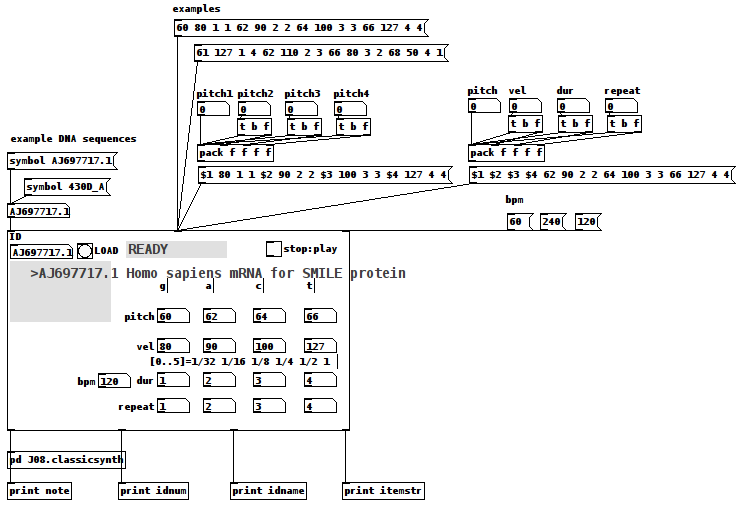
Credits:
All source data is retrieved from the "Nucleotide Database" (DB) via National Center for Biotechnology Information, U.S. National Library of Medicine (NCBI) at
https://www.ncbi.nlm.nih.gov/nucleotide/
Miller Puckette for the J08.classicsynth
and
the creator(?) of the vlist2symbol abstraction.
Requirements:
wget, Linux command line web retrieval tool
Linux
ggee, [shell]
cyclone, [counter]
Use Case:
Actors: those who want to hear the patterns in DNA nucleotide sequences and/or comprehend how Nature makes Music not "noise"/Gene sequences are like one of Nature's "voices"/
Case:
Enter the "Accession" (identification number (id)) of a NCBI DB entry into the id symbol field
Case:
Click on "LOAD"
Case:
Click "PLAY".
Instructions:
1-Go to the DB (https://www.ncbi.nlm.nih.gov/nucleotide/) and find an Accession(id) of a sequence;
2-Enter that value into the ID [symbol] box of the patch
3-Click the "LOAD" [button/bang];
4-Set pitch, velocity, duration, and repeat for G,A,C, and T (representing the four nucleotide bases of a DNA strand — guanine, cytosine, adenine, and thymine);
5-Toggle "PLAY" to 1, i.e. to On, to hear the sequence using the variables you set in 4) and to "0" to stop it.
How It Works:
The patch takes the input ID and packs it into a string as the FILE(Path) for wget.
The wget command is then sent as a list to a shell object.
The output of the shell object is then parsed (using an intermediate [text] object) into a [text] object with each line being 4 characters long, each character being either G,C,A, or T.
Once loaded and Play is clicked, each line is then reconstructed as a midi note with the pitch as determined by the first character, velocity (2nd) and duration (3rd) and repeated as many times as the 4th character dictates (as set in 4) above).
Once the entire sequence is played, the player stops sending notes.
Inlets(left to right):
id, either numbers or symbols
values, a 16 item list of 4x4 sets of pitch, velocity, duration, repeat (i.e. one set per nucleotide type, G,C,A, or T) (Note: the sequence, if loaded, will play immediately upon receipt of this list.)
beats per minute, bpm, esp. as it relates to note durations.
Outlets:
the current midi note, i.e. pitch/velocity/duration
id (of the gene sequence)
sequence name, as listed by the NCBI DB
nucleotide being played as a string, ex. GGAC
AFTERWARD:
-
Since it really is only sending midi value it can be connected to whatever synth you would like;
-
Elsewhere on this Forum, I shared a patch which took "noise" as its input and converted it into music using sigmund~, in that case "running water" as its source. (See for reference: https://forum.pdpatchrepo.info/topic/12108/converting-noise-to-music-rushing-water-using-sigmund) This patch takes that concept and applies it to what might also be called "noise", DNA sequences, were it not that the results (like the running water, yet even more so) sound like "Music".
This exploration has me wondering...
How can we delineate what is noise (only natural at this point) and what is music?
Is the creative/ordering/soulful nature's being expressed in our own music not also being expressed by Nature itself? ...so that we might be considered one "bow" playing upon it?
And, if by Music we mean notes laid down on purpose, might not it be said that is what Nature has been done? Is doing?
I hope you find the patch useful, stimulating, and exciting, or at the very least funny to think about.
Love through Music, no matter in what state Life may find you,
Peace,
Scott
posted in patch~
Digital to audio processing issues
@Joseph-Mikkelson No, changing the samplerate will not help, except that matching it to the soundcard reduces the load on the cpu......but there are more important issues...... see below.....
I should have expanded on latency.
Using a live input [adc~] and doing some Pd processing effects and then sending that to speakers [dac~] latency is not so much of a problem. Often it involves delays anyway (echo, reverb, etc.) and our ears are used to that.
Latency for playback of an audio track, or generated audio, is no problem...... it is heard when it arrives at the speakers and that is all.
Problems arise when the input goes straight to the output....... as with a monitor mixer built in Pd for example..... with live acoustic instruments...... where the musician hears their own instrument acoustically and the same sound delayed in the monitor. Essentially a chorus effect is produced, caused by the latency, and that will make it harder for a violinist for example to pitch correctly.
Chorus in a reverb effect really upsets violinists..... anything much over 5ms.
Of course a massive latency...... 100ms+..... will cause timing problems even for a guitarist, and even if they are the rare musician that didn't have such issues in the first place.
I have met classical and jazz musicians that have learnt to dissociate what they play from what they hear...... for example playing through a delay, but in sync with everyone else...... so playing say 1 second before everyone else....... but...... 
SAMPLE RATE
You should match your samplerate to your soundcard, or you will have re-sampling artefacts....... usually a low level high pitched whine when your patch is not producing any sound.
It is slightly more complicated than that.
If you play an audio file that was recorded at 44.1KHz while the Pd samplerate is set to 48KHz it will play back at the wrong speed....... Pd will not resample it and so the pitch will be wrong.
It's a PITA.
So the Pd samplerate must be set to match all the audio files that you use in Pd.
To avoid the artefacts you then need to set your soundcard to match Pd.
Other programs will adjust..... so that is not a problem.
External cards can make that change through their control panel, and internal cards should have the option somewhere.
In windows it is here in the speaker control panel..... https://forum.pdpatchrepo.info/topic/12094/newbie-clipping-on-pure-data-portable-with-mmio/4
and I am pretty sure that windows always sets the on-board soundcard to 48KHz "out of the box".
David.
 posted in technical issues
Subpatch to address specific index on the monome grid
this may be clear here: I have linked the subpatch sampler. Within the patch prac.pd sampler is named "sampler 1" and there's also "sampler 2". Inside an instance of sampler I need to send a single to a row on a 16 * 16 hardware grid called Monome and you can see the message /monome/grid/led/row 0 1 0 0 or /monome/grid/led/set $1 1 1. I was hoping somehow I can use the number in the instance of 'sampler' ( so in this case 'sampler 1' or 'sampler 2' to then allocate a row. Using /monome/grid/led/row 0 $1 0 0 or
/monome/grid/led/set $2 $1 1 ....$1 doesnt take the value from 'sampler 1' and so I don't think its equates to 1? why is this?prac.pd sampler.pd
 posted in technical issues
[gme~] / [gmes~] - Game Music Emu
Allows you to play various game music formats, including:
AY - ZX Spectrum/Amstrad CPC
GBS - Nintendo Game Boy
GYM - Sega Genesis/Mega Drive
HES - NEC TurboGrafx-16/PC Engine
KSS - MSX Home Computer/other Z80 systems (doesn't support FM sound)
NSF/NSFE - Nintendo NES/Famicom (with VRC 6, Namco 106, and FME-7 sound)
SAP - Atari systems using POKEY sound chip
SPC - Super Nintendo/Super Famicom
VGM/VGZ - Sega Master System/Mark III, Sega Genesis/Mega Drive,BBC Micro
The externals use the game-music-emu library, which can be found here: https://bitbucket.org/mpyne/game-music-emu/wiki/Home
[gme~] has 2 outlets for left and right audio channels, while [gmes~] is a multi-channel variant that has 16 outlets for 8 voices, times 2 for stereo.
[gmes~] only works for certain emulator types that have implemented a special class called Classic_Emu. These types include AY, GBS, HES, KSS, NSF, SAP, and sometimes VGM. You can try loading other formats into [gmes~] but most likely all you'll get is a very sped-up version of the song and the voices will not be separated into their individual channels. Under Linux, [gmes~] doesn't appear to work even for those file types.
Luckily, there's a workaround which involves creating multiple instances of [gme~] and dedicating each one to a specific voice/channel. I've included an example of how that works in the zip file.
Methods
- [ info ( - Post game and song info, and track number in the case of multi-track formats
- this currently does not include .rsn files, though I plan to make that possible in the future. Since .rsn is essentially a .rar file, you'll need to first extract the .spc's and open them individually.
- [ path ( - Post the file's full path
- [ read $1 ( - Reads the path of a file
- To get gme~ to play music, start by reading in a file, then send either a bang or a number indicating a specific track.
- [ goto $1 ( - Seeks to a time in the track in milliseconds
- Still very buggy. It works well for some formats and not so well for others. My guess is it has something to do with emulators that implement Classic_Emu.
- [ tempo $1 ( - Sets the tempo
- 0.5 is half speed, while 2 is double. It caps at 4, though I might eventually remove or increase the cap if it's safe to do so.
- [ track $1 ( - Sets the track without playing it
- sending a float to gme~ will cause that track number to start playing if a file has been loaded.
- [ mute $1 ... ( - Mutes the channels specified.
- can be either one value or a list of values.
- [ solo $1 ... ( - Mutes all channels except the ones specified.
- it toggles between solo and unmute-all if it's the same channel(s) being solo'd.
- [ mask ($1) ( - Sets the muting mask directly, or posts its current state if no argument is given.
- muting actually works by reading an integer and interpreting each bit as an on/off switch for a channel.
- -1 mutes all channels, 0 unmutes all channels, 5 would mute the 1st and 3nd channels since 5 in binary is 0101.
- [ stop ( - Stops playback.
- start playback again by sending a bang or "play" message, or a float value
- [ play | bang ( - Starts playback or pauses/unpauses when playback has already started, or restarts playback if it has been stopped.
- "play" is just an alias for bang in the event that it needs to be interpreted as its own unique message.
Creation args
Both externals optionally take a list of numbers, indicating the channels that should be played, while the rest get muted. If there are no creation arguments, all channels will play normally.
Note: included in the zip are libgme.* files. These files, depending on which OS you're running, might need to accompany the externals. In the case of Windows, libgme.dll almost definitely needs to accompany gme(s)~.dll
Also, gme can read m3u's, but not directly. When you read a file like .nsf, gme will look for a file that has the exact same name but with the extension m3u, then use that file to determine track names and in which order the tracks are to be played.
posted in extra~