
How to maintain pitch, when playing an audio file with a 44.1k samplerate when PD samplerate is 48k
@ablue It is possible to up / downsample internally in Pd using [block~]..... but only in multiples of 2.... so not useful here.
In extended you could simply change the samplerate for Pd for each track played.......... https://forum.pdpatchrepo.info/topic/10302/openpanel-and-readsf-play-audio-file-detuned-and-slowed-down
and of course that can still be done for vanilla if all the externals are available (compiled) for your os. Try "find externals" "deken" in Pd to see if you can get them. Very unlikely for iOS I think.
The patch I posted there simply gets info about the file to be played and changes the Pd samplerate before playing it. It cannot deal with playing two tracks at different rates at the same time. Sound generation within Pd... [osc~] etc would be unaffected though...... which is all good.
Changing the samplerate of Pd might not change the soundcard rate in iOS (unsure). The os might do the up / downsampling itself.
If you cannot use the externals from extended then I think you will have to add the samplerate info to all your tracks..... in their names........ like this...... "my-track 48.wav" and extract the 48 or 44 value to do the same.
You can still send the [audio-dialog( message to Pd in Vanilla....... so that part of this patch will still work........ set_audio_parameters.pd
There is a complete list of the values that need to be set by the message in there as well, and by clicking the [audio-properties( message at bottom right you can get your current parameters........ then change the sample-rate.... then send the new message back to Pd.
Or you could load tracks into a table and calculate the new values for the table as they are loaded..... horrible..... and you would still need to know the track samplerate.
Probably easier to just re-sample all the audio for your project first, at 48K, using another program.
David.
 posted in technical issues
unable to load abstraction at boot
@reflect_ Ignore what I have written after "probably work" for the moment.
Change the name of "sampler.pd" to "mysampler.pd" (no spaces in the name)......
And in your script of course....
That will probably work.
The error: sampler: can't load abstraction within itself....... suggests the patch is broken. Will it run on another machine?
Maybe you created sampler.pd, and within it you put "sampler 1" "sampler 2" etc. which would all be read as sampler with arguments 1, 2, etc.
If so you need to change their names to [sampler_1] or [sampler1] etc.
If you cannot open the patch then you can change its name to sampler.txt and edit it in a simple text editor.....
If you don't manage it then upload it on the forum and someone will fix it for you.
David.
posted in technical issues
The Harmonizer: Communal Synthesizer via Wifi-LAN and Mobmuplat
The Harmonizer: Communal Synthesizer via Wifi-LAN and Mobmuplat
The Harmonizer
The Harmonizer is a single or multi-player mini-moog synthesizer played over a shared LAN.
(credits: The original "minimoog" patch is used by permission from Jaime E. Oliver La Rosa at the the New York University, Music Department and NYU Waverly Labs (Spring 2014) and can be found at: http://nyu-waverlylabs.org/wp-content/uploads/2014/01/minimoog.zip)
One or more players can play the instrument with each player contributing to one or more copies of the synthesizer (via the app installed on each handheld) depending on whether they opt to play "player 1" or "player 2".
By default, all users are "player 1" so any changes to their app, ex. changing a parameter, playing a note, etc., goes to all other players playing "player 1".
If a user is "player 2", then their notes, controls, mod-wheel etc. are all still routed to the network, i.e. to all "player 1"'s, but they hear no sound on their own machine.
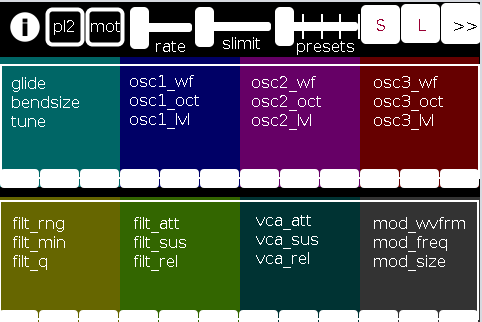
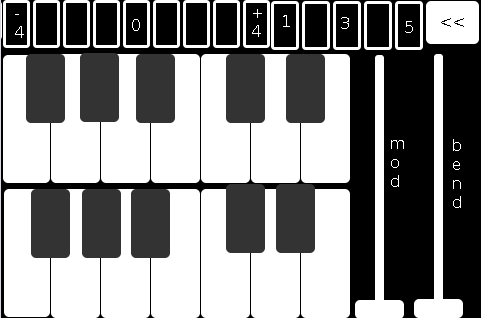
There are 2 pages in The Harmonizer. (See screenshots below.)
PAGE 1:
PAGE 2:
The first page of the app contains all controls operating on a (more or less) "meta"-level for the player: in the following order (reading top-left to bottom-right):
pl2: if selected (toggled) the user is choosing to play "player 2"
mot(ion): triggers system motion controls of the osc1,2&3 levels (volume) based on the accelerometer inside the smartphone (i.e as you twist and turn the handheld in your hand the 3 oscs' volumes change)
rate: how frequently should the handheld update its accelerometer data
slimit: by how much should the app slow down sending the (continuous) accelerometer data over the network
presets: from 1 to 5 preset "save-slots" to record and reload the Grid 1 and Grid 2 settings that are currently active
S: save the current Grid1 and Grid2 selections to the current "save slot"
L: load the currently selected preset into both Grids
">>": go the the next page (page 2 has the reverse, a "<<" button)
Grid 1: the settings, in 4 banks of 3 parameters per-, which are labeled top-down equating to left-right
Grid 2: the same as Grid 1, but with a different set of parameters
The second page comprises:
the 2-octave keyboard (lower notes on top),
a 9-button octave grid (which can go either up or down 4 octaves),
a quick-preset grid which loads one of the currently saved 5 presets
the "<<" button mentioned above, and
both a mod and pitch-bend wheel (as labeled).
SETUP:
All players install Mobmuplat;
Receive The Harmonizer (in the form of a .zip file either via download or thru email, etc.)
When on your smartphone, click on the zip file, for example, as an attachment in an email.
Both android and iphone will recognize (unless you have previously set a default behavior for .zip files) the zip file and ask if you would like to open it in Mobmuplat. Do so.
When you open Mobmuplat, you will be presented with a list of names, if in android click the 3 dots in the top right of the window and on the settings window , click "Network" Or on an iphone click "Network" just below the name list;
On the Network tab, click "LANDINI".
Switch "LANDINI" from "off" to "on".
(this will allow you to send your control data over your local area network with anyone else who is on that same LAN).
From that window, click "Documents".
You will be presented again, with the previous list of names.
Scroll down to "TheHarmonizer" and click on it.
The app will open to Page 1 as described and shown in the image above.
Enjoy with Or without Friends, Loved, Ones, or just folks who want to know what you mean "is possible" with Pure Data  )!
)!
Theories of Thought on the Matter
My opinion is:
While competition could begin over "who controls" the song, in not too great a deal of time, players will see first hand, that it is better (at least in this case) to work together than against one another.
If any form of competition emerges in the game, for instance loading a preset when a another player was working on a tune or musical idea, the Overall playablilty and gratitude-level will wain.
However, on the other hand, if players see the many, many ways one can constructively collaborate I think the rewards will be far more measurable than the costs, for instance, one player plays notes while the other player plays the controls.
p.s. my thinking is:
since you can play solo: it will be fun to create cool presets when alone then throw them into the mix once you start to play together. (Has sort of a card collecting fee ).
Afterward:
This was just too easy Not to do.
It conjoins many aspects of pure data together (I have been working on lately (afterward: i did this app a long time ago but for some reason and am only now thinking to share it) both logistical and procedural into a single whole.
I think it does both quite well, as well as, offer the user an opportunity to consider or perhaps even wonder: What is 'possible'?"
Always share. Life is just too damn short not to.
Love only.
-svanya
 posted in patch~
markovGenerator: A music generator based on Markov chains with variable length
Edit: There is a general [markov] abstraction now at https://forum.pdpatchrepo.info/topic/12147/midi-into-seq-and-markov-chains/45
This is one of the early projects by @Jona and me. Happy to finally release it.
markovGenerator
Generates music from learned material using Markov chains. It is polyphonic, plays endlessly and supports Markov chains with variable length.
markovGenerator.zip (updated)
Usage:
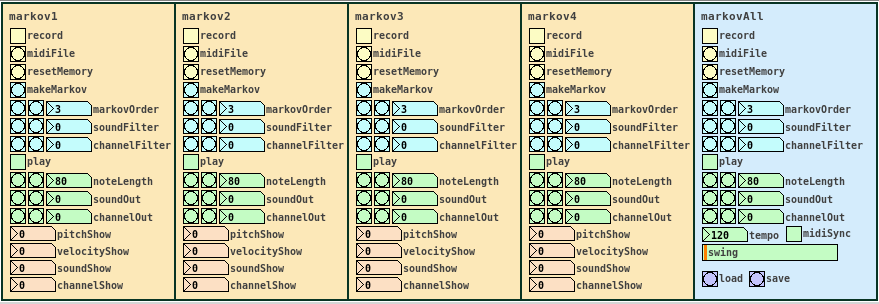
- Record midi notes or load midi files
- Make Markov system
- Play
-
Record midi notes or load midi files
Until you reset the memory, each new recording will be added to the memory. The recorded material is seen as a loop, so that the last note is followed by the the first note, for endless play. markovGenerator handles recording midi and loading midi files differently: When you record midi, it will record notes according to the midi clock every sixth midi tick. This is defined in the counter in [pd midiclock]. So that way, breaks are being recorded and the rhythm is preserved. When loading midi files, no breaks are being recorded, the notes are just recorded in order, so the rhythm will be lost. In any case, simultaneous notes will be recorded as chords, so polyphony is preserved. -
Make Markov system
Set markovOrder to specify the length of the Markov chain. The higher the order, the more musical information will be kept, the lower the order, the more random it gets. You can use soundFilter and channelFilter to only use notes of the specified sound or channel. This is especially useful when working with midi files. Note that if there are no notes of the specified sound or channel, the Markov system will be empty and nothing will be played. Set the filters to zero to disable them. If you change the settings for the Markov system, click makeMarkov again for them to take effect. You can make new Markov systems with different settings out of the same recorded material over and over again, even when playing. If you record additional notes, click makeMarkov again to incorporate them into the Markov system. -
Play
While playing, you can change the note length, sound and midi out channel. Set soundOut and channelOut to zero to use the sound and channel information of the original material. Playing starts with the Markov chain of the last recorded notes, so the first note might be played first.
Use the markovAll section on the right to control all Markov channels at once. Here you can also set tempo, swing and midiSync, and you can save the project or load previous projects.
Have fun!
If it does not play, make sure that
- you recorded some notes,
- you hit the makeMarkov button,
- soundFilter and channelFilter are not set to values where there are no notes. Try setting the filters to zero and hit makeMarkov again.
About the Markov system:
You can see the Markov system of each Markov channel in [text define $0markov]. Notes are stored as symbols, where the values are joined by "?". A note might look like 42?69?35?10 (pitch?velocity?sound?channel). Chords are joined by "=". A chord of two notes might look like 40?113?35?10=42?49?35?10. Notes and chords are joined to Markov chains by "-". The velocity values are not included in the chains. Sound and midi channel values are only included, if soundFilter or channelFilter are off, respectively. Markov chains of order three may look like 42?35?10-36?35?10=42?35?10-60?35?2 with filters off and simply like 42-37-40 with both filters active, only using the pitch value.
Requires Pd 0.47.1 with the libraries cyclone, zexy and list-abs.
 posted in patch~
Is PD for me?
Hi,
I don't know anything to PD for now. I'm a French programmer and guitarist playing (among others) in a Pink Floyd Tribute band. Our shows can be pretty complex. Using many keyboard sounds, guitar sounds, settings on our XR32, playing audio samples, playing videos... As we don't play using a click track, all of these actions are done by each of us at the right moment. It works, but sometimes it gets "tricky"; we have to play the right chord and sing in tune without forget to start the sample and change the guitar sound... It can disturb us from our primary goal; play good music!
So I'm looking for tool that could handle many (all?) of those things and be controlled in a very simple way. I imagine it like this; I would define the "actions" that have to be done (send program changes to differents hardware, play an audio sample, play a video, send OSC to the XR32...). Actions that have to be made at the same time would be grouped in a "script". And these scripts would be ordered in a "playlist". Then, when pressing a single (midi) footswitch the scripts will be fired sequentially at the right moment.
So is Pure Data is the right tool to make this? If it is not do you know some tool that will do it?
 posted in technical issues
Polyphonic voice management using \[poly\]
Keeping track of note-ons and note-offs for a polyphonic synth can be a pain. Luckily, the [poly] object can be used to take care of that for you. However, the nuts and bolts of how to use it may not be immediately obvious, particularly given its sparse help patch. Hopefully this tutorial will clarify its usefulness. It will probably be easier to follow along with this explanation if you open the attached patch. I'll try to be thorough, which hopefully won't actually make it more confusing!
To start, [poly] accepts a MIDI-style message of note number and velocity in its left and right inlets, respectively...
[notein]
| \
[poly 4]
...or as a list in it left inlet.
[60 100(
|
[poly 4]
The first argument is the maximum number of voices (or note-ons) that [poly] will keep track of. When [poly] receives a new note-on, it will assign it a voice number and output the voice number, note number, and velocity out its outlets. When [poly] gets a note-off, it will automatically match it with its corresponding note-on and pass it out with the same voice number.
By [pack]ing the outputs, you can use [route] to send the note number and velocity to the specified voice. For those of you not familiar, [route] will take a list, match the first element of the list to one of its arguments, and send the rest of the list through the outlet that goes with that argument. So, if you have [route 1 2 3], and you send it a list where the first element is 2, then it will pass the rest of the list to the second outlet because 2 is the second argument here. It's basically a way of assigning "tags" to messages and making sure they go where they are assigned. If there is no match, it sends the whole list out the last outlet (which we won't be using here).
[poly 4]
| \ \
[pack f f f] <-- create list of voice number, note, and velocity
|
[route 1 2 3 4] <-- send note and velocity to the outlet corresponding to voice number
At each outlet of [route] (except the last) there should be a voice subpatch or abstraction that can be triggered on and off using note-on and note-off messages, respectively. In most cases, you'll want each voice to be exact copies of each other. (See the attached for this. It's not very ASCII art friendly.)
The last thing I'll mention is the second argument to [poly]. This argument is to activate voice-stealing: 1 turns voice-stealing on, 0 or no argument turns it off. This determines how [poly] behaves when the maximum number of voices has been exceeded. With voice-stealing activated, once [poly] goes over its voice limit, it will first send a note-off for the oldest voice it has stored, thus freeing up a voice, then it will pass the new note-on. If it is off, new note-ons are simply ignored and don't get passed through.
And that's it. It's really just a few objects, and it's all you need to get polyphony going.
[notein]
| \
| \
[poly 4 1]
| \ \
[pack f f f]
|
[route 1 2 3 4]
| | | |
( voices )
 posted in tutorials
Toooo sensitive buttons for TouchOSC
first to thank you for trying to help me.
if I hold push button its like this:
print: /MIXER/push12 1 its receive PLAY
print: /MIXER/push12 1 PLAY
print: /MIXER/push12 1 PLAY
print: /MIXER/push12 1 PLAY
print: /MIXER/push12 1 PLAY
print: /MIXER/push12 1 PLAY
print: /MIXER/push12 0
if I just press it its with less 1s but i need only one 1 to get one PLAY.
if I press JUST ONCE toggle button:
print: /MIXER/toggle12 0
print: /MIXER/toggle12 0
print: /MIXER/toggle12 0
print: /MIXER/toggle12 0
print: /MIXER/toggle12 1
or
print: /MIXER/toggle11 0
print: /MIXER/toggle11 0
print: /MIXER/toggle11 1
so I need to put change to every button, regarding PUSH or TOGGLE.
can you PLEASEEEEE give me example where to put and how to put PATCH CHORDS for CHANGE object. Ive try everything I can think off. DO I NEED ONLY CHANGE OBJECT OR SOME OTHER STUFF(numbers above change) PLEASEEEEEE:
routeOSC /push9
| 0 1
| | |
change
|
* 127
|
ctlout 9 1
 ???
???
for organizing patch: I found out about pure data on Monday so its little bit early for that , but Ill try, it will be fun to optimize/organize this PD as much as I can.
 posted in technical issues
Play sample only once with Tabread4~
Hello everyone,
I'm trying to build a simple sample player triggered by the computer keyboard.
I have first used [tabplay~] to play samples loaded in arrays, but now I want to be able to change the sample speed so I'm using [tabread4~].
I have two play modes : loop and only once, I have set the system for loop and it works fine, (I can change the speed, etc) I just have stuff to adjust to trigger the thing.
My problem now is to be able to play the sample only once (with the adjusted speed).
I don't find any solutions, even only to play it at normal speed only once. I have followed the technique used in this thread
http://puredata.hurleur.com/sujet-580-tabread4-question
and I made something like that :
                             [0, $1 $2 <
                             |
                             [line~]
                             |
                             [tabread4~ mytable]
Where $1 is the sample size given by [soundfiler] and $2 is the sample length in miliseconds (sample size * 44100).
And it doesn't play the file right, it cuts it or play faster or slower.
And I don't have a clue on how to play it in the speed selected from the loop mode.
Sorry, my patch is a little bit messy.
Thank you.
 posted in technical issues
Pool.pd\_linux doesn't work
Hello,
I'm trying to use fid_abs, and need pool object
I have simply downloaded it first, but it freezes Pure Data.
This problem is often encountered in some linux distrib (in my case Ubuntu Studio 8.04).
So, I compiled pool.pd_linux with flext.
Compilation and installation proceed correctly, but after configuring PD to load pool on startup, I have this error when I open a patch using pool :
tried /usr/lib/pd/extra/pool.pd_linux and succeeded
/usr/lib/pd/extra/pool.pd_linux: /usr/lib/pd/extra/pool.pd_linux: undefined symbol: __sync_fetch_and_add_4
and then :
pool fid_abs
... couldn't create
I don't really understand this message, and where the problem comes from.
I'm a beginner with Pd and object compilation, so I'm not sure I did it correctly. I join my flext config file, which may be wrong?
Thanks
Diane
 posted in extra~
Non-audio "stutter"
maybe you didn't understand what i was trying to say or maybe my explanation wasn't clear.
what i want to do shouldn't involve the sampler as a device (an electribe, by the way), only the bangs being sent to it. all the sampler is doing is storing the sounds that i am triggering. maybe i should have said "drum machine" instead of sampler.
for example, i have it set up on the sampler to be note 1 = bass drum, note 2 = snare, etc. so if i send 1 1 2 1 to the sampler, it will play bass bass snare bass. i want to have a stutter-style effect that will be able to grab whatever sequence of numbers that is playing and repeat that little snippet of information. this would (in my own theory) replace the use of an audio-based stutter effect and achieve (sort of) the same effect by just repeating a short pattern of numbers going to the device (sampler, drum machine, whatever)
does that make more sense, or is this just a stupid idea to begin with? i'm thinking i could record the note numbers into some sort of array and play them back out of the array in a little loop or something. i just got home from work and i am going to start trying some things.
just wondering if anyone else has done this and what kind of results they got. thanks.
 posted in technical issues