
Help with audio patch on off based on some condition
@ddw_music said:
If the loop is set to zero meaning - no loop; for some reason the track will not play until the end rather will always stop before finished.
Could you explain a little more how you are arriving at this conclusion?
Yes, I loaded a shorter track of 40 seconds to the abstraction and play with it pausing and resuming pausing and resuming. Not a single time the track stops at the end rather always a few milliseconds before - cutting the end of the track.
Now there's no timed envelope and you should get the play~ native pause/resume behavior >without interference (I hope
).
Yes! now iw working perfectly! I wander why is not happen with play~ object?
I have few abstraction for that player (sf-play2~) that I'm loading a file using $0 sign. will it be difficult to change them to fit the way you use to play~ object ?
I will need to do something like this?
if I wrote sf-play2~ audio$0
for each play~ I will need to giver the name play~ audio$0_LEFT and play~ audio$0_RIGHT ? that should make it fine?
Thanks again for your help and explanations!
 posted in technical issues
Help with audio patch on off based on some condition
@KMETE said:
One reason I needed to use the loop 1 message is that the track was always paused for some reason before it ends when no in loop mode.
Ohhhhhh... now I see what it is.
When you ask sf-play(2)~ to play a timed region, it also runs a timed envelope. When you pause / resume, the playback timing doesn't match the envelope timing, so the envelope closes before the end of the source audio.
I'd rather not complicate sf-play(2)~ to allow the envelope to be disabled. But you can back out of one layer of abstraction and use play~ directly.
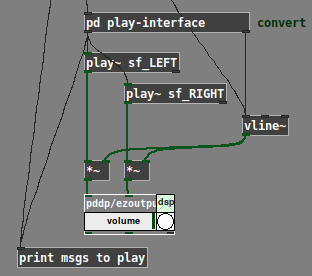
play~ doesn't take "start end rate" lists like sf-play~ does -- but I have a translator object for that. Since there's already a [pd] subpatch to translate "start/resume" messages, I'd just stick the play translator in there:
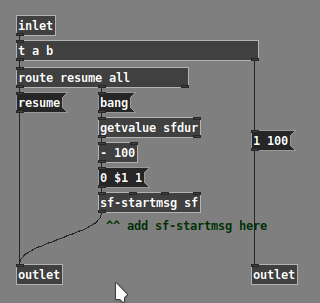
Now there's no timed envelope and you should get the play~ native pause/resume behavior without interference (I hope ).
hjh
 posted in technical issues
Help with audio patch on off based on some condition
The idea that it gonna be long track of conversation as part of an installation. it could be that someone will start the track and then go away. I don't want it to run all the 20 minutes so the audio will run in chunks of time. every lets say 60 seconds (not 20) the audio will pause and if someone will press it again within the short time frame (its say 10 seconds) it will resume. if not it will be start from the beginning at next press.
OK, so the "playing" and "paused" timers actually have no interaction -- there are just two rules:
- Play: Stop when user stops, OR after x seconds
- Pause: If paused a short time, resume; if paused a long time, restart (here, btw, the [list store] idea was based on my mistaken understanding that the "resume" vs "start over" behavior depended on the duration of the last segment that was playing. In fact, it depends only on the last pause duration -- which is determined at the moment of play -- so it's a simple [timer] --> [moses] and done)
Here's my solution. (Screenshot omits a [loadbang] --> "loopx 100" -- the patch for download is complete.)
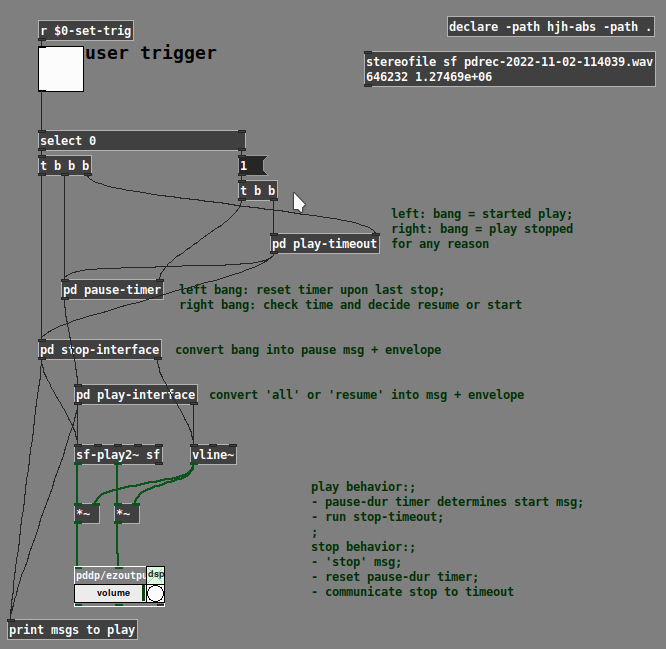
[pd play-timeout]
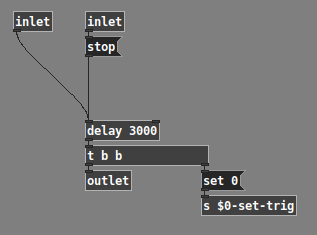
[pd pause-timer]
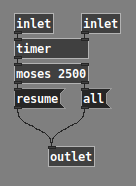
One other thing I'd like to call attention to is the liberal use of [pd] subpatches. When things get complicated, it's useful to encapsulate parts of the logic, for two reasons:
-
Less stuff in the window to get confused about. (I've seen students think "eh, a busy window is no big deal" but... if you have 10 times as many inlets/outputs visible, that's a hundred times more chances to make a wrong connection.)
-
Programming works better and goes more smoothly when the flow of information is restricted to a smaller number of paths whose meaning can be controlled and understood. It's much much easier to deal with the pause-timer and play-timeout when they are in their own windows, with only the necessary information coming in via inlets.
hjh
posted in technical issues
Help with audio patch on off based on some condition
play~: no method for 'symbol'
Ohhhhhh... this. The no. 1 most irritating feature of Pd... sometimes you need to mark a leading symbol with the keyword ("symbol" or "list") and sometimes you don't.
Here, the keyword is needed before [list store], but it needs to be removed before [sf-play2~]. I always forget this.
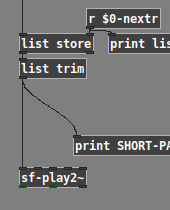
that scenario should resume the playback and not start from the beginning
But this wasn't the functional spec you gave before (at least as it appeared to me).
In the first post of this thread, you said: "What I am trying to add is if the audio is playing more then 60 seconds the audio will stop and will back to the beginning of the file (so when pressed again it will start from beginning)."
This looked like you want LONG-PLAY always to go back to the beginning... but now it seems that isn't what you wanted. Quite difficult to build a patch when the rules are changing, or not communicated clearly.
I also find this a bit confusing: "assuming a situation of long track of 20 minutes... after 30 sec of track playing without any press it will pause."
If you have 20 minutes of audio, why do you want it to stop playing after 30 seconds? In that case, wouldn't you just load 30 seconds into memory, and then use the entire contents in memory (not looping)? At 44.1 kHz, 20 minutes stereo is about 400 megabytes... I hope you're not loading 400 MB into RAM only to want to play 10 MB of that.
So that's one way to stop automatically after x seconds -- simply don't load audio that you don't plan to use.
Otherwise, if you want it to stop playing after x (milli)seconds automatically, then you need [delay].
When you start playing, "bang" the [delay 30000]. At this point, if nothing else happens, then [delay] will output a bang 30 seconds later, and you can use this to stop playback.
If the sensor triggers during that time, according to documentation, you can send a "stop" message to the [delay] and it will cancel the 30-sec later output trigger.
So: [timer] measures the time between actually-occurring triggers (two triggers, reset and measure --> one result). [delay] produces a trigger later (one trigger --> add one result).
hjh
posted in technical issues
Help with audio patch on off based on some condition
Here, I've distilled the trigger and timing logic -- should be easy to re-add sf-play2~ etc. (and substitute the real play-duration in place of "xxxxx" in the messages).
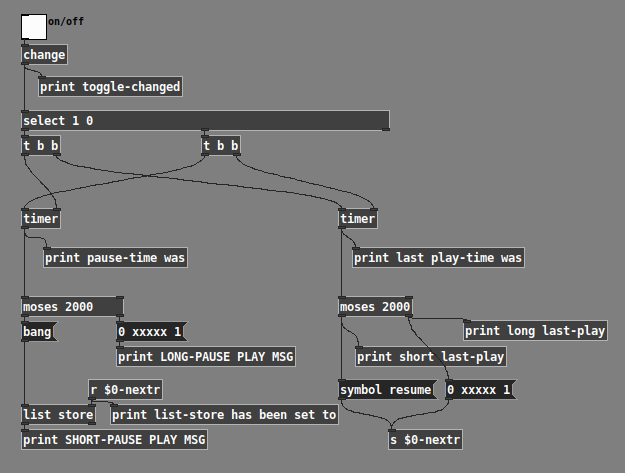
Checking the 4 cases:
Played a long time, then paused a long time:
toggle-changed: 0
last play-time was: 2997.33
long last-play: 2997.33
list-store has been set to: 0 xxxxx 1
toggle-changed: 1
pause-time was: 2348
LONG-PAUSE PLAY MSG: 0 xxxxx 1 -- started from beginning, OK
Played a long time, then paused a short time:
toggle-changed: 0
last play-time was: 3250.67
long last-play: 3250.67
list-store has been set to: 0 xxxxx 1
toggle-changed: 1
pause-time was: 1092
SHORT-PAUSE PLAY MSG: 1092 0 xxxxx 1 -- even though it's a short pause, it starts from the beginning, OK
Played a short time, then paused a short time:
toggle-changed: 0
last play-time was: 1297.33
short last-play: 1297.33
list-store has been set to: symbol resume
toggle-changed: 1
pause-time was: 556
SHORT-PAUSE PLAY MSG: symbol resume -- OK
Played a short time, paused a long time:
toggle-changed: 0
last play-time was: 1553.33
short last-play: 1553.33
list-store has been set to: symbol resume -- short play time planned to resume, but...
toggle-changed: 1
pause-time was: 2125.33
LONG-PAUSE PLAY MSG: 0 xxxxx 1 -- the long pause time overrides "resume" and it starts from the beginning, OK
I'd really suggest to add sf-play2~ to this framework, rather than replacing chunks of it with over-complicated counter mechanisms which you don't need (timer measures time more efficiently).
hjh
posted in technical issues
Help with audio patch on off based on some condition
What I am trying to add is if the audio is playing more then 60 seconds the audio will stop and will back to the beginning of the file (so when pressed again it will start from beginning).
Do you mean like this?
- Pause >= 5 sec:
- Next play should always start from the beginning
- Pause < 5 sec:
- Last audio play time >= 60 sec: play from beginning
- Last audio play time < 60 sec: resume
(It's really helpful to make a tree, or a table, describing the cases. If you just write sentences, it's very easy to overlook patterns.)
One pattern you can see from this is that the "pause >= 5" branch is easy: always from the beginning. So the "all" is fine.
But the "resume" message needs to be either "resume" or "all," depending on the last play duration. The last play duration is measured at the time of the "off" trigger.
This is a common pattern in patching, which has a standard solution: You need a changing message to be sent later, where the contents of the message are determined earlier based on some condition. (When the user lets go of the sensor, you determine at that moment how the next "on" will behave.)
For this, you need:
- A storage object. One of the messages is a list, so, use [list store].
- The "off" trigger sets the value of this storage object using its cold inlet.
- The (later) "on" trigger bangs the hot inlet.
Should be something like this:
1676400706585-talk.pd -- EDIT: but I just realized there's a mistake in here, the [r nextr] should be [r $0-nextr] and then the message-sends to that name should change to a real [s $0-nextr] instead of the message-box shortcut. I can update the patch later but I don't have time right this second.
This usage of a storage object is a pattern that's useful in thousands of contexts -- took me forever to figure it out (which reflects a pedagogy problem).
hjh
posted in technical issues
help with polyphonic synth
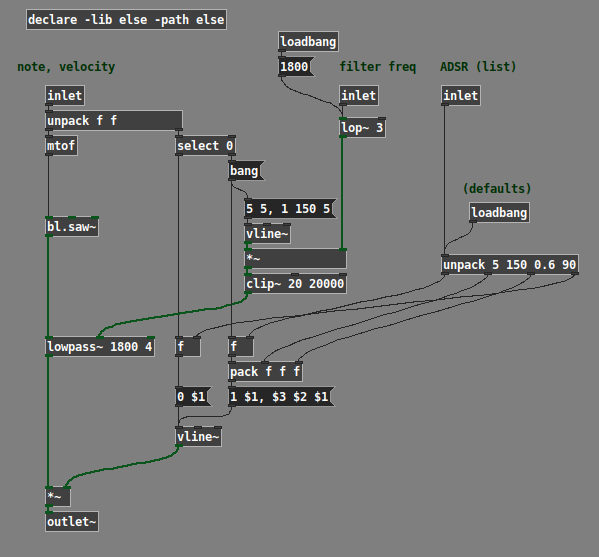
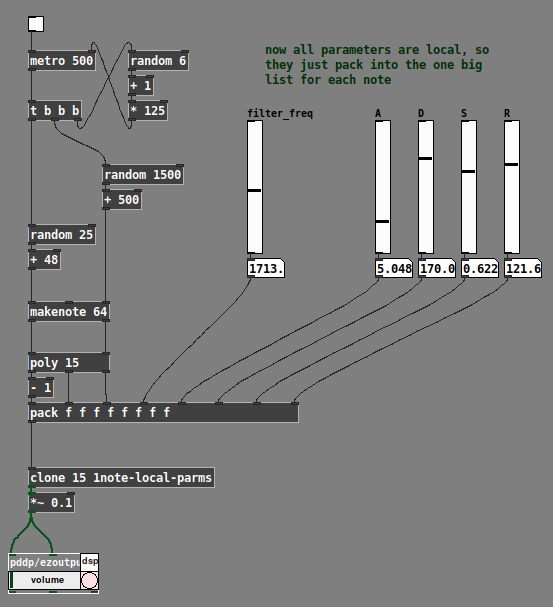
I realized, after posting that, that there are two ways of thinking about the "extra parameters" going into the synth clone, which for lack of a better term I could call "global" vs "local" parameters.
Local parameters are "per-note" -- they are set at the time the note begins, and they hold their value for the duration of the note. The next note (which might overlap) could have completely different values.
Global parameters affect all notes simultaneously. This is the usual way that, for instance, filter frequency works. You twist the filter cutoff knob and all notes' cutoff changes simultaneously (even though each note could have its own filter cutoff envelope).
At minimum, pitch (note number or frequency) and velocity (on/off trigger) should be per-note. Other parameters could be global or local (and you can mix those styles).
As far as I can see, the best way is:
- All local parameters get packed into a list, along with the clone instance number (which is supplied by [poly]). The "local" list goes into the leftmost input, and only the leftmost.
- "Global" parameters add one or more inlets to the right. Note carefully in the [clone] help file that control inlets need to tag their values for specific instances. If we're using these as global parameters, then the tag should be
all. Signal inlets are always global.
IMO it's best to be consistent about the handling of these input types, to avoid introducing bugs into your patch.
Example with filter cutoff and envelope parameters treated globally:
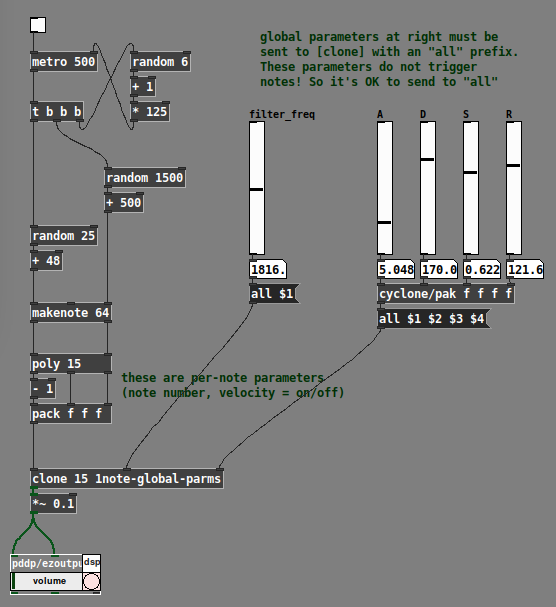
Example with filter cutoff and envelope parameters treated locally:
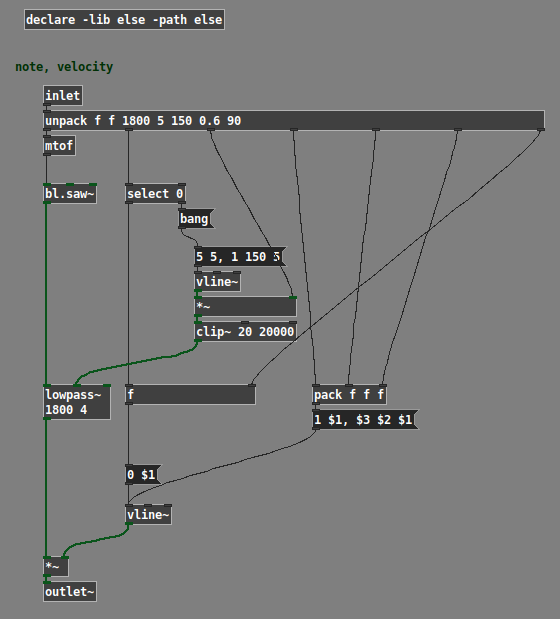
(Note: The example patches use the ELSE external library, and the global one uses cyclone.)
Hope this helps. IMO polysynth is a basic use case for any audio programming environment; if what I've posted here can't be easily figured out from the documentation, then it suggests a gap in the help. (One reason why I worked it out is that I teach a class in Pd; if the students ask "how do I make a poly synth?" then I'd better have an answer at the ready. So I tried a few ways and came up with this as a basic template that Just Works... then, just do it that way.)
hjh
posted in technical issues
Little help please: abstraction to shrink or compress not resize a table~
@svanya said:
What I need to do is, for example:
Take soundfiles, aka. tabplay~'s of varying sizes/lengths and shrink them all so they play over the same amount of time.
I think cyclone/play~ is the easiest way to do this. Its "start" message is in the format:
- Time within the array where you want to start playing (ms);
- Time within the array where you want to stop playing (ms);
- Duration to play.
The playback rate is then automatically calculated from (end - start) / dur.
The problem with cyclone buffer~ / play~ is that (AFAICS) they don't handle the situation where the audio file being loaded is at a different sample rate from the soundcard. (Maybe they do, but if so, I don't see it.)
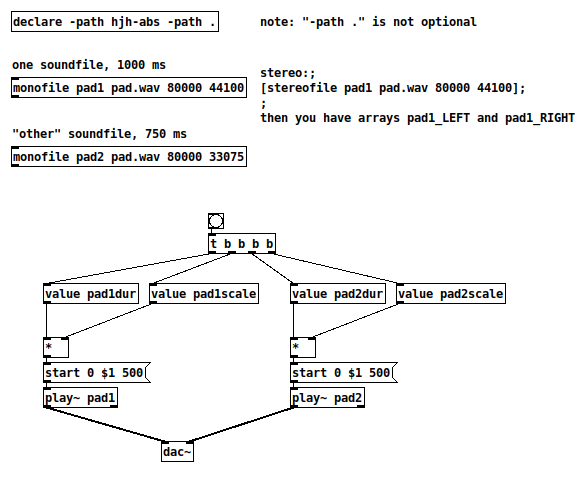
If you're sure that the sound files will match the DSP sample rate, then, no problem -- if one array contains 750 ms of audio and you want it to play in 250 ms, then:
[start 0 750 250(
|
[cyclone/play~ arrayname]
If you're not sure, then one solution would be some abstractions in my library (https://github.com/jamshark70/hjh-abs) that provide [value] variables with information about sound files loaded into arrays. [value xxxscale] is file's sample rate / system sample rate (btw DSP should be on before loading... I should fix that later).
(Edit: You may need to have "-lib cyclone" in the [declare] too.)
hjh
posted in technical issues
Interactive pole-zero-diagram for basic filter design
I've been trying to understand some of the basic principles of filter design lately, and here is a result of my modest first attempts in that field. It's a patch demonstrating the effect of different pole and zero locations by (graphically) calculating the corresponding frequency responses.
To avoid confusion, I should probably say some things about how the patch actually works ...
Most importantly, I decided to only use complex filters and to arrange them in conjugate pairs to get real valued outputs at every stage within the cascade of elementary filters. Shortcuts as used in [vcf~] (a one-pole complex filter) aren't possible in this kind of implementation. To get the result corresponding to its left outlet (= real output), you would have to place a (real) zero right in the middle between the two (complex conjugate) poles etc.
The patch allows to use up to six (pairs of) poles or zeros, which may be either real or complex. If less poles or zeros are used, the coefficients of the unused filters are simply set to zero (just as the conjugate poles or zeros are set to zero for the real elementary filters).
By the way: In an earlier version of the patch, I also graphed the phase response of the filter, but I dropped that very soon because I thought this wouldn't be too helpful anyway.
Now for the use: The key control options are explained in the patch itself. Apart from that, you can click and drag the poles and zeros or specify each of its five parameters using the number boxes (values are rounded according to the graphic resolution of one hundredth).
The radii of all poles an zeros are clipped to guarantee stability.
Well, that's about it, I guess.
Bug reports or hints at unexpected behaviour are, as always, very welcome!
 posted in patch~
Ganymede: an 8-track, semi-automatic samples-looper and percussion instrument based on modulus instead of metro
Ganymede.7z (includes its own limited set of samples)
Background:
Ganymede was created to test a bet I made with myself:
that I could boil down drum sequencing to a single knob (i.e. instead of writing a pattern).
As far as I am concerned, I won the bet.
The trick is...
Instead of using a knob to turn, for example, up or down a metro, you use it to turn up or down the modulus of a counter, ie. counter[1..16]>[mod X]>[sel 0]>play the sample. If you do this then add an offset control, then where the beat occurs changes in Real-Time.
But you'll have to decide for yourself whether I won the bet.  .
.
(note: I have posted a few demos using it in various stages of its' carnation recently in the Output section of the Forum and intend to share a few more, now that I have posted this.)
Remember, Ganymede is an instrument, i.e. Not an editor.
It is intended to be "played" or...allowed to play by itself.
(aside: specifically designed to be played with an 8-channel, usb, midi, mixer controller and mouse, for instance an Akai Midimix or Novation LaunchPad XL.)
So it does Not save patterns nor do you "write" patterns.
Instead, you can play it and save the audio~ output to a wave file (for use later as a loop, song, etc.)
Jumping straight to The Chase...
How to use it:
REQUIRES:
moonlib, zexy, list-abs, hcs, cyclone, tof, freeverb~ and iemlib
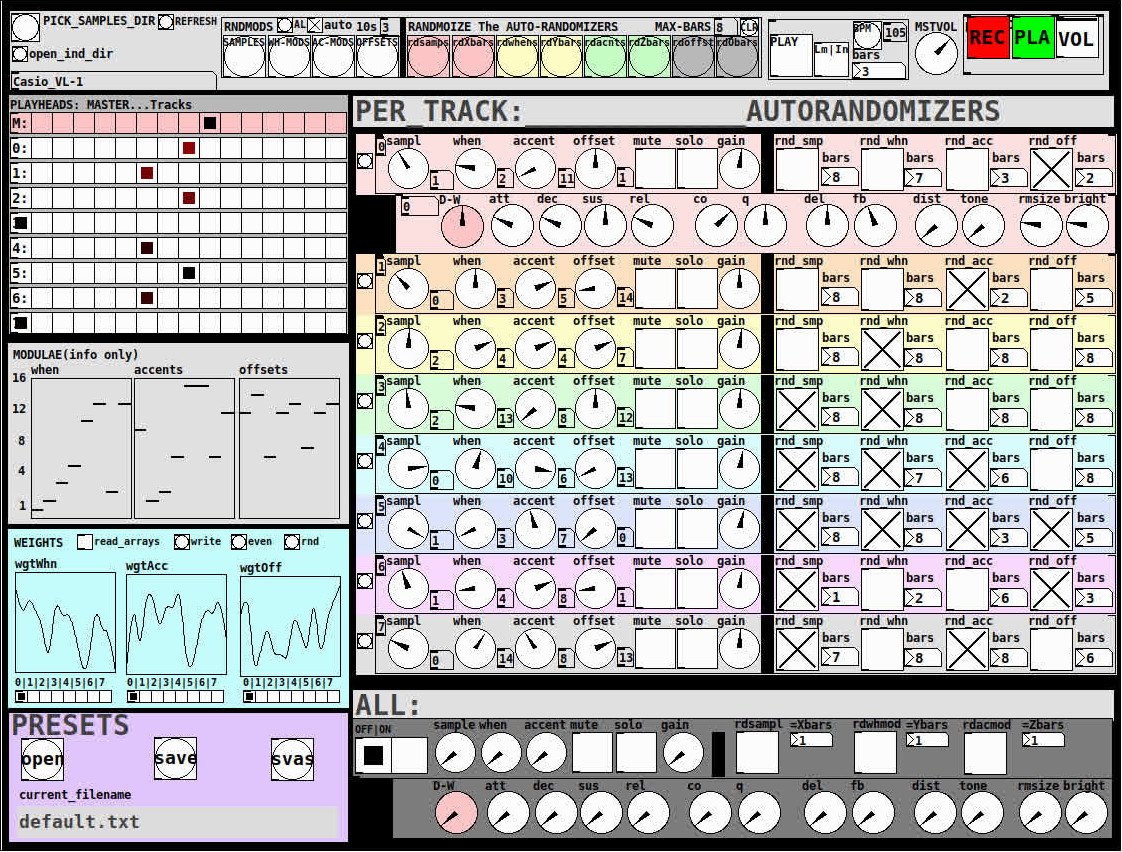
THE 7 SECTIONS:
- GLOBAL:
- to set parameters for all 8 tracks, exs. pick the samples directory from a tof/pmenu or OPEN_IND_DIR (open an independent directory) (see below "Samples"for more detail)
- randomizing parameters, random all. randomize all every 10*seconds, maximum number of bars when randomizing bars, CLR the randomizer check boxes
- PLAY, L(imited) or I(nfinite) counter, if L then number of bars to play before resetting counter, bpm(menu)
- MSTVOL
- transport/recording (on REC files are automatically saved to ./ganymede/recordings with datestamp filename, the output is zexy limited to 98 and the volume controls the boost into the limiter)
- PLAYHEADS:
- indicating where the track is "beating"
- blank=no beat and black-to-red where redder implies greater env~ rms
- MODULAE:
- for information only to show the relative values of the selected modulators
- WEIGHTS:
- sent to [list-wrandom] when randomizing the When, Accent, and Offset modulators
- to use click READ_ARRAYS, adjust as desired, click WRITE, uncheck READ ARRAYS
- EVEN=unweighted, RND for random, and 0-7 for preset shapes
- PRESETS:
- ...self explanatory
-
PER TRACK ACCORDION:
- 8 sections, 1 per track
- each open-closable with the left most bang/track
- opening one track closes the previously opened track
- includes main (always shown)
- with knobs for the sample (with 300ms debounce)
- knobs for the modulators (When, Accent, and Offset) [1..16]
- toggles if you want that parameter to be randomized after X bars
- and when opened, 5 optional effects
- adsr, vcf, delayfb, distortion, and reverb
- D-W=dry-wet
- 2 parameters per effect
-
ALL:
when ON. sets the values for all of the tracks to the same value; reverts to the original values when turned OFF
MIDI:
CC 7=MASTER VOLUME
The other controls exposed to midi are the first four knobs of the accordion/main-gui. In other words, the Sample, When, Accent, and Offset knobs of each track. And the MUTE and SOLO of each track.
Control is based on a midimap file (./midimaps/midimap-default.txt).
So if it is easier to just edit that file to your controller, then just make a backup of it and edit as you need. In other words, midi-learn and changing midimap files is not supported.
The default midimap is:
By track
CCs
| ---TRACK--- | ---SAMPLE--- | ---WHEN--- | ---ACCENT--- | --- OFFSET--- |
|---|---|---|---|---|
| 0 | 16 | 17 | 18 | 19 |
| 1 | 20 | 21 | 22 | 23 |
| 2 | 24 | 25 | 26 | 27 |
| 3 | 28 | 29 | 30 | 31 |
| 4 | 46 | 47 | 48 | 49 |
| 5 | 50 | 51 | 52 | 53 |
| 6 | 54 | 55 | 56 | 57 |
| 7 | 58 | 59 | 60 | 61 |
NOTEs
| ---TRACK--- | ---MUTE--- | ---SOLO--- |
|---|---|---|
| 0 | 1 | 3 |
| 1 | 4 | 6 |
| 2 | 7 | 9 |
| 3 | 10 | 12 |
| 4 | 13 | 15 |
| 5 | 16 | 18 |
| 6 | 19 | 21 |
| 7 | 22 | 24 |
SAMPLES:
Ganymede looks for samples in its ./samples directory by subdirectory.
It generates a tof/pmenu from the directories in ./samples.
Once a directory is selected, it then searches for ./**/.wav (wavs within 1-deep subdirectories) and then ./*.wav (wavs within that main "kit" directory).
I have uploaded my collection of samples (that I gathered from https://archive.org/details/old-school-sample-cds-collection-01, Attribution-Non Commercial-Share Alike 4.0 International Creative Commons License, 90's Old School Sample CDs Collection by CyberYoukai) to the following link on my Google Drive:
https://drive.google.com/file/d/1SQmrLqhACOXXSmaEf0Iz-PiO7kTkYzO0/view?usp=sharing
It is a large 617 Mb .7z file, including two directories: by-instrument with 141 instruments and by-kit with 135 kits. The file names and directory structure have all been laid out according to Ganymede's needs, ex. no spaces, etc.
My suggestion to you is unpack the file into your Path so they are also available for all of your other patches.
MAKING KITS:
I found Kits are best made by adding directories in a "custom-kits" folder to your sampls directory and just adding files, but most especially shortcuts/symlinks to all the files or directories you want to include in the kit into that folder, ex. in a "bongs&congs" folder add shortcuts to those instument folders. Then, create a symnlink to "bongs&congs" in your ganymede/samples directory.
Note: if you want to experiment with kits on-the-fly (while the patch is on) just remember to click the REFRESH bang to get a new tof/pmenu of available kits from your latest ./samples directory.
If you want more freedom than a dynamic menu, you can use the OPEN_IND(depedent)_DIR bang to open any folder. But do bear in mind, Ganymede may not see all the wavs in that folder.
AFTERWARD/NOTES
-
the [hcs/folder_list] [tof/pmenu] can only hold (the first) 64 directories in the ./samples directory
-
the use of 1/16th notes (counter-interval) is completely arbitrary. However, that value (in the [pd global_metro] subpatch...at the noted hradio) is exposed and I will probably incorporate being able to change it in a future version)
-
rem: one of the beauties of this technique is: If you don't like the beat,rhythm, etc., you need only click ALL to get an entirely new beat or any of the other randomizers to re-randomize it OR let if do that by itself on AUTO until you like it, then just take it off AUTO.
-
One fun thing to do, is let it morph, with some set of toggles and bars selected, and just keep an ear out for the Really choice ones and record those or step in to "play" it, i.e. tweak the effects and parameters. It throws...rolls...a lot of them.
-
Another thing to play around with is the notion of Limited (bumpy) or Infinite(flat) sequences in conjunction with the number of bars. Since when and where the modulator triggers is contegent on when it resets.
-
Designed, as I said before, to be played, esp. once it gets rolling, it allows you to focus on the production (instead of writing beats) by controlling the ALL and Individual effects and parameters.
-
Note: if you really like the beat Don't forget to turn off the randomizers. CLEAR for instance works well. However you can't get the back the toggle values after they're cleared. (possible feature in next version)
-
The default.txt preset loads on loadbang. So if you want to save your state, then just click PRESETS>SAVE.
-
[folder_list] throws error messages if it can't find things, ex. when you're not using subdirectories in your kit. No need to worry about it. It just does that.
POSTSCRIPT
If you need any help, more explanation, advise, or have opinions or insight as to how I can make it better, I would love to hear from you.
I think that's >=95% of what I need to tell you.
If I think of anything else, I'll add it below.
Peace thru Music.
Love thru Pure Data.
-s
,
 posted in patch~