
Canvas Properties not working.
@willblackhurst said:
you make a pd "sub-patch" object. you put object and type pd and then a space and a name.. and off click so then you are immediately inside the sub patch page. then you right click for properties. you make it yes graph-on parent. and then you move it with margin in the properties window and the size is also in the properties window. then if you go to the above page parent page and you see the object box you made except its larger according to the properties you entered on the inside page.
Not sure what you're trying to say. I know how to make subpatches, and the video I linked is creating a general use object for use in other patches.
I assumed you meant this behavior would change if done in a subpatch, but it's the same.
In short, when I right click on the canvas and select properties, and then enable graph on parent, the red box appears but cannot be moved by the mouse -- is that expected behavior? Hovering over the red box's borders doesn't allow me to relocate or change the size of the box (unlike in the video I linked).
I understand what the red box represents, and got it to work through a laborious process of trial and error as I stated in the "edit" at the bottom of my post.. but am uncertain if it's supposed to be draggable / resizeable via the mouse as evidenced in that video.
 posted in technical issues
Canvas Properties not working.
you make a pd "sub-patch" object. you put object and type pd and then a space and a name.. and off click so then you are immediately inside the sub patch page. then you right click for properties. you make it yes graph-on parent. and then you move it with margin in the properties window and the size is also in the properties window. then if you go to the above page parent page and you see the object box you made except its larger according to the properties you entered on the inside page.
 posted in technical issues
dynamic GUI, load abstraction dynamically
Hi,
I'm running into two issues I can't seem to solve:
-
Is there a way to dynamically load and clear abstractions?
Let’s say I have multiple synthesizer engines with different GOP settings and sliders.
I’d like to switch between them by always loading just one engine at a time and replacing the GOP of the previous engine. -
I’d like to create a virtual display/dynamic GUI. I know that I can’t hide objects in Pure Data, but I could move the GOP to different sections to give the impression of switching display pages.
The problem is that I have 16 tracks, and each track might need 6–8 pages. That’s already over 100 pages — not including the different synthesizer engines with their own settings for each page.
Altogether, that could easily add up to 400+ pages, which is way too much to handle just by shifting the GOP.
I also considered using one abstraction per track. But that would require showing a GOP inside another GOP, which looks like that won`t work either?
Are there any other options I could try?
 posted in technical issues
Passing a list as parameter to csound6~
Hi everyone,
I've been playing a bit with a Csound handpan synth from here and I've used the r_cycle external to make a handpan with my Launchpad  (the patch is not very complicated so I didn't try to make it neat, sorry!).
The csound patch maps specific MIDI notes to the synth according to a scale, and the Pd patch lights up the pads so each colored group of pads sends the corresponding MIDI note to CSound:
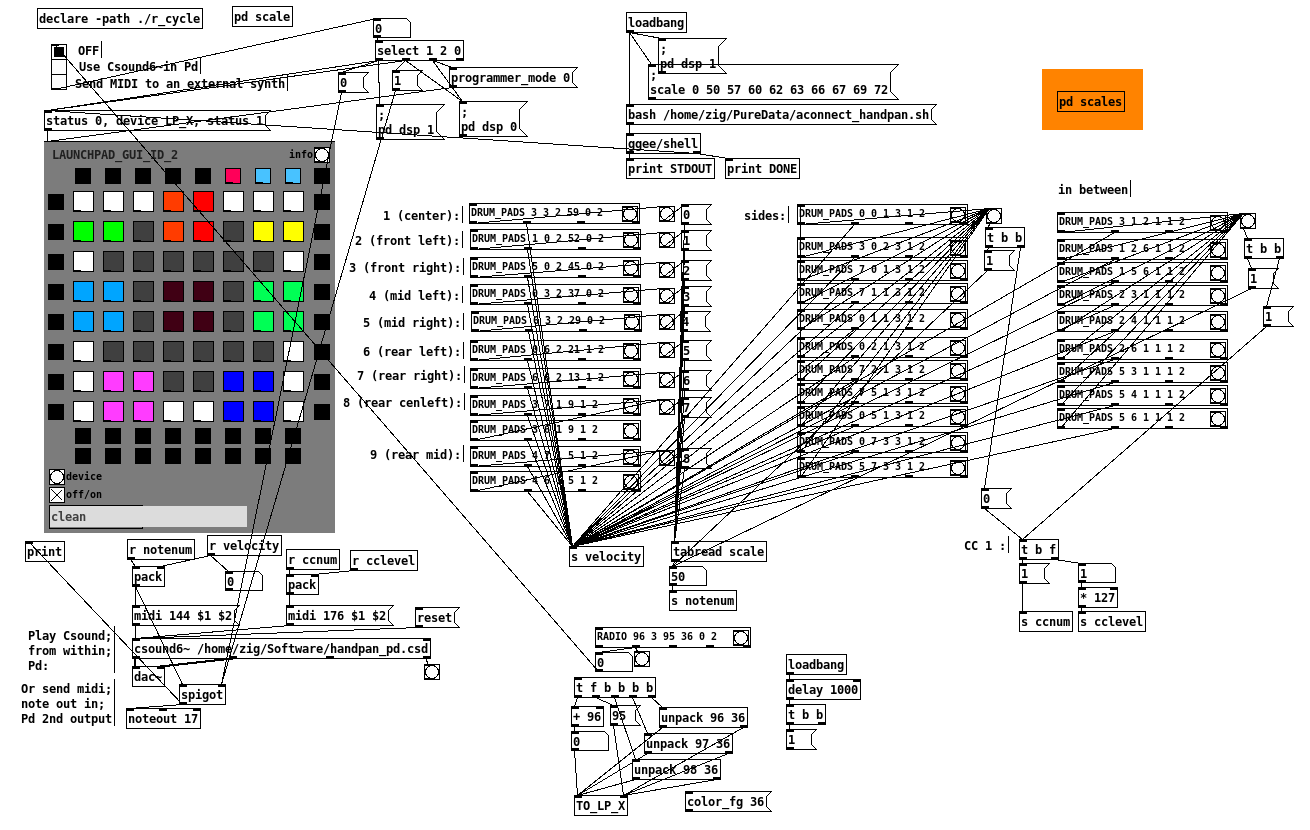
I'm super happy with it, but the next step is to make it configurable: the csound patch contains many different scales defined with giNotes = ftgen(0, 0, -<number of notes>, -2, <list of note numbers> ) :
; B Kurd
;giNotes = ftgen(0, 0, -10, -2, 47, 54, 55, 57, 59, 61, 62, 64, 66, 69)

; B Golden Arcadia
giNotes = ftgen(0, 0, -9, -2, 47, 51, 54, 58, 59, 61, 65, 66, 68)
So instead of editing the CSD file and changing the color mapping of the launchpad when I want to change scale, I would like to send a list/array/table of note numbers from Pd to [csound6~] via a message (and adjust the MIDI notes sent by the launchpad at the same time).
I know basically nothing about Csound, so I've read up and found examples using chnget/chnset or invalue which seem relatively straightforward to change the value of a single int variable. However I don't really have any idea on how to pass the list/array of scale notes using chnset or invalue, or if there is a better way to do it.
Maybe someone around here has an idea? Thanks for reading so far in any case 
 posted in technical issues
Web Audio Conference 2019 - 2nd Call for Submissions & Keynotes
Apologies for cross-postings
Fifth Annual Web Audio Conference - 2nd Call for Submissions
The fifth Web Audio Conference (WAC) will be held 4-6 December, 2019 at the Norwegian University of Science and Technology (NTNU) in Trondheim, Norway. WAC is an international conference dedicated to web audio technologies and applications. The conference addresses academic research, artistic research, development, design, evaluation and standards concerned with emerging audio-related web technologies such as Web Audio API, Web RTC, WebSockets and Javascript. The conference welcomes web developers, music technologists, computer musicians, application designers, industry engineers, R&D scientists, academic researchers, artists, students and people interested in the fields of web development, music technology, computer music, audio applications and web standards. The previous Web Audio Conferences were held in 2015 at IRCAM and Mozilla in Paris, in 2016 at Georgia Tech in Atlanta, in 2017 at the Centre for Digital Music, Queen Mary University of London in London, and in 2018 at TU Berlin in Berlin.
The internet has become much more than a simple storage and delivery network for audio files, as modern web browsers on desktop and mobile devices bring new user experiences and interaction opportunities. New and emerging web technologies and standards now allow applications to create and manipulate sound in real-time at near-native speeds, enabling the creation of a new generation of web-based applications that mimic the capabilities of desktop software while leveraging unique opportunities afforded by the web in areas such as social collaboration, user experience, cloud computing, and portability. The Web Audio Conference focuses on innovative work by artists, researchers, students, and engineers in industry and academia, highlighting new standards, tools, APIs, and practices as well as innovative web audio applications for musical performance, education, research, collaboration, and production, with an emphasis on bringing more diversity into audio.
Keynote Speakers
We are pleased to announce our two keynote speakers: Rebekah Wilson (independent researcher, technologist, composer, co-founder and technology director for Chicago’s Source Elements) and Norbert Schnell (professor of Music Design at the Digital Media Faculty at the Furtwangen University).
More info available at: https://www.ntnu.edu/wac2019/keynotes
Theme and Topics
The theme for the fifth edition of the Web Audio Conference is Diversity in Web Audio. We particularly encourage submissions focusing on inclusive computing, cultural computing, postcolonial computing, and collaborative and participatory interfaces across the web in the context of generation, production, distribution, consumption and delivery of audio material that especially promote diversity and inclusion.
Further areas of interest include:
- Web Audio API, Web MIDI, Web RTC and other existing or emerging web standards for audio and music.
- Development tools, practices, and strategies of web audio applications.
- Innovative audio-based web applications.
- Web-based music composition, production, delivery, and experience.
- Client-side audio engines and audio processing/rendering (real-time or non real-time).
- Cloud/HPC for music production and live performances.
- Audio data and metadata formats and network delivery.
- Server-side audio processing and client access.
- Frameworks for audio synthesis, processing, and transformation.
- Web-based audio visualization and/or sonification.
- Multimedia integration.
- Web-based live coding and collaborative environments for audio and music generation.
- Web standards and use of standards within audio-based web projects.
- Hardware and tangible interfaces and human-computer interaction in web applications.
- Codecs and standards for remote audio transmission.
- Any other innovative work related to web audio that does not fall into the above categories.
Submission Tracks
We welcome submissions in the following tracks: papers, talks, posters, demos, performances, and artworks. All submissions will be single-blind peer reviewed. The conference proceedings, which will include both papers (for papers and posters) and extended abstracts (for talks, demos, performances, and artworks), will be published open-access online with Creative Commons attribution, and with an ISSN number. A selection of the best papers, as determined by a specialized jury, will be offered the opportunity to publish an extended version at the Journal of Audio Engineering Society.
Papers: Submit a 4-6 page paper to be given as an oral presentation.
Talks: Submit a 1-2 page extended abstract to be given as an oral presentation.
Posters: Submit a 2-4 page paper to be presented at a poster session.
Demos: Submit a work to be presented at a hands-on demo session. Demo submissions should consist of a 1-2 page extended abstract including diagrams or images, and a complete list of technical requirements (including anything expected to be provided by the conference organizers).
Performances: Submit a performance making creative use of web-based audio applications. Performances can include elements such as audience device participation and collaboration, web-based interfaces, Web MIDI, WebSockets, and/or other imaginative approaches to web technology. Submissions must include a title, a 1-2 page description of the performance, links to audio/video/image documentation of the work, a complete list of technical requirements (including anything expected to be provided by conference organizers), and names and one-paragraph biographies of all performers.
Artworks: Submit a sonic web artwork or interactive application which makes significant use of web audio standards such as Web Audio API or Web MIDI in conjunction with other technologies such as HTML5 graphics, WebGL, and Virtual Reality frameworks. Works must be suitable for presentation on a computer kiosk with headphones. They will be featured at the conference venue throughout the conference and on the conference web site. Submissions must include a title, 1-2 page description of the work, a link to access the work, and names and one-paragraph biographies of the authors.
Tutorials: If you are interested in running a tutorial session at the conference, please contact the organizers directly.
Important Dates
March 26, 2019: Open call for submissions starts.
June 16, 2019: Submissions deadline.
September 2, 2019: Notification of acceptances and rejections.
September 15, 2019: Early-bird registration deadline.
October 6, 2019: Camera ready submission and presenter registration deadline.
December 4-6, 2019: The conference.
At least one author of each accepted submission must register for and attend the conference in order to present their work. A limited number of diversity tickets will be available.
Templates and Submission System
Templates and information about the submission system are available on the official conference website: https://www.ntnu.edu/wac2019
Best wishes,
The WAC 2019 Committee
 posted in news
split list
I have a list
1 2 3,page,1
[1] [2] [3,page,1]
[list split]
Is there any way that when [1] is bang I get a 1 but if [3,page,1] is bang I can split at each comma
and print 3 atoms like float 3 smybol page flot 1
 posted in technical issues
MobMuPlat OSC-to-MIDI Remote Control, spec. for PD, Guitarix, and Rakarrack and other guitar effects apps
It's always funny to me how working on one PD project results in fruit that might also prove useful.
Currently, working on a broader project, but this part (at least) (I think) is ready for distribution.
Background: I Really hate leaving the side of my guitar (for example to click a mouse or tweak a setting) when I am playing. So designed this mmp app so that I can attach (with funtack, ex.) my handheld to my guitar and control my settings from there or perhaps even as I play. Like so:
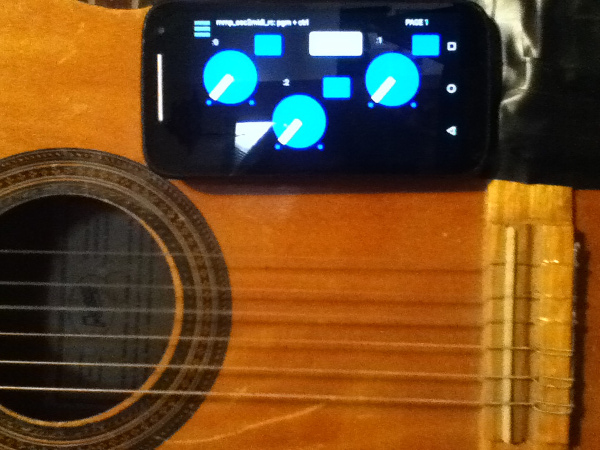
[Aside: the broader project also includes (on the front-side of the app) controls driven by the handheld's tilt, as well as, the adc~ pitch, env~, and distance of the pitch from a "center". But that part has to wait (though the code is all inside the mmp_osc2midi_rc.pd patch just disconnected/does not use the cpu).]
SETUP (linux is what I know, so other OSes may work just can't/haven't tested them):
JACK
Pure Data
a2jmidid - JACK MIDI daemon for ALSA MIDI (in the Ubuntu at least repos)
guitarix a/o rakarrack, or other midi-driven effects apps (such as the included set of 30 pd effects(see below))
PIECES:
The mmp_osc2midi_rc.zip (extract(android)/install(ios) to MobMuPlat directory)
The osc2midi_bridge.zip (to be run on the "pd receiver") and includes the osc2midi_bridge.pd, help file, and a set of 30 mmp-ready-(mono) effects (in the ./effs directory) that can be used if PD is to be used as the receiver. (They are standardized to include 3 inlets: left=inlet~, center=[0 $1(, [1 $1(, [2 $1( messages sent to 3 parameters on the effect, and right=[switch~] and 1 outlet~ and a demo guitarix "bank" file called "MIDITEST.gx" (which includes 2 presets/programs and set midi values (0-8) to test. Just add the file to the guitarix config "banks" folder).
Instructions:
- Start Jack;
- In Pure Data, open the osc2midi_bridge-help.pd file; toggle "listen" on; and set MEDIA to "ALSA-MIDI" (the additional pieces are just examples of receiving the midi values);
- In Jack>ALSA: Connect Read:MIDI to Write:PD & Read:PD to Write:Midi;
- From the command line execute "a2j_control start" (no quotes);
- Start (ex.) guitarix;
- In Jack>Midi connect a2j:Pure Data(capture) to (ex) gx_head_amp:midi_in_1.
Note/Alert/etc. For a machine to receive OSC messages the recipient-computer's firewall must (I believe) be turned off.
GUI:
The GUI has 3 pages that look (basically) as follows (with the subsequent 2 pages having only the 3 knobs and 3 buttons).
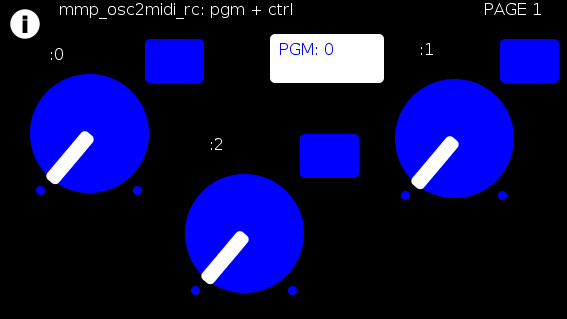
The buttons trigger text entry boxes which allow you to enter numbers (0-127) representing:
PGM: the number sent to (midi) [pgm]
and
(the buttons beside the knobs) the midi value, i.e [ctrl] (0-127), each knob is to be sent to (all on channel=0). (The resulting number of which are all written to the label to the left.)
For example:
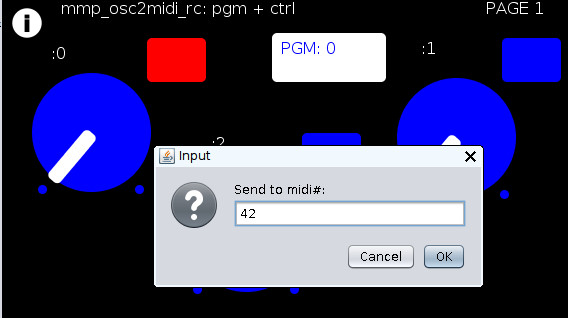
Results in:
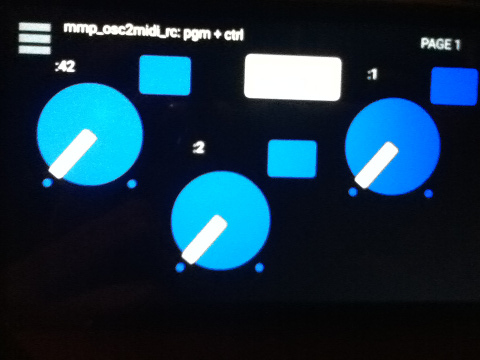
You can now to do 1 of 2 things:
Set the mmp-knobs to whatever midi values you have set in guitarix
or
Set the guitarix midi values (mousewheel click on a control) to one of the mmp preset 0-8 midi values.
WOW!!!
That took a helluva a lot of writing (and reading) but I hope you can both see the value and make use of this bit of technology.
As I said before,
I look forward to being able to fine tune my sound ALL while my hands and I are BOTH still at my guitar and not bend over, move, etc. etc. etc. to get the sound I want.
Peace, Love, and Ever-Lasting Good Cheer.
If you made it this far , Thanks for Listening.
Sincerely and Optimistically,
Scott
p.s. ask whatever you want regarding setup, how to use, points-of-clarification, etc. I am more than happy to help.
"Out of Love comes Joy"
 posted in patch~
digital artifacts when using the shell object
the [shell] object starts a new process through the system scheduler I think so I believe it already has it's own thread (process)..
I would think that most of the glitches happen when you close and open Preview every time you need a new page..
Perhaps you could have all of the pages in a single pdf file with preview open, and when you need a new page perhaps there is a program with a "page down" scriptable event?
 posted in technical issues
Novation Launch controller abstraction, with LED feedback for the buttons.
Heeeeelllloooo PD users
Here is my first contribution to the community library. This is a midi controller abstraction for the
Novation Launch Controller. The first 4 pages on the Launch Controller are assigned to midi cc and gives you full feedback over the LED's See further description in patch.
Patch with abstractions for each of the first 4 pages:
Launch Controller .pd
I have also included the 4 Launch Controller set up for the 4 pages to get you started.
PD user page 1.syx
PD user page 2.syx
PD user page 3.syx
PD user page 4.syx
These have been updated, the first version I put was not really working. I was a bit too quick posting
it out of Pure excitement 
Have fun!
Jaffa
 posted in abstract~
Andúril (MobMuPlat app): fwd/bwd looper + 14 effects + elven cloak (control parameters via env~ and pitch as you play)
Andúril (MobMuPlat app): fwd/bwd looper + 14 effects + elven cloak (control parameters via env~ and pitch as you play)
UPDATED VERSION (corrected MobMuPlat system crash problem):
anduril.zip
This has been long in coming and I am very glad to finally release it (even tho my handheld hardware is not up to the job of running the elven cloak feature).
First a demo video and some screenshots, , and then the instructions.
DEMO VIDEO
SCREENSHOTS
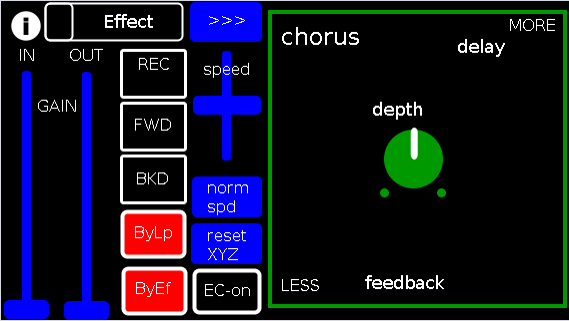
Intention(s):
The app is designed to give (specifically a guitarist) tho really any input (even prerecorded as is the case in the demo (from: "Laura DeNardis Performing Pachabels Canon" from https://archive.org/details/LauraDenardisPerformingPachabelsCanon, specifically the wave file at: https://archive.org/download/LauraDenardisPerformingPachabelsCanon/PachabelsCanon.wav, Attribution-Noncommercial-Share Alike 3.0) FULL Control over the "voice" of their output-sound.
It includes:
a 5-band EQ (on page 2 of the app) (upfront that is applied to all incoming sounds);
a looper: with record, forward, backward, speed, and bypass controls (that runs via a throw along with the effects channel)
14 effects each with 3 controllable parameters (via the xy-slider+centered knob) including: chorus, distortion, delay, reverb, flanger, tremolo, vibrato, vcf, pitchshifter, pitchdelay, 12string, stepvibrato, pushdelay (delayfb driven by magnitude of the env~), and stagdelay (2 out-of-sync delay lines which can be driven in and out of phase by the sum of their delwrite+vd's so what goes in first may come out last)
elven_cloak: which drives the 3 parameter controls via the peak bands amplitude and proximity to a set pitch (midi note) and whose window can be broadened or shrunk and shifted within that window, i.e. the three effect parameters are changed automatically according to what and how you play
and
a tester synth: that randomly sends midi pitches between 20-108, velocities between 20-127, and durations between 250-500ms.
CONTROLS (from top-left to bottom-right):
PAGE 1:
Effect: effects menu where the you choose an effect;
>>>,<<<: page navigation buttons;
IN,OUT: gains (IN is the preamp on the EQ5, and OUT is applied to total output);
REC,FWD,BWD,speed,normspd: the looper toggles and on speed, higher is faster and mid normal and normspd resets to mid;
xy-slider+centered knob: the 3 parameter controls + their labels (the bottom is x, top y and above the knob for the third one), the name of the selected effect and its parameters load each time you choose from the Effects menu, bottom left is lowest, top-right highest;
ByLp,ByEff: bypasses for the looper and effects "channel" (the outputs are summed);
EC-on: elven cloak toggle (default=off);
PAGE 2:
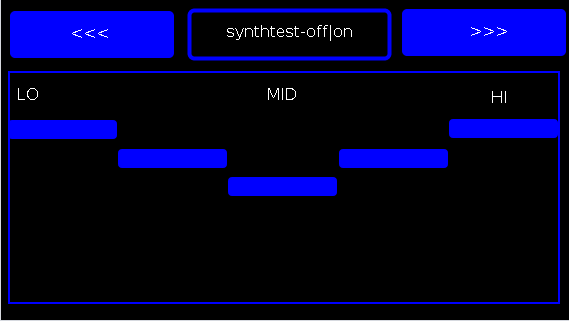
the EQ5 controls;
synthtest: off|on, default is off;
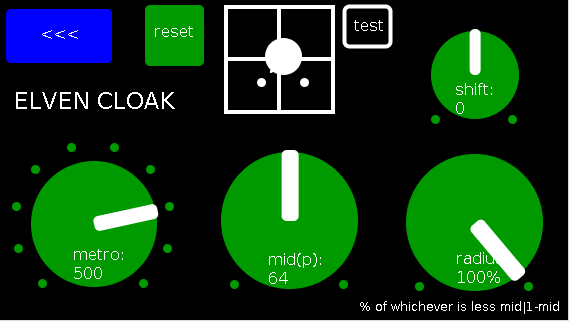
PAGE 3: elven cloak controls
reset: sets shift, metro, mid, and radius to 0, 500(ms),64,100% respectively (i.e. the entire midispectrum, 0-127) respectively;
mini-xyz, test: if test is on, you see a miniature representation of the xyz controls on the first page, so you can calibrate the cloak to your desired values;
shift: throws the center of the range to either the left or right(+/-1);
metro: how frequently in milliseconds to take env~ readings;
mid: the center in midipitch, i.e. 0-127, of the "watched" bands
radius(%): the width of the total bands to watch as a percentage of whichever is lower 1-mid or mid
END CONTROLS
Basic Logic:
There are 4 modes according to the bypass state of the looper and effects.
A throw catch and gain/sum/divide is applied accordingly.
End:
As I mentioned at the first, my handheld(s) are not good enough to let me use this but it runs great on my laptop.
So...
I would love to hear if this Does or Does Not work for others and even better any output others might make using it. I am enormously curious to hear what is "possible" with it.
Presets have not (yet been included as I see it, esp. with the cloak as a tool to be used for improv and less set work. Tho I think it will work nicely for that too if you just turn the cloak off.
hmmm, hmmm,...
I think that's about it.
Let me know if you need any help, suggestions, ideas, explanations, etc. etc. etc. regarding the tool. I would be more than happy to share what I learned.
Peace, Love, and Ever-Lasting Music.
Sincerely,
Scott
p.s. please let me know if I did not handle the "attribution" part of "Laura DeNardis Performing Pachabels Canon" License correctly and I will correct it immediately.
Ciao, for now. Happy PD-ing!
posted in patch~