Thanks a lot! i was looking for that patch point inside the compressor for days. I would have never come out with the solution of simply putting it outside the comp without you pointing to it. Thanks again your patches are gold.
-
Audiolab is now available on deken!
-
Version 0.70 is now available on deken.
I added some simple but convenient objects:
pp.amp~ a simple signal multiplier
pp.adsr~ adsr/adr envelope generator
pp.xfade~ signal crossfader
pp.shiftlfo~ a LFO that can generate irregular rhythmic patternspp.dynamics~ now has an option to enable feedback compression
Some parameter sliders are now colored light orange in the GUI. This indicates that the slider does not cover the full range of the parameter and is intended to encourage experimenting with values that are above or below the range of the slider.
fixed some minor bugs.
Happy patching!
-
I just downloaded Audiolab to get pp.spectrum~ and I love it! Thank you for making this.
-
I love the way that Audiolab modules look and work. Thank you for making it! I'm trying to use pp.eqfilter~ as a notch filter. When I close and reopen the patch, I have to reset notch and the other parameters. Is there a way to get it to remember my settings? Thank you!
-
@jamcultur thanks! You can save any of these objects with a message [save 1( to the rightmost inlet. Then use [recall 1( to retrieve your parameter settings. You can save up to 21 presets this way. This is also documented in the help files and in Examples/01-basics.pd
-
@solipp Thank you!
-
Hi, I have trouble installing latest 0.71 version on Deken. It cannot create folders Examples and audio and cannot copy any stuff into them.
0.70 is OK
Thanks -
@jyg someone reported a similar issue with the deken installation on a Windows OS on github. I can not reproduce this on Linux and i don't know what could be causing it, so my suspicion was that it is somehow related to Windows security permissions. Are you using Windows? Does this happen with other libraries as well? Unfortunately, there is not much i can do about it, but i'll test as soon as i have access to a Windows machine.
For now, if you want to stay up to date you can download from github and set the path manually in pd settings.Edit: just saw that you created another issue about this on github. I'll close it because it is not related to the development of this library, but we can continue the conversation here.
-
Sorry, I mistook the OSes. On Windows it's OK, although I get some error messages (see video below).
At end, the files and folder structure are copied.
BUT on MacOs BigSur The folder structure is not copied, neither the contained files (Examples and audio) -
@jyg i just uploaded a new version 0.71.1 to the deken repo. Can you test if this works for you?
-
Unfortunately it doesn't work on macOS with plugdata. But I have to deeper check if this is related to plugdata / puredata or to the specific OSX platform I use. (I won't have any access to it until january 2026)
-
Thank you this is very cool. I can see myself making use of many of these objects
-
I just installed 0.71.1 on Windows 11, and it seems to be working fine.
-
The problem occurs during installation of audiolab, with plugdata (find externals menu) that triggers an error when attempting to create the LICENCE folder.
May be it is related to file permissions in the archive ?
On the other hand, in puredata I still get this strange behaviour (see video : "replace existing files ?")
audiolab-installDeken.mp4 -
@jyg there were no issues with packaging and uploading it to the deken repos, and unfortunately that's all i can do from my end. If you can narrow down the problem, you might consider submitting a bug report on the deken github.
-
@solipp I wrote to the plugdata discord forum to signal the issue. May be the deken implementation in plugdata is less permissive than with puredata.
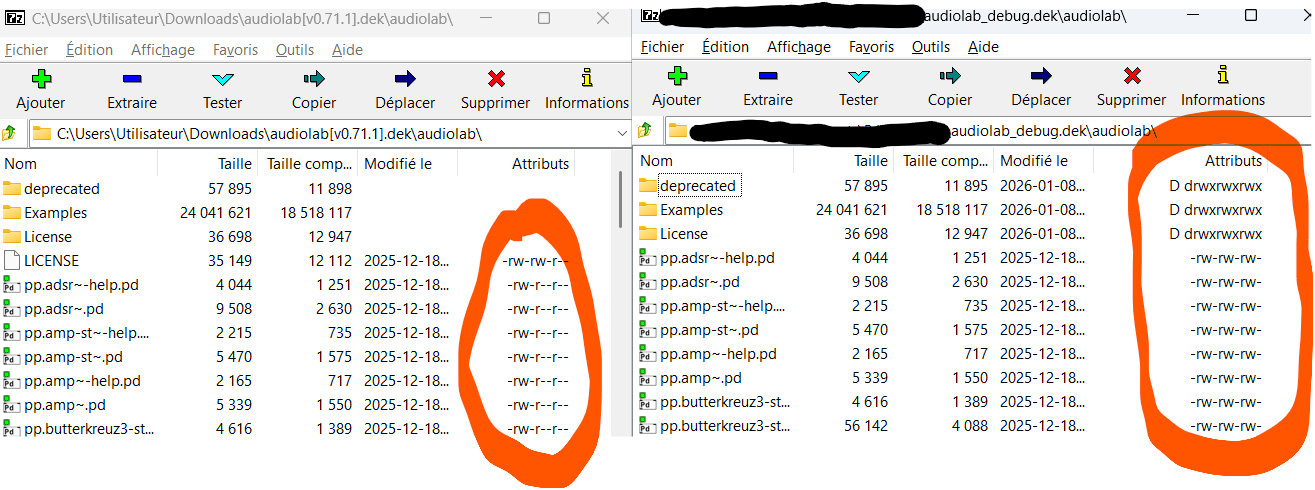
However, I tried something that worked : I extracted audiolab last version (0.7.1) , then rezipped it (under Windows 11) and renamed the archive as audiolab_debug.dek, with the side effect that Windows changed the permissions for all files/folders. Finally I put it on the puredata server.
It solved all my issues, as well with puredata as with plugdata.
Below the permissions as displayed with 7-zip utility for original and modified audiolab 0.7.1 deken files.
I hope this helps.
-
@jyg hm so i just checked if i missed something and if it is actually common practice to share files on deken with group and global write permissions. But that doesn't seem to be the case, here is a part of
zipinfooutput of else-v1.0-0_rc14 for example:
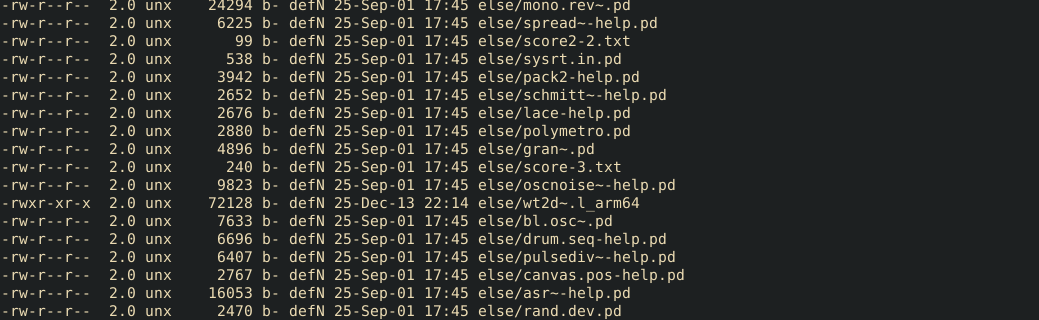
Is installing else causing trouble for you?
Could it be that you are having this problems because you are logged in as admin, not as user or you are trying to unpack these files to a protected folder or something like this?If it helps i can re-upload the files with extra write permissions.
-
@solipp I have the same problem with else. Deken turns in loop as shown in the video above.
All I can say is that I have defined a custom target folder for externals, on another drive (D:)
I'll check tomorrow on another machine.
Meanwhile, I opened a ticket on the puredata list : https://lists.iem.at/hyperkitty/list/pd-list@lists.iem.at/thread/DT7GLBV75QARBGHNECH2KUAB2EI65QVE/However, did you try to install audiolab from plugdata ?
-
@jyg installing from plugdata works fine for me.
-
Did you re-upload the latest audiolab 0.71.1 ?
As I wrote in the pdlist thread, Plugdata now silently and successfully installs audiolab on all tested computers (mac and windows)
I still have some issues with puredata on my main W11 computer, but this seems related to the fact I migrated my personnal folders and home to another logical drive formated as exFAT instead of NTFS.
Anyway, thanks for your attention.